

This content will later be published as a tutorial somewhere on one of our documentation websites. This was originally “just” an article on doing blue/green deployments when using projections with Marten, so hence the two martens up above:)
Event Sourcing may not seem that complicated to implement, and you might be tempted to forego any kind of off the shelf tooling and just roll your own. Just appending events to storage by itself isn’t all that difficult, but you’ll almost always need projections of some sort to derive the system state in a usable way and that’s a whole can of complexity worms as you need to worry about consistency models, concurrency, performance, snapshotting, and you inevitably need to change a projection in a deployment down the road.

Fortunately, the full combination of Marten and Wolverine (the “Critter Stack”) for Event Sourcing architectures gives you powerful options to cover a variety of projection scenarios and needs. Marten by itself provides multiple ways to achieve strongly consistent projected data when you have to have that. When you prefer or truly need eventual consistency instead for certain projections, Wolverine helps Marten scale up to larger data loads by distributing the background work that Marten does for asynchronous projection building. Moreover, when you put the two tools together, the Critter Stack can support zero downtime deployments that involve projections rebuilds without sacrificing strong consistency for certain types of projections.
Consistency Models in Marten
One of the decision points in building projections is determining for each individual projection view whether you need strong consistency where the projected data is guaranteed to match the current state of the persisted events, or if it would be preferable to rely on eventual consistency where the projected data might be behind the current events, but will “eventually” be caught up. Eventual consistency might be attractive because there are definite performance advantages to moving some projection building to an asynchronous, background process (Marten’s async daemon feature). Besides the performance benefits, eventual consistency might be necessary to accommodate cases where highly concurrent system inputs would make it very difficult to update projection data within command handling without either risking data loss or applying events out of sequential order.
Marten supports three projection lifecycles that we’ll explore throughout this paper:
- “Live” projections are calculated in memory by fetching the raw events and building up an aggregated view. Live projections are strongly consistent.
- “Inline” projections are persisted in the Marten database, and the projected data is updated as part of the same database transaction whenever any events are appended. Inline projections are also strongly consistent.
- “Async” projections are continuously built and updated in the database as new events come in a background process in Marten called the “Async Daemon“. On its face this is obviously eventual consistency, but there’s a technical wrinkle where Marten can “fast forward” asynchronous projections to still be strongly consistent on demand.
For Inline or Async projections, the projected data is being persisted to Marten using its document database capabilities and that data is available to be loaded through all of Marten’s querying capabilities, including its LINQ support. Writing “snapshots” of the projected data to the database also has an obvious performance advantage when it comes to reading projection state, especially if your event streams become too long to do Live aggregations on demand.
Now let’s talk about some common projection scenarios and how you should choose projection lifecycles for these scenarios:

A “write model” projection for a single event stream that represents a logical business entity or workflow like an “Invoice” or an “Order” with all the necessary information you would need in command handlers to “decide” how to process incoming commands. You will almost certainly need this data to be strongly consistent with the events in your command processing. I think it’s a perfectly good default to start with a Live lifecycle, and maybe even move to Inline if you want snapshotting in the case of longer event streams, but there’s a way in Marten to actually use Async as well with its FetchForWriting() API as shown below in this sample MVC controller that acts as a command handler (the “C” in CQRS):
    [HttpPost("/api/incidents/categorise")]
    public async Task<IActionResult> Post(
        CategoriseIncident command,
        IDocumentSession session,
        IValidator<CategoriseIncident> validator)
    {
        // Some validation first
        var result = await validator.ValidateAsync(command);
        if (!result.IsValid)
        {
            return Problem(statusCode: 400, detail: result.Errors.Select(x => x.ErrorMessage).Join(", "));
        }

        var userId = currentUserId();

        // This will give us access to the projected current Incident state for this event stream
        // regardless of whatever the projection lifecycle is!
        var stream = await session.Events.FetchForWriting<Incident>(command.Id, command.Version, HttpContext.RequestAborted);
        if (stream.Aggregate == null) return NotFound();

        if (stream.Aggregate.Category != command.Category)
        {
            stream.AppendOne(new IncidentCategorised
            {
                Category = command.Category,
                UserId = userId
            });
        }

        await session.SaveChangesAsync();

        return Ok();
    }
The FetchForWriting() API is the recommended way to write command handlers that need to use a “write model” to potentially append new events. FetchForWriting helps you opt into easy optimistic concurrency protection that you probably want to protect against concurrent access to the same event stream. As importantly, FetchForWriting completely encapsulates whatever projection lifecycle we’re using for the Incident write model above. If Incident is registered as:
Live, then this API does a live aggregation in memoryInline, then this API just loads the persisted snapshot out of the database similar toIQuerySession.LoadAsync<Incident>(id)Async, then this API does a “catch up” model for you by fetching — in one database round trip mind you! — the last persisted snapshot of theIncidentand any captured events to that event stream after the last persisted snapshot, and incrementally applies the extra events to effectively “advance” theIncidentto reflect all the current events captured in the system.
The takeaway here is that you can have the strongly consistent model you need for command handlers with concurrent access protections and be able to use any projection lifecycle as you see fit. You can even change lifecycles later without having to make code changes!
In the next section I’ll discuss how that “catch up” ability will allow you to make zero downtime deployments with projection changes.
I didn’t want to use any “magic” in the code sample above to discuss the FetchForWriting API in Marten, but do note that Wolverine’s “aggregate handler workflow” approach to streamlined command handlers utilizes Marten’s FetchForWriting API under the covers. Likewise, Wolverine has some other syntactic sugar for more easily using Marten’s FetchLatest API.
A “read model” projection for a single stream that again represents the state of a logical business entity or workflow, but this time optimized for whatever data needs a user interface or query endpoint of your system needs. You might be okay in some circumstances to get away with eventually consistent data for your “read model” projections, but for the sake of this article let’s say you do want strongly consistent information for your read model projections. There’s also a little bit lighter API called FetchLatest in Marten for fetching a read only view of a projection (this only works with a single stream projection in case you’re wondering):
public static async Task read_latest(
    // Watch this, only available on the full IDocumentSession
    IDocumentSession session,
    Guid invoiceId)
{
    var invoice = await session
        .Events.FetchLatest<Projections.Invoice>(invoiceId);
}
Our third common projection role is simply having a projected view for reporting. This kind of projection may incorporate information from outside of the event data as well, combine information from multiple “event streams” into a single document or record, or even cross over between logical types of event streams. At this point it’s not really possible to do Live aggregations like this, and an Inline projection lifecycle would be problematic if there was any level of concurrent requests that impact the same “multi-stream” projection state. You’ll pretty well have to use the Async lifecycle and accept some level of eventual consistency.
It’s beyond the scope of this paper, but there are ways to “wait” for an asynchronous projection to catch up or to take “side effect” actions whenever an asynchronous projection is being updated in a background process.
I should note that “read model” and “write model” are just roles within your system, and it’s going to be common to get by with a single model that happily plays both roles in simpler systems, but don’t hesitate to use separate projection representations of the same events if the consumers of your system’s data just have very different needs.
Persisting the snapshots comes with a potentially significant challenge when there is inevitably some reason why the projection data has to be rebuilt as part of a deployment. Maybe it’s because of a bug, new business requirements, a change in how your system calculates a metric from the event data, or even just adding an entirely new projection view of the same old event data — but the point is, that kind of change is pretty likely and it’s more reliable to plan for change rather than depend on being perfect upfront in all of your event modeling.
Fortunately, Marten with some serious help from Wolverine, has some answers for that!
There’s also an option to write projected data to “flat” PostgreSQL tables as you see fit.
Zero Downtime with Blue / Green Deployments
As I alluded to just above, one of the biggest challenges with systems using event sourcing is what happens when you need to deploy changes that involve projection changes that will require rebuilding persisted data in the database. As a community we’ve invested a lot of time into making the projection rebuild process smoother and faster, but there’s admittedly more work yet to come.
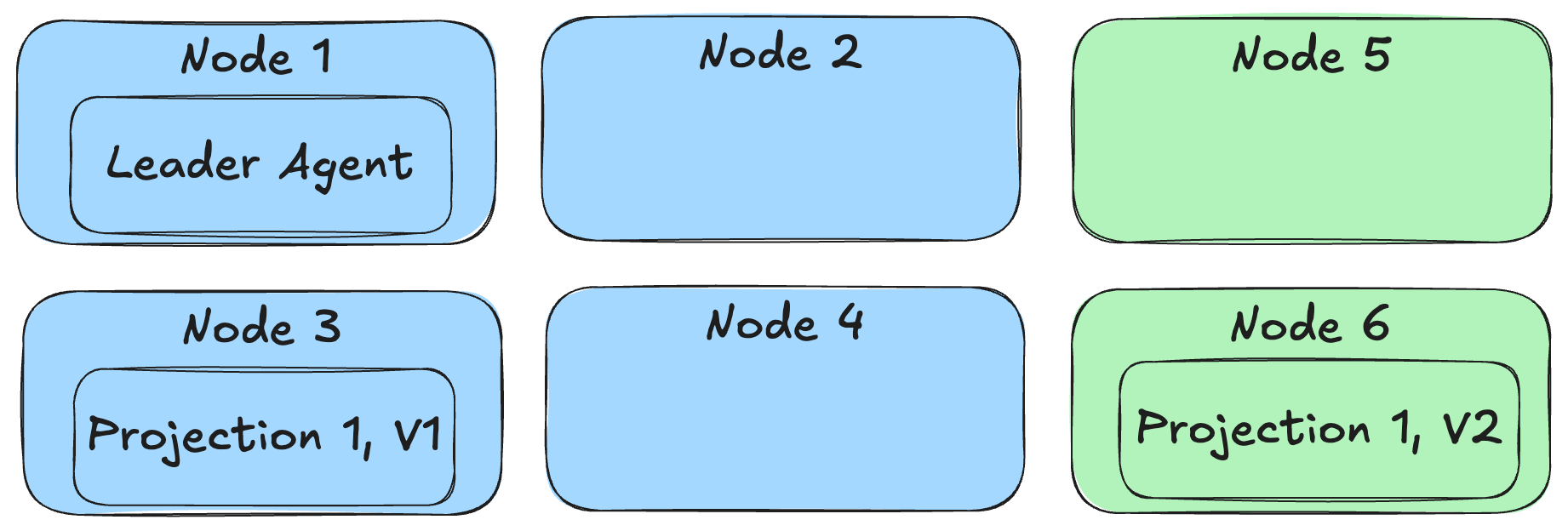
Instead of requiring some system downtime in order to do projection rebuilds before a new deployment though, the Critter Stack can now do a true “blue / green” deployment where both the old and new versions of the system and even versioned projections can run in parallel as shown below:
Let’s rewind a little bit and talk about how to make this happen, because it is a little bit of a multi-step process.
First off, try to only use FetchForWriting() or FetchLatest() when you need strongly consistent access to any kind of single stream projection (definitely “write model” projections and probably “read model” projections as well).
Next, if you need to make some kind of breaking changes to a projection of any kind, use the ProjectionVersion property and increment it to the next version like so:
// This class contains the directions for Marten about how to create the
// Incident view from the raw event data
public class IncidentProjection: SingleStreamProjection<Incident>
{
    public IncidentProjection()
    {
        // THIS is the magic sauce for side by side execution
        // in blue/green deployments
        ProjectionVersion = 2;
    }

    public static Incident Create(IEvent<IncidentLogged> logged) =>
        new(logged.StreamId, logged.Data.CustomerId, IncidentStatus.Pending, Array.Empty<IncidentNote>());

    public Incident Apply(IncidentCategorised categorised, Incident current) =>
        current with { Category = categorised.Category };

    // More event type handling...
}
By incrementing the projection version, we’re effectively making this a completely new projection in the application that will use completely different database tables for the Incident projection version 1 and version 2. This allows the “blue” nodes running the starting version of our application to keep chugging along using the old version of Incident while “green” nodes running the new version of our application can be running completely in parallel, but depending on the new version 2 of the Incident projection.
You will also need to make every single newly revised projection run under the Async lifecycle as well. As we discussed earlier, the FetchForWriting API is able to “fast forward” a single Incident write model projection as needed for command processing, so our “green” nodes will be able to handle commands against Incident event streams with the correct system state. Admittedly, the system might be running a little slower until the asynchronous Incident V2 projection gets caught up, but “slower” is arguably much better than “down”.
With the case of multi-stream projections (our reports), there is no equivalent to FetchLatest, so we’re stuck with eventual consistency. What you can at least do is deploy some “green” nodes with the new version of the system and the revisioned projections and let it start building the new projections from scratch as it starts — but not allow those nodes to handle outside requests until the new versions of the projection are “close” to being caught up to the current event store.
Now, the next question is “how does Marten know to only run the “green” versions of the projections on “green” nodes and make sure that every single projection + version combination is running somewhere?
While there are plenty of nice to have features that the Wolverine integration with Marten brings for the coding model, this next step is absolutely mandatory for the blue/green approach. In our application, we need to use Wolverine to distribute the background projection processes across our entire application cluster:
// This would be in your application bootstrapping
opts.Services.AddMarten(m =>
    {
        // Other Marten configuration

        m.Projections.Add<IncidentProjection>(ProjectionLifecycle.Async);

    })
    .IntegrateWithWolverine(m =>
    {
        // This makes Wolverine distribute the registered projections
        // and event subscriptions evenly across a running application
        // cluster
        m.UseWolverineManagedEventSubscriptionDistribution = true;
    });
Referring back to the diagram from above, that option above enables Wolverine to distribute projections to running application nodes based on each node’s declared capabilities. This also tries to evenly distribute the background projections so they’re spread out over the running service nodes of our application for better scalability instead of only running “hot/cold” like earlier versions of Marten’s async daemon did.
As “blue” nodes are pulled offline, it’s safe to drop the Marten table storage for the projection versions that are no longer used. Sorry, but at this point there’s nothing built into the Critter Stack, but you can easily do that through PostgreSQL by itself with pure SQL.
Summary
This is a powerful set of capabilities that can be valuable in real life, grown systems that utilize Event Sourcing and CQRS with the Critter Stack, but I think we as a community have failed until now to put all of this content together in one place to unlock its usage by more people.
I am not aware of any other Event Sourcing tool in .NET or any other technical ecosystem for that matter that can match Marten & Wolverine’s ability to support this kind of potentially zero downtime deployment model. I’ve also never seen another Event Sourcing tool that has something like Marten’s FetchForWriting and FetchLatest APIs. I definitely haven’t seen any other CQRS tooling enable your application code to be as streamlined as the Critter Stack’s approach to CQRS and Event Sourcing.
I hope the key takeaway here is that Marten is a mature tool that’s been beaten on by real people building and maintaining real systems, and that it already solves challenging technical issues in Event Sourcing. Lastly, Marten is the most commonly used Event Sourcing tool for .NET as is, and I’m very confident in saying it has by far the most complete and robust feature set while also having a very streamlined getting started experience.
So this was meant to be a quick win blog post that I was going to bang out at the kitchen table after dinner last night, but instead took most of the next day. The Critter Stack core team is working on a new set of tutorials for both Marten and Wolverine, and this will hopefully take its place with that new content soon.
 The Shade Tree Developer