

A JasperFx Software client was asking recently about the features for software controlled load balancing and “sticky” agents I’m describing in this post. Since these features are both critical for Wolverine functionality and maybe not perfectly documented already, it’s a great topic for a new blog post! Both because it’s helpful to understand what’s going on under the covers if you’re running Wolverine in production and also in case you want to build your own software managed load distribution for your own virtual agents.
Wolverine was rebooted around in 2022 as a complement to Marten to extend the newly named “Critter Stack” into a full Event Driven Architecture platform and arguably the only single “batteries included” technical stack for Event Sourcing on the .NET platform.
One of the things that Wolverine does for Marten is to provide a first class event subscription function where Wolverine can either asynchronously process events captured by Marten in strict order or forward those events to external messaging brokers. Those first class event subscriptions and the existing asynchronous projection support from Marten can both be executed in only one process at a time because the processing is stateful. As you can probably imagine, it would be very helpful for your system’s scalability and performance if those asynchronous projections and subscriptions could be spread out over an executing cluster of system nodes.
Fortunately enough, Wolverine works with Marten to provide its subscription and projection distribution to assign different asynchronous projections and event subscriptions to run on different nodes so you have a bit more even spread of work throughout your running application cluster like this illustration:
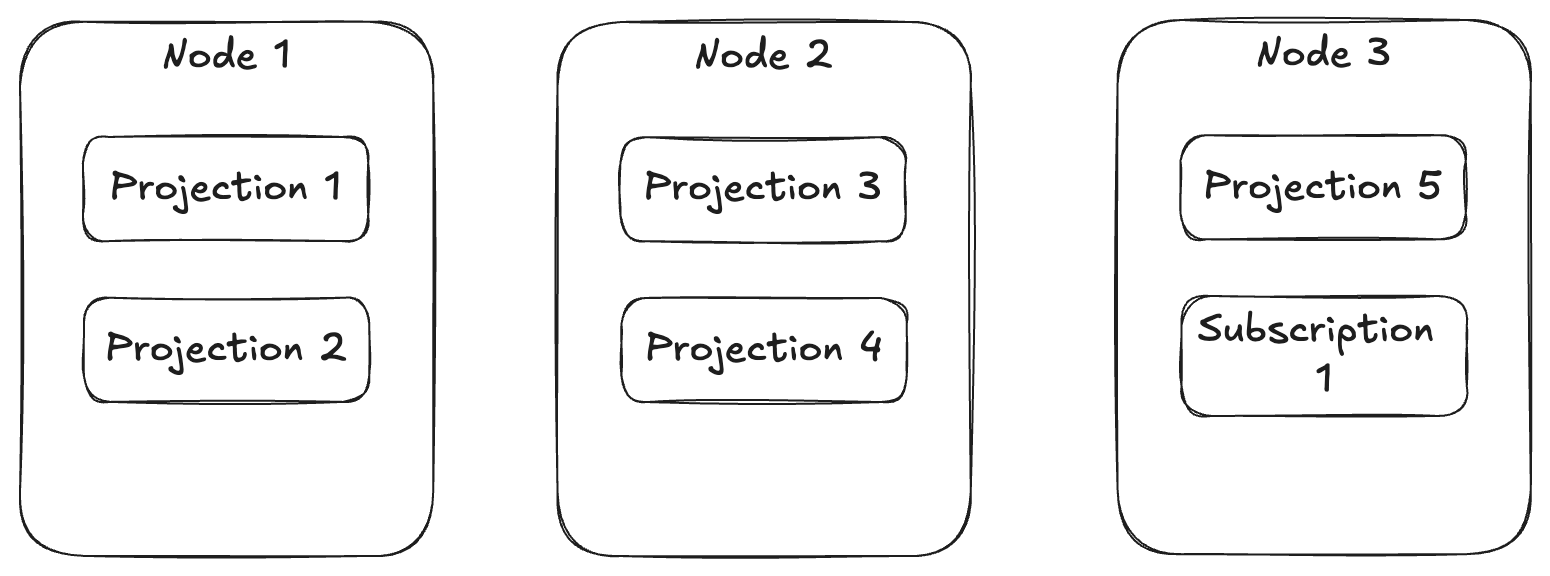
To support that capability above, Wolverine uses a combination of its Leader Election that allows Wolverine to designate one — and only one — node within an application cluster as the “leader” and it’s “agent family” feature that allows for assigning stateful agents across a running cluster of nodes. In the case above, there’s a single agent for every configured projection or subscription in the application that Wolverine will try to spread out over the application cluster.
Just for the sake of completeness, if you have configured Marten for multi-tenancy through separate databases, Wolverine’s projection/subscription distribution will distribute by database rather than by individual projection or subscription + database.
Alright, so here’s the things you might want to know about the subsystem above:
- You need to have some sort of Wolverine message persistence configured for your application. You might already be familiar with that for the transactional inbox or outbox storage, but there’s also storage to persist information about the running nodes and agents within your system that’s important for both the leader election and agent assignments
- There has to be some sort of “control endpoint” configured for Wolverine to be able to communicate between specific nodes. There is a built in “database control” transport that can act as a fallback mechanism, but all of this back and forth communication works better with transports like Wolverine’s Rabbit MQ integration that can quietly use non-durable queues per node for this intra-node communication. And in case you’re wondering, the Rabbit MQ
- Wolverine’s leader election process tries to make sure that there is always a single node that is running the “leader agent” that is monitoring the other running node status and all the known agents
- Wolverine’s agent (some other frameworks call these “virtual actors“) subsystem consisting of the
IAgentFamilyandIAgentinterfaces
Building Your Own Agents
Let’s say you have some kind of stateful process in your system that you want to always be running like something that polls against an external system maybe. And then because this is a somewhat common scenario, let’s say that you need a completely separate polling mechanism against different outside entities or tenants.
First, we need to implement this Wolverine interface to be able to start and stop agents in your application:
/// <summary>
///     Models a constantly running background process within a Wolverine
///     node cluster
/// </summary>
public interface IAgent : IHostedService
{
    /// <summary>
    ///     Unique identification for this agent within the Wolverine system
    /// </summary>
    Uri Uri { get; }

    /// <summary>
    /// Is the agent running, stopped, or paused? Not really used
    /// by Wolverine *yet*
    /// </summary>
    AgentStatus Status { get; }
}
IHostedService up above is the same old interface from .NET for long running processes, and Wolverine just adds a Uri and currently unused Status property (that hopefully gets used by “CritterWatch” someday soon for health checks). You could even use the BackgroundService from .NET itself as a base class.
Next, you need a way to tell Wolverine what agents exist and a strategy for distributing the agents across a running application cluster by implementing this interface:
/// <summary>
///     Pluggable model for managing the assignment and execution of stateful, "sticky"
///     background agents on the various nodes of a running Wolverine cluster
/// </summary>
public interface IAgentFamily
{
    /// <summary>
    ///     Uri scheme for this family of agents
    /// </summary>
    string Scheme { get; }

    /// <summary>
    ///     List of all the possible agents by their identity for this family of agents
    /// </summary>
    /// <returns></returns>
    ValueTask<IReadOnlyList<Uri>> AllKnownAgentsAsync();

    /// <summary>
    ///     Create or resolve the agent for this family
    /// </summary>
    /// <param name="uri"></param>
    /// <param name="wolverineRuntime"></param>
    /// <returns></returns>
    ValueTask<IAgent> BuildAgentAsync(Uri uri, IWolverineRuntime wolverineRuntime);

    /// <summary>
    ///     All supported agent uris by this node instance
    /// </summary>
    /// <returns></returns>
    ValueTask<IReadOnlyList<Uri>> SupportedAgentsAsync();

    /// <summary>
    ///     Assign agents to the currently running nodes when new nodes are detected or existing
    ///     nodes are deactivated
    /// </summary>
    /// <param name="assignments"></param>
    /// <returns></returns>
    ValueTask EvaluateAssignmentsAsync(AssignmentGrid assignments);
}
In this case, you can plug custom IAgentFamily strategies into Wolverine by just registering a concrete service in your DI container against that IAgentFamily interface. Wolverine does a simple IServiceProvider.GetServices<IAgentFamily>() during its boostrapping to find them.
As you can probably guess, the Scheme should be unique, and the Uri structure needs to be unique across all of your agents. EvaluateAssignmentsAsync() is your hook to create distribution strategies, with a simple “just distribute these things evenly across my cluster” strategy possible like this example from Wolverine itself:
    public ValueTask EvaluateAssignmentsAsync(AssignmentGrid assignments)
    {
        assignments.DistributeEvenly(Scheme);
        return ValueTask.CompletedTask;
    }
If you go looking for it, the equivalent in Wolverine’s distribution of Marten projections and subscriptions is a tiny bit more complicated in that it uses knowledge of node capabilities to support blue/green semantics to only distribute work to the servers that “know” how to use particular agents (like version 3 of a projection that doesn’t exist on “blue” nodes):
    public ValueTask EvaluateAssignmentsAsync(AssignmentGrid assignments)
    {
        assignments.DistributeEvenlyWithBlueGreenSemantics(SchemeName);
        return new ValueTask();
    }
The AssignmentGrid tells you the current state of your application in terms of which node is the leader, what all the currently running nodes are, and which agents are running on which nodes. Beyond the even distribution, the AssignmentGrid has fine grained API methods to start, stop, or reassign agents.
To wrap this up, I’m trying to guess at the questions you might have and see if I can cover all the bases:
- Is some kind of persistence necessary? Yes, absolutely. Wolverine has to have some way to “know” what nodes are running and which agents are really running on each node.
- How does Wolverine do health checks for each node? If you look in the
wolverine_nodestable when using PostgreSQL or Sql Server, you’ll see a heartbeat column with a timestamp. Each Wolverine application is running a polling operation that updates its heartbeat timestamp and also checks that there is a known leader node. In normal shutdown, Wolverine tries to gracefully mark the current node as offline and send a message to the current leader node if there is one telling the leader that the node is shutting down. In real world usage though, Kubernetes or who knows what is frequently killing processes without a clean shutdown. In that case, the leader node will be able to detect stale nodes that are offline, eject them from the node persistence, and redistribute agents. - Can Wolverine switch over the leadership role? Yes, and that should be relatively quick. Plus Wolverine would keep trying to start a leader election if none is found. But yet, it’s an imperfect world where things can go wrong and there will 100% be the ability to either kickstart or assign the leader role from the forthcoming CritterWatch user interface.
- How does the leadership election work? Crudely and relatively effectively. All of the storage mechanics today have some kind of sequential node number assignment for all newly persisted nodes. In a kind of simplified “Bully Algorithm,” Wolverine will always try to send “try assume leadership” messages to the node with the lowest sequential node number which will always be the longest running node. When a node does try to take leadership, it uses whatever kind of global, advisory lock function the current persistence uses to get sole access to write the leader node assignment to itself, but will back out if the current node detects from storage that the leadership is already running on another active node.
- Can I extract the Wolverine leadership election for my own usage? Not easily at all, sorry. I don’t have the link anywhere handy, but there is I believe a couple OSS libraries in .NET that implement the Raft consensus algorithm for leader election. I honestly don’t remember why I didn’t think that was suitable for Wolverine though. Leadership election is most certainly not something for the feint of heart.
Summary
I’m not sure how useful this post was for most users, but hopefully it’s helpful to some. I’m sure I didn’t hit every possible question or concern you might have, so feel free to reach out in Discord or comments here with any questions.
 The Shade Tree Developer