

The Marten community made our first big release of the new year with 8.18 this morning. I’m particularly happy with a couple significant things in this release:
- We had 8 different contributors in just the last month of work this release represents
- Anne Erdtsieck did a lot to improve our documentation for using our multi-stream projections for advanced query model projections
- The entire documentation section on projections got a much needed revamp and now includes a lot more information about capabilities from our big V8 release last year. I’m hopeful that the new structure and content makes this crucial feature set more usable.
- We improved Marten’s event enrichment ability within projections to more easily and efficiently incorporate information from outside of the raw event data
- The “Composite or Chained Projections” feature has been something we’ve talked about as a community for years, and now we have it
The one consistent theme in those points is that Marten just got a lot better for our users for creating “query models” in systems.
Let’s Build a TeleHealth System!
I got to be a part of a project like this for a start up during the pandemic. Fantastic project with lots of great people. Even though I wasn’t able to use Marten on the project at that time (we used a hand rolled Event Sourcing solution with Node.JS + TypeScript), that project has informed several capabilities added to Marten in the years since including the features shown in this post.
Just to have a problem domain for the sample code, let’s pretend that we’re building a new only TeleHealth system that allows patients to register for an appointment online and get matched up with a healthcare provider for an appointment that day. The system will do all the work of coordinating these appointments as well as tracking how the healthcare providers spend their time.
That domain might have some plain Marten document storage for reference data including:
Provider— representing a medical provider (Nurse? Physician? PA?) who fields appointmentsSpecialty— models a medical specialtyPatient— personal information about patients who are requesting appointments in our system
Switching to event streams, we may be capturing events for:
Board– events modeling a single, closely related group of appointments during a single day. Think of “Pediatrics in Austin, Texas for January 19th”ProviderShift– events modeling the activity of a single provider working in a singleBoardduring a single dayAppointment– events recording the progress of an appointment including requesting an appointment through the appointment being cancelled or completed
Better Query Models
The easiest and most common form of a projection in Marten is a simple “write model” that projects the information from a single event stream to a projected document. From our TeleHealth domain, here’s the “self-aggregating” Board:
public class Board{ private Board() { } public Board(BoardOpened opened) { Name = opened.Name; Activated = opened.Opened; Date = opened.Date; } public void Apply(BoardFinished finished) { Finished = finished.Timestamp; } public void Apply(BoardClosed closed) { Closed = closed.Timestamp; CloseReason = closed.Reason; } public Guid Id { get; set; } public string Name { get; private set; } public DateTimeOffset Activated { get; set; } public DateTimeOffset? Finished { get; set; } public DateOnly Date { get; set; } public DateTimeOffset? Closed { get; set; } public string CloseReason { get; private set; }}
Easy money. All the projection has to do is apply the raw event data for that one stream and nothing else. Marten is even doing the event grouping for you, so there’s just not much to think about at all.
Now let’s move on to more complicated usages. One of the things that makes Marten such a great platform for Event Sourcing is that it also has its dedicated document database feature set on top of the PostgreSQL engine. All that means that you can happily keep some relatively static reference data back in just plain ol’ documents or even raw database tables.
To that end, let’s say in our TeleHealth system that we want to just embed all the information for a Provider (think a nurse or a physician) directly into our ProviderShift for easier usage:
public class ProviderShift(Guid boardId, Provider provider){ public Guid Id { get; set; } public int Version { get; set; } public Guid BoardId { get; private set; } = boardId; public Guid ProviderId => Provider.Id; public ProviderStatus Status { get; set; } = ProviderStatus.Paused; public string Name { get; init; } public Guid? AppointmentId { get; set; } // I was admittedly lazy in the testing, so I just // completely embedded the Provider document directly // in the ProviderShift for easier querying later public Provider Provider { get; set; } = provider;}
When mixing and matching document storage and events, Marten has always given you the ability to utilize document data during projections by brute force lookups in your projection code like this:
    public async Task<ProviderShift> Create(
        // The event data
        ProviderJoined joined,
        IQuerySession session)
    {
        var provider = await session
            .LoadAsync<Provider>(joined.ProviderId);

        return new ProviderShift(joined.BoardId, provider);
    }
The code above is easy to write and conceptually easy to understand, but when the projection is being executed in our async daemon where the projection is processing a large batch of events at one time, the code above potentially sets you up for an N+1 query anti-pattern where Marten has to make lots of small database round trips to get each referenced Provider every time there’s a separate ProviderJoined event.
Instead, let’s use Marten’s recent hook for event enrichment and the new declarative syntax we just introduced in 8.18 today to get all the related Provider information in one batched query for maximum efficiency:
    public override async Task EnrichEventsAsync(SliceGroup<ProviderShift, Guid> group, IQuerySession querySession, CancellationToken cancellation)
    {
        await group

            // First, let's declare what document type we're going to look up
            .EnrichWith<Provider>()

            // What event type or marker interface type or common abstract type
            // we could look for within each EventSlice that might reference
            // providers
            .ForEvent<ProviderJoined>()

            // Tell Marten how to find an identity to look up
            .ForEntityId(x => x.ProviderId)

            // And finally, execute the look up in one batched round trip,
            // and apply the matching data to each combination of EventSlice, event within that slice
            // that had a reference to a ProviderId, and the Provider
            .EnrichAsync((slice, e, provider) =>
            {
                // In this case we're swapping out the persisted event with the
                // enhanced event type before each event slice is then passed
                // in for updating the ProviderShift aggregates
                slice.ReplaceEvent(e, new EnhancedProviderJoined(e.Data.BoardId, provider));
            });
    }
Now, inside the actual projection for ProviderShift, we can use the EnhancedProviderJoined event from above like this:
    // This is a recipe introduced in Marten 8 to just write explicit code
    // to "evolve" aggregate documents based on event data
    public override ProviderShift Evolve(ProviderShift snapshot, Guid id, IEvent e)
    {
        switch (e.Data)
        {
            case EnhancedProviderJoined joined:
                snapshot = new ProviderShift(joined.BoardId, joined.Provider)
                {
                    Provider = joined.Provider, Status = ProviderStatus.Ready
                };
                break;

            case ProviderReady:
                snapshot.Status = ProviderStatus.Ready;
                break;

            case AppointmentAssigned assigned:
                snapshot.Status = ProviderStatus.Assigned;
                snapshot.AppointmentId = assigned.AppointmentId;
                break;

            case ProviderPaused:
                snapshot.Status = ProviderStatus.Paused;
                snapshot.AppointmentId = null;
                break;

            case ChartingStarted charting:
                snapshot.Status = ProviderStatus.Charting;
                break;
        }

        return snapshot;
    }
In the sample above, I replaced the ProviderJoined event being sent to our projection with the richer EnhancedProviderJoined event, but there are other ways to send data to projections with a new References<T> event type that’s demonstrated in our documentation on this feature.
Sequential or Composite Projections
This feature was introduced in Marten 8.18 in response to feedback from several JasperFx Software clients who needed to efficiently create projections that effectively made de-normalized views across multiple stream types and used reference data outside of the events. Expect this feature to grow in capability as we get more feedback about its usage.
Here are a handful of scenarios that Marten users have hit over the years:
- Wanting to use the build products of Projection 1 as an input to Projection 2. You can do that today by running Projection 1 as
Inlineand Projection 2 asAsync, but that’s imperfect and sensitive to timing. Plus, you might not have wanted to run the first projectionInline. - Needing to create a de-normalized projection view that incorporates data from several other projections and completely different types of event streams, but that previously required quite a bit of duplicated logic between projections
- Looking for ways to improve the throughput of asynchronous projections by doing more batching of event fetching and projection updates by trying to run multiple projections together
To meet these somewhat common needs more easily, Marten has introduced the concept of a “composite” projection where Marten is able to run multiple projections together and possibly divided into multiple, sequential stages. This provides some potential benefits by enabling you to safely use the build products of one projection as inputs to a second projection. Also, if you have multiple projections using much of the same event data, you can wring out more runtime efficiency by building the projections together so your system is doing less work fetching events and able to make updates to the database with fewer network round trips through bigger batches.
In our TeleHealth system, we need to have single stream “write model” projections for each of the three stream types. We also need to have a rich view of each Board that combines all the common state of the active Appointment and ProviderShift streams in that Board including the more static Patient and Provider information that can be used by the system to automate the assignment of providers to open patients (a real telehealth system would need to be able to match up the requirements of an appointment with the licensing, specialty, and location of the providers as well as “knowing” what providers are available or estimated to be available). We probably also need to build a denormalized “query model” about all appointments that can be efficiently queried by our user interface on any of the elements of Board, Appointment, Patient, or Provider.
What we really want is some way to efficiently utilize the upstream products and updates of the Board, Appointment, and ProviderShift “write model” projections as inputs to what we’ll call the BoardSummary and AppointmentDetails projections. We’ll use the new “composite projection” feature to run these projections together in two stages like this:
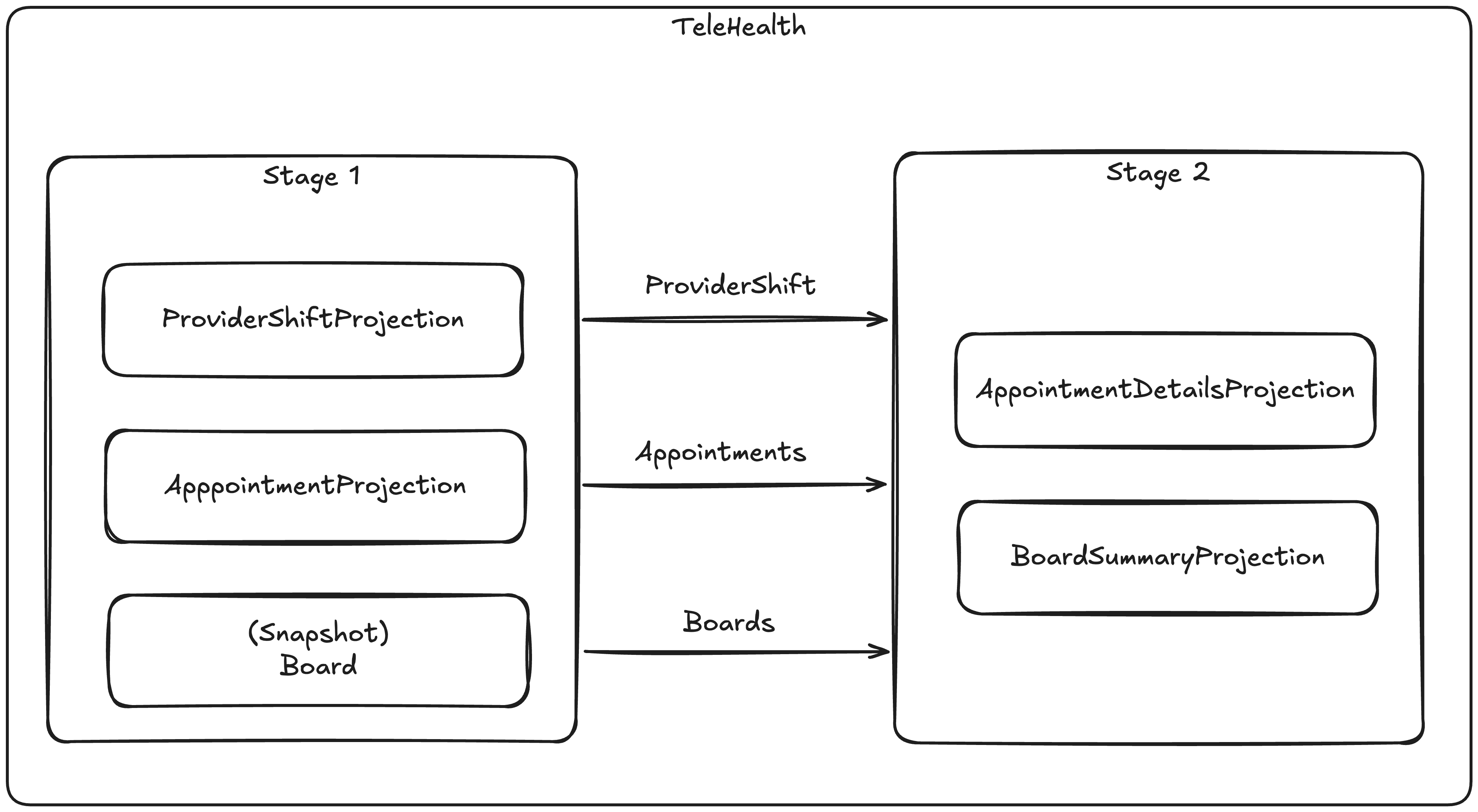
Before we dive into each child projection, this is how we can set up the composite projection using the StoreOptions model in Marten:
opts.Projections.CompositeProjectionFor("TeleHealth", projection =>{ projection.Add<ProviderShiftProjection>(); projection.Add<AppointmentProjection>(); projection.Snapshot<Board>(); // 2nd stage projections projection.Add<AppointmentDetailsProjection>(2); projection.Add<BoardSummaryProjection>(2);});
First, let’s just look at the simple ProviderShiftProjection:
public class ProviderShiftProjection: SingleStreamProjection<ProviderShift, Guid>{ public ProviderShiftProjection() { // Make sure this is turned on! Options.CacheLimitPerTenant = 1000; } public override async Task EnrichEventsAsync(SliceGroup<ProviderShift, Guid> group, IQuerySession querySession, CancellationToken cancellation) { await group // First, let's declare what document type we're going to look up .EnrichWith<Provider>() // What event type or marker interface type or common abstract type // we could look for within each EventSlice that might reference // providers .ForEvent<ProviderJoined>() // Tell Marten how to find an identity to look up .ForEntityId(x => x.ProviderId) // And finally, execute the look up in one batched round trip, // and apply the matching data to each combination of EventSlice, event within that slice // that had a reference to a ProviderId, and the Provider .EnrichAsync((slice, e, provider) => { // In this case we're swapping out the persisted event with the // enhanced event type before each event slice is then passed // in for updating the ProviderShift aggregates slice.ReplaceEvent(e, new EnhancedProviderJoined(e.Data.BoardId, provider)); }); } public override ProviderShift Evolve(ProviderShift snapshot, Guid id, IEvent e) { switch (e.Data) { case EnhancedProviderJoined joined: snapshot = new ProviderShift(joined.BoardId, joined.Provider) { Provider = joined.Provider, Status = ProviderStatus.Ready }; break; case ProviderReady: snapshot.Status = ProviderStatus.Ready; break; case AppointmentAssigned assigned: snapshot.Status = ProviderStatus.Assigned; snapshot.AppointmentId = assigned.AppointmentId; break; case ProviderPaused: snapshot.Status = ProviderStatus.Paused; snapshot.AppointmentId = null; break; case ChartingStarted charting: snapshot.Status = ProviderStatus.Charting; break; } return snapshot; }}
Now, let’s go downstream and look at the AppointmentDetailsProjection that will ultimately need to use the build products of all three upstream projections:
public class AppointmentDetailsProjection : MultiStreamProjection<AppointmentDetails, Guid>{ public AppointmentDetailsProjection() { Options.CacheLimitPerTenant = 1000; Identity<Updated<Appointment>>(x => x.Entity.Id); Identity<IEvent<ProviderAssigned>>(x => x.StreamId); Identity<IEvent<AppointmentRouted>>(x => x.StreamId); } public override async Task EnrichEventsAsync(SliceGroup<AppointmentDetails, Guid> group, IQuerySession querySession, CancellationToken cancellation) { // Look up and apply specialty information from the document store // Specialty is just reference data stored as a document in Marten await group .EnrichWith<Specialty>() .ForEvent<Updated<Appointment>>() .ForEntityId(x => x.Entity.Requirement.SpecialtyCode) .AddReferences(); // Also reference data (for now) await group .EnrichWith<Patient>() .ForEvent<Updated<Appointment>>() .ForEntityId(x => x.Entity.PatientId) .AddReferences(); // Look up and apply provider information await group .EnrichWith<Provider>() .ForEvent<ProviderAssigned>() .ForEntityId(x => x.ProviderId) .AddReferences(); // Look up and apply Board information that matches the events being // projected await group .EnrichWith<Board>() .ForEvent<AppointmentRouted>() .ForEntityId(x => x.BoardId) .AddReferences(); } public override AppointmentDetails Evolve(AppointmentDetails snapshot, Guid id, IEvent e) { switch (e.Data) { case AppointmentRequested requested: snapshot ??= new AppointmentDetails(e.StreamId); snapshot.SpecialtyCode = requested.SpecialtyCode; snapshot.PatientId = requested.PatientId; break; // This is an upstream projection. Triggering off of a synthetic // event that Marten publishes from the early stage // to this projection running in a secondary stage case Updated<Appointment> updated: snapshot ??= new AppointmentDetails(updated.Entity.Id); snapshot.Status = updated.Entity.Status; snapshot.EstimatedTime = updated.Entity.EstimatedTime; snapshot.SpecialtyCode = updated.Entity.SpecialtyCode; break; case References<Patient> patient: snapshot.PatientFirstName = patient.Entity.FirstName; snapshot.PatientLastName = patient.Entity.LastName; break; case References<Specialty> specialty: snapshot.SpecialtyCode = specialty.Entity.Code; snapshot.SpecialtyDescription = specialty.Entity.Description; break; case References<Provider> provider: snapshot.ProviderId = provider.Entity.Id; snapshot.ProviderFirstName = provider.Entity.FirstName; snapshot.ProviderLastName = provider.Entity.LastName; break; case References<Board> board: snapshot.BoardName = board.Entity.Name; snapshot.BoardId = board.Entity.Id; break; } return snapshot; }}
And also the definition for the downstream BoardSummary view:
public class BoardSummaryProjection: MultiStreamProjection<BoardSummary, Guid>{ public BoardSummaryProjection() { Options.CacheLimitPerTenant = 100; Identity<Updated<Appointment>>(x => x.Entity.BoardId ?? Guid.Empty); Identity<Updated<Board>>(x => x.Entity.Id); Identity<Updated<ProviderShift>>(x => x.Entity.BoardId); } public override Task EnrichEventsAsync(SliceGroup<BoardSummary, Guid> group, IQuerySession querySession, CancellationToken cancellation) { return group.ReferencePeerView<Board>(); } public override (BoardSummary, ActionType) DetermineAction(BoardSummary snapshot, Guid identity, IReadOnlyList<IEvent> events) { snapshot ??= new BoardSummary { Id = identity }; if (events.TryFindReference<Board>(out var board)) { snapshot.Board = board; } var shifts = events.AllReferenced<ProviderShift>().ToArray(); foreach (var providerShift in shifts) { snapshot.ActiveProviders[providerShift.ProviderId] = providerShift; if (providerShift.AppointmentId.HasValue) { snapshot.Unassigned.Remove(providerShift.ProviderId); } } foreach (var appointment in events.AllReferenced<Appointment>()) { if (appointment.ProviderId == null) { snapshot.Unassigned[appointment.Id] = appointment; snapshot.Assigned.Remove(appointment.Id); } else { snapshot.Unassigned.Remove(appointment.Id); var shift = shifts.FirstOrDefault(x => x.Id == appointment.ProviderId.Value); snapshot.Assigned[appointment.Id] = new AssignedAppointment(appointment, shift?.Provider); } } return (snapshot, ActionType.Store); }}
Note the usage of the Updated<T> event types that the downstream projections are using in their Evolve or DetermineAction methods. That is a synthetic event added by Marten to communicate to the downstream projections what projected documents were updated for the current event range. These events are carrying the latest snapshot data for the current event range so the downstream projections can just use the build products without making any additional fetches. It also guarantees that the downstream projections are seeing the exact correct upstream projection data for that point of the event sequencing.
Moreover, the composite “telehealth” projection is reading the event range once for all five constituent projections, and also applying the updates for all five projections at one time to guarantee consistency.
Some the documentation on Composite Projections for more information about how this feature fits it with rebuilding, versioning, and non stale querying.
Summary
Marten has hopefully gotten much better at building “query model” projections that you’d use for bigger dashboard screens or search within your application. We’re hoping that this makes Marten a better tool for real life development.
The best way for an OSS project to grow healthily is having a lot of user feedback and engagement coupled with the maintainers reacting to that feedback with constant improvement. And while I’d sometimes like to have the fire hose of that “feedback” stop for a couple days, it helps drive the tools forward.
The advent of JasperFx Software has enabled me to spend much more time working with our users and seeing the real problems they face in their system development. The features I described in this post are a direct result of engagements with at least four different JasperFx clients in the past year and a half. Drop us a line anytime at sales@jasperfx.net and I’d be happy to talk to you about how we can help you be more successful with Event Sourcing using Marten.
 The Shade Tree Developer