

This post is from a decade old draft where I thought I would write a grand treatise about every bit of wisdom I could possibly impart to other developers. So let this be proof that I absolutely can still write about software development outside of promoting the “Critter Stack” if you give me a decade to finish the post and a day when my new fangled AI agent is being extremely slow!
A lot of my time over the past 15 years has been spent helping other software developers analyze, debug, and fix problems in their own work. I also spend a lot of time working in some fairly complicated problem domains where I not infrequently have to unwind problems of my own creation. It follows pretty naturally that I’ve spent a significant amount of time thinking both about how I debug problems in code and how I would try to teach other developers to be better at debugging their own problems.
Here then is a few thoughts about the act of debugging problems in software systems. You’ll note that I’m not going to talk really at all about specific tools. I’m happy to leave that to other people and really just focus on how you use your noggin to think your way into determining root causes and fixes.
Do what I say, not what I just did…
And of course while I was writing this I wasn’t practicing what I’m preaching, so let’s look at a micro-cosm of all this advice for a problem I was troubleshooting right after I wrote most of this post. Right now I’m focused on a forthcoming product for JasperFx Software named “CritterWatch.” That product will have to manage communication between Wolverine systems, the centralized CritterWatch service and connected CritterWatch browsers. Last week I was initially struggling with why the initial load of the web pages was missing some data from the backend as shown in this diagram:
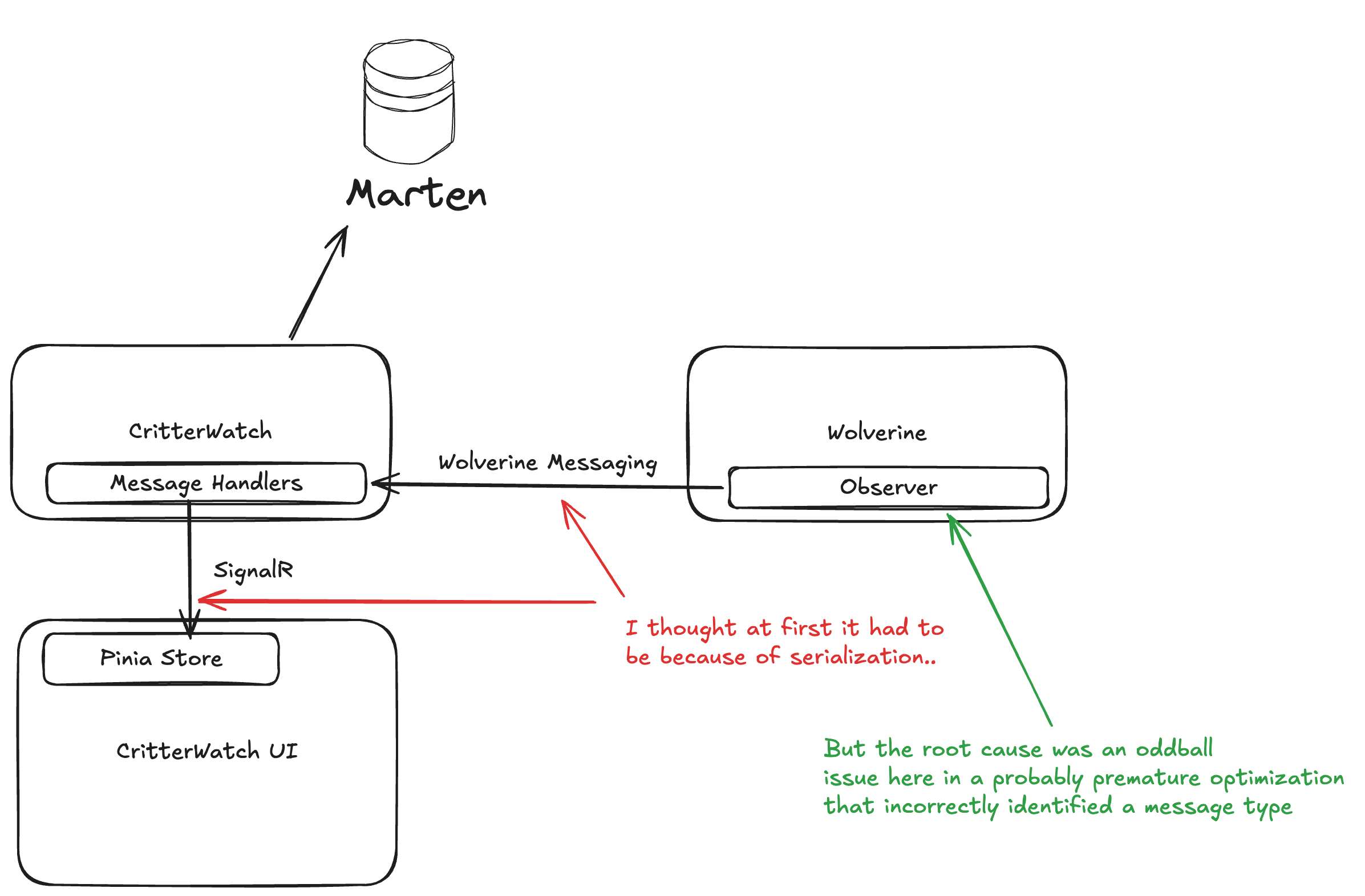
I was working pretty late in the afternoon waiting for my daughter to wrap up an after school activity, and I admittedly wasn’t at my best. I followed these steps:
- There were custom value types in the information flow from Wolverine to CritterWatch to the CritterWatch user interface, so I first went with the reasonable theory that there were JSON serialization problems that had cropped up since last I’d worked seriously in this codebase.
- I was feeling lazy at the end of the day, so I tried to get Claude to “solve” the problem for me and told it to look at serialization issues. Claude claimed to have fixed a problem, but no dice when I ran the whole stack
- I wasn’t really getting into the whole flow yet, so I kept trying to just add more tests to verify bidirectional JSON serialization and deserialization of the custom types, and all of those new tests were passing just fine.
- I finally listened to what the feedback was telling me and moved off of what had been my initial theory once I had really disproven that theory about serialization problems several ways to Sunday.
- I walked away for the night, and came back fresh the next morning
- After some rest, I went a lot deeper in the code and got back up to speed on how data flowed throughout and with a little more judicious debugging I was able to determine that the data was flowing incorrectly much earlier in the workflow than I’d originally thought and that the problem was very different than I’d first theorized. To use the analogy I’ll introduce in a bit, I took my mental X-Wing right into the trench to go find the thermal exhaust port.
- Knowing where the problem was, I switched to using automated tests that were finer grained than running the while system end to end and much more quickly repeatable
- With the faster feedback loop and a new theory about what could be going wrong, I made a change to the internals that turned out to be correct and I got the tests passing before moving on to running the full stack end to end and seeing the whole system function correctly. Finally.
- And lastly, I actually did remember to go rip out some of the temporary tracing code I’d put in while diagnosing the problems
Does any of this matter if we have LLMs now?
Definitely for the short term and probably for the longer term too? I’ve been very impressed with my usage of Claude Code so far, but I’ve seen plenty of times when I could have probably have solved an issue much faster myself than letting Claude hit it with brute force. Even with a tool like Claude or Copilot, I’d still say you want to feed it what you think the likely cause is to speed up its own work and whatever facts you know. And I guess at the end of the day I just don’t believe an LLM is going to be better than a capable human at everything, especially when you’re facing a novel problem.
I have found it advantageous to have the LLM tools retrofit tests to verify or disprove theories about why code is broken. It’s also been helpful to get an LLM to create summaries of a code subsystem including dumping that out to a markdown file with requested Mermaid diagrams explaining the flow.
Oh, and I absolutely think it’s important for you to understand how the fancy AI tool was able to fix the issue later anyway.
15/15 Minute Rule
Before we get into the real meat of this post, there are two unhealthy behaviors I see from other developers asking for help that drive me absolutely bananas:
- Not making the slightest attempt to solve their problem on their own before they ask for help, but I think this is commonly caused by developers who can’t do what I’m going to call step 1 below
- Spending hours banging their head against the wall trying to solve something that I could have helped them get through much more quickly
I really wish I’d made of note who wrote this first — and we can happily quibble about what exactly the time duration should be — but I’d highly recommend the “15/15 Rule” of debugging. You should spend at least 15 minutes trying to debug a problem on your own both to develop your own skills and to keep from overloading your colleagues and maybe causing them to resent you. After that though, spend no more than 15 more minutes trying to solve the problem before you lift your head up and ask someone else for help.
It’s been years since I have been an active development lead, but I vividly remember how frustrating either extreme can be. At the time I started this post I was a remote “architect” who was on call to help anyone who could reach me on Hipchat (I think? Long before Slack), and I tried to take that role seriously. Now, one very important thing I should have taken more seriously then and that I have tried to impart to technical leaders since is that you should try really hard to teach the other people on your team how you debugged the problem and found the eventual answer. That could include knowing to check certain log files, database tables, or just imparting more about how the system works.
And of course, there were days when I wished fewer people needed my help on any given day. Then a few years later that company hired a lot more people in the main office with a few senior folks mixed in and people stopped asking me for help altogether. And if you are assuming that probably led to me no longer working there, you’d probably be at least partially right.
Step 1: Believing that you can figure it out
I despise touchy feely, kumbayah statements in regards to software development, but I do actually think that believing that you can understand the problem you’re facing and fix it is the all important first step. If you stay on the outside and just randomly try different things without understanding what you’re dealing with or try to set Debugger breakpoints in what you hope might be a useful spot, you might get lucky, but in my experience that’s not a sure thing.
Look, I’m solidly GenX, so the analogy I’m going to make is trying to destroy the Death Star. Sure, you can try to lob shots from the outside, the only sure way is to go fly your X-Wing right through that trench until you find the thermal exhaust port that will blow up the whole thing.
Long story short, I think you need to be ready to roll your sleeves up and learn enough about whatever it is you’re working on to have a good enough mental model of how information flows and where the points are that the process could be failing.
Oh, and another important point. Experience helps tremendously in debugging problems, and the only way to get experience is to try to debug problems yourself or at least just not ask the older dev on your team to just fix it for you.
Create a Mental Model
Okay, so once we actually believe that we can ultimately understand the code, the problem, and the eventual solution, I suggest you create or refresh your own mental model of how the code that’s failing works. I’d say to first focus on:
- Where, when, and how system state is mutated
- The workflow of the code or system or systems in play. How does information pass between elements of the code or the system?
What I think specifically you’re looking for is the most likely place in that workflow where things are going wrong and that you should…
One thing I already like AI for is to quickly say “make me a summary of XYZ code in markdown with a Mermaid sequence diagram for ABC.”
Have a Theory, then Prove or Disprove It
Formulate the most likely theory about why the functionality is failing and devise some way to verify or disprove that theory. Sometimes you can do this through targeted Debugger usage, but I’ll also highly recommend trying to build automated tests to verify intermediate steps as that’s almost always going to be a much faster feedback cycle than manually running through a system or series of systems. To put this more bluntly, always be looking to shorten your debugging session by looking for faster, finer grained feedback cycles that can tell you something valuable. And of course, absolutely leave behind automated test coverage as regression tests against whatever the problem turns out to be.
Having a working theory will provide some structure to how you’re trying to debug and fix your broken code. However, you need to be able to drop that working theory and look for a new one as soon as you get feedback to the contrary. Several of the longest debugging sessions I’ve undergone were prolonged by me refusing to give up on my initial explanation for what was wrong.
I was joking online the other day that Extreme Programming was the fount of all knowledge about software development. One of the ideas I learned from XP was that having to frequently use a Debugger tool meant that you should be adding more finer-grained automated tests and that you generally don’t want to spend a long time fussing with a Debugger if you can help it.
Pay Attention to Trends and Correlation
“Correlation isn’t Causation” necessarily, but it will absolutely suggest issues with certain types of input or configuration and tell you something that deserves further investigation and be an input into creating a viable theory.
Select isn’t Broken
The saying “Select isn’t Broken” comes from the seminal Pragmatic Programmer book that every aspiring developer should read at some point (it’s pretty short). I also like the Coding Horror take on this from years ago.
The gist of this is that it’s far more likely that the source of your problem is in your freshly written code and not in the much more mature tools you may be using. As a .Net developer, I know that it’s far more likely that a bug in my system is much more likely caused by my code than the core CLR code underneath it that’s used by millions of developers.
This isn’t necessarily saying that you’re a bad developer, but it can definitely save you time to assume that the problem is in your code and start from there.
Another way to put this is to always apply…
Occam’s Razor
From Wikipedia’s entry on Occam’s Razor:
Occam’s Razor is a problem-solving principle that, when presented with competing hypothetical answers to a problem, one should select the one that makes the fewest assumptions
This one is simple, look for the most likely explanation for your problem and focus in on that in your testing and debugging. Sorry to say this, but Occam’s Razor is frequently going to point at your code.
I probably shouldn’t tell anybody this, but an easy “tell” that I’m getting annoyed or impatient with somebody that I’m trying to help solve a problem is if I use either the phrase “Occam’s Razor says…” or something to the effect of “Dude, SELECT isn’t broken…”
I wrote that last sentence a decade ago but it’s still completely true today.
Don’t be so quick to blame the weird thing
So here’s the situation, you just got assigned to a project that uses some kind of technology that is completely new to you. Or maybe you pulled down some hotshot OSS library for the first time. Either way, you might find yourself pounding your head on your desk not being able to understand why some piece of code that uses that weird new thing isn’t working.
The common reaction is to blame the weird new thing, but you might just be completely wrong. Even when faced with some kind of novel technology, you still need to check for the normal, banal problems. I’ve fallen prey to this myself several times in the past, only to realize that my code that used the strange new thing was wrong. In particular, I remember feeling pretty stupid when I realized that I had a file path in the code wrong. It wasn’t the strange, new thing, it was just the common kind of mistake that I’ve made and quickly fixed several hundred times before.
Another way to put this is to always blame your code first. I say that based on the fact that it should be easiest and quickest to troubleshoot your own code to eliminate any possible problems there before getting into the strange new thing.
This is closely related to the initial “Believing that you can figure it out” rule, because blaming the “weird thing” allows you to push off all responsibility instead of diving in to try to understand what’s not working.
This section was written a decade ago after an incident where I happened to be in the main office when a developer said in a stand up meeting that he had a “FubuMVC problem.” As the primary author of FubuMVC, I jumped in and said I’d pair with him to try to fix whatever it was. When we sat down, he showed me the exception he was getting, and a quick glance at the inner exception pointed at it being just a run of the mill issue with a collection in his code not being initialized before the code tried to modify it. Easy money. But of course, the next day I popped into their stand up again and he told them that we had fixed the “FubuMVC problem.” Grr.
As the author of many OSS tools meant for other developers, I sometimes get the brunt of this issue. I’ve got some thoughts and lessons learned about better or worse stack trace and exception messages from my time writing tools and frameworks for other developers that I tackle in a later section — but, the main thing I want to tell other developers sometimes is to…
In no small part, Wolverine’s runtime architecture was purposely designed to streamline Exception stack traces compared to how FubuMVC at that time (or ASP.Net Core today for that matter) would add an absurd amount of framework noise to stack traces. I would argue that this is a significant advantage to Wolverine over the middleware strategies of other tools in the .NET space today.
Read the Exception Message Carefully
Yeah, this one is self explanatory. But yet this section is here because oftentimes the most important information you need to pay attention is buried in an inner exception. Or just don’t jump to incorrect conclusions about what the exception message and stack trace is telling you.
And also, the absolutely most important debugging rule. If you jump online and flag me down to help you solve your problem, don’t ever just say “I had an Exception” but instead post the whole damn stack trace (please)!
Just Flat Out Walk Away
Yeah, I’m not kidding. Sometimes if you’re really stuck and you can get away with this, just walk away and go do something else and hopefully recharge. It’s not a perfectly reliable or predictable strategy at all, but your subconscious will frequently throw up the eventual answer — or at least a new theory — at some random time while you’re walking the dog or doing dishes or whatever your daily routines are.
Probably more importantly, just getting some mental rest and coming back with a fresh mind and hopefully ready to entertain new ideas about what’s going wrong and how to solve that is frequently helpful as compared to banging your head on your desk and hoping this time you’ll notice something in the Debugger that tips you off to the problem.
The Secret of Management
As I was wrapping this up, I realized that I recreated this classic episode of News Radio (i.e., one of the greatest sitcoms ever even if it gave us Joe Rogan and RIP Phil Hartman):
 The Shade Tree Developer