

In the midst of some let’s call it “market” research to better understand how Marten stacks up to a newer competitor, I stumbled back over a GitHub discussion I initiated in 2021 called “What would it take for you to adopt Marten?” long before I was able to found JasperFx Software. I seeded this original discussion with my thoughts about the then forthcoming giant Marten 4.0 release that was meant to permanently put Marten on a solid technical foundation for all time and address all known significant technical shortcomings of Marten.
Narrators’s voice: the V4 release was indeed a major step forward and still shapes a great deal of Marten’s internals, but it was not even remotely the end all, be all of technical releases and V5 came out less than 6 months later to address shortcomings of V4 and to add first class multi-tenancy through separate databases. And arguably, V7 just three years later was nearly as big a change to Marten’s internals.
So now that it’s five years later and Marten’s usage numbers are vastly greater than that moment in time in 2021, let me run through the things we thought needed to change to garner more usage, whether or not and how those ideas took fruit, and whether or not I think those ideas made any difference in the end.
Enterprise Level Support
People frequently told me that they could not seriously consider Marten or later Wolverine without there being commercial support for those tools or at least a company behind them. As of now, JasperFx Software (my company) provides support agreements for any tool under the JasperFx GitHub organization. I would say though that the JasperFx support agreement ends up being more like an ongoing consulting engagement rather than the “here’s an email for support, we’ll response within 72 hours” licensing agreement that you’d be getting from other Event Driven Architecture tools and companies in the .NET space.
Read more about that in Little Diary of How JasperFx Helps Our Clients.
And no, we’re not a big company at all, but we’re getting there and at least “we” isn’t just the royal “we” now:)
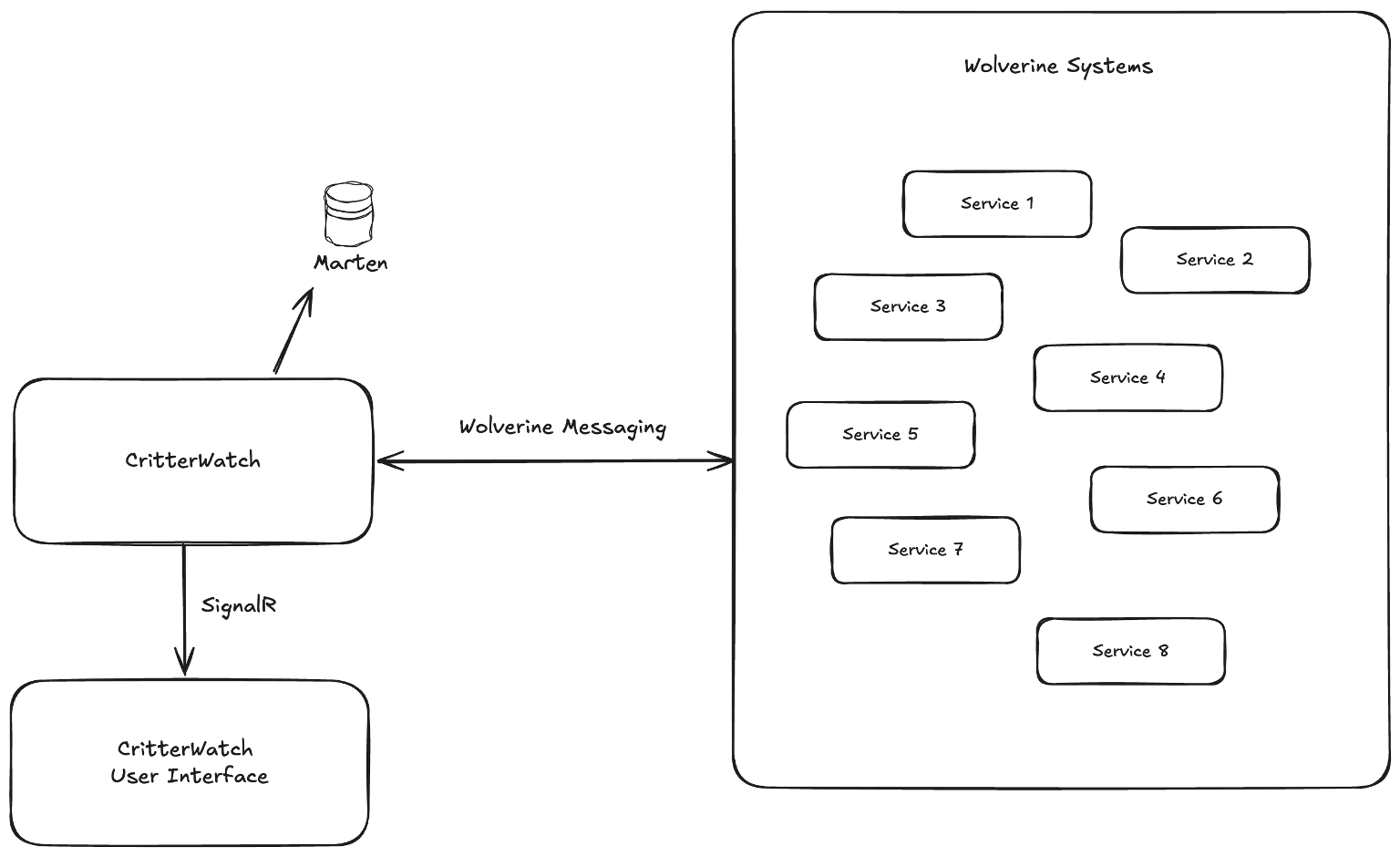
I’m hoping that JasperFx is able to expand when we are able to start selling the CritterWatch commercial add on soon.
More Professional Documentation
Long story short, a good, a modern looking website for your project is an absolute must. Today, all of the Critter Stack / JasperFx projects use VitePress and MarkdownSnippets for our documentation websites. Plus we have real project logo images that I really like myself created by Khalid Abuhakmeh. Babu Annamalai did a fantastic job on setting up our documentation infrastructure.
People do still complain about the documentation from time to time, but after I was mercilessly flogged online for the StructureMap documentation being so far behind in the late 00’s and FubuMVC never really having had any, I’ve been paranoid about OSS documentation ever since and we as a community try really hard to curate and expand our documentation. Anne Erdtsieck especially has added quite a bit of explanatory detail to the Marten documentation in the last six months.
It’s only anecdotal evidence, but the availability of the LLMS-friendly docs plus the most recent advances in AI LLM tools seem to have dramatically reduced the amount of questions we’re fielding in our Discord chat rooms while our usage numbers are still accelerating.
Oh, and I cannot emphasize more how important and valuable it is to be able to both quickly publish documentation updates and to enable users to quickly make suggestions to the documentation through pull requests.
Moar YouTube Videos
I dragged my feet on this one for a long time and probably still don’t do well enough, but we have the JasperFx Software Channel now with some videos and plenty of live streams. I’ve had mostly positive feedback on the live streams, so it’s just up to me to get back in a groove on this one.
SQL Server or CosmosDb Support in Addition to PostgreSQL
The most common complaint or concern about Marten in its first 5-7 years was that it only supported PostgreSQL as a backing data store. The most common advice we got from the outside was that we absolutely had to have SQL Server support in order to be viable inside the .NET ecosystem where shops do tend to be conservative in technology adoption and also tend to favor Microsoft offerings.
While I’ve always seen the obvious wisdom in supporting SQL Server, I never believed that it was practical to replicate Marten’s functionality with SQL Server. Partially because SQL Server lagged far behind PostgreSQL in its JSON capabilities for a long time and partially just out of sheer bandwidth limitations. I think it’s telling that nobody built a truly robust and widely used event store on top of SQL Server in the mean time.
But it’s 2026 and the math feels very different in many ways:
- PostgreSQL has grown in stature and at least in my experience, far more .NET shops are happy to take the plunge into PostgreSQL. It absolutely helps that the PostgreSQL ecosystem has absolutely exploded with innovation and that PostgreSQL has first class managed hosting or even serverless support on every cloud provider of any stature.
- SQL Server 2025 introduced a new native JSON type that brought SQL Server at least into the same neighborhood as PostgreSQL’s JSONB type. Using that, the JasperFx Software is getting close to releasing a full fledged port of most of Marten (you won’t miss the parts that were left out, I know I won’t!) called “Polecat” that will be backed by SQL Server 2025. We’ll see how much traction that tool gets, but early feedback has been positive.
- While we’re not there yet on Event Sourcing, at least Wolverine does have CosmosDb backed transactional inbox and outbox support as well as other integration into Wolverine handlers. I don’t have any immediate plans for Event Sourcing with CosmosDb other than “wouldn’t that be nice?” kind of thoughts. I don’t hear that many requests for this. I get even less feedback about DynamoDb, but I’ve always assumed we’d get around to that some day too.
Better Support for Cross Document Views or Queries
So, yeah. Document database approaches are awesome when your problem domain is well described by self-contained entities, but maybe not so much if you really need to model a lot of relationships between different first class entities in your system. Marten already had the Include() operator in our LINQ support, but folks aren’t super enthusiastic about it all the time. As Marten really became mostly about Event Sourcing over time, some of this issue went away for folks who could focus on using projections to just write documents out exactly as your use cases needed — which can sometimes happily eliminate the need for fancy JOIN queries and AutoMapper type translation in memory. However, I’ve worked with several JasperFx clients and other users in the past couple years who had real struggles with creating denormalized views with Marten projections, so that needed work too.
While that complaint was made in 2021, we now have or are just about to get in the next wave of releases:
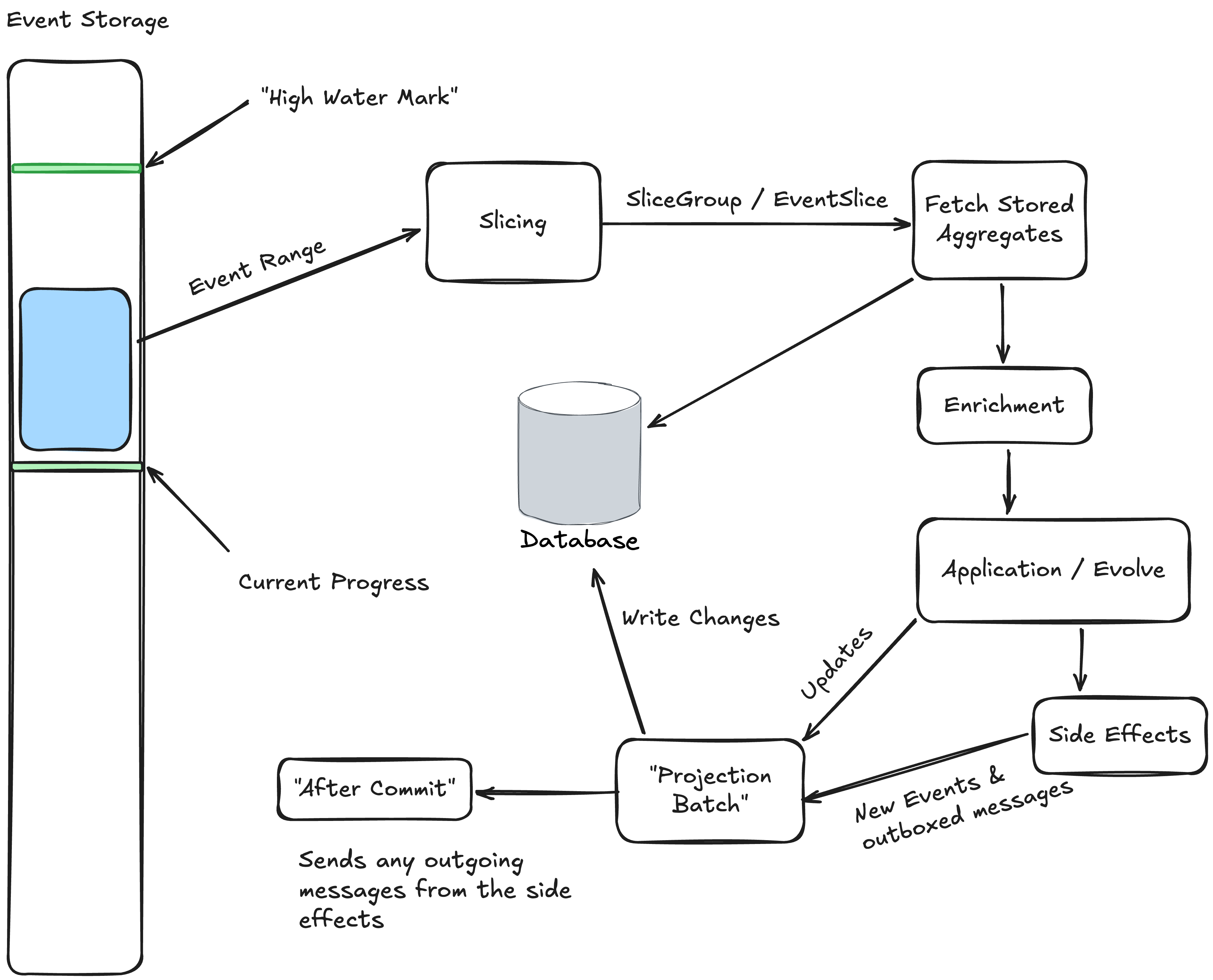
- The new “composite projection” model that was designed for easier creation of denormalized event projection views that has already met with some early success (and actionable feedback). This feature was also designed with some performance and scalability tuning in mind as well.
- The next big release of Marten (8.23) will include support for the GroupJoin LINQ provider. Finally.
- And let’s face it, EF Core will always have better LINQ support than Marten over all and a straight up relational table is probably always going to be more appropriate for reporting. To that end, Marten 8.23 will also have an extension library that adds first class event projections that write to EF Core.
Polecat 1.0 will include all of these new Marten features as well.
Improving LINQ Support
LINQ support was somewhat improved for that V4 release I was already selling in 2021, but much more so for V7 in early 2024 that moved us toward using much more PostgreSQL specific optimizations in JSONB searching as we were able to utilize JSONPath searching or back to the PostgreSQL containment operator.
At this point, it has turned out that recent versions of Claude are very effective at enhancing or fixing issues in the LINQ provider and at this point we have zero open issues related to LINQ for the first time since Marten’s founding back in 2015!
There’s one issue open as I write this that has an existing fix that hasn’t been committed to master yet, so if you go check up on me, I’m not technically lying:)
Open Telemetry Support and other Improved Metadata
Open Telemetry support is table stakes for .NET application framework tools and especially for any kind of Event Driven Architecture or Event Sourcing tool like Marten. We’ve had all that since Marten V7, with occasional enhancements or adjustments since in reaction to JasperFx client needs.
More Sample Applications
Yeah, we could still do a lot better on this front. Sigh.
One thing I want to try doing soon is developing some Claude skills for the Critter Stack in general, and a particular focus on creating instructions for best practices converting codebases to the Critter Stack. As part of that, I’ve identified about a dozen open source sample applications out there that would be good targets for this work. It’s a lazy way to create new samples applications while building an AI offering for JasperFx, but I’m all about being lazy sometimes.
We’ll see how this goes.
Scalability Improvements including Sharding
We’ve done a lot here since that 2021 discussion. Some of the Event Sourcing scalability options are explained here. This isn’t an exhaustive list, but since 2021 we have:
- Much better load distribution of asynchronous projection and subscription work within clusters
- Support for PostgreSQL read replicas
- First class support for managing PostgreSQL native partitioning with Marten
- A ton of internal improvements including work to utilize the latest, greatest low level support in Npgsql for query batching
And for that matter, I’ve finishing up a proposal this weekend for a new JasperFx client looking to scale a single Marten system to the neighborhood of 200-300 billion events, so there’s still more work ahead.
Event Streaming Support or Transactional Outbox Integration
This was frequently called out as a big missing feature in Marten in 2021, but with the integration into the full Critter Stack with Wolverine, we have first class event streaming support that was introduced in 2024 for every messaging technology that Wolverine supports today, which is just about everything you could possibly think to use!
Management User Interface
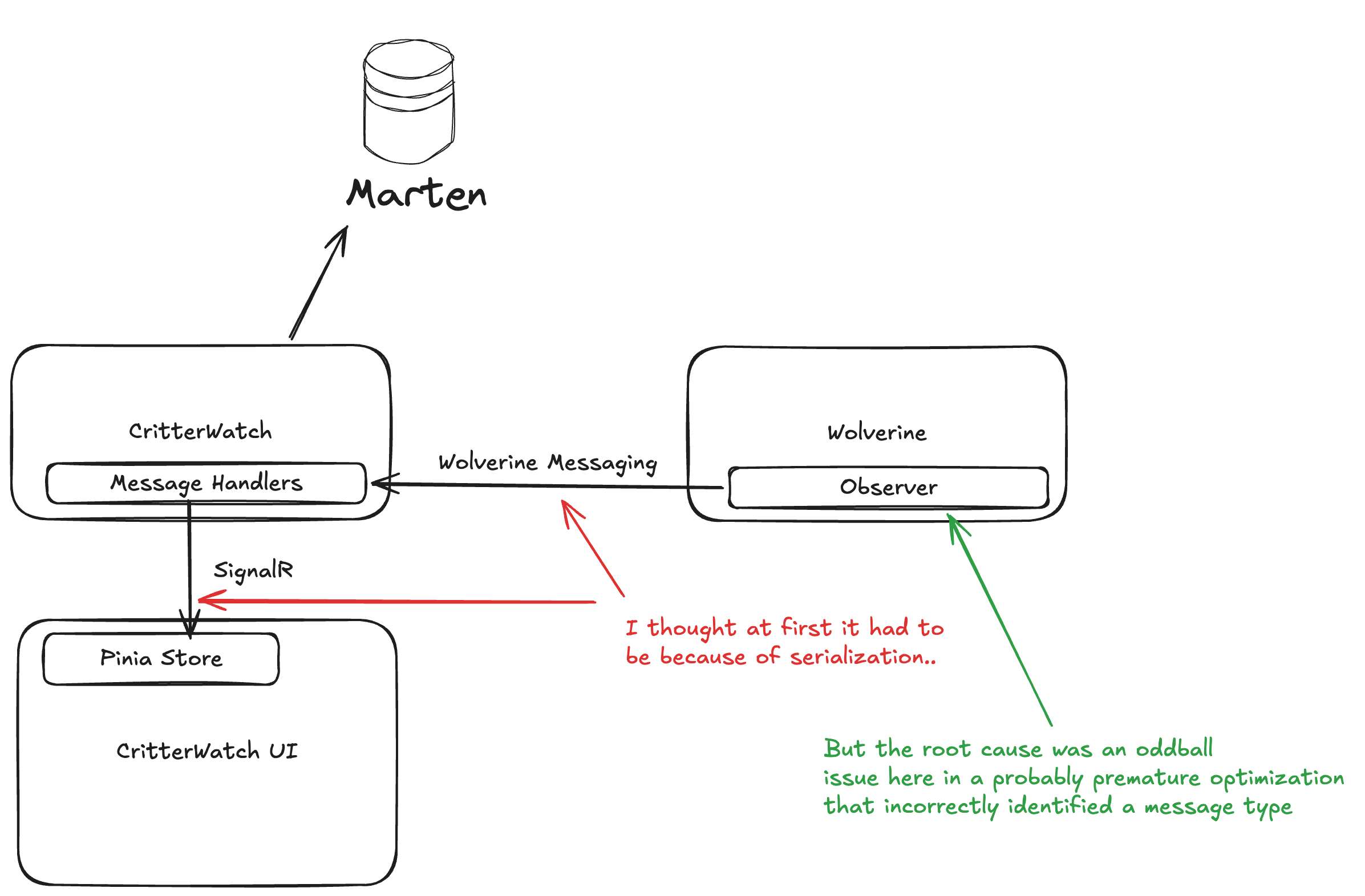
Sigh. Still in flight, but now very heavily in flight with a CritterWatch MVP promised to a JasperFx client by the end of this month. Learn more about that here:
Cloud Hosting Models and Recipes
People have brought this up a bit over the years, but we don’t have much other than some best practices with using Marten inside of Docker containers. I think it helps us that PostgreSQL is almost ubiquitous now and that otherwise a Marten application is just a .NET application.








 The Shade Tree Developer