Wolverine Does More to Simplify Server Side Code

Just to set myself up with some pressure to perform, let me hype up a live stream on Wolverine I’m doing later this week!

I’m doing a live stream on Thursday afternoon (U.S. friendly this time) entitled Vertical Slices the Critter Stack Way based on a fun, meandering talk I did for Houston DNUG and an abbreviated version at Commit Your Code last month.

So, yes, it’s technically about the “Vertical Slice Architecture” in general and specifically with Marten and Wolverine, but more importantly, the special sauce in Wolverine that does more — in my opinion of course — than any other server side .NET application framework to simplify your code and improve testability. In the live stream, I’m going to discuss:

  • A little bit about how I think modern layered architecture approaches and “Ports and Adapters” style approaches can sometimes lead to poor results over time
  • The qualities of a code base that I think are most important (the ability to reason about the behavior of the code, testability of all sorts, ease of iteration, and modularity)
  • How Wolverine’s low code ceremony improves outcomes and the qualities I listed above by reducing layering and shrinking your code into a much tighter vertical slice approach so you can actually see what your system does later on
  • Adopting Wolverine’s idiomatic “A-Frame Architecture” approach and “imperative shell, functional core” thinking to improve testability
  • A sampling of the ways that Wolverine can hugely simplify data access in simpler scenarios and how it can help you keep more complicated data access much closer to behavioral code so you can actually reason about the cause and effects between those two things. And all of that while happily letting you leverage every bit of power in whatever your database or data access tooling happens to be. Seriously, layering approaches and abstractions that obfuscate the database technologies and queries within your system are a very common source of poor system performance in Onion/Clean Architecture approaches.
  • Using Wolverine.HTTP as an alternative AspNetCore Endpoint model and why that’s simpler in the end than any kind of “Mediator” tooling inside of MVC Core or Minimal API
  • Wolverine’s adaptive approach to middleware
  • The full “Critter Stack” combination with Marten and how that leads to arguably the simplest and cleanest code for CQRS command handlers on the planet
  • Wolverine’s goodies for the majority of .NET devs using the venerable EF Core tooling as well

If you’ve never heard of Wolverine or haven’t really paid much attention to it yet, I’m most certainly inviting you to the live stream to give it a chance. If you’ve blown Wolverine off in the past as “yet another messaging tool in .NET,” come find out why that is most certainly not the full story because Wolverine will do much more for you within your application code than other, mere messaging frameworks in .NET or even any of the numerous “Mediator” tools floating around.

Wolverine 5 and Modular Monoliths

In the announcement for the Wolverine 5.0 release last week, I left out a pretty big set of improvements for modular monolith support, specifically in how Wolverine can now work with multiple databases from one service process.

Wolverine works closely with databases for:

And all of those features are supported for Marten, EF Core with either PostgreSQL or SQL Server, and RavenDb.

Back to the “modular monolith” approach and what I’m seeing folks do or want to do is some combination of:

  • Use multiple EF Core DbContext types that target the same database, but maybe with different schemas
  • Use Marten’s “ancillary or separated store” feature to divide the storage up for different modules against the same database

Wolverine 3/4 supported the previous two bullet points, but now Wolverine 5 will be able to support any combination of every possible option in the same process. That even includes the ability to:

  • Use multiple DbContext types that target completely different databases altogether
  • Mix and match with Marten ancillary stores that target completely different database
  • Use RavenDb for some modules, even if others use PostgreSQL or SQL Server
  • Utilize either Marten’s built in multi-tenancy through a database per tenant or Wolverine’s managed EF Core multi-tenancy through a database per tenant

And now do that in one process while being able to support Wolverine’s transactional inbox, outbox, scheduled messages, and saga support for every single database that the application utilizes. And oh, yeah, from the perspective of the future CritterWatch, you’ll be able to use Wolverine’s dead letter management services against every possible database in the service.

Okay, this is the point where I do have to admit that the RavenDb support for the dead letter administration is lagging a little bit, but we’ll get that hole filled in soon.

Here’s an example from the tests:

        var builder = Host.CreateApplicationBuilder();
        var sqlserver1 = builder.Configuration.GetConnectionString("sqlserver1");
        var sqlserver2 = builder.Configuration.GetConnectionString("sqlserver2");
        var postgresql = builder.Configuration.GetConnectionString("postgresql");

        builder.UseWolverine(opts =>
        {
            // This helps Wolverine "know" how to share inbox/outbox
            // storage across logical module databases where they're
            // sharing the same physical database but with different schemas
            opts.Durability.MessageStorageSchemaName = "wolverine";

            // This will be the "main" store that Wolverine will use
            // for node storage
            opts.Services.AddMarten(m =>
            {
                m.Connection(postgresql);
            }).IntegrateWithWolverine();

            // "An" EF Core module using Wolverine based inbox/outbox storage
            opts.UseEntityFrameworkCoreTransactions();
            opts.Services.AddDbContextWithWolverineIntegration<SampleDbContext>(x => x.UseSqlServer(sqlserver1));
            
            // This is helping Wolverine out by telling it what database to use for inbox/outbox integration
            // when using this DbContext type in handlers or HTTP endpoints
            opts.PersistMessagesWithSqlServer(sqlserver1, role:MessageStoreRole.Ancillary).Enroll<SampleDbContext>();
            
            // Another EF Core module
            opts.Services.AddDbContextWithWolverineIntegration<ItemsDbContext>(x => x.UseSqlServer(sqlserver2));
            opts.PersistMessagesWithSqlServer(sqlserver2, role:MessageStoreRole.Ancillary).Enroll<ItemsDbContext>();

            // Yet another Marten backed module
            opts.Services.AddMartenStore<IFirstStore>(m =>
            {
                m.Connection(postgresql);
                m.DatabaseSchemaName = "first";
            });
        });

I’m certainly not saying that you *should* run out and build a system that has that many different persistence options in a single deployable service, but now you *can* with Wolverine. And folks have definitely wanted to build Wolverine systems that target multiple databases for different modules and still get every bit of Wolverine functionality for each database.

Summary

Part of the Wolverine 5.0 work was also Jeffry Gonzalez and I pushing on JasperFx’s forthcoming “CritterWatch” tool and looking for any kind of breaking changes in the Wolverine “publinternals” that might be necessary to support CritterWatch. The “let’s let you use all the database options at one time!” improvements I tried to show in the post were suggested by the work we are doing for dead letter message management in CritterWatch.

I shudder to think how creative folks are going to be with this mix and match ability, but it’s cool to have some bragging rights over these capabilities because I don’t think that any other .NET tool can match this.

Wolverine 5.0 is Here!

That’s of course supposed to be a 1992 Ford Mustang GT with the 5.0L V8 that high school age me thought was the coolest car I could imagine ever owning (I most certainly never did of course). Queue “Ice, Ice Baby” and sing “rolling, in my 5.0” in your head because here we go…

Wolverine 5.0 went live on Nuget earlier today after about three months of pretty intensive development from *20* different contributors with easily that many more folks having contributed to discussions and GitHub issues that helped get us here. I’m just not going to be able to list everyone, so let me just thank the very supportive Wolverine community, the 19 other contributors, and the JasperFx clients who contributed to this release.

This release came closely on the heels of Wolverine 4.0 earlier this year, with the primary reasons for a new major version release being:

  • A big change in the internals as we replaced the venerable TPL DataFlow library with the System.Threading.Channels library in every place that Wolverine uses in memory queueing. We did this as a precursor to a hugely important new feature commissioned by a JasperFx Software client (who really needs to get that feature in for their “scale out” so it was definitely about time I got this out today).
  • Some breaking API changes in the “publinternals” of Wolverine to support “CritterWatch”, our long planned and I promise finally in real development add on tooling for Critter Stack observability and management

With that being said, the top line new changes to Wolverine that I’ll be trying to blog about next week are:

For a partial list of significant, smaller improvements:

  • Wolverine can utilize Marten batch querying for the declarative data access, and that includes working with multiple Marten event streams in one logical operation. This is part of the Critter Stack’s response to the “Dynamic Consistency Boundary” idea from some of the commercial event sourcing tools
  • You can finally use strong typed identifiers with the “aggregate handler workflow”
  • An overhaul of the dead letter queue administration services that was part of our ongoing work for CritterWatch
  • A new tutorial for dealing with concurrency when building against Wolverine
  • Optimistic concurrency support for EF Core backed Sagas from the community
  • Ability to target multiple Azure Service Bus namespaces from a single application and improvements to using Azure Service Bus namespace per tenant
  • Improvements to Rabbit MQ for advanced usage

What’s Next?

As happens basically every time, several features that were planned for 5.0 and some significant open issues didn’t make the 5.0 cut. The bigger effort to optimize the cold start time for both Marten and Wolverine will hopefully happen later this year. I think the next minor point release will target some open issues around Wolverine.HTTP (multi-part uploads, actual content negotiation) and the Kafka transport. I would like to take a longer look sometime at how the CritterStack combination can better support operations that cross stream boundaries.

But in the meantime, I’m shifting to open Marten issues before hopefully spending a couple weeks trying to jump start CritterWatch development again.

I usually end these kinds of major release announcements with a link to Don’t Steal My Sunshine as an exhortation to hold off on reporting problems or asking for whatever didn’t make the release. After referring to “Ice, Ice Baby” in the preface to this and probably getting that bass line stuck in your head, here’s the song you want to hear now anyway — which I feel much less of after getting this damn release out:

Migrations the “Critter Stack” Way

I was the guest speaker today on the .NET Data Community Standup doing a talk on how the “Critter Stack” (Marten, Wolverine, and Weasel) support a style of database migrations and even configuration for messaging brokers that greatly reduces development time friction for more productive teams.

The general theme is “it should just work” so developers and testers can get their work done and even iterate on different approaches without having to spend much time fiddling with database or other infrastructure configuration.

And I also shared some hard lessons learned from previous OSS project failures that made the Critter Stack community so adamant that the default configurations “should just work.”

Last Sprint to Wolverine 5.0

Little update since the last check in on Wolverine 5.0. I think right now that Wolverine 5.0 hits by next Monday (October 6th). To be honest, besides documentation updates, the biggest work is just pushing more on the CritterWatch backend this week to see if that forces any breaking changes in the Wolverine internals.

What’s definitely “in” right now:

  • The “Partitioned Sequential Messaging” feature work that we previewed in a live stream
  • Big improvements and expansion to Wolverine’s interoperability story against NServiceBus, MassTransit, CloudEvents, and whatever custom interoperability folks need to do
  • A first class SignalR transport which is getting used heavily in our own CritterWatch work
  • A first class Redis messaging transport from the community
  • Modernization and upgrades to the GCP Pubsub transport
  • The ability to mix and match database storage with Wolverine for modular monoliths
  • A bit batch of optimization for the Marten integration including improvements for multi-stream operations as our response to the “Dynamic Boundary Consistency” idea from other tools
  • The utilization of System.Threading.Channels in place of the TPL DataFlow library

What’s unfortunately out:

  • Any effort to optimize the cold start times for Marten and Wolverine. Just a bandwidth problem, plus I think this can get done without breaking changes

And we’ll see:

  • Random improvements for Azure Service Bus and Kafka usage
  • HTTP improvements for content negotiation and multi-part uploads
  • Yet more improvements to the “aggregate handler workflow” with Marten to allow for yet more strong typed identifier usage

The items in the 3rd list don’t require any breaking changes, so could slide to Wolverine 5.1 if necessary.

All in all, I’d argue this turned out to be a big batch of improvements with very few breaking API changes and almost nothing that would impact the average user.

Some Thoughts on MS Pulling Back on their “Eventing Framework”

I’ll admit that I’d stopped paying attention quite awhile ago and didn’t even realize Microsoft was still considering building out their own “Eventing Framework” until everybody and their little brother started posting a link to their announcement about forgoing this effort today.

Here’s a very few thoughts from me about this, and I think for about the first time ever, I’m disallowing comments on this one to just spit this out and be done with it.

  • I thought that what they were proposing in terms of usability by basically trying to make it “Minimal API” for asynchronous messaging was not going to be very successful in complex systems. I get that their approach might have led to a low learning code for simple usage and there’s some appeal to having a common programming model with web development, but man, I think that would have severely limited that tooling in terms of what it helped you do to deal with application complexity or testability compared to existing tools in this space.
  • Specifically, I think that the Microsoft tooling teams have a blind spot sometimes about testability design in their application frameworks
  • I think this is a technical area where .NET is actually very rich in options and there’s actually a lot of existing innovation across our ecosystem already (Wolverine, NServiceBus, MassTransit, AkkaDotNet, Rebus, Brighter, Microsoft’s own Dapr for crying out loud). I did not believe that the proposed tooling from Microsoft in this case did anything to improve the ecosystem except for the inevitable folks who just don’t want to have any dependency on .NET technology that is not from Microsoft
  • I’m continuously shocked anytime something like this bubbles up how a seemingly large part of the .NET community is outright hostile to non-Microsoft tooling in .NET
  • I will 100% admit that I was concerned about my own Wolverine project being severely harmed by the MS offering at the same time believing quite fervently that Wolverine would long remain a far superior technical solution. The reality is that Microsoft tooling tends to quickly take the Oxygen out of the air for non-Microsoft tools regardless of relative quality or even suitability for real usage. You can absolutely compete with the Microsoft offerings on technical quality, but not in informational reach or community attention
  • If Microsoft had gone ahead with their tooling, I had every intention of being aggressive online to try to point out every possible area where Wolverine had advantages and I had no plans to just give up. My thought was to just lean in much, much harder to the greater Critter Stack as a full blown Event Sourcing solution where there is really nothing competitive to the Critter Stack in the rest of the .NET community (I said what I said) and certainly nothing from Microsoft themselves (yet)
  • I think it hurts the .NET ecosystem when Microsoft squelches community innovation and this is something I’ve never liked about the greater .NET community’s fixation on having official, Microsoft approved tooling.
  • One thing the Microsoft folks tried to sell people like me who lead asynchronous messaging projects is that they (MS) were really good at application frameworks, and we could all take dependencies on a new set of medium level messaging abstractions and core libraries for messaging. I wonder if what they meant is what are now the various Aspire plugins for Rabbit MQ or Azure Service Bus. I was also extremely dubious about all of that.
  • As someone else pointed out, do you really want one tool trying to be all things to all people because that’s a recipe for a bloated, unmaintainable tool
  • I think the Microsoft team was a bit naive about what they would have to build out and how many feature requests they would have gotten from folks wanting to ditch very mature tools like MassTransit. I really don’t believe that Microsoft would have resisted the demands from some elements of the community to grow the new things into something able to handle more complex requirements
  • I don’t know what to say about the people who flipped their lids over the MassTransit and MediatR commercialization plans. I think folks were drastically underestimating the value of those tools, the overhead in supporting those tools over time, and in complete denial about the practicality of rolling your own one off tools.
  • The idea that Microsoft is an infallible maintainer of their development tools is bonkers
  • Regardless, the Critter Stack is going down the “Open Core” model

As my mentor used to say at my first real software development job, I feel better now and thank you for listening.

And now, back to Wolverine 5 and CritterWatch for me…

Little Diary of How JasperFx Helps Our Clients

For any shops using the “Critter Stack” (Marten and Wolverine), JasperFx Software offers support contracts and custom consulting engagements in support of these tools — or really anything you might be doing on the server side with .NET as well. Something we’ve had some success with, especially lately, is positioning these “support” contracts as essentially having JasperFx on call for adhoc consulting beyond merely assisting with production issues or bugs.

Just to try to illustrate the value of these engagements, I thought it would be interesting to describe what JasperFx has done for clients in just the past 30 days — in very general terms with zero information about our client’s business domain of course.

In no particular order, we’ve:

  • Helped several clients with CI/CD related tasks around Wolverine or Marten’s code generation as a way to find problems faster and to optimize cold start times. Also fixed some issues with the codegen for one of our support clients. As always, I’d rather we never had any bugs, but we do try to stomp those out relatively quickly for our clients
  • Explained and worked through error handling strategies built into Wolverine with a client who was dealing with a dependency on an external service that has somewhat strict rate limiting
  • Planned out identity strategies for importing data from a legacy system into Marten and for interoperability with that legacy system for the time being
  • Jumped on a Zoom call to pair program with a client who needed to use some pretty advanced Wolverine middleware capabilities
  • Did a Zoom call with that same client to help them plan for future message broker usage. Most of our support work is done through Discord or Slack, but sometimes a real call is what you need to have more of discussion — especially when I think I need to ask the client several questions to better understand their needs and the context around their questions before firing off a quick answer.
  • Helped a client troubleshoot usage issue with Kafka
  • Added some improvements for Wolverine usage with F# for one of our first clients
  • Developed some new test automation support around scheduled message capabilities in Wolverine for one of our clients who is very aggressive in their integration test automation
  • Built a small feature in Marten to help optimize some upcoming work for a client using Marten projections. I won’t say that building new features is an official part of support contracts, but we will prioritize features for support clients.
  • Interacted with a client team to best utilize the Critter Stack “Aggregate Handler Workflow” approach as a way of streamlining their application code and maximizing their ability to unit test business logic. If you’ll buy into Wolverine idioms, you can build systems with much less code than the typical Clean/Onion Architecture approaches.
  • Assisted several clients with using the test automation support features backed into Wolverine, with quite a bit of pure consulting on how to be more successful with test automation efforts in .NET.
  • Conducted more Zoom calls to talk through Event Sourcing modeling questions for multiple clients. I’m a big believer in Event Sourcing, but it is a pretty new technique and architectural style, and it’s not necessarily a natural transition for folks who are very used to thinking and building in terms of relational databases. JasperFx can help!
  • We fielded plenty of questions about the best usage of projections in Marten
  • Helped a client try to optimize their experience with Kubernetes helpfully stopping and starting pods while the pods were quite busy with Marten and Wolverine work. That was fun. Not.
  • Talked through Wolverine usages and made some additional changes to Wolverine for a client who is using Wolverine as an in memory message bus for a modular monolith architecture.

And answering plenty of small questions about features or approaches that probably just amount to giving our clients peace of mind about what they were doing.

As I was compiling this, I noticed that there hasn’t been any recent support questions about multi-tenancy or concurrency lately. I’m going to take that as a sign that we’re very mature in those two areas!

I would hope the point I made here is that there’s quite a lot of value we can bring to your organization through an ongoing support contract and engagement with JasperFx Software. Certainly feel free to reach out to us at sales@jasperfx.net for any questions about how we could potentially help your shop!

While I do enjoy interacting with our clients and I most certainly love getting to make a living off of my own technical babies, anytime I do some outright shilling and promotion like this post, I’m a bit reminded of this (and I’m definitely the “Ray”):

Update on Wolverine 5 and CritterWatch

We’re targeting October 1st for the release of Wolverine 5.0. At this point, I think I’d like to say that we’re not going to be adding any new features to Wolverine 4.* except for JasperFx Software client needs. And also, not that I have any pride about this, I don’t think we’re going to address bugs in 4.* if those bugs do not impact many people.

To catch you up if you want:

In addition to the new features we originally envisioned, add in:

  • A messaging transport for Redis from the community — which might also lead to a Redis backed saga model some day too, but not for 5.0
  • Ongoing work to improve Wolverine’s capability to allow folks to mix and match persistent message stores in “modular monolith” applications
  • Working over some of the baked in Dead Letter Queue administration, which is being done in conjunction with ongoing “CritterWatch” work

I think we’re really close to the point where it’s time to play major release triage and push back any enhancements that wouldn’t require any breaking changes to the public API, so anything not yet done or at least started probably slides to a future 5.* minor release. The one exception might be trying to tackle the “cold start optimization.” The wild card in this is that I’m desperately trying to work through as much of the CritterWatch backend plumbing as possible right now as that work is 100% causing some changes and improvements to Wolverine 5.0

What about CritterWatch?

If you understand why the image above appears in this section, I would hope you’d feel some sympathy for me here:-)

I’ve been able to devote some serious time to CritterWatch the past couple weeks, and it’s starting to be “real” after all this time. Jeffry Gonzalez and I will be marrying up the backend and a real frontend in the next couple weeks and who knows, we might be able to demo something to early adopters in about a month or so. After Wolverine 5.0 is out, CritterWatch will be my and JasperFx’s primary technical focus the rest of the year.

Just to rehash, the MVP for CritterWatch is looking like:

  1. The basic shell and visualization of what your monitored Critter Stack applications are, including messaging
  2. Every possible thing you need to manage Dead Letter Queue messages in Wolverine — but I’d warn you that it’s focused on Wolverine’s database backed DLQ
  3. Monitoring and a control panel over Marten event projections and subscriptions and everything you need to keep those running smoothly in production

Event Enrichment in Marten Projections

So here’s a common scenario when building a system using Event Sourcing with Marten:

  1. Some of the data in your system is just reference data stored as plain old Marten documents. Something like user data (like I’ll use in just a bit), company data, or some other kind of static reference data that doesn’t justify the usage of Event Sourcing. Or maybe you have some data that is event sourced, but it’s very static data otherwise and you can essentially treat the projected documents as just documents.
  2. You have workflows modeled with event sourcing and you want some of the projections from those events to also include information from the reference data documents

As an example, let’s say that your application has some reference information about system users saved in this document type (from the Marten testing suite):

public class User
{
    public User()
    {
        Id = Guid.NewGuid();
    }

    public List<Friend> Friends { get; set; }

    public string[] Roles { get; set; }
    public Guid Id { get; set; }
    public string UserName { get; set; }
    public string FirstName { get; set; }
    public string LastName { get; set; }
    public string FullName => $"{FirstName} {LastName}";
}

And you also have events for some kind of UserTask aggregate that manages the workflow of some kind of work tracking. You might have some events like this:

public record TaskLogged(string Name);
public record TaskStarted;
public record TaskFinished;

public class UserAssigned
{
    public Guid UserId { get; set; }

    // You don't *have* to do this with a mutable
    // property, but it is *an* easy way to pull this off
    public User? User { get; set; }
}

In a “query model” view of the event data, you’d love to be able to show the full, human readable User information about the user’s full name right into the projected document:

public class UserTask
{
    public Guid Id { get; set; }
    public bool HasStarted { get; set; }
    public bool HasCompleted { get; set; }
    public Guid? UserId { get; set; }

    // This would be sourced from the User
    // documents
    public string UserFullName { get; set; }
}

In the projection for UserTask, you can always reach out to Marten in an adhoc way to grab the right User documents like this possible code in the projection definition for UserTask:

    // We're just gonna go look up the user we need right here and now!
    public async Task Apply(UserAssigned assigned, IQuerySession session, UserTask snapshot)
    {
        var user = await session.LoadAsync<User>(assigned.UserId);
        snapshot.UserFullName = user.FullName;
    }

The ability to just pull in IQuerySession and go look up whatever data you need as you need it is certainly powerful, but hold on a bit, because what if:

  1. You’re running the projection for UserTask asynchronously using Marten’s async daemon where it updates potentially hundreds of UserTask documents a the same time?
  2. You expect the UserAssigned events to be quite common, so there’s a lot of potential User lookups to process the projection
  3. You are quite aware that the code above could easily turn into an N+1 Query Problem that won’t be helpful at all for your system’s performance. And if you weren’t aware of that before, please be so now!

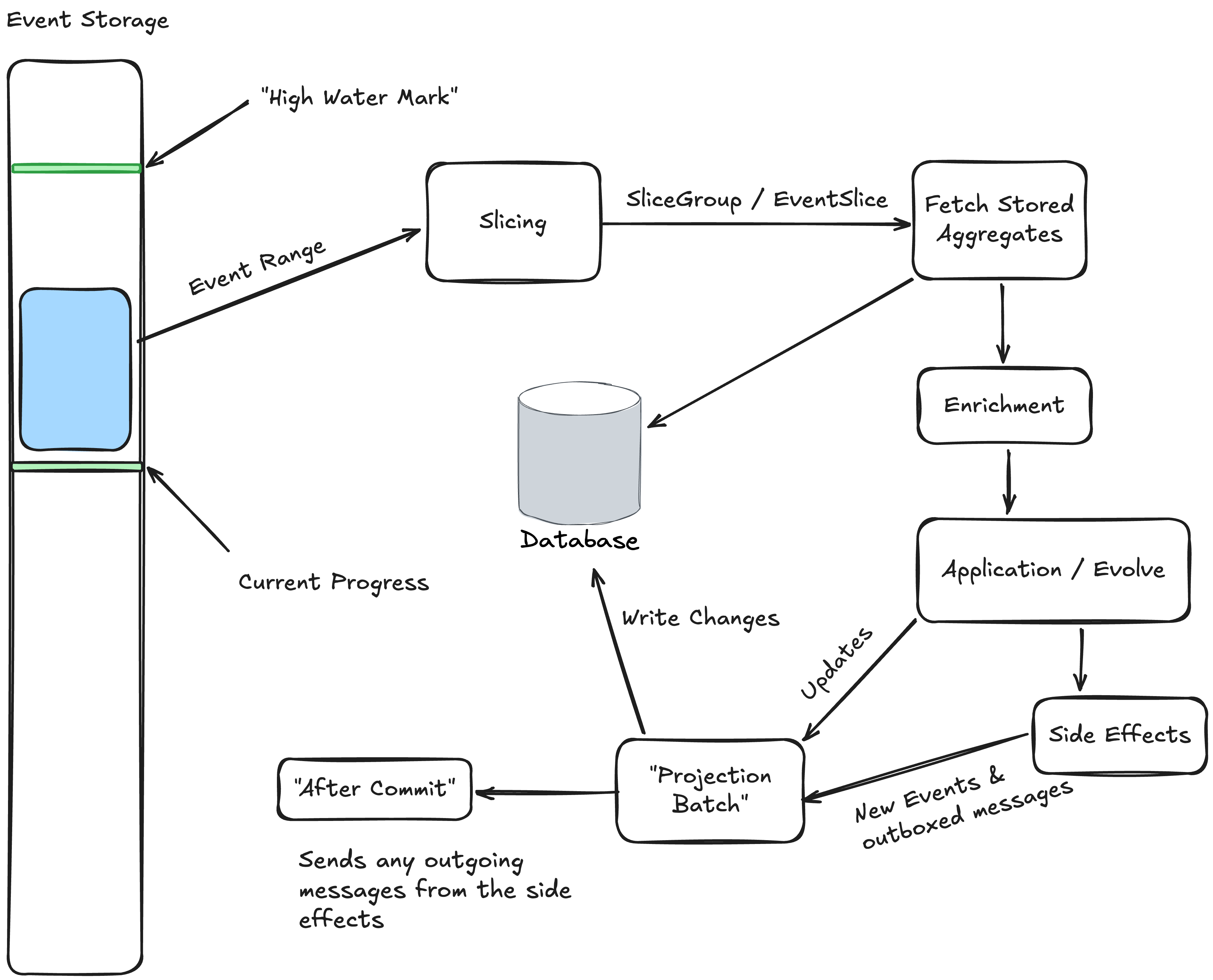
Instead of the N+1 Query Problem you could easily get from doing the User lookup one single event at a time, what if instead we were able to batch up the calls to lookup all the necessary User information for a batch of UserTask data being updated by the async daemon?

Enter Marten 8.11 (hopefully by the time you read this!) and our newly introduced hook for “event enrichment” and you can now do exactly that as a way of wringing more performance and scalability out of your Marten usage! Let’s build a single stream projection for the UserTask aggregate type shown up above that batches the User lookup:

public class UserTaskProjection: SingleStreamProjection<UserTask, Guid>
{
    // This is where you have a hook to "enrich" event data *after* slicing,
    // but before processing
    public override async Task EnrichEventsAsync(
        SliceGroup<UserTask, Guid> group, 
        IQuerySession querySession, 
        CancellationToken cancellation)
    {
        // First, let's find all the events that need a little bit of data lookup
        var assigned = group
            .Slices
            .SelectMany(x => x.Events().OfType<IEvent<UserAssigned>>())
            .ToArray();

        // Don't bother doing anything else if there are no matching events
        if (!assigned.Any()) return;

        var userIds = assigned.Select(x => x.Data.UserId)
            // Hey, watch this. Marten is going to helpfully sort this out for you anyway
            // but we're still going to make it a touch easier on PostgreSQL by
            // weeding out multiple ids
            .Distinct().ToArray();
        var users = await querySession.LoadManyAsync<User>(cancellation, userIds);

        // Just a convenience
        var lookups = users.ToDictionary(x => x.Id);
        foreach (var e in assigned)
        {
            if (lookups.TryGetValue(e.Data.UserId, out var user))
            {
                e.Data.User = user;
            }
        }
    }

    // This is the Marten 8 way of just writing explicit code in your projection
    public override UserTask Evolve(UserTask snapshot, Guid id, IEvent e)
    {
        snapshot ??= new UserTask { Id = id };
        switch (e.Data)
        {
            case UserAssigned assigned:
                snapshot.UserId = assigned?.User.Id;
                snapshot.UserFullName = assigned?.User.FullName;
                break;

            case TaskStarted:
                snapshot.HasStarted = true;
                break;

            case TaskFinished:
                snapshot.HasCompleted = true;
                break;
        }

        return snapshot;
    }
}

Focus please on the EnrichEventsAsync() method above. That’s a new hook in Marten 4.13 that lets you define a step in asynchronous projection running to potentially do batched data lookups immediately after Marten has “sliced” and grouped a batch of events by each aggregate identity that is about to be updated, but before the actual updates are made to any of the UserTask snapshot documents.

In the code above, we’re looking for all the unique user ids that are referenced by any UserAssigned events in this batch of events, and making one single call to Marten to fetch the matching User documents. Lastly, we’re looping around on the AgentAssigned objects and actually “enriching” the events by setting a User property on them with the data we just looked up.

A couple other things:

  • It might not be terribly obvious, but you could still use immutable types for your event data and “just” quietly swap out single event objects within the EventSlice groupings as well.
  • You can also do “event enrichment” in any kind of custom grouping within MultiStreamProjection types without this new hook method, but I felt like we needed this to have an easy recipe at least for SingleStreamProjection classes. You might find this hook easier to use than doing database lookups in custom grouping anyway

Summary

That EnrichEventsAsync() code is admittedly some busy code that really isn’t the most obvious thing in the world to do, but when you need better throughput, the ability to batch up queries to the database can be a hugely effective way to improve your system’s performance and we think this will be a very worthy addition to the Marten projection model. I cannot possibly stress enough how insidious N+1 Query issues can be in enterprise systems.

This work was more or less spawned by conversations with a JasperFx Software client and some of their upcoming development needs. Just saying, if you want any help being more successful with any part of the Critter Stack, drop us a line at sales@jasperfx.net.

Working and Testing Against Scheduled Messages with Wolverine

Wolverine has long had some ability to schedule some messages to be executed at a later time or schedule messages to be delivered at a later time. The Wolverine 4.12 release last night added some probably overdue test automation helpers to better deal with scheduled messaging within integration testing against Wolverine applications — and that makes now a perfectly good time to talk about this capability within Wolverine!

First, let’s say that we’re just using Wolverine locally within the current system with a setup like this:

var builder = Host.CreateApplicationBuilder();
builder.Services.AddWolverine(opts =>
{
    // The only thing that matters here is that you have *some* kind of 
    // envelope persistence for Wolverine configured for your application
    var connectionString = builder.Configuration.GetConnectionString("postgres");
    opts.PersistMessagesWithPostgresql(connectionString);
});

The only point being that we have some kind of message persistence set up in our Wolverine application because the message or execution scheduling depends on persisted envelope storage.

Wolverine actually does support in memory scheduling without any persistence, but that’s really only useful for scheduled error handling or fire and forget type semantics because you’d lose everything if the process is stopped.

So now let’s move on to simply telling Wolverine to execute a message locally at a later time with the IMessageBus service:

public static async Task use_message_bus(IMessageBus bus)
{
    // Send a message to be sent or executed at a specific time
    await bus.SendAsync(new DebitAccount(1111, 100),
        new(){ ScheduledTime = DateTimeOffset.UtcNow.AddDays(1) });
    
    // Same mechanics w/ some syntactical sugar
    await bus.ScheduleAsync(new DebitAccount(1111, 100), DateTimeOffset.UtcNow.AddDays(1));

    // Or do the same, but this time express the time as a delay
    await bus.SendAsync(new DebitAccount(1111, 225), new() { ScheduleDelay = 1.Days() });
    
    // And the same with the syntactic sugar
    await bus.ScheduleAsync(new DebitAccount(1111, 225), 1.Days());
}

In the system above, all messages are being handled locally. To actually process the scheduled messages, Wolverine is as you’ve probably guessed, polling the message storage (PostgreSQL in the case above), and looking for any messages that are ready to be played. Here’s a few notes on the mechanics:

  • Every node within a cluster is trying to pull in scheduled messages, but there’s some randomness in the timing to keep every node from stomping on each other
  • Any one node will only pull in a limited “page” of scheduled jobs at a time so that if you happen to be going bonkers scheduling thousands of messages at one time, Wolverine can share the load across nodes and keep any one node from blowing up
  • The scheduled messages are in Wolverine’s transactional inbox storage with a Scheduled status. When Wolverine decides to “play” the messages, they move to an Incoming status before finally getting marked as Handled when they are successful
  • When scheduled messages for local execution are “played” in a Wolverine node, they are put into the local queue for that message, so all the normal rules for ordering or parallelization for that queue still apply.

Now, let’s move on to scheduling message delivery to external brokers. Just say you have any external routing rules like this:

using var host = await Host.CreateDefaultBuilder()
    .UseWolverine(opts =>
    {
        opts.UseRabbitMq()
            // Opt into conventional Rabbit MQ routing
            .UseConventionalRouting();
    }).StartAsync();

And go back to the same syntax for sending messages, but this time the message will get routed to a Rabbit MQ exchange:

    await bus.ScheduleAsync(new DebitAccount(1111, 100), DateTimeOffset.UtcNow.AddDays(1));

This time, Wolverine is still using its transactional inbox, but with a twist. When Wolverine knows that it is scheduling message delivery to an outside messaging mechanism, it actually schedules a local ScheduledEnvelope message that when executed, sends the original message to the outbound delivery point. In this way, Wolverine is able to support scheduled message delivery to every single messaging transport that Wolverine supports with a common mechanism.

With idiomatic Wolverine usage, you do want to try to keep most of your handler methods as “pure functions” for easier testing and frankly less code noise due to async/await mechanics. To that end, there’s a couple helpers to schedule messages in Wolverine using its cascading messages syntax:

public IEnumerable<object> Consume(MyMessage message)
{
    // Go West in an hour
    yield return new GoWest().DelayedFor(1.Hours());

    // Go East at midnight local time
    yield return new GoEast().ScheduledAt(DateTime.Today.AddDays(1));
}

The extension methods above would give you the raw message wrapped in a Wolverine DeliveryMessage<T> object where T is the wrapped message type. You can still use that type to write assertions in your unit tests.

There’s also another helper called “timeout messages” that help you create scheduled messages by subclassing a Wolverine base class. This is largely associated with sagas just because it’s commonly a need for timing out saga workflows.

Error Handling

The scheduled message support is also useful in error handling. Consider this code:

using var host = await Host.CreateDefaultBuilder()
    .UseWolverine(opts =>
    {
        opts.Policies.OnException<TimeoutException>().ScheduleRetry(5.Seconds());
        opts.Policies.OnException<SecurityException>().MoveToErrorQueue();

        // You can also apply an additional filter on the
        // exception type for finer grained policies
        opts.Policies
            .OnException<SocketException>(ex => ex.Message.Contains("not responding"))
            .ScheduleRetry(5.Seconds());
    }).StartAsync();

In the case above, Wolverine uses the message scheduling to take a message that just failed, move it out of the current receiving endpoint so other messages can proceed, then retries it no sooner than 5 seconds later (it won’t be real time perfect on the timing). This is an important difference than the RetryWithCooldown() mechanism that is effectively just doing an await Task.Delay(timespan) inline to purposely slow down the application.

As an example of how this might be useful, I’ve had to work with 3rd party systems where users can create a pessimistic lock on a bank account, so any commands against that account would always fail because of that lock. If you can tell that the command failure is because of a pessimistic lock in the exception message, you might tell Wolverine to retry that message an hour later when hopefully the lock is released, but clear out the current receiving endpoint and/or queue for other work that can proceed.

Testing with Scheduled Messaging

We’re having some trouble with the documentation publishing for some reason that we haven’t figured out yet, but there will be docs soon on this new feature.

Finally, on to some new functionality! Wolverine 4.12 just added some improvements to Wolverine’s tracked session testing feature specifically to help you with scheduled messages.

First, for some background, let’s say you have these simple handlers:

public static DeliveryMessage<ScheduledMessage> Handle(TriggerScheduledMessage message)
{
    // This causes a message to be scheduled for delivery in 5 minutes from now
    return new ScheduledMessage(message.Text).DelayedFor(5.Minutes());
}

public static void Handle(ScheduledMessage message) => Debug.WriteLine("Got scheduled message");

And now this test using the tracked session which shows the new first class support for scheduled messaging:

[Fact]
public async Task deal_with_locally_scheduled_execution()
{
    // In this case we're just executing everything in memory
    using var host = await Host.CreateDefaultBuilder()
        .UseWolverine(opts =>
        {
            opts.PersistMessagesWithPostgresql(Servers.PostgresConnectionString, "wolverine");
            opts.Policies.UseDurableInboxOnAllListeners();
        }).StartAsync();

    // Should finish cleanly, even though there's going to be a message that is scheduled
    // and doesn't complete
    var tracked = await host.SendMessageAndWaitAsync(new TriggerScheduledMessage("Chiefs"));
    
    // Here's how you can query against the messages that were detected to be scheduled
    tracked.Scheduled.SingleMessage<ScheduledMessage>()
        .Text.ShouldBe("Chiefs");

    // This API will try to immediately play any scheduled messages immediately
    var replayed = await tracked.PlayScheduledMessagesAsync(10.Seconds());
    replayed.Executed.SingleMessage<ScheduledMessage>().Text.ShouldBe("Chiefs");
}

And a similar test, but this time where the scheduled messages are being routed externally:

var port1 = PortFinder.GetAvailablePort();
var port2 = PortFinder.GetAvailablePort();

using var sender = await Host.CreateDefaultBuilder()
    .UseWolverine(opts =>
    {
        opts.PublishMessage<ScheduledMessage>().ToPort(port2);
        opts.ListenAtPort(port1);
    }).StartAsync();

using var receiver = await Host.CreateDefaultBuilder()
    .UseWolverine(opts =>
    {
        opts.ListenAtPort(port2);
    }).StartAsync();

// Should finish cleanly
var tracked = await sender
    .TrackActivity()
    .IncludeExternalTransports()
    .AlsoTrack(receiver)
    .InvokeMessageAndWaitAsync(new TriggerScheduledMessage("Broncos"));

tracked.Scheduled.SingleMessage<ScheduledMessage>()
    .Text.ShouldBe("Broncos");

var replayed = await tracked.PlayScheduledMessagesAsync(10.Seconds());
replayed.Executed.SingleMessage<ScheduledMessage>().Text.ShouldBe("Broncos");

Here’s what’s new in the code above:

  1. ITrackedSession.Scheduled is a bit special collection of all activity that happened during the tracked activity that led to messages being scheduled. You can use this just to interrogate what scheduled messages resulted from the original activity.
  2. ITrackedSession.PlayScheduledMessagesAsync() will “play” all scheduled messages right now and return a new ITrackedSession for those messages. This method will immediately execute any messages that were scheduled for local execution and tries to immediately send any messages that were scheduled for later delivery to external transports.

The new support in the existing tracked session feature further extends Wolverine’s already extensive test automation story. This new work was done at the behest of a JasperFx Software client who is quite aggressive in their test automation. Certainly reach out to us at sales@jasperfx.net for any help you might want with your own efforts!