I normally write this out in January, but I’m feeling like now is a good time to get this out as some of it is in flight. So with plenty of feedback from the other Critter Stack Core team members and a lot of experience seeing where JasperFx Software clients have hit friction in the past couple years, here’s my current thinking about where the Critter Stack development goes for 2026.
As I’m sure you can guess, every time I’ve written this yearly post, it’s been absurdly off the mark of what actually gets done through the year.
Critter Watch
For the love of all that’s good in this world, JasperFx Software needs to get an MVP out the door that’s usable for early adopters who are already clamoring for it. The “Critter Watch” tool, in a nutshell, should be able to tell you everything you need to know about how or why a Critter Stack application is unhealthy and then also give you the tools you need to heal your systems when anything does go wrong.
The MVP is still shaping up as:
A visualization and explanation of the configuration of your Critter Stack application
Performance metrics integration from both Marten and Wolverine
Event Store monitoring and management of projections and subscriptions
Wolverine node visualization and monitoring
Dead Letter Queue querying and management
Alerting – but I don’t have a huge amount of detail yet. I’m paying close attention to the issues JasperFx clients see in production applications though, and using that to inform what information Critter Watch will surface through its user interface and push notifications
This work is heavily in flight, and will hopefully accelerate over the holidays and January as JasperFx Software clients tend to be much quieter. I will be publishing a separate vision document soon for users to review.
The Entire “Critter Stack”
We’re standing up the new docs.jasperfx.net (Babu is already working on this) to hold documentation on supporting libraries and more tutorials and sample projects that cross Marten & Wolverine. This will finally add some documentation for Weasel (database utilities and migration support), our command line support, the stateful resource model, the code generation model, and everything to do with DevOps recipes.
Play the “Cold Start Optimization” epic across both Marten and Wolverine (and possibly Lamar). I don’t think that true AOT support is feasible, but maybe we can get a lot closer. Have an optimized start mode of some sort that eliminates all or at least most of:
Reflection usage in bootstrapping
Reflection usage at runtime, which today is really just occasional calls to object.GetType()
Assembly scanning of any kind, which we know can be very expensive for some systems with very large dependency trees.
Increased and improved integration with EF Core across the stack
Marten
The biggest set of complaints I’m hearing lately is all around views between multiple entity types or projections involving multiple stream types or multiple entity types. I also got some feedback from multiple past clients about the limitation of Marten as a data source underneath UI grids, which isn’t particularly a new bit of feedback. In general, there also appears to be a massive opportunity to improve Marten’s usability for many users by having more robust support in the box for projecting event data to flat, denormalized tables.
I think I’d like to prioritize a series of work in 2026 to alleviate the complicated view problem:
The “Composite Projections” Epic where you might use the build products of upstream projections to create multi-stream projection views. This is also an opportunity to ratchet up even more scalability and throughput in the daemon. I’ve gotten positive feedback from a couple JasperFx clients about this. It’s also a big opportunity to increase the throughput and scalability of the Async Daemon by making fewer database requests
Revisit GroupJoin in the LINQ support even though that’s going to be absolutely miserable to build. GroupJoin() might end up being a much easier usage that all our Include() functionality.
A first class model to project Marten event data with EF Core. In this proposed model, you’d use an EF Core DbContext to do all the actual writes to a database.
Other than that, some other ideas that have kicked around for awhile are:
Improve the documentation and sample projects, especially around the usage of projections
Take a better look at the full text search features in Marten
Finally support the PostGIS extension in Marten. I think that could be something flashy and quick to build, but I’d strongly prefer to do this in the context of an actual client use case.
Continue to improve our story around multi-stream operations. I’m not enthusiastic about “Dynamic Boundary Consistency” (DCB) in regards to Marten though, so I’m not sure what this actually means yet. This might end up centering much more on the integration with Wolverine’s “aggregate handler workflow” which is already perfectly happy to support strong consistency models even with operations that touch more than one event stream.
Wolverine
Wolverine is by far and away the busiest part of the Critter Stack in terms of active development right now, but I think that slows down soon. To be honest, most work at this point is us reacting tactically to JasperFx client or user needs. In terms of general, strategic themes, I think that 2026 will involve:
In conjunction with “CritterWatch”, improving Wolverine’s management story around dead letter queueing
I would love to expand Wolverine’s database support beyond “just” SQL Server and PostgreSQL
Improving the Kafka integration. That’s not our most widely used messaging broker, but that seems to be the leading source of enhancement requests right now
New Critters?
We’ve done a lot of preliminary work to potentially build new Critter Stack event store alternatives based on different database engines. I’ve always believed that SQL Server would be the logical next database engine, but we’ve gotten fewer and fewer requests for this as PostgreSQL has become a much more popular database choice in the .NET ecosystem.
I’m not sure this will be a high priority in 2026, but you never know…
A JasperFx Software client was asking recently about the features for software controlled load balancing and “sticky” agents I’m describing in this post. Since these features are both critical for Wolverine functionality and maybe not perfectly documented already, it’s a great topic for a new blog post!Both because it’s helpful to understand what’s going on under the covers if you’re running Wolverine in production and also in case you want to build your own software managed load distribution for your own virtual agents.
Wolverine was rebooted around in 2022 as a complement to Marten to extend the newly named “Critter Stack” into a full Event Driven Architecture platform and arguably the only single “batteries included” technical stack for Event Sourcing on the .NET platform.
One of the things that Wolverine does for Marten is to provide a first class event subscription function where Wolverine can either asynchronously process events captured by Marten in strict order or forward those events to external messaging brokers. Those first class event subscriptions and the existing asynchronous projection support from Marten can both be executed in only one process at a time because the processing is stateful. As you can probably imagine, it would be very helpful for your system’s scalability and performance if those asynchronous projections and subscriptions could be spread out over an executing cluster of system nodes.
Fortunately enough, Wolverine works with Marten to provide its subscription and projection distribution to assign different asynchronous projections and event subscriptions to run on different nodes so you have a bit more even spread of work throughout your running application cluster like this illustration:
To support that capability above, Wolverine uses a combination of its Leader Election that allows Wolverine to designate one — and only one — node within an application cluster as the “leader” and it’s “agent family” feature that allows for assigning stateful agents across a running cluster of nodes. In the case above, there’s a single agent for every configured projection or subscription in the application that Wolverine will try to spread out over the application cluster.
Just for the sake of completeness, if you have configured Marten for multi-tenancy through separate databases, Wolverine’s projection/subscription distribution will distribute by database rather than by individual projection or subscription + database.
Alright, so here’s the things you might want to know about the subsystem above:
You need to have some sort of Wolverine message persistence configured for your application. You might already be familiar with that for the transactional inbox or outbox storage, but there’s also storage to persist information about the running nodes and agents within your system that’s important for both the leader election and agent assignments
There has to be some sort of “control endpoint” configured for Wolverine to be able to communicate between specific nodes. There is a built in “database control” transport that can act as a fallback mechanism, but all of this back and forth communication works better with transports like Wolverine’s Rabbit MQ integration that can quietly use non-durable queues per node for this intra-node communication. And in case you’re wondering, the Rabbit MQ
Wolverine’s leader election process tries to make sure that there is always a single node that is running the “leader agent” that is monitoring the other running node status and all the known agents
Wolverine’s agent (some other frameworks call these “virtual actors“) subsystem consisting of the IAgentFamily and IAgent interfaces
Building Your Own Agents
Let’s say you have some kind of stateful process in your system that you want to always be running like something that polls against an external system maybe. And then because this is a somewhat common scenario, let’s say that you need a completely separate polling mechanism against different outside entities or tenants.
First, we need to implement this Wolverine interface to be able to start and stop agents in your application:
/// <summary>
///     Models a constantly running background process within a Wolverine
///     node cluster
/// </summary>
public interface IAgent : IHostedService
{
    /// <summary>
    ///     Unique identification for this agent within the Wolverine system
    /// </summary>
    Uri Uri { get; }

    /// <summary>
    /// Is the agent running, stopped, or paused? Not really used
    /// by Wolverine *yet*
    /// </summary>
    AgentStatus Status { get; }
}
IHostedService up above is the same old interface from .NET for long running processes, and Wolverine just adds a Uri and currently unused Status property (that hopefully gets used by “CritterWatch” someday soon for health checks). You could even use the BackgroundService from .NET itself as a base class.
Next, you need a way to tell Wolverine what agents exist and a strategy for distributing the agents across a running application cluster by implementing this interface:
/// <summary>
///     Pluggable model for managing the assignment and execution of stateful, "sticky"
///     background agents on the various nodes of a running Wolverine cluster
/// </summary>
public interface IAgentFamily
{
    /// <summary>
    ///     Uri scheme for this family of agents
    /// </summary>
    string Scheme { get; }

    /// <summary>
    ///     List of all the possible agents by their identity for this family of agents
    /// </summary>
    /// <returns></returns>
    ValueTask<IReadOnlyList<Uri>> AllKnownAgentsAsync();

    /// <summary>
    ///     Create or resolve the agent for this family
    /// </summary>
    /// <param name="uri"></param>
    /// <param name="wolverineRuntime"></param>
    /// <returns></returns>
    ValueTask<IAgent> BuildAgentAsync(Uri uri, IWolverineRuntime wolverineRuntime);

    /// <summary>
    ///     All supported agent uris by this node instance
    /// </summary>
    /// <returns></returns>
    ValueTask<IReadOnlyList<Uri>> SupportedAgentsAsync();

    /// <summary>
    ///     Assign agents to the currently running nodes when new nodes are detected or existing
    ///     nodes are deactivated
    /// </summary>
    /// <param name="assignments"></param>
    /// <returns></returns>
    ValueTask EvaluateAssignmentsAsync(AssignmentGrid assignments);
}
In this case, you can plug custom IAgentFamily strategies into Wolverine by just registering a concrete service in your DI container against that IAgentFamily interface. Wolverine does a simple IServiceProvider.GetServices<IAgentFamily>() during its boostrapping to find them.
As you can probably guess, the Scheme should be unique, and the Uri structure needs to be unique across all of your agents. EvaluateAssignmentsAsync() is your hook to create distribution strategies, with a simple “just distribute these things evenly across my cluster” strategy possible like this example from Wolverine itself:
    public ValueTask EvaluateAssignmentsAsync(AssignmentGrid assignments)
    {
        assignments.DistributeEvenly(Scheme);
        return ValueTask.CompletedTask;
    }
If you go looking for it, the equivalent in Wolverine’s distribution of Marten projections and subscriptions is a tiny bit more complicated in that it uses knowledge of node capabilities to support blue/green semantics to only distribute work to the servers that “know” how to use particular agents (like version 3 of a projection that doesn’t exist on “blue” nodes):
    public ValueTask EvaluateAssignmentsAsync(AssignmentGrid assignments)
    {
        assignments.DistributeEvenlyWithBlueGreenSemantics(SchemeName);
        return new ValueTask();
    }
The AssignmentGrid tells you the current state of your application in terms of which node is the leader, what all the currently running nodes are, and which agents are running on which nodes. Beyond the even distribution, the AssignmentGrid has fine grained API methods to start, stop, or reassign agents.
To wrap this up, I’m trying to guess at the questions you might have and see if I can cover all the bases:
Is some kind of persistence necessary? Yes, absolutely. Wolverine has to have some way to “know” what nodes are running and which agents are really running on each node.
How does Wolverine do health checks for each node? If you look in the wolverine_nodes table when using PostgreSQL or Sql Server, you’ll see a heartbeat column with a timestamp. Each Wolverine application is running a polling operation that updates its heartbeat timestamp and also checks that there is a known leader node. In normal shutdown, Wolverine tries to gracefully mark the current node as offline and send a message to the current leader node if there is one telling the leader that the node is shutting down. In real world usage though, Kubernetes or who knows what is frequently killing processes without a clean shutdown. In that case, the leader node will be able to detect stale nodes that are offline, eject them from the node persistence, and redistribute agents.
Can Wolverine switch over the leadership role? Yes, and that should be relatively quick. Plus Wolverine would keep trying to start a leader election if none is found. But yet, it’s an imperfect world where things can go wrong and there will 100% be the ability to either kickstart or assign the leader role from the forthcoming CritterWatch user interface.
How does the leadership election work? Crudely and relatively effectively. All of the storage mechanics today have some kind of sequential node number assignment for all newly persisted nodes. In a kind of simplified “Bully Algorithm,” Wolverine will always try to send “try assume leadership” messages to the node with the lowest sequential node number which will always be the longest running node. When a node does try to take leadership, it uses whatever kind of global, advisory lock function the current persistence uses to get sole access to write the leader node assignment to itself, but will back out if the current node detects from storage that the leadership is already running on another active node.
Can I extract the Wolverine leadership election for my own usage? Not easily at all, sorry. I don’t have the link anywhere handy, but there is I believe a couple OSS libraries in .NET that implement the Raft consensus algorithm for leader election. I honestly don’t remember why I didn’t think that was suitable for Wolverine though. Leadership election is most certainly not something for the feint of heart.
Summary
I’m not sure how useful this post was for most users, but hopefully it’s helpful to some. I’m sure I didn’t hit every possible question or concern you might have, so feel free to reach out in Discord or comments here with any questions.
To continue a consistent theme about how Wolverine is becoming the antidote to high ceremony Clean/Onion Architecture approaches, Wolverine 4.8 added some significant improvements to its declarative persistence support (partially after seeing how a recent JasperFx Software client was encountering a little bit of repetitive code).
A pattern I try to encourage — and many Wolverine users do like — is to make the main method of a message handler or an HTTP endpoint be the “happy path” after validation and even data lookups so that that method can be a pure method that’s mostly concerned with business or workflow logic. Wolverine can do this for you through its “compound handler” support that gets you to a low ceremony flavor of Railway Programming.
With all that out of the way, I saw a client frequently writing code something like this endpoint that would need to process a command that referenced one or more entities or event streams in their system:
public record ApproveIncident(Guid Id);

public class ApproveIncidentEndpoint
{
    // Try to load the referenced incident
    public static async Task<(Incident, ProblemDetails)> LoadAsync(

        // Say this is the request body, which we can *also* use in
        // LoadAsync()
        ApproveIncident command,

        // Pulling in Marten
        IDocumentSession session,
        CancellationToken cancellationToken)
    {
        var incident = await session.LoadAsync<Incident>(command.Id, cancellationToken);
        if (incident == null)
        {
            return (null, new ProblemDetails { Detail = $"Incident {command.Id} cannot be found", Status = 400 });
        }

        return (incident, WolverineContinue.NoProblems);
    }

    [WolverinePost("/api/incidents/approve")]
    public SomeResponse Post(ApproveIncident command, Incident incident)
    {
        // actually do stuff knowing that the Incident is valid
    }
}
I’d ask you to mostly pay attention to the LoadAsync() method, and imagine copy & pasting dozens of times in a system. And sure, you could go back to returning IResult as a continuation from the HTTP endpoint method above, but that moves clutter back into your HTTP method and would add more manual work to mark up the method with attributes for OpenAPI metadata. Or we could improve the OpenAPI metadata generation by returning something like Task<Results<Ok<SomeResponse>, ProblemHttpResult>>, but c’mon, that’s an absolute eye sore that detracts from the readability of the code.
Instead, let’s use the newly enhanced version of Wolverine’s [Entity] attribute to simplify the code above and still get OpenAPI metadata generation that reflects both the 200 SomeResponse happy path and 400 ProblemDetails with the correct content type. That would look like this:
    [WolverinePost("/api/incidents/approve")]
    public static SomeResponse Post(
        // The request body. Wolverine doesn't require [FromBody], but it wouldn't hurt
        ApproveIncident command,

        [Entity(OnMissing = OnMissing.ProblemDetailsWith400, MissingMessage = "Incident {0} cannot be found")]
        Incident incident)
    {
        // actually do stuff knowing that the Incident is valid
        return new SomeResponse();
    }
Behaviorally, at runtime that endpoint will try to load the Incident entity from whatever persistence tooling is configured for the application (Marten in the tests) using the “Id” property of the ApproveIncident object deserialized from the HTTP request body. If the data cannot be found, the HTTP requests ends with a 400 status code and a ProblemDetails response with the configured message up above. If the Incident can be found, it’s happily passed along to the main endpoint.
Not that every endpoint or message handler is really this simple, but plenty of times you would be changing a property on the incident and persisting it. We can *still* be mostly a pure function with the existing persistence helpers in Wolverine like so:
    [WolverinePost("/api/incidents/approve")]
    public static (SomeResponse, IStorageAction<Incident>) Post(
        // The request body. Wolverine doesn't require [FromBody], but it wouldn't hurt
        ApproveIncident command,

        [Entity(OnMissing = OnMissing.ProblemDetailsWith400, MissingMessage = "Incident {0} cannot be found")]
        Incident incident)
    {
        incident.Approved = true;

        // actually do stuff knowing that the Incident is valid
        return (new SomeResponse(), Storage.Update(incident));
    }
Here’s some things I’d like you to know about that [Entity] attribute up above and how that is going to work out in real usage:
There is some default conventional magic going on to “decide” how to get the identity value for the entity being loaded (“IncidentId” or “Id” on the command type or request body type, then the same value in routing values for HTTP endpoints or declared query string values). This can be explicitly configured on the attribute something like [Entity(nameof(ApproveIncident.Id)]
Every attribute type that I’m mentioning in this post that can be applied to method parameters supports the same identity logic as I explained in the previous bullet
Before Wolverine 4.8, the “on missing” behavior was to simply set a 404 status code in HTTP or log that required data was missing in message handlers and quit. Wolverine 4.8 adds the ability to control the “on missing” behavior
This new “on missing” behavior is available on the older [Document] attribute in Wolverine.Http.Marten, and [Document] is now a direct subclass of [Entity] that can be used with either message handlers or HTTP endpoints now
The existing [AggregateHandler] and [Aggregate] attributes that are part of the Wolverine + Marten “aggregate handler workflow” (the “C” in CQRS) now support this “on missing” behavior, but it’s “opt in,” meaning that you would have to use [Aggregate(Required = true)] to get the gating logic. We had to make that required test opt in to avoid breaking existing behavior when folks upgraded.
The lighter weight [ReadAggregate] in the Marten integration also standardizes on this “OnMissing” behavior
Because of the confusion I was seeing from some users between [Aggregate]which is meant for writing events and is a little heavier runtime wise than [ReadAggregate], there’s a new [WriteAggregate] attribute with identical behavior to [Aggregate] and now available for message handlers as well. I think that [Aggregate] might get deprecated soon-ish to sidestep the potential confusion
[Entity] attribute usage is 100% supported for EF Core and RavenDb as well as Marten. Wolverine is even smart enough to select the correct DbContext type for the declared entity
If you coded with any of that [Entity] or Storage stuff and switched persistence tooling, your code should not have to change at all
There’s no runtime Reflection going on here. The usage of [Entity] is impacting Wolverine’s code generation around your message handler or HTTP endpoint methods.
The options so far for “OnMissing” behavior is this:
public enum OnMissing
{
    /// <summary>
    /// Default behavior. In a message handler, the execution will just stop after logging that the data was missing. In an HTTP
    /// endpoint the request will stop w/ an empty body and 404 status code
    /// </summary>
    Simple404,

    /// <summary>
    /// In a message handler, the execution will log that the required data is missing and stop execution. In an HTTP
    /// endpoint the request will stop w/ a 400 response and a ProblemDetails body describing the missing data
    /// </summary>
    ProblemDetailsWith400,

    /// <summary>
    /// In a message handler, the execution will log that the required data is missing and stop execution. In an HTTP
    /// endpoint the request will stop w/ a 404 status code response and a ProblemDetails body describing the missing data
    /// </summary>
    ProblemDetailsWith404,

    /// <summary>
    /// Throws a RequiredDataMissingException using the MissingMessage
    /// </summary>
    ThrowException
}
The Future
This new improvement to the declarative data access is meant to be part of a bigger effort to address some bigger use cases. Not every command or query is going to involve just one single entity lookup or one single Marten event stream, so what do you do when there are multiple declarations for data lookups?
I’m not sure what everyone else’s experience is, but a leading cause of performance problems in the systems I’ve helped with over the past decade has been too much chattiness between the application servers and the database. The next step with the declarative data access is to have at least the Marten integration opt into using Marten’s batch querying mechanism to improve performance by batching up requests in fewer network round trips any time there are multiple data lookups in a single HTTP endpoint or message handler.
The step after that is to also enroll our Marten integration for command handlers so that you can craft message handlers or HTTP endpoints that work against 2 or more event streams with strong consistency and transactional support while also leveraging the Marten batch querying for all the efficiency we can wring out of the tooling. I mostly want to see this behavior because I’ve seen clients who could actually use what I was just describing as a way to make their systems more efficient and remove some repetitive code.
I’ll also admit that I think this capability to have an alternative “aggregate handler workflow” that allows you to work efficiently with more than one event stream and/or projected aggregate at one time would put the Critter Stack ahead of the commercial tools pursuing “Dynamic Consistency Boundaries” with what I’ll be arguing is an easier to use alternative.
It’s already possible to work transactionally with multiple event streams at one time with strong consistency and both optimistic and exclusive version protections, but there’s opportunity for performance optimization here.
Summary
Pride goeth before destruction, and an haughty spirit before a fall.
Proverbs 16:18 in the King James version
With the quote above out of the way, let’s jump into some cocky salesmanship! My hope and vision for the Critter Stack is that it becomes the most effective tooling for building typical server side software systems. My personal vision and philosophy for making software development more productive and effective over time is to ruthlessly reduce repetitive code and eliminate code ceremony wherever possible. Our community’s take is that we can achieve improved results compared to more typical Clean/Onion/Hexagonal Architecture codebases by compressing and compacting code down without ever sacrificing performance, resiliency, or testability.
The declarative persistence helpers in this article are, I believe, a nice example of the evolving “Critter Stack Way.”
Railway Programming is an idea that came out of the F# community as a way to develop for “sad path” exception cases without having to resort to throwing .NET Exceptions as a way of doing flow control. Railway Programming works by chaining together functions with a standardized response in such a way that it’s relatively easy to abort workflows as preliminary steps are found to be invalid while still passing the results of the preceding function as the input into the next function.
Wolverine has some direct support for a quasi-Railway Programming approach by moving validation or data loading steps prior to the main message handler or HTTP endpoint logic. Let’s jump into a quick sample that works with either message handlers or HTTP endpoints using the built in HandlerContinuation enum:
public static class ShipOrderHandler
{
    // This would be called first
    public static async Task<(HandlerContinuation, Order?, Customer?)> LoadAsync(ShipOrder command, IDocumentSession session)
    {
        var order = await session.LoadAsync<Order>(command.OrderId);
        if (order == null)
        {
            return (HandlerContinuation.Stop, null, null);
        }

        var customer = await session.LoadAsync<Customer>(command.CustomerId);

        return (HandlerContinuation.Continue, order, customer);
    }

    // The main method becomes the "happy path", which also helps simplify it
    public static IEnumerable<object> Handle(ShipOrder command, Order order, Customer customer)
    {
        // use the command data, plus the related Order & Customer data to
        // "decide" what action to take next

        yield return new MailOvernight(order.Id);
    }
}
By naming convention (but you can override the method naming with attributes as you see fit), Wolverine will try to generate code that will call methods named Before/Validate/Load(Async) before the main message handler method or the HTTP endpoint method. You can use this compound handler approach to do set up work like loading data required by business logic in the main method or in this case, as validation logic that can stop further processing based on failed validation or data requirements or system state. Some Wolverine users like using these method to keep the main methods relatively simple and focused on the “happy path” and business logic in pure functions that are easier to unit test in isolation.
By returning a HandlerContinuation value either by itself or as part of a tuple returned by a Before, Validate, or LoadAsync method, you can direct Wolverine to stop all other processing.
You have more specialized ways of doing that in HTTP endpoints by using the ProblemDetails specification to stop processing like this example that uses a Validate() method to potentially stop processing with a descriptive 400 and error message:
public record CategoriseIncident(
    IncidentCategory Category,
    Guid CategorisedBy,
    int Version
);

public static class CategoriseIncidentEndpoint
{
    // This is Wolverine's form of "Railway Programming"
    // Wolverine will execute this before the main endpoint,
    // and stop all processing if the ProblemDetails is *not*
    // "NoProblems"
    public static ProblemDetails Validate(Incident incident)
    {
        return incident.Status == IncidentStatus.Closed
            ? new ProblemDetails { Detail = "Incident is already closed" }

            // All good, keep going!
            : WolverineContinue.NoProblems;
    }

    // This tells Wolverine that the first "return value" is NOT the response
    // body
    [EmptyResponse]
    [WolverinePost("/api/incidents/{incidentId:guid}/category")]
    public static IncidentCategorised Post(
        // the actual command
        CategoriseIncident command,

        // Wolverine is generating code to look up the Incident aggregate
        // data for the event stream with this id
        [Aggregate("incidentId")] Incident incident)
    {
        // This is a simple case where we're just appending a single event to
        // the stream.
        return new IncidentCategorised(incident.Id, command.Category, command.CategorisedBy);
    }
}
The value WolverineContinue.NoProblems tells Wolverine that everything is good, full speed ahead. Anything else will write the ProblemDetails value out to the response, return a 400 status code (or whatever you decide to use), and stop processing. Returning a ProblemDetails object hopefully makes these filter methods easy to unit test themselves.
You can also use the AspNetCore IResult as another formally supported “result” type in these filter methods like this shown below:
public static class ExamineFirstHandler
{
    public static bool DidContinue { get; set; }

    public static IResult Before([Entity] Todo2 todo)
    {
        return todo != null ? WolverineContinue.Result() : Results.Empty;
    }

    [WolverinePost("/api/todo/examinefirst")]
    public static void Handle(ExamineFirst command) => DidContinue = true;
}
In this case, the “special” value WolverineContinue.Result() tells Wolverine to keep going, otherwise, Wolverine will execute the IResult returned from one of these filter methods and stop all other processing for the HTTP request.
It’s maybe a shameful approach for folks who are more inline with a Functional Programming philosophy, but you could also use a signature like:
[WolverineBefore]
public static UnauthorizedHttpResult? Authorize(SomeCommand command, ClaimsPrincipal user)
In the case above, Wolverine will do nothing if the return value is null, but will execute the UnauthorizedHttpResult response if there is, and stop any further processing. There is *some* minor value to expressing the actual IResult type above because that can be used to help generate OpenAPI metadata.
Lastly, let’s think about the very common need to write an HTTP endpoint where you want to return a 404 status code if the requested data doesn’t exist. In many cases the API user is supplying the identity value for an entity, and your HTTP endpoint will first query for that data, and if it doesn’t exist, abort the processing with the 404 status code. Wolverine has some built in help for this tedious task through its unique persistence helpers as shown in this sample HTTP endpoint below:
    [WolverineGet("/orders/{id}")]
    public static Order GetOrder([Entity] Order order) => order;
Note the presence of the [Entity] attribute for the Order argument to this HTTP endpoint route. That’s telling Wolverine that that data should be loaded using the “id” route argument as the Order key from whatever persistence mechanism in your application deals with the Order entity, which could be Marten of course, an EF Core DbContext that has a mapping for Order, or Wolverine’s RavenDb integration. Unless we purposely mark [Entity(Required = false)], Wolverine.HTTP will return a 404 status code if the Order entity does not exist. The simplistic sample from Wolverine’s test suite above doesn’t do any kind of mapping from the raw Order to a view model, but the mechanics of the [Entity] loading would work equally if you also mapped the raw Order to some kind of OrderViewModel maybe.
Last Thoughts
I’m pushing Wolverine users and JasperFx clients to utilize Wolverine’s quasi Railway Programming capabilities as guard clauses to better separate out validation or error condition handling into easily spotted, atomic operations while reducing the core HTTP request or message handler to being a “happy path” operation. Especially in HTTP services where the ProblemDetails specification and integration with Wolverine fits well with this pattern and where I’d expect many HTTP client tools to already know how to work with problem details responses.
There have been a few attempts to adapt Railway Programming to C# that I’m aware of, inevitably using some kind of custom Result type that denotes success or failure with the actual results for the next function. I’ve seen some folks and OSS tools try to chain functions together with nested lambda functions within a fluent interface. I’m not a fan of any of this because I think the custom Result types just add code noise and extra mechanical work, then the fluent Interface approach can easily be nasty to debug and detracts from readability by the extra code noise. But anyway, read a lot more about this in Andrew Lock’s Series: Working with the result pattern and make up your own mind.
I’ve also seen an approach where folks used MediatR handlers for each individual step in the “railway” where each handler had to return a custom Result type with the inputs for the next handler in the series. I beg you, please don’t do this in your own system because that leads to way too much complexity, code that’s much harder to reason about because of the extra hoops and indirection, and potentially poor system performance because again, you can’t see what the code is doing and you can easily end up making unnecessarily duplicate database round trips or just being way too “chatty” to the database. And no, replacing MediatR handlers with Wolverine handlers is not going to help because the pattern was the problem and not MediatR itself.
As always, the Wolverine philosophy is that the path to long term success in enterprise-y software systems is by relentlessly eliminating code ceremony so that developers can better reason about how the system’s logic and behavior works. To a large degree, Wolverine is a reaction to the very high ceremony Clean/Onion Architecture/iDesign architectural approaches of the past 15-20 years and how hard those systems can be to deal with over time.
And as happens with just about any halfway good thing in programming, some folks overused the Railway Programming idea and there’s a little bit of pushback or backlash to the technique. I can’t find the quote to give it the real attribution, but something I’ve heard Martin Fowler say is that “we don’t know how useful an idea really can be until we push it too far, then pull back a little bit.”
Lamar, the spiritual successor to StructureMap, had a corresponding 15.0 release
And underneath those tools, the new JasperFx & JasperFx.Events library went 1.0 and the supporting Weasel library that provides some low level functionality went 8.0
Before getting into the highlights, let me start by thanking the Critter Stack Core team for all their support, contributions to both the code and documentation, and for being a constant sounding board for me and source of ideas and advice:
Next, I’d like to thank our Critter Stack community for all the interest and the continuous help we get with suggestions, pull requests that improve the tools, and especially for the folks who take the time to create actionable bug reports because that’s half the battle of getting problems fixed. And while there are plenty of days when I wish there wasn’t a veritable pack of raptors prowling around the projects probing for weaknesses in the projects, I cannot overstate the importance for an OSS project to have user and community feedback.
Alright, on to some highlights.
The big changes are that we consolidated several smaller shared libraries into one bigger shared JasperFx library and also combined some smaller libraries like Marten.CommandLine, Weasel.CommandLine, and Lamar.Diagnostics into Marten, Weasel, and Lamar respectfully. That’s hopefully going to help folks get to command line utilities quicker and easier, and the Critter Stack tools do get some value out of those command line utilities.
We’ve now got a shared model to configure behavioral differences at “Development” vs “Production” time for both Marten and Wolverine all at one time like this:
// These settings would apply to *both* Marten and Wolverine
// if you happen to be using both
builder.Services.CritterStackDefaults(x =>
{
    x.ServiceName = "MyService";
    x.TenantIdStyle = TenantIdStyle.ForceLowerCase;

    // You probably won't have to configure this often,
    // but if you do, this applies to both tools
    x.ApplicationAssembly = typeof(Program).Assembly;

    x.Production.GeneratedCodeMode = TypeLoadMode.Static;
    x.Production.ResourceAutoCreate = AutoCreate.None;

    // These are defaults, but showing for completeness
    x.Development.GeneratedCodeMode = TypeLoadMode.Dynamic;
    x.Development.ResourceAutoCreate = AutoCreate.CreateOrUpdate;
});
It might be awhile before this pays off for us, but everything from the last couple paragraphs is also meant to speed up the development of additional Event Sourcing “Critter” tools to expand beyond PostgreSQL — not that we’re even slightly backing off our investment in the do everything PostgreSQL database!
For Wolverine 4.0, we’ve improved Wolverine’s ability to support modular monolith architectures that might utilize multiple Marten stores or EF Core DbContext services targeting the same database or even different databases. More on this soon.
Both Wolverine and Marten got some streamlined Open Telemetry span naming changes that were suggested by Pascal Senn of ChiliCream who collaborates with JasperFx for a mutual client.
For both Wolverine and Lamar 15, we added a little more full support for the [FromKeyedService] and “keyed services” in the .NET Core DI abstractions like this for a Wolverine handler:
    // From a test, just showing that you *can* do this
    // *Not* saying you *should* do that very often
    public static void Handle(UseMultipleThings command,
        [FromKeyedServices("Green")] IThing green,
        [FromKeyedServices("Red")] IThing red)
    {
        green.ShouldBeOfType<GreenThing>();
        red.ShouldBeOfType<RedThing>();
    }
And inside of Lamar itself, any dependency from a constructor function that has this:
// Lamar will inject the IThing w/ the key "Red" here
public record ThingUser([FromKeyedServices("Red")] IThing Thing);
Granted, Lamar already had its own version of keyed services and even an equivalent to the [FromKeyedService] attribute long before this was added to the .NET DI abstractions and ServiceProvider conforming container, but .NET is Microsoft’s world and lowly OSS projects pretty well have to conform to their abstractions sometimes.
Just for the record, StructureMap had an equivalent to keyed services in its first production release way back in 2004 back when David Fowler was probably in middle school making googly eyes at Rihanna.
What’s Next for the Critter Stack?
Honestly, I had to cut some corners on documentation to get the releases out for a JasperFx Software client, so I’ll be focused on that for most of this week. And of course, plenty of open issues and some outstanding pull requests didn’t make the release, so those hopefully get addressed in the next couple minor releases.
For the bigger picture, I think the rest of this year is:
“CritterWatch”, our long planned, not moving fast enough for my taste, management and observability console for both Marten and Wolverine.
Improvements to Marten’s performance and scalability for Event Sourcing. We did a lot in that regard last year throughout Marten 7.*, but there’s another series of ideas to increase the throughput even farther.
Wolverine is getting a lot of user contributions right now, and I expect that especially the asynchronous messaging support will continue to grow. I would like to see us add CosmosDb support to Wolverine by the end of the year. By and large, I would like to increase Wolverine’s community usage over all by trying to grow the tool beyond just folks already using Marten — but the Marten + Wolverine combination will hopefully continue to improve.
More Critters? We’re still talking about a SQL Server backed Event Store, with CosmosDb being a later alternative
Wrapping Up
As for the wisdom of ever again making a release cycle where the entire Critter Stack has a major release at the exact same time, this:
Finally, a lot of things didn’t make the release that folks wanted, heck that I wanted, but at some point it becomes expensive for a project to have a long running branch for “vNext” and you have to make the release. I’m hopeful that even though these major releases didn’t add a ton of new functionality that they set us up with the right foundation for where the tools go next.
I also know that folks will have plenty of questions and probably even inevitably run into problems or confusion with the new releases — especially until we can catch up on documentation — but I stole time from the family to get this stuff out this weekend and I’ll probably not be able to respond to anyone but JasperFx customers on Monday. Finally, in the meantime, right after every big push, I promise to start responding to whatever problems folks will have, but:
It’s just time for an update from my last post on Critter Stack Roadmap Update for February as the work has progressed in the past weeks and we have more clarity on what’s going to change.
Work is heavily underway right now for a round of related releases in the Critter Stack (Marten, Wolverine, and other tools) I was originally calling “Critter Stack 2025” involving these tools:
Ermine for Event Sourcing with SQL Server
“Ermine” is our next full fledged “Critter” that’s been a long planned port of a significant subset of Marten’s functionality to targeting SQL Server. At this point, the general thinking is:
Focus on porting the Event Sourcing functionality from Marten
Quite possibly build around the JSON field support in EF Core and utilize EF Core under the covers. Maybe.
Use a new common JasperFx.Events library that will contain the key abstractions, metadata tracking, and even projection support. This new library will be shared between Marten, Ermine, and theoretical later “critters” targeting CosmosDb or DynamoDb down the line
Maybe try to lift out more common database handling code from Marten, but man, there’s more differences between PostgreSQL and SQL Server than I think people understand and that might turn into a time sink
Support the same kind of “aggregate handler workflow” integration with Wolverine as we have with Marten today, and probably try to do this with shared code, but that’s just a detail
Is this a good idea to do at all? We’ll see. The work to generalize the Marten projection support has been a time sink so far. I’ve been told by folks for a decade that Marten should have targeted SQL Server, and that supporting SQL Server would open up a lot more users. I think this is a bit of a gamble, but I’m hopeful.
JasperFx Dependency Consolidation
Most of the little, shared foundational elements of Marten, Wolverine, and soon to be Ermine have been consolidated into a single JasperFx library. That now includes what was:
JasperFx.Core (which in turn was renamed from “Baseline” after someone else squatted on that name and in turn was imported from ancient FubuCore for long term followers of mine)
The command line discovery, parsing, and execution model that is in Oakton today. That might be a touch annoying for the initial conversion, but in the little bit longer term that’s allowed us to combine several Nuget packages and simplify the project structure over all. TL;DR: fewer Nugets to install going forward.
Marten 8.0
I hope that Marten 8.0 is a much smaller release than Marten 7.0 was last year, but the projection model changes are turning out to be substantial. So far, this work has been done:
.NET 6/7 support has been dropped and the dependency tree simplified after that
Synchronous database access APIs have been eliminated
All other API signatures that were marked as [Obsolete] in the latest versions of Marten 7.* were removed
Marten.CommandLine was removed altogether, but the “db-*” commands are available as part of Marten’d dependency tree with no difference in functionality from the “marten-*” commands
Upgraded to the latest Npgsql 9
The projection subsystem overhaul is ongoing and substantial and frankly I’m kind of expecting Vizzini to show up in my home office and laugh at me for starting a land war in Southeast Asia. For right now I’ll just say that the key goals are:
The aforementioned reuse with Ermine and potential other Event Store implementations later
Making it as easy as possible to use explicit code instead as desired for the projections in addition to the existing conventional Apply / Create methods
Eliminate code generation for just the projections
Simplify the usage of “event slicing” for grouping events in multi-stream projections. I’m happy how this is shaping up so far, and I think this is going to end up being a positive after the initial conversion
Improve the throughput of the async daemon
There’s also a planned “stream compacting” feature happening, but it’s too early to talk about that much. Depending on how the projection work goes, there may be other performance related work as well.
Wolverine 4.0
Wolverine 4.0 is mostly about accomodating the work in other products, but there are some changes. Here’s what’s already been done:
Dropped .NET 7 support
Significant work for a single application being able to use multiple databases from within one application for folks getting clever with modular monoliths. In Wolverine 4.*, you’ll be able to mix and match any number of data stores with the corresponding transactional inbox/outbox support much better than Wolverine 3.* can do. This is 100% about modular monoliths, but also fit into the CritterWatch work
Work to provide information to CritterWatch
There are some other important features that might be part of Wolverine 4.0 depending on some ongoing negotiations with a potential JasperFx customer.
CritterWatch Minimal Viable Product Direction
“CritterWatch” is a long planned commercial add on product for Wolverine, Marten, and any future “critter” Event Store tools. The goal is to create both a management and monitoring dashboard for Wolverine messaging and the Event Sourcing processes in those systems.
The initial concept is shown below:
At least for the moment, the goal of the CritterWatch MVP is to deliver a standalone system that can be deployed either in the cloud or on a client premises. The MVP functionality set will:
Explain the configuration and capabilities of all your Critter Stack systems, including some visualization of how messages flow between your systems and the state of any event projections or subscriptions
Work with your OpenTelemetry tracking to correlate ongoing performance information to the artifacts in your system.
Visualize any ongoing event projections or subscriptions by telling you where each is running and how healthy they are — as well as give you the ability to pause, restart, rebuild, or rewind them as needed
Manage the dead letter queued (DLQ) messages of your system with the ability to query the messages and selectively replay or discard the DLQ messages
We have a world of other plans for CritterWatch, but the feature set above is the most requested features from the companies that are most interested in this tool first.
This content will later be published as a tutorial somewhere on one of our documentation websites.This was originally “just” an article on doing blue/green deployments when using projections with Marten, so hence the two martens up above:)
Event Sourcing may not seem that complicated to implement, and you might be tempted to forego any kind of off the shelf tooling and just roll your own. Just appending events to storage by itself isn’t all that difficult, but you’ll almost always need projections of some sort to derive the system state in a usable way and that’s a whole can of complexity worms as you need to worry about consistency models, concurrency, performance, snapshotting, and you inevitably need to change a projection in a deployment down the road.
Fortunately, the full combination of Marten and Wolverine (the “Critter Stack”) for Event Sourcing architectures gives you powerful options to cover a variety of projection scenarios and needs. Marten by itself provides multiple ways to achieve strongly consistent projected data when you have to have that. When you prefer or truly need eventual consistency instead for certain projections, Wolverine helps Marten scale up to larger data loads by distributing the background work that Marten does for asynchronous projection building. Moreover, when you put the two tools together, the Critter Stack can support zero downtime deployments that involve projections rebuilds without sacrificing strong consistency for certain types of projections.
Consistency Models in Marten
One of the decision points in building projections is determining for each individual projection view whether you need strong consistency where the projected data is guaranteed to match the current state of the persisted events, or if it would be preferable to rely on eventual consistency where the projected data might be behind the current events, but will “eventually” be caught up. Eventual consistency might be attractive because there are definite performance advantages to moving some projection building to an asynchronous, background process (Marten’s async daemon feature). Besides the performance benefits, eventual consistency might be necessary to accommodate cases where highly concurrent system inputs would make it very difficult to update projection data within command handling without either risking data loss or applying events out of sequential order.
“Live” projections are calculated in memory by fetching the raw events and building up an aggregated view. Live projections are strongly consistent.
“Inline” projections are persisted in the Marten database, and the projected data is updated as part of the same database transaction whenever any events are appended. Inline projections are also strongly consistent.
“Async” projections are continuously built and updated in the database as new events come in a background process in Marten called the “Async Daemon“. On its face this is obviously eventual consistency, but there’s a technical wrinkle where Marten can “fast forward” asynchronous projections to still be strongly consistent on demand.
For Inline or Async projections, the projected data is being persisted to Marten using its document database capabilities and that data is available to be loaded through all of Marten’s querying capabilities, including its LINQ support. Writing “snapshots” of the projected data to the database also has an obvious performance advantage when it comes to reading projection state, especially if your event streams become too long to do Live aggregations on demand.
Now let’s talk about some common projection scenarios and how you should choose projection lifecycles for these scenarios:
A “write model” projection for a single event stream that represents a logical business entity or workflow like an “Invoice” or an “Order” with all the necessary information you would need in command handlers to “decide” how to process incoming commands. You will almost certainly need this data to be strongly consistent with the events in your command processing. I think it’s a perfectly good default to start with a Live lifecycle, and maybe even move to Inline if you want snapshotting in the case of longer event streams, but there’s a way in Marten to actually use Async as well with its FetchForWriting() API as shown below in this sample MVC controller that acts as a command handler (the “C” in CQRS):
    [HttpPost("/api/incidents/categorise")]
    public async Task<IActionResult> Post(
        CategoriseIncident command,
        IDocumentSession session,
        IValidator<CategoriseIncident> validator)
    {
        // Some validation first
        var result = await validator.ValidateAsync(command);
        if (!result.IsValid)
        {
            return Problem(statusCode: 400, detail: result.Errors.Select(x => x.ErrorMessage).Join(", "));
        }

        var userId = currentUserId();

        // This will give us access to the projected current Incident state for this event stream
        // regardless of whatever the projection lifecycle is!
        var stream = await session.Events.FetchForWriting<Incident>(command.Id, command.Version, HttpContext.RequestAborted);
        if (stream.Aggregate == null) return NotFound();

        if (stream.Aggregate.Category != command.Category)
        {
            stream.AppendOne(new IncidentCategorised
            {
                Category = command.Category,
                UserId = userId
            });
        }

        await session.SaveChangesAsync();

        return Ok();
    }
The FetchForWriting() API is the recommended way to write command handlers that need to use a “write model” to potentially append new events. FetchForWriting helps you opt into easy optimistic concurrency protection that you probably want to protect against concurrent access to the same event stream. As importantly, FetchForWriting completely encapsulates whatever projection lifecycle we’re using for the Incident write model above. If Incident is registered as:
Inline, then this API just loads the persisted snapshot out of the database similar to IQuerySession.LoadAsync<Incident>(id)
Async, then this API does a “catch up” model for you by fetching — in one database round trip mind you! — the last persisted snapshot of the Incident and any captured events to that event stream after the last persisted snapshot, and incrementally applies the extra events to effectively “advance” the Incident to reflect all the current events captured in the system.
The takeaway here is that you can have the strongly consistent model you need for command handlers with concurrent access protections and be able to use any projection lifecycle as you see fit. You can even change lifecycles later without having to make code changes!
In the next section I’ll discuss how that “catch up” ability will allow you to make zero downtime deployments with projection changes.
I didn’t want to use any “magic” in the code sample above to discuss the FetchForWriting API in Marten, but do note that Wolverine’s “aggregate handler workflow” approach to streamlined command handlers utilizes Marten’s FetchForWriting API under the covers. Likewise, Wolverine has some other syntactic sugar for more easily using Marten’s FetchLatest API.
A “read model” projection for a single stream that again represents the state of a logical business entity or workflow, but this time optimized for whatever data needs a user interface or query endpoint of your system needs. You might be okay in some circumstances to get away with eventually consistent data for your “read model” projections, but for the sake of this article let’s say you do want strongly consistent information for your read model projections. There’s also a little bit lighter API called FetchLatest in Marten for fetching a read only view of a projection (this only works with a single stream projection in case you’re wondering):
public static async Task read_latest(
    // Watch this, only available on the full IDocumentSession
    IDocumentSession session,
    Guid invoiceId)
{
    var invoice = await session
        .Events.FetchLatest<Projections.Invoice>(invoiceId);
}
Our third common projection role is simply having a projected view for reporting. This kind of projection may incorporate information from outside of the event data as well, combine information from multiple “event streams” into a single document or record, or even cross over between logical types of event streams. At this point it’s not really possible to do Live aggregations like this, and an Inline projection lifecycle would be problematic if there was any level of concurrent requests that impact the same “multi-stream” projection state. You’ll pretty well have to use the Async lifecycle and accept some level of eventual consistency.
It’s beyond the scope of this paper, but there are ways to “wait” for an asynchronous projection to catch up or to take “side effect” actions whenever an asynchronous projection is being updated in a background process.
I should note that “read model” and “write model” are just roles within your system, and it’s going to be common to get by with a single model that happily plays both roles in simpler systems, but don’t hesitate to use separate projection representations of the same events if the consumers of your system’s data just have very different needs.
Persisting the snapshots comes with a potentially significant challenge when there is inevitably some reason why the projection data has to be rebuilt as part of a deployment. Maybe it’s because of a bug, new business requirements, a change in how your system calculates a metric from the event data, or even just adding an entirely new projection view of the same old event data — but the point is, that kind of change is pretty likely and it’s more reliable to plan for change rather than depend on being perfect upfront in all of your event modeling.
Fortunately, Marten with some serious help from Wolverine, has some answers for that!
As I alluded to just above, one of the biggest challenges with systems using event sourcing is what happens when you need to deploy changes that involve projection changes that will require rebuilding persisted data in the database. As a community we’ve invested a lot of time into making the projection rebuild process smoother and faster, but there’s admittedly more work yet to come.
Instead of requiring some system downtime in order to do projection rebuilds before a new deployment though, the Critter Stack can now do a true “blue / green” deployment where both the old and new versions of the system and even versioned projections can run in parallel as shown below:
Let’s rewind a little bit and talk about how to make this happen, because it is a little bit of a multi-step process.
First off, try to only use FetchForWriting() or FetchLatest() when you need strongly consistent access to any kind of single stream projection (definitely “write model” projections and probably “read model” projections as well).
Next, if you need to make some kind of breaking changes to a projection of any kind, use the ProjectionVersion property and increment it to the next version like so:
// This class contains the directions for Marten about how to create the
// Incident view from the raw event data
public class IncidentProjection: SingleStreamProjection<Incident>
{
    public IncidentProjection()
    {
        // THIS is the magic sauce for side by side execution
        // in blue/green deployments
        ProjectionVersion = 2;
    }

    public static Incident Create(IEvent<IncidentLogged> logged) =>
        new(logged.StreamId, logged.Data.CustomerId, IncidentStatus.Pending, Array.Empty<IncidentNote>());

    public Incident Apply(IncidentCategorised categorised, Incident current) =>
        current with { Category = categorised.Category };

    // More event type handling...
}
By incrementing the projection version, we’re effectively making this a completely new projection in the application that will use completely different database tables for the Incident projection version 1 and version 2. This allows the “blue” nodes running the starting version of our application to keep chugging along using the old version of Incident while “green” nodes running the new version of our application can be running completely in parallel, but depending on the new version 2 of the Incident projection.
You will also need to make every single newly revised projection run under the Async lifecycle as well. As we discussed earlier, the FetchForWriting API is able to “fast forward” a single Incident write model projection as needed for command processing, so our “green” nodes will be able to handle commands against Incident event streams with the correct system state. Admittedly, the system might be running a little slower until the asynchronous Incident V2 projection gets caught up, but “slower” is arguably much better than “down”.
With the case of multi-stream projections (our reports), there is no equivalent to FetchLatest, so we’re stuck with eventual consistency. What you can at least do is deploy some “green” nodes with the new version of the system and the revisioned projections and let it start building the new projections from scratch as it starts — but not allow those nodes to handle outside requests until the new versions of the projection are “close” to being caught up to the current event store.
Now, the next question is “how does Marten know to only run the “green” versions of the projections on “green” nodes and make sure that every single projection + version combination is running somewhere?
// This would be in your application bootstrapping
opts.Services.AddMarten(m =>
    {
        // Other Marten configuration

        m.Projections.Add<IncidentProjection>(ProjectionLifecycle.Async);

    })
    .IntegrateWithWolverine(m =>
    {
        // This makes Wolverine distribute the registered projections
        // and event subscriptions evenly across a running application
        // cluster
        m.UseWolverineManagedEventSubscriptionDistribution = true;
    });
Referring back to the diagram from above, that option above enables Wolverine to distribute projections to running application nodes based on each node’s declared capabilities. This also tries to evenly distribute the background projections so they’re spread out over the running service nodes of our application for better scalability instead of only running “hot/cold” like earlier versions of Marten’s async daemon did.
As “blue” nodes are pulled offline, it’s safe to drop the Marten table storage for the projection versions that are no longer used. Sorry, but at this point there’s nothing built into the Critter Stack, but you can easily do that through PostgreSQL by itself with pure SQL.
Summary
This is a powerful set of capabilities that can be valuable in real life, grown systems that utilize Event Sourcing and CQRS with the Critter Stack, but I think we as a community have failed until now to put all of this content together in one place to unlock its usage by more people.
I am not aware of any other Event Sourcing tool in .NET or any other technical ecosystem for that matter that can match Marten & Wolverine’s ability to support this kind of potentially zero downtime deployment model. I’ve also never seen another Event Sourcing tool that has something like Marten’s FetchForWriting and FetchLatest APIs. I definitely haven’t seen any other CQRS tooling enable your application code to be as streamlined as the Critter Stack’s approach to CQRS and Event Sourcing.
I hope the key takeaway here is that Marten is a mature tool that’s been beaten on by real people building and maintaining real systems, and that it already solves challenging technical issues in Event Sourcing. Lastly, Marten is the most commonly used Event Sourcing tool for .NET as is, and I’m very confident in saying it has by far the most complete and robust feature set while also having a very streamlined getting started experience.
So this was meant to be a quick win blog post that I was going to bang out at the kitchen table after dinner last night, but instead took most of the next day. The Critter Stack core team is working on a new set of tutorials for both Marten and Wolverine, and this will hopefully take its place with that new content soon.
Wolverine 4.0 is also under way, but there will be at least some Wolverine.HTTP improvements in the 3.* branch before we get to 4.0.
Big thanks to the whole Critter Stack community for continuing to support Wolverine, including the folks who took the time to create actionable bug reports that led to several of the fixes and the folks who made fixes to the documentation website as well!
The last time I wrote about the Critter Stack / JasperFx roadmap, I was admittedly feeling a little conservative about big new releases and really just focused on stabilization. In the past week though, the rest of the Critter Stack Core Team decided it was time to get going on the next round of releases for what will be Marten 8.0 and Wolverine 4.0, so let’s get into the details.
Definitely in Scope:
Upgrade Marten (and Weasel/Wolverine) to Npgsql 9.0
Drop .NET 6/7 support in Marten and .NET 7 support in Wolverine. Both will have targets for .NET 8/9
Consolidation of supporting libraries. What is today JasperFx.Core, JasperFx.CodeGeneration, and Oakton are getting combined into a new library called JasperFx. That’s partially to simplify setup by reducing the number of dotnet add ... calls you need to do, but also to potentially streamline configuration that’s today duplicated between Marten & Wolverine.
Drop the synchronous APIs that are already marked as [Obsolete] in Marten’s API surface
“Stream Compacting” in Marten/Wolverine/CritterWatch. This feature is being done in partnership with a JasperFx client
In addition to that work, JasperFx Software is working hard on the forthcoming “Critter Watch” tooling that will be a management and monitoring console application for Wolverine and Marten, so there’s also a bit of the work to help support Critter Watch through improvements to instrumentation and additional APIs that will land in Wolverine or Marten proper.
I’ll write much more about Critter Watch soon. Right now the MVP looks to be:
A dead letter message explorer and management tool for Wolverine
A view of your Critter Watch application configuration, which will be able to span multiple applications to better understand how messages flow throughout your greater ecosystem of services
Viewing and managing asynchronous projections in Marten, which should include performance information, a dashboard explaining what projections or subscriptions are running, and the ability to trigger projection rebuilds, rewind subscriptions, and to pause/restart projections at runtime
Displaying performance metrics about your Wolverine / Marten application by integration with your Otel tooling (we’re initially thinking about PromQL integration here).
Maybe in Scope???
It may be that we go for a quick and relatively low impact Marten 8 / Wolverine 4 release, but here are the things we are considering for this round of releases and would love any feedback or requests you might have:
Overhaul the Marten projection support, with a very particular emphasis on simplifying the multi-stream projections especially. The core team & I did quite a bit of work on that in the 4th quarter last year in the first attempt at Marten 8, and that work might feed into this effort as well. Part of that goal is to make it as easy as possible to use purely explicit code for projections as a ready alternative to the conventional Apply/Create method conventions. There’s an existing conversation in this issue.
Multi-tenancy support for EF Core with Wolverine commensurate with the existing Marten + Wolverine + multi-tenancy support. I really want to be expanding the Wolverine user base this year, and better EF Core support feels like a way to help achieve that.
Revisit the async daemon and add support for dependencies between asynchronous projections and/or the ability to “lock” the execution of 2 or more projections together. That’s 100% about scalability and throughput for folks who have particularly nasty complicated multi-stream projections. This would also hopefully be in partnership with a JasperFx client.
Revisiting the event serialization in Marten and its ability to support “downcasters” or “upcasters” for event versioning. There is an opportunity to ratchet up performance by moving to higher performance serializers like MessagePack or MemoryPack for the event serialization. You’d have to make that an opt in model, probably support side by side JSON & whatever other serialization, and make sure folks know that means losing the LINQ querying support for Marten events if you opt for the better performance.
Potentially risky time sink: pull quite a bit of the event store support code in Marten today into a new shared library (like the IEvent model and maybe quite a bit of the projection subsystem) where that code could be shared between Marten and the long planned Sql Server-backed event store. And maybe even a CosmosDb integration.
Some improvements to Wolverine specifically for modular monolith usage discussed in more depth in the next section.
I think we’re in good shape with Wolverine message handler discovery and routing for modular monoliths, but there’s some challenges around database integration, the transactional inbox/outbox support, and transactional middleware within with a single application that’s potentially talking to multiple databases from a single process — and then make things more complicated still by throwing in the possibility of using multi-tenancy through separated databases.
Wolverine already does fine with an architecture like the one below where you might have separate logical “modules” in your system that generally work against the same database, but using separate database schemas for the isolation:
Where Wolverine doesn’t yet go (and I’m also not aware of any other .NET tooling that actually solves this) is the case where separate modules may be talking to completely separate physical databases as shown below:
The work I’m doing right now with “Critter Watch” touches on Wolverine’s message storage, so it’s somewhat convenient to try to improve Wolverine’s ability to allow you to mix and match different databases and even different database engines from one Wolverine application as part of this release.
I happened to see this post from Milan Jovanović today about a little backlash to the MediatR library. For my part, I think MediatR is just a victim of its own success and any backlash is mostly due to folks misusing it very badly in unnecessarily complicated ways (that’s my experience). That aside, yes, I absolutely feel that Wolverine is a much stronger toolset that covers a much broader set of use cases while doing a lot more than MediatR to potentially simplify your application code and do more to promote testability, so here goes this post.
MediatR is an extraordinarily successful OSS project in the .NET ecosystem, but it’s a very limited tool and the Wolverine team frequently fields questions from folks converting to Wolverine from MediatR. Offhand, the common reasons to do so are:
Many people are using MediatR and a separate asynchronous messaging framework like MassTransit or NServiceBus while Wolverine handles the same use cases as MediatR andasynchronous messaging as well with one single set of rules for message handlers
Wolverine’s programming model can easily result in significantly less application code than the same functionality would with MediatR
It’s important to note that Wolverine allows for a completely different coding model than MediatR or other “IHandler of T” application frameworks in .NET. While you can use Wolverine as a near exact drop in replacement for MediatR, that’s not taking advantages of Wolverine’s capabilities.
MediatR is an example of what I call an “IHandler of T” framework, just meaning that the primary way to plug into the framework is by implementing an interface signature from the framework like this simple example in MediatR:
public class Ping : IRequest<Pong>
{
    public string Message { get; set; }
}

public class PingHandler : IRequestHandler<Ping, Pong>
{
    private readonly TextWriter _writer;

    public PingHandler(TextWriter writer)
    {
        _writer = writer;
    }

    public async Task<Pong> Handle(Ping request, CancellationToken cancellationToken)
    {
        await _writer.WriteLineAsync($"--- Handled Ping: {request.Message}");
        return new Pong { Message = request.Message + " Pong" };
    }
}
Now, if you assume that TextWriter is a registered service in your application’s IoC container, Wolverine could easily run the exact class above as a Wolverine handler. While most Hollywood Principle application frameworks usually require you to implement some kind of adapter interface, Wolverine instead wraps around your code, with this being a perfectly acceptable handler implementation to Wolverine:
// No marker interface necessary, and records work well for this kind of little data structure
public record Ping(string Message);
public record Pong(string Message);

// It is legal to implement more than message handler in the same class
public static class PingHandler
{
    public static Pong Handle(Ping command, TextWriter writer)
    {
        _writer.WriteLine($"--- Handled Ping: {request.Message}");
        return new Pong(command.Message);
    }
}
So you might notice a couple of things that are different right away:
While Wolverine is perfectly capable of using constructor injection for your handlers and class instances, you can eschew all that ceremony and use static methods for just a wee bit fewer object allocations
Like MVC Core and Minimal API, Wolverine supports “method injection” such that you can pass in IoC registered services directly as arguments to the handler methods for a wee bit less ceremony
There are no required interfaces on either the message type or the handler type
Wolverine discovers message handlers through naming conventions (or you can also use marker interfaces or attributes if you have to)
You can use synchronous methods for your handlers when that’s valuable so you don’t have to scatter return Task.CompletedTask(); all over your code
Moreover, Wolverine’s best practice as much as possible is to use pure functions for the message handlers for the absolute best testability
There are more differences though. At a minimum, you probably want to look at Wolverine’s compound handler capability as a way to build more complex handlers.
Wolverine was built with the express goal of allowing you to write very low ceremony code. To that end we try to minimize the usage of adapter interfaces, mandatory base classes, or attributes in your code.
Wolverine’s IMessageBus.InvokeAsync() is the direct equivalent to MediatR’s IMediator.Send(), but, the Wolverine usage also builds in support for some of Wolverine’s error handling policies such that you can build in selective retries.
MediatR’s INotificationHandler
Point blank, you should not be using MediatR’s INotificationHandler for any kind of background work that needs a true delivery guarantee (i.e., the notification will get processed even if the process fails unexpectedly). This has consistently been one of the very first things I tell JasperFx customers when I start working with any codebase that uses MediatR.
MediatR’s INotificationHandler concept is strictly fire and forget, which is just not suitable if you need delivery guarantees of that work. Wolverine on the other hand supports both a “fire and forget” (Buffered in Wolverine parlance) or a durable, transactional inbox/outbox approach with its in memory, local queues such that work will not be lost in the case of errors. Moreover, using the Wolverine local queues allows you to take advantage of Wolverine’s error handling capabilities for a much more resilient system that you’ll achieve with MediatR.
INotificationHandler in Wolverine is just a message handler. You can publish messages anytime through the IMessageBus.PublishAsync() API, but if you’re just needing to publish additional messages (either commands or events, to Wolverine it’s all just a message), you can utilize Wolverine’s cascading message usage as a way of building more testable handler methods.
MediatR IPipelineBehavior to Wolverine Middleware
MediatR uses its IPipelineBehavior model as a “Russian Doll” model for handling cross cutting concerns across handlers. Wolverine has its own mechanism for cross cutting concerns with its middleware capabilities that are far more capable and potentially much more efficient at runtime than the nested doll approach that MediatR (and MassTransit for that matter) take in its pipeline behavior model.
The Fluent Validation example is just about the most complicated middleware solution in Wolverine, but you can expect that most custom middleware that you’d write in your own application would be much simpler.
Let’s just jump into an example. With MediatR, you might try to use a pipeline behavior to apply Fluent Validation to any handlers where there are Fluent Validation validators for the message type like this sample:
    public class ValidationBehaviour<TRequest, TResponse> : IPipelineBehavior<TRequest, TResponse> where TRequest : IRequest<TResponse>
    {
        private readonly IEnumerable<IValidator<TRequest>> _validators;
        public ValidationBehaviour(IEnumerable<IValidator<TRequest>> validators)
        {
            _validators = validators;
        }
        public async Task<TResponse> Handle(TRequest request, CancellationToken cancellationToken, RequestHandlerDelegate<TResponse> next)
        {
            if (_validators.Any())
            {
                var context = new ValidationContext<TRequest>(request);
                var validationResults = await Task.WhenAll(_validators.Select(v => v.ValidateAsync(context, cancellationToken)));
                var failures = validationResults.SelectMany(r => r.Errors).Where(f => f != null).ToList();
                if (failures.Count != 0)
                    throw new ValidationException(failures);
            }
            return await next();
        }
    }
It’s cheating a little bit, because Wolverine has both an add on for incorporating Fluent Validation middleware for message handlers and a separate one for HTTP usage that relies on the ProblemDetails specification for relaying validation errors. Let’s still dive into how that works just to see how Wolverine really differs — and why we think those differences matter for performance and also to keep exception stack traces cleaner (don’t laugh, we really did design Wolverine quite purposely to avoid the really nasty kind of Exception stack traces you get from many other middleware or “behavior” using frameworks).
Let’s say that you have a Wolverine.HTTP endpoint like so:
public record CreateCustomer
(
    string FirstName,
    string LastName,
    string PostalCode
)
{
    public class CreateCustomerValidator : AbstractValidator<CreateCustomer>
    {
        public CreateCustomerValidator()
        {
            RuleFor(x => x.FirstName).NotNull();
            RuleFor(x => x.LastName).NotNull();
            RuleFor(x => x.PostalCode).NotNull();
        }
    }
}

public static class CreateCustomerEndpoint
{
    [WolverinePost("/validate/customer")]
    public static string Post(CreateCustomer customer)
    {
        return "Got a new customer";
    }
}
In the application bootstrapping, I’ve added this option:
app.MapWolverineEndpoints(opts =>
{
    // more configuration for HTTP...

    // Opting into the Fluent Validation middleware from
    // Wolverine.Http.FluentValidation
    opts.UseFluentValidationProblemDetailMiddleware();
}
Just like with MediatR, you would need to register the Fluent Validation validator types in your IoC container as part of application bootstrapping. Now, here’s how Wolverine’s model is very different from MediatR’s pipeline behaviors. While MediatR is applying that ValidationBehaviour to each and every message handler in your application whether or not that message type actually has any registered validators, Wolverine is able to peek into the IoC configuration and “know” whether there are registered validators for any given message type. If there are any registered validators, Wolverine will utilize them in the code it generates to execute the HTTP endpoint method shown above for creating a customer. If there is only one validator, and that validator is registered as a Singleton scope in the IoC container, Wolverine generates this code:
    public class POST_validate_customer : Wolverine.Http.HttpHandler
    {
        private readonly Wolverine.Http.WolverineHttpOptions _wolverineHttpOptions;
        private readonly Wolverine.Http.FluentValidation.IProblemDetailSource<WolverineWebApi.Validation.CreateCustomer> _problemDetailSource;
        private readonly FluentValidation.IValidator<WolverineWebApi.Validation.CreateCustomer> _validator;

        public POST_validate_customer(Wolverine.Http.WolverineHttpOptions wolverineHttpOptions, Wolverine.Http.FluentValidation.IProblemDetailSource<WolverineWebApi.Validation.CreateCustomer> problemDetailSource, FluentValidation.IValidator<WolverineWebApi.Validation.CreateCustomer> validator) : base(wolverineHttpOptions)
        {
            _wolverineHttpOptions = wolverineHttpOptions;
            _problemDetailSource = problemDetailSource;
            _validator = validator;
        }


        public override async System.Threading.Tasks.Task Handle(Microsoft.AspNetCore.Http.HttpContext httpContext)
        {
            // Reading the request body via JSON deserialization
            var (customer, jsonContinue) = await ReadJsonAsync<WolverineWebApi.Validation.CreateCustomer>(httpContext);
            if (jsonContinue == Wolverine.HandlerContinuation.Stop) return;

            // Execute FluentValidation validators
            var result1 = await Wolverine.Http.FluentValidation.Internals.FluentValidationHttpExecutor.ExecuteOne<WolverineWebApi.Validation.CreateCustomer>(_validator, _problemDetailSource, customer).ConfigureAwait(false);

            // Evaluate whether or not the execution should be stopped based on the IResult value
            if (result1 != null && !(result1 is Wolverine.Http.WolverineContinue))
            {
                await result1.ExecuteAsync(httpContext).ConfigureAwait(false);
                return;
            }


            // The actual HTTP request handler execution
            var result_of_Post = WolverineWebApi.Validation.ValidatedEndpoint.Post(customer);

            await WriteString(httpContext, result_of_Post);
        }

    }
The point here is that Wolverine is trying to generate the most efficient code possible based on what it can glean from the IoC container registrations and the signature of the HTTP endpoint or message handler methods. The MediatR model has to effectively use runtime wrappers and conditional logic at runtime.
Do note that Wolverine has built in middleware for logging, validation, and transactional middleware out of the box. Most of the custom middleware that folks are building for Wolverine are much simpler than the validation middleware I talked about in this guide.
Vertical Slice Architecture
MediatR is almost synonymous with the “Vertical Slice Architecture” (VSA) approach in .NET circles, but Wolverine arguably enables a much lower ceremony version of VSA. The typical approach you’ll see is folks delegating to MediatR commands or queries from either an MVC Core Controller like this (stolen from this blog post):
public class AddToCartRequest : IRequest<Result>
{
    public int ProductId { get; set; }
    public int Quantity { get; set; }
}

public class AddToCartHandler : IRequestHandler<AddToCartRequest, Result>
{
    private readonly ICartService _cartService;

    public AddToCartHandler(ICartService cartService)
    {
        _cartService = cartService;
    }

    public async Task<Result> Handle(AddToCartRequest request, CancellationToken cancellationToken)
    {
        // Logic to add the product to the cart using the cart service
        bool addToCartResult = await _cartService.AddToCart(request.ProductId, request.Quantity);

        bool isAddToCartSuccessful = addToCartResult; // Check if adding the product to the cart was successful.
        return Result.SuccessIf(isAddToCartSuccessful, "Failed to add the product to the cart."); // Return failure if adding to cart fails.
    }

public class CartController : ControllerBase
{
    private readonly IMediator _mediator;

    public CartController(IMediator mediator)
    {
        _mediator = mediator;
    }

    [HttpPost]
    public async Task<IActionResult> AddToCart([FromBody] AddToCartRequest request)
    {
        var result = await _mediator.Send(request);

        if (result.IsSuccess)
        {
            return Ok("Product added to the cart successfully.");
        }
        else
        {
            return BadRequest(result.ErrorMessage);
        }
    }
}
While the introduction of MediatR probably is a valid way to sidestep the common code bloat from MVC Core Controllers, with Wolverine we’d recommend just using the Wolverine.HTTP mechanism for writing HTTP endpoints in a much lower ceremony way and ditch the “mediator” step altogether. Moreover, we’d even go so far as to drop repository and domain service layers and just put the functionality right into an HTTP endpoint method if that code isn’t going to be reused any where else in your application.
public static class AddToCartRequestEndpoint
{
    // Remember, we can do validation in middleware, or
    // even do a custom Validate() : ProblemDetails method
    // to act as a filter so the main method is the happy path

    [WolverinePost("/api/cart/add")]
    public static Update<Cart> Post(
        AddToCartRequest request,

        // See
        [Entity] Cart cart)
    {
        return cart.TryAddRequest(request) ? Storage.Update(cart) : Storage.Nothing(cart);
    }
}
We of course believe that Wolverine is more optimized for Vertical Slice Architecture than MediatR or any other “mediator” tool by how Wolverine can reduce the number of moving parts, layers, and code ceremony.
Just know that Wolverine has a very different relationship with your application’s IoC container than MediatR. Wolverine’s philosophy all along has been to keep the usage of IoC service location at runtime to a bare minimum. Instead, Wolverine wants to mostly use the IoC tool as a service registration model at bootstrapping time.
Summary
Wolverine has some overlap with MediatR, but it’s a quite different animal altogether with a very different approach and far more functionality like the integrated transactional inbox/outbox support that’s important for building resilient server side systems. The Wolverine.HTTP mechanism cuts down the number of code artifacts compared to MediatR + MVC Core or Minimal API. Moreover, the way that you write Wolverine handlers, its integration with persistence tooling, and its middleware strategies can just much more to simplify your application code compared to just about anything else in the .NET ecosystem.
And lastly, let me just admit that I would be thrilled beyond belief if Wolverine had 1/100 the usage that MediatR already has by the end of this year. When you see a lot of posts about “why X is better than Y!” (why Golang is better than JavaScript!) it’s a clear sign that the “Y” in question is already a hugely successful project and the “X” isn’t there yet.



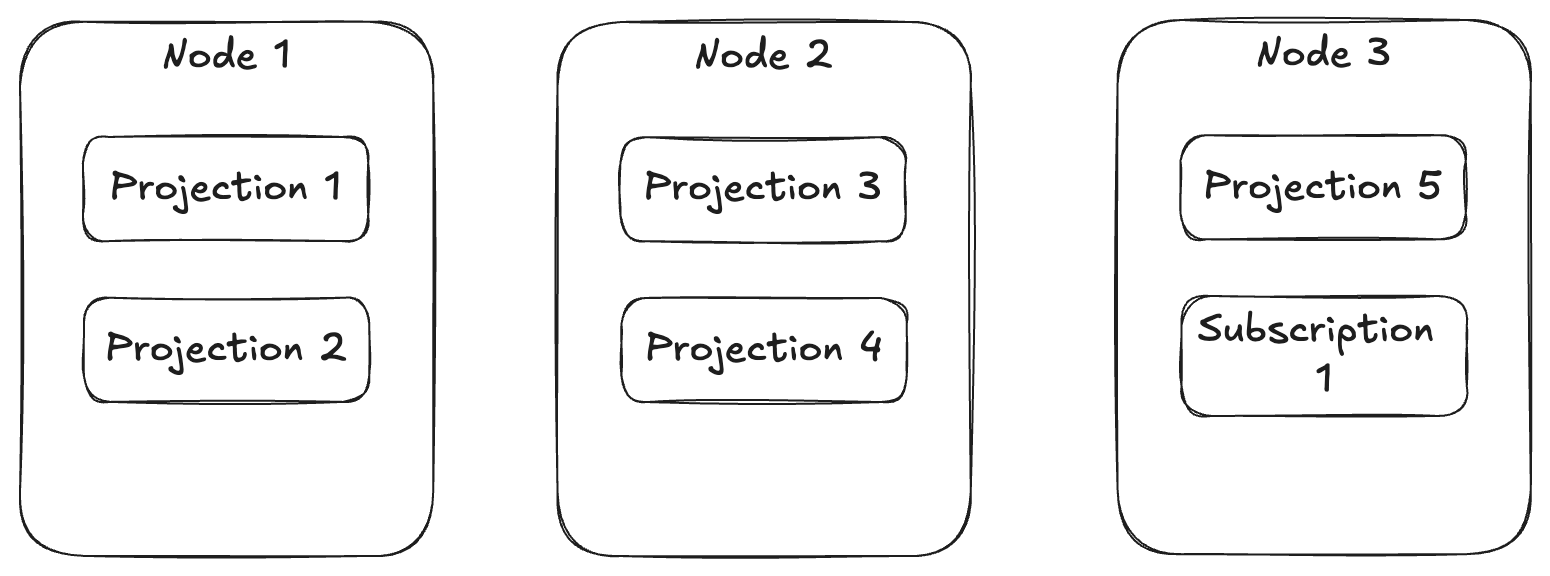




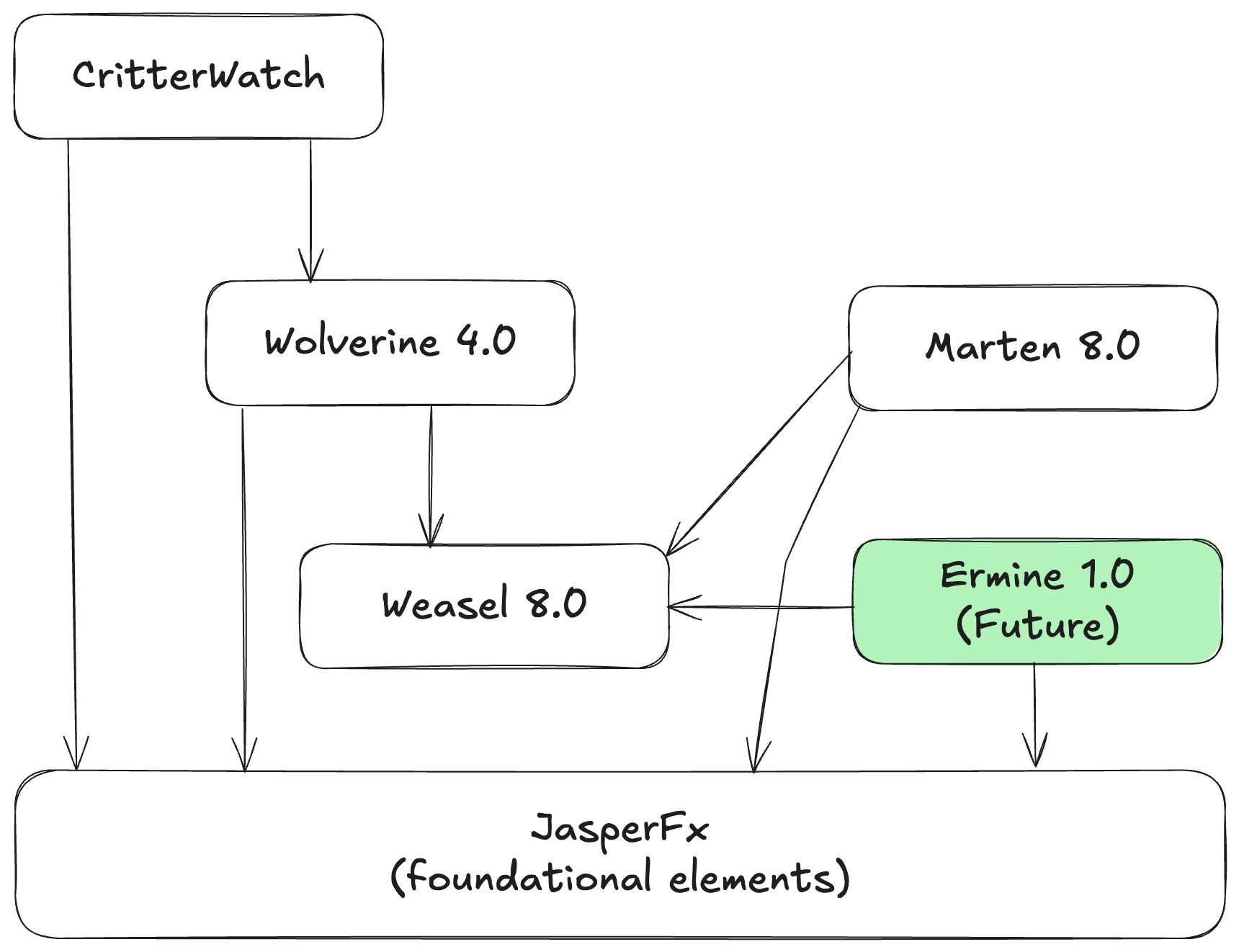


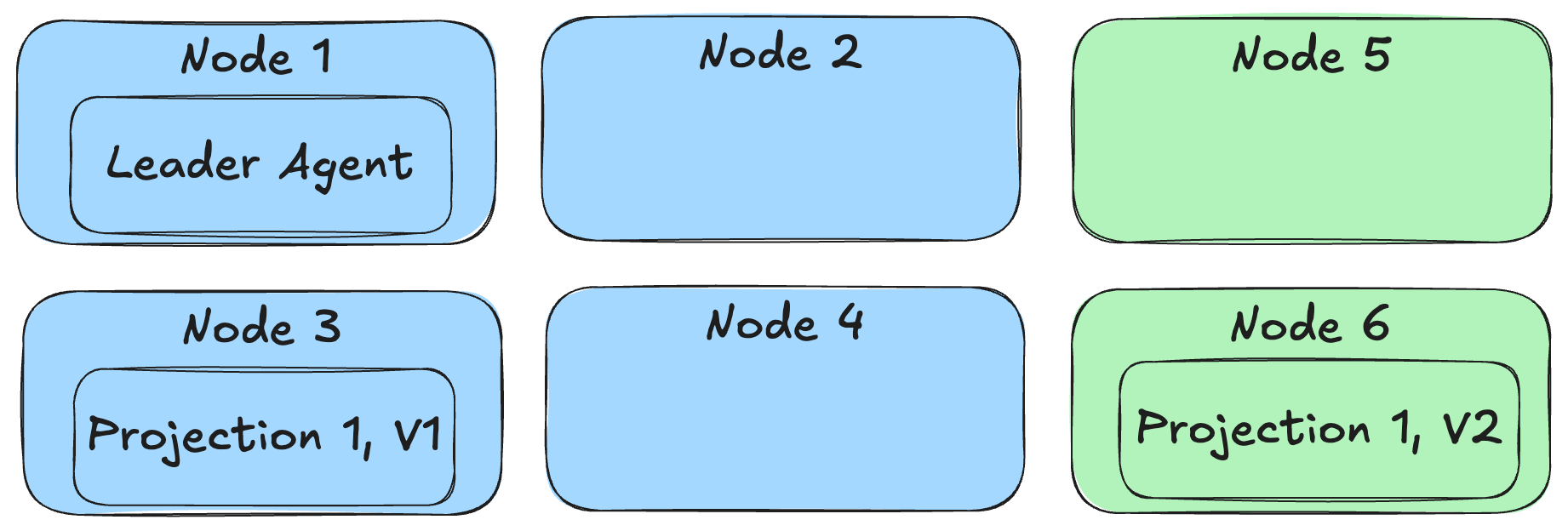


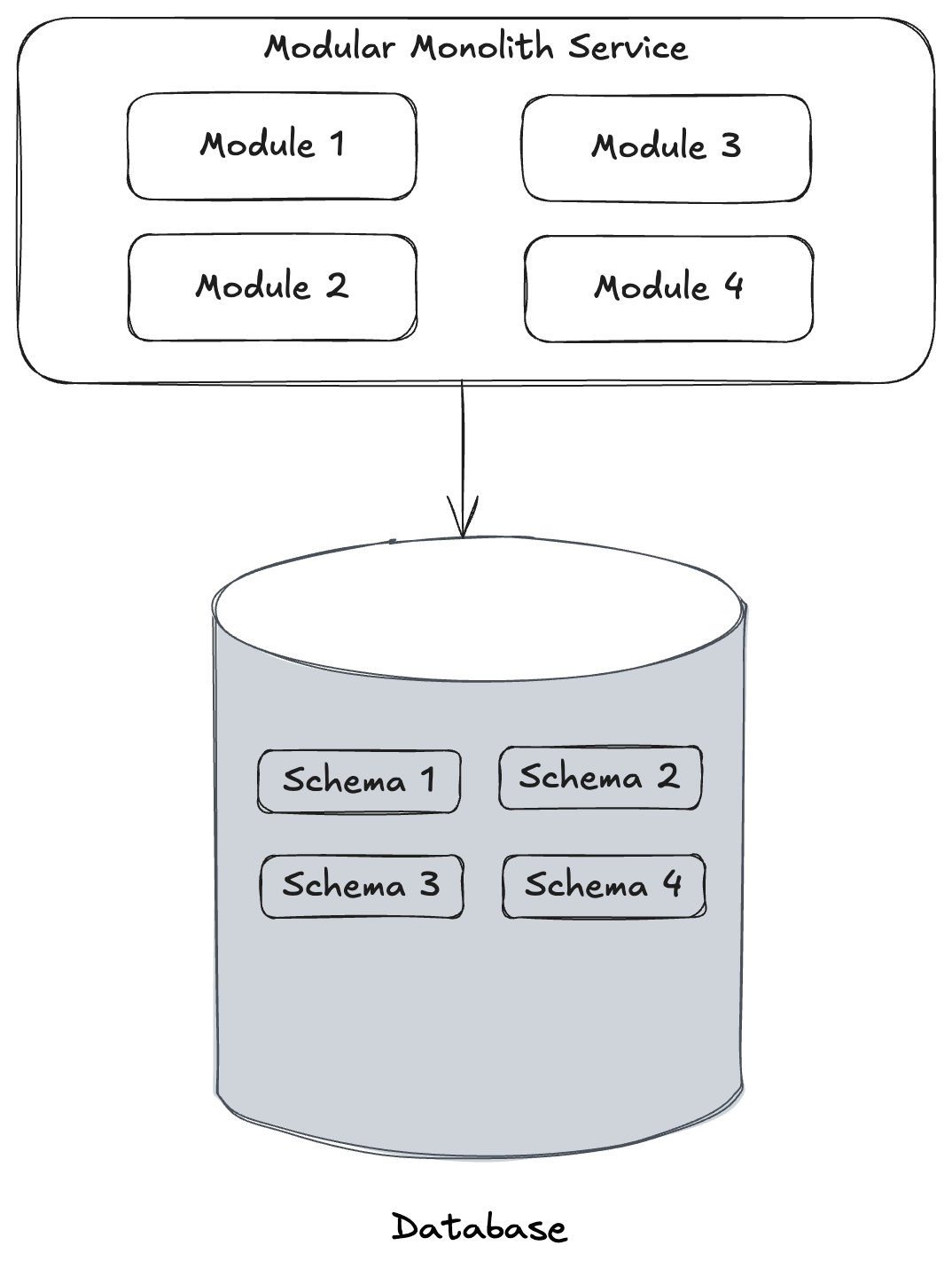
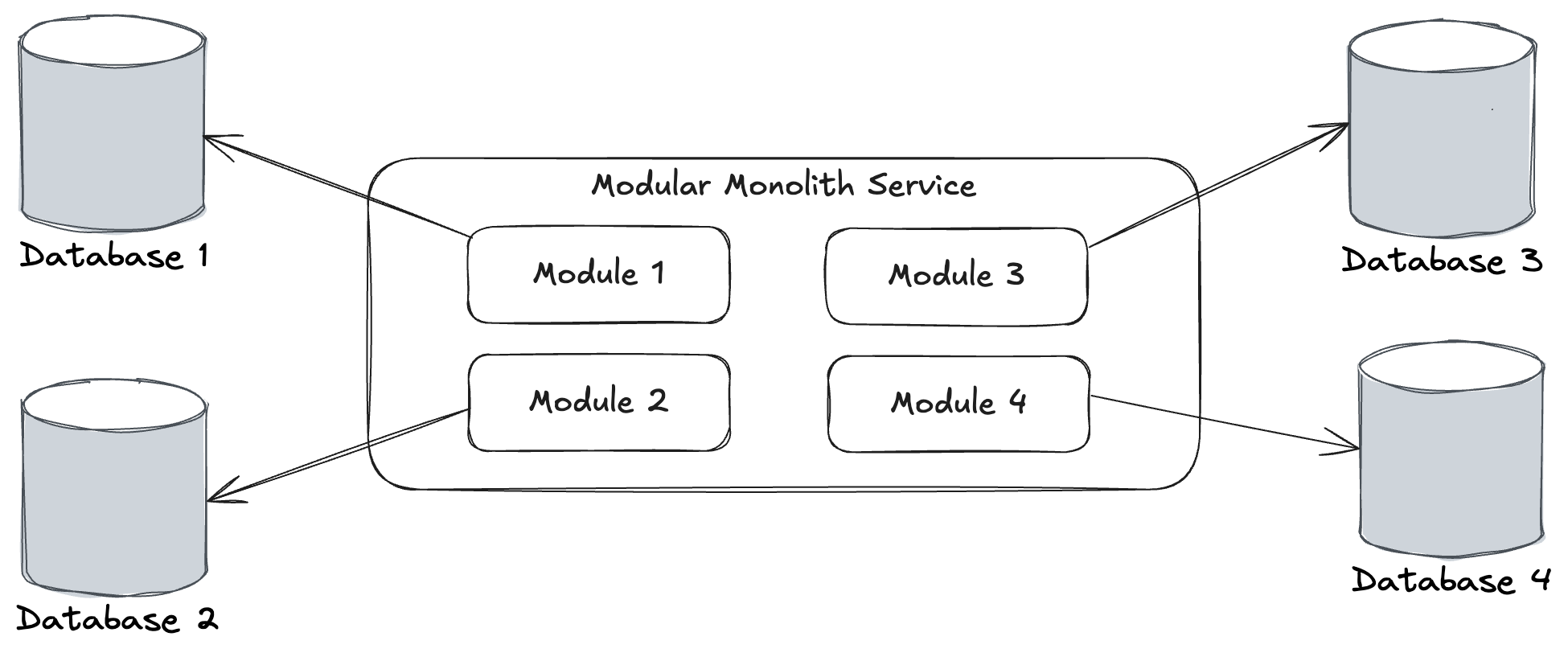
 The Shade Tree Developer