To try to explain “Dynamic Consistency Boundary” usage in Event Sourcing, I’d contrast it to “traditional” Event Sourcing where events are only organized into a stream of related events. For example, all the events related to a single invoice in an invoicing system are an example of an event stream. DCB came about because Axon IQ has weak consistency and couldn’t support transactions across multiple streams the way that Marten or Polecat can it’s often impossible to model a system where every operation only involves a single event stream. To that end, folks created the idea of “Dynamic Consistency Boundary” Event Sourcing where events are more organized by tags and the event stores that support DCB are able to enforce transactional boundaries based on an event tag query (think: all the events of these types that are related to either this class id, student id, or instructor id) so that systems can be much more flexible over time.
Marten has had support for the Dynamic Consistency Boundary approach (DCB) to Event Sourcing for a little while. The Marten 9.0 release last week added a new, potentially more performant option for DCB using the PostgreSQL HSTORE extension — which is supported by all the major cloud providers plus specialized cloud providers for managed PostgreSQL like Neon and Supabase.
Unfortunately, we don’t yet have a way to retroactively switch from “classic” DCB to the HSTORE style DCB in an existing application, but let’s say that you’re starting:
A greenfield application
A problem domain where the event stream boundaries either aren’t clear upfront or you think will never cleanly line up neatly in terms of event streams
You might want to adopt DCB style Event Sourcing from the get go, then use the HSTORE flavor of Marten DCB to be more performant. To get started, just opt into that style of DCB storage like this:
// This is all you need to do, but this does assume
// that the HSTORE extension is available
opts.Events.DcbStorageMode=DcbStorageMode.HStore;
});
The HSTORE style of DCB is a big performance improvement if you are querying events by two or more tag values at a time, which I’d probably argue is the only time DCB is worthwhile to use from a logical structure perspective anyway:)
I was the technical lead of a very successful software project for supply chain management in the early 2000’s. The most popular feature within that early web application was a last minute throw in report that I did as a favor for our business contact that wasn’t even part of our original specification. Once the system was live and folks found out about that report, we actually had to add new servers to the application cluster to keep up with the unexpected load just because that one single report was so popular with supply chain analysts.
My only point there is that I’m not always sure what features will actually resonate with users. Sometimes you know based on reported friction that a new feature will eliminate a pain point, but with the DCB support in Marten and Wolverine, I flat out don’t know. DCB is very popular in the Event Sourcing community outside of the Critter Stack, and it was clear we had to have that feature set just to be competitive from an adoption perspective, but I’m not seeing a lot of interest in DCB from our existing community as Marten is much more able to handle more flexible transactional consistency across event streams than specialist Event Store databases seem to be able to do.
But, if DCB is something you’re interested in or just works much easier for your mental model of how the domain should be modeled in your system, Marten has you covered!
This is in lieu of the “official” release post I’ll make early next week after the Memorial Day holiday when I have enough rest and energy to do something much better by hand. Until then, here’s a peek at the new releases we’ll be announcing early next week — but with some published updates to our AI Skills tomorrow morning that will help you do the migrations!
The whole stack just shipped to NuGet — a coordinated major release across every Critter Stack project, built on a shared JasperFx 2.0 foundation and targeting .NET 9 + .NET 10. Headline themes: AOT-friendly, faster cold-start, and Marten ↔ Polecat dedupe onto shared infrastructure.
(Quick notes for now — a full writeup written by an actual human being with benchmarks lands next week.)
JasperFx 2.0 (foundation)
The shared base for the whole stack — also ships JasperFx.Events 2.0 + JasperFx.RuntimeCompiler 5.0.
AOT-compatible core; runtime Roslyn split into JasperFx.RuntimeCompiler so Static-mode apps drop it and the trimmer removes Roslyn.
Source generators for projection dispatch (FEC-free), CLI command discovery, and options descriptions — less runtime reflection.
Database-primitive foundation on JasperFx 2.0; the consolidation home for IStorageOperation, OperationRole, BulkInsertMode, and the SQL Server advisory lock (dedupe pillar).
Postgres / SQL Server / Sqlite / MySql / Oracle / EF Core providers, all 9.0.0.
No more runtime code generation — Roslyn is gone. Closed-shape document/event storage + Marten.SourceGenerator compiled queries. No codegen write step for Marten; AOT-publishable in Static mode.
Best-perf defaults flipped on: Quick append w/ server timestamps, advanced async tracking, bigint events, lightweight sessions, System.Text.Json. One-line revert with opts.RestoreV8Defaults().
IRevisioned.Version stays int (V8-compatible); new ILongVersioned for long. DCB gains optional HSTORE tag storage + identity-less boundary aggregates.
SQL Server / EF Core-rooted event sourcing on the shared foundation — source-generator-first and AOT-clean end to end.
Adopted the lifted JasperFx.Events async-daemon abstractions; folded SqlServerAppLock into Weasel.SqlServer.AdvisoryLock; SingleTenant lock-ids now align with Marten.
⚠️ Runtime codegen decoupled from core. Apps in the default Dynamic mode must add WolverineFx.RuntimeCompilation (dev/test), or pre-generate via codegen write + Static mode (prod). This is the #1 upgrade gotcha — see the migration guide.
⚠️ ServiceLocationPolicy.NotAllowed is the new default — restructure registrations or call opts.RestoreV5Defaults() to revert.
AOT-clean; Tier-1 cold-start static handler registry. Newtonsoft extracted to WolverineFx.Newtonsoft; IForwardsTo<T> discovery is now explicit.
Upgrading? Bump the whole stack in lockstep — JasperFx 2.0 / Weasel 9.0 / Marten 9.0 / Polecat 4.0 / Wolverine 6.0. Each migration guide above has an at-a-glance table of breaking changes. The big perf/benchmark writeup is coming next week. 🚀
This post is ostensibly about a sample usage of Wolverine middleware, but I’m going to meander a bit.
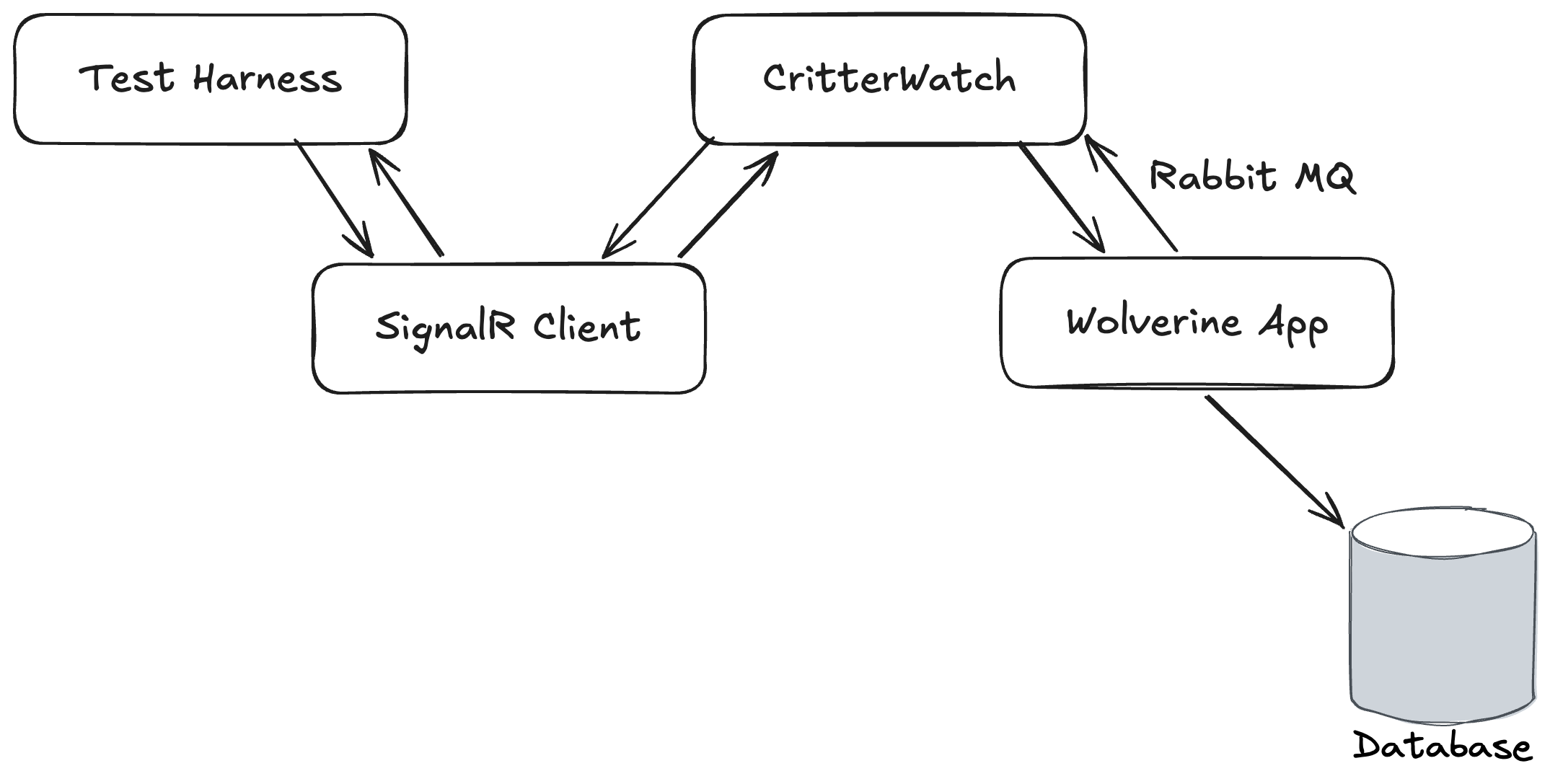
I’m working pretty hard this week trying to make some serious progress on CritterWatch, our long planned production monitoring and management console for the “Critter Stack.” At one point late in the day I was working to troubleshoot some failing tests in the CritterWatch codebase with a harness like this:
CritterWatch itself and a test Wolverine application were both running in memory as separate IHost instances. CritterWatch heavily utilizes the Wolverine SignalR messaging transport for communication between its Vue.js based user interface and the CritterWatch server. Part of Wolverine’s SignalR integration is a SignalR Client Transport option that makes it easy for us to use WebSockets communication in integration tests to mimic the client, but live completely in the world of strong typed C# objects.
The integration tests in question were trying to:
Send a message through the SignalR client to mimic commands from the user interface
Which would be relayed from CritterWatch to the right monitored Wolverine service
Which would execute a command against its database, then send a response message back to CritterWatch
Which would relay that response message right back to the original caller through SignalR
The test was failing in a very annoying way by timing out waiting for the ultimate response message to come all the way back with no real feedback about why it was failing.
More on this in a bit, but some of the handler code and automated testing code was written somewhat naively by AI agents and I have some thoughts.
As I wrote about recently in On Debugging Problems, I frequently start debugging efforts by formulating a theory about the most likely cause of the problem and trying to take a quick way to either prove or disprove that theory. This time I happened to be exactly right as I found this code:
After dithering back and forth on this, we landed on the idea of making CritterWatch a “freemium” model where all the advanced features require an installed license and I retrofitted the license protection with a little bit of help from my friend Claude — and wouldn’t you know it, in all the constant sprinting on the user interface, the test harness didn’t have a license applied so it could test through the message handler above. Easy fix to bring the tests back to green, but I wanted to improve the license guard usage by utilizing Wolverine middleware and that might be a great example for a blog post!
Then I remembered that the way that message handler is built completely sidesteps Wolverine middleware, so hold that thought.
The first problem was that we weren’t getting any obvious indication in the test harness that the test was failing because the license file wasn’t applied during tests. That’s an easy thing to fix by just changing the guard clause to this:
if (!LicenseGuard.IsOperationAllowed())
{
thrownewLicenseRequiredException();
}
And a bit of corresponding error handling configuration for Wolverine to know to discard these messages rather than let them go to the dead letter queue or waste any time retrying:
By throwing an exception — and I’m not too worried about using an exception here for flow control because after all, you’re doing something naughty if you manage to hit that message handler — I knew that would be automatically written out to any test failures with the Wolverine tracked session testing helpers that these tests were using even though the exceptions are happening in asynchronous message handling and would be handled internally by Wolverine.
The key point here is that it is very often important in your test automation strategy to think about how you can report contextual information about test failures that will help developers troubleshoot said failures.
Alright, so let’s pretend that I’m working with normal Wolverine message handlers and middleware strategies are available. In that case I can get the license guard out of the message handler code as a cross cutting concern. A way to do that is to design a new [RequiresLicense] attribute that will add middleware for the license guard to any handler class or method decorated with that attribute. Here’s the Wolverine flavor of that strategy:
With that attribute marking up either the handler class or the main message handler method, Wolverine is going to do some “code weaving” so that this line of code will appear on the first line of in the generated code that Wolverine builds around your handler code:
Just to make sure this is clear, Wolverine does not use any kind of Reflection at runtime but instead “bakes” the middleware application in on the first usage of the handler or even completely ahead of time in production usage.
Wolverine’s Configuration vs Runtime Model
It’s admittedly a goofy model that is quite different than basically every other “Russian Doll” tool out there where there’s usually some kind of wrapping model like MediatR’s IPipelineBehavior<TRequest, TResponse>. Wolverine’s model was intentionally designed to avoid the bloated object allocations that tools like MediatR accidentally cause when folks get a little slap happy with middleware usage. Wolverine’s model is also designed to minimize the dreadful exception stack traces that many application frameworks that support middleware create for you by doing so much object wrapping and delegation *cough* ASP.Net Core *cough*.
I had an extremely popular professor in college for all our heat transfer classes who had a legendary drinking game that had been passed down for generations (if Dr. Chapman gets chalk on his pants, take a drink). If there was a drinking game for me, it would be “if Jeremy quotes the original C2 Wiki or links to a Martin Fowler post…”
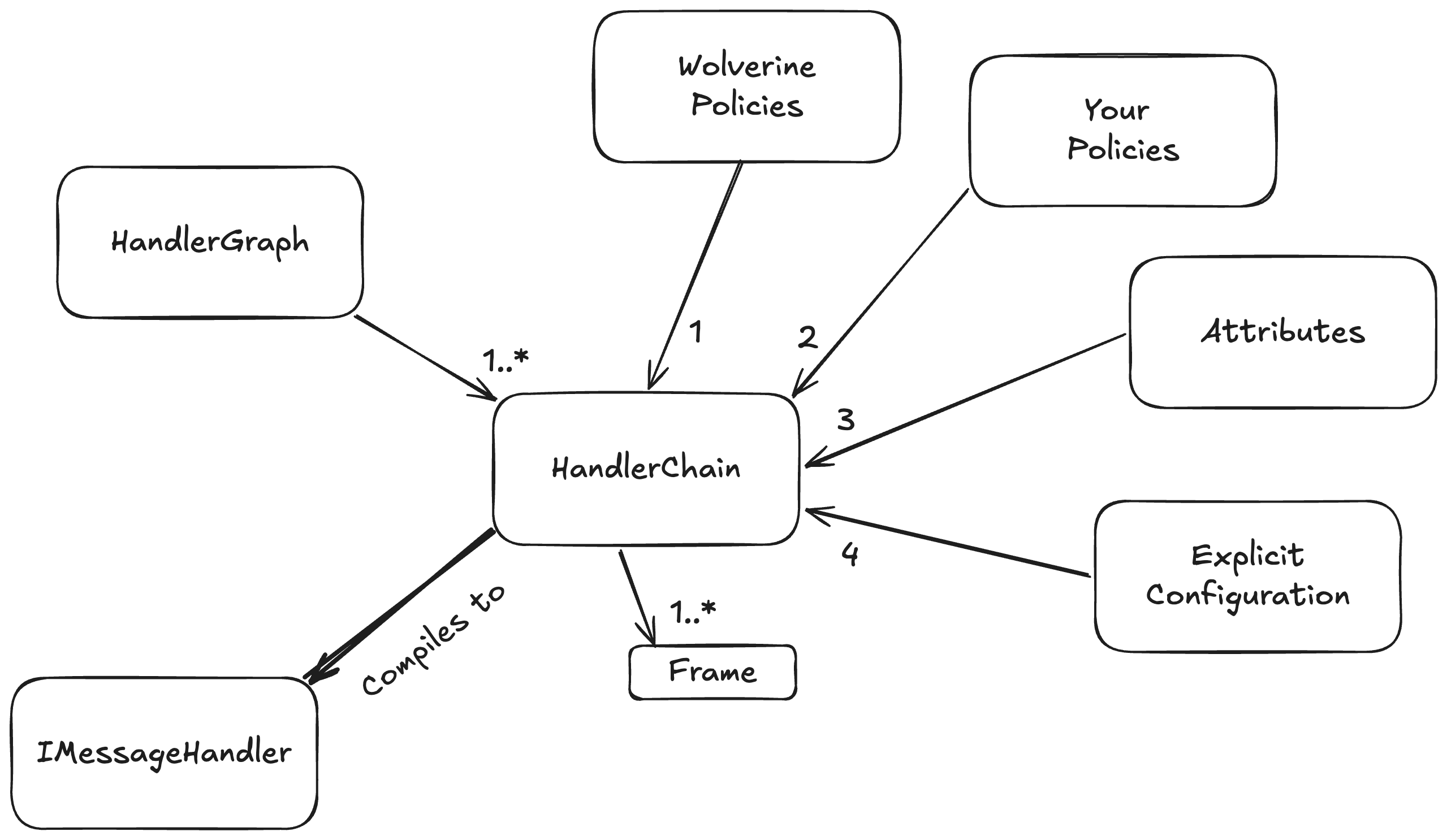
Wolverine’s middleware strategy also varies quite a bit from a MediatR or most other is our usage of an internal “Semantic Model” that is built up at configuration and bootstrapping time, then compiled into a runtime model:
At bootstrapping time, we build up a configuration model for how every discovered message handler or HTTP endpoint method will be handled. That same model also models the application of middleware, post processors, error handling for message handlers, and a ton of HTTP specific elements for each message handler or HTTP endpoint. In order, the configuration is built up by:
Built in Wolverine policies like “an HTTP endpoint method that returns a string will write out content type text/plain go first
User defined policies go next, and can override anything from the Wolverine policies
Attributes on the message handler or HTTP endpoint type and method apply individual overrides on specific message handlers or HTTP endpoint handling. We do this through the base ModifyChainAttribute or ModifyHttpChainAttribute classes that expose a method that directly modifies the HandlerChain configuration model for each message handler or likewise the HttpChain model for an HTTP endpoint. Attributes of course win out over policies
Lastly, Wolverine has a way to expose direct manipulation of the underlying HandlerChain model for individual handlers, and the more explicit mechanisms always win out over any kind of policies
This HandlerChain model is also built up with knowledge of your application’s IoC container and through that, the dependencies of any given message handler or HTTP endpoint method. Wolverine can use this to selectively apply middleware. For example:
Wolverine’s Fluent Validation middleware doesn’t apply if there are no matching validators for a message type and can effectively inline a single or collection of validators otherwise. No runtime probing of the IoC containers like you see in many validation middleware approaches out there
In a system using multiple EF Core DbContext types, Wolverine can choose the right one for a given Saga type and generate the most efficient code possible to use that DbContext without having to use any kind of wrappers or runtime IoC tricks
In a system that uses both EF Core and Marten, Wolverine can tell from the dependencies of a single handler if it should use Marten based or EF Core based transactional middleware
The key point here is that the “Semantic Model” usage and the way we do configuration in Wolverine allows you a great deal of control over the application of middleware in a fine grained way and this is frequently valuable.
NServiceBus also has their BehaviorGraph concept that is the same “Semantic Model” concept I’m discussing here that allows either Wolverine or NServiceBus users to fine tune the application of middleware to specific messaging handlers based on user or framework defined conventions. The similarity is not the slightest bit coincidental because NServiceBus’s model was taken from FubuMVC that was the spiritual predecessor of Wolverine.
About the AI Thing
Ages ago I read a quote from Martin Fowler (take a drink) something to the effect of:
The only way to know how far a new tool or technique can go is to take it too far, then back off a bit
I’m in my “back off” phase for AI assisted development after feeling completely blown away at first by how much I was able to accomplish. Up above, I explained that I ran into some trouble because of code written naively by AI that I had not reviewed well enough. I’ve also been the victim or perpetrator of several AI coding related problems in the past couple months alone that have let regression bugs slip out into the wild.
I don’t think that anybody is going all the way back to coding completely by hand, but for my part, I think that AI tempts you into trying to develop faster than you should and that you need to exert more control over the code than I apparently had before this week. I guess my only main takeaway is to slow down, not make too many risky changes just because an AI tool made it easy, and if you are responsible for code used by other people, make sure you have eyeballs on it.
I miss long form blogging
If you’ll allow me a little diversion, I used to enjoy technical blogging when that was the way that developers communicated online. Before social media took off, I would take time to formulate and craft a blog post to explain some idea I had or to share something I’d learned that I self importantly thought other developers should know too. At one point I had an hour and change commute on a train every morning, and used to occasionally write a series of mini essays I called a “Train of Thought” for topics that were on my mind but not worthy of a long form blog post by themselves. As I thought tonight about writing up a little blog post sample of Wolverine middleware, it occurred to me that that was going to touch on several other topics and that reminded me of that magic little time when I enjoyed writing technical blog posts.
Then came Twitter of course, and that acted as a release valve that let you blurt things out without ever building up a cohesive, long form post and everything changed forever. Now, of course, what was Twitter isn’t nearly as important, there’s basically no technical content on BluSky, Mastodon has “Linux on the Desktop” energy, and LinkedIn posts are nothing but non stop self-promotion. Younger developers are on Twitch or cranking out YouTube videos. I still blog, but I’m admittedly almost completely focused on promoting the “Critter Stack” tools or JasperFx Software and it’s not the same at all. For what it’s worth, I enjoyed just sitting down tonight and trying to write something by hand.
Before you read any of this, just know that it’s perfectly possible to mix and match Wolverine.HTTP, MVC Core controllers, and Minimal API endpoints in the same application.
Edit: The documentation links were all wrong when I pushed this late at night of course, so:
If you’ve built ASP.NET Core applications of any size, you’ve probably run into the same friction: MVC controllers that balloon with constructor-injected dependencies, or Minimal API handlers that accumulate scattered app.MapGet(...) calls across multiple files. And if you’ve reached for a Mediator library to impose some structure, you’ve added a layer of abstraction that — while familiar — brings its own ceremony and a seam that can make unit testing harder than it should be.
Wolverine.HTTP is a different model. It’s a first-class HTTP framework built on top of ASP.NET Core that’s designed from the ground up for vertical slice architecture, has built-in transactional outbox support, and delivers a middleware story that is arguably more powerful than IEndpointFilter. And it doesn’t need a separate “Mediator” library because the Wolverine HTTP endpoints very naturally support a “Vertical Slice” style without so many moving parts as the average “check out my vertical slice architecture template!” approach online.
Moreover, Wolverine.HTTP has first class support for resilient messaging through Wolverine’s transactional outbox and asynchronous messaging. No other HTTP endpoint library in .NET has any such smooth integration.
What Is Vertical Slice Architecture?
The core idea is organizing code by feature rather than by technical layer. Instead of a Controllers/ folder, a Services/ folder, and a Repositories/ folder that all have to be navigated to understand one feature, you co-locate everything that belongs to a single use case: the request type, the handler, and any supporting types.
The payoff is locality. When a bug is filed against “create order”, you open one file. When a feature is deleted, you delete one file. There’s no hunting across layers.
Wolverine.HTTP is a natural fit for this style. A Wolverine HTTP endpoint is just a static class — no base class, no constructor injection, no framework coupling. The framework discovers it by scanning for [WolverineGet], [WolverinePost], [WolverinePut], [WolverineDelete], and [WolverinePatch] attributes.
And because of the world we live in now, I have to mention that there is already plenty of anecdotal evidence that AI assisted coding works better with the “vertical slice” approach than it does against heavily layered approaches.
Getting Started
Install the NuGet package:
dotnet add package WolverineFx.Http
Wire it up in Program.cs:
varbuilder=WebApplication.CreateBuilder(args);
builder.Host.UseWolverine();
builder.Services.AddWolverineHttp();
varapp=builder.Build();
app.MapWolverineEndpoints();
returnawaitapp.RunJasperCommands(args;
A Complete Vertical Slice
Here’s what a full feature slice looks like with Wolverine.HTTP. Request type, response type, and handler all in one place:
// The request
publicrecordCreateTodo(stringName);
// The response
publicrecordTodoCreated(intId);
// The handler — a plain static class, no base class required
publicstaticclassCreateTodoEndpoint
{
[WolverinePost("/todoitems")]
publicstaticasyncTask<IResult>Post(
CreateTodocommand,
IDocumentSessionsession) // injected by Wolverine from the IoC container
Compare that to what this would look like in MVC Core with a service layer and constructor injection. The Wolverine version is shorter, has no framework coupling in the handler method itself, and every dependency is explicit in the method signature. There’s no hidden state, and the method is trivially unit-testable in isolation.
No controller. No service interface. No repository abstraction. Just the feature.
No Separate Mediator Needed
One of the most common patterns in .NET vertical slice architecture is using a Mediator library like MediatR to dispatch commands from controllers to handlers. Wolverine makes this unnecessary — it handles both HTTP routing and in-process message dispatch with the same execution pipeline.
If you’re coming from MediatR, the key difference is that there’s no IRequest<T> base type to implement, no IRequestHandler<TRequest, TResponse> to wire up, and no _mediator.Send(command) call to thread through your controllers. The HTTP endpoint is the handler. When you also want to dispatch a message for async processing, you just return it from the method (more on that below).
Here is where Wolverine.HTTP really pulls ahead. In any event-driven architecture, HTTP endpoints frequently need to do two things atomically: save data to the database and publish a message or event. If you do these as two separate operations and something crashes between them, you’ve lost a message — or worse, written corrupted state.
The standard solution is a transactional outbox: write the message to the same database transaction as the data change, then have a background process deliver it reliably.
With plain IMessageBus in a Minimal API handler, you’re responsible for the outbox mechanics yourself. With Wolverine.HTTP, the outbox is automatic. Any message returned from an endpoint method is enrolled in the same transaction as the handler’s database work.
The simplest pattern uses tuple return values. Wolverine recognizes any message types in the return tuple and routes them through the outbox:
publicstaticclassCreateTodoEndpoint
{
[WolverinePost("/todoitems")]
publicstatic (Todotodo, TodoCreatedcreated) Post(
CreateTodocommand,
IDocumentSessionsession)
{
vartodo=newTodo { Name=command.Name };
session.Store(todo);
// Both the HTTP response (Todo) and the outbox message (TodoCreated)
// are committed in the same transaction. No message is lost.
return (todo, newTodoCreated(todo.Id));
}
}
The Todo becomes the HTTP response body. The TodoCreated message goes into the outbox and is delivered durably after the transaction commits. The database write and the message write are atomic — no coordinator needed.
If you need to publish multiple messages, use OutgoingMessages:
All four database and message operations commit together. This is the kind of correctness that is genuinely difficult to achieve with raw IMessageBus calls in Minimal API, and it comes for free in Wolverine.HTTP.
Middleware: Better Than IEndpointFilter
ASP.NET Core Minimal API introduced IEndpointFilter as its extensibility hook — a way to run logic before and after an endpoint handler. It works, but it has a few rough edges: you write a class that implements an interface with a single InvokeAsync method that receives an EndpointFilterInvocationContext, and you have to dig values out by index or type from the context object. It’s not especially readable, and composing multiple filters is verbose.
Wolverine.HTTP’s middleware model is different. Middleware is just a class with Before and After methods that can take any of the same parameters the endpoint handler can take — including the request body, IoC services, HttpContext, and even values produced by earlier middleware. Wolverine generates the glue code at compile time (via source generation), so there’s no runtime reflection and no boxing.
Here’s a stopwatch middleware that times every request:
A middleware method can also return IResult to conditionally stop the request. If the returned IResult is WolverineContinue.Result(), processing continues. Anything else — Results.Unauthorized(), Results.NotFound(), Results.Problem(...) — short-circuits the handler and writes the response immediately:
This same pattern powers Wolverine’s built-in FluentValidation middleware — every validation failure becomes a ProblemDetails response with no boilerplate in the handler itself.
The IHttpPolicy interface lets you apply middleware conventions across many endpoints at once:
Wolverine.HTTP is built on top of ASP.NET Core, not around it. Every piece of standard ASP.NET Core middleware works exactly as you’d expect — Wolverine endpoints are just routes in the middleware pipeline.
Authentication and Authorization work via the standard [Authorize] and [AllowAnonymous] attributes:
The UseRateLimiter() call in the pipeline hooks standard ASP.NET Core rate limiting middleware, and the [EnableRateLimiting] attribute wires up the policy exactly as it does for Minimal API or MVC — no Wolverine-specific configuration required.
OpenAPI / Swagger Support
Wolverine.HTTP integrates with Swashbuckle and the newer Microsoft.AspNetCore.OpenApi package. Endpoints are discovered as standard ASP.NET Core route metadata, so Swagger UI works out of the box. You can use [Tags], [ProducesResponseType], and [EndpointSummary] to enrich the generated spec:
TL;DR: Wolverine has a pretty good development and production time story for developers using EF Core and that is constantly being improved.
Wolverine was explicitly restarted 3-4 years back specifically to combine with Marten as a complete end to end solution for Event Sourcing and CQRS with asynchronous messaging support. While that “Critter Stack” strategy has definitely paid off, vastly more .NET developers and systems are using EF Core as their primary persistence mechanism. And since I’d personally like to see Wolverine get much more usage and see JasperFx Software continue to grow, we’ve made a serious effort to improve the development time experience with EF Core and Wolverine.
I should say, that’s not expressly necessary, but all of the development time accelerators, middleware, and transactional inbox/outbox integration we’re about to utilize require that library.
Let’s just get started with a simple Wolverine bootstrapping configuration that is going to use a single EF Core DbContext (for now, Wolverine happily supports using multiple DbContext types in a single application) and SQL Server for the Wolverine message persistence we’ll need for transactional outbox support later:
// Adding EF Core transactional middleware, saga support,
// and EF Core support for Wolverine storage operations
opts.UseEntityFrameworkCoreTransactions();
});
// Rest of your bootstrapping...
With that in place, let’s look at a simple message handler that uses our ItemsDbContext:
publicstaticclassCreateItemCommandHandler
{
publicstaticItemCreatedHandle(
// This would be the message
CreateItemCommandcommand,
// Any other arguments are assumed
// to be service dependencies
ItemsDbContextdb)
{
// Create a new Item entity
varitem=newItem
{
Name=command.Name
};
// Add the item to the current
// DbContext unit of work
db.Items.Add(item);
// This event being returned
// by the handler will be automatically sent
// out as a "cascading" message
returnnewItemCreated
{
Id=item.Id
};
}
}
In the handler above, you’ll notice there’s no synchronous calls at all, and that’s because we’ve turned on Wolverine’s transactional middleware for EF Core that will handle the actual transaction management. You’ll also notice that we’re using Wolverine’s cascading messages syntax to kick out an ItemCreated domain event upon the successful completion of this handler. With the EF Core transactional middleware, that is also handling any integration with Wolverine’s transactional outbox for reliable messaging. Absolutely nothing else for you to do in that handler to enable any of that behavior, and we can shove off some of the typically ugly async/await mechanics into Wolverine itself while keeping our actual application behavior cleaner.
Now let’s go a little farther and utilize some Wolverine optimizations for our EF Core usage and change the service registration up above to this:
// If you're okay with this, this will register the DbContext as normally,
// but make some Wolverine specific optimizations at the same time
That version of the integration optimizes application performance by fine tuning the service lifetimes in a way that improves Wolverine’s internal usage of the DbContext type, and adds direct mappings for Wolverine’s internal inbox and outbox storage. By using a “Wolverine optimized DbContext” like this, Wolverine is able to improve your system’s performance by allowing EF Core to batch the SQL commands for your application code and Wolverine’s transactional outbox storage in a single database round trip — and that’s important because the single most common killer of performance in enterprise applications is database chattiness!
So that’s the bare bones basics, now let’s look at some recent improvements in Wolverine for…
Development Time Usage with EF Core
We’ve invested a lot of time recently in trying to make EF Core easier to work with at development time with Wolverine. Coming from Marten where our database migrations have an “it should just work” model that quietly configures the database to match your application configuration at runtime for quick iteration at development time.
With the Wolverine.EntityFrameworkCore library, you can get that same behavior with EF Core through this option:
// This will make Wolverine do any necessary database migration
// work happen at application startup
opts.Services.AddResourceSetupOnStartup();
});
To be clear, with this setup, you can change your EF Core mappings, then restart the application or an IHost in testing and your application will automatically detect any database differences from the configuration and quietly apply a patch for you on application startup. This enables a much faster iteration cycle than EF Core Migrations do in my opinion.
The Weasel docs go deeper on the diff engine, opt-outs, and how it handles schemas.
Another feature in Marten that our community utilizes very heavily is the ability to quickly reset the state of a database in tests. I’ve also occasionally used the Respawn library for the same kind of ability when developing closer to the metal of a relational database to do the same. In a recent version of Wolverine, we’ve added similar abilities to our EF Core support including a version of Marten’s IInitialData concept to help you reset data in tests:
The ResetAllDataAsync<T>() method will look through a DbContext object to see all the tables it maps to, and delete all the data in those tables. It does take into account foreign key relationships to order its operations. After the data is wiped out, each IInitialData<T> registered in your system will be applied to lay down baseline data.
While this feature will surely have to be enhanced if many people start using it, this is already helping us make the Wolverine internal EF Core testing a lot more reliable and easier to use.
Declarative Persistence with EF Core
The next usage is special to Wolverine. A lot of times in simpler HTTP endpoints or command handlers you simply need to load an entity by its identity or primary key. And frequently, you’ll need to apply some repetitive validation that the entity exists in the first place. For that common need, Wolverine has its declarative persistence helpers like the [Entity] attribute shown below that can automatically load an entity through EF Core by its identity on the incoming command type implied by some naming conventions like this sample below:
The mapping of the identity can be explicitly mapped as well of course, and the pre-generated code always reveals Wolverine’s behavior around handlers or HTTP endpoint methods.
In the code above, Wolverine “knows” that the ItemsDbContext persists both the BacklogItems and Sprint entities, so it’s generating code around your handler to load these entities through ItemsDbContext. We can also tell Wolverine to automatically stop handling or in HTTP usage return a 400 ProblemDetails response if either of the requested entities are missing in the database. This helps keep Wolverine handler or HTTP endpoint code simpler by eliminating asynchronous code and letting you write more and more business or workflow logic in pure functions that are easy to test.
In the code above, the EF Core transactional middleware is calling ItemsDbContext.SaveChangesAsync() for you, and the automatic EF Core change tracking will catch the change to the BacklogItem.
And now, I think this is cool, Wolverine has its own new mechanism to batch up the two queries above through a custom EF Core futures query mechanism so that the handler above can fetch both the BacklogItem and the Sprint entity in one database round trip.
But wait, there’s more!
At the risk of making this blog post way too long, here’s more ways that Wolverine can make EF Core usage more successful:
For non basketball fans, the NCAA Tournament championship game broadcasts end each year with a highlight montage to a cheesy song called “One Shining Moment” that’s one of my favorite things to watch each year.
The Critter Stack community is pretty much always busy, but we were able to make some releases to Marten, Polecat, and Wolverine yesterday and today that dropped our open issue counts on GitHub to the lowest number in a decade. That’s bug fixes, some long overdue structural improvements, quite a few additions to the documentation, new features, and some quiet enablement of near term improvements in CritterWatch and our AI development strategy.
Wolverine 5.28.0 Released
We’re happy to announce Wolverine 5.28.0, a feature-packed release that significantly strengthens both the messaging and HTTP sides of the framework. This release includes major new infrastructure for transport observability, powerful new Wolverine.HTTP capabilities bringing closer parity with ASP.NET Core’s feature set, and several excellent community contributions.
Last week I took some time to do a “gap analysis” of Wolverine.HTTP against Minimal API and MVC Core for missing features and did a similar exercise of Wolverine’s asynchronous messaging support against other offerings in the .NET and Java world. This release actually plugs most of those gaps — albeit with just documentation in many cases.
Highlights
🔍 Transport Health Checks
This has been one of our most requested features. Wolverine now provides built-in health check infrastructure for all message transports — RabbitMQ, Kafka, Azure Service Bus, Amazon SQS, NATS, Redis, and MQTT. The new WolverineTransportHealthCheck base class reports point-in-time health status including connection state and, where supported, broker queue depth — critical for detecting the “silent failure” scenario where messages are piling up on the broker but aren’t being consumed (a situation we’ve seen in production with RabbitMQ).
Health checks integrate with ASP.NET Core’s standard IHealthCheck interface, so they plug directly into your existing health monitoring infrastructure.
This was built specifically for CritterWatch integration. I should also point out that CritterWatch is now able to kickstart the “silent failure” issues where Marten/Polecat projections claim to be running, but not advancing and messaging listeners who appear to be active but also aren’t actually receiving messages.
🔌 Wire Tap (Message Auditing)
Implementing the classic Enterprise Integration Patterns Wire Tap, this feature lets you record a copy of every message flowing through configured endpoints — without affecting the primary processing pipeline. It’s ideal for compliance logging, analytics, or debugging.
opts.ListenToRabbitQueue("orders")
.UseWireTap();
Implement the IWireTap interface with RecordSuccessAsync() and RecordFailureAsync() methods, and Wolverine handles the rest. Supports keyed services for different implementations per endpoint.
This feature is meant to be a new type of “declarative invariant” that will enable Critter Stack systems to be more efficient. If this is used with other declarative persistence helpers in the same HTTP endpoint or message handler, Wolverine is able to opt into Marten’s batch querying for more efficient code.
New [DocumentExists<T>] and [DocumentDoesNotExist<T>] attributes let you declaratively guard handlers with Marten document existence checks. Wolverine generates optimized middleware at compile time — no manual boilerplate needed:
A community contribution that adds first-class support for Confluent Schema Registry serialization with Kafka topics. Both JSON Schema and Avro (for ISpecificRecord types) serializers are included, with automatic schema ID caching and the standard wire format (magic byte + 4-byte schema ID + payload).
This release brings a wave of HTTP features that close the gap with vanilla ASP.NET Core while maintaining Wolverine’s simpler programming model:
Response Content Negotiation
New ConnegMode configuration with Loose (default, falls back to JSON) and Strict (returns 406 Not Acceptable) modes. Use the [Writes] attribute to declare supported content types and [StrictConneg] to enforce strict matching per endpoint.
This is orthogonal to Wolverine’s error handling policies.
Handler and middleware methods named OnException or OnExceptionAsync are now automatically wired as exception handlers, ordered by specificity. Return ProblemDetails, IResult, or HandlerContinuation to control the response:
public static ProblemDetails OnException(OrderNotFoundException ex)
{
return new ProblemDetails { Status = 404, Detail = ex.Message };
Direct integration with ASP.NET Core’s output caching middleware via the [OutputCache] attribute on endpoints, supporting policy names, VaryByQuery, VaryByHeader, and tag-based invalidation.
Form endpoints automatically require antiforgery validation. Use [ValidateAntiforgery] to opt in non-form endpoints or [DisableAntiforgery] to opt out. Global configuration available via opts.RequireAntiforgeryOnAll().
Documentation and examples for Server-Sent Events and streaming responses using ASP.NET Core’s Results.Stream(), fully integrated with Wolverine’s service injection.
Marten 8.29.0 Release — Performance, Extensibility, and Bug Fixes
Marten 8.29.0 shipped yesterday with a packed release: a new LINQ operator, event enrichment for EventProjection, major async daemon performance improvements, the removal of the FSharp.Core dependency, and several important bug fixes for partitioned tables.
New Features
OrderByNgramRank — Sort Search Results by Relevance
You can now sort NGram search results by relevance using the new OrderByNgramRank() LINQ operator:
varresults=awaitsession
.Query<Product>()
.Where(x=>x.Name.NgramSearch("blue shoes"))
.OrderByNgramRank(x=>x.Name, "blue shoes")
.ToListAsync();
This generates ORDER BY ts_rank(mt_grams_vector(...), mt_grams_query(...)) DESC under the hood — no raw SQL needed.
EnrichEventsAsync for EventProjection
The EnrichEventsAsync hook that was previously only available on aggregation projections (SingleStreamProjection, MultiStreamProjection) is now available on EventProjection too. This lets you batch-load reference data before individual events are processed, avoiding N+1 query problems:
ConfigureNpgsqlDataSourceBuilder — Plugin Registration for All Data Sources
A new ConfigureNpgsqlDataSourceBuilder API on StoreOptions ensures Npgsql plugins like UseVector(), UseNetTopologySuite(), and UseNodaTime() are applied to everyNpgsqlDataSource Marten creates — including tenant databases in multi-tenancy scenarios:
This is the foundation for external PostgreSQL extension packages (PgVector, PostGIS, etc.) to work correctly across all tenancy modes.
And by the way, JasperFx will be releasing formal Marten support for pgvector and PostGIS in commercial add ons very soon.
Performance Improvements
Opt-in Event Type Index for Faster Projection Rebuilds
If your projections filter on a small subset of event types and your event store has millions of events, rebuilds can time out scanning through non-matching events. A new opt-in composite index solves this:
opts.Events.EnableEventTypeIndex=true;
This creates a (type, seq_id) B-tree index on mt_events, letting PostgreSQL jump directly to matching event types instead of sequential scanning.
And as always, remember that adding more indexes can slow down inserts, so use this judiciously.
Adaptive EventLoader
TL;DR: this helps make the Async Daemon be more reliable in the face of unexpected usage and more adaptive to get over unusual errors in production usage.
Even without the index, the async daemon now automatically adapts when event loading times out. It falls back through progressively simpler strategies — skip-ahead (find the next matching event via MIN(seq_id)), then window-step (advance in 10K fixed windows) — and resets when events flow normally. No configuration needed.
See the expanded tuning documentation for guidance on when to enable the index and how to diagnose slow rebuilds.
FSharp.Core Dependency Removed
Marten no longer has a compile-time dependency on FSharp.Core. F# support still works — if your project references FSharp.Core (as any F# project does), Marten detects it at runtime via reflection. This unblocks .NET 8 users who were stuck on older Marten versions due to the FSharp.Core 9.0.100 requirement.
If you use F# types with Marten (FSharpOption, discriminated union IDs, F# records), everything continues to work unchanged. The dependency just moved from Marten’s package to your project.
Bug Fixes
Partitioned Table Composite PK in Update Functions (#4223)
The generated mt_update_* PostgreSQL function now correctly uses all composite primary key columns in its WHERE clause. Previously, for partitioned tables with a PK like (id, date), the update only matched on id, causing duplicate key violations when multiple rows shared the same ID with different partition keys.
Long Identifier Names (#4224)
Auto-discovered tag types with long names (e.g., BootstrapTokenResourceName) no longer cause PostgresqlIdentifierTooLongException at startup. Generated FK, PK, and index names that exceed PostgreSQL’s 63-character limit are now deterministically shortened with a hash suffix.
This has been longstanding problem in Marten, and we probably should have dealt with this years ago:-(
EF Core 10 Compatibility (#4225)
Updated Weasel to 8.12.0 which fixes MissingMethodException when using Weasel.EntityFrameworkCore with EF Core 10 on .NET 10.
Some time in the last couple weeks I wrote a blog post about my experiences so far with Claude assisted developement where I tried to say that you absolutely have to carefully review what your AI tools are doing because they can take short cuts. So, yeah, I should do that even more closely.
Polecat 2.0.1 is using the SQL Server 2025 native JSON type correctly now, and the database migrations are now all done with the underlying Weasel library that enables Polecat to play nicely with all of the Critter Stack command line support for migrations.
This is the kind of post I write for myself and just share on a Friday or weekend when not many folks are paying any attention.
I’ve taken a couple days at the end of this week after a month long crush to just think about the strategic technical vision for the Critter Stack and the commercial add on products that we’re building under the JasperFx Software rubric. As part of my “deep think, but don’t work too hard” day, I had Claude help me do a gap analysis between Wolverine.HTTP and ASP.Net Core Minimal API & MVC Core and even FastEndpoints. I also did the same for Wolverine’s messaging feature set and all the widely used .NET messaging frameworks (I think .NET has more strong options for this than any other platform and it still irritates me that Microsoft seriously tried to butt into that) and several options in the Java ecosystem.
Before I share the results and what I thought was and wasn’t important, let me share one big insight. Different tools in the same problem space frequently solve the same problems, but with very different technical solutions, concepts, and abstractions. Sometimes different tools even have very similar solutions to common problems, but use very different nomenclature . All this is to say that this effort helped me identify several places where we will try to improve documentation to map features from other tools to the options in Wolverine as Claude “identified” almost two dozen functional “gaps” where I felt like Wolverine already happily solved the same problems that features in MassTransit, NServiceBus, Mulesoft, or other tools did.
There’s also a lesson for folks who switch tools to understand the different concepts in the new tool instead of automatically trying to map your mental model from tool A to tool B without first learning what’s really different.
And lastly, a lesson for anybody who ever does any kind of support of development tools: remember to ask a user who is struggling what their end goals are or their real use case is instead of just focusing on the sometimes oddball implementation or API questions they’re asking you. And that goes double when a user is quite possibly trying to force fit their mental model of a completely different tool into your tool.
Anyway, here’s what I ended up adding to our backlog as well as things that I didn’t think were valuable at this time.
On the HTTP front, I came up with several things, with the big items being:
Anti-forgery support. I originally thought that Wolverine.HTTP would mostly be used for API development, so didn’t really bother much upfront with too much for supporting HTTP forms, but I think there’s a significant overlap between Wolverine.HTTP usage and htmx where forms are used more heavily, so here we go.
Routing prefixes. It’s come up occasionally, and been just barely on my radar
Endpoint rate limiting middleware for HTTP. This will build on our new rate limiting middleware for message handlers
Server Sent Events support. Why not? For whatever reason, SSE seems to be getting rediscovered by folks. FubuMVC (Wolverine’s predecessor in the early 2010’s) actually had a first class SSE support all those years ago
Output Caching. This has been in my thinking for quite awhile. I think this is going to be two pronged, with direct support for ASP.Net Core caching middleware and maybe some more directed “per entity” caching around our existing “declarative persistence” helpers. I think the second actually lives inside of message handlers as well
API versioning of some sort. It’s easy enough to just add “1.0” into your routes, but we’ll look at more alternatives as well
A little bit of content negotiation support, but that’s been on the periphery of my attention from the beginning. My thought all along was to not bother with that until people explicitly asked for it, but now I just want to close the gaps. FubuMVC had that 15 years ago, so I’ve already dealt with that successfully before — but that was in the ReST craze and “conneg” just isn’t nearly as common in usage as far as I can tell.
And the gap analysis helped point out several areas where we had opportunities to improve the documentation (and future AI skills) to help map Minimal API or MVC Core concepts to existing features in Wolverine.HTTP.
Now, on to the messaging support which turned up almost nothing that I was actually interested in adding to Wolverine except for these:
Formal support for the EIP “Claim Check” pattern. I’ve never pursued that before because I’ve felt like it’s just not that much explicit code, but I still added that to the backlog for “completeness”
Build in EIP “Wire Tap” support to persist messages but that was already in our backlog as that comes up from users and also because we have plans to expose that through MCP and command line AI support tools. I’m not enthusiastic thought about bothering with the “command sourcing” concept from Greg Young, but we’ll see if anybody ever wants it.
Claude came up with about 35 different things to consider, but other than those two things above, those items fell into either functionality we already had with different names or different conceptual solutions, features I just have no interest in supporting or I don’t see being used or requested by our users, or a third group of features that are happily planned and already underway with our forthcoming CritterWatch commercial add on.
Just for completeness, the features I’m saying we won’t even plan to support right now were:
The EIP “Routing Slip” concept. I know that MassTransit supports it, but I’m deeply unenthusiastic about both the concept and any attempt to support that in Wolverine. They can have that one.
Distributed transaction support. I don’t even know why I would need to explain why not!
“Change Data Capture” integration with something like Debezium. I just don’t see a demand for that with Wolverine
Any kind of visual process designer. Even on the Marten/Polecat side, I’m wanting us to focus on Markdown or Gherkin specifications or just flat out making our code as simple as possible to write instead of blowing energy on visual tools that generate XML that in turn get generated into Java code. Not that I’m necessarily giving some side eye to any other tool out there *cough* liar! *cough*
Batch processing support that really touched on ETL concerns
A long lived job model. Maybe down the road, but I’d push folks to just break that up into smaller actions whenever possible anyway. It’s trivial in Wolverine to have message handlers cascade out a request for the next step. Actually, this one is probably the one I’m most likely to have to change my mind about, but we’ll see
NServiceBus has their “messaging bridge” that I think would be trivial to build out later if that’s ever valuable for someone, but nobody is asking for that today and Wolverine happily lets you mix and match all the transports and even multiple brokers in one application
And of course, there was some random quirky features of some of the other tools I just didn’t think were worth any consideration outside of client requests or common user community requests.
We put on another Critter Stack live stream today to give a highlight tour of the multi-tenancy features and support across the entire stack. Long story short, I think we have by far and away the most comprehensive feature set for multi-tenancy in the .NET ecosystem, but I’ll let you judge that for yourself:
The Critter Stack provides comprehensive multi-tenancy support across all three tools — Marten, Wolverine, and Polecat — with tenant context flowing seamlessly from HTTP requests through message handling to data persistence. Here’s some links to various bits of documentation and some older blog posts at the bottom as well.
Marten (PostgreSQL)
Marten offers three tenancy strategies for both the document database and event store:
Conjoined Tenancy — All tenants share tables with automatic tenant_id discrimination, cross-tenant querying via TenantIsOneOf() and AnyTenant(), and PostgreSQL LIST/HASH partitioning on tenant_id (Document Multi-Tenancy, Event Store Multi-Tenancy)
Database per Tenant — Four strategies ranging from static mapping to single-server auto-provisioning, master table lookup, and runtime tenant registration (Database-per-Tenant Configuration)
Sharded Multi-Tenancy with Database Pooling — Distributes tenants across a pool of databases using hash, smallest-database, or explicit assignment strategies, combining conjoined tenancy with database sharding for extreme scale (Database-per-Tenant Configuration)
Global Streams & Projections — Mix globally-scoped and tenant-specific event streams within a conjoined tenancy model (Event Store Multi-Tenancy)
Wolverine (Messaging, Mediator, and HTTP)
Wolverine propagates tenant context automatically through the entire message processing pipeline:
Handler Multi-Tenancy — Tenant IDs tracked as message metadata, automatically propagated to cascaded messages, with InvokeForTenantAsync() for explicit tenant targeting (Handler Multi-Tenancy)
HTTP Tenant Detection — Built-in strategies for detecting tenant from request headers, claims, query strings, route arguments, or subdomains (HTTP Multi-Tenancy)
Marten Integration — Database-per-tenant or conjoined tenancy with automatic IDocumentSession scoping and transactional inbox/outbox per tenant database (Marten Multi-Tenancy)
Polecat Integration — Same database-per-tenant and conjoined patterns for SQL Server (Polecat Multi-Tenancy)
EF Core Integration — Multi-tenant transactional inbox/outbox with separate databases and automatic migrations (EF Core Multi-Tenancy)
RabbitMQ per Tenant — Map tenants to separate virtual hosts or entirely different brokers (RabbitMQ Multi-Tenancy)
Database per Tenant — Dedicated SQL Server database per tenant with independent schema management and async daemon processing (Database-per-Tenant Configuration)
As anybody knows who follows the Critter Stack on our Discord server, I’m uncomfortable with the rapid pace of releases that we’ve sustained in the past couple quarters and I think I would like the release cadence to slow down. However, open issues and pull requests feel like money burning a hole in my pocket, and I don’t letting things linger very long. Our rapid cadence is somewhat driven by JasperFx Software client requests, some by our community being quite aggressive in contributing changes, and our users finding new issues that need to be addressed. While I’ve been known to be very unhappy with feedback saying that our frequent release cadence must be a sign of poor quality, I think our community seems to mostly appreciate that we move relatively fast. I believe that we are definitely innovating much faster and more aggressively than any of the other asynchronous messaging tools in the .NET space, so there’s that. Anyway, enough of that, here’s a rundown of the new releases today.
It’s been a busy week across the Critter Stack! We shipped coordinated releases today across all five projects: Marten 8.27, Wolverine 5.25, Polecat 1.5, Weasel 8.11.1, and JasperFx 1.21.1. Here’s a rundown of what’s new.
Marten 8.27.0
Sharded Multi-Tenancy with Database Pooling
For teams operating at extreme scale — we’re talking hundreds of billions of events — Marten now supports a sharded multi-tenancy model that distributes tenants across a pool of databases. Each tenant gets its own native PostgreSQL LIST partition within a shard database, giving you the isolation benefits of per-tenant databases with the operational simplicity of a managed pool.
Configuration is straightforward:
opts.MultiTenantedWithShardedDatabases(x =>
{
    // Connection to the master database that holds the pool registry
    x.ConnectionString = masterConnectionString;

    // Schema for the registry tables in the master database
    x.SchemaName = "tenants";

    // Seed the database pool on startup
    x.AddDatabase("shard_01", shard1ConnectionString);
    x.AddDatabase("shard_02", shard2ConnectionString);
    x.AddDatabase("shard_03", shard3ConnectionString);
    x.AddDatabase("shard_04", shard4ConnectionString);

    // Choose a tenant assignment strategy (see below)
    x.UseHashAssignment(); // this is the default
});
Calling MultiTenantedWithShardedDatabases() automatically enables conjoined tenancy for both documents and events, with native PG list partitions created per tenant.
Three tenant assignment strategies are built-in:
Hash Assignment (default) — deterministic FNV-1a hash of the tenant ID. Fast, predictable, no database queries needed. Best when tenants are roughly equal in size.
Smallest Database — assigns new tenants to the database with the fewest existing tenants. Accepts a custom IDatabaseSizingStrategy for balancing by row count, disk usage, or any other metric.
Explicit Assignment — you control exactly which database hosts each tenant via the admin API.
The admin API lets you manage the pool at runtime: AddTenantToShardAsync, AddDatabaseToPoolAsync, MarkDatabaseFullAsync — all with advisory-locked concurrent safety.
Bulk COPY Event Append for High-Throughput Seeding
For data migrations, test fixture setup, load testing, or importing events from external systems, Marten now supports a bulk COPY-based event append that uses PostgreSQL’s COPY ... FROM STDIN BINARY for maximum throughput:
// Build up a list of stream actions with events
var streams = new List<StreamAction>();

for (int i = 0; i < 1000; i++)
{
    var streamId = Guid.NewGuid();
    var events = new object[]
    {
        new OrderPlaced(streamId, "Widget", 5),
        new OrderShipped(streamId, $"TRACK-{i}"),
        new OrderDelivered(streamId, DateTimeOffset.UtcNow)
    };

    streams.Add(StreamAction.Start(store.Events, streamId, events));
}

// Bulk insert all events using PostgreSQL COPY for maximum throughput
await store.BulkInsertEventsAsync(streams);
This supports all combinations of Guid/string identity, single/conjoined tenancy, archived stream partitioning, and metadata columns. When using conjoined tenancy, a tenant-specific overload is available:
FetchForWriting now auto-discovers natural keys without requiring an explicit projection registration, and works correctly with strongly typed IDs combined with UseIdentityMapForAggregates
Compiled queries using IsOneOf with array parameters now generate correct SQL
EF Core OwnsOne().ToJson() support (via Weasel 8.11.1) — schema diffing now correctly handles JSON column mapping when Marten and EF Core share a database
Thanks to @erdtsieck for fixing duplicate codegen when using secondary document stores!
Wolverine 5.25.0
This is a big release with 12 PRs merged — a mix of bug fixes, new features, and community contributions.
MassTransit and NServiceBus Interop for Azure Service Bus Topics
Previously, MassTransit and NServiceBus interoperability was only available on Azure Service Bus queues. With 5.25, you can now interoperate on ASB topics and subscriptions too — making it much easier to migrate incrementally or coexist with other .NET messaging frameworks:
// Publish to a topic with NServiceBus interop
opts.PublishAllMessages().ToAzureServiceBusTopic("nsb-topic")
    .UseNServiceBusInterop();

// Listen on a subscription with MassTransit interop
opts.ListenToAzureServiceBusSubscription("wolverine-sub")
    .FromTopic("wolverine-topic")
    .UseMassTransitInterop(mt => { })
    .DefaultIncomingMessage<ResponseMessage>().UseForReplies();
Both UseMassTransitInterop() and UseNServiceBusInterop() are available on AzureServiceBusTopic (for publishing) and AzureServiceBusSubscription (for listening). This is ideal for brownfield scenarios where you’re migrating services one at a time and need different messaging frameworks to talk to each other through shared ASB topics.
Other New Features
Handler Type Naming for Conventional Routing — NamingSource.FromHandlerType names listener queues after the handler type instead of the message type, useful for modular monolith scenarios with multiple handlers per message
Enhanced WolverineParameterAttribute — new FromHeader, FromClaim, and FromMethod value sources for binding handler parameters to HTTP headers, claims, or static method return values
Full Tracing for InvokeAsync — opt-in InvokeTracingMode.Full emits the same structured log messages as transport-received messages, with zero overhead in the default path
Configurable SQL transport polling interval — thanks to new contributor @xwipeoutx!
SQL Server saga storage now supports nvarchar identity columns (thanks @kakins!)
Polecat 1.5.0
Polecat — the Critter Stack’s newer, lighter-weight event store option — had a big jump from 1.2 to 1.5:
net9.0 support and CI workflow
SingleStreamProjection<TDoc, TId> with strongly-typed ID support
Auto-discover natural keys for FetchForWriting
Conjoined tenancy support for DCB tags and natural keys
Fix for FetchForWriting with UseIdentityMapForAggregates and strongly typed IDs
Weasel 8.11.1
EF Core OwnsOne().ToJson() support — Weasel’s schema diffing now correctly handles EF Core’s JSON column mapping, preventing spurious migration diffs when Marten and EF Core share a database
JasperFx 1.21.1 / JasperFx.Events 1.24.1
Skip unknown flags when AutoStartHost is true — fixes an issue where unrecognized CLI flags would cause errors during host auto-start
Retrofit IEventSlicer tests
Upgrading
All packages are available on NuGet now. The Marten and Wolverine releases are fully coordinated — if you’re using the Critter Stack together, upgrade both at the same time for the best experience.
As always, please report any issues on the respective GitHub repositories and join us on the Critter Stack Discord if you have questions!
I’m working pretty hard this week and early next to deliver the CritterWatch MVP (our new management and observability console for the Critter Stack) to a JasperFx Software client. One of the things we need to do for testing is to fake out several failure conditions in message handlers to be able to test CritterWatch’s “Dead Letter Queue” management and alerting features. To that end, we have some fake systems that constantly process messages, and we’ve rigged up what I’m going to call the world’s crudest Chaos Monkey in Wolverine middleware:
    public static async Task Before(ChaosMonkeySettings chaos)
    {
        // Configurable slow handler for testing back pressure
        if (chaos.SlowHandlerMs > 0)
        {
            await Task.Delay(chaos.SlowHandlerMs);
        }

        if (chaos.FailureRate <= 0) return;

        // Chaos monkey — distribute failure rate equally across 5 exception types
        var perType = chaos.FailureRate / 5.0;
        var next = Random.Shared.NextDouble();

        if (next < perType)
        {
            throw new TripServiceTooBusyException("Just feeling tired at " + DateTime.Now);
        }

        if (next < perType * 2)
        {
            throw new TrackingUnavailableException("Tracking is down at " + DateTime.Now);
        }

        if (next < perType * 3)
        {
            throw new DatabaseIsTiredException("The database wants a break at " + DateTime.Now);
        }

        if (next < perType * 4)
        {
            throw new TransientException("Slow down, you move too fast.");
        }

        if (next < perType * 5)
        {
            throw new OtherTransientException("Slow down, you move too fast.");
        }
    }
And this to control it remotely in tests or just when doing exploratory manual testing:
In this case, the Before middleware is just baked into the message handlers, but in your development the “chaos monkey” middleware could be applied only in testing with a Wolverine extension.
And I was probably listening to Simon & Garfunkel when I did the first cut at the chaos monkey: