I’ve been able to talk and write a bit about Wolverine in the last couple weeks. This builds on the previous blog posts in this list:
Wolverine on the JetBrains Webinar series — but watch out, the ICommandBus interface shown in that webinar was consolidated and changed to IMessageBus in the latest release. The rest of the syntax and the concepts are all unchanged though.
Wolverine on DotNetRocks — a conversation about Wolverine with a bonus rant from me about prescriptive, hexagonal architectures
This post is a little bonus content that I accidentally cut from the previous post.
Last time I talked about Wolverine’s support for the transactional outbox pattern for messages that just absolutely have to be delivered. About the same day that I was writing that post, I was also talking with a colleague through a very different messaging scenario where a stream of status updates were being streamed to WebSocket connected clients. In this case, the individual messages being broadcast only had temporary validity, and were quickly obsolete. There’s absolutely no need for message persistence or guaranteed delivery. There’s also no good reason to even attempt to deliver a message in this case that’s more than a few seconds old.
To that end, let’s go back yet again to the command handler for the DebitAccount command, but in this version I’m going to cascade an AccountUpdated message that would ostensibly be broadcast through WebSockets to any connected client:
    [Transactional]
    public static IEnumerable<object> Handle(
        DebitAccount command,
        Account account,
        IDocumentSession session)
    {
        account.Balance -= command.Amount;

        // This just marks the account as changed, but
        // doesn't actually commit changes to the database
        // yet. That actually matters as I hopefully explain
        session.Store(account);

        // Conditionally trigger other, cascading messages
        if (account.Balance > 0 && account.Balance < account.MinimumThreshold)
        {
            yield return new LowBalanceDetected(account.Id);
        }
        else if (account.Balance < 0)
        {
            yield return new AccountOverdrawn(account.Id);
        }

        // Send out a status update message that is maybe being
        // broadcast to websocket-connected clients
        yield return new AccountUpdated(account.Id, account.Balance);
    }
Now I need to switch to the Wolverine bootstrapping and configure some explicit routing of the AccountUpdated message. In this case, I’m going to let the WebSocket messaging of the AccountUpdated messages happen from a non-durable, local queue:
builder.Host.UseWolverine(opts =>
{
    // Middleware introduced in previous posts
    opts.Handlers.AddMiddlewareByMessageType(typeof(AccountLookupMiddleware));
    opts.UseFluentValidation();

    // Explicit routing for the AccountUpdated
    // message handling. This has precedence over conventional routing
    opts.PublishMessage<AccountUpdated>()
        .ToLocalQueue("signalr")

        // Throw the message away if it's not successfully
        // delivered within 10 seconds

        // THIS CONFIGURATION ITEM WAS ADDED IN v0.9.6
        .DeliverWithin(10.Seconds())

        // Not durable
        .BufferedInMemory();

    var rabbitUri = builder.Configuration.GetValue<Uri>("rabbitmq-broker-uri");
    opts.UseRabbitMq(rabbitUri)
        // Just do the routing off of conventions, more or less
        // queue and/or exchange based on the Wolverine message type name
        .UseConventionalRouting()
        .ConfigureSenders(x => x.UseDurableOutbox());

});
The call to DeliverWithin(10.Seconds()) puts a rule on the local “signalr” queue that all messages published to that queue will have an effective expiration date of 10 seconds from the point at which the message was published. If the web socket publishing is backed up, or there’s a couple failure/retry cycles that delays the message, Wolverine will discard the message before it’s processed.
This option is perfect for transient status messages that have short shelf lives. Wolverine also lets you happily mix and match durable messaging and transient messages in the same message batch, as I hope is evident in the sample handler method in the first code sample.
Lastly, I used a fluent interface to apply the “deliver within” rule at the local queue level. That can also be applied at the message type level with an attribute like this alternative usage:
// The attribute directs Wolverine to send this message with
// a "deliver within 5 seconds, or discard" directive
[DeliverWithin(5)]
public record AccountUpdated(Guid AccountId, decimal Balance);
Or lastly, I can set the “deliver within” rule on a message by message basis at the time of sending the message like so:
        // "messaging" is a Wolverine IMessageContext or IMessageBus service
        // Do the deliver within rule on individual messages
        await messaging.SendAsync(new AccountUpdated(account.Id, account.Balance),
            new DeliveryOptions { DeliverWithin = 5.Seconds() });
I’ll try to sneak in one more post before mostly shutting down for Christmas and New Year’s. Next time up I’d like to talk about Wolverine’s support for grown up “clone n’ go” development through its facilities for configuring infrastructure like Postgresql or Rabbit MQ for you based on your application configuration.
I’ve been able to talk and write a bit about Wolverine in the last couple weeks. This builds on the last two blog posts in this list:
Wolverine on the JetBrains Webinar series — but watch out, the ICommandBus interface shown in that webinar was consolidated and changed to IMessageBus in the latest release. The rest of the syntax and the concepts are all unchanged though.
Wolverine on DotNetRocks — a conversation about Wolverine with a bonus rant from me about prescriptive, hexagonal architectures
Alright, back to the sample message handler from my previous two blog posts here’s the shorthand version:
    [Transactional]
    public static async Task Handle(
        DebitAccount command,
        Account account,
        IDocumentSession session,
        IMessageContext messaging)
    {
        account.Balance -= command.Amount;

        // This just marks the account as changed, but
        // doesn't actually commit changes to the database
        // yet. That actually matters as I hopefully explain
        session.Store(account);

        // Conditionally trigger other, cascading messages
        if (account.Balance > 0 && account.Balance < account.MinimumThreshold)
        {
            await messaging.SendAsync(new LowBalanceDetected(account.Id));
        }
        else if (account.Balance < 0)
        {
            await messaging.SendAsync(new AccountOverdrawn(account.Id));

            // Give the customer 10 days to deal with the overdrawn account
            await messaging.ScheduleAsync(new EnforceAccountOverdrawnDeadline(account.Id), 10.Days());
        }
    }
and just for the sake of completion, here is a longer hand, completely equivalent version of the same handler:
[Transactional]
public static async Task Handle(
    DebitAccount command,
    Account account,
    IDocumentSession session,
    IMessageContext messaging)
{
    account.Balance -= command.Amount;

    // This just marks the account as changed, but
    // doesn't actually commit changes to the database
    // yet. That actually matters as I hopefully explain
    session.Store(account);

    if (account.Balance > 0 && account.Balance < account.MinimumThreshold)
    {
        await messaging.SendAsync(new LowBalanceDetected(account.Id));
    }
    else if (account.Balance < 0)
    {
        await messaging.SendAsync(new AccountOverdrawn(account.Id));

        // Give the customer 10 days to deal with the overdrawn account
        await messaging.ScheduleAsync(new EnforceAccountOverdrawnDeadline(account.Id), 10.Days());
    }
}
To review just a little bit, that Wolverine style message handler at runtime is committing changes to an Account in the underlying database and potentially sending out additional messages based on the state of the Account. For folks who are experienced with asynchronous messaging systems who hear me say that Wolverine does not support any kind of 2 phase commits between the database and message brokers, you’re probably already concerned with some potential problems in that code above:
Maybe the database changes fail, but there are “ghost” messages already queued that pertain to data changes that never actually happened
Maybe the messages actually manage to get through to their downstream handlers and are applied erroneously because the related database changes have not yet been applied. That’s a race condition that absolutely happens if you’re not careful (ask me how I know 😦 )
Maybe the database changes succeed, but the messages fail to be sent because of a network hiccup or who knows what problem happens with the message broker
Needless to say, there’s genuinely a lot of potential problems from those handful lines of code up above. Some of you reading this have probably already said to yourself that this calls for using some sort of transactional outbox — and Wolverine thinks so too!
The general idea of an “outbox” is to obviate the lack of true 2 phase commits by ensuring that outgoing messages are held until the database transaction is successful, then somehow guaranteeing that the messages will be sent out afterward. In the case of Wolverine and its integration with Marten, the order of operations in the message handler (in either version) shown above is to:
Tell Marten that the Account document needs to be persisted. Nothing happens at this point other than marking the document as changed
The handler creates messages that are registered with the current IMessageContext. Again, the messages do not actually go out here, instead they are routed by Wolverine to know exactly how and where they should be sent later
The Wolverine + Marten [Transactional] middleware is calling the Marten IDocumentSession.SaveChangesAsync() method that makes the changes to the Account document and also creates new database records to persist any outgoing messages in the underlying Postgresql application database in one single, native database transaction. Even better, with the Marten integration, all the database operations are even happening in one single batched database call for maximum efficiency.
When Marten successfully commits the database transaction, it tells Wolverine to “flush” the outgoing messages to the sending agents in Wolverine (depending on configuration and exact transport type, the messages might be sent “inline” or batched up with other messages to go out later).
To be clear, Wolverine also supports a transactional outbox with EF Core against either Sql Server or Postgresql. I’ll blog and/or document that soon.
The integration with Marten that’s in the WolverineFx.Marten Nuget isn’t that bad (I hope). First off, in my application bootstrapping I chain the IntegrateWithWolverine() call to the standard Marten bootstrapping like this:
using Wolverine.Marten;

var builder = WebApplication.CreateBuilder(args);

builder.Services.AddMarten(opts =>
{
    // This would be from your configuration file in typical usage
    opts.Connection(Servers.PostgresConnectionString);
    opts.DatabaseSchemaName = "wolverine_middleware";
})
    // This is the wolverine integration for the outbox/inbox,
    // transactional middleware, saga persistence we don't care about
    // yet
    .IntegrateWithWolverine()

    // Just letting Marten build out known database schema elements upfront
    // Helps with Wolverine integration in development
    .ApplyAllDatabaseChangesOnStartup();
For the moment, I’m going to say that all the “cascading messages” from the DebitAccount message handler are being handled by local, in memory queues. At this point — and I’d love to have feedback on the applicability or usability of this approach — each endpoint has to be explicitly enrolled into the durable outbox or inbox (for incoming, listening endpoints) mechanics. Knowing both of those things, I’m going to add a little bit of configuration to make every local queue durable:
builder.Host.UseWolverine(opts =>
{
    // Middleware introduced in previous posts
    opts.Handlers.AddMiddlewareByMessageType(typeof(AccountLookupMiddleware));
    opts.UseFluentValidation();

    // The nomenclature might be inconsistent here, but the key
    // point is to make the local queues durable
    opts.Policies
        .AllLocalQueues(x => x.UseDurableInbox());
});
If instead I chose to publish some of the outgoing messages with Rabbit MQ to other processes (or just want the messages queued), I can add the WolverineFx.RabbitMQ Nuget and change the bootstrapping to this:
builder.Host.UseWolverine(opts =>
{
    // Middleware introduced in previous posts
    opts.Handlers.AddMiddlewareByMessageType(typeof(AccountLookupMiddleware));
    opts.UseFluentValidation();

    var rabbitUri = builder.Configuration.GetValue<Uri>("rabbitmq-broker-uri");
    opts.UseRabbitMq(rabbitUri)
        // Just do the routing off of conventions, more or less
        // queue and/or exchange based on the Wolverine message type name
        .UseConventionalRouting()
        .ConfigureSenders(x => x.UseDurableOutbox());
});
I just threw a bunch of details at you all, so let me try to anticipate a couple questions you might have and also try to answer them:
Do the messages get delivered before the transaction completes? No, they’re held in memory until the transaction completes, then get sent
What happens if the message delivery fails? The Wolverine sending agents run in a hosted service within your application. When message delivery fails, the sending agent will try it again up to a configurable amount of times (100 is the default). Read the next question though before the “100” number bugs you:
What happens if the whole message broker is down? Wolverine’s sending agents have a crude circuit breaker and will stop trying to send message batches if there are too many failures in a period of time, then resume sending after a periodic “ping” message gets though. Long story short, Wolverine will buffer outgoing messages in the application database until Wolverine is able to reach the message broker.
What happens if the application process fails between the transaction succeeding and the message getting to the broker? The message will be recovered and sent by either another active node of the application if running in a cluster, or by restarting the single application process.
So you can do this in a cluster without sending the message multiple times? Yep.
What if you have zillions of stored messages and you restart the application, will it overwhelm the process and cause harm? It’s paged, distributes a bit between nodes, and there’s some back pressure to keep it from having too many outgoing messages in memory.
Can I use Sql Server instead? Yes. But for the moment, it’s like the scene in Blues Brothers when Elwood asks what kinds of music they have and the waitress replies “we have both kinds, Country and Western.”
Can I tell Wolverine to throw away a message that’s old and maybe out of date if it still hasn’t been processed? Yes, and I’ll show a bit of that in the next post.
What about messages that are routed to a non-durable endpoint as part of an outbox’d transaction? Good question! Wolverine is still holding those messages in memory until the message being processed successfully finishes, then kicks them out to in memory sending agents. Those sending agents have their own internal queues and retry loops for maximum resiliency. And actually for that matter, Wolverine has a built in in memory outbox to at least deal with ordering between the message processing and actually sending outgoing messages.
Next Time
WordPress just cut off the last section, so I’ll write a short follow up on mixing in non-durable message queues with message expirations. Next week I’ll keep on this sample application by discussing how Wolverine & its friends try really hard for a “clone n’go” developer workflow where you can be up and running mere minutes with all the database & message broker infrastructure up and going after a fresh clone of the codebase.
Yesterday I blogged about the new Wolverine alpha release with a sample that hopefully showed off how Wolverine’s different approach can lead to better developer productivity and higher performance than similar tools. Today I want to follow up on that by extending the code sample with other functionality, but then diving into how Wolverine (hopefully) makes automated unit or integration testing easier than what you may be used to.
From yesterday’s sample, I showed this small message handler for applying a debit to a bank account from an incoming message:
public static class DebitAccountHandler
{
    [Transactional]
    public static void Handle(DebitAccount command, Account account, IDocumentSession session)
    {
        account.Balance -= command.Amount;
        session.Store(account);
    }
}
Today let’s extend this to:
Raise an event if the balance gets below a specified threshold for the account
Or raises a different event if the balance goes negative, but also…
Sends a second “timeout” message to carry out some kind of enforcement action against the account if it is still negative by then
Here’s the new event and command messages:
public record LowBalanceDetected(Guid AccountId) : IAccountCommand;
public record AccountOverdrawn(Guid AccountId) : IAccountCommand;

// We'll change this in a little bit
public class EnforceAccountOverdrawnDeadline : IAccountCommand
{
    public Guid AccountId { get; }

    public EnforceAccountOverdrawnDeadline(Guid accountId)
    {
        AccountId = accountId;
    }
}
Now, we could extend the message handler to raise the necessary events and the overdrawn enforcement command message like so:
    [Transactional]
    public static async Task Handle(
        DebitAccount command,
        Account account,
        IDocumentSession session,
        IMessageContext messaging)
    {
        account.Balance -= command.Amount;

        // This just marks the account as changed, but
        // doesn't actually commit changes to the database
        // yet. That actually matters as I hopefully explain
        session.Store(account);

        if (account.Balance > 0 && account.Balance < account.MinimumThreshold)
        {
            await messaging.SendAsync(new LowBalanceDetected(account.Id));
        }
        else if (account.Balance < 0)
        {
            await messaging.SendAsync(new AccountOverdrawn(account.Id));

            // Give the customer 10 days to deal with the overdrawn account
            await messaging.ScheduleAsync(new EnforceAccountOverdrawnDeadline(account.Id), 10.Days());
        }
    }
And just to add a little more context, here’s part of what the message handler for the EnforceAccountOverdrawnDeadlinecould look like:
    public static void Handle(EnforceAccountOverdrawnDeadline command, Account account)
    {
        // Don't do anything if the balance has been corrected
        if (account.Balance >= 0) return;

        // Dunno, send in the goons? Report them to a credit agency? Guessing
        // nothing pleasant happens here
    }
Alrighty then, back to the new version of the message handler that raises extra event messages depending on the state of the account. You’ll notice that I used method injection to pass in the Wolverine IMessageContext for the current message being handled. That gives me access to spawn additional messages and even schedule the execution of a command for a later time. You should notice that I now had to make the handler method asynchronous as the various SendAsync() calls return ValueTask, so it’s a little uglier now. Don’t worry, we’re going to come back to that, so don’t settle for this quite yet.
I’m going to leave this for the next post, but if you’re experienced with asynchronous messaging you’re screaming that there’s a potential race condition or risk of phantom data or messages between the extra messages going out and the Account being committed. Tomorrow I’ll discuss how Wolverine’s transactional outbox support removes those very real, very common problems in asynchronous message processing.
So let’s jump into what a unit test could look like for the message handler for the DebitAccount method. To start with, I’ll use Wolverine’s built in TestMessageContext to act as a “spy” on the method. A couple tests might look like this using my typical testing stack of xUnit.Net, Shouldly, and NSubstitute:
public class when_the_account_is_overdrawn : IAsyncLifetime
{
    private readonly Account theAccount = new Account
    {
        Balance = 1000,
        MinimumThreshold = 100,
        Id = Guid.NewGuid()
    };

    private readonly TestMessageContext theContext = new TestMessageContext();

    // I happen to like NSubstitute for mocking or dynamic stubs
    private readonly IDocumentSession theDocumentSession = Substitute.For<IDocumentSession>();


    public async Task InitializeAsync()
    {
        var command = new DebitAccount(theAccount.Id, 1200);
        await DebitAccountHandler.Handle(command, theAccount, theDocumentSession, theContext);
    }

    [Fact]
    public void the_account_balance_should_be_negative()
    {
        theAccount.Balance.ShouldBe(-200);
    }

    [Fact]
    public void raises_an_account_overdrawn_message()
    {
        // ShouldHaveMessageOfType() is an extension method in
        // Wolverine itself to facilitate unit testing assertions like this
        theContext.Sent.ShouldHaveMessageOfType<AccountOverdrawn>()
            .AccountId.ShouldBe(theAccount.Id);
    }

    [Fact]
    public void raises_an_overdrawn_deadline_message_in_10_days()
    {
        var scheduledTime  = theContext.ScheduledMessages()
            // Also an extension method in Wolverine for testing
            .ShouldHaveEnvelopeForMessageType<EnforceAccountOverdrawnDeadline>()
            .ScheduledTime;

        // Um, do something to verify that the scheduled time is 10 days from this moment
        // and also:
        //  https://github.com/JasperFx/wolverine/issues/110
    }

    public Task DisposeAsync()
    {
        return Task.CompletedTask;
    }
}
It’s not horrendous, and I’ve seen much, much worse in real life code. All the same though, let’s aim for easier code to test by removing more infrastructure code and trying to get to purely synchronous code. To get there, I’m first going to start with the EnforceAccountOverdrawnDeadline message type and change it slightly to this:
// I'm hard coding the delay time for execution, just
// go with that for now please:)
public record EnforceAccountOverdrawnDeadline(Guid AccountId) : TimeoutMessage(10.Days()), IAccountCommand;
And now back the the Handle(DebitAccount) handler, we’ll use Wolverine’s concept of cascading messages to simplify the handler and make it completely synchronous:
    [Transactional]
    public static IEnumerable<object> Handle(
        DebitAccount command,
        Account account,
        IDocumentSession session)
    {
        account.Balance -= command.Amount;

        // This just marks the account as changed, but
        // doesn't actually commit changes to the database
        // yet. That actually matters as I hopefully explain
        session.Store(account);

        if (account.Balance > 0 && account.Balance < account.MinimumThreshold)
        {
            yield return new LowBalanceDetected(account.Id);
        }
        else if (account.Balance < 0)
        {
            yield return new AccountOverdrawn(account.Id);

            // Give the customer 10 days to deal with the overdrawn account
            yield return new EnforceAccountOverdrawnDeadline(account.Id);
        }
    }
Now, we’re able to mostly use state-based testing, eliminate the fake IMessageContext, and work with strictly synchronous code. Here’s the new version of the test class from before:
public class when_the_account_is_overdrawn
{
    private readonly Account theAccount = new Account
    {
        Balance = 1000,
        MinimumThreshold = 100,
        Id = Guid.NewGuid()
    };


    // I happen to like NSubstitute for mocking or dynamic stubs
    private readonly IDocumentSession theDocumentSession = Substitute.For<IDocumentSession>();
    private readonly object[] theOutboundMessages;

    public when_the_account_is_overdrawn()
    {
        var command = new DebitAccount(theAccount.Id, 1200);
        theOutboundMessages = DebitAccountHandler.Handle(command, theAccount, theDocumentSession)
            .ToArray();
    }

    [Fact]
    public void the_account_balance_should_be_negative()
    {
        theAccount.Balance.ShouldBe(-200);
    }

    [Fact]
    public void raises_an_account_overdrawn_message()
    {
        // ShouldHaveMessageOfType() is an extension method in
        // Wolverine itself to facilitate unit testing assertions like this
        theOutboundMessages.ShouldHaveMessageOfType<AccountOverdrawn>()
            .AccountId.ShouldBe(theAccount.Id);
    }

    [Fact]
    public void raises_an_overdrawn_deadline_message_in_10_days()
    {
        var scheduledTime  = theOutboundMessages
            // Also an extension method in Wolverine for testing
            .ShouldHaveEnvelopeForMessageType<EnforceAccountOverdrawnDeadline>();
    }

    [Fact]
    public void should_not_raise_account_balance_low_event()
    {
        theOutboundMessages.ShouldHaveNoMessageOfType<LowBalanceDetected>();
    }
}
The second version of both the handler method and the accompanying unit test is arguably simpler because:
We were able to make the handler method synchronous which helpfully removes some boilerplate code, which is especially helpful if you use xUnit.Net because that allows us to eschew the IAsyncLifetime thing.
Except for verifying that the account data was stored, all of the unit test code is now using state-based testing, which is generally easier to understand and write than interaction-based tests that necessarily depend on mock objects
Wolverine in general also made the handler method easier to test through the middleware I introduced in my previous post that “pushes” in the Account data to the handler method instead of making you jump through data access code and potential mock/stub object setup to inject the data inputs.
At the end of the day, I think that Wolverine not only does quite a bit to simplify your actual application code by doing more to isolate business functionality away from infrastructure, Wolverine also leads to more easily testable code for effective Test Driven Development.
But what about……….?
I meant to also show Wolverine’s built in integration testing support, but to be honest, I’m about to meet a friend for lunch and I’ve gotta wrap this up in the next 10 minutes. In subsequent posts I’m going to stick with this example and extend that into integration testing across the original message and into the cascading messages. I’ll also get into the very important details about Wolverine’s transactional outbox support.
TL;DR — Wolverine’s runtime model is significantly different than other tools with similar functionality in the .NET world in a way that leads to simpler application code and more efficient runtime execution.
I was able to push a new version of Wolverine today based on the newly streamlined API worked out in this GitHub issue. Big thanks to Oskar, Eric, and Blake for their help in coming to what I feel turned out be a great improvement in usability — even though I took some convincing to get there. Also some huge thanks to Babu for the website scaffolding and publishing, and Khalid for all his graphics help and general encouragement.
The Wolverine docs — such as they are — are up on the Wolverine website.
In a nutshell, Wolverine is a mediator and message bus tool. There’s plenty of those tools already in the .NET space, so let me drop right into how Wolverine’s execution pipeline is genuinely unique and potentially does much more than older tools to improve developer productivity.
I’m going to build a very crude banking service that includes a message endpoint that will need to:
Accept a message to apply a debit to a given account
Verify that the debit amount is non-zero before you do anything else
Load the information for the designated account from the database
Apply the debit to the current balance of the account
Persist the changes in balance back to the database
I’ll introduce “cascaded” messages tomorrow for things business rules like an account reaching a low balance or being overdrawn, but I’m ignoring that today to make this a smaller post.
While Wolverine supports EF Core and SQL Server as well, I unsurprisingly want to use Marten as a lower ceremony approach to application persistence in this particular case.
Before I even try to write the message handler, let me skip a couple design steps and say that I’m going to utilize three different sets of middleware to deal with cross cutting concerns:
I’m going to use Wolverine’s built in Fluent Validation middleware to apply any known validation rules for the incoming messages. I’m honestly not sure I’d use this in real life, but this was built out and demo’d today as a way to demonstrate what’s “special” about Wolverine’s runtime architecture.
Custom middleware to load and push account data related to the incoming message to the message handler, or log and abort the message processing when the account data referenced in the message does not exist — and this more than anything is where the example code will show off Wolverine’s different approach. This example came directly from a common use case in a huge system at my work that uses NServiceBus.
Keeping in mind that we’ll be using some Wolverine middleware in a second, here’s the simple message handler to implement exactly the numbered list above:
public static class DebitAccountHandler
{
    // This explicitly adds the transactional middleware
    // The Fluent Validation middleware is applied because there's a validator
    // The Account argument is passed in by the AccountLookupMiddleware middleware
    [Transactional] // This could be done w/ a policy, but I'm opting to do this explicitly here
    public static void Handle(
        // The actual command message
        DebitAccount command,

        // The current data for the account stored in the database
        // This will be "pushed" in by middleware
        Account account,

        // The Marten document session service scoped to the
        // current message being handled.
        // Wolverine supports method injection similar to ASP.NET minimal api
        IDocumentSession session)
    {
        // decrement the balance
        account.Balance -= command.Amount;

        // Just telling Marten that this account document changed
        // so that it can be persisted by the middleware
        session.Store(account);
    }
}
I would argue that that handler method is very easy to understand. By removing away so many infrastructure concerns, a developer is able to mostly focus on business logic in isolation even without having to introduce all the baggage of some sort of hexagonal architecture style. Moreover, using Wolverine’s middleware allowed me to write purely synchronous code, which also reduces the code noise. Finally, but being able to “push” the business entity state into the method, I’m much more able to quickly write unit tests for the code and do TDD as I work.
Every message processing tool has middleware strategies for validation or transaction handling, but let’s take the example of the account data instead. When reviewing a very large system at work that uses NServiceBus, I noticed a common pattern of needing to load an entity from the database related to the incoming message and aborting the message handling if the entity does not exist. It’s an obvious opportunity for using middleware to eliminate the duplicated code.
First off, we need some way to “know” what the account id is for the incoming message. In this case I chose to use a marker interface just because that’s easy:
public interface IAccountCommand
{
    Guid AccountId { get; }
}
And the DebitAccountCommand becomes:
public record DebitAccount(Guid AccountId, decimal Amount) : IAccountCommand;
The actual middleware implementation is this:
// This is *a* way to build middleware in Wolverine by basically just
// writing functions/methods. There's a naming convention that
// looks for Before/BeforeAsync or After/AfterAsync
public static class AccountLookupMiddleware
{
    // The message *has* to be first in the parameter list
    // Before or BeforeAsync tells Wolverine this method should be called before the actual action
    public static async Task<(HandlerContinuation, Account?)> BeforeAsync(
        IAccountCommand command,
        ILogger logger,
        IDocumentSession session,
        CancellationToken cancellation)
    {
        var account = await session.LoadAsync<Account>(command.AccountId, cancellation);
        if (account == null)
        {
            logger.LogInformation("Unable to find an account for {AccountId}, aborting the requested operation", command.AccountId);
        }

        return (account == null ? HandlerContinuation.Stop : HandlerContinuation.Continue, account);
    }
}
There’s also a Fluent Validation validator for the command as well (again, not sure I’d actually do it this way myself, but it shows off Wolverine’s middleware capabilities):
public class DebitAccountValidator : AbstractValidator<DebitAccount>
{
    public DebitAccountValidator()
    {
        RuleFor(x => x.Amount).GreaterThan(0);
    }
}
Stepping back to the actual application, I first added the WolverineFx.Marten Nuget reference to a brand new ASP.Net Core web api application, and made the following Program file to bootstrap the application:
using AppWithMiddleware;
using IntegrationTests;
using Marten;
using Oakton;
using Wolverine;
using Wolverine.FluentValidation;
using Wolverine.Marten;

var builder = WebApplication.CreateBuilder(args);

builder.Services.AddMarten(opts =>
{
    // This would be from your configuration file in typical usage
    opts.Connection(Servers.PostgresConnectionString);
    opts.DatabaseSchemaName = "wolverine_middleware";
}).IntegrateWithWolverine()
    // Just letting Marten build out known database schema elements upfront
    .ApplyAllDatabaseChangesOnStartup();

builder.Host.UseWolverine(opts =>
{
    // Custom middleware to load and pass account data into message
    // handlers
    opts.Handlers.AddMiddlewareByMessageType(typeof(AccountLookupMiddleware));

    // This will register all the Fluent Validation validators, and
    // apply validation middleware where the command type has
    // a validator
    opts.UseFluentValidation();
});

var app = builder.Build();

// One Minimal API that just delegates directly to Wolverine
app.MapPost("/accounts/debit", (DebitAccount command, IMessageBus bus) => bus.InvokeAsync(command));

return await app.RunOaktonCommands(args);
After all of those pieces are put together, let’s finally talk about how Wolverine’s runtime execution is really different. Wolverine’s “special sauce” is that instead of forcing you to write your code wrapped around the framework, Wolverine conforms to your application code by generating code at runtime (don’t worry, it can be done ahead of time as well to minimize cold start time).
For example, here’s the runtime code that’s generated for the DebitAccountHandler.Handle() method:
// <auto-generated/>
#pragma warning disable
using FluentValidation;
using Microsoft.Extensions.Logging;
using Wolverine.FluentValidation;
using Wolverine.Marten.Publishing;

namespace Internal.Generated.WolverineHandlers
{
    // START: DebitAccountHandler1928499868
    public class DebitAccountHandler1928499868 : Wolverine.Runtime.Handlers.MessageHandler
    {
        private readonly FluentValidation.IValidator<AppWithMiddleware.DebitAccount> _validator;
        private readonly Wolverine.Marten.Publishing.OutboxedSessionFactory _outboxedSessionFactory;
        private readonly Wolverine.FluentValidation.IFailureAction<AppWithMiddleware.DebitAccount> _failureAction;
        private readonly Microsoft.Extensions.Logging.ILogger<AppWithMiddleware.DebitAccount> _logger;

        public DebitAccountHandler1928499868(FluentValidation.IValidator<AppWithMiddleware.DebitAccount> validator, Wolverine.Marten.Publishing.OutboxedSessionFactory outboxedSessionFactory, Wolverine.FluentValidation.IFailureAction<AppWithMiddleware.DebitAccount> failureAction, Microsoft.Extensions.Logging.ILogger<AppWithMiddleware.DebitAccount> logger)
        {
            _validator = validator;
            _outboxedSessionFactory = outboxedSessionFactory;
            _failureAction = failureAction;
            _logger = logger;
        }


        public override async System.Threading.Tasks.Task HandleAsync(Wolverine.Runtime.MessageContext context, System.Threading.CancellationToken cancellation)
        {
            await using var documentSession = _outboxedSessionFactory.OpenSession(context);
            var debitAccount = (AppWithMiddleware.DebitAccount)context.Envelope.Message;
            (var handlerContinuation, var account) = await AppWithMiddleware.AccountLookupMiddleware.BeforeAsync((AppWithMiddleware.IAccountCommand)context.Envelope.Message, ((Microsoft.Extensions.Logging.ILogger)_logger), documentSession, cancellation).ConfigureAwait(false);
            if (handlerContinuation == Wolverine.HandlerContinuation.Stop) return;
            Wolverine.FluentValidation.Internals.FluentValidationExecutor.ExecuteOne<AppWithMiddleware.DebitAccount>(_validator, _failureAction, debitAccount);
            AppWithMiddleware.DebitAccountHandler.Handle(debitAccount, account, documentSession);

            // Commit the unit of work
            await documentSession.SaveChangesAsync(cancellation).ConfigureAwait(false);
        }

    }

    // END: DebitAccountHandler1928499868


}
It’s auto-generated code, so it’s admittedly ugly as sin, but there’s some things I’d like you to notice or just no:
This class is only instantiated one single time in the application and held in memory for the rest of the application instance’s lifecycle
That handler code is managing service lifecycle and service disposal, but yet there’s no IoC tool anywhere in sight
The code only has to create and resolve the Fluent Validation validator one single time, and it’s inlined access the complete rest of the way
The code up above minimizes the number of objects allocated per message being handled compared to other tools that utilize some kind of Russian Doll middleware model by dodging the need for framework adapter objects that are created and destroyed for each message execution. Less garbage collector thrashing from fewer object allocations means better performance and scalability
The Fluent Validation middleware wouldn’t even apply to message types that don’t have any known validators, and can optimize itself. Contrast that with Fluent Validation middleware strategies with something like MediatR where it would create a decorator object for each request and loop through an empty enumerable even when there are not validator for a given message type. That’s not a lot of overhead per se, but that adds up when there’s a lot of framework cruft.
You might have to take my word for it, but having built other frameworks and having spent a long time poring over the internals of other similar frameworks, Wolverine is going to do a lot fewer object allocations, indirections, and dictionary lookups at runtime than other tools with similar capabilities
I’m following this up immediately tomorrow by adding some “cascading” messages and diving into the built in testing support within Wolverine.
The fine folks at DotNetRocks graciously allowed me to come on and talk about Wolverine and its combination with Marten into the new “Critter Stack” for highly productive server side development in .NET.
Wolverine is a new framework (but based on previous tools dating back over a decade) for server side .NET development that acts as both an in-process mediator tool and message bus for asynchronous messaging between processes. In an admittedly crowded field, Wolverine stands apart from older tools in a couple important ways:
While Wolverine will happily take care of infrastructure concerns like error handling, logging, distributed tracing with OpenTelemetry, serialization, performance metrics, and interacting directly with message brokers, Wolverine does a much better job of keeping out of your application code
Wolverine’s runtime model — including its robust middleware strategy — completely bypasses the performance problems the older tools incur
Application code testability is a first class goal with Wolverine, and it shows. Unit testing is certainly easier with Wolverine keeping more infrastructure concerns out of your code, while also adding some unique test automation support for integration testing
Developer productivity is enhanced by aiming for baking in infrastructure setup and configuration directly into Wolverine. And because some of Wolverine’s productivity boost admittedly comes from coding convention magic, Wolverine can tell you exactly what it’s going to do at runtime through its built in diagnostics.
The usage is already going to change next week based on a lot of early user feedback, but you can easily get the gist of what Wolverine is like in usage through the JetBrains webinar on Wolverine a couple weeks back:
Alba is a small library that enables easy integration testing of ASP.Net Core routes completely in process within an NUnit/xUnit.Net/MSTest project. Alba 7.1 just dropped today with .NET 7 support, improved JSON handling for Minimal API endpoints, and multipart form support.
Quickstart with Minimal API
Keeping things almost absurdly simple, let’s say that you have a Minimal API route (taken from the Alba tests) like so:
app.MapPost("/go", (PostedMessage input) => new OutputMessage(input.Id));
Now, over in your testing project, you could write a crude test for the route above like so:
    [Fact]
    public async Task sample_test()
    {
        // This line only matters if you use Oakton for the command line
        // processing
        OaktonEnvironment.AutoStartHost = true;

        // I'm doing this inline to make the sample easier to understand,
        // but you'd want to share the AlbaHost between tests because
        // this is expensive
        await using var host = await AlbaHost.For<MinimalApiWithOakton.Program>();

        var guid = Guid.NewGuid();

        var result = await _host.PostJson(new PostedMessage(guid), "/go")
            .Receive<OutputMessage>();

        result.Id.ShouldBe(guid);
    }
A couple notes about the code above:
The test is bootstrapping your actual application using its configuration, but using the TestServer in place of Kestrel as the web server.
The call to PostJson() is using the application’s JSON serialization configuration, just in case you’ve customized the JSON serialization. Likewise, the call to Receive<T>() is also using the application’s JSON serialization mechanism to be consistent. This functionality was improved in Alba 7 to “know” whether to use MVC Core or Minimal API style JSON serialization (but you can explicitly override that in mixed applications on a case by case basis)
When the test executes, it’s running through your entire application’s ASP.Net Core pipeline including any and all registered middleware
If you choose to use Alba with >= .NET 6 style application bootstrapping inside of an inferred Program.Main() method, be aware that you will need to grant your test project visibility to the internals of your main project something like this:
I think most people by now are somewhat familiar with the testing pyramid idea (or testing trophy or any other number of shapes). Just to review, it’s the idea that a software system is best served by being backed by a mix of automated tests between solitary unit tests, intermediate integration tests, and some number of end to end, black box tests.
We can debate what the exact composition of your test pyramid should be on a particular project until the cows come home. For my part, I want more fast running, easier to write tests and fewer potentially nasty Selenium/Playwright/Cypress.io tests that tend towards being slow and brittle. I like Alba in particular because it allows our teams at work to test at the HTTP web service layer through to the database completely within process — meaning the tests can be executed on demand without any kind of deployment. In short, Alba sits in the middle of the pyramid graphic above and makes those very valuable kind of tests easier to write, execute, and debug for the developers working on the system.
I’m trying to help one of our teams at work that constantly modifies a very large, very complex, 12-15 year old managed workflow system. Like many shops, we’re working to improve our testing practices, and our developers are pretty diligent about adding tests for new code.
Great, but the next step in my opinion is to adopt some different approaches for structuring the code to make unit testing easier and lead toward smaller, more focused unit tests when possible (see my post on a Real Life TDD Example for some of my thinking on that).
All that being said, it’s a very complicated system with data elements out the wazoo that coordinates work across a bevy of internal and external services. Sometimes there’s a single operation that necessarily does a lot of things in one unit of work (almost inevitably an NServiceBus message handler in this case) like:
Changing state in business entities based on incoming commands — and the system will frequently change more than one entity at a time
Sending out additional command or event messages based on the inputs and existing state of the system
To deal with the complexity of testing these kinds of message handlers, I’m suggesting that we dust off the old BDD-ish “Context/Specification” style of tests. If you think of automated tests generally following some sort of arrange/act/assertion structure, the Context/Specification style in an OO language is going to follow this structure:
A class with a name that describes the scenario being tested
A single scenario set up that performs both the “arrange” and “act” parts of the logical test group
Multiple, granular tests with descriptive names that make a single, logical assertion against the expectations of the desired behavior
Jumping into a simple example, here’s a test class from the built in Open Telemetry instrumentation in Wolverine:
public class when_creating_an_execution_activity
{
    private readonly Activity theActivity;
    private readonly Envelope theEnvelope;

    public when_creating_an_execution_activity()
    {
        // In BDD terms....
        // Given a message envelope
        // When creating a new Otel activity for processing a message
        // Then the activity uses the envelope conversation id as the otel messaging conversation id
        // And [a bunch of other things]
        theEnvelope = ObjectMother.Envelope();
        theEnvelope.ConversationId = Guid.NewGuid();

        theEnvelope.MessageType = "FooMessage";
        theEnvelope.CorrelationId = Guid.NewGuid().ToString();
        theEnvelope.Destination = new Uri("tcp://localhost:6666");

        theActivity = new Activity("process");
        theEnvelope.WriteTags(theActivity);
    }

    [Fact]
    public void should_set_the_otel_conversation_id_to_correlation_id()
    {
        theActivity.GetTagItem(WolverineTracing.MessagingConversationId)
            .ShouldBe(theEnvelope.ConversationId);
    }

    [Fact]
    public void tags_the_message_id()
    {
        theActivity.GetTagItem(WolverineTracing.MessagingMessageId)
            .ShouldBe(theEnvelope.Id);
    }

    [Fact]
    public void sets_the_message_system_to_destination_uri_scheme()
    {
        theActivity.GetTagItem(WolverineTracing.MessagingSystem)
            .ShouldBe("tcp");
    }

    [Fact]
    public void sets_the_message_type_name()
    {
        theActivity.GetTagItem(WolverineTracing.MessageType)
            .ShouldBe(theEnvelope.MessageType);
    }

    [Fact]
    public void the_destination_should_be_the_envelope_destination()
    {
        theActivity.GetTagItem(WolverineTracing.MessagingDestination)
            .ShouldBe(theEnvelope.Destination);
    }

    [Fact]
    public void should_set_the_payload_size_bytes_when_it_exists()
    {
        theActivity.GetTagItem(WolverineTracing.PayloadSizeBytes)
            .ShouldBe(theEnvelope.Data!.Length);
    }

    [Fact]
    public void trace_the_conversation_id()
    {
        theActivity.GetTagItem(WolverineTracing.MessagingConversationId)
            .ShouldBe(theEnvelope.ConversationId);
    }
}
In the case above, the constructor is doing the “arrange” and “act” part of the group of tests, but each individual [Fact] is a logical assertion on the expected outcomes.
Here’s some takeaways from this style and when and where it might be useful:
It’s long been a truism that unit tests should have a single logical assertion. That’s just a rule of thumb, but I still find it to be useful in making tests readable and “digestable”
With that testing style, I find it easier to work on one assertion at a time in a red/green/refactor cycle than it can be to specify all the related assertions in one bigger test
Arguably, that style can at least sometimes do a much better job of making the tests act as useful documentation about how the system should behave than more monolithic tests
This style doesn’t require the usage of specialized Gherkin style tools, but at some point when you’re dealing with data intensive tests a Gherkin-based tool becomes much more attractive
This style is verbose, and it’s not my default test structure for everything by any means
For structure or grouping, you might structure these tests like:
// Some people like to use the other class to group the tests
// in IDE test runners. It's not necessary, but it might be
// advantageous
public class SomeHandlerSpecs
{
    // A single scenario
    public class when_some_description_of_the_specific_scenario1
    {
        public when_some_description_of_the_specific_scenario1()
        {
            // shared context setup
            // the logical "arrange" and "act"
        }

        [Fact]
        public void then_some_kind_of_descriptive_name_for_a_single_logical_assertion()
        {
            // do an assertion
        }

        [Fact]
        public void then_some_kind_of_descriptive_name_for_a_single_logical_assertion_2()
        {
            // do an assertion
        }
    }

    // A second scenario
    public class when_some_description_of_the_second_scenario1
    {
        public when_some_description_of_the_second_scenario1()
        {
            // shared context setup
            // the logical "arrange" and "act"
        }

        [Fact]
        public void then_some_kind_of_descriptive_name_for_a_single_logical_assertion()
        {
            // do an assertion
        }

        [Fact]
        public void then_some_kind_of_descriptive_name_for_a_single_logical_assertion_2()
        {
            // do an assertion
        }
    }
}
Admittedly, I frequently end up doing quite a bit of copy/paste between different scenarios when I use this style. I’m going to say that’s mostly okay because test code should be optimized for readability rather than for eliminating duplication as we would in production code (see the discussion about DAMP vs DRY in this post for more context).
To be honest, I couldn’t remember what this style of test was even called until I spent some time googling for better examples today. I remember this being a major topic of discussion in the late 00’s, but not really since. I think it’s maybe a shame that Behavior Driven Development (BDD) became too synonymous with Cucumber tooling, because there was definitely some very useful thinking going on with BDD approaches. Way too many “how many Angels can dance on the head of a pin” arguments too of course too though.
Marten was conceived and launched way back in 2016 as an attempt to quickly improve the performance and stability of a mission critical web application by utilizing Postgresql and its new JSON capabilities as a replacement for a 3rd party document database – and do that in a hurry before the next busy season. My former colleagues and I did succeed in that endeavor, but more importantly for the longer run, Marten was also launched as an open source project on GitHub and quickly attracted attention from other developers. The addition of an originally small feature set for event sourcing dramatically increased interest and participation in Marten.
Fast forward to today, and we have a vibrant community of engaged users and a core team of contributors that are constantly improving the tool and discussing ideas about how to make it even better. The giant V4 release last year brought an overhaul of almost all the library internals and plenty of new capabilities. V5 followed early in 2022 with more multi-tenancy options and better tooling for development lifecycles and database management based on early issues with V4.
At this point, I’d list the strong points of Marten that we’ve already achieved as:
A very useful document database option that provides the powerful developer productivity you expect from NoSQL solutions while also supporting a strong consistency model that’s usually missing from NoSQL databases.
A wide range of viable hosting options by virtue of being on top of Postgresql. No cloud vendor lock-in with Marten!
Quite possibly the easiest way to build an application using Event Sourcing in .NET with both event storage and user defined view projections in the box
A great local development story through the simple ability to run Postgresql in a Docker container and Marten’s focus on an “it just works” style database schema management subsystem
The aforementioned core team and active user base makes Marten a viable OSS tool for teams wanting some reassurance that Marten is going to be well supported in the future
Great! But now it’s time to talk about the next steps we’re planning to take Marten to even greater heights in the forthcoming Marten V6 that’s being planned now. The overarching theme is to remove the most common hurdles for not choosing Marten. By and large, I think the biggest themes for Marten are:
Scalability, so Marten can be used for much larger data sets. From user feedback, Marten is able to handle data sets of 10 million events today, but there’s opportunities to go far, far larger than that.
Improvements to operational support. Database migrations when documents change, rebuilding projections without downtime, usage metrics, and better support for using multiple databases for multi-tenancy
Marten is in good shape as a purely storage option for Event Sourcing, but users are very often asking for an array of subscription options to propagate events captured by Marten
More powerful options for aggregating event data into more complex projected views
Improving the Linq and other querying support is a seemingly never-ending battle
The lack of professional support for Marten. Obviously a lot of shops and teams are perfectly comfortable with using FOSS tools knowing that they may have to roll up their sleeves and pitch in with support, but other shops are not comfortable with this at all and will not allow FOSS usage for critical functions. More on this later.
First though, Marten is getting a new “critter” friend in the larger JasperFx project family:
Wolverine is a new/old OSS command bus and messaging tool for .NET. It’s what was formerly being developed as Jasper, but the Marten team decided to rebrand the tool as a natural partner with Marten (both animals plus Weasel are members of the Mustelidae family). While both Marten and Wolverine are happily usable without each other, we think that the integration of these tools gives us the opportunity to build a full fledged platform for building applications in .NET using a CQRS architecture with Event Sourcing. Moreover, we think there’s a significant gap in .NET for this kind of tooling and we hope to fill that.
So, onto future plans…
There’s a couple immediate ways to improve the scalability of Marten we’re planning to build in Marten V6. The first idea is to utilize Postgresql table sharding in a couple different ways.
First, we can enable sharding on document tables based on user defined criteria through Marten configuration. The big challenge there is to provide a good migration strategy for doing this as it requires at least a 3 step process of copying the existing table data off to the side before creating the new tables.
The next idea is to shard the event storage tables as well, with the immediate idea being to shard off of archived status to effectively create a “hot” storage of recent events and a “cold” storage of older events that are much less frequently accessed. This would allow Marten users to keep the active “hot” event storage to a much smaller size and therefore greatly improve potential performance even as the database continues to grow.
We’re not done “sharding” yet, but this time we need to shift to the asynchronous projection support in Marten. The core team has some ideas to improve the throughput of the asynchronous projection code as it is, but today it’s limited to only running on one single application node with “hot/cold” rollover support. With some help from Wolverine, we’re hoping to build a “sharded” asynchronous projection that can shard the processing of single projections and distribute the projection work across potentially many nodes as shown in the following diagram:
The asynchronous projection sharding is going to be a big deal for Marten all by itself, but there’s some other potentially big wins for Marten V6 with better tooling for projection rebuilds and asynchronous projections in general:
Some kind of user interface to monitor and manage the asynchronous projections
Faster projection rebuilds
Zero downtime projection rebuilds
Marten + Wolverine == “Critter Stack”
Again, both Marten and Wolverine will be completely usable independently, but we think there’s some potential synergy through the combination. One of the potential advantages of combining the tools is to use Wolverine’s messaging to give Marten a full fledged subscription model for Marten events. All told we’re planning three different mechanisms for propagating Marten events to the rest of your system:
Through Wolverine’s transactional outbox right at the point of event capture when you care more about immediate delivery than strict ordering (this is already working)
Through Martens asynchronous daemon when you do need strict ordering
If this works out, through CDC event streaming straight from the database to Kafka/Pulsar/Kinesis
That brings me to the last topic I wanted to talk about in this post. Marten and Wolverine in their current form will remain FOSS under the MIT license, but it’s past time to make a real business out of these tools.
I don’t know how this is exactly going to work out yet, but the core Marten team is actively planning on building a business around Marten and now Wolverine. I’m not sure if this will be the front company, but I personally have formed a new company named “Jasper Fx Software” for my own activity – but that’s going to be limited to just being side work for at least awhile.
The general idea – so far – is to offer:
Support contracts for Marten
Consulting services, especially for help modeling and maximizing the usage of the event sourcing support
Training workshops
Add on products that add the advanced features I described earlier in this post
Maybe success leads us to offering a SaaS model for Marten, but I see that as a long way down the road.
What think you gentle reader? Does any of this sound attractive? Should we be focusing on something else altogether?
In this post I’m going to walk through how I used TDD myself to build a feature and try to explain why I wrote the tests I did, and why I sequenced things as I did. Along the way, I dropped in short descriptions of ideas or techniques to best use TDD that I’ll hopefully revisit in longer form later in subsequent posts.
I do generally use Test Driven Development (TDD) in the course of my own coding work, but these days the mass majority of my coding work is in open source projects off to the side. One of the active open source projects I’m actively contributing to is a tool named “Wolverine” that is going to be a new command bus / mediator / messaging tool for .NET (it’s “Jasper” rebranded with a lot of improvements). I’ll be using Wolverine code for the code samples in this post going forward.
TDD’ing “Back Pressure” in Wolverine
One of the optional features of Wolverine is to buffer incoming messages from an external queue like Rabbit MQ in a local, in-process queue (through TPL Dataflow if you’re curious) before these messages are processed by the application’s message handlers. That’s sometimes great because it can sometimes speed up processing throughput quite a bit. It can also be bad if the local queue gets backed up and there are too many messages floating around that create memory pressure in your application.
To alleviate that concern, Wolverine uses the idea of “back pressure” to temporarily shut off local message listening from external message brokers if the local queue gets too big, and turn message listening back on only when the local queues get smaller as messages are successfully handled.
Here’s a little diagram of the final structure of that back pressure subsystem and where it sits in the greater scope of things:
The diagram above reflects the final product only after I used Test Driven Development along the way to help shape the code. Rewinding a little bit, let me talk about the intermediate steps I took to get to this final, fully tested structure by going through some of my internal rules for TDD.
The first, most important step though is to just commit to actually doing TDD as you work. Everything else follows from that.
Writing that First Test
Like a lot of other things in life, coding is sometimes a matter of momentum or lack thereof. Developers can easily psych themselves into a state of analysis paralysis if they can’t immediately decide on exactly how the code should be designed from end to end. TDD can help here by letting you concentrate on a small area of the code you do know how to build, and verify that the new code works before you set it aside to work on the next step.
When I started the back pressure work, the very first test I wrote was to simply verify the ability for users to configure thresholds for when the messaging listener should be stopped and restarted on an endpoint by endpoint basis (think Rabbit MQ queue or a named, local in memory queue). I also wrote a test for default thresholds (which I made up on the spot) in cases when there was no explicit override.
public class configuring_endpoints : IDisposable
{
    private readonly IHost _host;
    private WolverineOptions theOptions;
    private readonly IWolverineRuntime theRuntime;

    public configuring_endpoints()
    {
        // This bootstraps a simple Wolverine system
        _host = Host.CreateDefaultBuilder().UseWolverine(x =>
        {
            // I'm configuring some known endpoints in the system. This is the "Arrange"
            // part of the system
            x.ListenForMessagesFrom("local://one").Sequential().Named("one");
            x.ListenForMessagesFrom("local://two").MaximumParallelMessages(11);
            x.ListenForMessagesFrom("local://three").UseDurableInbox();
            x.ListenForMessagesFrom("local://four").UseDurableInbox().BufferedInMemory();
            x.ListenForMessagesFrom("local://five").ProcessInline();

            x.ListenForMessagesFrom("local://durable1").UseDurableInbox(new BufferingLimits(500, 250));
            x.ListenForMessagesFrom("local://buffered1").BufferedInMemory(new BufferingLimits(250, 100));
        }).Build();

        theOptions = _host.Get<WolverineOptions>();
        theRuntime = _host.Get<IWolverineRuntime>();
    }
I’m a very long term usage of ReSharper and now Rider from JetBrains, so I happily added the new BufferingLimits argument to the previously existing BufferedInMemory() method in the unit test and let Rider add the argument to the method based on your inferred usage within the unit test. It’s not really the point of this post, but absolutely lean on your IDE when writing code “test first” to generate stub methods or change existing methods based on the inferred usage from your test code. It’s frequently a way to go a little faster when doing TDD.
And next, here’s some of the little tests that I used to verify both the buffering limit defaults and overrides based on the new syntax above:
    [Fact]
    public void has_default_buffering_options_on_buffered()
    {
        var queue = localQueue("four");
        queue.BufferingLimits.Maximum.ShouldBe(1000);
        queue.BufferingLimits.Restart.ShouldBe(500);
    }

    [Fact]
    public void override_buffering_limits_on_buffered()
    {
        var queue = localQueue("buffered1");
        queue.BufferingLimits.Maximum.ShouldBe(250);
        queue.BufferingLimits.Restart.ShouldBe(100);
    }
It’s just a couple simple tests with a little bit of admittedly non-trivial setup code, but you have to start somewhere. A few notes about why I started with those particular tests and how I decided to test that way:
Test Small before Testing Big — One of my old rules of doing TDD is to start by testing the building blocks of a new user story/feature/bug fix before trying to attempt to write a test that spans the entire flow of the new code. In this case, I want to prove out that just the configuration element of this complicated new functionality works before I even think about running the full stack. Using this rule should help you keep your debugger on the sidelines. More on this in later posts
Bottom Up or Top Down — You can either start by trying to code the controlling workflow and create method stubs or interface stubs for dependencies as you discover exactly what’s necessary. That’s working top down. In contrast, I frequently work “bottom up” when I understand some of the individual tasks within the larger feature, but maybe don’t yet understand how the entire workflow should be yet. More on this in a later post, but the key is always to start with what you already understand.
Sociable vs solitary tests — The tests above are “sociable” in that they use a “full” Wolverine application to test the new configuration code within the full cycle of the application bootstrapping process. This is opposed to being a “solitary” test that tests a very small, isolated part of the code. My decision to do this was based on my feeling that that test would be simple enough to write, and that a more isolated test in this particular case wasn’t really useful anyway.
The code tested by these first couple tests was pretty trivial, but it has to work before the whole feature can work, so it deserves a test. By and large, I like the advice that you write tests for any code that could conceivably be wrong.
I should also note that I did not in this case do a full design upfront of how this entire back pressure feature would be structured before I wrote that first couple tests.
One of the advantages of working in a TDD style is that it forces you (or should) to work incrementally in smaller pieces of code, which can hopefully be rearranged later when your initial ideas about how the code should be structured turn out to be wrong.
Using Responsibility Driven Design
I don’t always do this in a formal way, but by and large my first step in developing a new feature is to just think through the responsibilities within the new feature. To help discover those responsibilities I like to use object role stereotypes to quickly suggest splitting up the feature into different elements of the code by responsibility in order to make the code easier to test and proceed from there.
Back to building the back pressure feature, from experience I knew that it’s often helpful to separate out the responsibility to make a decision to take an action away from actually performing that action. To that end I chose to separate out a small, separate class called BackPressureAgent that will be responsible for deciding when to pause or restart listening based on the conditions of the current endpoint (how many messages are queued locally, and is the listener actively pulling in new messages from the external resource).
In object role stereotype terms, BackPressureAgent becomes a “controller” that controls and directs the actions of other objects and decides what those other objects should be doing. In this case, BackPressureAgent is telling an IListeningAgent object whether to pause or restart as shown in this “happy path, all is good, do nothing” test case shown below below:
    [Fact]
    public void do_nothing_when_accepting_and_under_the_threshold()
    {
        theListeningAgent.Status
            .Returns(ListeningStatus.Accepting);
        theListeningAgent.QueueCount
            .Returns(theEndpoint.BufferingLimits.Maximum - 1);

        // Evaluate whether or not the listening should be paused
        // based on the current queued item count, the current status
        // of the listening agent, and the configured buffering limits
        // for the endpoint
        theBackPressureAgent.CheckNowAsync();

        // Should decide NOT to do anything in this particular case
        theListeningAgent.DidNotReceive().MarkAsTooBusyAndStopReceivingAsync();
        theListeningAgent.DidNotReceive().StartAsync();
    }
In the tests above, I’m using a dynamic mock using NSubstitute for the listening agent just to simulate the current queue size and status, then evaluate whether or not the code under test decided to stop the listening or not. In the case above, the listening agent is running fine, and no action should take place.
Some notes on the test above:
In object role stereotype terms, the IListeningAgent is both an “interfacer” that we can use to provide information about the local queue and a “service provider” that can in this case “mark a listening endpoint as too busy and stop receiving external messages” and also restart the message listening later
The test above is an example of “interaction-based testing” that I’ll expound on and contrast with “state-based testing” in the following section
IListeningAgent already existed at this point, but I added new elements for QueueCount and the clumsily named `MarkAsTooBusyAndStopReceivingAsync()` method while writing the test. Again, I defined the new method and property names within the test itself, then let Rider generate the methods behind the scenes. We’ll come back to those later.
Isolate the Ugly Stuff — Early on I decided that I’d probably have BackPressureAgent use a background timer to occasionally sample the state of the listening agent and take action accordingly. Writing tests against code that uses a timer or really any asynchronous code is frequently a pain, so I bypassed that for now by isolating the logic on deciding to stop or restart external message listening away from the background timer, the active message broker infrastructure (again, think Rabbit MQ or AWS SNS or Azure Service Bus).
Keep a Short Tail — Again, the decision making logic is easy to test without having to pull in the background timer, the local queue infrastructure, or any kind of external infrastructure. Another way to think about that I learned years ago was this simple test of your code’s testability: “if I try to write a test for your code/method/function, what else do I have to pull off the shelf in order to run that test?” You ideally want that answer to be “not very much” or at least “nothing that’s hard to set up or control.”
Mocks are a red pepper flake test ingredient. Just like cooking with red pepper flakes, some judicial usage of dynamic mock objects can sometimes be a good thing, but using too many mock objects is pretty much always going to ruin the test in terms of readability, test setup work, and harmful coupling between the test and the implementation details
I needed to add an actual implementation of IListeningAgent.QueueCount that just reflected the current state of a listening endpoint based on the local queue within that endpoint like so:
public int QueueCount => _receiver is ILocalQueue q ? q.QueueCount : 0;
I made the judgement call that that code above was simple enough — and also too much trouble to test anyway — that it was low risk to not write any test whatsoever.
Making a required code coverage number is not a first class goal. Neither is using pure, unadulterated TDD for every line of code you write (but definitely test as you work rather than waiting until the very end to test no matter how you work). The real goal is being able to use TDD as a very rapid feedback cycle and as a way to arrive as code that exhibits the desirable qualities of high cohesion and low coupling.
Introducing the first integration test
Earlier I said that one of my rules was “test small before testing big.” At this point I still wasn’t ready to try to just code the rest of the back pressure and try to run it all because I hadn’t yet coded the functionality to actually pause listening to external messages. That new method in ListeningAgent is shown below:
    public async ValueTask MarkAsTooBusyAndStopReceivingAsync()
    {
        if (Status != ListeningStatus.Accepting || _listener == null) return;
        await _listener.StopAsync();
        await _listener.DisposeAsync();
        _listener = null;

        Status = ListeningStatus.TooBusy;
        _runtime.ListenerTracker.Publish(new ListenerState(Uri, Endpoint.Name, Status));

        _logger.LogInformation("Marked listener at {Uri} as too busy and stopped receiving", Uri);
    }
It’s not very much code, and to be honest, I sketched out the code without first writing a test. Now, I could have written a unit test for this method, but my ultimate “zeroth rule” of testing is:
Test with the finest grained mechanism that tells you something important
Me!
I did not believe that a “solitary” unit test — probably using mock objects? — would provide the slightest bit of value and would simply replicate the implementation of the method in mock object expectations. Instead, I wrote an integration test in Wolverine’s “transport compliance” test suite like so:
[Fact]
public async Task can_stop_receiving_when_too_busy_and_restart_listeners()
{
    var receiving = (theReceiver ?? theSender);
    var runtime = receiving.Get<IWolverineRuntime>();

    foreach (var listener in runtime.Endpoints.ActiveListeners().Where(x => x.Endpoint.Role == EndpointRole.Application))
    {
        await listener.MarkAsTooBusyAndStopReceivingAsync();

        listener.Status.ShouldBe(ListeningStatus.TooBusy);
    }

    foreach (var listener in runtime.Endpoints.ActiveListeners().Where(x => x.Endpoint.Role == EndpointRole.Application))
    {
        await listener.StartAsync();

        listener.Status.ShouldBe(ListeningStatus.Accepting);
    }

    var session = await theSender.TrackActivity(Fixture.DefaultTimeout)
        .AlsoTrack(theReceiver)
        .DoNotAssertOnExceptionsDetected()
        .ExecuteAndWaitAsync(c => c.SendAsync(theOutboundAddress, new Message1()));


    session.FindSingleTrackedMessageOfType<Message1>(EventType.MessageSucceeded)
        .ShouldNotBeNull();
}
The test above reaches into the listening endpoints within a receiving Wolverine application:
Pauses the external message listening
Restarts the external message listening
Publishes a new message from a sender to a receiving application
Verifies that, yep, that message really got to where it was supposed to go
As the test above is applied to every current transport type in Wolverine (Rabbit MQ, Pulsar, TCP), I had to then run a whole bunch of integration tests against external infrastructure (running locally in Docker containers, isn’t it a great time to be alive?).
Once that test passed for all transports — and I felt that was important because there had been previous issues making a similar circuit breaker feature work without “losing” in flight messages — I was able to move on.
Almost there, but when should back pressure be applied?
At this point I was so close to being ready to make that last step and finish it all off by running end to end with everything! But at this point I remembered that back pressure should only be checked for certain types of messaging endpoints with what ultimately became these rules:\
It’s not a local queue. I know this might be a touch confusing, but Wolverine let’s you use named, local queues as well as using local queues internally for the listening endpoint from external message brokers like Rabbit MQ queues. If the endpoint is a named, local queue, there’s no point in using back pressure (at least in its current incarnation).
The listening endpoint is configured to be what Wolverine calls “buffered” mode as opposed to “inline” mode where a message has be be completely processed inline with being delivered by external message brokers before you acknowledge the receipt to the message broker
After fiddling with the logic to make that determination inline inside of ListeningAgent or BufferingAgent, I decided for a variety of reasons that that little bit of logic really belonged in its own method on Wolverine’s Endpoint class that is the configuration model for all communication endpoints. The base method is just this:
    public virtual bool ShouldEnforceBackPressure()
    {
        return Mode != EndpointMode.Inline;
    }
In this particular case, I probably jumped right into the code, but immediately wrote tests for the code for Rabbit MQ endpoints:
        [Theory]
        [InlineData(EndpointMode.BufferedInMemory, true)]
        [InlineData(EndpointMode.Durable, true)]
        [InlineData(EndpointMode.Inline, false)]
        public void should_enforce_back_pressure(EndpointMode mode, bool shouldEnforce)
        {
            var endpoint = new RabbitMqEndpoint(new RabbitMqTransport());
            endpoint.Mode = mode;
            endpoint.ShouldEnforceBackPressure().ShouldBe(shouldEnforce);
        }
and also for endpoints that model local queue endpoints that should of course never have back pressure applied in the current model:
    [Theory]
    [InlineData(EndpointMode.Durable)]
    [InlineData(EndpointMode.Inline)]
    [InlineData(EndpointMode.BufferedInMemory)]
    public void should_not_enforce_back_pressure_no_matter_what(EndpointMode mode)
    {
        var endpoint = new LocalQueueSettings("foo")
        {
            Mode = mode
        };

        endpoint.ShouldEnforceBackPressure().ShouldBeFalse();
    }
That’s nearly trivial code, and I wasn’t that worried about the code not working. I did write tests for that code — even if later — because the test made a statement about how the code should work and keeps someone else from accidentally breaking the back pressure subsystem by changing that method. In a way, putting that test in the code acts as documentation for later developers.
Before wrapping up with a giant integration test, let’s talk about…
State vs Interaction Testing
One way or another, most automated tests are going to fall into the rough structure of Arrange-Act-Assert where you connect known inputs to expected outcomes for some kind of action or determination within your codebase. Focusing on assertions, most of the time developers are using state-based testing where the tests are validating the expected value of:
    [Fact]
    public void type_match()
    {
        var match = new TypeMatch<BadImageFormatException>();
        match.Matches(new BadImageFormatException()).ShouldBeTrue();
        match.Matches(new DivideByZeroException()).ShouldBeFalse();
    }
In contrast, interaction-based testing involves asserting on the expected signals passed or messages passed between two or more elements of code. You probably already know this from mock library usage. Here’s an example from Wolverine code that I’ll explain and discuss more below:
    [Fact]
    public async Task do_not_actually_send_outgoing_batched_when_the_system_is_trying_to_shut_down()
    {
        // This is a cancellation token for the subsystem being tested
        theCancellation.Cancel();

        // This is the "action"
        await theSender.SendBatchAsync(theBatch);

        // Do not send on the batch of messages if the
        // underlying cancellation token has been marked
        // as cancelled
        await theProtocol.DidNotReceive()
            .SendBatchAsync(theSenderCallback, theBatch);
    }
Part of Wolverine’s mission is to be a messaging tool between two or more processes. The code being tested above takes part of sending outgoing messages in a background test. When the application has signaled that it is shutting down through the usage of a CancellationToken, the BatchSender class being tested above should not send any more outgoing messages. I’m asserting that behavior by checking that a certain interaction between BatchSender and a raw socket handling class was not called with new messages, and therefore, no outgoing messages were sent.
A common criticism of the testing technique I used above is something to the effect of “why do I care whether or not a method was called, I only care about the actual impact of the code!” This is a bit semantic, but my advice here is to say (and think to yourself) that you are asserting on the decision whether or not to send outgoing messages when the system itself is trying to shut down.
As to whether or not to use state-based vs interaction-based testing, I’d say that is a case by case decision. If you can easily verify the expected change of state or expected result of an action, definitely opt for state-based testing. I’d also use state-based testing anytime that the necessary interactions are unclear or confusing, even if that means opting for a bigger more “sociable” test or a full blown integration test.
However, to repeat an earlier theme, there are plenty of times when it’s easiest in code to separate the decision made to take an action from testing the result of that action in code. Here’s an example from my own work from just last week adding some back pressure protection to the message listening subsystem in Wolverine.
Summary of Test Driven Development So Far
My goal with this post was to introduce a lot of ideas and concepts I like to use with TDD in the context of a non-trivial, but still not too big, development of a real life feature that was built with TDD.
I briefly mentioned some of my old “Jeremy’s Rules of Test Driven Development” that really just amount to some heuristic tools to think through separation of concerns through the lens of what makes unit testing easier or at least possible:
Test Small before Testing Big
Isolate the Ugly Stuff
Keep a Short Tail
Push, don’t Pull — I didn’t have an example for this in the back pressure work, but I’ll introduce this in its own post some day soon
I also discussed state-based vs interaction-based testing. I think you need both in your mental toolbox and have some idea of when to apply both.
I also introduced responsibility driven design with an eye toward how that can help TDD efforts.
In my next post I think I’ll revisit the back pressure feature from Wolverine and show how I ultimately created an end to end integration test that got cut from this post because it’s big, hugely complicated, and worthy of its own little post.
After that, I’ll do some deeper dives on some of the design techniques and testing concepts that I touched on in this post.
I wrote a lot about Test Driven Development back in the days of the now defunct CodeBetter site. You can read a little of the old precursor content from this old MSDN Magazine article I wrote in 2008.As time permits or my ambition level waxes and wanes, I’ll be resurrecting and rewriting some of my old “Shade Tree Developer” content on team dynamics, design fundamentals, and Agile software practices from those days.This is just a preface to a new blog series on my thinking about how to effectively do TDD in your daily coding work.
I’m giving an internal talk at work this week about applying Test Driven Development (TDD) within one of our largest systems. Our developers today certainly build tests for new code today with a mix of unit tests and integration tests, but there’s room for improvement to help our developers do more effective unit testing with less effort and end up with more useful tests.
That being said, it’s not all that helpful to just yell at your developers and tell them they should “just” write more or better tests or say that they should “just do TDD.” So instead of yelling, let’s talk through some possible strategies and mental tools for applying TDD in real world code. But first, here’s a quick rundown of…
What we don’t want:
Tests that require a lot of setup code just to establish inputs. Not only does that keep developers from being productive when writing tests, it’s a clear sign that you may have harmful coupling problems within your code structure.
Tests that only duplicate the implementation of the code under test. This frequently happens from overusing mock objects. Tests written this way are often brittle when the actual code needs to be refactored, and can even serve to prevent developers from trying to make code improvements through refactoring. These tests are also commonly caused by attempts to “shut up the code coverage check” in CI with tests retrofitted onto existing code.
Tests that “blink,” meaning that they do not consistently pass or fail even if the actual functionality is correct. This is all too painfully common with integration tests that deal with asynchronous code. Selenium tests are notoriously bad for this.
Slow feedback cycles between writing code and knowing whether or not that code actually works
Developers needing to spend a lot of time in the debugger trying to trace down problems in the code.
Instead, let’s talk about…
What we do want:
Fast feedback cycles for development. It’s hard to overstate how important that is for developers to be productive.
Developers to be able to efficiently use their time while constantly switching between writing tests and the code to make those tests pass
The tests are fine-grained enough to allow our developers to find and remove problems in the code
The existing tests are useful for refactoring. Or at least not a significant cause of friction when trying to refactor code.
Test tests clearly express the intent of the code and act as a form of documentation.
The code should generally exhibit useful qualities of cohesion and coupling between various pieces of code
And more than anything, I would like developers to be able to use TDD to help them think through their code as they build it. TDD is a couple things, but the most important two things to me are as a heuristic to think through code structure and as a rapid feedback cycle. Having the tests around later to facilitate safe refactoring in the codebase is important too, especially if you’re going to be working on a codebase for years that’s likely going to outgrow its original purpose.
So what’s next?
I’ve already started working on the actual content of how to do TDD with examples mostly pulled from my open source projects. Right now, I’m thinking about writing over the next couple months about:
Using responsibility driven design as a way to structure code in a way that’s conducive to easier unit testing
Some real world examples of building open source features with TDD
My old “Jeremy’s Rules of TDD” which really just amount to some heuristics for improving the properties of cohesion or coupling in your code based on testability. I’m going to supplement that by stealing from Jim Shore’s excellent book on Testing without Mocks
A discussion of state-based vs interaction based testing and when you would choose either
Switching between top down code construction or bottom up coding using TDD
What code deserves a test, and what could you let slide without?
Choosing between solitary unit tests, sociable unit tests, or pulling in infrastructure to write integration tests on a case by case basis
Dealing with data intensive testing. Kind of a big deal working for a company whose raison d’etre is data analytics




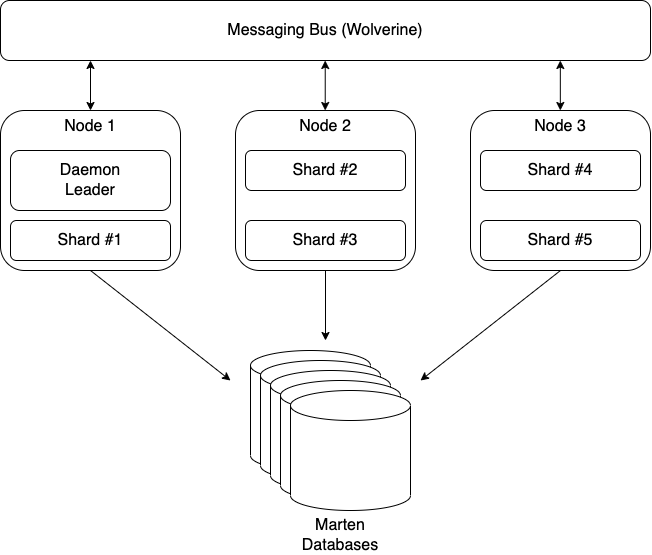


 The Shade Tree Developer