So, yes, Wolverine overlaps quite a bit with both MediatR and MassTransit. If you’re a MediatR user, Wolverine just does a helluva lot more and we have an existing guide for converting from MediatR to Wolverine. For MassTransit (or NServiceBus) users, Wolverine covers a lot of the same asynchronous messaging framework use cases, but does much, much more to simplify your application code than any other .NET messaging framework and should not be compared as an apples to apples messaging feature comparison. And no other tool in the entire .NET ecosystem can come even remotely close to the Critter Stack’s support for Event Sourcing from soup to nuts.
It’s kind of a big day in .NET OSS news with both MediatR and MassTransit respectively announcing moves to commercial licensing models. I’d like to start by wishing the best of luck to my friends Jimmy Bogard and Chris Patterson respectively with their new ventures.
As any long term participant in or observer of the .NET ecosystem knows, there’s about to be a flood of negativity from various people in our community about these moves. There will also be an outcry from a sizable cohort in the .NET community who seem to believe that all development tools should be provided by Microsoft and that only Microsoft can ever be a reliable supplier of these types of tools while somehow suffering from amnesia about how Microsoft has frequently abandoned high profile tools like Silverlight or WCF.
As for Marten, Wolverine, and other future Critter Stack tools, the current JasperFx Software strategy remains following the “open core” model where the existing capabilities in the MIT-licensed tools (note below) remain under an OSS license and JasperFx Software focuses on services, support plans, and the forthcoming commercial CritterWatch tool for monitoring, management, and some advanced features for data privacy, multi-tenancy, and extreme scalability. While we certainly respect MassTransit’s decision, we’re going to try a different path and stay down the “open core” model and Marten 8 / Wolverine 4 will be released under the MIT OSS license. I will admit that you may see some increasing reluctance to be providing as much free support through Discord as we have to users in the past though.
To be technical, there is one existing feature in Marten 7.* for optimized projection rebuilds that I think we’ll redesign and move to the commercial add on tooling in the Marten 8 timeframe, but in this case the existing feature is barely usable anyway so ¯\_(ツ)_/¯
It’s just time for an update from my last post on Critter Stack Roadmap Update for February as the work has progressed in the past weeks and we have more clarity on what’s going to change.
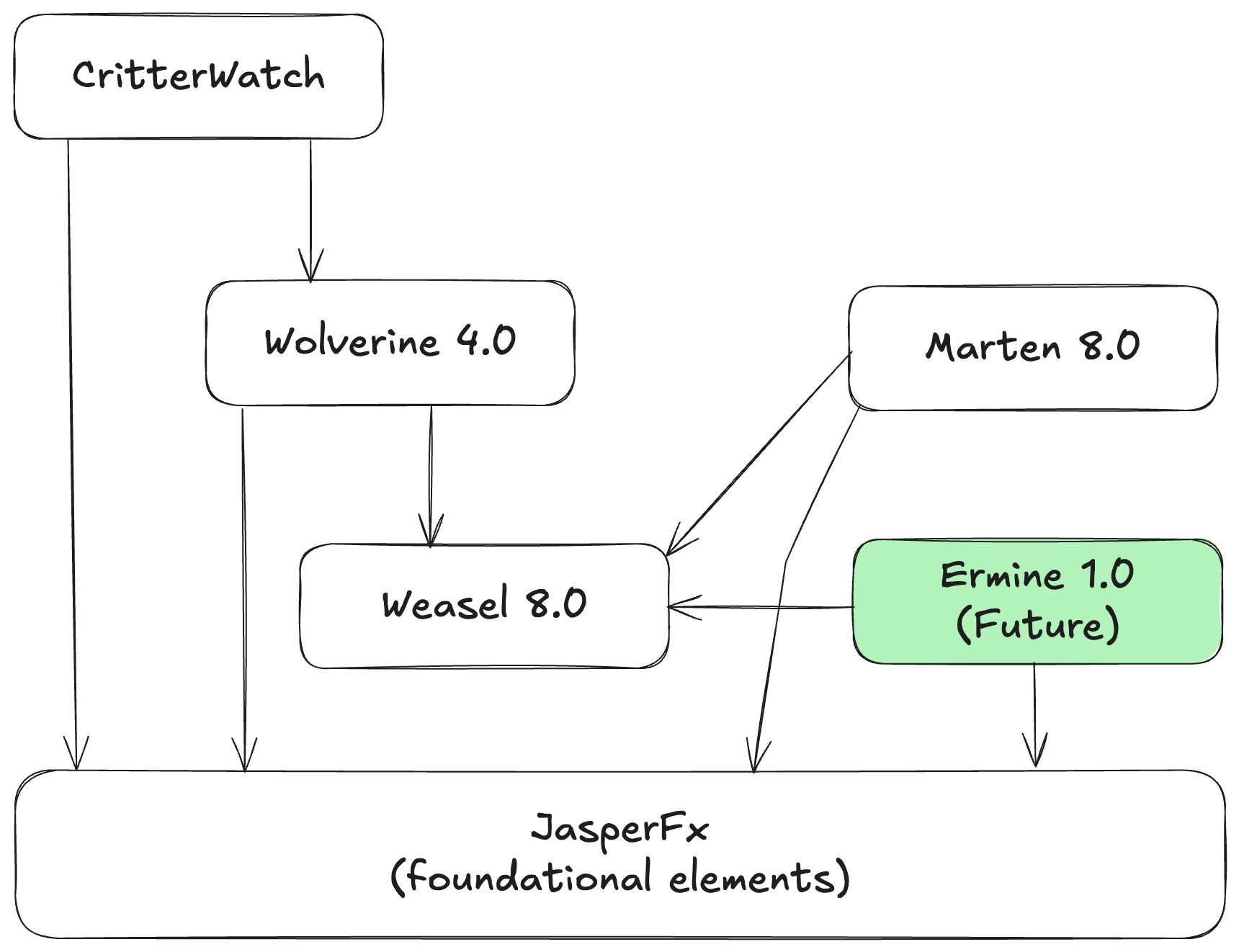
Work is heavily underway right now for a round of related releases in the Critter Stack (Marten, Wolverine, and other tools) I was originally calling “Critter Stack 2025” involving these tools:
Ermine for Event Sourcing with SQL Server
“Ermine” is our next full fledged “Critter” that’s been a long planned port of a significant subset of Marten’s functionality to targeting SQL Server. At this point, the general thinking is:
Focus on porting the Event Sourcing functionality from Marten
Quite possibly build around the JSON field support in EF Core and utilize EF Core under the covers. Maybe.
Use a new common JasperFx.Events library that will contain the key abstractions, metadata tracking, and even projection support. This new library will be shared between Marten, Ermine, and theoretical later “critters” targeting CosmosDb or DynamoDb down the line
Maybe try to lift out more common database handling code from Marten, but man, there’s more differences between PostgreSQL and SQL Server than I think people understand and that might turn into a time sink
Support the same kind of “aggregate handler workflow” integration with Wolverine as we have with Marten today, and probably try to do this with shared code, but that’s just a detail
Is this a good idea to do at all? We’ll see. The work to generalize the Marten projection support has been a time sink so far. I’ve been told by folks for a decade that Marten should have targeted SQL Server, and that supporting SQL Server would open up a lot more users. I think this is a bit of a gamble, but I’m hopeful.
JasperFx Dependency Consolidation
Most of the little, shared foundational elements of Marten, Wolverine, and soon to be Ermine have been consolidated into a single JasperFx library. That now includes what was:
JasperFx.Core (which in turn was renamed from “Baseline” after someone else squatted on that name and in turn was imported from ancient FubuCore for long term followers of mine)
The command line discovery, parsing, and execution model that is in Oakton today. That might be a touch annoying for the initial conversion, but in the little bit longer term that’s allowed us to combine several Nuget packages and simplify the project structure over all. TL;DR: fewer Nugets to install going forward.
Marten 8.0
I hope that Marten 8.0 is a much smaller release than Marten 7.0 was last year, but the projection model changes are turning out to be substantial. So far, this work has been done:
.NET 6/7 support has been dropped and the dependency tree simplified after that
Synchronous database access APIs have been eliminated
All other API signatures that were marked as [Obsolete] in the latest versions of Marten 7.* were removed
Marten.CommandLine was removed altogether, but the “db-*” commands are available as part of Marten’d dependency tree with no difference in functionality from the “marten-*” commands
Upgraded to the latest Npgsql 9
The projection subsystem overhaul is ongoing and substantial and frankly I’m kind of expecting Vizzini to show up in my home office and laugh at me for starting a land war in Southeast Asia. For right now I’ll just say that the key goals are:
The aforementioned reuse with Ermine and potential other Event Store implementations later
Making it as easy as possible to use explicit code instead as desired for the projections in addition to the existing conventional Apply / Create methods
Eliminate code generation for just the projections
Simplify the usage of “event slicing” for grouping events in multi-stream projections. I’m happy how this is shaping up so far, and I think this is going to end up being a positive after the initial conversion
Improve the throughput of the async daemon
There’s also a planned “stream compacting” feature happening, but it’s too early to talk about that much. Depending on how the projection work goes, there may be other performance related work as well.
Wolverine 4.0
Wolverine 4.0 is mostly about accomodating the work in other products, but there are some changes. Here’s what’s already been done:
Dropped .NET 7 support
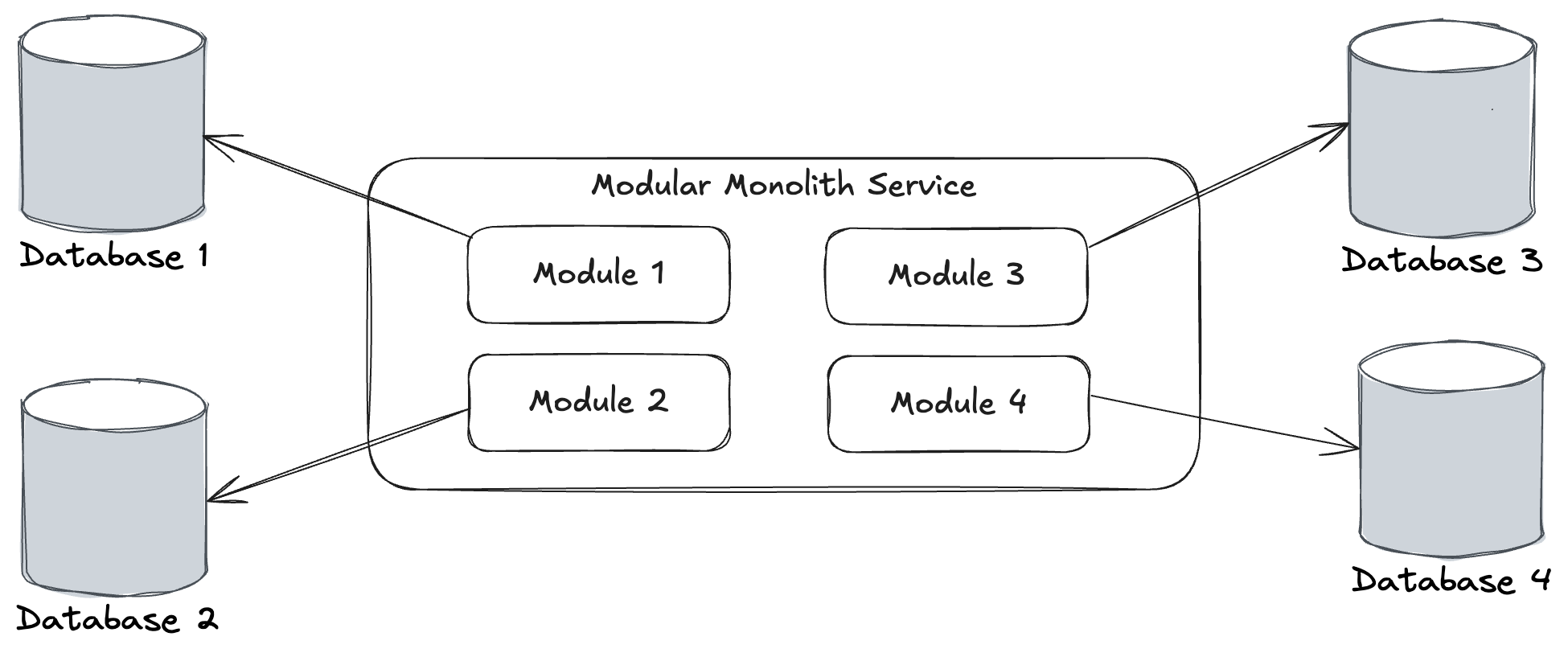
Significant work for a single application being able to use multiple databases from within one application for folks getting clever with modular monoliths. In Wolverine 4.*, you’ll be able to mix and match any number of data stores with the corresponding transactional inbox/outbox support much better than Wolverine 3.* can do. This is 100% about modular monoliths, but also fit into the CritterWatch work
Work to provide information to CritterWatch
There are some other important features that might be part of Wolverine 4.0 depending on some ongoing negotiations with a potential JasperFx customer.
CritterWatch Minimal Viable Product Direction
“CritterWatch” is a long planned commercial add on product for Wolverine, Marten, and any future “critter” Event Store tools. The goal is to create both a management and monitoring dashboard for Wolverine messaging and the Event Sourcing processes in those systems.
The initial concept is shown below:
At least for the moment, the goal of the CritterWatch MVP is to deliver a standalone system that can be deployed either in the cloud or on a client premises. The MVP functionality set will:
Explain the configuration and capabilities of all your Critter Stack systems, including some visualization of how messages flow between your systems and the state of any event projections or subscriptions
Work with your OpenTelemetry tracking to correlate ongoing performance information to the artifacts in your system.
Visualize any ongoing event projections or subscriptions by telling you where each is running and how healthy they are — as well as give you the ability to pause, restart, rebuild, or rewind them as needed
Manage the dead letter queued (DLQ) messages of your system with the ability to query the messages and selectively replay or discard the DLQ messages
We have a world of other plans for CritterWatch, but the feature set above is the most requested features from the companies that are most interested in this tool first.
This content will later be published as a tutorial somewhere on one of our documentation websites.This was originally “just” an article on doing blue/green deployments when using projections with Marten, so hence the two martens up above:)
Event Sourcing may not seem that complicated to implement, and you might be tempted to forego any kind of off the shelf tooling and just roll your own. Just appending events to storage by itself isn’t all that difficult, but you’ll almost always need projections of some sort to derive the system state in a usable way and that’s a whole can of complexity worms as you need to worry about consistency models, concurrency, performance, snapshotting, and you inevitably need to change a projection in a deployment down the road.
Fortunately, the full combination of Marten and Wolverine (the “Critter Stack”) for Event Sourcing architectures gives you powerful options to cover a variety of projection scenarios and needs. Marten by itself provides multiple ways to achieve strongly consistent projected data when you have to have that. When you prefer or truly need eventual consistency instead for certain projections, Wolverine helps Marten scale up to larger data loads by distributing the background work that Marten does for asynchronous projection building. Moreover, when you put the two tools together, the Critter Stack can support zero downtime deployments that involve projections rebuilds without sacrificing strong consistency for certain types of projections.
Consistency Models in Marten
One of the decision points in building projections is determining for each individual projection view whether you need strong consistency where the projected data is guaranteed to match the current state of the persisted events, or if it would be preferable to rely on eventual consistency where the projected data might be behind the current events, but will “eventually” be caught up. Eventual consistency might be attractive because there are definite performance advantages to moving some projection building to an asynchronous, background process (Marten’s async daemon feature). Besides the performance benefits, eventual consistency might be necessary to accommodate cases where highly concurrent system inputs would make it very difficult to update projection data within command handling without either risking data loss or applying events out of sequential order.
“Live” projections are calculated in memory by fetching the raw events and building up an aggregated view. Live projections are strongly consistent.
“Inline” projections are persisted in the Marten database, and the projected data is updated as part of the same database transaction whenever any events are appended. Inline projections are also strongly consistent.
“Async” projections are continuously built and updated in the database as new events come in a background process in Marten called the “Async Daemon“. On its face this is obviously eventual consistency, but there’s a technical wrinkle where Marten can “fast forward” asynchronous projections to still be strongly consistent on demand.
For Inline or Async projections, the projected data is being persisted to Marten using its document database capabilities and that data is available to be loaded through all of Marten’s querying capabilities, including its LINQ support. Writing “snapshots” of the projected data to the database also has an obvious performance advantage when it comes to reading projection state, especially if your event streams become too long to do Live aggregations on demand.
Now let’s talk about some common projection scenarios and how you should choose projection lifecycles for these scenarios:
A “write model” projection for a single event stream that represents a logical business entity or workflow like an “Invoice” or an “Order” with all the necessary information you would need in command handlers to “decide” how to process incoming commands. You will almost certainly need this data to be strongly consistent with the events in your command processing. I think it’s a perfectly good default to start with a Live lifecycle, and maybe even move to Inline if you want snapshotting in the case of longer event streams, but there’s a way in Marten to actually use Async as well with its FetchForWriting() API as shown below in this sample MVC controller that acts as a command handler (the “C” in CQRS):
    [HttpPost("/api/incidents/categorise")]
    public async Task<IActionResult> Post(
        CategoriseIncident command,
        IDocumentSession session,
        IValidator<CategoriseIncident> validator)
    {
        // Some validation first
        var result = await validator.ValidateAsync(command);
        if (!result.IsValid)
        {
            return Problem(statusCode: 400, detail: result.Errors.Select(x => x.ErrorMessage).Join(", "));
        }

        var userId = currentUserId();

        // This will give us access to the projected current Incident state for this event stream
        // regardless of whatever the projection lifecycle is!
        var stream = await session.Events.FetchForWriting<Incident>(command.Id, command.Version, HttpContext.RequestAborted);
        if (stream.Aggregate == null) return NotFound();

        if (stream.Aggregate.Category != command.Category)
        {
            stream.AppendOne(new IncidentCategorised
            {
                Category = command.Category,
                UserId = userId
            });
        }

        await session.SaveChangesAsync();

        return Ok();
    }
The FetchForWriting() API is the recommended way to write command handlers that need to use a “write model” to potentially append new events. FetchForWriting helps you opt into easy optimistic concurrency protection that you probably want to protect against concurrent access to the same event stream. As importantly, FetchForWriting completely encapsulates whatever projection lifecycle we’re using for the Incident write model above. If Incident is registered as:
Inline, then this API just loads the persisted snapshot out of the database similar to IQuerySession.LoadAsync<Incident>(id)
Async, then this API does a “catch up” model for you by fetching — in one database round trip mind you! — the last persisted snapshot of the Incident and any captured events to that event stream after the last persisted snapshot, and incrementally applies the extra events to effectively “advance” the Incident to reflect all the current events captured in the system.
The takeaway here is that you can have the strongly consistent model you need for command handlers with concurrent access protections and be able to use any projection lifecycle as you see fit. You can even change lifecycles later without having to make code changes!
In the next section I’ll discuss how that “catch up” ability will allow you to make zero downtime deployments with projection changes.
I didn’t want to use any “magic” in the code sample above to discuss the FetchForWriting API in Marten, but do note that Wolverine’s “aggregate handler workflow” approach to streamlined command handlers utilizes Marten’s FetchForWriting API under the covers. Likewise, Wolverine has some other syntactic sugar for more easily using Marten’s FetchLatest API.
A “read model” projection for a single stream that again represents the state of a logical business entity or workflow, but this time optimized for whatever data needs a user interface or query endpoint of your system needs. You might be okay in some circumstances to get away with eventually consistent data for your “read model” projections, but for the sake of this article let’s say you do want strongly consistent information for your read model projections. There’s also a little bit lighter API called FetchLatest in Marten for fetching a read only view of a projection (this only works with a single stream projection in case you’re wondering):
public static async Task read_latest(
    // Watch this, only available on the full IDocumentSession
    IDocumentSession session,
    Guid invoiceId)
{
    var invoice = await session
        .Events.FetchLatest<Projections.Invoice>(invoiceId);
}
Our third common projection role is simply having a projected view for reporting. This kind of projection may incorporate information from outside of the event data as well, combine information from multiple “event streams” into a single document or record, or even cross over between logical types of event streams. At this point it’s not really possible to do Live aggregations like this, and an Inline projection lifecycle would be problematic if there was any level of concurrent requests that impact the same “multi-stream” projection state. You’ll pretty well have to use the Async lifecycle and accept some level of eventual consistency.
It’s beyond the scope of this paper, but there are ways to “wait” for an asynchronous projection to catch up or to take “side effect” actions whenever an asynchronous projection is being updated in a background process.
I should note that “read model” and “write model” are just roles within your system, and it’s going to be common to get by with a single model that happily plays both roles in simpler systems, but don’t hesitate to use separate projection representations of the same events if the consumers of your system’s data just have very different needs.
Persisting the snapshots comes with a potentially significant challenge when there is inevitably some reason why the projection data has to be rebuilt as part of a deployment. Maybe it’s because of a bug, new business requirements, a change in how your system calculates a metric from the event data, or even just adding an entirely new projection view of the same old event data — but the point is, that kind of change is pretty likely and it’s more reliable to plan for change rather than depend on being perfect upfront in all of your event modeling.
Fortunately, Marten with some serious help from Wolverine, has some answers for that!
As I alluded to just above, one of the biggest challenges with systems using event sourcing is what happens when you need to deploy changes that involve projection changes that will require rebuilding persisted data in the database. As a community we’ve invested a lot of time into making the projection rebuild process smoother and faster, but there’s admittedly more work yet to come.
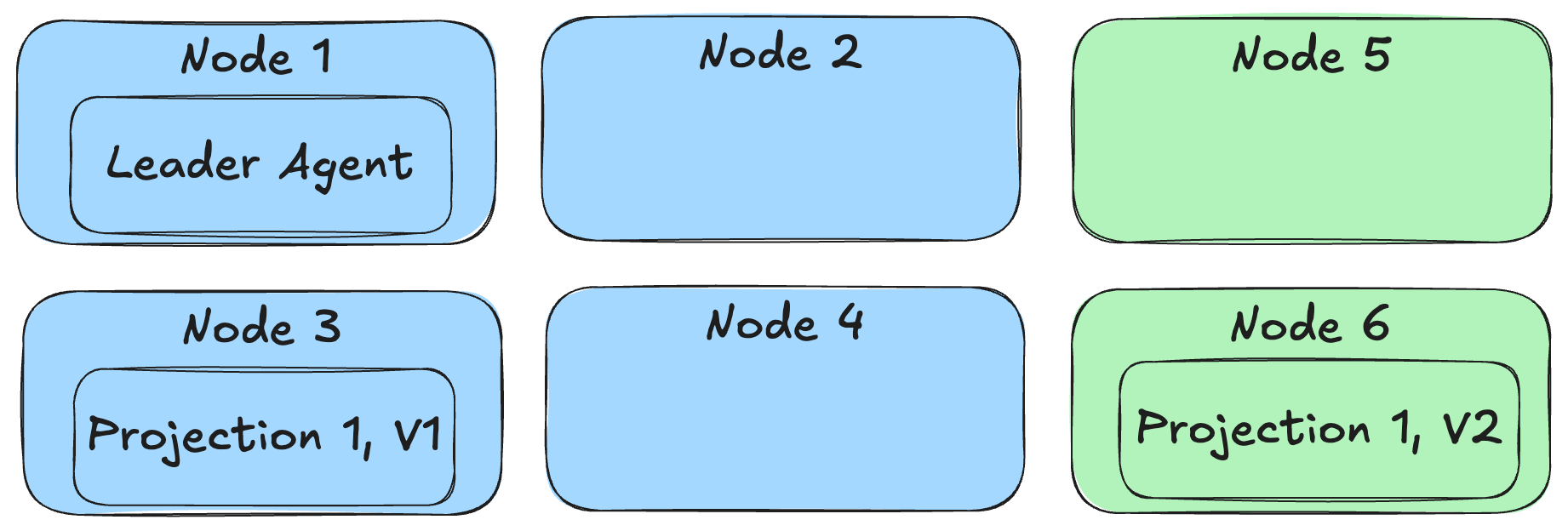
Instead of requiring some system downtime in order to do projection rebuilds before a new deployment though, the Critter Stack can now do a true “blue / green” deployment where both the old and new versions of the system and even versioned projections can run in parallel as shown below:
Let’s rewind a little bit and talk about how to make this happen, because it is a little bit of a multi-step process.
First off, try to only use FetchForWriting() or FetchLatest() when you need strongly consistent access to any kind of single stream projection (definitely “write model” projections and probably “read model” projections as well).
Next, if you need to make some kind of breaking changes to a projection of any kind, use the ProjectionVersion property and increment it to the next version like so:
// This class contains the directions for Marten about how to create the
// Incident view from the raw event data
public class IncidentProjection: SingleStreamProjection<Incident>
{
    public IncidentProjection()
    {
        // THIS is the magic sauce for side by side execution
        // in blue/green deployments
        ProjectionVersion = 2;
    }

    public static Incident Create(IEvent<IncidentLogged> logged) =>
        new(logged.StreamId, logged.Data.CustomerId, IncidentStatus.Pending, Array.Empty<IncidentNote>());

    public Incident Apply(IncidentCategorised categorised, Incident current) =>
        current with { Category = categorised.Category };

    // More event type handling...
}
By incrementing the projection version, we’re effectively making this a completely new projection in the application that will use completely different database tables for the Incident projection version 1 and version 2. This allows the “blue” nodes running the starting version of our application to keep chugging along using the old version of Incident while “green” nodes running the new version of our application can be running completely in parallel, but depending on the new version 2 of the Incident projection.
You will also need to make every single newly revised projection run under the Async lifecycle as well. As we discussed earlier, the FetchForWriting API is able to “fast forward” a single Incident write model projection as needed for command processing, so our “green” nodes will be able to handle commands against Incident event streams with the correct system state. Admittedly, the system might be running a little slower until the asynchronous Incident V2 projection gets caught up, but “slower” is arguably much better than “down”.
With the case of multi-stream projections (our reports), there is no equivalent to FetchLatest, so we’re stuck with eventual consistency. What you can at least do is deploy some “green” nodes with the new version of the system and the revisioned projections and let it start building the new projections from scratch as it starts — but not allow those nodes to handle outside requests until the new versions of the projection are “close” to being caught up to the current event store.
Now, the next question is “how does Marten know to only run the “green” versions of the projections on “green” nodes and make sure that every single projection + version combination is running somewhere?
// This would be in your application bootstrapping
opts.Services.AddMarten(m =>
    {
        // Other Marten configuration

        m.Projections.Add<IncidentProjection>(ProjectionLifecycle.Async);

    })
    .IntegrateWithWolverine(m =>
    {
        // This makes Wolverine distribute the registered projections
        // and event subscriptions evenly across a running application
        // cluster
        m.UseWolverineManagedEventSubscriptionDistribution = true;
    });
Referring back to the diagram from above, that option above enables Wolverine to distribute projections to running application nodes based on each node’s declared capabilities. This also tries to evenly distribute the background projections so they’re spread out over the running service nodes of our application for better scalability instead of only running “hot/cold” like earlier versions of Marten’s async daemon did.
As “blue” nodes are pulled offline, it’s safe to drop the Marten table storage for the projection versions that are no longer used. Sorry, but at this point there’s nothing built into the Critter Stack, but you can easily do that through PostgreSQL by itself with pure SQL.
Summary
This is a powerful set of capabilities that can be valuable in real life, grown systems that utilize Event Sourcing and CQRS with the Critter Stack, but I think we as a community have failed until now to put all of this content together in one place to unlock its usage by more people.
I am not aware of any other Event Sourcing tool in .NET or any other technical ecosystem for that matter that can match Marten & Wolverine’s ability to support this kind of potentially zero downtime deployment model. I’ve also never seen another Event Sourcing tool that has something like Marten’s FetchForWriting and FetchLatest APIs. I definitely haven’t seen any other CQRS tooling enable your application code to be as streamlined as the Critter Stack’s approach to CQRS and Event Sourcing.
I hope the key takeaway here is that Marten is a mature tool that’s been beaten on by real people building and maintaining real systems, and that it already solves challenging technical issues in Event Sourcing. Lastly, Marten is the most commonly used Event Sourcing tool for .NET as is, and I’m very confident in saying it has by far the most complete and robust feature set while also having a very streamlined getting started experience.
So this was meant to be a quick win blog post that I was going to bang out at the kitchen table after dinner last night, but instead took most of the next day. The Critter Stack core team is working on a new set of tutorials for both Marten and Wolverine, and this will hopefully take its place with that new content soon.
Wolverine 4.0 is also under way, but there will be at least some Wolverine.HTTP improvements in the 3.* branch before we get to 4.0.
Big thanks to the whole Critter Stack community for continuing to support Wolverine, including the folks who took the time to create actionable bug reports that led to several of the fixes and the folks who made fixes to the documentation website as well!
I have been writing up a little one pager for a JasperFx Software client for their new CTO on why and how their flagship system could use some technical transformation and modernization. I ran my write up past one of their senior developers that I’ve been collaborating on for tactical performance improvements, and he more or less agreed with everything but felt bad that I was maybe throwing the original development team (all since departed for other opportunities) under the bus a bit — my words, not his.
My response was that their planned approach might have been working just fine upfront when the system was simpler, but maybe they would have happily and competently adapted over time as the system overgrew the original patterns and reference architecture, but just weren’t around to get that feedback.
And let’s be honest, I know I’ve created some clever architectures that got dropped on unsuspecting other people in my day too. Including the (actually kind of successful) workflow system I did in Classic ASP + Oracle that had ~70 metadata tables and the system that was written in 6 different programming languages.
That brings me finally to my main point here, and that’s even though I see plenty of systems where the codebase is very challenging to work with and puts the system at risk, I don’t think that any of the teams were necessarily incompetent or didn’t care about doing good work or didn’t have an organized theory about how the code should be structured or even what the architecture should be. Moreover, I can’t say that I’ve even seen a true, classic ball of mud in a couple decades.
Instead, I would say that the systems that I’ve seen in the past decade that were widely known as having code that was hard to work on and suffered from poor performance all had a pretty cohesive coding approach and architecture. The real problem was that at some point the system or the database had grown enough to expose the flaws in the approach or simply grown too complex to be confined within the system’s prescriptive approach, but the teams who owned those systems did not, or were not able to, adapt over time.
To try to make this post not ramble on too long, here’s a couple follow up points:
I think that if you have technical ownership over any kind of large system, or are tasked with creating what’s likely going to grow to become a large system, you should adopt an attitude of constantly challenging the basic approach and at a minimum, being aware of when intended changes to the system are difficult because of the current architectural approach
Moderate on the idea of consistency throughout your codebase or at least between features. On my recent appearance on DotNetRocks, I veered into a sports metaphor about “raising the floor” vs “raising the ceiling” of the technical quality of a codebase. Technical leads who are worried about consistency and prescriptive project templates are trying to “raise the floor” on code quality — and that works to a point. On the other hand, I think that if you empower a development team to adapt or change their technical approach over time or even just for new subsystems, and if the team has the skillset to do so, you can “raise the ceiling” on technical quality because I have found that one of the main contributors to bad system code is rigid adherence to some kind of prescriptive approach that just doesn’t scale up to the more complicated use cases in a big system.
If you follow me or have ever stumbled into many discussions about the Critter Stack, you’ll know that I very strongly believe that reducing code ceremony. For me this means forsaking too many abstractions over persistence, reducing layering, favoring a vertical slice architecture, and honestly, letting in some “magic” through conventional approaches (that’s a debate all by itself of course). I think there’s a huge advantage in being able to easily reason about a codebase throughout a use case from system inputs all the way down to the database. On the other side of that, I think that complex layering strategies will often put too many layers of code to the point where teams cannot easily understand the cause and effect between system inputs and what the outcomes actually are. That is, I think, the number one cause of poor system performance by teams comes from not being able to easily see how chatty a system becomes between its front end, server layer, and database. As an aside, I’ve seen OpenTelemetry tracing be a godsend for identifying performance bottlenecks in unnecessarily complicated code by showing you exactly how many queries a single web request is really making.
Just to hammer on the code ceremony angle yet again, I think the only truly reliable way to arrive at a good system that meets your company’s needs over time and is easy to change is iteration and adaptation. High ceremony coding approaches retard your ability to quickly iterate and adapt, and but more of an onus on teams to get things right upfront — which just isn’t consistently possible no matter how hard your try.
Summary
Anyway, to close out, I think that the mass majority of us really do care about doing a good job in our software development work, but we’re all quite capable of having ideas about how a system should be coded, structured, and architected that simply will not work out over time. The only real solution is empowered teams that constantly adapt as necessary instead of letting a codebase get out of control in the first place.
Wait, what’s that you ask? How do you work with your product owners to give you the space to do that? And that’s my cue to start my week long vacation!
Good luck folks, and try to be a little easier on your feelings toward the “previous folks”. And that goes double for me.
And look, I got through this whole post without ranting about how prescriptive Onion/Clean/Hexagonal/Ports and Adapters/iDesign approaches and all the cruft that the DDD community dares each other to build into systems is the root of all coding evil! Oops, never mind.
JasperFx Software offers custom consulting engagements or ongoing support contracts for any part of the Critter Stack. Some of the features in this post were either directly part of client engagements or inspired by our work with JasperFx clients.
This week brought out some new functionality and inevitably some new bug fixes in Marten 7.38 and Wolverine 3.10. I’m actually hopeful this is about the last Marten 7.* release, and Marten 8.0 is heavily underway. Likewise, Wolverine 3.* is probably about played out, and Wolverine 4.0 will come out at the same time. For now though, here’s some highlights of new functionality.
Delete All Marten Data for a Single Tenant
A JasperFx client has a need to occasionally remove all data for a single named tenant across their entire system. Some of their Marten documents and the events themselves are multi-tenanted, while others are global documents. In their particular case, they’re using Marten’s support for managed table partitions by tenant, but other folks might not. To make the process of cleaning out all data for a single tenant as easy as possible regardless of your particular Marten storage configuration, Marten 7.38 added this API:
var builder = Host.CreateApplicationBuilder();
builder.UseWolverine(opts =>
{
    opts
        .UseRabbitMq(builder.Configuration.GetConnectionString("rabbit"))

        // You can configure the queue type for declaration with this
        // usage as well
        .DeclareQueue("stream", q => q.QueueType = QueueType.stream)

        // Use quorum queues by default as a policy
        .UseQuorumQueues()

        // Or instead use streams
        .UseStreamsAsQueues();

    opts.ListenToRabbitQueue("quorum1")
        // Override the queue type in declarations for a
        // single queue, and the explicit configuration will win
        // out over any policy or convention
        .QueueType(QueueType.quorum);


});
Note that nothing in Wolverine changed other than giving you the ability to make Wolverine declare Rabbit MQ queues as quorum queues or as streams.
Easy Access to Marten Event Sourced Aggregation Data in Wolverine
While the Wolverine + Marten “aggregate handler workflow” is a popular feature for command handlers that may need to append events, sometimes you just want a read only version of an event sourced aggregate. Marten has its FetchLatest API that lets you retrieve the current state of an aggregated projection consistent with the current event store data regardless of the lifecycle of the projection (live, inline, or async). Wolverine now has a quick short cut for accessing that data as a value “pushed” into your HTTP endpoints by decorating a parameter of your handler method with the new [ReadAggregate] attribute like so:
[WolverineGet("/orders/latest/{id}")]
public static Order GetLatest(Guid id, [ReadAggregate] Order order) => order;
public record FindAggregate(Guid Id);

public static class FindLettersHandler
{
    // This is admittedly just some weak sauce testing support code
    public static LetterAggregateEnvelope Handle(
        FindAggregate command,
        [ReadAggregate] LetterAggregate aggregate)

        => new LetterAggregateEnvelope(aggregate);
}
This feature was inspired by a session with a JasperFx Software client where their HTTP endpoints frequently needed to access projected aggregate data for multiple event streams, but only append events to one stream. This functionality was probably already overdue anyway as a way to quickly get projection data any time you just need to read that data as part of a command or query handler.
So roughly, here’s what I said or at least tried to say:
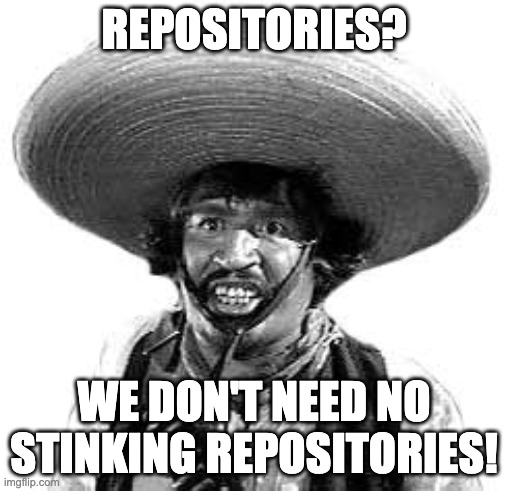
I would generally recommend against using wrapping repository abstractions around low level persistence tooling like Marten, EF Core, or Dapper in systems in most cases. Hence the title of this post:). I say this for a couple reasons:
The typical IRepository<T> abstraction does pretty well nothing to add any value and frequently blows up the complexity of code when you inevitably have use cases that work on more than one domain entity type at a time
Those abstractions frequently push teams toward using least common denominator capabilities of those tools and accidentally eliminate the usage of a lot of features like batch data querying that would help make system performance better
Despite the theory that using these abstractions will make it easier or at least possible to swap out technical infrastructure later, I think that’s patently not true, especially not when these abstractions are combined with an emphasis on horizontal layering by technical concern and every little bit of data access for the system is in one giant project.
Instead, I prefer to directly utilize Marten or RavenDb’s IDocumentSession or an EF Core DbContext and utilize every last bit of special capabilities these tools have to improve performance. Moreover, following that theme of “vertical slice”, if some kind of database query is only used by a single HTTP request or command handler, I’d strongly prefer that query be right smack dab in the vertical slice code instead of scattered all over your codebase in different horizontal layers because that frequently has some bearing on understanding how the entire message handling or HTTP request or whatever the transaction is actually works.
A large part of this is the feeling that we mostly need to reason about the complete functionality of a single use case or a closely related set of use cases at a time from system inputs down to database queries. On the other hand, I have almost never needed to reason about a system’s entire data access layer in isolation even though that’s held up as an advantage of Clean/Onion/Hexagonal layering approaches. Some folks will argue that there’s value in having all the system’s business logic in one domain layer, but I would think that’s not that valuable in a bigger system anyway.
I think a reasonable person could easily disagree with everything I just said with concerns about testability, consistency in code (a little bit overrated in my personal opinion), and the coupling to technical infrastructure. On that note, let’s shift to what I think does actually lead to maintainable system code:
Code that is easy to reason about. At this point, I think this is the single most important attribute of a long lived, non trivial sized business system that is constantly needing to change. The harder it is for the developers working on the system to understand the impact of changes in logic are within the system, or the harder it is to understand the behavior of the code around a reported bug, the less successful you’ll be. In my experience, the very techniques that we’ve been told lead to maintainable code (layering, abstractions, dependency inversion, prescriptive architectural patterns) are a large part of why systems I’ve worked with have been hard to reason about. To that end, I’m a big believer in reducing code ceremony and code noise so it’s easier to read (and write) the code by just having less junk to wade through. I also strongly recommend trying collapse layering so that it’s easier to just see how an entire feature actually works by having a lot less code to wade through and putting the closely related code together regardless of its technical stereotype (the very basis of the whole “vertical slice” idea).
Effective automated testing coverage. The single best way to truly have “reversible” technical decisions or just being able to actually upgrade technical infrastructure is having a strong level of automated test coverage to make changing the system safe.
With this emphasis on effective test coverage, I naturally believe in having testable code as an important enabler — but yet I’m strongly recommending reducing the number of abstractions and layering that many feel is necessary for testability. To that end, Wolverine’s encourages the idea of the A Frame Architecture approach to “vertical slices” as a way to achieve high testability without having to introduce abstractions and bloat your IoC container. Plus it’s just nice being able to write focused unit tests on business logic without having to fuss with lots of testing fakes. To be clear, I absolutely think it is possible to keep your business logic decoupled from infrastructure concerns without having to introduce additional layers of abstraction and layering.
Organize code around the “verbs” of the system more than the “nouns” (entities) of the system. Especially for a system that has any level of workflow logic rather than being a straight up CRUD system (and if you’re truly building a CRUD system, I think you can ignore everything I’ve said and just go bang out code). So structure your code around an “approve invoice” handler, and not automatically by the “Invoice” entity. And especially don’t prematurely try to divide up a system into separate micro-services or bounded contexts by entity. That’s maybe another way of saying “vertical slice”, but the point here is to avoid having massively bloated “InvoiceController” or “InvoiceRepository” classes that take part in a potentially large number of use cases. When you are dividing your system into separate modules or bounded contexts, pay attention to where the messages are going in between. If you ever have 2 or more modules that frequently have to access each other’s data or change together or be chatty in terms of messaging between themselves, you’re probably wanting to combine them into one single bounded context even if they technically involve more than one entity (invoice *and* inventory in one context maybe). It’s easy to reason about the shape of the system data sometimes, but that noun-centric/data-centric code organization doesn’t lend itself to code that’s easy to reason about when the workflow gets complicated in my experience.
If you possibly can, keep the system somewhat modularized so you could technically upgrade libraries or frameworks or databases in part of the system at a time. You can do all the “Clean Architecture” layering you want, but if your system is huge and there’s just one giant horizontal technical layer for data access, you won’t be able to swap it out easily because of the sheer amount of effort it might take to regression test the entire system when we all know damn well that your product managers will not give you months at a tie with no feature work just to do technical upgrades.
In the absence of reasons not to, I would strongly recommend defaulting to technology choices that play nicely in local integration testing. For a concrete example, if there’s no compelling reason otherwise, I’d prefer to use Rabbit MQ over Azure Service Bus strictly because Rabbit MQ has a fantastic local development story and Azure Service Bus does not (the new emulator is a nice step, but I didn’t find it to be usable yet). Likewise, PostgreSQL with Marten makes it very easy to quickly spin up an application database from a fresh Docker image for fast local development and isolated integration tests.
There’s a reddit thread going right now about people’s experiences with “vertical slice architecture vs clean architecture” on the /dotnet subreddit, and the one and only one thing that’s clear is that there’s a ton of disagreement about what the hell it is that “vertical slice architecture” actually means and a lot of folks conflating that with bounded contexts or micro-services. My takeaway is that like “ReST” before it, the “vertical slice” nomenclature may be quickly made useless by the variance of understanding of that terminology.
Summary
I banged this out fast and it probably shows. I’ll aim for some YouTube videos expanding on this some day soon.
The last time I wrote about the Critter Stack / JasperFx roadmap, I was admittedly feeling a little conservative about big new releases and really just focused on stabilization. In the past week though, the rest of the Critter Stack Core Team decided it was time to get going on the next round of releases for what will be Marten 8.0 and Wolverine 4.0, so let’s get into the details.
Definitely in Scope:
Upgrade Marten (and Weasel/Wolverine) to Npgsql 9.0
Drop .NET 6/7 support in Marten and .NET 7 support in Wolverine. Both will have targets for .NET 8/9
Consolidation of supporting libraries. What is today JasperFx.Core, JasperFx.CodeGeneration, and Oakton are getting combined into a new library called JasperFx. That’s partially to simplify setup by reducing the number of dotnet add ... calls you need to do, but also to potentially streamline configuration that’s today duplicated between Marten & Wolverine.
Drop the synchronous APIs that are already marked as [Obsolete] in Marten’s API surface
“Stream Compacting” in Marten/Wolverine/CritterWatch. This feature is being done in partnership with a JasperFx client
In addition to that work, JasperFx Software is working hard on the forthcoming “Critter Watch” tooling that will be a management and monitoring console application for Wolverine and Marten, so there’s also a bit of the work to help support Critter Watch through improvements to instrumentation and additional APIs that will land in Wolverine or Marten proper.
I’ll write much more about Critter Watch soon. Right now the MVP looks to be:
A dead letter message explorer and management tool for Wolverine
A view of your Critter Watch application configuration, which will be able to span multiple applications to better understand how messages flow throughout your greater ecosystem of services
Viewing and managing asynchronous projections in Marten, which should include performance information, a dashboard explaining what projections or subscriptions are running, and the ability to trigger projection rebuilds, rewind subscriptions, and to pause/restart projections at runtime
Displaying performance metrics about your Wolverine / Marten application by integration with your Otel tooling (we’re initially thinking about PromQL integration here).
Maybe in Scope???
It may be that we go for a quick and relatively low impact Marten 8 / Wolverine 4 release, but here are the things we are considering for this round of releases and would love any feedback or requests you might have:
Overhaul the Marten projection support, with a very particular emphasis on simplifying the multi-stream projections especially. The core team & I did quite a bit of work on that in the 4th quarter last year in the first attempt at Marten 8, and that work might feed into this effort as well. Part of that goal is to make it as easy as possible to use purely explicit code for projections as a ready alternative to the conventional Apply/Create method conventions. There’s an existing conversation in this issue.
Multi-tenancy support for EF Core with Wolverine commensurate with the existing Marten + Wolverine + multi-tenancy support. I really want to be expanding the Wolverine user base this year, and better EF Core support feels like a way to help achieve that.
Revisit the async daemon and add support for dependencies between asynchronous projections and/or the ability to “lock” the execution of 2 or more projections together. That’s 100% about scalability and throughput for folks who have particularly nasty complicated multi-stream projections. This would also hopefully be in partnership with a JasperFx client.
Revisiting the event serialization in Marten and its ability to support “downcasters” or “upcasters” for event versioning. There is an opportunity to ratchet up performance by moving to higher performance serializers like MessagePack or MemoryPack for the event serialization. You’d have to make that an opt in model, probably support side by side JSON & whatever other serialization, and make sure folks know that means losing the LINQ querying support for Marten events if you opt for the better performance.
Potentially risky time sink: pull quite a bit of the event store support code in Marten today into a new shared library (like the IEvent model and maybe quite a bit of the projection subsystem) where that code could be shared between Marten and the long planned Sql Server-backed event store. And maybe even a CosmosDb integration.
Some improvements to Wolverine specifically for modular monolith usage discussed in more depth in the next section.
I think we’re in good shape with Wolverine message handler discovery and routing for modular monoliths, but there’s some challenges around database integration, the transactional inbox/outbox support, and transactional middleware within with a single application that’s potentially talking to multiple databases from a single process — and then make things more complicated still by throwing in the possibility of using multi-tenancy through separated databases.
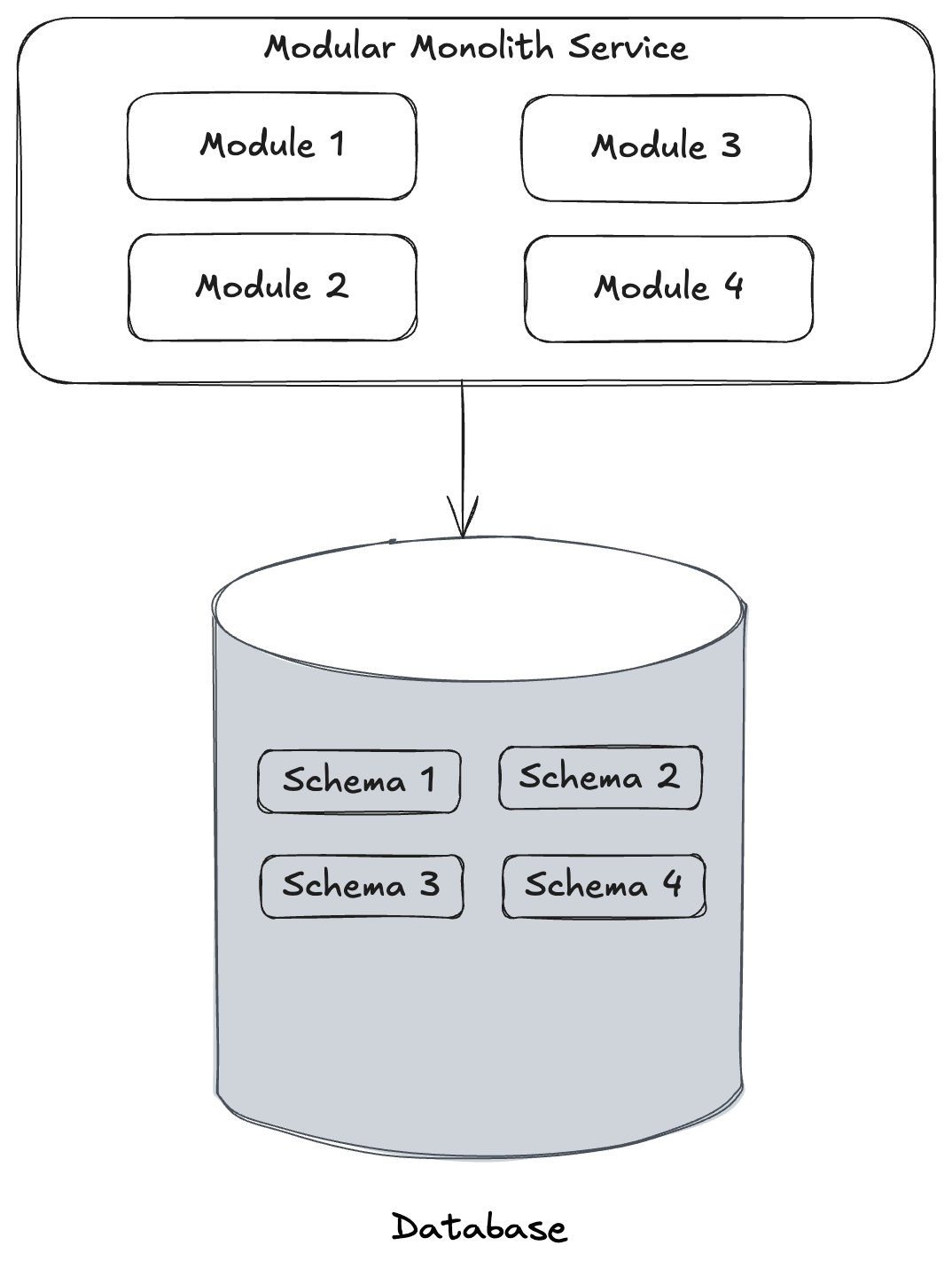
Wolverine already does fine with an architecture like the one below where you might have separate logical “modules” in your system that generally work against the same database, but using separate database schemas for the isolation:
Where Wolverine doesn’t yet go (and I’m also not aware of any other .NET tooling that actually solves this) is the case where separate modules may be talking to completely separate physical databases as shown below:
The work I’m doing right now with “Critter Watch” touches on Wolverine’s message storage, so it’s somewhat convenient to try to improve Wolverine’s ability to allow you to mix and match different databases and even different database engines from one Wolverine application as part of this release.
Coaching my daughter’s 1st/2nd grade basketball team is a trip. I don’t know that the girls are necessarily learning much, but one thing I’d love for them to understand is to “follow your shot” and try for a rebuild for a second shot if the ball doesn’t go in on their first shot. That’s the tortured metaphor/excuse for the marten playing basketball for this post:-)
I’m currently helping a JasperFx Software client to retrofit in some concurrency protection to their existing system that uses Marten for event sourcing by utilizing Marten’s FetchForWriting API deep in the guts of a custom repository to prevent their system from being put into an inconsistent state.
Great, right! Except that there’s not a very real possibility that their application will throw Marten’s ConcurrencyException when an operation fails in Marten’s optimistic concurrency checks.
Our next trick is building in some selective retries for the commands that could probably succeed if they just started over from the new system state after first triggering the concurrency check — and that’s an absolutely perfect use case for the built in Wolverine error handling policies!
This particular system was built around MediatR that doesn’t have any built in error handling policies, and we’ll probably end up rigging up some kind of pipeline behavior or even a flat out decorator MediatR. I did call out the error handling in Wolverine as an advantage in the Wolverine for MediatR Users guide.
In the ubiquitous “Incident Service” example we use in documentation here and there, we have a message handler for trying to automatically assign a priority to an in flight customer reported “Incident” like this:
public static class TryAssignPriorityHandler
{
    // Wolverine will call this method before the "real" Handler method,
    // and it can "magically" connect that the Customer object should be delivered
    // to the Handle() method at runtime
    public static Task<Customer?> LoadAsync(Incident details, IDocumentSession session)
    {
        return session.LoadAsync<Customer>(details.CustomerId);
    }

    // There's some database lookup at runtime, but I've isolated that above, so the
    // behavioral logic that "decides" what to do is a pure function below.
    [AggregateHandler]
    public static (Events, OutgoingMessages) Handle(
        TryAssignPriority command,
        Incident details,
        Customer customer)
    {
        var events = new Events();
        var messages = new OutgoingMessages();

        if (details.Category.HasValue && customer.Priorities.TryGetValue(details.Category.Value, out var priority))
        {
            if (details.Priority != priority)
            {
                events.Add(new IncidentPrioritised(priority, command.UserId));

                if (priority == IncidentPriority.Critical)
                {
                    messages.Add(new RingAllTheAlarms(command.IncidentId));
                }
            }
        }

        return (events, messages);
    }
}
The handler above depends on the current state of the Incident in the system, and it’s somewhat possible that two or more people or transactions are happily trying to modify the same Incident at the same time. The Wolverine aggregate handler workflow triggered by the [AggregateHandler] usage up above happily builds in optimistic concurrency protection such that an attempt to save the pending transaction will throw an exception if something else has modified that Incident between the command starting and the call to persist all changes.
Now, depending on the command, you may want to either:
Immediately discard the command message because it’s not obsolete
Just have the command message retried from scratch, either immediately, with a little delay, or even scheduled for a much later time
Wolverine will happily do that for you. While you can happily set global error handling, you can also fine tune the specific error handling for specific message handlers, exception types, and even exception details as shown below:
public static class TryAssignPriorityHandler
{
    public static void Configure(HandlerChain chain)
    {
        // It's a fall through, so you would only do *one*
        // of these options!

        // It can never succeed, so just discard it instead of wasting
        // time on retries or dead letter queues
        chain.OnException<ConcurrencyException>().Discard();

        // Do some selective retries with a progressive wait
        // in between tries, and if that fails, move it to the dead
        // letter storage
        chain.OnException<ConcurrencyException>()
            .RetryWithCooldown(50.Milliseconds(), 100.Milliseconds(), 250.Milliseconds())
            .Then
            .MoveToErrorQueue();

        // Or throw it away after a few tries...
        chain.OnException<ConcurrencyException>()
            .RetryWithCooldown(50.Milliseconds(), 100.Milliseconds(), 250.Milliseconds())
            .Then
            .Discard();
    }

    // rest of the handler code...
If you’re processing messages through the asynchronous messaging in Wolverine — and this includes from local, in memory queues too — you have the full set of error policies. If you’re consuming Wolverine as a “Mediator” tool where you may be delegating to Wolverine like so:
Wolverine can still use any “Retry” or “Discard” error handling policies, and if Wolverine does a retry, it effectively starts from a completely clean slate so you don’t have to worry about any dirty state from scoped services used by the initial failed attempt to process the message.
Summary
Wolverine puts a ton of emphasis on allowing our users to build low ceremony code that’s highly testable, but we also aren’t compromising on resiliency or observability. While being a “mediator” isn’t really what our hopes and dreams for Wolverine were originally, it does it quite credibly and even brings some of the error handling resiliency that you may be used to in asynchronous messaging frameworks but aren’t always a feature of smaller “mediator” tools.
I happened to see this post from Milan Jovanović today about a little backlash to the MediatR library. For my part, I think MediatR is just a victim of its own success and any backlash is mostly due to folks misusing it very badly in unnecessarily complicated ways (that’s my experience). That aside, yes, I absolutely feel that Wolverine is a much stronger toolset that covers a much broader set of use cases while doing a lot more than MediatR to potentially simplify your application code and do more to promote testability, so here goes this post.
MediatR is an extraordinarily successful OSS project in the .NET ecosystem, but it’s a very limited tool and the Wolverine team frequently fields questions from folks converting to Wolverine from MediatR. Offhand, the common reasons to do so are:
Many people are using MediatR and a separate asynchronous messaging framework like MassTransit or NServiceBus while Wolverine handles the same use cases as MediatR andasynchronous messaging as well with one single set of rules for message handlers
Wolverine’s programming model can easily result in significantly less application code than the same functionality would with MediatR
It’s important to note that Wolverine allows for a completely different coding model than MediatR or other “IHandler of T” application frameworks in .NET. While you can use Wolverine as a near exact drop in replacement for MediatR, that’s not taking advantages of Wolverine’s capabilities.
MediatR is an example of what I call an “IHandler of T” framework, just meaning that the primary way to plug into the framework is by implementing an interface signature from the framework like this simple example in MediatR:
public class Ping : IRequest<Pong>
{
    public string Message { get; set; }
}

public class PingHandler : IRequestHandler<Ping, Pong>
{
    private readonly TextWriter _writer;

    public PingHandler(TextWriter writer)
    {
        _writer = writer;
    }

    public async Task<Pong> Handle(Ping request, CancellationToken cancellationToken)
    {
        await _writer.WriteLineAsync($"--- Handled Ping: {request.Message}");
        return new Pong { Message = request.Message + " Pong" };
    }
}
Now, if you assume that TextWriter is a registered service in your application’s IoC container, Wolverine could easily run the exact class above as a Wolverine handler. While most Hollywood Principle application frameworks usually require you to implement some kind of adapter interface, Wolverine instead wraps around your code, with this being a perfectly acceptable handler implementation to Wolverine:
// No marker interface necessary, and records work well for this kind of little data structure
public record Ping(string Message);
public record Pong(string Message);

// It is legal to implement more than message handler in the same class
public static class PingHandler
{
    public static Pong Handle(Ping command, TextWriter writer)
    {
        _writer.WriteLine($"--- Handled Ping: {request.Message}");
        return new Pong(command.Message);
    }
}
So you might notice a couple of things that are different right away:
While Wolverine is perfectly capable of using constructor injection for your handlers and class instances, you can eschew all that ceremony and use static methods for just a wee bit fewer object allocations
Like MVC Core and Minimal API, Wolverine supports “method injection” such that you can pass in IoC registered services directly as arguments to the handler methods for a wee bit less ceremony
There are no required interfaces on either the message type or the handler type
Wolverine discovers message handlers through naming conventions (or you can also use marker interfaces or attributes if you have to)
You can use synchronous methods for your handlers when that’s valuable so you don’t have to scatter return Task.CompletedTask(); all over your code
Moreover, Wolverine’s best practice as much as possible is to use pure functions for the message handlers for the absolute best testability
There are more differences though. At a minimum, you probably want to look at Wolverine’s compound handler capability as a way to build more complex handlers.
Wolverine was built with the express goal of allowing you to write very low ceremony code. To that end we try to minimize the usage of adapter interfaces, mandatory base classes, or attributes in your code.
Wolverine’s IMessageBus.InvokeAsync() is the direct equivalent to MediatR’s IMediator.Send(), but, the Wolverine usage also builds in support for some of Wolverine’s error handling policies such that you can build in selective retries.
MediatR’s INotificationHandler
Point blank, you should not be using MediatR’s INotificationHandler for any kind of background work that needs a true delivery guarantee (i.e., the notification will get processed even if the process fails unexpectedly). This has consistently been one of the very first things I tell JasperFx customers when I start working with any codebase that uses MediatR.
MediatR’s INotificationHandler concept is strictly fire and forget, which is just not suitable if you need delivery guarantees of that work. Wolverine on the other hand supports both a “fire and forget” (Buffered in Wolverine parlance) or a durable, transactional inbox/outbox approach with its in memory, local queues such that work will not be lost in the case of errors. Moreover, using the Wolverine local queues allows you to take advantage of Wolverine’s error handling capabilities for a much more resilient system that you’ll achieve with MediatR.
INotificationHandler in Wolverine is just a message handler. You can publish messages anytime through the IMessageBus.PublishAsync() API, but if you’re just needing to publish additional messages (either commands or events, to Wolverine it’s all just a message), you can utilize Wolverine’s cascading message usage as a way of building more testable handler methods.
MediatR IPipelineBehavior to Wolverine Middleware
MediatR uses its IPipelineBehavior model as a “Russian Doll” model for handling cross cutting concerns across handlers. Wolverine has its own mechanism for cross cutting concerns with its middleware capabilities that are far more capable and potentially much more efficient at runtime than the nested doll approach that MediatR (and MassTransit for that matter) take in its pipeline behavior model.
The Fluent Validation example is just about the most complicated middleware solution in Wolverine, but you can expect that most custom middleware that you’d write in your own application would be much simpler.
Let’s just jump into an example. With MediatR, you might try to use a pipeline behavior to apply Fluent Validation to any handlers where there are Fluent Validation validators for the message type like this sample:
    public class ValidationBehaviour<TRequest, TResponse> : IPipelineBehavior<TRequest, TResponse> where TRequest : IRequest<TResponse>
    {
        private readonly IEnumerable<IValidator<TRequest>> _validators;
        public ValidationBehaviour(IEnumerable<IValidator<TRequest>> validators)
        {
            _validators = validators;
        }
        public async Task<TResponse> Handle(TRequest request, CancellationToken cancellationToken, RequestHandlerDelegate<TResponse> next)
        {
            if (_validators.Any())
            {
                var context = new ValidationContext<TRequest>(request);
                var validationResults = await Task.WhenAll(_validators.Select(v => v.ValidateAsync(context, cancellationToken)));
                var failures = validationResults.SelectMany(r => r.Errors).Where(f => f != null).ToList();
                if (failures.Count != 0)
                    throw new ValidationException(failures);
            }
            return await next();
        }
    }
It’s cheating a little bit, because Wolverine has both an add on for incorporating Fluent Validation middleware for message handlers and a separate one for HTTP usage that relies on the ProblemDetails specification for relaying validation errors. Let’s still dive into how that works just to see how Wolverine really differs — and why we think those differences matter for performance and also to keep exception stack traces cleaner (don’t laugh, we really did design Wolverine quite purposely to avoid the really nasty kind of Exception stack traces you get from many other middleware or “behavior” using frameworks).
Let’s say that you have a Wolverine.HTTP endpoint like so:
public record CreateCustomer
(
    string FirstName,
    string LastName,
    string PostalCode
)
{
    public class CreateCustomerValidator : AbstractValidator<CreateCustomer>
    {
        public CreateCustomerValidator()
        {
            RuleFor(x => x.FirstName).NotNull();
            RuleFor(x => x.LastName).NotNull();
            RuleFor(x => x.PostalCode).NotNull();
        }
    }
}

public static class CreateCustomerEndpoint
{
    [WolverinePost("/validate/customer")]
    public static string Post(CreateCustomer customer)
    {
        return "Got a new customer";
    }
}
In the application bootstrapping, I’ve added this option:
app.MapWolverineEndpoints(opts =>
{
    // more configuration for HTTP...

    // Opting into the Fluent Validation middleware from
    // Wolverine.Http.FluentValidation
    opts.UseFluentValidationProblemDetailMiddleware();
}
Just like with MediatR, you would need to register the Fluent Validation validator types in your IoC container as part of application bootstrapping. Now, here’s how Wolverine’s model is very different from MediatR’s pipeline behaviors. While MediatR is applying that ValidationBehaviour to each and every message handler in your application whether or not that message type actually has any registered validators, Wolverine is able to peek into the IoC configuration and “know” whether there are registered validators for any given message type. If there are any registered validators, Wolverine will utilize them in the code it generates to execute the HTTP endpoint method shown above for creating a customer. If there is only one validator, and that validator is registered as a Singleton scope in the IoC container, Wolverine generates this code:
    public class POST_validate_customer : Wolverine.Http.HttpHandler
    {
        private readonly Wolverine.Http.WolverineHttpOptions _wolverineHttpOptions;
        private readonly Wolverine.Http.FluentValidation.IProblemDetailSource<WolverineWebApi.Validation.CreateCustomer> _problemDetailSource;
        private readonly FluentValidation.IValidator<WolverineWebApi.Validation.CreateCustomer> _validator;

        public POST_validate_customer(Wolverine.Http.WolverineHttpOptions wolverineHttpOptions, Wolverine.Http.FluentValidation.IProblemDetailSource<WolverineWebApi.Validation.CreateCustomer> problemDetailSource, FluentValidation.IValidator<WolverineWebApi.Validation.CreateCustomer> validator) : base(wolverineHttpOptions)
        {
            _wolverineHttpOptions = wolverineHttpOptions;
            _problemDetailSource = problemDetailSource;
            _validator = validator;
        }


        public override async System.Threading.Tasks.Task Handle(Microsoft.AspNetCore.Http.HttpContext httpContext)
        {
            // Reading the request body via JSON deserialization
            var (customer, jsonContinue) = await ReadJsonAsync<WolverineWebApi.Validation.CreateCustomer>(httpContext);
            if (jsonContinue == Wolverine.HandlerContinuation.Stop) return;

            // Execute FluentValidation validators
            var result1 = await Wolverine.Http.FluentValidation.Internals.FluentValidationHttpExecutor.ExecuteOne<WolverineWebApi.Validation.CreateCustomer>(_validator, _problemDetailSource, customer).ConfigureAwait(false);

            // Evaluate whether or not the execution should be stopped based on the IResult value
            if (result1 != null && !(result1 is Wolverine.Http.WolverineContinue))
            {
                await result1.ExecuteAsync(httpContext).ConfigureAwait(false);
                return;
            }


            // The actual HTTP request handler execution
            var result_of_Post = WolverineWebApi.Validation.ValidatedEndpoint.Post(customer);

            await WriteString(httpContext, result_of_Post);
        }

    }
The point here is that Wolverine is trying to generate the most efficient code possible based on what it can glean from the IoC container registrations and the signature of the HTTP endpoint or message handler methods. The MediatR model has to effectively use runtime wrappers and conditional logic at runtime.
Do note that Wolverine has built in middleware for logging, validation, and transactional middleware out of the box. Most of the custom middleware that folks are building for Wolverine are much simpler than the validation middleware I talked about in this guide.
Vertical Slice Architecture
MediatR is almost synonymous with the “Vertical Slice Architecture” (VSA) approach in .NET circles, but Wolverine arguably enables a much lower ceremony version of VSA. The typical approach you’ll see is folks delegating to MediatR commands or queries from either an MVC Core Controller like this (stolen from this blog post):
public class AddToCartRequest : IRequest<Result>
{
    public int ProductId { get; set; }
    public int Quantity { get; set; }
}

public class AddToCartHandler : IRequestHandler<AddToCartRequest, Result>
{
    private readonly ICartService _cartService;

    public AddToCartHandler(ICartService cartService)
    {
        _cartService = cartService;
    }

    public async Task<Result> Handle(AddToCartRequest request, CancellationToken cancellationToken)
    {
        // Logic to add the product to the cart using the cart service
        bool addToCartResult = await _cartService.AddToCart(request.ProductId, request.Quantity);

        bool isAddToCartSuccessful = addToCartResult; // Check if adding the product to the cart was successful.
        return Result.SuccessIf(isAddToCartSuccessful, "Failed to add the product to the cart."); // Return failure if adding to cart fails.
    }

public class CartController : ControllerBase
{
    private readonly IMediator _mediator;

    public CartController(IMediator mediator)
    {
        _mediator = mediator;
    }

    [HttpPost]
    public async Task<IActionResult> AddToCart([FromBody] AddToCartRequest request)
    {
        var result = await _mediator.Send(request);

        if (result.IsSuccess)
        {
            return Ok("Product added to the cart successfully.");
        }
        else
        {
            return BadRequest(result.ErrorMessage);
        }
    }
}
While the introduction of MediatR probably is a valid way to sidestep the common code bloat from MVC Core Controllers, with Wolverine we’d recommend just using the Wolverine.HTTP mechanism for writing HTTP endpoints in a much lower ceremony way and ditch the “mediator” step altogether. Moreover, we’d even go so far as to drop repository and domain service layers and just put the functionality right into an HTTP endpoint method if that code isn’t going to be reused any where else in your application.
public static class AddToCartRequestEndpoint
{
    // Remember, we can do validation in middleware, or
    // even do a custom Validate() : ProblemDetails method
    // to act as a filter so the main method is the happy path

    [WolverinePost("/api/cart/add")]
    public static Update<Cart> Post(
        AddToCartRequest request,

        // See
        [Entity] Cart cart)
    {
        return cart.TryAddRequest(request) ? Storage.Update(cart) : Storage.Nothing(cart);
    }
}
We of course believe that Wolverine is more optimized for Vertical Slice Architecture than MediatR or any other “mediator” tool by how Wolverine can reduce the number of moving parts, layers, and code ceremony.
Just know that Wolverine has a very different relationship with your application’s IoC container than MediatR. Wolverine’s philosophy all along has been to keep the usage of IoC service location at runtime to a bare minimum. Instead, Wolverine wants to mostly use the IoC tool as a service registration model at bootstrapping time.
Summary
Wolverine has some overlap with MediatR, but it’s a quite different animal altogether with a very different approach and far more functionality like the integrated transactional inbox/outbox support that’s important for building resilient server side systems. The Wolverine.HTTP mechanism cuts down the number of code artifacts compared to MediatR + MVC Core or Minimal API. Moreover, the way that you write Wolverine handlers, its integration with persistence tooling, and its middleware strategies can just much more to simplify your application code compared to just about anything else in the .NET ecosystem.
And lastly, let me just admit that I would be thrilled beyond belief if Wolverine had 1/100 the usage that MediatR already has by the end of this year. When you see a lot of posts about “why X is better than Y!” (why Golang is better than JavaScript!) it’s a clear sign that the “Y” in question is already a hugely successful project and the “X” isn’t there yet.









 The Shade Tree Developer