Critter Stack Roadmap for 2026

I normally write this out in January, but I’m feeling like now is a good time to get this out as some of it is in flight. So with plenty of feedback from the other Critter Stack Core team members and a lot of experience seeing where JasperFx Software clients have hit friction in the past couple years, here’s my current thinking about where the Critter Stack development goes for 2026.

As I’m sure you can guess, every time I’ve written this yearly post, it’s been absurdly off the mark of what actually gets done through the year.

Critter Watch

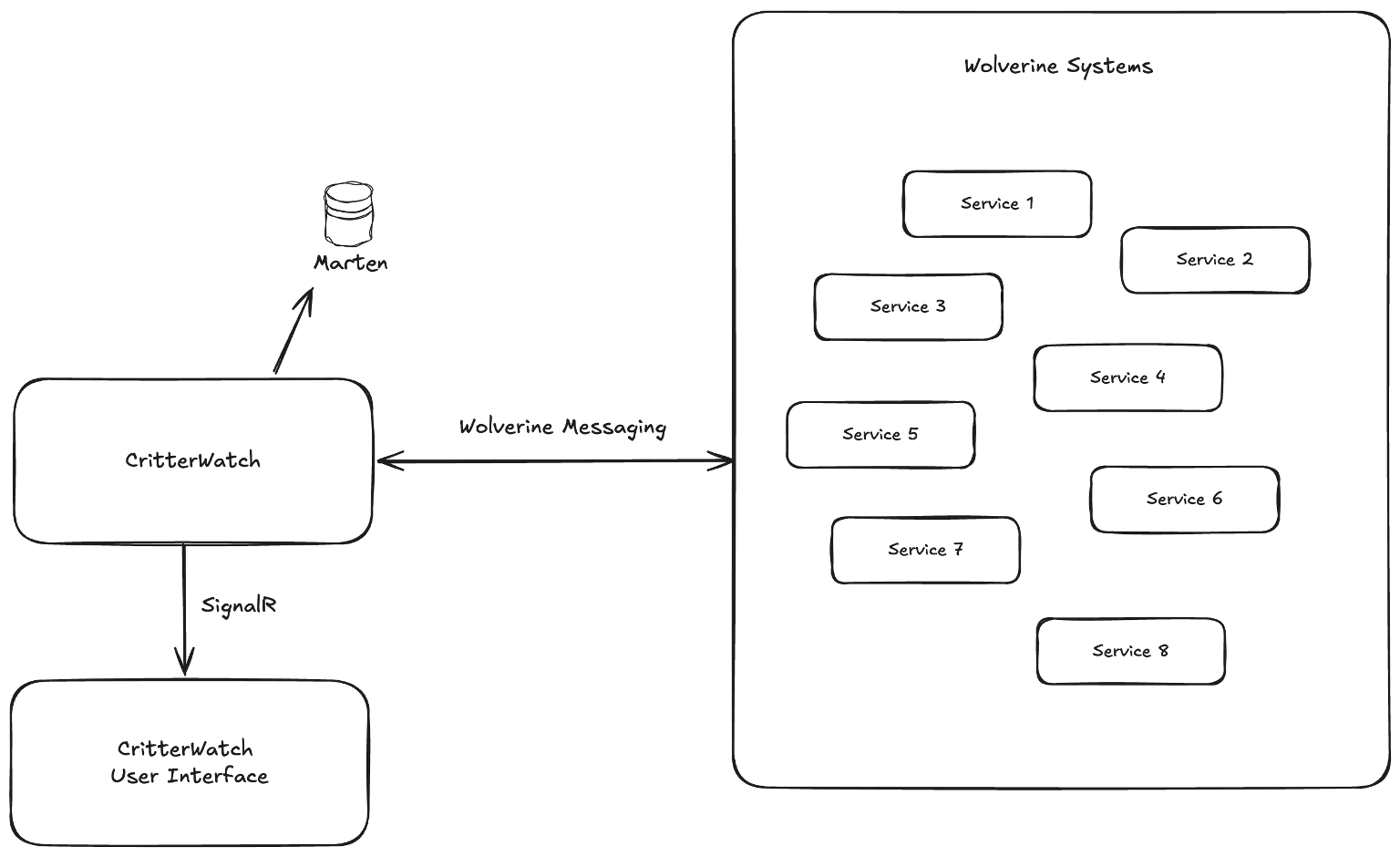
For the love of all that’s good in this world, JasperFx Software needs to get an MVP out the door that’s usable for early adopters who are already clamoring for it. The “Critter Watch” tool, in a nutshell, should be able to tell you everything you need to know about how or why a Critter Stack application is unhealthy and then also give you the tools you need to heal your systems when anything does go wrong.

The MVP is still shaping up as:

  • A visualization and explanation of the configuration of your Critter Stack application
  • Performance metrics integration from both Marten and Wolverine
  • Event Store monitoring and management of projections and subscriptions
  • Wolverine node visualization and monitoring
  • Dead Letter Queue querying and management
  • Alerting – but I don’t have a huge amount of detail yet. I’m paying close attention to the issues JasperFx clients see in production applications though, and using that to inform what information Critter Watch will surface through its user interface and push notifications

This work is heavily in flight, and will hopefully accelerate over the holidays and January as JasperFx Software clients tend to be much quieter. I will be publishing a separate vision document soon for users to review.

The Entire “Critter Stack”

  • We’re standing up the new docs.jasperfx.net (Babu is already working on this) to hold documentation on supporting libraries and more tutorials and sample projects that cross Marten & Wolverine. This will finally add some documentation for Weasel (database utilities and migration support), our command line support, the stateful resource model, the code generation model, and everything to do with DevOps recipes.
  • Play the “Cold Start Optimization” epic across both Marten and Wolverine (and possibly Lamar). I don’t think that true AOT support is feasible, but maybe we can get a lot closer. Have an optimized start mode of some sort that eliminates all or at least most of:
    • Reflection usage in bootstrapping
    • Reflection usage at runtime, which today is really just occasional calls to object.GetType()
    • Assembly scanning of any kind, which we know can be very expensive for some systems with very large dependency trees.
  • Increased and improved integration with EF Core across the stack

Marten

The biggest set of complaints I’m hearing lately is all around views between multiple entity types or projections involving multiple stream types or multiple entity types. I also got some feedback from multiple past clients about the limitation of Marten as a data source underneath UI grids, which isn’t particularly a new bit of feedback. In general, there also appears to be a massive opportunity to improve Marten’s usability for many users by having more robust support in the box for projecting event data to flat, denormalized tables.

I think I’d like to prioritize a series of work in 2026 to alleviate the complicated view problem:

  • The “Composite Projections” Epic where you might use the build products of upstream projections to create multi-stream projection views. This is also an opportunity to ratchet up even more scalability and throughput in the daemon. I’ve gotten positive feedback from a couple JasperFx clients about this. It’s also a big opportunity to increase the throughput and scalability of the Async Daemon by making fewer database requests
  • Revisit GroupJoin in the LINQ support even though that’s going to be absolutely miserable to build. GroupJoin() might end up being a much easier usage that all our Include() functionality. 
  • A first class model to project Marten event data with EF Core. In this proposed model, you’d use an EF Core DbContext to do all the actual writes to a database. 

Other than that, some other ideas that have kicked around for awhile are:

  • Improve the documentation and sample projects, especially around the usage of projections
  • Take a better look at the full text search features in Marten
  • Finally support the PostGIS extension in Marten. I think that could be something flashy and quick to build, but I’d strongly prefer to do this in the context of an actual client use case.
  • Continue to improve our story around multi-stream operations. I’m not enthusiastic about “Dynamic Boundary Consistency” (DCB) in regards to Marten though, so I’m not sure what this actually means yet. This might end up centering much more on the integration with Wolverine’s “aggregate handler workflow” which is already perfectly happy to support strong consistency models even with operations that touch more than one event stream.

Wolverine

Wolverine is by far and away the busiest part of the Critter Stack in terms of active development right now, but I think that slows down soon. To be honest, most work at this point is us reacting tactically to JasperFx client or user needs. In terms of general, strategic themes, I think that 2026 will involve:

  • In conjunction with “CritterWatch”, improving Wolverine’s management story around dead letter queueing
  • I would love to expand Wolverine’s database support beyond “just” SQL Server and PostgreSQL
  • Improving the Kafka integration. That’s not our most widely used messaging broker, but that seems to be the leading source of enhancement requests right now

New Critters?

We’ve done a lot of preliminary work to potentially build new Critter Stack event store alternatives based on different database engines. I’ve always believed that SQL Server would be the logical next database engine, but we’ve gotten fewer and fewer requests for this as PostgreSQL has become a much more popular database choice in the .NET ecosystem.

I’m not sure this will be a high priority in 2026, but you never know…

“Classic” .NET Domain Events with Wolverine and EF Core

I was helping a new JasperFx Software client this week to best integrate a Domain Events strategy into their new Wolverine codebase. This client wanted to use the common model of using an EF Core DbContext to harvest domain events raised by different entities and relay those to Wolverine messaging with proper Wolverine transactional outbox support for system durability. As part of that assistance — and also to have some content for other Wolverine users trying the same thing later — I promised to write a blog post showing how I’d do this kind of integration myself with Wolverine and EF Core or at least consider a few options. To try to more permanently head this usage problem for other users, I went into mad scientist mode this evening and just rolled out a new Wolverine 5.6 with some important improvements to make this Domain Events pattern much easier to use in combination with EF Core.

Let’s start with some context about the general kind of approach I’m referring to with…

Typical .NET Approach with EF Core and MediatR

I’m largely basing all the samples in this post on Camron Frenzel’s Simple Domain Events with EFCore and MediatR. In his example there was a domain entity like this:

    // Base class that establishes the pattern for publishing
    // domain events within an entity
    public abstract class Entity : IEntity
    {     
        [NotMapped]
        private readonly ConcurrentQueue<IDomainEvent> _domainEvents = new ConcurrentQueue<IDomainEvent>();

        [NotMapped]
        public IProducerConsumerCollection<IDomainEvent> DomainEvents => _domainEvents;

        protected void PublishEvent(IDomainEvent @event)
        {
            _domainEvents.Enqueue(@event);
        }

        protected Guid NewIdGuid()
        {
            return MassTransit.NewId.NextGuid();
        }
    }

    public class BacklogItem : Entity
    {
        public Guid Id { get; private set; }

        [MaxLength(255)]
        public string Description { get; private set; }
        public virtual Sprint Sprint { get; private set; }
        public DateTime CreatedAtUtc { get; private set; } = DateTime.UtcNow;

        private BacklogItem() { }

        public BacklogItem(string desc)
        {
            this.Id = NewIdGuid();
            this.Description = desc;
        }
    
        public void CommitTo(Sprint s)
        {
            this.Sprint = s;
            this.PublishEvent(new BacklogItemCommitted(this, s));
        }
    }

Note the CommitTo() method that publishes a BacklogItemCommitted event that in his sample is published via MediatR with some customization of an EF Core DbContext like this from the referenced post with some comments that I added:

public override async Task<int> SaveChangesAsync(CancellationToken cancellationToken = default(CancellationToken))
{
    await _preSaveChanges();
    var res = await base.SaveChangesAsync(cancellationToken);
    return res;
}

private async Task _preSaveChanges()
{
    await _dispatchDomainEvents();
}

private async Task _dispatchDomainEvents()
{
    // Find any entity objects that were changed in any way
    // by the current DbContext, and relay them to MediatR
    var domainEventEntities = ChangeTracker.Entries<IEntity>()
        .Select(po => po.Entity)
        .Where(po => po.DomainEvents.Any())
        .ToArray();

    foreach (var entity in domainEventEntities)
    {
        // _dispatcher was an abstraction in his post
        // that was a light wrapper around MediatR
        IDomainEvent dev;
        while (entity.DomainEvents.TryTake(out dev))
            await _dispatcher.Dispatch(dev);
    }
}

The goal of this approach is to make DDD style entity types the entry point and governing “decider” of all business behavior and workflow and give these domain model types a way to publish event messages to the rest of the system for side effects in the system outside of the state of the entity. Like for example, maybe the backlog system has to publish a message to a Slack room about the back log item being added to the sprint. You sure as hell don’t want your domain entity to have to know about the infrastructure you use to talk to Slack or web services or whatever.

Mechanically, I’ve seen this typically done with some kind of Entity base class that either exposes a collection of published domain events like the sample above, or puts some kind of interface like this directly into the Entity objects:

// Just assume that this little abstraction
// eventually relays the event messages to Wolverine
// or whatever messaging tool you're using
public interface IEventPublisher
{
    void Publish<T>(T @event);
}

// Using a Nullo just so you don't have potential
// NullReferenceExceptions
public class NulloEventPublisher : IEventPublisher
{
    public void Publish<T>(T @event)
    {
        // Do nothing.
    }
}

public abstract class Entity
{
    public IEventPublisher Publisher { get; set; } = new NulloEventPublisher();
}

public class BacklogItem : Entity
{
    public Guid Id { get; private set; } = Guid.CreateVersion7();

    public string Description { get; private set; }
    
    // ZOMG, I forgot how annoying ORMs are. Use a document database
    // and stop worrying about making things virtual just for lazy loading
    public virtual Sprint Sprint { get; private set; }

    public void CommitTo(Sprint sprint)
    {
        Sprint = sprint;
        Publisher.Publish(new BackLotItemCommitted(Id, sprint.Id));
    }
}

In the approach of using the abstraction directly inside of your entity classes, you incur the extra overhead of connecting the Entity objects loaded out of EF Core with the implementation of your IEventPublisher interface at runtime. I’ll do a few thought experiments later in this post and try out a couple different alternatives.

Before going back to EF Core integration ideas, let me deviate into…

Idiomatic Critter Stack Usage

Forget EF Core for a second, let’s examine a possible usage with the full “Critter Stack” and use Marten for Event Sourcing instead. In this case, a command handler to add a backlog item to a sprint could look something like this (folks, I didn’t spend much time thinking about how a back log system would be built here):

public record BackLotItemCommitted(Guid SprintId);
public record CommitToSprint(Guid BacklogItemId, Guid SprintId);

// This is utilizing Wolverine's "Aggregate Handler Workflow" 
// which is the Critter Stack's flavor of the "Decider" pattern
public static class CommitToSprintHandler
{
    public static Events Handle(
        // The actual command
        CommitToSprint command,

        // Current state of the back log item, 
        // and we may decide to make the commitment here
        [WriteAggregate] BacklogItem item,

        // Assuming that Sprint is event sourced, 
        // this is just a read only view of that stream
        [ReadAggregate] Sprint sprint)
    {
        // Use the item & sprint to "decide" if 
        // the system can proceed with the commitment
        return [new BackLotItemCommitted(command.SprintId)];
    }
}

In the code above we’re appending the BackLotItemCommitted event to Marten that’s returned from the method. If you need to carry out side effects outside of the scope of this handler using that event as a message input, you have a couple options to have Wolverine relay that through any of its messaging through the event forwarding (faster, but un-ordered) or event subscriptions (strictly ordered, but that always means slower).

I should also say that if the events returned from the function above are also being forwarded as messages and not just being appended to the Marten event store, that messaging is completely integrated with Wolverine’s transactional outbox support. That’s a key differentiation all by itself from a similar MediatR based approach that doesn’t come with outbox support.

That’s it, that’s the whole handler, but here are some things I would want you to take away from that code sample above:

  • Yes, the business logic is embedded directly in the handler method instead of being buried in the BacklogItem or Sprint aggregates. We are very purposely going down a Functional Programming (adjacent? curious?) approach where the logic is primarily in pure “Decider” functions
  • I think the code above clearly shows the relationship between the system input (the CommitToSprint command message) and the potential side effects and changes in state of the system. This relative ease of reasoning about the code is of the utmost importance for system maintainability. We can look at the handler code and know that executing that message will potentially lead to events or event messages being published. I’m going to hit this point again from some of the other potential approaches because I think this is a vital point.
  • Testability of the business logic is easy with the pure function approach
  • There are no marker interfaces, Entity base classes, or jumping through layers. There’s no repository or factory
  • Yes, there is absolutely a little bit of “magic” up above, but you can get Wolverine to show you the exact generated code around your handler to explain what it’s doing

So enough of that, let’s start with some possible alternatives for Wolverine integration of domain events from domain entity objects with EF Core.

Relay Events from Your Entity Subclass to Wolverine

Switching back to EF Core integration, let’s look at a possible approach to teach Wolverine how to scrape domain events for publishing from your own custom Event or IEvent layer supertype like this one that we’ll put behind our BackLogItem type:

// Of course, if you're into DDD, you'll probably 
// use many more marker interfaces than I do here, 
// but you do you and I'll do me in throwaway sample code
public abstract class Entity
{
    public List<object> Events { get; } = new();

    public void Publish(object @event)
    {
        Events.Add(@event);
    }
}

public class BacklogItem : Entity
{
    public Guid Id { get; private set; }

    public string Description { get; private set; }
    public virtual Sprint Sprint { get; private set; }
    public DateTime CreatedAtUtc { get; private set; } = DateTime.UtcNow;
    
    public void CommitTo(Sprint sprint)
    {
        Sprint = sprint;
        Publish(new BackLotItemCommitted(Id, sprint.Id));
    }
}

Let’s utilize this a little bit within a Wolverine handler, first with explicit code:

public static class CommitToSprintHandler
{
    public static async Task HandleAsync(
        CommitToSprint command,
        ItemsDbContext dbContext)
    {
        var item = await dbContext.BacklogItems.FindAsync(command.SprintId);
        var sprint = await dbContext.Sprints.FindAsync(command.SprintId);
        
        // This method would cause an event to be published within
        // the BacklogItem object here that we need to gather up and
        // relay to Wolverine later
        item.CommitTo(sprint);
        
        // Wolverine's transactional middleware handles 
        // everything around SaveChangesAsync() and transactions
    }
}

Or a little bit cleaner with some Wolverine “magic” with Wolverine’s declarative persistence support if you’re so inclined:

public static class CommitToSprintHandler
{
    public static IStorageAction<BacklogItem> Handle(
        CommitToSprint command,
        
        // There's a naming convention here about how
        // Wolverine "knows" the id for the BacklogItem
        // from the incoming command
        [Entity] BacklogItem item,
        [Entity] Sprint sprint
        )
    {
        // This method would cause an event to be published within
        // the BacklogItem object here that we need to gather up and
        // relay to Wolverine later
        item.CommitTo(sprint);

        // This is necessary to "tell" Wolverine to put transactional middleware around the handler
        // Just taking in the right DbContext type as a dependency
        // work work just as well if you don't like the Wolverine
        // magic
        return Storage.Update(item);
    }
}

Now, let’s add some Wolverine configuration to just make this pattern work:

builder.Host.UseWolverine(opts =>
{
    // Setting up Sql Server-backed message storage
    // This requires a reference to Wolverine.SqlServer
    opts.PersistMessagesWithSqlServer(connectionString, "wolverine");

    // Set up Entity Framework Core as the support
    // for Wolverine's transactional middleware
    opts.UseEntityFrameworkCoreTransactions();
    
    // THIS IS A NEW API IN Wolverine 5.6!
    opts.PublishDomainEventsFromEntityFrameworkCore<Entity>(x => x.Events);

    // Enrolling all local queues into the
    // durable inbox/outbox processing
    opts.Policies.UseDurableLocalQueues();
});

In the Wolverine configuration above, the EF Core transactional middleware now “knows” how to scrape out possible domain events from the active DbContext.ChangeTracker and publish them through Wolverine. Moreover, the EF Core transactional middleware is doing all the operation ordering for you so that the events are enqueued as outgoing messages as part of the transaction and potentially persisted to the transactional inbox or outbox (depending on configuration) before the transaction is committed.

To make this as clear as possible, this approach is completely reliant on the EF Core transactional middleware.

Oh, and also note that this domain event “scraping” is also supported and tested with the IDbContextOutbox<T> service if you want to use this in application code outside of Wolverine message handlers or HTTP endpoints.

This approach could also support the thread safe approach that the sample from the first section used in the future, but I’m dubious that that’s necessary.

If I were building a system that embeds domain event publishing directly in domain model entity classes, I would prefer this approach. But, let’s talk about another option that will not require any changes to Wolverine…

Relay Events from Entity to Wolverine Cascading Messages

In this approach, which I’m granting that some people won’t like at all, we’ll simply pipe the event messages from the domain entity right to Wolverine and utilize Wolverine’s cascading message feature.

This time I’m going to change the BacklogItem entity class to something like this:

public class BacklogItem 
{
    public Guid Id { get; private set; }

    public string Description { get; private set; }
    public virtual Sprint Sprint { get; private set; }
    public DateTime CreatedAtUtc { get; private set; } = DateTime.UtcNow;
    
    // The exact return type isn't hugely important here
    public object[] CommitTo(Sprint sprint)
    {
        Sprint = sprint;
        return [new BackLotItemCommitted(Id, sprint.Id)];
    }
}

With the handler signature:

public static class CommitToSprintHandler
{
    public static object[] Handle(
        CommitToSprint command,
        
        // There's a naming convention here about how
        // Wolverine "knows" the id for the BacklogItem
        // from the incoming command
        [Entity] BacklogItem item,
        [Entity] Sprint sprint
        )
    {
        return item.CommitTo(sprint);
    }
}

The approach above let’s you make the handler be a single pure function which is always great for unit testing, eliminates the need to do any customization of the DbContext type, makes it unnecessary to bother with any kind of IEventPublisher interface, and let’s you keep the logic for what event messages should be raised completely in your domain model entity types.

I’d also argue that this approach makes it more clear to later developers that “hey, additional messages may be published as part of handling the CommitToSprint command” and I think that’s invaluable. I’ll harp on this more later, but I think the traditional, MediatR-flavored approach to domain events from the first example at the top makes application code harder to reason about and therefore more buggy over time.

Embedding IEventPublisher into the Entities

Lastly, let’s move to what I think is my least favorite approach that I will from this moment be recommending against for any JasperFx clients but is now completely supported by Wolverine 5.6+! Let’s use an IEventPublisher interface like this:

// Just assume that this little abstraction
// eventually relays the event messages to Wolverine
// or whatever messaging tool you're using
public interface IEventPublisher
{
    void Publish<T>(T @event) where T : IDomainEvent;
}

// Using a Nullo just so you don't have potential
// NullReferenceExceptions
public class NulloEventPublisher : IEventPublisher
{
    public void Publish<T>(T @event) where T : IDomainEvent
    {
        // Do nothing.
    }
}

public abstract class Entity
{
    public IEventPublisher Publisher { get; set; } = new NulloEventPublisher();
}

public class BacklogItem : Entity
{
    public Guid Id { get; private set; } = Guid.CreateVersion7();

    public string Description { get; private set; }
    
    // ZOMG, I forgot how annoying ORMs are. Use a document database
    // and stop worrying about making things virtual just for lazy loading
    public virtual Sprint Sprint { get; private set; }

    public void CommitTo(Sprint sprint)
    {
        Sprint = sprint;
        Publisher.Publish(new BackLotItemCommitted(Id, sprint.Id));
    }
}

Now, on to a Wolverine implementation for this pattern. You’ll need to do just a couple things. First, add this line of configuration to Wolverine, and note there are no generic arguments here:

// This will set you up to scrape out domain events in the
// EF Core transactional middleware using a special service
// I'm just about to explain
opts.PublishDomainEventsFromEntityFrameworkCore();

Now, build a real implementation of that IEventPublisher interface above:

public class EventPublisher(OutgoingDomainEvents Events) : IEventPublisher
{
    public void Publish<T>(T e) where T : IDomainEvent
    {
        Events.Add(e);
    }
}

OutgoingDomainEvents is a service from the WolverineFx.EntityFrameworkCore Nuget that is registered as Scoped by the usage of the EF Core transactional middleware. Next, register your custom IEventPublisher with the Scoped lifecycle:

opts.Services.AddScoped<IEventPublisher, EventPublisher>();

How you wire up IEventPublisher to your domain entities getting loaded out of the your EF Core DbContext? Frankly, I don’t want to know. Maybe a repository abstraction around your DbContext types? Dunno. I hate that kind of thing in code, but I perfectly trust *you* to do that and to not make me see that code.

What’s important is that within a message handler or HTTP endpoint, if you resolve the IEventPublisher through DI and use the EF Core transactional middleware, the domain events published to that interface will be piped correctly into Wolverine’s active messaging context.

Likewise, if you are using IDbContextOutbox<T>, the domain events published to IEventPublisher will be correctly piped to Wolverine if you:

  1. Pull both IEventPublisher and IDbContextOutbox<T> from the same scoped service provider (nested container in Lamar / StructureMap parlance)
  2. Call IDbContextOutbox<T>.SaveChangesAndFlushMessagesAsync()

So, we’re going to have to do some sleight of hand to keep your domain entities synchronous

Last note, in unit testing you might use a stand in “Spy” like this:

public class RecordingEventPublisher : OutgoingMessages, IEventPublisher
{
    public void Publish<T>(T @event)
    {
        Add(@event);
    }
}

Summary

I have always hated this Domain Events pattern and much prefer the full “Critter Stack” approach with the Decider pattern and event sourcing. But, Wolverine is picking up a lot more users who combine it with EF Core (and JasperFx deeply appreciates these customers!) and I know damn well that there will be more and more demand for this pattern as people with more traditional DDD backgrounds and used to more DI-reliant tools transition to Wolverine. Now was an awfully good time to plug this gap.

If it was me, I would also prefer having an Entity just store published domain events on itself and depend on Wolverine “scraping” these events out of the DbContext change tracking so you don’t have to do any kind of gymnastics and extra layering to attach some kind of IEventPublisher to your Entity types.

Lastly, if you’re comparing this straight up to the MediatR approach, just keep in mind that this is not an oranges to oranges comparison because Wolverine also needs to correctly utilize its transactional outbox for resiliency, which is a feature that MediatR does not provide.

The Critter Stack Gets Even Better at Testing

My internal code name for one of the new features I’m describing is “multi-stage tracked sessions” which somehow got me thinking of the ZZ Top song “Stages” and their Afterburner album because the sound track for getting this work done this week. Not ZZ Top’s best stuff, but there’s still some bangers on it, or at least *I* loved how it sounded on my Dad’s old phonograph player when I was a kid. For what it’s worth, my favorite ZZ Top albums cover to cover are Degüello and their La Futura comeback album.

I was heavily influenced by Extreme Programming in my early career and that’s made me have a very deep appreciation for the quality of “Testability” in the development tools I use and especially for the tools like Marten and Wolverine that I work on. I would say that one of the differentiators for Wolverine over other .NET messaging libraries and application frameworks is its heavy focus and support for automated testing of your application code.

The Critter Stack community released Marten 8.14 and Wolverine 5.1 today with some significant improvements to our testing support. These new features mostly originated from my work with JasperFx Software clients that give me a first hand look into what kinds of challenges our users hit automating tests that involve multiple layers of asynchronous behavior.

Stubbed Message Handlers in Wolverine

The first improvement is Wolverine getting the ability to let you temporarily apply stubbed message handlers to a bootstrapped application in tests. The key driver for this feature is teams that take advantage of Wolverine’s request/reply capabilities through messaging.

Jumping into an example, let’s say that your system interacts with another service that estimates delivery costs for ordering items. At some point in the system you might reach out through a request/reply call in Wolverine to estimate an item delivery before making a purchase like this code:

// This query message is normally sent to an external system through Wolverine
// messaging
public record EstimateDelivery(int ItemId, DateOnly Date, string PostalCode);

// This message type is a response from an external system
public record DeliveryInformation(TimeOnly DeliveryTime, decimal Cost);

public record MaybePurchaseItem(int ItemId, Guid LocationId, DateOnly Date, string PostalCode, decimal BudgetedCost);
public record MakePurchase(int ItemId, Guid LocationId, DateOnly Date);
public record PurchaseRejected(int ItemId, Guid LocationId, DateOnly Date);

public static class MaybePurchaseHandler
{
    public static Task<DeliveryInformation> LoadAsync(
        MaybePurchaseItem command, 
        IMessageBus bus, 
        CancellationToken cancellation)
    {
        var (itemId, _, date, postalCode, budget) = command;
        var estimateDelivery = new EstimateDelivery(itemId, date, postalCode);
        
        // Let's say this is doing a remote request and reply to another system
        // through Wolverine messaging
        return bus.InvokeAsync<DeliveryInformation>(estimateDelivery, cancellation);
    }
    
    public static object Handle(
        MaybePurchaseItem command, 
        DeliveryInformation estimate)
    {

        if (estimate.Cost <= command.BudgetedCost)
        {
            return new MakePurchase(command.ItemId, command.LocationId, command.Date);
        }

        return new PurchaseRejected(command.ItemId, command.LocationId, command.Date);
    }
}

And for a little more context, the EstimateDelivery message will always be sent to an external system in this configuration:

var builder = Host.CreateApplicationBuilder();
builder.UseWolverine(opts =>
{
    opts
        .UseRabbitMq(builder.Configuration.GetConnectionString("rabbit"))
        .AutoProvision();

    // Just showing that EstimateDelivery is handled by
    // whatever system is on the other end of the "estimates" queue
    opts.PublishMessage<EstimateDelivery>()
        .ToRabbitQueue("estimates");
});

In testing scenarios, maybe the external system isn’t available at all, or it’s just much more challenging to run tests that also include the external system, or maybe you’d just like to write more isolated tests against your service’s behavior before even trying to integrate with the other system (my personal preference anyway). To that end we can now stub the remote handling like this:

public static async Task try_application(IHost host)
{
    host.StubWolverineMessageHandling<EstimateDelivery, DeliveryInformation>(
        query => new DeliveryInformation(new TimeOnly(17, 0), 1000));

    var locationId = Guid.NewGuid();
    var itemId = 111;
    var expectedDate = new DateOnly(2025, 12, 1);
    var postalCode = "78750";

    var maybePurchaseItem = new MaybePurchaseItem(itemId, locationId, expectedDate, postalCode,
        500);
    
    var tracked =
        await host.InvokeMessageAndWaitAsync(maybePurchaseItem);
    
    // The estimated cost from the stub was more than we budgeted
    // so this message should have been published
    
    // This line is an assertion too that there was a single message
    // of this type published as part of the message handling above
    var rejected = tracked.Sent.SingleMessage<PurchaseRejected>();
    rejected.ItemId.ShouldBe(itemId);
    rejected.LocationId.ShouldBe(locationId);
}

After calling making this call:

        host.StubWolverineMessageHandling<EstimateDelivery, DeliveryInformation>(
            query => new DeliveryInformation(new TimeOnly(17, 0), 1000));

Calling this from our Wolverine application:

        // Let's say this is doing a remote request and reply to another system
        // through Wolverine messaging
        return bus.InvokeAsync<DeliveryInformation>(estimateDelivery, cancellation);

Will use the stubbed logic we registered. This is enabling you to use fake behavior for difficult to use external services.

For the next test, we can completely remove the stub behavior and revert back to the original configuration like this:

public static void revert_stub(IHost host)
{
    // Selectively clear out the stub behavior for only one message
    // type
    host.WolverineStubs(stubs =>
    {
        stubs.Clear<EstimateDelivery>();
    });
    
    // Or just clear out all active Wolverine message handler
    // stubs
    host.ClearAllWolverineStubs();
}

There’s a bit more to the feature you can read about in our documentation, but hopefully you can see right away how this can be useful for effectively stubbing out the behavior of external systems through Wolverine in tests.

And yes, some older .NET messaging frameworks already had *this* feature and it’s been occasionally requested from Wolverine, so I’m happy to say we have this important and useful capability.

Forcing Marten’s Asynchronous Daemon to “Catch Up”

Marten has had the IDocumentStore.WaitForNonStaleProjectionDataAsync(timeout) API (see the documentation for an example) for quite awhile that lets you pause a test while any running asynchronous projections or subscriptions run and catch up to wherever the event store “high water mark” was when you originally called the method. Hopefully, this lets ongoing background work proceed until the point where it’s now safe for you to proceed to the “Assert” part of your automated tests. As a convenience, this API is also available through extension methods on both IHost and IServiceProvider.

We’ve recently invested time into this API to make it provide much more contextual information about what’s happening asynchronously if the “waiting” does not complete. Specifically, we’ve made the API throw an exception that embeds a table of where every asynchronous projection or subscription ended up at compared to the event store’s “high water mark” (the highest sequential identifier assigned to a persisted event in the database). In this last release we made sure that that textual table also shows any projections or subscriptions that never recorded any process with a sequence of “0” so you can see what did or didn’t happen. We have also changed the API to record any exceptions thrown by the asynchronous daemon (serialization errors? application errors from *your* projection code? database errors?) and have those exceptions piped out in the failure messages when the “WaitFor” API does not successfully complete.

Okay, with all of that out of the way, we also added a completely new, slightly alternative for the asynchronous daemon that just forces the daemon to quickly process all outstanding events through every asynchronous projection or subscription right this second and throw up any exceptions that it encounters. We call this the “catch up” API:

        using var daemon = await theStore.BuildProjectionDaemonAsync();
        await daemon.CatchUpAsync(CancellationToken.None);

This mode is faster and hopefully more reliable than WaitFor***** because it’s happening inline and shortcuts a lot of the normal asynchronous polling and messaging within the normal daemon processing.

There’s also an IHost.CatchUpAsync() or IServiceProvider.CatchUpAsync() convenience method for test usage as well.

Multi Stage Tracked Sessions

I’m obviously biased, but I’d say that Wolverine’s tracked session capability is a killer feature that makes Wolverine stand apart from other messaging tools in the .NET ecosystem and it goes a long way toward making integration testing through Wolverine asynchronous messaging be productive and effective.

But, what if you have a testing scenario where you:

  1. Carry out some kind of action (an HTTP request invoked through Alba? publishing a message internally within your application?) that leads to messages being published in Wolverine that might in turn lead to even more messages getting published within your Wolverine system or other tracked systems
  2. Along the way, handling one or more commands leads to events being appended to a Marten event store
  3. An asynchronously executing projection might append other events or publish messages in Marten’s RaiseSideEffects() capability or an event subscription might in turn publish other Wolverine messages that start up an all new cycle of “when is the system really done with all the work it has started.”

That might sound a little bit contrived, but it reflects real world scenarios I’ve discussed with multiple JasperFx clients in just the past couple weeks. With their help and some input from the community, we came up with this new extension to Wolverine’s “tracked sessions” to also track and wait for work spawned by Marten. Consider this bit of code from the tests for this feature:

var tracked = await _host.TrackActivity()
    
    // This new helper just resets the main Marten store
    // Equivalent to calling IHost.ResetAllMartenDataAsync()
    .ResetAllMartenDataFirst()
    
    .PauseThenCatchUpOnMartenDaemonActivity(CatchUpMode.AndResumeNormally)
    .InvokeMessageAndWaitAsync(new AppendLetters(id, ["AAAACCCCBDEEE", "ABCDECCC", "BBBA", "DDDAE"]));


To add some context, handling the AppendLetters command message appends events to a Marten stream and possibly cascades another Wolverine message that also appends events. At the same time, there are asynchronous projections and event subscriptions that will publish messages through Wolverine as they run. We can now make this kind of testing scenario much more feasible and hopefully reliable (async heavy tests are super prone to being blinking tests) through the usage of the PauseThenCatchUpOnMartenDaemonActivity() extension method from the Wolverine.Marten library.

In the bit of test code above, that API is:

  1. Registering a “before” action to pause all async daemon activity before executing the “Act” part of the tracked session which in this case is calling IMessageBus.InvokeAsync() against an AppendLetters command
  2. Registering a 2nd stage of the tracked session

When this tracked session is executed, the following sequence happens:

  1. The tracked session calls Marten’s ResetAllMartenDataAsync() in the main DocumentStore for the application to effectively rewind the database state down to your defined initial state
  2. IMessageBus.InvokeAsync(AppendLetters) is called as the actual “execution” of the tracked session
  3. The tracked session is watching everything going on with Wolverine messaging and waits until all “cascaded” messages are complete — and that is recursive. Basically, the tracked session waits until all subsequent messaging activity in the Wolverine application is complete
  4. The 2nd stage we registered to “CatchUp” means the tracked session calls Marten’s new “CatchUp” API to force all asynchronous projections and event subscriptions in the system to immediately process all persisted events. This also restarts the tracked session monitoring of any Wolverine messaging activity so that this stage will only complete when all detected Wolverine messaging activity is completed.

By using this new capability inside of the older tracked session feature, we’re able to effectively test from the original message input through any subsequent messages triggered by the original message through asynchronous Marten behavior caused by the original messages which might in turn publish yet more messages through Wolverine.

Long story short, this gives us a reliable way to know when the “Act” part of a test is actually complete and proceed to the “Assert” portion of a test. Moreover, this new feature also tries really hard to bring out some visibility into the asynchronous Marten behavior and the second stage messaging behavior in the case of test failures.

Summary

None of this is particularly easy conceptually, and it’s admittedly here because of relatively hard problems in test automation that you might eventually run into. Selfishly, I needed to get these new features into the hands of a client tomorrow and ran out of time to better document these new features, so you get this braindump blog post.

If it helps, I’m going to talk through these new capabilities a bit more in our next Critter Stack live stream tomorrow (Nov. 6th):

Wolverine Does More to Simplify Server Side Code

Just to set myself up with some pressure to perform, let me hype up a live stream on Wolverine I’m doing later this week!

I’m doing a live stream on Thursday afternoon (U.S. friendly this time) entitled Vertical Slices the Critter Stack Way based on a fun, meandering talk I did for Houston DNUG and an abbreviated version at Commit Your Code last month.

So, yes, it’s technically about the “Vertical Slice Architecture” in general and specifically with Marten and Wolverine, but more importantly, the special sauce in Wolverine that does more — in my opinion of course — than any other server side .NET application framework to simplify your code and improve testability. In the live stream, I’m going to discuss:

  • A little bit about how I think modern layered architecture approaches and “Ports and Adapters” style approaches can sometimes lead to poor results over time
  • The qualities of a code base that I think are most important (the ability to reason about the behavior of the code, testability of all sorts, ease of iteration, and modularity)
  • How Wolverine’s low code ceremony improves outcomes and the qualities I listed above by reducing layering and shrinking your code into a much tighter vertical slice approach so you can actually see what your system does later on
  • Adopting Wolverine’s idiomatic “A-Frame Architecture” approach and “imperative shell, functional core” thinking to improve testability
  • A sampling of the ways that Wolverine can hugely simplify data access in simpler scenarios and how it can help you keep more complicated data access much closer to behavioral code so you can actually reason about the cause and effects between those two things. And all of that while happily letting you leverage every bit of power in whatever your database or data access tooling happens to be. Seriously, layering approaches and abstractions that obfuscate the database technologies and queries within your system are a very common source of poor system performance in Onion/Clean Architecture approaches.
  • Using Wolverine.HTTP as an alternative AspNetCore Endpoint model and why that’s simpler in the end than any kind of “Mediator” tooling inside of MVC Core or Minimal API
  • Wolverine’s adaptive approach to middleware
  • The full “Critter Stack” combination with Marten and how that leads to arguably the simplest and cleanest code for CQRS command handlers on the planet
  • Wolverine’s goodies for the majority of .NET devs using the venerable EF Core tooling as well

If you’ve never heard of Wolverine or haven’t really paid much attention to it yet, I’m most certainly inviting you to the live stream to give it a chance. If you’ve blown Wolverine off in the past as “yet another messaging tool in .NET,” come find out why that is most certainly not the full story because Wolverine will do much more for you within your application code than other, mere messaging frameworks in .NET or even any of the numerous “Mediator” tools floating around.

Wolverine 5 and Modular Monoliths

In the announcement for the Wolverine 5.0 release last week, I left out a pretty big set of improvements for modular monolith support, specifically in how Wolverine can now work with multiple databases from one service process.

Wolverine works closely with databases for:

And all of those features are supported for Marten, EF Core with either PostgreSQL or SQL Server, and RavenDb.

Back to the “modular monolith” approach and what I’m seeing folks do or want to do is some combination of:

  • Use multiple EF Core DbContext types that target the same database, but maybe with different schemas
  • Use Marten’s “ancillary or separated store” feature to divide the storage up for different modules against the same database

Wolverine 3/4 supported the previous two bullet points, but now Wolverine 5 will be able to support any combination of every possible option in the same process. That even includes the ability to:

  • Use multiple DbContext types that target completely different databases altogether
  • Mix and match with Marten ancillary stores that target completely different database
  • Use RavenDb for some modules, even if others use PostgreSQL or SQL Server
  • Utilize either Marten’s built in multi-tenancy through a database per tenant or Wolverine’s managed EF Core multi-tenancy through a database per tenant

And now do that in one process while being able to support Wolverine’s transactional inbox, outbox, scheduled messages, and saga support for every single database that the application utilizes. And oh, yeah, from the perspective of the future CritterWatch, you’ll be able to use Wolverine’s dead letter management services against every possible database in the service.

Okay, this is the point where I do have to admit that the RavenDb support for the dead letter administration is lagging a little bit, but we’ll get that hole filled in soon.

Here’s an example from the tests:

        var builder = Host.CreateApplicationBuilder();
        var sqlserver1 = builder.Configuration.GetConnectionString("sqlserver1");
        var sqlserver2 = builder.Configuration.GetConnectionString("sqlserver2");
        var postgresql = builder.Configuration.GetConnectionString("postgresql");

        builder.UseWolverine(opts =>
        {
            // This helps Wolverine "know" how to share inbox/outbox
            // storage across logical module databases where they're
            // sharing the same physical database but with different schemas
            opts.Durability.MessageStorageSchemaName = "wolverine";

            // This will be the "main" store that Wolverine will use
            // for node storage
            opts.Services.AddMarten(m =>
            {
                m.Connection(postgresql);
            }).IntegrateWithWolverine();

            // "An" EF Core module using Wolverine based inbox/outbox storage
            opts.UseEntityFrameworkCoreTransactions();
            opts.Services.AddDbContextWithWolverineIntegration<SampleDbContext>(x => x.UseSqlServer(sqlserver1));
            
            // This is helping Wolverine out by telling it what database to use for inbox/outbox integration
            // when using this DbContext type in handlers or HTTP endpoints
            opts.PersistMessagesWithSqlServer(sqlserver1, role:MessageStoreRole.Ancillary).Enroll<SampleDbContext>();
            
            // Another EF Core module
            opts.Services.AddDbContextWithWolverineIntegration<ItemsDbContext>(x => x.UseSqlServer(sqlserver2));
            opts.PersistMessagesWithSqlServer(sqlserver2, role:MessageStoreRole.Ancillary).Enroll<ItemsDbContext>();

            // Yet another Marten backed module
            opts.Services.AddMartenStore<IFirstStore>(m =>
            {
                m.Connection(postgresql);
                m.DatabaseSchemaName = "first";
            });
        });

I’m certainly not saying that you *should* run out and build a system that has that many different persistence options in a single deployable service, but now you *can* with Wolverine. And folks have definitely wanted to build Wolverine systems that target multiple databases for different modules and still get every bit of Wolverine functionality for each database.

Summary

Part of the Wolverine 5.0 work was also Jeffry Gonzalez and I pushing on JasperFx’s forthcoming “CritterWatch” tool and looking for any kind of breaking changes in the Wolverine “publinternals” that might be necessary to support CritterWatch. The “let’s let you use all the database options at one time!” improvements I tried to show in the post were suggested by the work we are doing for dead letter message management in CritterWatch.

I shudder to think how creative folks are going to be with this mix and match ability, but it’s cool to have some bragging rights over these capabilities because I don’t think that any other .NET tool can match this.

Using SignalR with Wolverine 5.0

The Wolverine 5.0 release earlier last last week (finally) added a long requested SignalR transport.

The SignalR library from Microsoft isn’t hard to use from Wolverine for simplistic WebSockets or Server Sent Events usage as it was, but what if you want a server side application to exchange any number of different messages between a browser (or other WebSocket client because that’s actually possible) and your server side code in a systematic way? To that end, Wolverine now supports a first class messaging transport for SignalR. To get started, just add a Nuget reference to the WolverineFx.SignalR library:

dotnet add package WolverineFx.SignalR

There’s a very small sample application called WolverineChat in the Wolverine codebase that just adapts Microsoft’s own little sample application to show you how to use Wolverine.SignalR from end to end in a tiny ASP.Net Core + Razor + Wolverine application. The server side bootstrapping is at minimum, this section from the Wolverine bootstrapping within your Program file:

builder.UseWolverine(opts =>
{
    // This is the only single line of code necessary
    // to wire SignalR services into Wolverine itself
    // This does also call IServiceCollection.AddSignalR()
    // to register DI services for SignalR as well
    opts.UseSignalR(o =>
    {
        // Optionally configure the SignalR HubOptions
        // for the WolverineHub
        o.ClientTimeoutInterval = 10.Seconds();
    });
    
    // Using explicit routing to send specific
    // messages to SignalR. This isn't required
    opts.Publish(x =>
    {
        // WolverineChatWebSocketMessage is a marker interface
        // for messages within this sample application that
        // is simply a convenience for message routing
        x.MessagesImplementing<WolverineChatWebSocketMessage>();
        x.ToSignalR();
    });
});

And a little bit down below where you configure your ASP.Net Core execution pipeline:

// This line puts the SignalR hub for Wolverine at the 
// designated route for your clients
app.MapWolverineSignalRHub("/api/messages");

On the client side, here’s a crude usage of the SignalR messaging support in raw JavaScript:

// Receiving messages from the server
connection.on("ReceiveMessage", function (json) {
    // Note that you will need to deserialize the raw JSON
    // string
    const message = JSON.parse(json);

    // The client code will need to effectively do a logical
    // switch on the message.type. The "real" message is 
    // the data element
    if (message.type == 'ping'){
        console.log("Got ping " + message.data.number);
    }
    else{
        const li = document.createElement("li");
        document.getElementById("messagesList").appendChild(li);
        li.textContent = `${message.data.user} says ${message.data.text}`;
    }
});

and this code to send a message to the server:

document.getElementById("sendButton").addEventListener("click", function (event) {
    const user = document.getElementById("userInput").value;
    const text = document.getElementById("messageInput").value;

    // Remember that we need to wrap the raw message in this slim
    // CloudEvents wrapper
    const message = {type: 'chat_message', data: {'text': text, 'user': user}};

    // The WolverineHub method to call is ReceiveMessage with a single argument
    // for the raw JSON
    connection.invoke("ReceiveMessage", JSON.stringify(message)).catch(function (err) {
        return console.error(err.toString());
    });
    event.preventDefault();
});

I should note here that we’re utilizing Wolverine’s new CloudEvents support for the SignalR messaging to Wolverine, but in this case the only single elements that are required are data and type. So if you had a message like this:

public record ChatMessage(string User, string Text) : WolverineChatWebSocketMessage;

Your JSON envelope that is sent from the server to the client through the new SignalR transport would be like this:

{ “type”: “chat_message”, “data”: { “user”: “Hank”, “text”: “Hey” } }

For web socket message types that are marked with the new WebSocketMessage interface, Wolverine is using kebab casing of the type name for Wolverine’s own message type name alias under the theory that that naming style is more or less common in JavaScript world.

I should also say that a first class SignalR messaging transport for Wolverine has been frequently requested over the years, but I didn’t feel confident building anything until we had more concrete use cases with CritterWatch. Speaking of that…

How we’re using this in CritterWatch

The very first question we got about this feature was more or less “why would I care about this?” To answer that, let me talk just a little bit about the ongoing development with JasperFx Software’s forthcoming “CritterWatch” tool:

CritterWatch is going to involve a lot of asynchronous messaging and processing between the web browser client, the CritterWatch web server application, and the CritterStack (Wolverine and/or Marten in this case) systems that CritterWatch is monitoring and administrating. The major point here is that we need to issue a about three dozen different command messages from the browser to CritterWatch that will kick off long running asynchronous processes that will trigger workflows in other CritterStack systems that will eventually lead to CritterWatch sending messages all the way back to the web browser clients.

The new SignalR transport also provides mechanisms to get the eventual responses back to the original Web Socket connection that triggered the workflow and several mechanisms for working with SignalR connection groups as well.

Using web sockets gives us one single mechanism to issue commands from the client to the CritterWatch service, where the command messages are handled as you’d expect by Wolverine message handlers with all the prerequisite middleware, tracing, and error handling you normally get from Wolverine as well as quick access to any service in your server’s IoC container. Likewise, we can “just” publish from our server to the client through cascading messages or IMessageBus.PublishAsync() without any regard for whether or not that message is being routed through SignalR or any other message transport that Wolverine supports.

Web Socket Publishing from Asynchronous Marten Projection Updates

It’s been relatively common in the past year for me to talk through the utilization of SignalR and Web Sockets (or Server Side Events) to broadcast updates from asynchronously running Marten projections.

Let’s say that you have an application using event sourcing with Marten and you use the Wolverine integration with Marten like this bit from the CritterWatch codebase:

        opts.Services.AddMarten(m =>
        {
            // Other stuff..

            m.Projections.Add<CritterServiceProjection>(ProjectionLifecycle.Async);
        })
            // This is the key part, just calling IntegrateWithWolverine() adds quite a few 
            // things to Marten including the ability to use Wolverine messaging from within
            // Marten RaiseSideEffects() methods
            .IntegrateWithWolverine(w =>
        {
            w.UseWolverineManagedEventSubscriptionDistribution = true;
        });

We have this little message to communicate to the client when configuration changes are detected on the server side:

    // The marker interface is just a helper for message routing
    public record CritterServiceUpdated(CritterService Service) : ICritterStackWebSocketMessage;

And this little bit of routing in Wolverine:

opts.Publish(x =>
{
x.MessagesImplementing<ICritterStackWebSocketMessage>();
x.ToSignalR();
});

And we have a single stream projection in CritterWatch like this:

public class CritterServiceProjection 
    : SingleStreamProjection<CritterService, string>

And finally, we can use the RaiseSideEffects() hood that exists in the Marten SingleStream/MultiStreamProjection to run some code every time an aggregated projection is updated:

    public override ValueTask RaiseSideEffects(IDocumentOperations operations, IEventSlice<CritterService> slice)
    {
        // This is the latest version of CritterService
        var latest = slice.Snapshot;
        
        // CritterServiceUpdated will be routed to SignalR,
        // so this is de facto updating all connected browser
        // clients at runtime
        slice.PublishMessage(new CritterServiceUpdated(latest!));
        
        return ValueTask.CompletedTask;
    }

And after admittedly a little bit of wiring, we’re at a point where we can happily send messages from asynchronous Marten projections through to Wolverine and on to SignalR (or any other Wolverine messaging mechanism too of course) in a reliable way.

Summary

I don’t think that this new transport is necessary for simpler usages of SignalR, but could be hugely advantageous for systems where there’s a multitude of logical messaging back and forth from the web browser clients to the backend.

Wolverine 5.0 is Here!

That’s of course supposed to be a 1992 Ford Mustang GT with the 5.0L V8 that high school age me thought was the coolest car I could imagine ever owning (I most certainly never did of course). Queue “Ice, Ice Baby” and sing “rolling, in my 5.0” in your head because here we go…

Wolverine 5.0 went live on Nuget earlier today after about three months of pretty intensive development from *20* different contributors with easily that many more folks having contributed to discussions and GitHub issues that helped get us here. I’m just not going to be able to list everyone, so let me just thank the very supportive Wolverine community, the 19 other contributors, and the JasperFx clients who contributed to this release.

This release came closely on the heels of Wolverine 4.0 earlier this year, with the primary reasons for a new major version release being:

  • A big change in the internals as we replaced the venerable TPL DataFlow library with the System.Threading.Channels library in every place that Wolverine uses in memory queueing. We did this as a precursor to a hugely important new feature commissioned by a JasperFx Software client (who really needs to get that feature in for their “scale out” so it was definitely about time I got this out today).
  • Some breaking API changes in the “publinternals” of Wolverine to support “CritterWatch”, our long planned and I promise finally in real development add on tooling for Critter Stack observability and management

With that being said, the top line new changes to Wolverine that I’ll be trying to blog about next week are:

For a partial list of significant, smaller improvements:

  • Wolverine can utilize Marten batch querying for the declarative data access, and that includes working with multiple Marten event streams in one logical operation. This is part of the Critter Stack’s response to the “Dynamic Consistency Boundary” idea from some of the commercial event sourcing tools
  • You can finally use strong typed identifiers with the “aggregate handler workflow”
  • An overhaul of the dead letter queue administration services that was part of our ongoing work for CritterWatch
  • A new tutorial for dealing with concurrency when building against Wolverine
  • Optimistic concurrency support for EF Core backed Sagas from the community
  • Ability to target multiple Azure Service Bus namespaces from a single application and improvements to using Azure Service Bus namespace per tenant
  • Improvements to Rabbit MQ for advanced usage

What’s Next?

As happens basically every time, several features that were planned for 5.0 and some significant open issues didn’t make the 5.0 cut. The bigger effort to optimize the cold start time for both Marten and Wolverine will hopefully happen later this year. I think the next minor point release will target some open issues around Wolverine.HTTP (multi-part uploads, actual content negotiation) and the Kafka transport. I would like to take a longer look sometime at how the CritterStack combination can better support operations that cross stream boundaries.

But in the meantime, I’m shifting to open Marten issues before hopefully spending a couple weeks trying to jump start CritterWatch development again.

I usually end these kinds of major release announcements with a link to Don’t Steal My Sunshine as an exhortation to hold off on reporting problems or asking for whatever didn’t make the release. After referring to “Ice, Ice Baby” in the preface to this and probably getting that bass line stuck in your head, here’s the song you want to hear now anyway — which I feel much less of after getting this damn release out:

Migrations the “Critter Stack” Way

I was the guest speaker today on the .NET Data Community Standup doing a talk on how the “Critter Stack” (Marten, Wolverine, and Weasel) support a style of database migrations and even configuration for messaging brokers that greatly reduces development time friction for more productive teams.

The general theme is “it should just work” so developers and testers can get their work done and even iterate on different approaches without having to spend much time fiddling with database or other infrastructure configuration.

And I also shared some hard lessons learned from previous OSS project failures that made the Critter Stack community so adamant that the default configurations “should just work.”

Marten 8.12 with New Plumbing

Until today’s Marten 8.12 release, Marten’s Async Daemon and a great deal of Wolverine‘s internals were both built around the venerable TPL DataFlow library. I had long considered a move to the newer System.Threading.Channels library, but put that off for the previous round of major releases because there was just so much other work to do and Channels isn’t exactly a drop in replacement for the “block” model in TPL DataFlow that we use so heavily in the Critter Stack.

But of course, a handful of things happened to make me want to finally tackle that conversion:

  1. A JasperFx Software client was able to produce behavior under load that proved that the TPL DataFlow ActionBlock wasn’t perfectly sequential even when it was configured with strict ordering
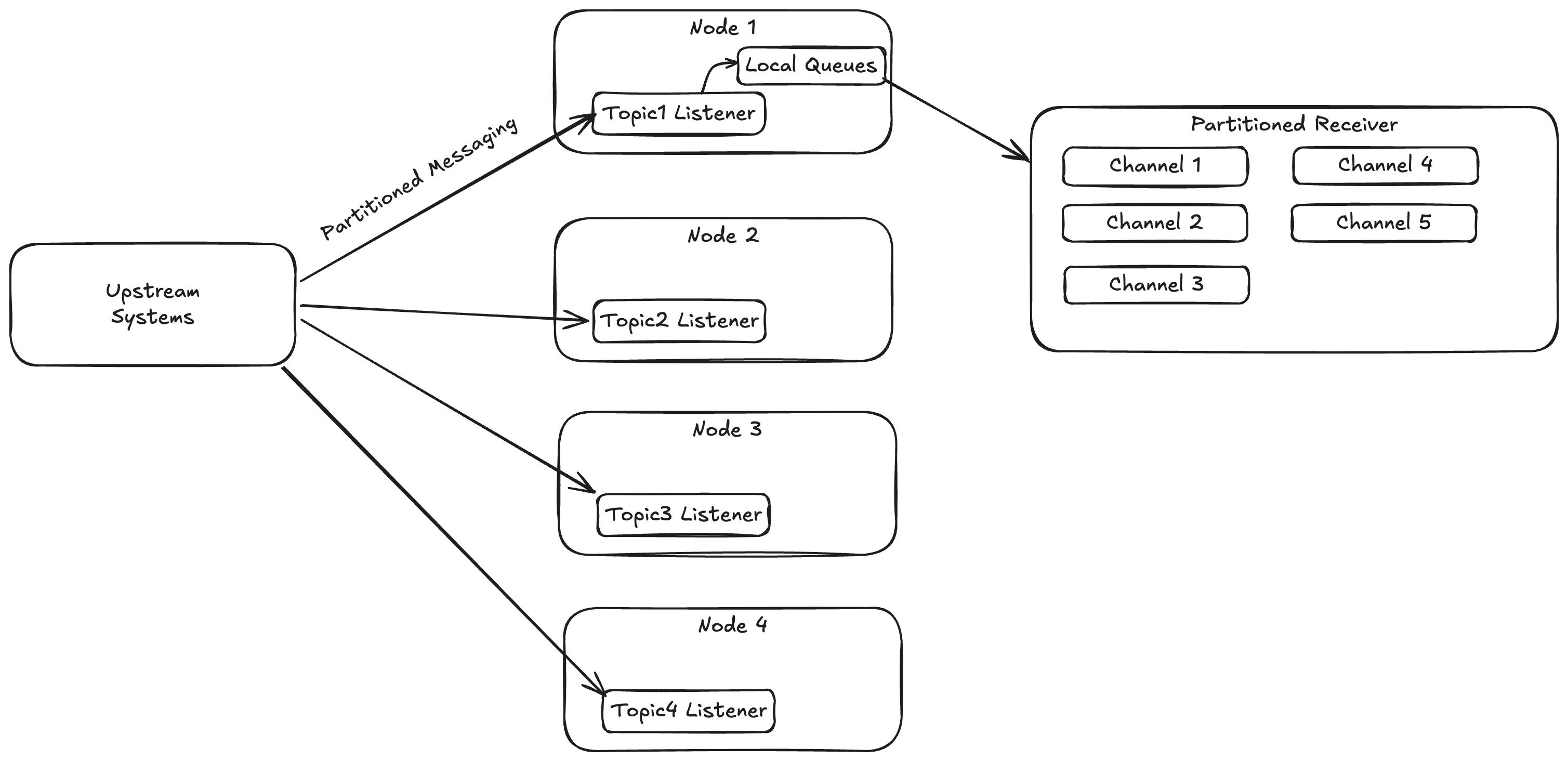
  2. That same client commissioned work on what will be the “partitioned sequential messaging” feature in Wolverine 5.0 that enables Wolverine to group messages on user defined criteria to greatly eliminate concurrent access problems in Critter Stack applications under heavy load

Long story short, we rewired Marten’s Async Daemon and all of Wolverine’s internals to use Channels, but underneath a new set of (thin) abstractions and wrappers that mimics the TPL DataFlow “ITargetBlock” idea. Our new blocks allow us to compose producer/consumer chains in some places, while also enabling our new “partitioned sequential messaging” feature that will hit in Wolverine 5.0.

If you’re curious, or want to laugh at us, or steal them for your own TPL DataFlow conversion, our “Blocks” wrappers are on GitHub here.

Celebrating Marten’s 10th Birthday!

To the best of my recollection and internet sleuthing today, development on Marten started in October of 2015 after my then colleague Corey Kaylor had kicked around an idea the previous summer to utilize the new JSONB feature in PostgreSQL 9.4 as a way to replace our then problematic usage of a third party NoSQL database in a production application (RavenDb, but some of that was on us (me) and RavenDb was young at the time). Digging around today, I found the first post I wrote when we first announced a new tool called Marten later that month.

At this point I feel pretty confident in saying that Marten is the leading Event Sourcing tool for the .NET platform. It’s definitely the most capable toolset for Event Sourcing you can use in .NET and arguably the only single truly “batteries included” option* — especially if you consider its combination with Wolverine into the “Critter Stack.” On top of that, it still fulfills its intended original role as a robust and easy to use document database with a much better local development story and transactional model than most NoSQL options that tend to be either cloud only or have weaker support for data consistency than Marten’s PostgreSQL foundation.

If you’ll indulge just a little bit of navel gazing today, I’d like to walk back through some of the notable history of Marten and thank some fellow travelers along the way. As I mentioned before, Corey Kaylor was the project cofounder and “Marten as a Document Database” was really his original idea. Oskar Dudycz was a massive contributor and really co-leader of Marten for many years, especially around Marten’s now focus on Event Sourcing (You can follow his current work with Event Sourcing and PostgreSQL on Node.JS with Emmett). Babu Annamalai has been a core team member of Marten for most of its life and has done yeoman work around our DevOps infrastructure and website as well as making large contributions to the code. Jaedyn Tonee has been one of our most active community members and now a core team member and contributor. Anne Erdtsieck adds some younger blood, enthusiasm, and a lot of helpful documentation. Jeffry Gonzalez is helping me a great deal with community efforts and now the CritterWatch tooling.

Beyond that, Marten has benefitted from far, far more community involvement than any other OSS project I’ve ever been a part of. I think we’re sitting at around ~250 official contributors to the codebase (a massive number for a .NET OSS project), but that undercounts the true community when you also account for everybody who has made suggestions, given feedback, or taken the time to create actionable GitHub issues that have led to improvements in Marten.

More recently, JasperFx Software‘s engagements with our customers using Marten has directly led to a very large number of technical improvements like partitioning support, first class subscriptions, multi-tenancy improvements, and quite a bit of the integration with Wolverine for scalability and first class messaging support.

Some Project History

When I started the initial PoC work on what is now Marten in late 2015, I was just getting over my funk from a previous multi-year OSS effort failing and furiously doing conceptual planning for a new application framework codenamed “Jasper” that was going to learn from everything that I thought went wrong with FubuMVC (“Jasper” was later rebooted as “Wolverine” to fit into the “Critter Stack” naming theme and also to act as a natural complement to Marten).

To tell this story one last time, as I was doing the initial work I was using the codename “Jasper.Data.” Corey called me one day and in his laconic manner asked me what codename I was going to use and even said “not something lame like Jasper.Data.” I said um, no, and remembering the story of how Selenium is the “cure for mercury poisoning” naming I quickly googled for the “natural predators of Ravens,” which is how we stumbled on the name “Marten” from that moment on as our planned drop in replacement for RavenDb.

As I said earlier, I was really smarting from the FubuMVC project failure, and a big part of my own lessons learned was that I should have been much more aggressive in projection promotion and community building from the very beginning instead of just being a mad scientist. It turned out that there were at least a couple other efforts out there to build something like Marten, but I still had some leftover name recognition from the CodeBetter and ALT.NET days (don’t bother looking for that, it’s all long gone now) and Marten won out quickly over those other nascent projects and even attracted an important cadre of early, active contributors.

Our 1.0 release was in mid 2016 just in time for Marten to go into production in an application with heavy traffic that fall.

A couple years previous I had spent about a month doing some proof of concept work on a possible PostgreSQL backed event store on NodeJS, so I had some interest in Event Sourcing as a possible feature set and tossed in a small event store feature set off to the side of the Marten 1.0 release that was mostly about the Document Database feature set. To be honest, I was just irritated at the wasted effort from the earlier NodeJS work that was abandoned and didn’t want it to be a complete loss. I had zero idea at that time that the Event Sourcing feature set in what I thought was going to be a little side project mostly for work was going to turn out to be the most important and positively impactful technical effort of my career.

As it turned out, we abandoned our plans at that time to jump from .NET to NodeJS when the left-pad incident literally happened the exact same day we were going to meet one last time to decide if we really wanted to do that (we, as it turned out, did not want to do that). At the same time, David Fowler and co in the AspNetCore team finally started talking about “Project K” that while cut down, did become what we now know as .NET Core and in my opinion — even thought that team drives me bonkers sometimes — saved .NET as a technical platform and gave .NET a much brighter future.

Marten 2.0 came out in 2017 with performance improvements, our first built in multi-tenancy feature set, and some customization of JSON serialization for the first time.

Marten 3.0 released in late 2018 with the incorporation of our first “official” core team. The release itself wasn’t that big of a deal, but the formation of an actual core team paid huge dividends for the project over time.

Marten went quiet for awhile as I left the company who had originally sponsored Marten development, but the community and I released the then mammoth Marten 4.0 release in late 2021 that I hoped at the time would permanently fix every possible bit of the technical foundation and set us up for endless success. Schema management, LINQ internals, multi-tenancy, low level mechanics, and a nearly complete overhaul of the Event Sourcing support were part of that release. At that point it was already clear that Marten was now an Event Sourcing tool that also had a Document Database feature set instead of vice versa.

Narrator voice: V4 was not the end of development and did not fix every possible bit of the Marten technical foundation.

Marten 5.0 followed just 6 months later to fix some usability issues we’d introduced in 4.0 with our first foray into standardized AddMarten() bootstrapping and .NET IHost integration. Also importantly, 5.0 introduced Marten’s support for multi-tenancy through separate databases in addition to our previous “conjoined” tenancy model.

Marten 6.0 landed in May 2023 right as I was just about to launch JasperFx. Oskar added the very important event upcaster feature. I might be misremembering, but I think this is about when we added full text search to Marten as well.

Marten 7.0 was released in March of last year, and represented the single largest feature release I think we’d ever done. In this release we did a near rewrite of the LINQ support and extended its use cases while in some cases dramatically improving query performance. The very lowest level database execution pipeline was greatly improved by introducing Polly for resiliency and using every possible advanced trick in Npgsql for improving query batching or command execution. The important async daemon got some serious improvements to how it could distribute work across an application cluster, with that being even more effective when combined with Wolverine for load distribution. Babu added a new native PostgreSQL “partial update” feature we’d wanted for years as the PLV8 engine had fallen out of favor. Heck, 7.0 even added a new model for dynamically adding new tenant databases at runtime with no downtime and a true blue/green deployment model for versioned projections as part of the Event Sourcing feature set. JT added PostgreSQL read replica support that’s completely baked into Marten.

Feel free to correct me if I’m wrong, but I don’t believe there is another event sourcing tool on the planet that can match the CritterStack’s ability to do blue/green deployments with active event projections while not sacrificing strong data consistency.

There was an absurd amount of feature development during 2024 and early 2025 that included:

  • PostgreSQL partitioning support for scalability and performance
  • Full Open Telemetry and Metrics support throughout Marten
  • The “Quick Append” option for faster event store operations
  • A “side effect” model within projections that folks had wanted for years
  • Convenience mechanisms to make event archiving easier
  • New mechanisms to manage tenant data at runtime
  • Non-stale querying of asynchronously projected event data
  • The FetchLatest() API for optimized fetching or advancement of single stream projections. This was very important to optimize common CQRS command handler usages
  • And a lot more…

Marten 8.0 released this June, and I’ll admit that it mostly involved restructuring the shared dependencies underneath both Marten and Wolverine. There was also a large effort to yank quite a bit of the event store functionality and key abstractions out to a shared library that will theoretically be used in a future critter tool to do SQL Server backed event sourcing.

And about that…

Why not SQL Server?!?

If Marten is 10 years old, then that means it’s been 10 years of receiving well (and sometimes not) intentioned advice that Marten should have been either built on SQL Server instead of PostgreSQL or that we should have sprinkled abstractions every which way so that we or community contributors would be able to just casually override a pluggable interface to swap PostgreSQL out for SQL Server or Oracle or whatever. \

Here’s the way I see this after all these years:

  • The PostgreSQL feature set for JSON is still far ahead of where SQL Server is, and Marten depends on a lot of that special PostgreSQL sauce. Maybe the new SQL Server JSON Type will change that equation, but…
  • I’ve already invested far more time than I think I should have getting ready to build a planned SQL Server backed port of Marten and I’m not convinced that that effort will end up being worth the sunk cost 😦
  • The “just use abstractions” armchair architecting isn’t really viable, and I think that would have exploded the internal complexity of several Marten subsystems. And honestly, I was adamant that we were going YAGNI on Marten extensibility upfront so we’d actually get something built after having gone to the opposite extreme with a prior OSS effort
  • PostgreSQL is gaining traction fast in the .NET community and it’s actually much rarer now to get pushback from potential users on PostgreSQL usage — even in the normally very Microsoft-centric .NET world

Marten’s Future

Other than possible performance optimizations, I think that Marten itself will slow down quite a bit in terms of feature development in the near future. That changes anytime a JasperFx client of course, but for the most part, I think most of the Critter Stack effort for the remainder of the year goes into the in flight “CritterWatch” tool that will be a management and observability console application for Critter Stack systems in production.

Summary

I can’t say that back in 2015 I had any clue that Marten would end up being so important to my career. I will say that when I was interviewing with Calavista in 2018 I did a presentation on early Marten as part of that process that most certainly helped me get that position. At the time, my soon to be colleague interviewing me asked me what professional effort I was most proud of, and I answered “Marten” even then.

I had long wanted to branch out and start a company around my OSS efforts, but had largely given up on that dream until someone I just barely know from conferences reached out to me to ask why in the world we hadn’t already commercialized Marten because he thought it was a better choice even then the leading commercial tool. That little DM exchange — along with endless encouragement and support from my wife of course — gave me a bit of confidence and a jolt to get going. Knowing that Marten needed some integration into messaging and a better story for CQRS within an application, Wolverine came back to life originally as a purposeful complement to Marten, which led to our now “Critter Stack” that is the only real end to end technical stack for Event Sourcing in the .NET ecosystem.

Anyway, the whole morale of this little story is that the most profound effort of my now long technical career was largely an accident and only possible with a helluva lot of help, support, and feedback from other people. From my side, I’d say that the one single personal strength that does set me apart from most developers and directly contributed to Marten’s success is simply having a much longer attention span than most of my peers:). Make of *that* what you will.

* Yes, you can use the commercial KurrentDb library within a .NET application, but that only provides a small subset of Marten’s capabilities and requires a lot more repetitive code to use than Marten does.