Multi Step Workflows with the Critter Stack

I’m working with a JasperFx Software client who is in the beginning stages of building a pretty complex, multi-step file import process that is going to involve several different services. For the sake of example code in this post, let’s say that we have the (much simplified from my client’s actual logical workflow) workflow from the diagram above:

  1. External partners (or customers) are sending us an Excel sheet with records that our system will need to process and utilize within our downstream systems (invoices? payments? people? transactions?)
  2. For the sake of improved throughput, the incoming file is broken into batches of records so the smaller batches can be processed in parallel
  3. Each batch needs to be validated by the “Validation Service”
  4. When each batch has been completely validated:
    • If there are any errors, send a rejection summary about the entire file to the original external partner
    • If there are no errors, try to send each record batch to “Downstream System #1”
  5. When each batch has been completely accepted or rejected by “Downstream System #1”
    • If there are any rejections, send a rejection summary about the entire file to the original external partner
    • If all batches are accepted by “Downstream System #1”, try to send each record batch to “Downstream System #2”
  6. When each batch has been completely accepted or rejected by “Downstream System #2”
    • If there are any rejections, send a rejection summary about the entire file to the original external partner and a message to “Downstream System #1” to reverse each previously accepted records in the file
    • If all batches are accepted by “Downstream System #2”, send a successful receipt message to the original external partner and archive the intermediate state

Right off the bat, I think we can identify a couple needs and challenges:

  • We need some way to track the current, in process state of an individual file and where all the various batches are in that process
  • At every point, make decisions about what to do next in the workflow based on the current state of the file based on incremental process. And to make this as clear as possible, I think it’s extremely valuable to be able to clearly write, read, unit test, and reason about this workflow code without any significant coupling to the surrounding infrastructure.
  • The whole system should be resilient in the face of the expected transient hiccups like a database getting overwhelmed or a downstream system being temporarily down and “work” should never get lost or hopefully even require human intervention at runtime
  • Especially for large files, we absolutely better be prepared for some challenging concurrency issues when lots of incoming messages attempt to update that central file import processing state
  • Make it all performance too of course!

Alright, so we’re definitely using both Marten for persistence and Wolverine for the workflow and messaging between services for all of this. The first basic approach for the state management is to use Wolverine’s stateful saga support with Marten. In that case we might have a saga type in Marten something like this:

// Again, express the stages in terms of your
// business domain instead of technical terms,
// but you'll do better than me on this front!
public enum FileImportStage
{
    Validating,
    Downstream1,
    Downstream2,
    Completed
}

// As long as it's JSON serialization friendly, you can happily
// tighten up the access here all you want, but I went for quick and simple
public class FileImportSaga : 
    // Only necessary marker type for Wolverine here
    Saga, 
    
    // Opts into tracked version concurrency for Marten
    // We probably want in this case
    IRevisioned
{
    // Identity for this saga within our system
    public Guid Id { get; set; }
    public string FileName { get; set; }
    public string PartnerTrackingNumber { get; set; }
    public DateTimeOffset Created { get; set; } = DateTimeOffset.UtcNow;
    public List<RecordBatchTracker> RecordBatches { get; set; } = new();

    public FileImportStage Stage { get; set; } = FileImportStage.Validating;
    
    // Much more in just a bit...
}

Inside our system, we can start a new FileImportSaga and launch the first set of messages to validate each batch of records with this handler that reacts to a request to import a new file:

public record ImportFile(string fileName);

// This could have been done inside the FileImportSaga as well,
// but I think I'd rather keep that focused on the state machine
// and workflow logic
public static class FileImportHandler
{
    public static async Task<(FileImportSaga, OutgoingMessages)> Handle(
        ImportFile command, 
        IFileImporter importer,
        CancellationToken token)
    {
        var saga = await importer.ReadAsync(command.fileName, token);
        var messages = new OutgoingMessages();
        messages.AddRange(saga.CreateValidationMessages());

        return (saga, messages);
    }
}

public interface IFileImporter
{
    Task<FileImportSaga> ReadAsync(string fileName, CancellationToken token);
}

Let’s say that we’re receiving messages back from the Validation Message like this:

public record ValidationResult(Guid Id, Guid BatchId, ValidationMessage[] Messages);

public record ValidationMessage(int RecordNumber, string Message);

Quick note, if Wolverine is handling the messaging in the downstream systems, it’s helping make this easier by tracking the saga id in message metadata from upstream to downstream and back to the upstream through response messages. Otherwise you’d have to track the saga id on the incoming messages.

We could process the validation results in our saga one at a time like so:

    // Use Wolverine's cascading message feature here for the next steps
    public IEnumerable<object> Handle(ValidationResult validationResult)
    {
        var currentBatch = RecordBatches
            .FirstOrDefault(x => x.Id == validationResult.BatchId);
        
        // We'd probably rig up Wolverine error handling so that it either discards
        // a message in this case or immediately moves it to the dead letter queue
        // because there's no sense in trying to retry a message that can never be
        // processed successfully
        if (currentBatch == null) throw new UnknownBatchException(Id, validationResult.BatchId);
        currentBatch.ReadValidationResult(validationResult);
        
        var currentValidationStatus = determineValidationStatus();
        switch (currentValidationStatus)
        {
            case RecordStatus.Pending:
                yield break;
            
            case RecordStatus.Accepted:
                Stage = FileImportStage.Downstream1;
                foreach (var batch in RecordBatches)
                {
                    yield return new RequestDownstream1Processing(Id, batch.Id, batch.Records);
                }

                break;
            
            case RecordStatus.Rejected:
                // This saga is complete
                MarkCompleted();
                
                // Tell the original sender that this file is rejected
                // I'm assuming that Wolverine will get the right information
                // back to the original sender somehhow
                yield return BuildRejectionMessage();
                break;
            
        }
    }
    
    private RecordStatus determineValidationStatus()
    {
        if (RecordBatches.Any(x => x.ValidationStatus == RecordStatus.Pending))
        {
            return RecordStatus.Pending;
        }

        if (RecordBatches.Any(x => x.ValidationStatus == RecordStatus.Rejected))
        {
            return RecordStatus.Rejected;
        }

        return RecordStatus.Accepted;
    }

First off, I’m going to argue that the way that Wolverine supports its stateful sagas and its cascading message feature make the workflow logic pretty easy to unit test in isolation from all the infrastructure. That part is good, right? But what’s maybe not great is that we could easily be getting a bunch of those ValidationResult messages back for the same file at the same time because they’re handled in parallel, so we really need to be prepared for that.

We could rely on the Wolverine/Marten combination’s support for optimistic concurrency and just retry ValidationResult messages that fail because of caught ConcurrencyException, but that’s potentially thrashing the database and the application pretty hard. We could also solve this problem in a “sledgehammer to crack a nut” kind of way by using Wolverine’s strictly ordered listener approach that would force the file import status messages to be processed in order on a single running node:

builder.Host.UseWolverine(opts =>
{
    opts.UseRabbitMq(builder.Configuration.GetConnectionString("rabbitmq"));

    opts.ListenToRabbitQueue("file-import-updates")
        
        // Single file, serialized access across the
        // entire running application cluster!
        .ListenWithStrictOrdering();
});

That solves the concurrency issue in a pretty hard core way, but it’s not going to terribly performant because you’ve eliminated all concurrency between different files and you’re making the system constantly load, then save the FileImportSaga data for intermediate steps. Let’s adjust this and incorporate Wolverine’s new message batching feature.

First off, let’s add a new validation batch message like so:

public record ValidationResultBatch(Guid Id, ValidationResult[] Results);

And a new message handler on our saga type for that new message type:

    public IEnumerable<object> Handle(ValidationResultBatch batch)
    {
        var groups = batch.Results.GroupBy(x => x.BatchId);
        foreach (var group in groups)
        {
            var currentBatch = RecordBatches
                .FirstOrDefault(x => x.Id == group.Key);

            foreach (var result in group)
            {
                currentBatch.ReadValidationResult(result);
            }
        }

        return DetermineNextStepsAfterValidation();
    }

    // I pulled this out as a helper, but also, it's something
    // you probably want to unit test in isolation on just the FileImportSaga
    // class to nail down the workflow logic w/o having to do an integration
    // test
    public IEnumerable<object> DetermineNextStepsAfterValidation()
    {
        var currentValidationStatus = determineValidationStatus();
        switch (currentValidationStatus)
        {
            case RecordStatus.Pending:
                yield break;
            
            case RecordStatus.Accepted:
                Stage = FileImportStage.Downstream1;
                foreach (var batch in RecordBatches)
                {
                    yield return new RequestDownstream1Processing(Id, batch.Id, batch.Records);
                }

                break;
            
            case RecordStatus.Rejected:
                // This saga is complete
                MarkCompleted();
                
                // Tell the original sender that this file is rejected
                // I'm assuming that Wolverine will get the right information
                // back to the original sender somehhow
                yield return BuildRejectionMessage();
                break;
            
        }
    }

And lastly, we need to tell Wolverine how to do the message batching, which I’ll do first with this code:

public class ValidationResultBatcher : IMessageBatcher
{
    public IEnumerable<Envelope> Group(IReadOnlyList<Envelope> envelopes)
    {
        var groups = envelopes
            .GroupBy(x => x.Message.As<ValidationResult>().Id)
            .ToArray();
        
        foreach (var group in groups)
        {
            var message = new ValidationResultBatch(group.Key, group.OfType<ValidationResult>().ToArray());

            // It's important here to pass along the group of envelopes that make up 
            // this batched message for Wolverine's transactional inbox/outbox
            // tracking
            yield return new Envelope(message, group);
        }
    }

    public Type BatchMessageType => typeof(ValidationResultBatch);
}

Then lastly, in your Wolverine configuration in your Program file (or a helper method that’s called from Program), you’d tell Wolverine about the batching strategy like so:

builder.Host.UseWolverine(opts =>
{
    // Other Wolverine configuration...
    
    opts.BatchMessagesOf<ValidationResult>(x =>
    {
        x.Batcher = new ValidationResultBatcher();
        x.BatchSize = 100;
    });
});

With the message batching, you’re potentially putting less load on the database and improving performance by simply making fewer reads and writes over all. You might still have some concurrency concerns, so you have more options to control the parallelization of the ValidationResultBatch messages running locally like this in your UseWolverine() configuration:

    opts.LocalQueueFor<ValidationResultBatch>()
        
        // You *could* do this to completely prevent
        // concurrency issues
        .Sequential()

        // Or depend on some level of retries on concurrency
        // exceptions and let it parallelize work by file
        .MaximumParallelMessages(5);

We could choose to accept some risk of concurrent access to an individual FileImportSaga (unlikely after the batching, but still), so let’s add some better optimistic concurrency checking with our friend Marten. For any given Saga type that’s persisted with Marten, just implement the IRevisioned interface to let Wolverine know to opt into Marten’s concurrency protection like so:

public class FileImportSaga : 
    // Only necessary marker type for Wolverine here
    Saga, 
    
    // Opts into tracked version concurrency for Marten
    // We probably want in this case
    IRevisioned

That’s it, that’s all you need to do. What this does for you is create a check by Wolverine & Marten together that during the processing of any message on a FileImportSaga that no other message was successfully processed against that FileImportSaga between loading the initial copy of the saga at the time the transaction is committed. If Marten detects a concurrency violation upon the commit, it rejects the transaction and throws a ConcurrencyException. We can handle that with a series of retries to just have Wolverine retry the message from the new state with this error handling policy that I’m going to make specific to our FileImportSaga like so:

public class FileImportSaga : 
    // Only necessary marker type for Wolverine here
    Saga, 
    
    // Opts into tracked version concurrency for Marten
    // We probably want in this case
    IRevisioned
{
    public static void Configure(HandlerChain chain)
    {
        // Retry the message over again at least 3 times
        // with the specified wait times
        chain.OnException<ConcurrencyException>()
            .RetryWithCooldown(100.Milliseconds(), 250.Milliseconds(), 250.Milliseconds());
    }

    // ... the rest of FileImportSaga

See Wolverine’s error handling facilities for more information.

So now we’ve got the beginnings of a multi-step process using Wolverine’s stateful saga support. We’ve also taken some care to protect our file import process against concurrency concerns. And we’ve done all of this in a way where we can quite handily test the workflow logic by just doing state-based tests against the FileImportSaga with no database or message broker infrastructure in sight before we waste any time trying to debug the whole shebang.

Summary

The key takeaway I hope you get from this is that the full Critter Stack has some significant tooling to help you build complex, multi-step workflows. Pair that with the easy getting started stories that both tools have, and I think you have a toolset that allows you to quickly start while also scaling up to more complex needs when you need that.

As so very often happens, this blog post was bigger than I thought it would be, and I’m breaking it up into a series of a follow ups. In the next version of this post, we’ll take the same logical FileImportSaga and do the logical workflow tracking with Marten event sourcing to track the state and use some cool new Marten functionality for the workflow logic inside of Marten projections.

This might take a bit to get to, but I’ll also revisit this original implementation and talk about some extra Marten functionality to further optimize performance by baking in archiving through Marten soft-deletes and its support for PostgreSQL table partitioning.

So historically I’m actually pretty persnickety about being precise about technical terms and design pattern names, but I’m admittedly sloppy about calling something a “Saga” when maybe it’s technically a “Process Manager” and I got jumped online about that by a celebrity programmer. Sorry, not sorry?

Scaling Event Projections and Subscriptions with the Critter Stack

The feature set shown in this post was built earlier this year at the behest of a JasperFx Software client who has some unusually high data throughput and wanted to have some significant ability to scale up Marten and Wolverine‘s ability to handle a huge number of incoming events. We originally put this into what was meant to be a paid add on product, but after consultation with the rest of the Critter Stack core team and other big users, we’ve decided that it would be best for this functionality to be in the OSS core of Wolverine.

JasperFx Software is currently working with a client who has a system with around 75 million events in their database and the expectation that that database could double soon. At the same time, they need to be running around 15-20 different event projections continuously running asynchronously to build read side views. To put it mildly, they’re going to want some serious ability for Marten (with a possible helping hand from Wolverine) to handle that data in a performant manner.

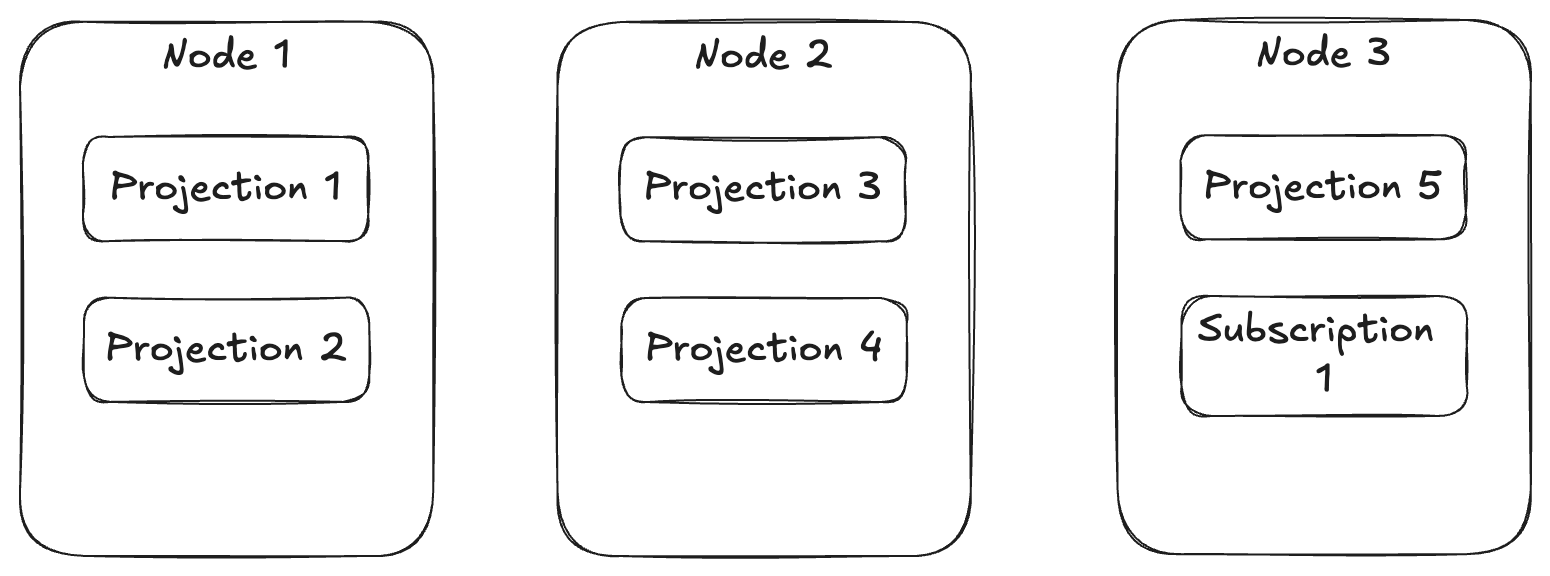
Before Marten 7.0, Marten could only run projections with a “hot/cold” ownership mode that resulted in every possible projection running on a single application node within the cluster. So, not that awesome for scalability to say the least. With 7.0, Marten can do some load distribution of different projections, but it’s not terribly predictable and has no guarantee of spreading the load out.

Enter Wolverine 3.0 (RC-2 in this case) and its new ability to distribute event projections and subscriptions throughout an application cluster. With this option, as shown below:

opts.Services.AddMarten(m =>
    {
        m.DisableNpgsqlLogging = true;
        m.Connection(Servers.PostgresConnectionString);
        m.DatabaseSchemaName = "csp";

        // This was taken from Wolverine test code
        // Imagine there being far more projections and
        // subscriptions
        m.Projections.Add<TripProjection>(ProjectionLifecycle.Async);
        m.Projections.Add<DayProjection>(ProjectionLifecycle.Async);
        m.Projections.Add<DistanceProjection>(ProjectionLifecycle.Async);
    })
    .IntegrateWithWolverine(m =>
    {
        // This makes Wolverine distribute the registered projections
        // and event subscriptions evenly across a running application
        // cluster
        m.UseWolverineManagedEventSubscriptionDistribution = true;
    });

Using the UseWolverineManagedEventSubscriptionDistribution() option in place of Marten’s own async daemon management will give you a load distribution more like this:

Using this model, Wolverine can spread the asynchronous load to more running nodes so you can hopefully get a lot more throughput in your asynchronous projections without overloading any one node.

With this option, Wolverine is going to ensure that every single known asynchronous event projection and every event subscription is running on exactly one running node within your application cluster. Moreover, Wolverine will purposely stop and restart projections or subscriptions to purposely spread the running load across your entire cluster of running nodes.

In the case of using multi-tenancy through separate databases per tenant with Marten, this Wolverine “agent distribution” will assign the work by tenant databases, meaning that all the running projections and subscriptions for a single tenant database will always be running on a single application node. This was done with the theory that this affinity would hopefully reduce the number of used database connections over all.

If a node is taken offline, Wolverine will detect that the node is no longer accessible and try to move start the missing projection/subscription agents on another active node.

If you run your application on only a single server, Wolverine will of course run all projections and subscriptions on just that one server.

Some other facts about this integration:

  • Wolverine’s agent distribution does indeed work with per-tenant database multi-tenancy
  • Wolverine does automatic health checking at the running node level so that it can fail over assigned agents
  • Wolverine can detect when new nodes come online and redistribute work
  • Wolverine is able to support blue/green deployment and only run projections or subscriptions on active nodes where a capability is present. This just means that you can add all new projections or subscriptions, or even just new versions of a projection or subscription on some application nodes in order to do try “blue/green deployment.”
  • This capability does depend on Wolverine’s built-in leadership election — which fortunately got a lot better in Wolverine 3.0

Future Plans

While this functionality will be in the OSS core of Wolverine 3.0, we plan to add quite a bit of support to further monitor and control this feature with the planned “Critter Watch” management console tool we (JasperFx) are building. We’re planning to allow users to:

  • Visualize and monitor which projections and/or subscriptions are running on which application node
  • See a correlation to performance metrics being emitted to the Open Telemetry tool of your choice — with Prometheus PromQL compatible tools being supported first
  • Be able to create affinity groups between projections or subscriptions that might be using the same event data as a possible optimization
  • Allow individual projections or subscriptions to be paused or restarted
  • Trigger manual projection rebuilds at runtime
  • Trigger “rewinds” of subscriptions at runtime

We’re also early in planning to port the Marten event sourcing support to additional database engines. The above functionality will be available for those other database engines when we get there.

This functionality was originally conceived of something like 5-6 years ago, and it’s personally very exciting to me to finally see it out in the wild!

Critter Stack 2025

I realize the title sounds a little too similar to somebody else’s 2025 platform proposals, but let’s please just overlook that

This is a “vision board” document I wrote up and shared with our core team (Anne, JT, Babu, and Jeffry) as well as some friendly users and JasperFx Software customers. I dearly want to step foot into January 2025 with the “Critter Stack” as a very compelling choice for any shop about to embark on any kind of Event Driven Architecture — especially with the usage of Event Sourcing as part of a system’s persistence strategy. Moreover, I want to arrive at a point where the “Critter Stack” actually convinces organizations to choose .NET just to take advantage of our tooling. I’d be grateful for any feedback.

As of now, the forthcoming Wolverine 3.0 release is almost to the finish line, Marten 7 is probably just about done growing, and work on “Critter Watch” (JasperFx Software’s envisioned management console tooling for the “Critter Stack”) is ramping up. Now is a good time to detail a technical vision for the “Critter Stack” moving into 2025. 

The big goals are:

  1. Simplify the “getting started” story for using the “Critter Stack”. Not just in getting a new codebase up, but going all the way to how a Critter Stack app could be deployed and opting into all the best practices. My concern is that there are getting to be way too many knobs and switches scattered around that have to be addressed to really make performance and deployment robust. 
  2. Deliver a usable “Critter Watch” MVP
  3. Expand the “Critter Stack” to more database options, with Sql Server and maybe CosmosDb being the leading contenders and DynamoDb or CockroachDb being later possibilities
  4. Streamline the dependency tree. Find a way to reduce the number of GitHub repositories and Nugets if possible. Both for our maintenance overhead and also to try to simplify user setup

The major initiatives are:

  1. Marten 8.0
  2. Wolverine 4.0
  3. “Critter Watch” and CritterStackPro.Projections (actually scratch the second part, that’s going to roll into the Wolverine OSS core, coming soon)
  4. Ermine 1.0 – the Sql Server port of the Marten event store functionality
  5. Out of the box project templates for Wolverine/Marten/Ermine usages – following the work done already by Jeffry Gonzalez
  6. Future CosmosDb backed event store and Wolverine integration — but I’m getting a lot of mixed feedback about whether Sql Server or CosmosDb should be a higher priority

Opportunities to grow the Critter Stack user base:

  • Folks who are concerned about DevOps issues. “Critter Watch” and maybe more templates that show how to apply monitoring, deployment steps, and Open Telemetry to existing Critter Stack systems. The key point here is a whole lot of focus on maintainability and sustainability of the event sourcing and messaging infrastructure
  • Get more interest from mainstream .NET developers. Improve the integration of Wolverine and maybe Marten/Ermine as well with EF Core. This could include reaching parity with Marten for middleware support, side effects, and multi-tenancy models using EF Core. Also, maybe, hear me out, take a heavy drink, there could be an official Marten/Ermine projection integration to write projection data to EF Core? I know of at least one Critter Stack user who would use that. At this point, I’m leaning heavily toward getting Wolverine 3.0 out and mostly tackle this in the Wolverine 4.0 timeframe this fall
  • Expand to Sql Server for more “pure” Microsoft shops. Adding databases to the general Wolverine / Event Sourcing support (the assumption here is that the document database support in Marten would be too much work to move)
  • Introduce Marten and Wolverine to more people, period. Moar “DevRel” type activity! More learning videos. I’ll keep trying to do more conferences and podcasts. More sample applications. Some ideas for new samples might be a sample application with variations using each transport, using Wolverine inside of a modular monolith with multiple Marten stores and/or EF DbContexts, HTTP services, background processing. Maybe actually invest in some SEO for the websites.

Ecosystem Realignment

With major releases coming up with both Marten 8.0 and Wolverine 4.0 and the forthcoming Ermine, there’s an “opportunity” to change the organization of the code to streamline the number of GitHub repositories and Nugets floating around while also centralizing more code. There’s also an opportunity to centralize a lot of infrastructure code that could help the Ermine effort go much faster. Lastly, there are some options like code generation settings and application assembly determination that are today independently configured for Marten and Wolverine which repeatedly trips up our users (and flat out annoys me when I build sample apps).

We’re actively working to streamline the configuration code, but in the meantime, the current thinking about some of this is in the GitHub issue for JasperFx Ecosystem Dependency Reorganization. The other half of that is the content in the next section.

Projection Model Reboot

This refers to the “Reboot Projection Model API” in the Marten GitHub issue list. The short tag line is to move toward enabling easier usage of folks just writing explicit code. I also want us to tackle the absurdly confusing API for “multi-stream projections” as well. This projection model will be shared across Marten, Ermine (Sql Server-backed event store), and any future CosmosDb/DynamoDb/CockroachDb event stores.

Wrapping up Marten 7.0

Marten 7 introduced a crazy amount of new functionality on top of the LINQ rewrite, the connection management rewrite, and introduction of Polly into the core. Besides some (important) ongoing work for JasperFx clients, the remainder of Marten 7 is hopefully just:

  • Mark all synchronous APIs that invoke database access as [Obsolete]
  • Make a pass over the projection model and see how close to the projection reboot you could get. Make anything that doesn’t conform to the new ideal be [Obsolete] with nudges
  • Introduce the new standard code generation / application assembly configuration in JasperFx.CodeGeneration today. Mark Marten’s version of that as [Obsolete] with a pointer to using the new standard – which is hopefully very close minus namespaces to where it will be in the end

Wrapping up Wolverine 3.0

  • Introduce the new standard code generation / application assembly configuration in JasperFx.CodeGeneration today. Mark Marten’s version of that as [Obsolete] with a pointer to using the new standard – which is hopefully very close minus namespaces to where it will be in the end
  • Put a little more error handling in for code generation problems just to make it easier to fix issues later
  • Maybe, reexamine what work could be done to make modular monoliths easier with Wolverine and/or Marten
  • Maybe, consider adding back into scope improvements for EF Core with Wolverine – but I’m personally tempted to let that slide to the Wolverine 4 work

Summary

The Critter Stack core & I plus the JasperFx Software folks have a pretty audaciously ambitious plan for next year. I’m excited for it, and I’ll be talking about it in public as much as y’all will let me get away with it!

Improved Command Line Tooling with Oakton

I know, command line parsing libraries are about the least exciting tooling in the entire software universe, and there are dozens of perfectly competent ones out there. Oakton though, is heavily used throughout the entire “Critter Stack” (Marten, Weasel, and Wolverine plus other tools) to provide command line utilities directly to any old .NET Core application that happens to be bootstrapped with one of the many ways to arrive at an IHost. Oakton’s key advantage over other command line parsing tools is its ability to easily add extension commands to a .NET application in external assemblies. And of course, as part of the entire JasperFx / Critter Stack philosophy of developer tooling, Oakton’s very concept was originally created to enhance the testability of custom command line tooling. Unlike some other tools *cough* System.CommandLine *cough*.

Oakton also has some direct framework-ish elements for environment checks and the stateful resource model used very heavily all the way through Marten and Wolverine to provide the very best development time experience possible when using our tools.

Today the extended JasperFx / Critter Stack community released Oakton 6.2 with some new, hopefully important use cases. First off, the stateful resource model that we use to setup, teardown, or just check “configured stateful resources” in our system like database schemas or message broker queues just got the concept of dependencies between resources such that you can control which resources are setup first.

Next, Oakton finally got a couple easy to use recipes for utilizing IoC services in Oakton commands (it was possible, just maybe a little higher ceremony that some folks prefer). The first way, assuming that you’re running Oakton from one of the many flavors of IHostBuilder or IHost like so:

// This would be the last line in your Program.Main() method
// "app" in this case is a WebApplication object, but there
// are other extension methods for headless services
return await app.RunOaktonCommands(args);

You can build an Oakton command class that uses “setter injection” to get IoC services like so:

public class MyDbCommand : OaktonAsyncCommand<MyInput>
{
    // Just assume maybe that this is an EF Core DbContext
    [InjectService]
    public MyDbContext DbContext { get; set; }
    
    public override Task<bool> Execute(MyInput input)
    {
        // do stuff with DbContext from up above
        return Task.FromResult(true);
    }
}

Just know that when you do this and execute a command that has decorated properties for services, Oakton is:

  1. Building your system’s IHost
  2. Creating a new IServiceScope from your application’s DI container, or in other words, a scoped container
  3. Building your command object and setting all the dependencies on your command object by resolving each dependency from the scoped container created in the previous step
  4. Executing the command as normal
  5. Disposing the scoped container and the IHost, effectively in a try/finally so that Oakton is always cleaning up after the application

In other words, Oakton is largely taking care of annoying issues like object disposal cleanup, scoping, and actually building the IHost if necessary.

Oakton’s Future

The Critter Stack Core team & I are charting a course for our entire ecosystem I’m calling “Critter Stack 2025” that’s hoping to greatly reduce the technical challenges in adopting our tool set. As part of that, what’s now Oakton is likely to move into a new shared library (I think it’s just going to be called “JasperFx”) between the various critters (and hopefully new critters for 2025!). Oakton itself will probably get a temporary life as a shim to the new location as a way to ease the transition for existing users. There’s a balance between actively improving your toolset for potential new users and not disturbing existing users too much. We’re still working on whatever that balance ends up being.

Multi-Tenancy in Wolverine Messaging

Building and maintaining a large, hosted system that requires multi-tenancy comes with a fair number of technical challenges. JasperFx Software has helped several of our clients achieve better results with their particular multi-tenancy challenges with Marten and Wolverine, and we’re available to do the same for your shop! Drop us a message on our Discord server or email us at sales@jasperfx.net to start a conversation.

This is continuing a series about multi-tenancy with MartenWolverine, and ASP.Net Core:

  1. What is it and why do you care?
  2. Marten’s “Conjoined” Model
  3. Database per Tenant with Marten
  4. Multi-Tenancy in Wolverine Messaging (this post)
  5. Multi-Tenancy in Wolverine Web Services (future)
  6. Using Partitioning for Better Performance with Multi-Tenancy and Marten (future)
  7. Multi-Tenancy in Wolverine with EF Core & Sql Server (future, and honestly, future functionality as part of Wolverine 4.0)
  8. Dynamic Tenant Creation and Retirement in Marten and Wolverine (definitely in the future)

Let’s say that you’re using the Marten + PostgreSQL combination for your system’s persistence needs in a web service application. Let’s also say that you want to keep the customer data within your system in completely different databases per customer company (or whatever makes sense in your system). Lastly, let’s say that you’re using Wolverine for asynchronous messaging and as a local “mediator” tool. Fortunately, Wolverine by itself has some important built in support for multi-tenancy with Marten that’s going to make your system a lot easier to build.

Let’s get started by just showing a way to opt into multi-tenancy with separate databases using Marten and its integration with Wolverine for middleware, saga support, and the all important transactional outbox support:

// Adding Marten for persistence
builder.Services.AddMarten(m =>
    {
        // With multi-tenancy through a database per tenant
        m.MultiTenantedDatabases(tenancy =>
        {
            // You would probably be pulling the connection strings out of configuration,
            // but it's late in the afternoon and I'm being lazy building out this sample!
            tenancy.AddSingleTenantDatabase("Host=localhost;Port=5433;Database=tenant1;Username=postgres;password=postgres", "tenant1");
            tenancy.AddSingleTenantDatabase("Host=localhost;Port=5433;Database=tenant2;Username=postgres;password=postgres", "tenant2");
            tenancy.AddSingleTenantDatabase("Host=localhost;Port=5433;Database=tenant3;Username=postgres;password=postgres", "tenant3");
        });

        m.DatabaseSchemaName = "mttodo";
    })
    .IntegrateWithWolverine(masterDatabaseConnectionString:connectionString);

Just for the sake of completion, here’s some sample Wolverine configuration that pairs up with the above:

// Wolverine usage is required for WolverineFx.Http
builder.Host.UseWolverine(opts =>
{
    // This middleware will apply to the HTTP
    // endpoints as well
    opts.Policies.AutoApplyTransactions();

    // Setting up the outbox on all locally handled
    // background tasks
    opts.Policies.UseDurableLocalQueues();
});

Now that we’ve got that basic setup for Marten and Wolverine, let’s move on to the first issue, how the heck does Wolverine “know” which tenant should be used? In a later post I’ll show how Wolverine.HTTP has built in tenant id detection, but for now, let’s pretend that you’re already taking care of tenant id detection from incoming HTTP requests some how within your ASP.Net Core pipeline and you just need to pass that into a Wolverine message handler that is being executed from within an MVC Core controller (“Wolverine as Mediator”):

[HttpDelete("/todoitems/{tenant}/longhand")]
public async Task Delete(
    string tenant,
    DeleteTodo command,
    IMessageBus bus)
{
    // Invoke inline for the specified tenant
    await bus.InvokeForTenantAsync(tenant, command);
}

By using the IMessageBus.InvokeForTenantAsync() method, we’re invoking a command inline, but telling Wolverine what the tenant id is. The command handler might look something like this:

// Keep in mind that we set up the automatic
// transactional middleware usage with Marten & Wolverine
// up above, so there's just not much to do here
public static class DeleteTodoHandler
{
    public static void Handle(DeleteTodo command, IDocumentSession session)
    {
        session.Delete<Todo>(command.Id);
    }
}

Not much going on there in our code, but Wolverine is helping us out here by:

  1. Seeing the tenant id value that we passed in before that Wolverine is tracking in its own Envelope structure (Wolverine’s version of Envelope Wrapper from the venerable EIP book)
  2. Creates the Marten IDocumentSession for that tenant id value, which will be reading and writing to the correct tenant database underneath Marten

Now, let’s make this a little more complex by also publishing an event message in that message handler for the DeleteTodo message:

public static class TodoCreatedHandler
{
    public static TodoDeleted Handle(DeleteTodo command, IDocumentSession session)
    {
        session.Delete<Todo>(command.Id);
        
        // This 
        return new TodoDeleted(command.Id);
    }
}

public record TodoDeleted(int TodoId);

Assuming that the TodoDeleted message is being published to a “durable” endpoint, Wolverine is using its transactional outbox integration with Marten to persist the outgoing message in the same tenant database and same transaction as the deletion we’re doing in that command handler. In other words, Wolverine is able to use the tenant databases for its outbox support with no other configuration necessary than what we did up above in the calls to AddMarten() and UseWolverine().

Moreover, Wolverine is even able to use its “durability agent” against all the tenant databases to ensure that any work that is somehow stranded by crashed processes.

Lastly, the TodoDeleted event message cascaded above from our message handler would be tracked throughout Wolverine with the tenant id of the original DeleteToDo command message so that you can do multi-part workflows through Wolverine while tracks the tenant id and utilizes the correct tenant database through Marten all along the way.

Summary

Building solutions with multi-tenancy can be complicated, but the Wolverine + Marten combination can make it a lot easier.

CQRS Command Handlers with Marten

Hey, did you know that JasperFx Software offers both consulting services and support plans for the “Critter Stack” tools? One of the common areas where we’ve helped our clients is in using Marten or Wolverine when the usage involves quite a bit of potential concerns about concurrency. As I write this, I’m currently working with a JasperFx client to implement the FetchForWriting API shown in this post as a way of improving their system’s resiliency to concurrency problems.

You’ve decided to use event sourcing as your persistence strategy, so that your persisted state of record are the actual business events segregated by streams that represent changes in state to some kind of logical business entity (an invoice? an order? an incident? a project?). Of course there will have to be some way of resolving or “projecting” the raw events into a usable view of the system state, but we’ll get to that.

You’ve also decided to organize your system around a CQRS architectural style (Command Query Responsibility Segregation). With a CQRS approach, the backend code is mostly organized around the “verbs” of your system, meaning the “command” messages (this could be HTTP services, and I’m not implying that there automatically has to be any asynchronous messaging) that are handled to capture changes to the system (events in our case), and “query” endpoints or APIs that strictly serve up information about your system.

While it’s certainly possible to do either Event Sourcing or CQRS without the other, the two things do go together as Forrest Gump would say, like peas and carrots. Marten is certainly valuable as part of a CQRS with Event Sourcing approach within a range of .NET messaging or web frameworks, but there is quite a bit of synergy between Marten and its “Critter Stack” stable mate Wolverine (see the details about the integration here).

And lastly of course, you’ve quite logically decided to use Marten as the persistence mechanism for the events. Marten is also a strong fit because it comes with some important functionality that we’ll need for CQRS command handlers:

  • Marten’s event projection support can give us a representation of the current state of the raw event data in a usable way that we’ll need within our command handlers to both validate requested actions and to “decide” what additional events should be persisted to our system
  • The FetchForWriting API in Marten will not only give us access to the projected event data, but it provides an easy mechanism for both optimistic and pessimistic concurrency protections in our system
  • Marten allows for a couple different options of projection lifecycle that can be valuable for performance optimization with differing system needs

As a sample application problem domain, I got to be part of a successful effort during the worst of the pandemic to stand up a new “telehealth” web portal using event sourcing. One of the concepts in that system that we needed to track in that system was the activity of a health care provider (nurse, doctor, nurse practitioner) with events for when they were available and what they were doing at any particular time during the day for later decision making:

public record ProviderAssigned(Guid AppointmentId);

public record ProviderJoined(Guid BoardId, Guid ProviderId);

public record ProviderReady;

public record ProviderPaused;

public record ProviderSignedOff;

// "Charting" is basically just whatever
// paperwork they need to do after
// an appointment, and it was important
// for us to track that time as part
// of their availability and future
// planning
public record ChartingFinished;

public record ChartingStarted;

public enum ProviderStatus
{
    Ready,
    Assigned,
    Charting,
    Paused
}

But of course, at several points, you do actually need to know what the actual state of the provider’s current shift is to be able to make decisions within the command handlers, so we had a “write” model something like this:

// I'm sticking the Marten "projection" logic for updating
// state from the events directly into this "write" model,
// but you could separate that into a different class if you
// prefer
public class ProviderShift
{
    public Guid Id { get; set; }

    // This is important, this would be set by Marten to the 
    // current event number or revision of the ProviderShift
    // aggregate. This is going to be important later for
    // concurrency protections
    public int Version { get; set; }
    public Guid BoardId { get; private set; }
    public Guid ProviderId { get; init; }
    public ProviderStatus Status { get; private set; }
    public string Name { get; init; }
    public Guid? AppointmentId { get; set; }
    
    // The Create & Apply methods are conventional targets
    // for Marten's "projection" capabilities
    // But don't worry, you would never *have* to take a reference
    // to Marten itself like I did below jsut out of laziness
    public static ProviderShift Create(
        ProviderJoined joined)
    {
        return new ProviderShift
        {
            Status = ProviderStatus.Ready,
            ProviderId = joined.ProviderId,
            BoardId = joined.BoardId
        };
    }

    public void Apply(ProviderReady ready)
    {
        AppointmentId = null;
        Status = ProviderStatus.Ready;
    }

    public void Apply(ProviderAssigned assigned)
    {
        Status = ProviderStatus.Assigned;
        AppointmentId = assigned.AppointmentId;
    }

    public void Apply(ProviderPaused paused)
    {
        Status = ProviderStatus.Paused;
        AppointmentId = null;
    }

    // This is kind of a catch all for any paperwork the
    // provider has to do after an appointment has ended
    // for the just concluded appointment
    public void Apply(ChartingStarted charting)
    {
        Status = ProviderStatus.Charting;
    }
}

The whole purpose of the ProviderShift type above is to be a “write” model that contains enough information for the command handlers to “decide” what should be done — as opposed to a “read” model that might have richer information like the provider’s name that would be more suitable or usable for using within a user interface. “Write” or “read” in this case is just a role within the system, and at different times it might be valuable to have separate models for different consumers of the information and in other times be able to happily get by with a single model.

Alright, so let’s finally look at a very simple command handler related to providers that tries to mark the provider as being finished charting:

// Since we're focusing on Marten, I'm using an MVC Core
// controller just because it's commonly used and understood
public class CompleteChartingController : ControllerBase
{
    [HttpPost("/provider/charting/complete")]
    public async Task Post(
        [FromBody] CompleteCharting charting,
        [FromServices] IDocumentSession session)
    {
        // We're looking up the current state of the ProviderShift aggregate
        // for the designated provider
        var stream = await session
            .Events
            .FetchForWriting<ProviderShift>(charting.ProviderShiftId, HttpContext.RequestAborted);

        // The current state
        var shift = stream.Aggregate;
        
        if (shift.Status != ProviderStatus.Charting)
        {
            // Obviously do something smarter in your app, but you 
            // get the point
            throw new Exception("The shift is not currently charting");
        }
        
        // Append a single new event just to say 
        // "charting is finished". I'm relying on 
        // Marten's automatic metadata to capture
        // the timestamp of this event for me
        stream.AppendOne(new ChartingFinished());

        // Commit the transaction
        await session.SaveChangesAsync();
    }
}

I’m using the Marten FetchForWriting() API to get at the current state of the event stream for the designated provider shift (a provider’s activity during a single day). I’m also using this API to capture a new event marking the provider as being finished with charting. FetchForWriting() is doing two important things for us:

  1. Executes or finds the projected data for ProviderShift from the raw events. More on this a little later
  2. Provides a little bit of optimistic concurrency protection for our provider shift stream

Building on the theme of concurrency first, the command above will “remember” the current state of the ProviderShift at the point that FetchForWriting() is called. Upon SaveChangesAsync(), Marten will reject the transaction and throw a ConcurrencyException if some how, some way, some other request magically came through and completed against that same ProviderShift stream between the call to FetchForWriting() and SaveChangesAsync().

That level of concurrency is baked in, but we can do a little bit better. Remember that the ProviderShift has this property:

    // This is important, this would be set by Marten to the 
    // current event number or revision of the ProviderShift
    // aggregate. This is going to be important later for
    // concurrency protections
    public int Version { get; set; }

The projection capability of Marten makes it easy for us to “know” and track the current version of the ProviderShift stream so that we can feed it back to command handlers later. Here’s the full definition of the CompleteCharting command:

public record CompleteCharting(
    Guid ProviderShiftId,
    
    // This version is meant to mean "I was issued
    // assuming that the ProviderShift is currently
    // at this version in the server, and if the version
    // has shifted since, then this command is now invalid"
    int Version
);

Let’s tighten up the optimistic concurrency protection such that Marten will shut down the command handling faster before we waste system resources doing unnecessary work by passing the command version right into this overload of FetchForWriting():

// Since we're focusing on Marten, I'm using an MVC Core
// controller just because it's commonly used and understood
public class CompleteChartingController : ControllerBase
{
    [HttpPost("/provider/charting/complete")]
    public async Task Post(
        [FromBody] CompleteCharting charting,
        [FromServices] IDocumentSession session)
    {
        // We're looking up the current state of the ProviderShift aggregate
        // for the designated provider
        var stream = await session
            .Events
            .FetchForWriting<ProviderShift>(
                charting.ProviderShiftId, 
                
                // Passing the expected, starting version of ProviderShift
                // into Marten
                charting.Version,
                HttpContext.RequestAborted);

        // And the rest of the controller stays the same as
        // before....
    }
}

In the usage above, Marten will do a version check both at the point of FetchForWriting() using the version we passed in, and again during the call to SaveChangesAsync() to reject any changes made if there was a concurrent update to that same stream.

Lastly, Marten gives you the ability to opt into heavier, exclusive access to the ProviderShift with this option:

// We're looking up the current state of the ProviderShift aggregate
// for the designated provider
var stream = await session
    .Events
    .FetchForExclusiveWriting<ProviderShift>(
        charting.ProviderShiftId, 
        HttpContext.RequestAborted);

In that last usage, we’re relying on the underlying PostgreSQL database to get us an exclusive row lock on the ProviderShift event stream such that only our current operation is allowed to write to that event stream while we have the lock. This is heavier and comes with some risk of database locking problems, but solves the concurrency issue.

So that’s concurrency protection in FetchForWriting(), but I mostly skipped over when and how that API will execute the projection logic to go from the raw events like ProviderJoined, ProviderReady, or ChartingStarted to the projected ProviderShift.

Any projection in Marten can be calculated or executed with three different “projection lifecycles”:

  1. Live — in this case, a projection is calculated on the fly by loading the raw events in memory and calculating the current state right then and there. In the absence of any other configuration, this is the default lifecycle for the ProviderShift per stream aggregation.
  2. Inline — a projection is updated at the time any events are appended by Marten and persisted by Marten as a document in the PostgreSQL database.
  3. Async — a projection is updated in a background process as events are captured by Marten across the system. The projected state is persisted as a Marten document to the underlying PostgreSQL database

The first two options give you strong consistency models where the projection will always reflect the current state of the events captured to the database. Live is probably a little more optimal in the case where you have many writes, but few reads, and you want to optimize the “write” side. Inline is optimal for cases where you have few writes, but many reads, and you want to optimize the “read” side (or need to query against the projected data rather than just load by id). The Async model gives you the ability to take the work of projecting events into the aggregated state out of both the “write” and “read” side of things. This might easily be advantageous for performance and very frequently necessary for ordering or concurrency concerns.

In the case of the FetchForWriting() API, you will always have a strongly consistent view of the raw events because that API is happily wallpapering over the lifecycle for you. Live aggregation works as you’d expect, Inline aggregation works by just loading the expected document directly from the database, and Async aggregation is a hybrid model that starts from the last known persisted value for the aggregate and applies any missing events right on top of that (the async behavior was a big feature added in Marten 7).

By hiding the actual lifecycle behavior behind the FetchForWriting() signature, teams are able to experiment with different approaches to optimize their application without breaking existing code.

Summary

FetchForWriting() was built specifically to ease the usage of Marten within CQRS command handlers after seeing how much boilerplate code teams were having to use before with Marten. At this point, this is our strongly recommended approach for command handlers. Also note that this API is utilized within the Wolverine + Marten “aggregate handler workflow” usage that does even more to remove code ceremony from CQRS command handler code. To some degree, what is now Wolverine was purposely rebooted and saved from the scrap heap specifically because of that combination with Marten and the FetchForWriting API.

Personally, I’m opposed to any kind of IAggregateRepository or approach where the “write” model itself tracks the events that are applied or uncommitted. I’m trying hard to discourage folks using Marten away from this still somewhat popular old approach in favor of a more Functional Programming-ish approach.

FetchForWriting could be used as part of a homegrown “Decider” pattern usage if that’s something you prefer (I think the “decider” pattern in real life usage ends up devolving into brute force procedural code through massive switch statements personally).

The “telehealth” system I mentioned before was built in real life with a hand-rolled Node.js event sourcing implementation, but that experience has had plenty of influence over later Marten work including a feature that just went into Marten over the weekend for a JasperFx client to be able to emit “side effect” actions and messages during projection updates.

I was deeply unimpressed with the existing Node.js tooling for event sourcing at that time (~2020), but I would hope it’s much better now. Marten has absolutely grown in capability in the past couple years.

Wolverine’s New Message Batching

Hey, did you know that JasperFx Software offers both consulting services and support plans for the “Critter Stack” tools? The new feature shown in this post was done at the behest of a JasperFx support customer. And of course, we’re also more than happy to help you with any kind of .NET backend development:)

Wolverine‘s new 3.0.0-beta-1 release adds a long requested feature set for batching up message handling. What does that mean? Well, sometimes you might want to process a stream of incoming messages in batches rather than one at a time. This might be for performance reasons, or maybe there’s some kind of business logic that makes more sense to calculate for batches, or maybe you want a logical “debounce” in how your system responds to the incoming messages so you don’t update some resource on every single message received by your system.

To that end, Wolverine 3.0 introduces a new feature for batching up message handling within a Wolverine system. Let’s say that you have a message type in your system like this:

public record Item(string Name);

And for whatever reason, we need to process these messages in batches. To do that, we first need to have a message handler for an array of Item like so:

public static class ItemHandler
{
    public static void Handle(Item[] items)
    {
        // Handle this just like a normal message handler,
        // just that the message type is Item[]
    }
}

And yes, before you ask, so far Wolverine only understands an array of the batched message type as the input message for the batch handler.

With that in our system, now we need to tell Wolverine to group Item messages, and we do that with the following syntax:

theHost = await Host.CreateDefaultBuilder()
    .UseWolverine(opts =>
    {
        opts.BatchMessagesOf<Item>(batching =>
        {
            // Really the maximum batch size
            batching.BatchSize = 500;
            
            // You can alternatively override the local queue
            // for the batch publishing. 
            batching.LocalExecutionQueueName = "items";

            // We can tell Wolverine to wait longer for incoming
            // messages before kicking out a batch if there
            // are fewer waiting messages than the maximum
            // batch size
            batching.TriggerTime = 1.Seconds();
            
        })
            
            // The object returned here is the local queue configuration that
            // will handle the batched messages. This may be useful for fine
            // tuning the behavior of the batch processing
            .Sequential();
    }).StartAsync();

A particularly lazy and hopefully effective technique in OSS project documentation is to take code snippets directly out of test code, and that’s what you see above. Two birds with one stone. Sometimes that works out well.

And that’s that! Just to bring this a little more into focus, here’s an end to end test from the Wolverine codebase — which just for clarity, is using Wolverine’s built in test automation support for end to end testing:

[Fact]
public async Task send_end_to_end_with_batch()
{
    // Items to publish
    var item1 = new Item("one");
    var item2 = new Item("two");
    var item3 = new Item("three");
    var item4 = new Item("four");

    Func<IMessageContext, Task> publish = async c =>
    {
        // I'm publishing the 4 items in sequence
        await c.PublishAsync(item1);
        await c.PublishAsync(item2);
        await c.PublishAsync(item3);
        await c.PublishAsync(item4);
    };

    // This is the "act" part of the test
    var session = await theHost.TrackActivity()
        
        // Wolverine testing helper to "wait" until
        // the tracking receives a message of Item[]
        .WaitForMessageToBeReceivedAt<Item[]>(theHost)
        .ExecuteAndWaitAsync(publish);

    // The four Item messages should be processed as a single 
    // batch message
    var items = session.Executed.SingleMessage<Item[]>();

    items.Length.ShouldBe(4);
    items.ShouldContain(item1);
    items.ShouldContain(item2);
    items.ShouldContain(item3);
    items.ShouldContain(item4);
}

Alright, with all that being said, here’s a few more facts about the batch messaging support:

  1. There is absolutely no need to create a specific message handler for the Item message, and in fact, you should not do so
  2. The message batching is able to group the message batches by tenant id if your Wolverine system uses multi-tenancy
  3. If you are using a durable inbox in your system, Wolverine is not marking the incoming envelopes as handled until the messages are successfully handled inside a batch message
  4. Likewise, if a batch message fails to the point where it triggers a move to the dead letter queue, each individual message that was part of that original batch is moved to the dead letter queue separately

Summary

Hey, that’s actually all I had to say about that! Wolverine 3.0 will hopefully go RC later this week or next, with the official release *knock on wood* happening before I leave for Swetugg and a visit in Copenhagen with a JasperFx client in a couple weeks.

Low Ceremony Sagas with Wolverine

Wolverine puts a very high emphasis on reducing code ceremony and tries really hard to keep itself out of your application code. Wolverine is also built with testability in mind. If you’d be interested in learning more about how Wolverine could simplify your existing application code or set you up with a solid foundation for sustainable productive development for new systems, JasperFx Software is happy to work with you!

Before I get into the nuts and bolts of Wolverine sagas, let me come right out and say that I think that compared to other .NET frameworks, the Wolverine implementation of sagas requires much less code ceremony and therefore easier code to reason about. Wolverine also requires less configuration and explicit code to integrate your custom saga with Wolverine’s saga persistence. Lastly, Wolverine makes the development experience better by building in so much support for automatically configuring development environment resources like database schema objects or message broker objects. I do not believe that any other .NET tooling comes close to the developer experience that the Wolverine and its “Critter Stack” buddy Marten can provide.

Let’s say that you have some kind of multi-step process in your application that might have some mix of:

  • Callouts to 3rd party services
  • Some logical steps that can be parallelized
  • Possibly some conditional workflow based on the results of some of the steps
  • A need to enforce “timeout” conditions if the workflow is taking too long — think maybe of some kind of service level agreement for your workflow

This kind of workflow might be a great opportunity to use Wolverine’s version of Sagas. Conceptually speaking, a “saga” in Wolverine is just a special message handler that needs to inherit from Wolverine’s Saga class and modify itself to track state between messages that impact the saga.

Below is a simple version from the documentation called Order:

public record StartOrder(string OrderId);

public record CompleteOrder(string Id);

public class Order : Saga
{
    // You do need this for the identity
    public string? Id { get; set; }

    // This method would be called when a StartOrder message arrives
    // to start a new Order
    public static (Order, OrderTimeout) Start(StartOrder order, ILogger<Order> logger)
    {
        logger.LogInformation("Got a new order with id {Id}", order.OrderId);

        // creating a timeout message for the saga
        return (new Order{Id = order.OrderId}, new OrderTimeout(order.OrderId));
    }

    // Apply the CompleteOrder to the saga
    public void Handle(CompleteOrder complete, ILogger logger)
    {
        logger.LogInformation("Completing order {Id}", complete.Id);

        // That's it, we're done. Delete the saga state after the message is done.
        MarkCompleted();
    }

    // Delete this order if it has not already been deleted to enforce a "timeout"
    // condition
    public void Handle(OrderTimeout timeout, ILogger<Order> logger)
    {
        logger.LogInformation("Applying timeout to order {Id}", timeout.Id);

        // That's it, we're done. Delete the saga state after the message is done.
        MarkCompleted();
    }

    public static void NotFound(CompleteOrder complete, ILogger logger)
    {
        logger.LogInformation("Tried to complete order {Id}, but it cannot be found", complete.Id);
    }
}

Order is really meant to just be a state machine where it modifies its own state in response to incoming messages and returns cascading messages (you could also use IMessageBus directly as a method argument if you prefer, but my advice is to use simple pure functions) that tell Wolverine what to do next in the multi-step process.

A new Order saga can be created by any old message handler by simply returning a type that inherits from the Saga type in Wolverine. Wolverine is going to automatically discover any public types inheriting from Saga and utilize any public instance methods following certain naming conventions (or static Create() methods) as message handlers that are assumed to modify the state of the saga objects. Wolverine itself is handling everything to do with loading and persisting the Order saga object between commands around the call to the message handler methods on the saga types.

If you’ll notice the Handle(CompleteOrder) method above, the Order is calling MarkCompleted() on itself. That will tell Wolverine that the saga is now complete, and direct Wolverine to delete the current Order saga from the underlying persistence.

As for tracking the saga id between message calls, there are naming conventions about the messages that Wolverine can use to pluck the identity of the saga, but if you’re strictly exchanging messages between a Wolverine saga and other Wolverine message handlers, Wolverine will automatically track metadata about the active saga back and forth.

I’d also ask you to notice the OrderTimeout message that the Order saga returns as it starts. That message type is shown below:

// This message will always be scheduled to be delivered after
// a one minute delay because I guess we want our customers to be
// rushed? Goofy example code:)
public record OrderTimeout(string Id) : TimeoutMessage(1.Minutes());

Wolverine’s cascading message support allows you to return an outgoing message with a time delay — or a particular scheduled time or any other number of options — by just returning a message object. Admittedly this ties you into a little more of Wolverine, but the key takeaway I want you to notice here is that every handler method is a “pure function” with no service dependencies. Every bit of the state change and workflow logic can be tested with simple unit tests that merely work on the before and after state of the Order objects as well as the cascaded messages returned by the message handler functions. No mock objects, no fakes, no custom test harnesses, just simple unit tests. No other saga implementation in the .NET ecosystem can do that for you anywhere nearly as cleanly.

So far I’ve only focused on the logical state machine part of sagas, so let’s jump to persistence. Wolverine has long had a simplistic saga storage mechanism with its integration with Marten, and that’s still one of the easiest and most powerful options. You can also use EF Core for saga persistence, but ick, that means having to use EF Core.

Wolverine 3.0 added a new lightweight saga persistence option for either Sql Server or PostgreSQL (without Marten or EF Core) that just stands up a little table for just a single Saga type and uses JSON serialization to persist the saga. Here’s an example:

using var host = await Host.CreateDefaultBuilder()
    .UseWolverine(opts =>
    {
        // This isn't actually mandatory, but you'll
        // need to do it just to make Wolverine set up
        // the table storage as part of the resource setup
        // otherwise, Wolverine is quite capable of standing
        // up the tables as necessary at runtime if they
        // are missing in its default configuration
        opts.AddSagaType<RedSaga>("red");
        opts.AddSagaType(typeof(BlueSaga),"blue");
       
        
       // This part is absolutely necessary just to have the 
       // normal transactional inbox/outbox support and the new
       // default, lightweight saga persistence
opts.PersistMessagesWithSqlServer(Servers.SqlServerConnectionString, "color_sagas");
        opts.Services.AddResourceSetupOnStartup();
    }).StartAsync();

Just as with the integration with Marten, Wolverine’s lightweight saga implementation is able to build the necessary database table storage on the fly at runtime if it’s missing. The “critter stack” philosophy is to optimize the all important “time to first pull request” metric — meaning that you can get a Wolverine application up fast on your local development box because it’s able to take care of quite a bit of environment setup for you.

Lastly, Wolverine 3.0 is adding optimistic concurrency checks for the Marten saga storage and the new lightweight saga persistence. That’s been an important missing piece of the Wolverine saga story.

Just for some comparison, check out some other saga implementations in .NET:

Wolverine is taking a leap forward with the first 3.0 Alpha Release

Why should you care about this Wolverine tool anyway? I’d say that if you’re building just about any kind of server side .NET application, that Wolverine will do more than any other existing server side .NET framework in the mediator, background processing, HTTP, or asynchronous messaging space to simplify your code, maximize the testability of your system code, and do so while still helping you write robust, well performing systems.

The first Wolverine 3.0-alpha-1 release just landed on Nuget for anybody who is either waiting on 3.0 features or willing to try out the new bits. Just to rewind, here was the theoretic plans for Wolverine 3.0, with the Aspire integration having fallen off a bit.

See the Wolverine migration guide for more details.

There are some additive changes to address some previous limitations of the Wolverine tooling I’ll get to below, but the two big ticket items in 3.0 are:

  • Wolverine is now completely decoupled from Lamar and happily able to run with the built in ServiceProvider now. Before, Wolverine was quietly replacing your IoC container with Lamar because it heavily relied on Lamar internal behavior for its runtime code generation. 3.0 ended that particular limitation. Not everyone cared, but the folks who did care, were particularly loud about their unhappiness about that and Lamar is probably heading into the subset anyway in the future. I felt like this was a very important limitation of Wolverine to address in this release. It’s also a precursor to further usage of .NET Aspire and enabling Wolverine to play nicely with just about any common recipe for bootstrapping .NET applications (Blazor, WPF, Orleans, you name it).
  • The leader election subsystem in Wolverine was pretty close to 100% rewritten to a much simpler, and so far as the internal testing shows, far more reliable and performant mechanism. This subsystem has been way too problematic in real usage, and I’m beyond relieved that there’s some serious improvements coming for this

As for smaller things so far, some other highlights are:

  • Being able to utilize multiple handlers for the same message type in the same application, and even determine which handlers execute for particular external listeners
  • The stateful saga support in Wolverine got some necessary optimistic concurrency protection at the behest of a JasperFx Software client
  • New “lightweight” saga options to utilize either PostgreSQL or Sql Server as JSON storage mechanisms so you don’t have to suffer the pain of EF Core mapping just to persist sagas if you aren’t using Marten
  • The Rabbit MQ integration is using the new version of the Rabbit MQ client that is finally async all the way through to prevent deadlock issues. There is also some significant improvement to the Rabbit MQ transport for header exchanges and more control over messaging conventions
  • There is a new Nuget of compliance tests for Wolverine to hopefully speed up the construction of new saga persistence providers, messaging transports, or message storage options that I hope will unlock new functionality in the following months

I’m actually hopeful that the final 3.0 release goes out early next week. I’m not sure what the remaining work will be to make it in, but I’m wanting to tackle:

  • Message batching, because that comes up fairly often
  • A round of enhancements to the EF Core integration with Wolverine to try to increase Wolverine utilization for folks who don’t use Marten for some bizarre reason

Critter Stack Workshop at DevUp Next Week

If you’re planning on coming to my workshop, you’ll want .NET 8, Git, and some kind of Docker Desktop on your box to run the sample code I’ll use in the workshop. If Docker doesn’t work for you, you maybe want a local install of PostgreSQL and Rabbit MQ.

Hey folks, I’ll be giving the first ever workshop on building an Event Driven Architecture with the full “Critter Stack” at DevUp 2024 in St. Louis next week on Wednesday the 14th bright and early at 8:30 AM.

We’ll be working through a sample backend web service that also communicates with other headless services using Event Sourcing within a general CQRS architectural approach with the whole “Critter Stack. We’ll use Marten (over PostgreSQL) for our persistence strategy using both its event sourcing support and as a document database. We’ll combine that with Wolverine as a server side framework for background processing, asynchronous messaging, and even as an alternative HTTP endpoint framework. Lastly, just for fun, there’ll be guest appearances from other JasperFx tools like Alba and Oakton for automated integration testing and command line execution respectively.

So why would you want to come to this and what might you get out of it? I’m hoping the takeaways — even if you don’t intend to use Marten or Wolverine — will be:

  • A good introduction to event sourcing as a technical approach and some of the real challenges you’ll face when building a system using event sourcing as a persistence strategy
  • An understanding of what goes into building a robust CQRS system including dealing with transient errors, observability, concurrency, and how to best segment message processing to achieve self-healing systems
  • Challenging the industry conventional wisdom about the efficacy of Hexagonal/Clean/Onion Architecture approaches really are when I show what a very low ceremony “vertical slice architecture” approach can be like with the Wolverine + Marten combination while still being robust, observable, highly testable, and still keeping infrastructure concerns out of the business logic
  • Some exposure to Open Telemetry and general observability tooling for distributed systems you absolutely want if you don’t already have that
  • Techniques for automating integration tests against an Event Driven Architecture

Because I’m absolutely in the business of promoting the “Critter Stack” tools, I’ll try to convince you that:

  • Marten is already the most robust and feature rich solution for event sourcing in the .NET ecosystem while also being arguably the easiest to get up and going with
  • How the Wolverine + Marten combination makes CQRS with Event Sourcing a much easier architectural pattern to use
  • Wolverine’s emphasis on low ceremony code approaches can help systems be more successfully maintained over time by simply having much less noise code and layering in your systems while still being robust
  • The “Critter Stack” has an excellent story for automated integration testing support that can do a lot to make your development efforts more successful
  • Both Marten & Wolverine can help your teams achieve a low “time to first pull request” by doing a lot to configure necessary infrastructure like databases or message brokers on the fly for a better development experience

I’m excited, because this is my first opportunity to do a workshop on the “Critter Stack” tools, and I think we’ve got a very compelling technical story to tell about the tools! And if nothing else, I’m looking forward to any feedback that might help us improve the tools down the line.

And for any *ahem* older folks from St. Louis in my talk, I personally at the time that Jorge Orta was out at first and the Cards should have won that game.