


This post is ostensibly about a sample usage of Wolverine middleware, but I’m going to meander a bit.
I’m working pretty hard this week trying to make some serious progress on CritterWatch, our long planned production monitoring and management console for the “Critter Stack.” At one point late in the day I was working to troubleshoot some failing tests in the CritterWatch codebase with a harness like this:
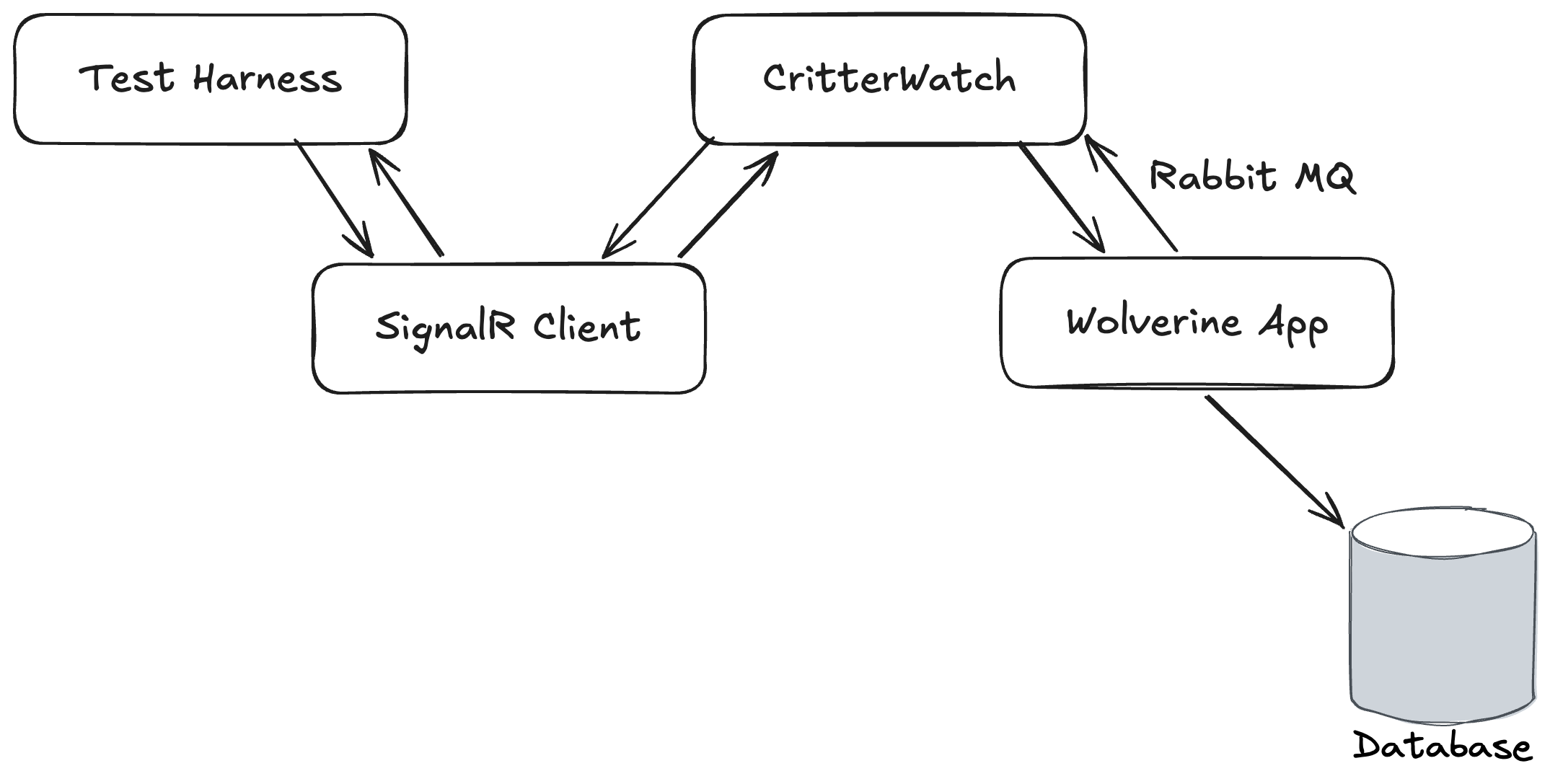
CritterWatch itself and a test Wolverine application were both running in memory as separate IHost instances. CritterWatch heavily utilizes the Wolverine SignalR messaging transport for communication between its Vue.js based user interface and the CritterWatch server. Part of Wolverine’s SignalR integration is a SignalR Client Transport option that makes it easy for us to use WebSockets communication in integration tests to mimic the client, but live completely in the world of strong typed C# objects.
The integration tests in question were trying to:
- Send a message through the SignalR client to mimic commands from the user interface
- Which would be relayed from CritterWatch to the right monitored Wolverine service
- Which would execute a command against its database, then send a response message back to CritterWatch
- Which would relay that response message right back to the original caller through SignalR
The test was failing in a very annoying way by timing out waiting for the ultimate response message to come all the way back with no real feedback about why it was failing.
More on this in a bit, but some of the handler code and automated testing code was written somewhat naively by AI agents and I have some thoughts.
As I wrote about recently in On Debugging Problems, I frequently start debugging efforts by formulating a theory about the most likely cause of the problem and trying to take a quick way to either prove or disprove that theory. This time I happened to be exactly right as I found this code:
public class ReplayMessagesHandler : MessageHandler<ReplayMessages>{ protected override async Task HandleAsync(ReplayMessages command, MessageContext context, CancellationToken cancellation) { // This, unsurprisingly, was the smoking gun if (!LicenseGuard.IsOperationAllowed()) { return; } // Other stuff... }}
After dithering back and forth on this, we landed on the idea of making CritterWatch a “freemium” model where all the advanced features require an installed license and I retrofitted the license protection with a little bit of help from my friend Claude — and wouldn’t you know it, in all the constant sprinting on the user interface, the test harness didn’t have a license applied so it could test through the message handler above. Easy fix to bring the tests back to green, but I wanted to improve the license guard usage by utilizing Wolverine middleware and that might be a great example for a blog post!
Then I remembered that the way that message handler is built completely sidesteps Wolverine middleware, so hold that thought.
The first problem was that we weren’t getting any obvious indication in the test harness that the test was failing because the license file wasn’t applied during tests. That’s an easy thing to fix by just changing the guard clause to this:
if (!LicenseGuard.IsOperationAllowed()){ throw new LicenseRequiredException();}
And a bit of corresponding error handling configuration for Wolverine to know to discard these messages rather than let them go to the dead letter queue or waste any time retrying:
// Just throw the message away if this happensoptions.OnException<LicenseRequiredException>().Discard();
By throwing an exception — and I’m not too worried about using an exception here for flow control because after all, you’re doing something naughty if you manage to hit that message handler — I knew that would be automatically written out to any test failures with the Wolverine tracked session testing helpers that these tests were using even though the exceptions are happening in asynchronous message handling and would be handled internally by Wolverine.
The key point here is that it is very often important in your test automation strategy to think about how you can report contextual information about test failures that will help developers troubleshoot said failures.
Alright, so let’s pretend that I’m working with normal Wolverine message handlers and middleware strategies are available. In that case I can get the license guard out of the message handler code as a cross cutting concern. A way to do that is to design a new [RequiresLicense] attribute that will add middleware for the license guard to any handler class or method decorated with that attribute. Here’s the Wolverine flavor of that strategy:
public class RequiresLicenseAttribute : ModifyChainAttribute{ // This method will be called at the beginning public static void Validate() { if (!LicenseGuard.IsOperationAllowed()) { throw new LicenseRequiredException(); } } // This is the actual middleware application. This will make Wolverine add // a call to the static Validate() method in the code it generates around // a Wolverine message handler public override void Modify(IChain chain, GenerationRules rules, IServiceContainer container) { chain.Middleware.Insert(0, new MethodCall(typeof(RequiresLicenseAttribute), nameof(Validate))); }}
With that attribute marking up either the handler class or the main message handler method, Wolverine is going to do some “code weaving” so that this line of code will appear on the first line of in the generated code that Wolverine builds around your handler code:
Wolverine.CritterWatch.Handlers.RequiresLicenseAttribute.Validate();
Just to make sure this is clear, Wolverine does not use any kind of Reflection at runtime but instead “bakes” the middleware application in on the first usage of the handler or even completely ahead of time in production usage.
Wolverine’s Configuration vs Runtime Model
It’s admittedly a goofy model that is quite different than basically every other “Russian Doll” tool out there where there’s usually some kind of wrapping model like MediatR’s IPipelineBehavior<TRequest, TResponse>. Wolverine’s model was intentionally designed to avoid the bloated object allocations that tools like MediatR accidentally cause when folks get a little slap happy with middleware usage. Wolverine’s model is also designed to minimize the dreadful exception stack traces that many application frameworks that support middleware create for you by doing so much object wrapping and delegation *cough* ASP.Net Core *cough*.
I had an extremely popular professor in college for all our heat transfer classes who had a legendary drinking game that had been passed down for generations (if Dr. Chapman gets chalk on his pants, take a drink). If there was a drinking game for me, it would be “if Jeremy quotes the original C2 Wiki or links to a Martin Fowler post…”
Wolverine’s middleware strategy also varies quite a bit from a MediatR or most other is our usage of an internal “Semantic Model” that is built up at configuration and bootstrapping time, then compiled into a runtime model:
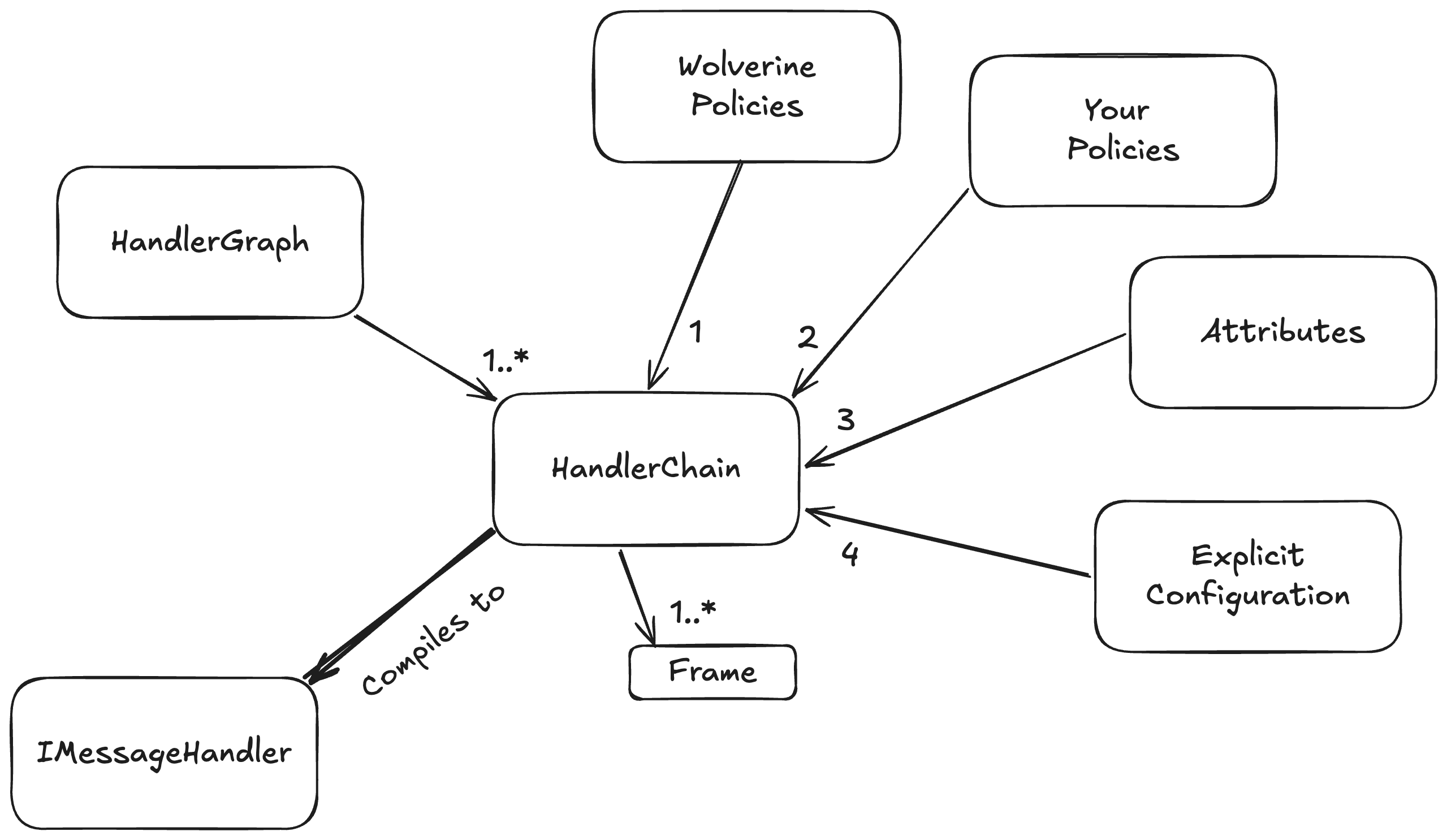
At bootstrapping time, we build up a configuration model for how every discovered message handler or HTTP endpoint method will be handled. That same model also models the application of middleware, post processors, error handling for message handlers, and a ton of HTTP specific elements for each message handler or HTTP endpoint. In order, the configuration is built up by:
- Built in Wolverine policies like “an HTTP endpoint method that returns a
stringwill write out content typetext/plaingo first - User defined policies go next, and can override anything from the Wolverine policies
- Attributes on the message handler or HTTP endpoint type and method apply individual overrides on specific message handlers or HTTP endpoint handling. We do this through the base
ModifyChainAttributeorModifyHttpChainAttributeclasses that expose a method that directly modifies theHandlerChainconfiguration model for each message handler or likewise theHttpChainmodel for an HTTP endpoint. Attributes of course win out over policies - Lastly, Wolverine has a way to expose direct manipulation of the underlying
HandlerChainmodel for individual handlers, and the more explicit mechanisms always win out over any kind of policies
This HandlerChain model is also built up with knowledge of your application’s IoC container and through that, the dependencies of any given message handler or HTTP endpoint method. Wolverine can use this to selectively apply middleware. For example:
- Wolverine’s Fluent Validation middleware doesn’t apply if there are no matching validators for a message type and can effectively inline a single or collection of validators otherwise. No runtime probing of the IoC containers like you see in many validation middleware approaches out there
- In a system using multiple EF Core
DbContexttypes, Wolverine can choose the right one for a givenSagatype and generate the most efficient code possible to use thatDbContextwithout having to use any kind of wrappers or runtime IoC tricks - In a system that uses both EF Core and Marten, Wolverine can tell from the dependencies of a single handler if it should use Marten based or EF Core based transactional middleware
The key point here is that the “Semantic Model” usage and the way we do configuration in Wolverine allows you a great deal of control over the application of middleware in a fine grained way and this is frequently valuable.
NServiceBus also has their BehaviorGraph concept that is the same “Semantic Model” concept I’m discussing here that allows either Wolverine or NServiceBus users to fine tune the application of middleware to specific messaging handlers based on user or framework defined conventions. The similarity is not the slightest bit coincidental because NServiceBus’s model was taken from FubuMVC that was the spiritual predecessor of Wolverine.
About the AI Thing
Ages ago I read a quote from Martin Fowler (take a drink) something to the effect of:
The only way to know how far a new tool or technique can go is to take it too far, then back off a bit
I’m in my “back off” phase for AI assisted development after feeling completely blown away at first by how much I was able to accomplish. Up above, I explained that I ran into some trouble because of code written naively by AI that I had not reviewed well enough. I’ve also been the victim or perpetrator of several AI coding related problems in the past couple months alone that have let regression bugs slip out into the wild.
I don’t think that anybody is going all the way back to coding completely by hand, but for my part, I think that AI tempts you into trying to develop faster than you should and that you need to exert more control over the code than I apparently had before this week. I guess my only main takeaway is to slow down, not make too many risky changes just because an AI tool made it easy, and if you are responsible for code used by other people, make sure you have eyeballs on it.
I miss long form blogging
If you’ll allow me a little diversion, I used to enjoy technical blogging when that was the way that developers communicated online. Before social media took off, I would take time to formulate and craft a blog post to explain some idea I had or to share something I’d learned that I self importantly thought other developers should know too. At one point I had an hour and change commute on a train every morning, and used to occasionally write a series of mini essays I called a “Train of Thought” for topics that were on my mind but not worthy of a long form blog post by themselves. As I thought tonight about writing up a little blog post sample of Wolverine middleware, it occurred to me that that was going to touch on several other topics and that reminded me of that magic little time when I enjoyed writing technical blog posts.
Then came Twitter of course, and that acted as a release valve that let you blurt things out without ever building up a cohesive, long form post and everything changed forever. Now, of course, what was Twitter isn’t nearly as important, there’s basically no technical content on BluSky, Mastodon has “Linux on the Desktop” energy, and LinkedIn posts are nothing but non stop self-promotion. Younger developers are on Twitch or cranking out YouTube videos. I still blog, but I’m admittedly almost completely focused on promoting the “Critter Stack” tools or JasperFx Software and it’s not the same at all. For what it’s worth, I enjoyed just sitting down tonight and trying to write something by hand.


I’ve always appreciated your long form posts, Jeremy. Thank you for continuing to write them.