Marten on DotNetRocks

Remarkably coincidental with the new Marten v0.8 release, the DotNetRocks guys just published a podcast talking with me about Marten. Give it a shot if you wanna learn a little bit about the motivation behind Marten, using Postgresql for .Net development, and using “polyglot persistence.”

I think the DNR guys were trying to get me to trash talk a little bit about Marten versus its obvious competitor, so how about just saying that I feel like Marten will lead to more developer productivity than using Entity Framework or micro-ORM’s and better performance and reliability than existing NoSQL solutions for .Net.

Marten Gets Serious with v0.8

EDIT: DotNetRocks just published a new episode about Marten.

I just pushed a new v0.8 version of Marten to Nuget.org with a handful of new features, a lot of bugfixes, and a slew of refinements in response to feedback from our early adopters. I feel like this release added some polish to Marten, and I largely attribute that to how helpful our community has been in making suggestions and contributing pull requests based on their early usage.

The documentation site has been updated to reflect the new changes and additions to Marten for v0.8. The full list of changes and bug fixes for v0.8 is available in the GitHub issue history for this milestone.

Release Highlights

  1. Marten got a lot more sophisticated about how it updates schema objects in the underlying Postgresql database. See the changes to AutoCreateSchemaObjects and the ability to update a table for additional “searchable” columns instead of dropping and recreating tables in the documentation.
  2. Bulk Deletes” by a query without first having to load documents before deleting them
  3. The Linq parsing support got worked over pretty hard, including some new linq query support extensibility.
  4. New mechanisms for instrumentation and diagnostics within Marten. I’ll have a blog post next week about how we’re going to integrate with this at work for profiling database activity in our web and service bus apps.
  5. A lot of work to integrate the forthcoming event store functionality. I left this out of the documentation updates for now, but there’ll be a lot more about this later.


What’s Up Next?

There’s some preliminary planning for Marten v0.9 on GitHub. The very next feature I’m tackling is going to be our equivalent to RavenDb’s Include() feature (but I think we’re going to do it differently). Other than that, I think the theme of the next release is going to be addressing the “read side” of Marten applications with view projections by finally supporting “Select()” in the Linq support and some mix of Javascript or .Net projections.

A note on the versioning

While I am a big believer in semantic versioning (or at least I think it’s far better than having nothing), Marten is still pre 1.0 and a few public API’s did change. We haven’t discussed a timeline for the all important “1.0” release, but I’m hopeful that that can happen by this summer (2016).

An Example of the Open/Closed Principle in Action

I saw someone on Twitter this month say that they’ve never really understood the Open/Closed Principle (OCP, the “O” in S.O.L.I.D.). I think it’s a very important concept in software architecture, but the terse statement maybe doesn’t make it too clear what it’s really about:

software entities (classes, modules, functions, etc.) should be open for extension, but closed for modification

There are some other ways to interpret the Open/Closed Principle (the Wikipedia article about it talks about inheritance which I think is short sighted), but my restatement of the OCP would be:

“structure code such that additional functionality can be mostly written in all new code modules with no, or at least minimal, changes to existing code modules”

The key point is that it’s much less risky and usually easier to write brand new code — especially if the new code has minimal coupling to old code — than it is to modify existing code. Or to put it another way, can I continually add all new functionality to my existing system without causing a lot of regression bugs?

It’s not just risk either, it’s generally easier to understand complicated new code written on a blank canvas than it is to open up an existing code file and find the right places to insert your changes without breaking the old functionality.


Some examples of systems from my career that most definitely did not follow OCP might better illustrate why you’d care about OCP:

  1. Dynamic web page application that was effectively written in one single VB6 class. Every single addition or fix to the application meant editing that one single file, and very frequently broke existing functionality
  2. A large shipping application where every bit of routing logic for box positions within a factory floor were coded in a single, giant switch statement that shared a lot of global state. Again, changes to routing logic commonly broke existing functionality. The cost of regression testing this routing logic slowed down the team in charge of this system considerably.
  3. COBOL style batch processes coded in giant stored procedures with lots of global state
  4. Naive usages of Redux in Javascript could easily lead to the massive switch statement problem where all kinds of unrelated code changes involve the same central file

An OCP Example: Linq Provider Extensibility in Marten

We’ve been building (and building and building) Linq query support into Marten. Linq support is the type of problem I refer to as “Permutation Hell,” meaning that there’s an almost infinite supply of “what about querying by this type/operator/method call?” use cases. Recently, one of our early adopters asked for Linq support for querying by a range of values like this:

// Find all SuperUser documents where the role is "Admin", 
// "Supervisor", or "Director"
var users = theSession.Query<SuperUser>()
    .Where(x => x.Role.IsOneOf("Admin", "Supervisor", "Director"));

In the case above, IsOneOf() is a custom extension method in Marten that just means “the value of this property/field should be any of these values”.

I thought that was a great idea, but at the time the Linq provider code in Marten was effectively a “Spike-quality” blob of if/then branching logic. Extending the Linq support meant tracing through the largely procedural code to find the right spot to insert the new parsing logic. I think recognizing this, our early adopter also suggested making an extensibility point so that users and contributors could easily author and add new method parsing to the Linq provider.

What we really needed was a little bit of Open/Closed structuring so that additional method call parsing for things like IsOneOf() could be written in brand new code instead of trying to ram more branching logic into the older MartenExpressionParser class (the link is to an older version;)).

Looking through the old Linq parsing code, I realized there was an opportunity to abstract the responsibility for handling a call to a method in Linq queries behind this interface from Marten:

    /// <summary>
    /// Models the Sql generation for a method call
    /// in a Linq query. For example, map an expression like Where(x => x.Property.StartsWith("prefix"))
    /// to part of a Sql WHERE clause
    /// </summary>
    public interface IMethodCallParser
    {
        /// <summary>
        /// Can this parser create a Sql where clause
        /// from part of a Linq expression that calls
        /// a method
        /// </summary>
        /// <param name="expression"></param>
        /// <returns></returns>
        bool Matches(MethodCallExpression expression);

        /// <summary>
        /// Creates an IWhereFragment object that Marten
        /// uses to help construct the underlying Sql
        /// command
        /// </summary>
        /// <param name="mapping"></param>
        /// <param name="serializer"></param>
        /// <param name="expression"></param>
        /// <returns></returns>
        IWhereFragment Parse(
            IDocumentMapping mapping, 
            ISerializer serializer, 
            MethodCallExpression expression
            );
    }

The next step was to pull out strategy classes implementing this interface for the method we already supported like String.Contains()String.StartsWith(), or String.EndsWith(). Inside of the Linq provider support, the next step was to select the right strategy for a method expression and use that to help create the Sql string:

protected override Expression VisitMethodCall(MethodCallExpression expression)
{
    var parser = _parent._options.Linq.MethodCallParsers.FirstOrDefault(x => x.Matches(expression)) 
        ?? _parsers.FirstOrDefault(x => x.Matches(expression));

    if (parser != null)
    {
        var @where = parser.Parse(_mapping, _parent._serializer, expression);
        _register.Peek()(@where);

        return null;
    }


    throw new NotSupportedException($"Marten does not (yet) support Linq queries using the {expression.Method.DeclaringType.FullName}.{expression.Method.Name}() method");
}

Once that was in place, I could build out the IsOneOf() search functionality by building an all new class implementing that IMethodCallParser interface described above. To wire up the new strategy, it was a one line change to the existing Linq code:

        // The out of the box method call parsers
        private static readonly IList<IMethodCallParser> _parsers = new List<IMethodCallParser>
        {
            new StringContains(),
            new EnumerableContains(),
            new StringEndsWith(),
            new StringStartsWith(),

            // Added
            new IsOneOf()
        };

So yes, I did have to “open” up the existing code to make a small change to enable the new functionality, but at least it was a low impact change with minimal risk.

I didn’t show it in this post, but there is also a new way to add your own implementations of IMethodCallParser to a Marten document store. I’m not entirely sure how many folks will take advantage of that extensibility point, but the structural refactoring I did to enable this story should make it much easier for us to continue to refine our Linq support.

My example is yet another example of using plugin strategies to demonstrate the Open/Closed Principle, but I think the real emphasis should be on compositional designs. Even without formal plugin patterns or IoC containers or configuration strategies, using the OCP to guide your design thinking about how to minimize the risk of later changes is still valuable.


StructureMap 4.1 is Out

I just made pushed the nuget for StructureMap 4.1 to nuget.org and updated the documentation website for the changes. It’s not a huge release, but there were some bug fixes and one new feature that folks were asking for. StructureMap tries hard to follow Semantic Versioning guidelines, and the minor point version just denotes that there are new public API’s, but no existing API’s from 4.0.* were changed.

Thank you to everyone who contributed pull requests and to the users who patiently worked with me to understand what was going wrong in their StructureMap usage.

What’s different?

For the entire list, see the GitHub issue list for 4.1. The highlights are:

  1. The assembly discovery mechanism in type scanning has new methods to scan for “.exe” files as Assembly candidates. I had removed “.exe” file searching in 4.0 thinking that it was more problematic than helpful, then several users asked for it back.
  2. The assembly discovery handles the PrivateBinPath of the AppDomain in all (known) cases now
  3. Child container creation is thread safe now


Batch Queries with Marten

Marten v0.7 was published just under two weeks ago, and one of the shiny new features was the batched query model with let’s say a trial balloon syntax that was shot down pretty fast in the Marten Gitter room (I wasn’t happy with it either). To remedy that, we pushed a new Nuget this morning (v0.7.1) that has a new, streamlined syntax for the batched query and updated the batched query docs to match.

So here’s the problem it tries to solve, say you have an HTTP endpoint that needs to aggregate several different sources of document data into a single, aggregated JSON message back to your web client (this is a common scenario in a large application at my work that is going to be converted to Marten shortly). To speed up that JSON endpoint, you’d like to be able to batch up those queries into a single call to the underlying Postgresql database, but still have an easy way to get at the results of each query later. This is where Marten’s batch query functionality comes in as demonstrated below:

// Start a new IBatchQuery from an active session
var batch = theSession.CreateBatchQuery();

// Fetch a single document by its Id
var user1 = batch.Load<User>("username");

// Fetch multiple documents by their id's
var admins = batch.LoadMany<User>().ById("user2", "user3");

// User-supplied sql
var toms = batch.Query<User>("where first_name == ?", "Tom");

// Query with Linq
var jills = batch.Query<User>().Where(x => x.FirstName == "Jill").ToList();

// Any() queries
var anyBills = batch.Query<User>().Any(x => x.FirstName == "Bill");

// Count() queries
var countJims = batch.Query<User>().Count(x => x.FirstName == "Jim");

// The Batch querying supports First/FirstOrDefault/Single/SingleOrDefault() selectors:
var firstInternal = batch.Query<User>().OrderBy(x => x.LastName).First(x => x.Internal);

// Kick off the batch query
await batch.Execute();

// All of the query mechanisms of the BatchQuery return
// Task's that are completed by the Execute() method above
var internalUser = await firstInternal;
Debug.WriteLine($"The first internal user is {internalUser.FirstName} {internalUser.LastName}");

Using the batch query is a four step process:

  1. Start a new batch query by calling IDocumentSession.CreateBatchQuery()
  2. Define the queries you want to execute by calling the Query() methods on the batch query object. Each query operator returns a Task<T> object that you’ll use later to access the results after the query has completed (under the covers it’s just a TaskCompletionSource).
  3. Execute the entire batch of queries and await the results
  4. Access the results of each query in the batch, either by using the await keyword or Task.Result.


A Note on our Syntax vis a vis RavenDb

You might note that the Marten syntax is quite a bit different syntax-wise and even conceptually to RavenDb’s Lazy Query feature. While we originally started Marten with the idea that we’d stay very close to RavenDb’s API to make the migration effort less difficult, we’re starting to deviate as we see fit. In this particular case, I wanted the API to be more explicit about the contents and lifecycle of the batched query. In other cases like the forthcoming “Include Query” feature, we will probably stay very close to RavenDb’s syntax if we don’t have any better ideas or strong reason to deviate from the existing art.


A Note on “Living” Documentation

I’ve received a lot of criticism over the years for having inadequate, missing, or misleading documentation for the OSS projects I’ve ran. Starting with Storyteller 3.0 and StructureMap 4.0 last year and now Marten this year, I’ve been having some success using Storyteller’s static website generation to author technical documentation in a way that’s been easy to keep code samples and content up to date with changes to the underlying tool. In the case of the batched query syntax from Marten above, the code samples are pulled directly from the acceptance tests for the feature. As soon as I made the changes to the code, I was able to update the documentation online to reflect the new syntax from running a quick script and pushing to the gh-pages branch of the Marten repository. All told, it took me under a minute to refresh the content online.

Storyteller, Continuous Integration, and the Art of Failing Fast

Someone today asked me if it were possible to use Storyteller 3 as part of their continuous integration builds. Fortunately, I was able to answer “yes” and point them to documentation on running Storyteller specifications with the headless “st run” command. One of my primary goals for Storyteller 3 was to make our existing continuous integration suites faster, more reliable, and for heaven’s sake, fail fast instead of trying to execute specifications against a hopelessly broken environment. You might not have any intention of every touching Storyteller itself, but the lessons we learned from earlier Storyteller and the resulting improvements in 3.0 I’m describing in this post should be useful for using any kind of test automation tooling.

How Storyteller 3 Integrates with Continuous Integration

While you generally author and even execute Storyteller specifications at development time with the interactive editor web application, you can also run batches of specifications with the “st run” command from the command line. By exposing this command line interface, you should be able to incorporate Storyteller into any kind of CI server or build automation tooling.

The results are written to a single, self-contained HTML file that can be opened and browsed directly (the equivalent report in earlier versions was a mess).


Acceptance vs. Regression Specs

This has been a bit of a will o’wisp always just out of reach for most of my career, but ideally you’d like the Storyteller specifications to be expressed – if not completely implemented – before developers start work on any new feature or user story. If you really can pull off “acceptance test driven development”, that means that you may very well be trying to execute Storyteller specifications in CI builds that aren’t really done yet. That’s okay though, because Storyteller let’s you mark specifications as two different “lifecycle” states:

  1. Acceptance – The default state, just tells Storyteller that it’s a work in progress
  2. Regression – The functionality expressed in a specification is supposed to be working correctly

For CI builds, you can either choose to run acceptance specifications strictly for informational value or leave them out for the sake of build times. Either way, the acceptance specs do not count toward the “st run” tool passing or failing the build. Any failures while running regression specifications will always fail the build though.


Being Judicious with Retries

To deal with “flaky”tests that had a lot of timing issues due to copious amounts of asynchronous behavior, the original Storyteller team took some inspiration from jQuery and added the ability to make Storyteller retry failing specifications a certain number of times and accept any later successes.

You really shouldn’t need this feature, but it’s an imperfect world and you might very well need this feature. What we found in earlier Storyteller though was that the retries were too generous and made the CI build times take far too long when things went off the rails.

In Storyteller 3, we adopted some more stringent guidelines for when and when not to retry specifications:

  1. The new default behavior is to not allow retries. You now have to opt into retries either on a specification by specification basis (recommended) or supply a default maximum retry count as a command line argument.
  2. Acceptance specifications are never retried
  3. Specifications will never be retried if an execution detects “critical” or “catastrophic” errors. This was done to try to distinguish between “timing errors” and cases where the system just flat out fails. The classic example we used when designing this behavior was getting an exception when trying to navigate to a new Url in a browser application.


Failing Faster This Time

Prior to Storyteller 3, our CI builds could go on forever when the system or environment was non-functional. Like many acceptance testing tools – and opposite of xUnit tools – Storyteller tries to run a specification from start to finish, even if any early step fails. This behavior is valuable when you have an expensive scenario setup for multiple assertions so that you can maximize the feedback when you’re attempting to fix the failures. Unfortunately, this behavior also killed us with runaway CI builds.

The canonical example my colleagues told me about was trying to navigate a browser to a new Url with WebDriver, the navigation failing with some kind of “YSOD”, but Storyteller still trying to wait until certain elements were visible — then add the retries into the now mess.

To alleviate this kind of pain, we invested a lot of time into making Storyteller 3 “fail fast” in its CI runs. Now, if Storyteller detects a “StorytellerCriticalExecution” or “StorytellerCatastrophicException” (the entire system is unresponsive), Storyteller 3 will immediately stop the specification execution, bypass any possible retries, and return the results so far. Underneath the covers, we made Storyteller treat any error in Fixture setup or teardown as critical exceptions.

“Catastrophic” exceptions would be caused by any error in trying to bootstrap the application or system wide setup or teardown. In this case, Storyteller 3 stops all execution and reports the results with the catastrophic exception message. Based on your own environment tests, users can also force a catastrophic exception that effectively sets the breaks on the current batch run (for things like “can’t connect to the database at all”).

This small change in logic has done a lot to stop runaway CI builds when things go off the rails.


Why so slow?

The major driver for launching the Storyteller 3 rewrite was to try to make the automated testing builds on a very large project much faster. On top of all the optimization work inside of Storyteller itself, we also invested in adding the collection of performance metrics about test execution to try to understand what steps and system actions were really causing the testing slowness (early adopters of Storyteller 3 have consistently described the integrated performance data as their favorite feature).

While all that performance data is embedded in the HTML results, you can also have that information dumped into either CSV files for easy import into tools like Excel or Access or exported as Storyteller’s own JSON format.

By analyzing the raw performance data with simple Access reports, I was able to spot some of the performance hot spots of our large application like particularly slow HTTP endpoints, a browser application probably being too chatty to the backend, and even spot pages that were slow to load. I can’t say that we have all the performance issues solved yet, but now we’re much more informed about the underlying problems.


Optimizing for Batch Execution

With Storyteller 3 I was trying to incorporate every possible trick we could think of to squeeze more throughput out of the big CI builds. While we don’t completely support parallelization of specification runs yet (but we will sooner or later), Storyteller 3 partially parallelizes the batch runs by using a cascading series of producer/consumer queues to:

  1. Read in specification data
  2. “Plan” the specification by doing all necessary data coercion and attaching the raw spec inputs to the objects that will execute each step. Basically, do everything that can possibly be done before actually executing the specification.
  3. Execute specifications one at a time

The strategy above can help quite a bit if you need to run a large number of small specifications, but doesn’t help much at all if you have a handful of very slow specification executions.

New Features and Improvements in Marten 0.7

The Marten project was launched about 6 months ago as a proof of concept that we could really treat Postgresql as a document database, an event store, and a potential replacement for a problematic subsystem at work. Right now, Marten is starting to look like a potentially successful OSS project with an increasingly active and engaged community. If you’re interested in using Postgresql, Document Db, or event sourcing in .Net, you may want to check out Marten’s website or jump into the discussions in the Marten Gitter room.

Marten development has been proceeding much faster over the past couple weeks as a lot of useful feedback and pull requests are flowing in from early adopters and I’m able to dedicate quite a bit of time at work to Marten in preparation for us converting some of our applications over. Only a couple weeks after a pretty sizable v0.6 release, I was just able to upload a new Marten v0.7 nuget as well as publish updated documentation for the new changes.

While you can see the entire list of changes from the GitHub issue list for this milestone, the big, flashy changes are:

  1. After several related requests, the database connection is now “sticky” to an IDocumentSession and the underlying database connection is exposed off of the interface. Among other things, this change allows users to integrate Dapper usage inside the same transaction boundaries as Marten. This change also allows you to specify the isolation level of the underlying transaction. See the documentation for a sample usage of this new feature.
  2. You can opt into storing a hierarchy of document types as a single database table and logical document collection. See the documentation topic for information on using this feature.
  3. Batched queries for potentially improved performance if you need to make several database requests at one time.
  4. The results of Linq queries are integrated with Marten’s Identity Map features
  5. Improved Linq query support for child collections

In addition to the big ticket items above, Marten improved the internals of its asynchronous query methods (thanks to Daniel Marbach), the robustness of its decision making on when and when not to regenerate tables, and ability to use reserved Postgresql names as columns.

What’s next for Marten?

Right now the obvious consensus in the Marten community seems to be that we need to get serious with read side projection support, transformations, and some equivalent to RavenDb’s Include feature. Beyond that, I want to get some kind of instrumentation or logging story going and there’s a handful of “if only Marten had this *one* feature I could switch over” features in our issue list.

It’s not completely set yet, but the theoretical plans for the next v0.8 release are listed on GitHub.

If there’s any time soon, I’d like to restart some work on the event store half of Marten, but that has to remain a lower priority for me just based on what we think we need first at work.

Table Based Specs and Custom Assertions with Storyteller 3

After over a year of work, I’m finally getting close to making an official 3.0 release of the newly rebuilt Storyteller project for executable specifications (BDD). There’s a webinar on youtube that I got to record for JetBrains for more background.

As a specification tool, Storyteller shines when the problem domain you’re working in lends itself toward table based specifications. At the same time, we’ve also invested heavily in making Storyteller mechanically efficient for expressing test data inputs with tables and the ability to customize data parsing in the specifications.

For an example, I’ve been working on a small OSS project named “Alba” that is meant to be a building block for a future web framework. Part of that work is a new HTTP router based on the Trie algorithm. One of our requirements for the new routing engine was to be able to detect routes with or without parameters (think “document/:id” where “id” is a routing parameter) and to be able to accurately match routes regardless of what order the routes were added (ahem, looking at you old ASP.Net Routing Module).

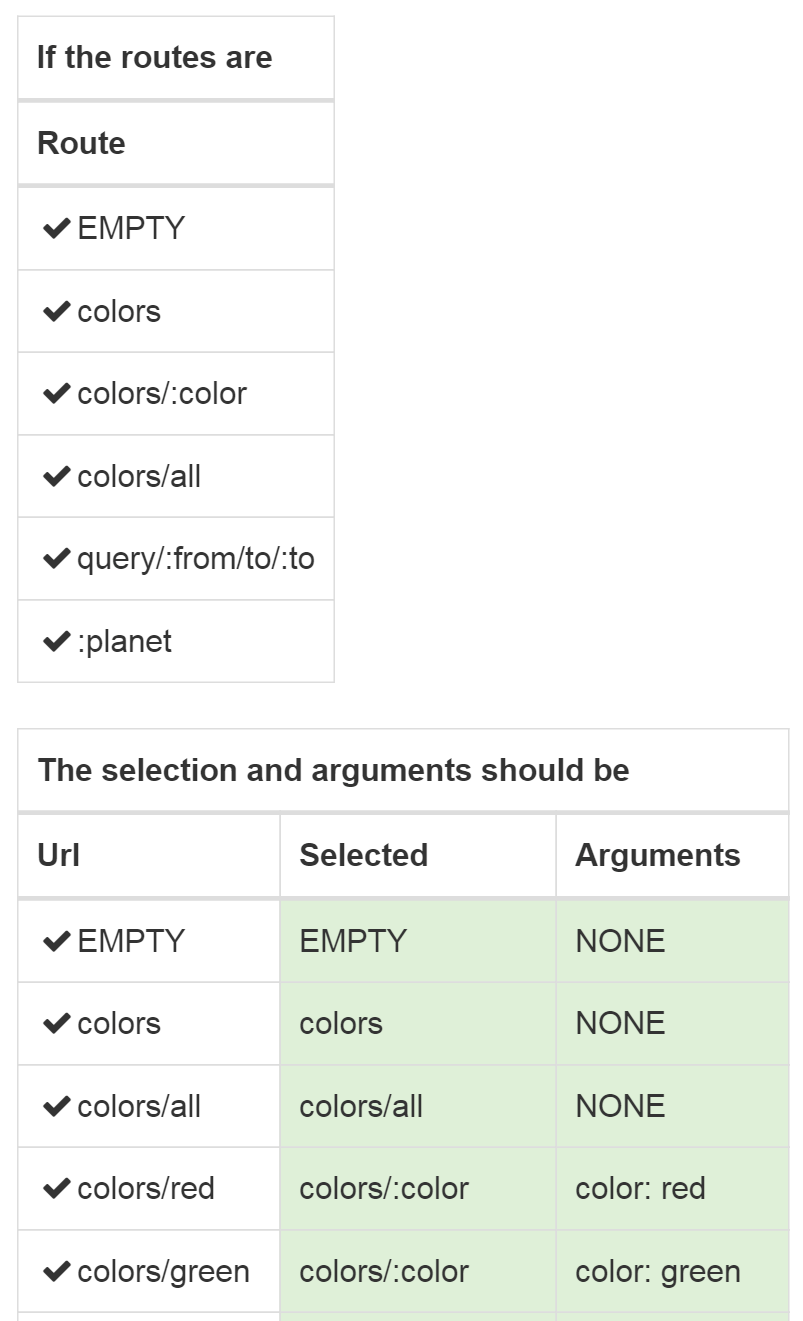
This turns out to be a pretty natural fit for expressing the requirements and sample scenarios with Storyteller. I started by jotting some notes on how I wanted to express the specifications by first setting up all the available routes in a new instance of the router, then running a series of scenarios through the router and proving that the router was choosing the correct route pattern and determining the route arguments for the routes that have parameters. That results of one of the specifications for the routing engine is shown below (but cropped for space):

AlbaSpec

Looking at the spec above, I did a couple things.

  1. “If the routes are” is a table grammar that just configures a router object with the supplied routes
  2. “The selection and arguments should be” is a second table grammar that takes in a Url pattern as an input, then asserts expected values against the route that was matched in the “Selected” column and uses a custom assertion to match up on the route parameters parsed from the Url (or asserts that there was “NONE”).

To set up the routing table in the first place, the “If the routes are” grammar is this (with the Fixture setup code to add some necessary context”:

        // This runs silently as the first step of a 
        // section using this Fixture
        public override void SetUp()
        {
            _tree = new RouteTree();
        }

        [ExposeAsTable("If the routes are")]
        public void RoutesAre(string Route)
        {
            var route = new Route(Route, HttpVerbs.GET, _ => Task.CompletedTask);

            _tree.AddRoute(route);
        }

The table for verifying the route selection is implemented by a second method:

        [ExposeAsTable("The selection and arguments should be")]
        public void TheSelectionShouldBe(
            string Url, 
            out string Selected, 
            [Default("NONE")]out ArgumentExpectation Arguments)
        {
            var env = new Dictionary<string, object>();
            var leaf = _tree.Select(Url);

            Selected = leaf.Pattern;

            leaf.SetValues(env, RouteTree.ToSegments(Url));

            Arguments = new ArgumentExpectation(env);
        }

The input value is just a single string “Url.” The method above takes that url string, runs it through the RouteTree object we had previously configured (“If the routes are”), finds the selected route, and fills the two out parameters. Storyteller itself will compare the two out values to the expected values defined by the specification. In the case of “Selected”, it just compares two strings. In the case of “ArgumentExpectation”, that’s a custom type I built in the Alba testing library as a custom assertion for this grammar. The key parts of ArgumentExpectation are shown below:

        private readonly string[] _spread;
        private readonly IDictionary<string, object> _args;

        public ArgumentExpectation(string text)
        {
            _spread = new string[0];
            _args = new Dictionary<string, object>();

            if (text == "NONE") return;

            var args = text.Split(';');
            foreach (var arg in args)
            {
                var parts = arg.Trim().Split(':');
                var key = parts[0].Trim();
                var value = parts[1].Trim();
                if (key == "spread")
                {
                    _spread = value == "empty" 
                        ? new string[0] 
                        : value.Split(',')
                        .Select(x => x.Trim()).ToArray();
                }
                else
                {
                    _args.Add(key, value);
                }

            }
        }

        public ArgumentExpectation(Dictionary<string, object> env)
        {
            _spread = env.GetSpreadData();
            _args = env.GetRouteData();
        }

        protected bool Equals(ArgumentExpectation other)
        {
            return _spread.SequenceEqual(other._spread) 
                && _args.SequenceEqual(other._args);
        }

Storyteller provides quite a bit of customization on how the engine can convert a string to the proper .Net type for any particular “Cell.” In the case of ArgumentExpectation, Storyteller has a built in convention to use any constructor function with the signature “ctor(string)” to convert a string to the specified type and I exploit that ability here.

You can find all of the code for the RoutingFixture behind the specification above on GitHub. If you want to play around or see all of the parts of the specification, you can run the Storyteller client for Alba by cloning the Github repository, then running the “storyteller.cmd” file to compile the code and open the Storyteller client to the Alba project.

Why was this useful?

Some of you are rightfully reading this and saying that many xUnit tools have parameterized tests that can be used to throw lots of test scenarios together quickly. That’s certainly true, but the Storyteller mechanism has some advantages:

  1. The test results are shown clearly and inline with the specification html itself. It’s not shown above (because it is a regression test that’s supposed to be passing at all times;-)), but failures would be shown in red table cells with both the expected and actual values. This can make specification failures easier to understand and diagnose compared to the xUnit equivalents.
  2. Only the test inputs and expected results are expressed in the specification body. This makes it substantially easier for non technical stakeholders to more easily comprehend and review the specifications. It also acts to clearly separate the intent of the code from the mechanical details of the API. In the case of the Alba routing engine, that is probably important because the implementation today is a little tightly coupled to OWIN hosting but it’s somewhat likely we’d like to decouple the router from OWIN later as ASP.Net seems to be making OWIN a second class citizen from here on out.
  3. The Storyteller specifications or their results can be embedded into technical documentation generated by Storyteller. You can see an example of that in the Storyteller docs themselves.
  4. You can also add prose in the form of comments to the Storyteller specifications for more descriptions on the desired functionality (not shown here).


Marten Takes a Big Step Forward with v0.6

EDIT: Nuget v0.6.1 is already up with some improvements to the async code in Marten. Hat tip to Daniel Marbach for his pull request on that one.

Marten is a new OSS project that seeks to turn Postgresql into a robust, usable document database (and an event store someday) for .Net development. There’s a recording of an internal talk I gave introducing Marten at work live on YouTube for more background.

Marten v0.6 just went live on nuget this afternoon. This turned into a pretty substantial release that I feel makes Marten much more robust, usable, and generally a lot closer to ready for production usage in bigger, more complicated systems.

This release came with substantial contributions from other developers and incorporates feedback from early adopters. I’d like to thank (in no particular order) Jens Pettersson, Corey Kaylor, Bojan Veljanovski, Jeff Doolittle, Phillip Haydon, and Evgeniy Kulakov for their contributions and feedback in this release.

What’s New:

You can see the complete set of changes from the v0.6 milestone on GitHub.

So, what’s next?

More than anything, I’m hoping to get more early adopters giving us feedback (and pull requests!) on what’s missing, what’s not easy to use, and where it needs to change. I think I’ll get the chance to try converting a large project from RavenDb to Marten soon that should help as well.

Feature wise, I think the next couple things up for a future v0.7 release would be:

  • Batched queries (futures)
  • Readside projections, but whether that’s going to be via Javascript, .Net transforms, or both is yet to be determined
  • Using saved queries to avoid unnecessarily taking the hit of Linq expression parsing

The Jetbrains Storyteller 3 Webinar is Online

The Storyteller 3 webinar I did last week for Jetbrains has been published to YouTube this morning.

The latest Storyteller nuget (3.0.0.320-rc) addressed all of the UI flaws I managed to hit in the demos;)

There’ll be much more to come on Storyteller 3 as it gets closer and closer to finally getting an official release. The next step is a bit more UI performance optimization (i.e., Jeremy finally learns some RxJS) and the ability to step through a specification for easier debugging.