Time for an update on Critter Stack release plans, and a follow up on my previous Critter Stack Work in Progress post from March. The current plan is to release Marten 8.0, Weasel 8.0, and Wolverine 4.0 on June 1st. It’s not going to be a huge release in terms of new functionality, but there are some important structural changes that will help us build some future features, and we needed to jettison older .NET versions while getting onto the latest Npgsql. “CritterWatch” is still very much planned and a little bit in progress, but we’ve got to get these big releases out first.
The key takeaways are that I want to essentially freeze Marten 7.* for everything but bug fixes right now, and probably freeze Wolverine 3.* for new feature development after a last wave of pull requests gets pulled in over the next couple days.
I’m admittedly too drowsy and lazy to write much tonight, so here’s just a dump of what I wrote up for the rest of our core team to review. I think we’re already at the point where we’re ready to just work on documentation and a few last touches, so the mass majority of this doesn’t get done in time, but here’s the full brain storm:
First though, what’s been done:
.NET 6 & 7 were dropped
Updated to Npgsql 9 across the board
Dropped all synchronous APIs in Marten
Deleted some [Obsolete] APIs in Marten
Consolidation of supporting libraries to a single JasperFx library
JasperFx has that new consolidated configuration option for common configuration like application assembly, code generation, and the stateful resource AutoCreate mode
Pulled out event projections and core event store abstractions to a new JasperFx.Events library
Removed code generation from all projections
Better explicit code options for aggregations and event projections
Wolverine 4 has better handles envelope storage & the transactional inbox/outbox for modular monoliths
Improved “Descriptor” model to describe the static configuration of Wolverine and/or Marten applications that we’ll use for CritterWatch too
Expanded commands for dead letter queue management in Wolverine that was meant for CritterWatch
Multi-tenancy options in Wolverine for SQL Server or PostgreSQL w/o Marten, multi-tenancy usage with EF Core
Punchlist?
Marten 7.40.4 release w/ a pair of outstanding PRs
Cherry pick commits to Marten “master”
JasperFx & JasperFx.Events 1.0
Documentation website?
Weasel “master” branch
All tests should be passing
Marten “master” branch
All tests should be passing
Documentation website should be building – that’s going to take some effort because of code samples
Get Anne’s PR for tutorials in (cool new guided tour of building a system using Event Sourcing and Event Driven Architecture with first Marten, then Wolverine)
Stream Compacting feature – for a JasperFx customer (this is definitely in for Marten 8, this is a big improvement for keeping a larger system running fast over time by compacting the database)
Fix the optimized projection rebuild options? Or rip it out and leave it for CritterWatch?
Figure out what the proper behavior of “Live” aggregations when there’s some ShouldDelete() action going on
Wolverine
One last 3.14 release with easy to grab pull requests and bug fixes
Rebase on 3.14
Fork off the 3.0 branch
4.0 becomes main branch
All tests should be passing
Documentation website should build
Migration guide
Critter Watch preparation
When integrated w/ CritterWatch, Wolverine can build the descriptor model for the entire application, including EventStoreUsage. No idea where this work stands right now. Did quite a bit earlier this year, then went off in a different direction
Review all Open Telemetry usage and activity naming across Marten and especially Wolverine. Add Open Telemetry & Metrics metadata to the descriptor model sent to CritterWatch. I think this is somewhat likely to get done before Wolverine 4.0.
Ability to send messages from CritterWatch to Wolverine. Might push through some kind of message routing and/or message handler extensibility
Programmatic message routing in Wolverine that varies based on the message contents? This is around options to route a message to one of a set of destinations based on the message core. Thinking about concurrency here. Could be done later.
More open issues in the Marten 8 milestone, but it’s about time to drop any issue that isn’t a breaking change
As I wrote last week, message or request concurrency is probably the single most common source of client questions in JasperFx Software consulting and support work around the Critter Stack. Wolverine is a powerful tool for command and event message processing, and it comes with a lot of built in options for wide range of usage scenarios that provider the answers for a lot of the questions we routinely field from clients and other users. More specifically, Wolverine provides a lot of adjustable knobs to limit or expand:
Message processing parallelism. I.e., how many messages can be executed simultaneously
Message ordering when you need messages to be processed in sequence, or a lack thereof when you don’t
For better or worse, Wolverine has built up quite a few options over the years, and that can be admittedly confusing. Also, there are real performance or correctness tradeoffs with the choices you make around message ordering and processing parallelism. To that end, let’s go through a little whirlwind tour of Wolverine’s options for concurrency, parallelism, and delivery guarantees.
Listener Endpoints
Note that Wolverine standardizes the fluent interface options for endpoint type, message ordering, and parallel execution are consistent across all of its messaging transport types (Rabbit MQ, Azure Service Bus, Kafka, Pulsar, etc.), though not every option is available for every transport.
All messages handled in a Wolverine application come from a constantly running listener “Endpoint” that then delegates the incoming messages to the right message handler. A Wolverine “Endpoint” could be a local, in process queue, a Rabbit MQ queue, a Kafka topic, or an Azure Service Bus subscription (see Wolverine’s documentation on asynchronous messaging for the entire list of messaging options).
This does vary a bit by messaging broker or transport, but there are three modes for Wolverine endpoints, starting with Inline endpoints:
// Configuring a Wolverine application to listen to
// an Azure Service Bus queue with the "Inline" mode
opts.ListenToAzureServiceBusQueue(queueName, q => q.Options.AutoDeleteOnIdle = 5.Minutes()).ProcessInline();
With an Inline endpoint, messages are pulled off the receiving queue or topic one message at a time, and “ack-ed” back to the original queue or topic only on the successful completion of the message handler. This mode completely eschews any kind of durable, transactional inbox, but does still give you an at-least-once delivery guarantee as it’s possible that the “ack” process could fail after the message is successfully handled, potentially resulting in the message being resent from the external messaging broker. Know though that this is rare, and Wolverine puts some error retries around the “ack-ing” process.
As you would assume, using the Inline mode gives you sequential processing of messages within a single node, but limits parallel handling. You can opt into running parallel listeners for any given listening endpoint:
opts.ListenToRabbitQueue("inline")
    // Process inline, default is with one listener
    .ProcessInline()

    // But, you can use multiple, parallel listeners
    .ListenerCount(5);
The second endpoint mode is Buffered where messages are pulled off the external messaging queue or topic as quickly as they can be, and immediately put into an in memory queue and “ack-ed” to any external broker.
// I overrode the buffering limits just to show
// that they exist for "back pressure"
opts.ListenToAzureServiceBusQueue("incoming")
    .BufferedInMemory(new BufferingLimits(1000, 200));
In the sample above, I’m showing how you can override the defaults for how many messages can be buffered in memory for this listening endpoint before the endpoint is paused. Wolverine has some support for back pressure within its Buffered or Durable endpoints to prevent memory from being overrun.
With Buffered or the Durable endpoints I’ll describe next, you can specify the maximum number of parallel messages that can be processed at one time within a listener endpoint on a single node like this:
Or you can choose to run messages in a strict sequential order, one at a time like this:
// Make any kind of Wolverine configuration
options
    .PublishMessage<Module1Message>()
    .ToLocalQueue("module1-high-priority")
    .Sequential();
The last endpoint type is Durable, which behaves identical to the Buffered approach except that messages received from external message brokers are persisted to a backing database first before processing, then deleted when the messages are successfully processed or discarded or moved to dead letter queues by error handling policies:
Using the Durable mode enrolls the listening endpoint into Wolverine’s transactional inbox. This is the single most robust option for delivery guarantees with Wolverine, and even adds some protection for idempotent receipt of messages such that Wolverine will quietly reject the same message being received multiple times. Durable endpoints are more robust in terms of delivery guarantees and resilient in the face of system hiccups than the Buffered mode, but does incur a little bit of extra overhead making calls to a database — but I should mention that Wolverine is trying really hard to batch up calls to the database whenever it can for better runtime efficiency, and there are retry loops in all the internals for resiliency as well.
If you really read this post you should hopefully be badly abused of the flippant advice floating around .NET circles right now after the MassTransit commercialization announcement that you can “just” write your own abstractions over messaging brokers instead of using a robust, off the shelf toolset that will have far more engineering for resiliency and observability than most folks realize.
Scenarios
Alright, let’s talk about some common messaging scenarios and look at possible Wolverine options. It’s important to note that there is some real tension between throughput (how many messages can you process over time), message ordering requirements, and delivery guarantees and I’ll try to call those compromises as we go.
You have a constant flood of small messages coming in that are relatively cheap to process…
In this case I would choose a Buffered endpoint and allow it to run messages in parallel:
Letting messages run without any strict ordering will allow the endpoint to process messages faster. Using the Buffered approach will allow the endpoint to utilize any kind of message batching that external message brokers might support, and does a lot to remove the messaging broker as a bottle neck for message processing. The Buffered approach isn’t durable of course, but if you care about throughput more than guarantees or message ordering, it’s the best option.
Note that any Buffered or Durable endpoint automatically allows for parallel message processing capped by the number of processor cores for the host process.
A message is expensive to process…
If you have a message type that turns out to require a lot of resources to process, you probably want to limit the parallelization to restrict how many resources the system uses for this message type. I would say to either use an Inline endpoint:
opts.ListenToRabbitQueue("expensive")
    // Process inline, default is with one listener
    .ProcessInline()

    // Cap it to no more than two messages in parallel at any
    // one time
    .ListenerCount(2);
or a Buffered or Durable endpoint, but cap the parallelization.
Messages should be processed in order, at least on each node…
Use either a ProcessInline endpoint, or use the Sequential() option on any other kind of endpoint to limit the local processing to single file:
A certain type of message should be processed in order across the entire application…
Sometimes there’s a need to say that a certain set of messages within your system need to be handled in strict order across the entire application. While some specific messaging brokers have some specific functionality for this scenario, Wolverine has this option to ensure that a listening endpoint for a certain location only runs on a single node within the application at any one time, and always processes in strict sequential order:
var host = await Host.CreateDefaultBuilder().UseWolverine(opts =>
{
    opts.UseRabbitMq().EnableWolverineControlQueues();
    opts.PersistMessagesWithPostgresql(Servers.PostgresConnectionString, "listeners");

    opts.ListenToRabbitQueue("ordered")

        // This option is available on all types of Wolverine
        // endpoints that can be configured to be a listener
        .ListenWithStrictOrdering();
}).StartAsync();
Watch out of course, because this throttles the processing of messages to single file on exactly one node. That’s perfect for cases where you’re not too concerned about throughput, but sequencing is very important. A JasperFx Software client is using this for messages to a stateful Saga that coordinates work across their application.
Do note that Wolverine will both ensure a listener with this option is only running on one node, and will redistribute any strict ordering listeners to better distribute work across a cluster. Wolverine will also be able to detect when it needs to switch the listening over to a different node if a node is taken down.
Messages should be processed in order within a logical group, but we need better throughput otherwise…
Let’s say that you have a case where you know the system would work much more efficiently if Wolverine could process messages related to a single business entity of some sort (an Invoice? a Purchase Order? an Incident?) in strict order. You still need more throughput than you can achieve through a strictly ordered listener that only runs on one node, but you do need the messages to be handled in order or maybe just one at a time for a single business entity to arrive at consistent state or to prevent errors due to concurrent access.
_host = await Host.CreateDefaultBuilder()
    .UseWolverine(opts =>
    {
        opts.UseAzureServiceBusTesting()
            .AutoProvision().AutoPurgeOnStartup();

        opts.ListenToAzureServiceBusQueue("send_and_receive");
        opts.PublishMessage<AsbMessage1>().ToAzureServiceBusQueue("send_and_receive");

        opts.ListenToAzureServiceBusQueue("fifo1")

            // Require session identifiers with this queue
            .RequireSessions()

            // This controls the Wolverine handling to force it to process
            // messages sequentially
            .Sequential();

        opts.PublishMessage<AsbMessage2>()
            .ToAzureServiceBusQueue("fifo1");

        opts.PublishMessage<AsbMessage3>().ToAzureServiceBusTopic("asb3");
        opts.ListenToAzureServiceBusSubscription("asb3")
            .FromTopic("asb3")

            // Require sessions on this subscription
            .RequireSessions(1)

            .ProcessInline();
    }).StartAsync();
But, there’s a little bit more to publishing because you’ll need to tell Wolverine what the GroupId value is for your message:
I think we’ll try to make this a little more automatic in the near future with Wolverine.
// bus is an IMessageBus
await bus.SendAsync(new AsbMessage3("Red"), new DeliveryOptions { GroupId = "2" });
await bus.SendAsync(new AsbMessage3("Green"), new DeliveryOptions { GroupId = "2" });
await bus.SendAsync(new AsbMessage3("Refactor"), new DeliveryOptions { GroupId = "2" });
Of course, if you don’t have Azure Service Bus, you still have some other options. I think I’m going to save this for a later post, hopefully after building out some formal support for this, but another option is to:
Plan on having several different listeners for a subset of messages that all have the strictly ordered semantics as shown in the previous section. Each listener can at least process information independently
Use some kind of logic that can look at a message being published by Wolverine and use some kind of deterministic rule that will assign that message to one of the strictly ordered messaging destinations
Like I said, more to come on this in the hopefully near future, and this might be part of a JasperFx Software engagement soon.
What about handling events in Wolverine that are captured to Marten (or future Critter Event Stores)?
I’m Gen X, so the idea of Marten & Wolverine assembling to create the ultimate Event Driven Architecture stack makes me think of Transformers cartoons:)
It’s been a few years, but what is now Wolverine was originally called “Jasper” and was admittedly a failed project until we decided to reorient it to being a complement to Event Sourcing with Marten and renamed it “Wolverine” to continue the “Critter Stack” theme. A huge part of that strategy was having first class mechanisms to either publish or handle events captured by Marten’s Event Sourcing through Wolverine’s robust message execution and message publishing capabilities.
You have two basic mechanisms for this. The first, and original option is “Event Forwarding” where events captured by Marten are published to Wolverine upon the successful completion of the Marten transaction:
builder.Services.AddMarten(opts =>
    {
        var connString = builder
            .Configuration
            .GetConnectionString("marten");

        opts.Connection(connString);

        // There will be more here later...

        opts.Projections
            .Add<AppointmentDurationProjection>(ProjectionLifecycle.Async);

        // OR ???

        // opts.Projections
        //     .Add<AppointmentDurationProjection>(ProjectionLifecycle.Inline);

        opts.Projections.Add<AppointmentProjection>(ProjectionLifecycle.Inline);
        opts.Projections
            .Snapshot<ProviderShift>(SnapshotLifecycle.Async);
    })

    // This adds a hosted service to run
    // asynchronous projections in a background process
    .AddAsyncDaemon(DaemonMode.HotCold)

    // I added this to enroll Marten in the Wolverine outbox
    .IntegrateWithWolverine()

    // I also added this to opt into events being forward to
    // the Wolverine outbox during SaveChangesAsync()
    .EventForwardingToWolverine();
Event forwarding gives you no ordering guarantees of any kind, but will push events as messages to Wolverine immediately. Event forwarding may give you significantly better throughput then the subscription model we’ll look at next because there’s less latency between persisting the event to Marten and the event being published to Wolverine. Moreover, using “Event Forwarding” means that the event publishing happens throughout any application cluster.
However, if you need strictly ordered handling of the events being persisted to Marten, you instead need to use the Event Subscriptions model where Wolverine is handling or relaying Marten events as messages in the strict order in which they are appended to Marten, and on a single running node. This is analogous to the strictly ordered listener option explained above.
There’s a real tradeoff between message ordering, processing throughput, and message delivery guarantees. Fortunately, Wolverine gives you plenty of options to meet a variety of different project requirements.
And one last time, you’re just not going to want to sign up for the level of robust options and infrastructure that’s under the covers of a tool like Wolverine can “just roll your own messaging abstractions” because you’re angry and think that community OSS tools can’t be trusted. And also, Wolverine is also a moving target that constantly improves based on the problems, needs, suggestions, and code contributions from our core team, community, and JasperFx Software customers. Your homegrown tooling will never receive that level of feedback, and probably won’t ever match Wolverine’s quality of documentation either.
JasperFx Software is the company I founded a little over two years ago to create an Open Core business model around the “Critter Stack” suite of open source tools (primarily Marten and Wolverine, with some smaller supporting tools). So far, our main sources of revenue (right now it’s myself with contributions from Babu Annamalai, but we’d sure like to grow soon!) have been technical consulting to help our customers get the best possible results from Marten or Wolverine, custom feature development within the tools, and ongoing support contracts.
Just by the nature of what they are for (asynchronous messaging, event sourcing, and data persistence), the “Critter Stack” tools have to be considered a mission critical part of your technical infrastructure. You can pick these tools off the shelf knowing that there is a company and community behind the tools even though they’re free to use through the permissive MIT license. To that point, a support plan from JasperFx Software gives you the piece of mind to use these tools knowing that you have ready access to the technical experts for questions or to have any problems you encounter with the tools addressed.
The support contracts include a dedicated, private Discord or Slack room for your company for relatively quick response (our SLA is 24 hours, but we generally answer much faster than that). We aren’t just there for defects, we’re (JasperFx) also there to answer questions and to advise you on best usages of the tools as you need within the bounds of the contract. I’ve frequently jumped on Zoom or Teams calls with our customers for trickier questions or just when it takes more communication to really get to a solution for our customers. I can proudly say that every single JasperFx support customer has renewed their yearly support plan when the first year was up so far.
Just to give you an idea of what kind of issues JasperFx can help you with, the most common issues have been:
Concurrency, concurrency, concurrency. Sometimes it’s helping users design queueing and messaging topologies to ameliorate concurrent access, sometimes it’s helping them to leverage Marten’s optimistic and pessimistic locking support, and sometimes it’s helping to design Wolverine resiliency strategies.
Guidance on Event Sourcing usage within the Critter Stack, with designing event projections being a particularly common source of questions
Multi-tenancy usage. Marten and Wolverine both have unusually strong support for multi-tenancy scenarios as a result of our users coming up with more and more scenarios for us!
Automated testing, both how to leverage Wolverine capabilities to write more easily testable business logic code and how to use both Marten and Wolverine’s built in support for integration testing
Plenty of issues around messaging brokers and messaging patterns
There’s been some consternation about some other widely used .NET OSS tools moving to commercial licenses that have caused many people to proclaim that they should just roll their own tools instead of paying for a commercial tool or using an OSS tool off the shelf that might become commercial down the road. I’m going to suggest a little different thinking.
Before you try to roll your own Event Sourcing tool, just know that Marten is over a decade old, it’s well documented, and it’s the most widely used Event Sourcing tool in the .NET ecosystem (by Nuget downloads, and it’s not really close at all). Moreover, you get the benefit of a tool that’s been beaten on and solves a lot of very real, and quite complex problems with Event Sourcing usage that you may not even know you’re going to have.
Before you “just write your own abstraction over messaging brokers”, know that tools like Wolverine do a lot more than just abstract away tools like Rabbit MQ or Azure Service Bus. Resiliency features — and some of that is quite more complicated than just plopping in Polly, Open Telemetry tracing, other instrumentation, dealing with serialization, stateful saga workflows, multi-tenancy, scheduled message execution, and transactional inbox/outbox features are just some of the built in capabilities that Wolverine provides. And besides all the normal features you’d expect out of a messaging tool in .NET, Wolverine potentially does much, much more within your application code to simplify your development efforts. The people who really embrace Wolverine’s different approach to application code love how it drastically reduces code ceremony compared to more common Clean/Onion Architecture layered approaches using other competitors. Having an ongoing relationship through a JasperFx Software support contract will only help you wring out the very most from your Wolverine usage.
If you’d prefer to start with more context, skip to the section named “Why is this important?”.
To set up the problem I’m hoping to address in this post, there are several settings across both Marten and Wolverine that need to be configured for the most optimal possible functioning between development, testing, and deployment time — but yet, some of these settings are done different ways today or have to be done independently for both Marten and Wolverine.
Below is a proposed configuration approach for Marten, Wolverine, and future “Critter” tools with the Marten 8 / Wolverine 4 “Critter Stack 2025” wave of releases:
        var builder = Host.CreateApplicationBuilder();

        // This would apply to both Marten, Wolverine, and future critters....
        builder.Services.AddJasperFx(x =>
        {
            // This expands in importance to be the master "AutoCreate"
            // over every resource at runtime and not just databases
            // So this would maybe take the place of AutoProvision() in Wolverine world too
            x.Production.AutoCreate = AutoCreate.None;
            x.Production.GeneratedCodeMode = TypeLoadMode.Static;
            x.Production.AssertAllPreGeneratedTypesExist = true;

            // Just for completeness sake, but these are the defaults
            x.Development.AutoCreate = AutoCreate.CreateOrUpdate;
            x.Development.GeneratedCodeMode = TypeLoadMode.Dynamic;

            // Unify the Marten/Wolverine/future critter application assembly
            // Default will always be the entry assembly
            x.ApplicationAssembly = typeof(Message1).Assembly;
        });

        // keep bootstrapping...
If you’ve used either Marten or Wolverine for production usages, you know that you probably want to turn off the dynamic code generation at production time, and you might choose to also turn off the automatic database migrations for both Marten and Wolverine in production (or not, I’ve been surprised how many folks are happy to just let the tools manage database schemas).
The killer problem for us today, is that the settings above have to be configured independently for both Marten and Wolverine — and as a bad coincidence, I just chatted with someone on Discord who got burned by this as I was starting this post. Grr.
Even worse, the syntactical options for disabling automatic database management for Wolverine’s envelope storage tables is a little different syntax altogether. And then just to make things more fun — and please cut the Critter Stack community and I some slack because all of this evolved over years — the “auto create / migrate / evolve” functionality for like Rabbit MQ queues/exchanges/bindings or Kafka topics is “opt in” instead of “opt out” like the automatic database migrations are with a completely different syntax and naming than either the Marten or Wolverine tables as shown with the AutoProvision() option below:
using var host = await Host.CreateDefaultBuilder()
    .UseWolverine(opts =>
    {
        opts.UseRabbitMq(rabbit => { rabbit.HostName = "localhost"; })
            // I'm declaring an exchange, a queue, and the binding
            // key that we're referencing below.
            // This is NOT MANDATORY, but rather just allows Wolverine to
            // control the Rabbit MQ object lifecycle
            .DeclareExchange("exchange1", ex => { ex.BindQueue("queue1", "key1"); })

            // This will direct Wolverine to create any missing Rabbit MQ exchanges,
            // queues, or binding keys declared in the application at application
            // start up time
            .AutoProvision();

        opts.PublishAllMessages().ToRabbitExchange("exchange1");
    }).StartAsync();
I’m not married to the syntax per se, but my proposal is that:
Every possible type of “stateful resource” (database configurations or message brokers or whatever we might introduce in the future) by default follows the AutoCreate settings in one place, which for right now is in the AddJasperFx() method (should this be named something else? ConfigureJasperFx(), ConfigureCritterStack() ????
You can override this at either the Marten or Wolverine levels, or within Wolverine, maybe you use the default behavior for the application for all database management, but turn down Azure Service Bus to AutoCreate.None.
We’ll use the AutoCreate enumeration that originated in Marten, but will now move down to a lower level shared library to define the level for each resource
All resource types will have a default setting of AutoCreate.CreateOrUpdate, even message brokers. This is to move the tools into more of a “it just works” out of the box developer experience. This will make the usage of AutoProvision() in Wolverine unnecessary unless you want to override the AutoCreate settings
We deprecate the OptimizeArtifactWorkflow() mechanisms that never really caught on, and instead let folks just set potentially different settings for “Development” vs “Production” time, and let the tools apply the right settings based on the IHostEnvironment.Environment name so you don’t have to clutter up your code with too many ugly if (builder.Environment.IsDevelopment() ... calls.
Just for some context, the AutoCreate values are below:
public enum AutoCreate
{
    /// <summary>
    ///     Will drop and recreate tables that do not match the Marten configuration or create new ones
    /// </summary>
    All,

    /// <summary>
    ///     Will never destroy existing tables. Attempts to add missing columns or missing tables
    /// </summary>
    CreateOrUpdate,

    /// <summary>
    ///     Will create missing schema objects at runtime, but will not update or remove existing schema objects
    /// </summary>
    CreateOnly,

    /// <summary>
    ///     Do not recreate, destroy, or update schema objects at runtime. Will throw exceptions if
    ///     the schema does not match the Marten configuration
    /// </summary>
    None
}
For longstanding Critter Stack users, we’ll absolutely keep:
The existing “stateful resource” model, including the resources command line helper for setting up or tearing down resource dependencies
The existing db-* command line tooling
The IServiceCollection.AddResourceSetupOnStartup() method for forcing all resources (databases and broker objects) to be correctly built out on application startup
The existing Marten and Wolverine settings for configuring the AutoCreate levels, but these will be marked as [Obsolete]
The existing Marten and Wolverine settings for configuring the code generation TypeLoadMode, but the default values will come from the AddJasperFx() options and the Marten or Wolverine options will be marked as [Obsolete]
Why is this important?
An important part of building, deploying, and maintaining an enterprise system with server side tooling like the “Critter Stack” (Marten, Wolverine, and their smaller sibling Weasel that factors quite a bit into this blog post) is dealing with creating or migrating database schema objects or message broker resources so that your application can function as expected against its infrastructure dependencies.
As any of you know who have ever walked into the development of an existing enterprise system, it’s often challenging to get your local development environment configured for that system — and that can frequently cause you days and I’ve even seen weeks of delay. What if instead you could simply start fresh with a clean clone of the code repository and be up and running very quickly?
If you pick up Marten for the first time today, spin up a brand new PostgreSQL database where you have full admin rights, and write this code it would happily work without you doing any explicit work to migrate the new PostgreSQL database:
public class Customer
{
    public Guid Id { get; set; }

    // We'll use this later for some "logic" about how incidents
    // can be automatically prioritized
    public Dictionary<IncidentCategory, IncidentPriority> Priorities { get; set; }
        = new();

    public string? Region { get; set; }

    public ContractDuration Duration { get; set; }
}

public record ContractDuration(DateOnly Start, DateOnly End);

public enum IncidentCategory
{
    Software,
    Hardware,
    Network,
    Database
}

public enum IncidentPriority
{
    Critical,
    High,
    Medium,
    Low
}

await using var store = DocumentStore
    .For("Host=localhost;Port=5432;Database=marten_testing;Username=postgres;password=postgres");

var customer = new Customer
{
    Duration = new ContractDuration(new DateOnly(2023, 12, 1), new DateOnly(2024, 12, 1)),
    Region = "West Coast",
    Priorities = new Dictionary<IncidentCategory, IncidentPriority>
    {
        { IncidentCategory.Database, IncidentPriority.High }
    }
};

// IDocumentSession is Marten's unit of work
await using var session = store.LightweightSession();
session.Store(customer);
await session.SaveChangesAsync();

// Marten assigned an identity for us on Store(), so
// we'll use that to load another copy of what was
// just saved
var customer2 = await session.LoadAsync<Customer>(customer.Id);

// Just making a pretty JSON printout
Console.WriteLine(JsonConvert.SerializeObject(customer2, Formatting.Indented));
Instead, with its default settings, Marten is able to quietly check if its underlying database has all the necessary database tables, functions, sequences, and schemas for whatever it needs roughly when it needs it for the first time. The whole point of this functionality is to ensure that a new developer coming into your project for the very first time can quickly clone your repository, and be up and running either the whole system or even just integration tests that hit the database immediately because Marten is able to “auto-migrate” database changes for you so you can just focus on getting work done.
Great, right? Except that sometimes you certainly wouldn’t want this “auto-migration” business going. Maybe because the system doesn’t have permissions, or maybe just to make the system spin up faster without the overhead of calculating the necessity of a migration step (it’s not cheap, especially for something like a Serverless usage where you depend on fast cold starts). Either way, you’d like to be able to turn that off at production time with the assumption that you’re applying database changes beforehand (which the Critter Stack has worlds of tools to help with as well), so you’ll turn off the default behavior something like the following with Marten 7 and before:
var builder = WebApplication.CreateBuilder(args);

builder.Services.AddMarten(opts =>
    {
        // Other configuration...

        // In production, let's turn off all the automatic database
        // migration stuff
        if (builder.Environment.IsProduction())
        {
            opts.AutoCreateSchemaObjects = AutoCreate.None;
        }
    })
    // Add background projection processing
    .AddAsyncDaemon(DaemonMode.HotCold)
    // This is a mild optimization
    .UseLightweightSessions();
Wolverine uses the same underlying Weasel helper library to make automatic database migrations that Marten does, and works similarly, but disabling the automatic database setup is different for reasons I don’t remember:
using var host = await Host.CreateDefaultBuilder()
    .UseWolverine(opts =>
    {
        // Disable automatic database migrations for message
        // storage
        opts.AutoBuildMessageStorageOnStartup = false;
    }).StartAsync();
Wolverine can do similar automatic management of Rabbit MQ, Azure Service Bus, AWS SQS, Kafka, Pulsar, or Google Pubsub objects at runtime, but in this case you have to explicitly “opt in” to that automatic management through the fluent interface registration of a message broker like this sample using Google Pubsub:
        var host = await Host.CreateDefaultBuilder()
            .UseWolverine(opts =>
            {
                opts.UsePubsub("your-project-id")

                    // Let Wolverine create missing topics and subscriptions as necessary
                    .AutoProvision()

                    // Optionally purge all subscriptions on application startup.
                    // Warning though, this is potentially slow
                    .AutoPurgeOnStartup();
            }).StartAsync();
Work is continuing on the “Critter Stack 2025” round of releases, but we have finally got an alpha release of Marten 8 (8.0.0-alpha-5) that’s good enough for friendly users and core team members to try out for feedback. 8.0 won’t be a huge release, but we’re making some substantial changes to the projections subsystem and this is where I’d personally love any and all feedback about the changes so far that I’m going to try to preview in this post.
Just know that first, here are the goals of the projection changes for Marten 8.0:
Eliminate the code generation for projections altogether and instead using dynamic Lambda compilation with FastExpressionCompiler for the remaining convention-based projection approaches. That’s complete in this alpha release.
Expand the support for strong typed identifiers (Vogen or StronglyTypedId or otherwise) across the public API of Marten. I’m personally sick to death of this issue and don’t particularly believe in the value of these infernal things, but the user community has spoken loudly. Some of the breaking API changes in this post were caused by expanding the strong typed identifier support.
Better support explicit code options for all projection categories (single stream projections, multi-stream projections, flat table projections, or event projections)
Extract the basic event sourcing types, abstractions, and most of the projection and event subscription support to a new shared JasperFx.Events library that is planned to be reusable between Marten and future “Critter” tools targeting Sql Server first, then maybe CosmosDb or DynamoDb. We’ll write a better migration guide later, but expect some types you may be using today to have moved namespaces. I was concerned before starting this work for the 2nd time that it would be a time consuming boondoggle that might not be worth the effort. After having largely completed this planned work I am still concerned that this was a time consuming boondoggle and opportunity cost. Alas.
Some significant performance and scalability improvements for asynchronous projections and projection rebuilds that are still a work in progress
Alright, on to the changes.
Single Stream Projection
Probably the most common projection type is to aggregate a single event stream into a view of that stream as either a “write model” to support decision making in commands or a “read model” to support queries or user interfaces. In Marten 8, you will still use the SingleStreamProjection base class (CustomProjection is marked as obsolete in V8), but there’s one significant change that now you have to use a second generic type argument for the identity type of the projected document (blame the proliferation of strong typed identifiers for this), with this as an example:
// This example is using the old Apply/Create/ShouldDelete conventions
public class ItemProjection: SingleStreamProjection<Item, Guid>
{
    public void Apply(Item item, ItemStarted started)
    {
        item.Started = true;
        item.Description = started.Description;
    }

    public void Apply(Item item, IEvent<ItemWorked> worked)
    {
        // Nothing, I know, this is weird
    }

    public void Apply(Item item, ItemFinished finished)
    {
        item.Completed = true;
    }

    public override Item ApplyMetadata(Item aggregate, IEvent lastEvent)
    {
        // Apply the last timestamp
        aggregate.LastModified = lastEvent.Timestamp;

        var person = lastEvent.GetHeader("last-modified-by");

        aggregate.LastModifiedBy = person?.ToString() ?? "System";

        return aggregate;
    }
}
The same Apply, Create, and ShouldDelete conventions from Marten 4-7 are still supported. You can also still just put those conventional methods directly on the aggregate type just like you could in Marten 4-7.
The inline lambda options are also still supported with the same method signatures:
So far the only different from Marten 4-7 is the additional type argument for the identity. Now let’s get into the new options for explicit code when either you just prefer that way, or your logic is too complex for the limited conventional approach.
First, let’s say that you want to use explicit code to “evolve” the state of an aggregated projection, but you won’t need any additional data lookups except for the event data. In this case, you can override the Evolve method as shown below:
public class WeirdCustomAggregation: SingleStreamProjection<MyAggregate, Guid>
{
    public WeirdCustomAggregation()
    {
        ProjectionName = "Weird";
    }

    public override MyAggregate Evolve(MyAggregate snapshot, Guid id, IEvent e)
    {
        // Given the current snapshot and an event, "evolve" the aggregate
        // to the next version.

        // And snapshot can be null, just meaning it hasn't been
        // started yet, so start it here
        snapshot ??= new MyAggregate(){ Id = id };
        switch (e.Data)
        {
            case AEvent:
                snapshot.ACount++;
                break;
            case BEvent:
                snapshot.BCount++;
                break;
            case CEvent:
                snapshot.CCount++;
                break;
            case DEvent:
                snapshot.DCount++;
                break;
        }

        return snapshot;
    }
}
I should note that you may want to explicitly configure what event types the projection is interested in as a way to optimize the projection when running in the async daemon.
Now, if you want to “evolve” a snapshot with explicit code, but you might need to do query some reference data as you do that, you can instead override the asynchronous EvolveAsync method with this signature:
    public virtual ValueTask<TDoc?> EvolveAsync(TDoc? snapshot, TId id, TQuerySession session, IEvent e,
        CancellationToken cancellation)
But wait, there’s (unfortunately) more options! In the recipes above, you’re assuming that the single stream projection has a simplistic lifecycle of being created, updated one or more times, then maybe being deleted and/or archived. But what if you have some kind of complex workflow where the projected document for a single event stream might be repeatedly created, deleted, then restarted? We had to originally introduce the CustomProjection mechanism to Marten 6/7 as a way of accommodating complex workflows, especially when they involved soft deletes of the projected documents. In Marten 8, we’re (for now) proposing reentrant workflows with this syntax by overriding the DetermineAction() method like so:
public class StartAndStopProjection: SingleStreamProjection<StartAndStopAggregate, Guid>
{
    public StartAndStopProjection()
    {
        // This is an optional, but potentially important optimization
        // for the async daemon so that it sets up an allow list
        // of the event types that will be run through this projection
        IncludeType<Start>();
        IncludeType<End>();
        IncludeType<Restart>();
        IncludeType<Increment>();
    }

    public override (StartAndStopAggregate?, ActionType) DetermineAction(StartAndStopAggregate? snapshot, Guid identity,
        IReadOnlyList<IEvent> events)
    {
        var actionType = ActionType.Store;

        if (snapshot == null && events.HasNoEventsOfType<Start>())
        {
            return (snapshot, ActionType.Nothing);
        }

        var eventData = events.ToQueueOfEventData();
        while (eventData.Any())
        {
            var data = eventData.Dequeue();
            switch (data)
            {
                case Start:
                    snapshot = new StartAndStopAggregate
                    {
                        // Have to assign the identity ourselves
                        Id = identity
                    };
                    break;

                case Increment when snapshot is { Deleted: false }:

                    if (actionType == ActionType.StoreThenSoftDelete) continue;

                    // Use explicit code to only apply this event
                    // if the snapshot already exists
                    snapshot.Increment();
                    break;

                case End when snapshot is { Deleted: false }:
                    // This will be a "soft delete" because the snapshot type
                    // implements the IDeleted interface
                    snapshot.Deleted = true;
                    actionType = ActionType.StoreThenSoftDelete;
                    break;

                case Restart when snapshot == null || snapshot.Deleted:
                    // Got to "undo" the soft delete status
                    actionType = ActionType.UnDeleteAndStore;
                    snapshot.Deleted = false;
                    break;
            }
        }

        return (snapshot, actionType);
    }

}
And of course, since *some* of you will do even more complex things that will require making database calls through Marten or maybe even calling into external web services, there’s an asynchronous alternative as well with this signature:
    public virtual ValueTask<(TDoc?, ActionType)> DetermineActionAsync(TQuerySession session,
        TDoc? snapshot,
        TId identity,
        IIdentitySetter<TDoc, TId> identitySetter,
        IReadOnlyList<IEvent> events,
        CancellationToken cancellation)
Multi-Stream Projections
Multi-stream projections are similar in mechanism to single stream projections, but there’s an extra step of “slicing” or grouping events across event streams into related aggregate documents. Experienced Marten users will be aware that the “slicing” API in Marten has not been the most usable API in the world. I think that even though it didn’t change *that* much in Marten 8, the “slicing” will still be easier to use.
First, here’s a sample multi-stream projection that didn’t change at all from Marten 7:
public class DayProjection: MultiStreamProjection<Day, int>
{
    public DayProjection()
    {
        // Tell the projection how to group the events
        // by Day document
        Identity<IDayEvent>(x => x.Day);

        // This just lets the projection work independently
        // on each Movement child of the Travel event
        // as if it were its own event
        FanOut<Travel, Movement>(x => x.Movements);

        // You can also access Event data
        FanOut<Travel, Stop>(x => x.Data.Stops);

        ProjectionName = "Day";

        // Opt into 2nd level caching of up to 100
        // most recently encountered aggregates as a
        // performance optimization
        Options.CacheLimitPerTenant = 1000;

        // With large event stores of relatively small
        // event objects, moving this number up from the
        // default can greatly improve throughput and especially
        // improve projection rebuild times
        Options.BatchSize = 5000;
    }

    public void Apply(Day day, TripStarted e)
    {
        day.Started++;
    }

    public void Apply(Day day, TripEnded e)
    {
        day.Ended++;
    }

    public void Apply(Day day, Movement e)
    {
        switch (e.Direction)
        {
            case Direction.East:
                day.East += e.Distance;
                break;
            case Direction.North:
                day.North += e.Distance;
                break;
            case Direction.South:
                day.South += e.Distance;
                break;
            case Direction.West:
                day.West += e.Distance;
                break;

            default:
                throw new ArgumentOutOfRangeException();
        }
    }

    public void Apply(Day day, Stop e)
    {
        day.Stops++;
    }
}
The options to use conventional Apply/Create methods or to override Evolve, EvolveAsync, DetermineAction, or DetermineActionAsync are identical to SingleStreamProjection.
Now, on to a more complicated “slicing” sample with custom code:
public class UserGroupsAssignmentProjection: MultiStreamProjection<UserGroupsAssignment, Guid>
{
    public UserGroupsAssignmentProjection()
    {
        CustomGrouping((_, events, group) =>
        {
            group.AddEvents<UserRegistered>(@event => @event.UserId, events);
            group.AddEvents<MultipleUsersAssignedToGroup>(@event => @event.UserIds, events);

            return Task.CompletedTask;
        });
    }
I know it’s not that much simpler than Marten 8, but one thing Marten 8 is doing is handling tenancy grouping behind the scenes for you so that you can just focus on defining how events apply to different groupings. The sample above shaves 3-4 lines of code and a level or two of nesting from the Marten 7 equivalent.
EventProjection and FlatTableProjection
The existing EventProjection and FlatTableProjection models are supported in their entirety, but we will have a new explicit code option with this signature:
public virtual ValueTask ApplyAsync(TOperations operations, IEvent e, CancellationToken cancellation)
And of course, you can still just write a custom IProjection class to go straight down to the metal with all your own code, but that’s been simplified a little bit from Marten 7 such that you don’t have to care about whether it’s running Inline or in Async lifetimes:
    public class QuestPatchTestProjection: IProjection
    {
        public Guid Id { get; set; }

        public string Name { get; set; }

        public Task ApplyAsync(IDocumentOperations operations, IReadOnlyList<IEvent> events, CancellationToken cancellation)
        {
            var questEvents = events.Select(s => s.Data);

            foreach (var @event in questEvents)
            {
                if (@event is Quest quest)
                {
                    operations.Store(new QuestPatchTestProjection { Id = quest.Id });
                }
                else if (@event is QuestStarted started)
                {
                    operations.Patch<QuestPatchTestProjection>(started.Id).Set(x => x.Name, "New Name");
                }
            }
            return Task.CompletedTask;
        }
    }
What’s Still to Come?
I’m admittedly cutting this post short just because I’m a good (okay, not horrible) Dad and it’s time to do bedtime in a minute. Beyond just responding to whatever feedback comes in, there’s some more test cases for the explicit coding options, more samples to write for documentation, and a seemingly endless array of use cases for strong typed identifiers.
Beyond that, there’s still a significant effort to come with Marten 8 to try some performance and scalability optimizations for asynchronous projections, but I’ll warn you all that anything too complex is likely to land in our theoretical paid add on model.
So, yes, Wolverine overlaps quite a bit with both MediatR and MassTransit. If you’re a MediatR user, Wolverine just does a helluva lot more and we have an existing guide for converting from MediatR to Wolverine. For MassTransit (or NServiceBus) users, Wolverine covers a lot of the same asynchronous messaging framework use cases, but does much, much more to simplify your application code than any other .NET messaging framework and should not be compared as an apples to apples messaging feature comparison. And no other tool in the entire .NET ecosystem can come even remotely close to the Critter Stack’s support for Event Sourcing from soup to nuts.
It’s kind of a big day in .NET OSS news with both MediatR and MassTransit respectively announcing moves to commercial licensing models. I’d like to start by wishing the best of luck to my friends Jimmy Bogard and Chris Patterson respectively with their new ventures.
As any long term participant in or observer of the .NET ecosystem knows, there’s about to be a flood of negativity from various people in our community about these moves. There will also be an outcry from a sizable cohort in the .NET community who seem to believe that all development tools should be provided by Microsoft and that only Microsoft can ever be a reliable supplier of these types of tools while somehow suffering from amnesia about how Microsoft has frequently abandoned high profile tools like Silverlight or WCF.
As for Marten, Wolverine, and other future Critter Stack tools, the current JasperFx Software strategy remains following the “open core” model where the existing capabilities in the MIT-licensed tools (note below) remain under an OSS license and JasperFx Software focuses on services, support plans, and the forthcoming commercial CritterWatch tool for monitoring, management, and some advanced features for data privacy, multi-tenancy, and extreme scalability. While we certainly respect MassTransit’s decision, we’re going to try a different path and stay down the “open core” model and Marten 8 / Wolverine 4 will be released under the MIT OSS license. I will admit that you may see some increasing reluctance to be providing as much free support through Discord as we have to users in the past though.
To be technical, there is one existing feature in Marten 7.* for optimized projection rebuilds that I think we’ll redesign and move to the commercial add on tooling in the Marten 8 timeframe, but in this case the existing feature is barely usable anyway so ¯\_(ツ)_/¯
It’s just time for an update from my last post on Critter Stack Roadmap Update for February as the work has progressed in the past weeks and we have more clarity on what’s going to change.
Work is heavily underway right now for a round of related releases in the Critter Stack (Marten, Wolverine, and other tools) I was originally calling “Critter Stack 2025” involving these tools:
Ermine for Event Sourcing with SQL Server
“Ermine” is our next full fledged “Critter” that’s been a long planned port of a significant subset of Marten’s functionality to targeting SQL Server. At this point, the general thinking is:
Focus on porting the Event Sourcing functionality from Marten
Quite possibly build around the JSON field support in EF Core and utilize EF Core under the covers. Maybe.
Use a new common JasperFx.Events library that will contain the key abstractions, metadata tracking, and even projection support. This new library will be shared between Marten, Ermine, and theoretical later “critters” targeting CosmosDb or DynamoDb down the line
Maybe try to lift out more common database handling code from Marten, but man, there’s more differences between PostgreSQL and SQL Server than I think people understand and that might turn into a time sink
Support the same kind of “aggregate handler workflow” integration with Wolverine as we have with Marten today, and probably try to do this with shared code, but that’s just a detail
Is this a good idea to do at all? We’ll see. The work to generalize the Marten projection support has been a time sink so far. I’ve been told by folks for a decade that Marten should have targeted SQL Server, and that supporting SQL Server would open up a lot more users. I think this is a bit of a gamble, but I’m hopeful.
JasperFx Dependency Consolidation
Most of the little, shared foundational elements of Marten, Wolverine, and soon to be Ermine have been consolidated into a single JasperFx library. That now includes what was:
JasperFx.Core (which in turn was renamed from “Baseline” after someone else squatted on that name and in turn was imported from ancient FubuCore for long term followers of mine)
The command line discovery, parsing, and execution model that is in Oakton today. That might be a touch annoying for the initial conversion, but in the little bit longer term that’s allowed us to combine several Nuget packages and simplify the project structure over all. TL;DR: fewer Nugets to install going forward.
Marten 8.0
I hope that Marten 8.0 is a much smaller release than Marten 7.0 was last year, but the projection model changes are turning out to be substantial. So far, this work has been done:
.NET 6/7 support has been dropped and the dependency tree simplified after that
Synchronous database access APIs have been eliminated
All other API signatures that were marked as [Obsolete] in the latest versions of Marten 7.* were removed
Marten.CommandLine was removed altogether, but the “db-*” commands are available as part of Marten’d dependency tree with no difference in functionality from the “marten-*” commands
Upgraded to the latest Npgsql 9
The projection subsystem overhaul is ongoing and substantial and frankly I’m kind of expecting Vizzini to show up in my home office and laugh at me for starting a land war in Southeast Asia. For right now I’ll just say that the key goals are:
The aforementioned reuse with Ermine and potential other Event Store implementations later
Making it as easy as possible to use explicit code instead as desired for the projections in addition to the existing conventional Apply / Create methods
Eliminate code generation for just the projections
Simplify the usage of “event slicing” for grouping events in multi-stream projections. I’m happy how this is shaping up so far, and I think this is going to end up being a positive after the initial conversion
Improve the throughput of the async daemon
There’s also a planned “stream compacting” feature happening, but it’s too early to talk about that much. Depending on how the projection work goes, there may be other performance related work as well.
Wolverine 4.0
Wolverine 4.0 is mostly about accomodating the work in other products, but there are some changes. Here’s what’s already been done:
Dropped .NET 7 support
Significant work for a single application being able to use multiple databases from within one application for folks getting clever with modular monoliths. In Wolverine 4.*, you’ll be able to mix and match any number of data stores with the corresponding transactional inbox/outbox support much better than Wolverine 3.* can do. This is 100% about modular monoliths, but also fit into the CritterWatch work
Work to provide information to CritterWatch
There are some other important features that might be part of Wolverine 4.0 depending on some ongoing negotiations with a potential JasperFx customer.
CritterWatch Minimal Viable Product Direction
“CritterWatch” is a long planned commercial add on product for Wolverine, Marten, and any future “critter” Event Store tools. The goal is to create both a management and monitoring dashboard for Wolverine messaging and the Event Sourcing processes in those systems.
The initial concept is shown below:
At least for the moment, the goal of the CritterWatch MVP is to deliver a standalone system that can be deployed either in the cloud or on a client premises. The MVP functionality set will:
Explain the configuration and capabilities of all your Critter Stack systems, including some visualization of how messages flow between your systems and the state of any event projections or subscriptions
Work with your OpenTelemetry tracking to correlate ongoing performance information to the artifacts in your system.
Visualize any ongoing event projections or subscriptions by telling you where each is running and how healthy they are — as well as give you the ability to pause, restart, rebuild, or rewind them as needed
Manage the dead letter queued (DLQ) messages of your system with the ability to query the messages and selectively replay or discard the DLQ messages
We have a world of other plans for CritterWatch, but the feature set above is the most requested features from the companies that are most interested in this tool first.
This content will later be published as a tutorial somewhere on one of our documentation websites.This was originally “just” an article on doing blue/green deployments when using projections with Marten, so hence the two martens up above:)
Event Sourcing may not seem that complicated to implement, and you might be tempted to forego any kind of off the shelf tooling and just roll your own. Just appending events to storage by itself isn’t all that difficult, but you’ll almost always need projections of some sort to derive the system state in a usable way and that’s a whole can of complexity worms as you need to worry about consistency models, concurrency, performance, snapshotting, and you inevitably need to change a projection in a deployment down the road.
Fortunately, the full combination of Marten and Wolverine (the “Critter Stack”) for Event Sourcing architectures gives you powerful options to cover a variety of projection scenarios and needs. Marten by itself provides multiple ways to achieve strongly consistent projected data when you have to have that. When you prefer or truly need eventual consistency instead for certain projections, Wolverine helps Marten scale up to larger data loads by distributing the background work that Marten does for asynchronous projection building. Moreover, when you put the two tools together, the Critter Stack can support zero downtime deployments that involve projections rebuilds without sacrificing strong consistency for certain types of projections.
Consistency Models in Marten
One of the decision points in building projections is determining for each individual projection view whether you need strong consistency where the projected data is guaranteed to match the current state of the persisted events, or if it would be preferable to rely on eventual consistency where the projected data might be behind the current events, but will “eventually” be caught up. Eventual consistency might be attractive because there are definite performance advantages to moving some projection building to an asynchronous, background process (Marten’s async daemon feature). Besides the performance benefits, eventual consistency might be necessary to accommodate cases where highly concurrent system inputs would make it very difficult to update projection data within command handling without either risking data loss or applying events out of sequential order.
“Live” projections are calculated in memory by fetching the raw events and building up an aggregated view. Live projections are strongly consistent.
“Inline” projections are persisted in the Marten database, and the projected data is updated as part of the same database transaction whenever any events are appended. Inline projections are also strongly consistent.
“Async” projections are continuously built and updated in the database as new events come in a background process in Marten called the “Async Daemon“. On its face this is obviously eventual consistency, but there’s a technical wrinkle where Marten can “fast forward” asynchronous projections to still be strongly consistent on demand.
For Inline or Async projections, the projected data is being persisted to Marten using its document database capabilities and that data is available to be loaded through all of Marten’s querying capabilities, including its LINQ support. Writing “snapshots” of the projected data to the database also has an obvious performance advantage when it comes to reading projection state, especially if your event streams become too long to do Live aggregations on demand.
Now let’s talk about some common projection scenarios and how you should choose projection lifecycles for these scenarios:
A “write model” projection for a single event stream that represents a logical business entity or workflow like an “Invoice” or an “Order” with all the necessary information you would need in command handlers to “decide” how to process incoming commands. You will almost certainly need this data to be strongly consistent with the events in your command processing. I think it’s a perfectly good default to start with a Live lifecycle, and maybe even move to Inline if you want snapshotting in the case of longer event streams, but there’s a way in Marten to actually use Async as well with its FetchForWriting() API as shown below in this sample MVC controller that acts as a command handler (the “C” in CQRS):
    [HttpPost("/api/incidents/categorise")]
    public async Task<IActionResult> Post(
        CategoriseIncident command,
        IDocumentSession session,
        IValidator<CategoriseIncident> validator)
    {
        // Some validation first
        var result = await validator.ValidateAsync(command);
        if (!result.IsValid)
        {
            return Problem(statusCode: 400, detail: result.Errors.Select(x => x.ErrorMessage).Join(", "));
        }

        var userId = currentUserId();

        // This will give us access to the projected current Incident state for this event stream
        // regardless of whatever the projection lifecycle is!
        var stream = await session.Events.FetchForWriting<Incident>(command.Id, command.Version, HttpContext.RequestAborted);
        if (stream.Aggregate == null) return NotFound();

        if (stream.Aggregate.Category != command.Category)
        {
            stream.AppendOne(new IncidentCategorised
            {
                Category = command.Category,
                UserId = userId
            });
        }

        await session.SaveChangesAsync();

        return Ok();
    }
The FetchForWriting() API is the recommended way to write command handlers that need to use a “write model” to potentially append new events. FetchForWriting helps you opt into easy optimistic concurrency protection that you probably want to protect against concurrent access to the same event stream. As importantly, FetchForWriting completely encapsulates whatever projection lifecycle we’re using for the Incident write model above. If Incident is registered as:
Inline, then this API just loads the persisted snapshot out of the database similar to IQuerySession.LoadAsync<Incident>(id)
Async, then this API does a “catch up” model for you by fetching — in one database round trip mind you! — the last persisted snapshot of the Incident and any captured events to that event stream after the last persisted snapshot, and incrementally applies the extra events to effectively “advance” the Incident to reflect all the current events captured in the system.
The takeaway here is that you can have the strongly consistent model you need for command handlers with concurrent access protections and be able to use any projection lifecycle as you see fit. You can even change lifecycles later without having to make code changes!
In the next section I’ll discuss how that “catch up” ability will allow you to make zero downtime deployments with projection changes.
I didn’t want to use any “magic” in the code sample above to discuss the FetchForWriting API in Marten, but do note that Wolverine’s “aggregate handler workflow” approach to streamlined command handlers utilizes Marten’s FetchForWriting API under the covers. Likewise, Wolverine has some other syntactic sugar for more easily using Marten’s FetchLatest API.
A “read model” projection for a single stream that again represents the state of a logical business entity or workflow, but this time optimized for whatever data needs a user interface or query endpoint of your system needs. You might be okay in some circumstances to get away with eventually consistent data for your “read model” projections, but for the sake of this article let’s say you do want strongly consistent information for your read model projections. There’s also a little bit lighter API called FetchLatest in Marten for fetching a read only view of a projection (this only works with a single stream projection in case you’re wondering):
public static async Task read_latest(
    // Watch this, only available on the full IDocumentSession
    IDocumentSession session,
    Guid invoiceId)
{
    var invoice = await session
        .Events.FetchLatest<Projections.Invoice>(invoiceId);
}
Our third common projection role is simply having a projected view for reporting. This kind of projection may incorporate information from outside of the event data as well, combine information from multiple “event streams” into a single document or record, or even cross over between logical types of event streams. At this point it’s not really possible to do Live aggregations like this, and an Inline projection lifecycle would be problematic if there was any level of concurrent requests that impact the same “multi-stream” projection state. You’ll pretty well have to use the Async lifecycle and accept some level of eventual consistency.
It’s beyond the scope of this paper, but there are ways to “wait” for an asynchronous projection to catch up or to take “side effect” actions whenever an asynchronous projection is being updated in a background process.
I should note that “read model” and “write model” are just roles within your system, and it’s going to be common to get by with a single model that happily plays both roles in simpler systems, but don’t hesitate to use separate projection representations of the same events if the consumers of your system’s data just have very different needs.
Persisting the snapshots comes with a potentially significant challenge when there is inevitably some reason why the projection data has to be rebuilt as part of a deployment. Maybe it’s because of a bug, new business requirements, a change in how your system calculates a metric from the event data, or even just adding an entirely new projection view of the same old event data — but the point is, that kind of change is pretty likely and it’s more reliable to plan for change rather than depend on being perfect upfront in all of your event modeling.
Fortunately, Marten with some serious help from Wolverine, has some answers for that!
As I alluded to just above, one of the biggest challenges with systems using event sourcing is what happens when you need to deploy changes that involve projection changes that will require rebuilding persisted data in the database. As a community we’ve invested a lot of time into making the projection rebuild process smoother and faster, but there’s admittedly more work yet to come.
Instead of requiring some system downtime in order to do projection rebuilds before a new deployment though, the Critter Stack can now do a true “blue / green” deployment where both the old and new versions of the system and even versioned projections can run in parallel as shown below:
Let’s rewind a little bit and talk about how to make this happen, because it is a little bit of a multi-step process.
First off, try to only use FetchForWriting() or FetchLatest() when you need strongly consistent access to any kind of single stream projection (definitely “write model” projections and probably “read model” projections as well).
Next, if you need to make some kind of breaking changes to a projection of any kind, use the ProjectionVersion property and increment it to the next version like so:
// This class contains the directions for Marten about how to create the
// Incident view from the raw event data
public class IncidentProjection: SingleStreamProjection<Incident>
{
    public IncidentProjection()
    {
        // THIS is the magic sauce for side by side execution
        // in blue/green deployments
        ProjectionVersion = 2;
    }

    public static Incident Create(IEvent<IncidentLogged> logged) =>
        new(logged.StreamId, logged.Data.CustomerId, IncidentStatus.Pending, Array.Empty<IncidentNote>());

    public Incident Apply(IncidentCategorised categorised, Incident current) =>
        current with { Category = categorised.Category };

    // More event type handling...
}
By incrementing the projection version, we’re effectively making this a completely new projection in the application that will use completely different database tables for the Incident projection version 1 and version 2. This allows the “blue” nodes running the starting version of our application to keep chugging along using the old version of Incident while “green” nodes running the new version of our application can be running completely in parallel, but depending on the new version 2 of the Incident projection.
You will also need to make every single newly revised projection run under the Async lifecycle as well. As we discussed earlier, the FetchForWriting API is able to “fast forward” a single Incident write model projection as needed for command processing, so our “green” nodes will be able to handle commands against Incident event streams with the correct system state. Admittedly, the system might be running a little slower until the asynchronous Incident V2 projection gets caught up, but “slower” is arguably much better than “down”.
With the case of multi-stream projections (our reports), there is no equivalent to FetchLatest, so we’re stuck with eventual consistency. What you can at least do is deploy some “green” nodes with the new version of the system and the revisioned projections and let it start building the new projections from scratch as it starts — but not allow those nodes to handle outside requests until the new versions of the projection are “close” to being caught up to the current event store.
Now, the next question is “how does Marten know to only run the “green” versions of the projections on “green” nodes and make sure that every single projection + version combination is running somewhere?
// This would be in your application bootstrapping
opts.Services.AddMarten(m =>
    {
        // Other Marten configuration

        m.Projections.Add<IncidentProjection>(ProjectionLifecycle.Async);

    })
    .IntegrateWithWolverine(m =>
    {
        // This makes Wolverine distribute the registered projections
        // and event subscriptions evenly across a running application
        // cluster
        m.UseWolverineManagedEventSubscriptionDistribution = true;
    });
Referring back to the diagram from above, that option above enables Wolverine to distribute projections to running application nodes based on each node’s declared capabilities. This also tries to evenly distribute the background projections so they’re spread out over the running service nodes of our application for better scalability instead of only running “hot/cold” like earlier versions of Marten’s async daemon did.
As “blue” nodes are pulled offline, it’s safe to drop the Marten table storage for the projection versions that are no longer used. Sorry, but at this point there’s nothing built into the Critter Stack, but you can easily do that through PostgreSQL by itself with pure SQL.
Summary
This is a powerful set of capabilities that can be valuable in real life, grown systems that utilize Event Sourcing and CQRS with the Critter Stack, but I think we as a community have failed until now to put all of this content together in one place to unlock its usage by more people.
I am not aware of any other Event Sourcing tool in .NET or any other technical ecosystem for that matter that can match Marten & Wolverine’s ability to support this kind of potentially zero downtime deployment model. I’ve also never seen another Event Sourcing tool that has something like Marten’s FetchForWriting and FetchLatest APIs. I definitely haven’t seen any other CQRS tooling enable your application code to be as streamlined as the Critter Stack’s approach to CQRS and Event Sourcing.
I hope the key takeaway here is that Marten is a mature tool that’s been beaten on by real people building and maintaining real systems, and that it already solves challenging technical issues in Event Sourcing. Lastly, Marten is the most commonly used Event Sourcing tool for .NET as is, and I’m very confident in saying it has by far the most complete and robust feature set while also having a very streamlined getting started experience.
So this was meant to be a quick win blog post that I was going to bang out at the kitchen table after dinner last night, but instead took most of the next day. The Critter Stack core team is working on a new set of tutorials for both Marten and Wolverine, and this will hopefully take its place with that new content soon.
JasperFx Software offers custom consulting engagements or ongoing support contracts for any part of the Critter Stack. Some of the features in this post were either directly part of client engagements or inspired by our work with JasperFx clients.
This week brought out some new functionality and inevitably some new bug fixes in Marten 7.38 and Wolverine 3.10. I’m actually hopeful this is about the last Marten 7.* release, and Marten 8.0 is heavily underway. Likewise, Wolverine 3.* is probably about played out, and Wolverine 4.0 will come out at the same time. For now though, here’s some highlights of new functionality.
Delete All Marten Data for a Single Tenant
A JasperFx client has a need to occasionally remove all data for a single named tenant across their entire system. Some of their Marten documents and the events themselves are multi-tenanted, while others are global documents. In their particular case, they’re using Marten’s support for managed table partitions by tenant, but other folks might not. To make the process of cleaning out all data for a single tenant as easy as possible regardless of your particular Marten storage configuration, Marten 7.38 added this API:
var builder = Host.CreateApplicationBuilder();
builder.UseWolverine(opts =>
{
    opts
        .UseRabbitMq(builder.Configuration.GetConnectionString("rabbit"))

        // You can configure the queue type for declaration with this
        // usage as well
        .DeclareQueue("stream", q => q.QueueType = QueueType.stream)

        // Use quorum queues by default as a policy
        .UseQuorumQueues()

        // Or instead use streams
        .UseStreamsAsQueues();

    opts.ListenToRabbitQueue("quorum1")
        // Override the queue type in declarations for a
        // single queue, and the explicit configuration will win
        // out over any policy or convention
        .QueueType(QueueType.quorum);


});
Note that nothing in Wolverine changed other than giving you the ability to make Wolverine declare Rabbit MQ queues as quorum queues or as streams.
Easy Access to Marten Event Sourced Aggregation Data in Wolverine
While the Wolverine + Marten “aggregate handler workflow” is a popular feature for command handlers that may need to append events, sometimes you just want a read only version of an event sourced aggregate. Marten has its FetchLatest API that lets you retrieve the current state of an aggregated projection consistent with the current event store data regardless of the lifecycle of the projection (live, inline, or async). Wolverine now has a quick short cut for accessing that data as a value “pushed” into your HTTP endpoints by decorating a parameter of your handler method with the new [ReadAggregate] attribute like so:
[WolverineGet("/orders/latest/{id}")]
public static Order GetLatest(Guid id, [ReadAggregate] Order order) => order;
public record FindAggregate(Guid Id);

public static class FindLettersHandler
{
    // This is admittedly just some weak sauce testing support code
    public static LetterAggregateEnvelope Handle(
        FindAggregate command,
        [ReadAggregate] LetterAggregate aggregate)

        => new LetterAggregateEnvelope(aggregate);
}
This feature was inspired by a session with a JasperFx Software client where their HTTP endpoints frequently needed to access projected aggregate data for multiple event streams, but only append events to one stream. This functionality was probably already overdue anyway as a way to quickly get projection data any time you just need to read that data as part of a command or query handler.
The last time I wrote about the Critter Stack / JasperFx roadmap, I was admittedly feeling a little conservative about big new releases and really just focused on stabilization. In the past week though, the rest of the Critter Stack Core Team decided it was time to get going on the next round of releases for what will be Marten 8.0 and Wolverine 4.0, so let’s get into the details.
Definitely in Scope:
Upgrade Marten (and Weasel/Wolverine) to Npgsql 9.0
Drop .NET 6/7 support in Marten and .NET 7 support in Wolverine. Both will have targets for .NET 8/9
Consolidation of supporting libraries. What is today JasperFx.Core, JasperFx.CodeGeneration, and Oakton are getting combined into a new library called JasperFx. That’s partially to simplify setup by reducing the number of dotnet add ... calls you need to do, but also to potentially streamline configuration that’s today duplicated between Marten & Wolverine.
Drop the synchronous APIs that are already marked as [Obsolete] in Marten’s API surface
“Stream Compacting” in Marten/Wolverine/CritterWatch. This feature is being done in partnership with a JasperFx client
In addition to that work, JasperFx Software is working hard on the forthcoming “Critter Watch” tooling that will be a management and monitoring console application for Wolverine and Marten, so there’s also a bit of the work to help support Critter Watch through improvements to instrumentation and additional APIs that will land in Wolverine or Marten proper.
I’ll write much more about Critter Watch soon. Right now the MVP looks to be:
A dead letter message explorer and management tool for Wolverine
A view of your Critter Watch application configuration, which will be able to span multiple applications to better understand how messages flow throughout your greater ecosystem of services
Viewing and managing asynchronous projections in Marten, which should include performance information, a dashboard explaining what projections or subscriptions are running, and the ability to trigger projection rebuilds, rewind subscriptions, and to pause/restart projections at runtime
Displaying performance metrics about your Wolverine / Marten application by integration with your Otel tooling (we’re initially thinking about PromQL integration here).
Maybe in Scope???
It may be that we go for a quick and relatively low impact Marten 8 / Wolverine 4 release, but here are the things we are considering for this round of releases and would love any feedback or requests you might have:
Overhaul the Marten projection support, with a very particular emphasis on simplifying the multi-stream projections especially. The core team & I did quite a bit of work on that in the 4th quarter last year in the first attempt at Marten 8, and that work might feed into this effort as well. Part of that goal is to make it as easy as possible to use purely explicit code for projections as a ready alternative to the conventional Apply/Create method conventions. There’s an existing conversation in this issue.
Multi-tenancy support for EF Core with Wolverine commensurate with the existing Marten + Wolverine + multi-tenancy support. I really want to be expanding the Wolverine user base this year, and better EF Core support feels like a way to help achieve that.
Revisit the async daemon and add support for dependencies between asynchronous projections and/or the ability to “lock” the execution of 2 or more projections together. That’s 100% about scalability and throughput for folks who have particularly nasty complicated multi-stream projections. This would also hopefully be in partnership with a JasperFx client.
Revisiting the event serialization in Marten and its ability to support “downcasters” or “upcasters” for event versioning. There is an opportunity to ratchet up performance by moving to higher performance serializers like MessagePack or MemoryPack for the event serialization. You’d have to make that an opt in model, probably support side by side JSON & whatever other serialization, and make sure folks know that means losing the LINQ querying support for Marten events if you opt for the better performance.
Potentially risky time sink: pull quite a bit of the event store support code in Marten today into a new shared library (like the IEvent model and maybe quite a bit of the projection subsystem) where that code could be shared between Marten and the long planned Sql Server-backed event store. And maybe even a CosmosDb integration.
Some improvements to Wolverine specifically for modular monolith usage discussed in more depth in the next section.
I think we’re in good shape with Wolverine message handler discovery and routing for modular monoliths, but there’s some challenges around database integration, the transactional inbox/outbox support, and transactional middleware within with a single application that’s potentially talking to multiple databases from a single process — and then make things more complicated still by throwing in the possibility of using multi-tenancy through separated databases.
Wolverine already does fine with an architecture like the one below where you might have separate logical “modules” in your system that generally work against the same database, but using separate database schemas for the isolation:
Where Wolverine doesn’t yet go (and I’m also not aware of any other .NET tooling that actually solves this) is the case where separate modules may be talking to completely separate physical databases as shown below:
The work I’m doing right now with “Critter Watch” touches on Wolverine’s message storage, so it’s somewhat convenient to try to improve Wolverine’s ability to allow you to mix and match different databases and even different database engines from one Wolverine application as part of this release.


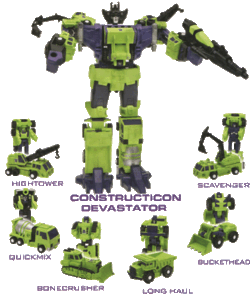


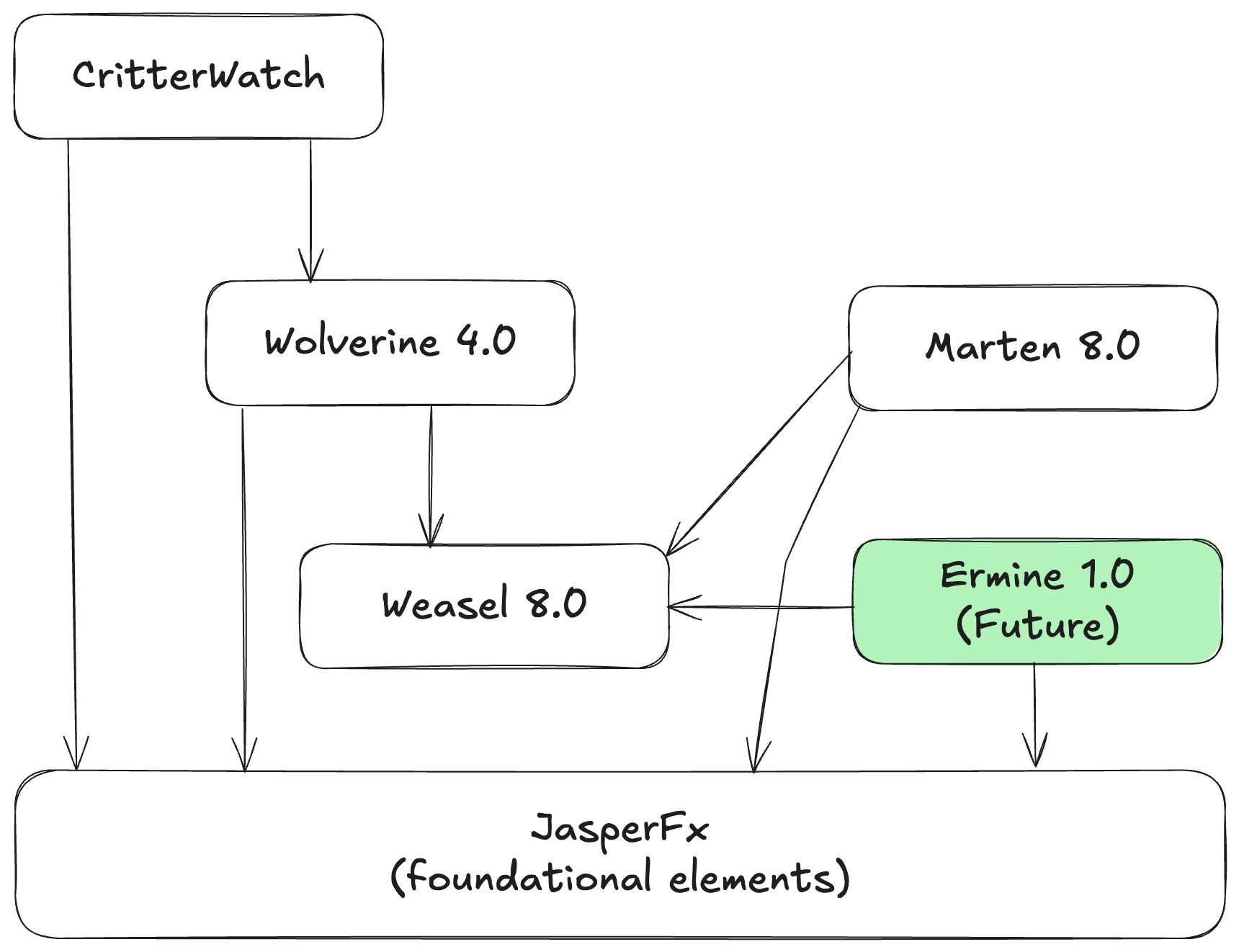


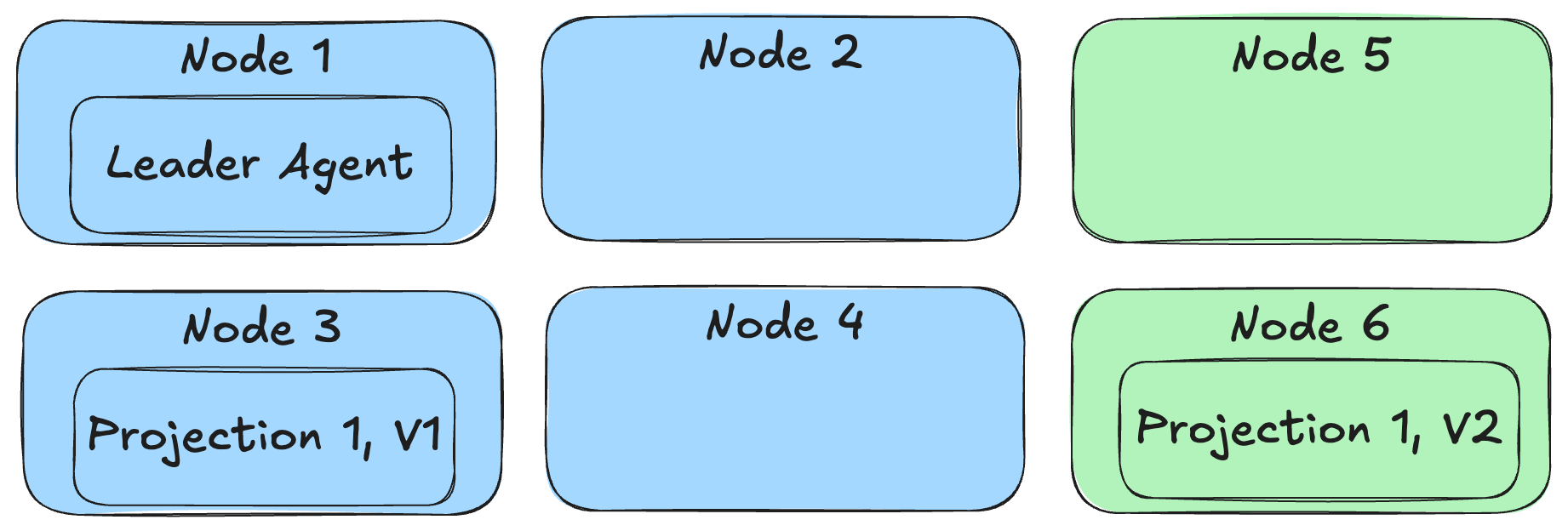


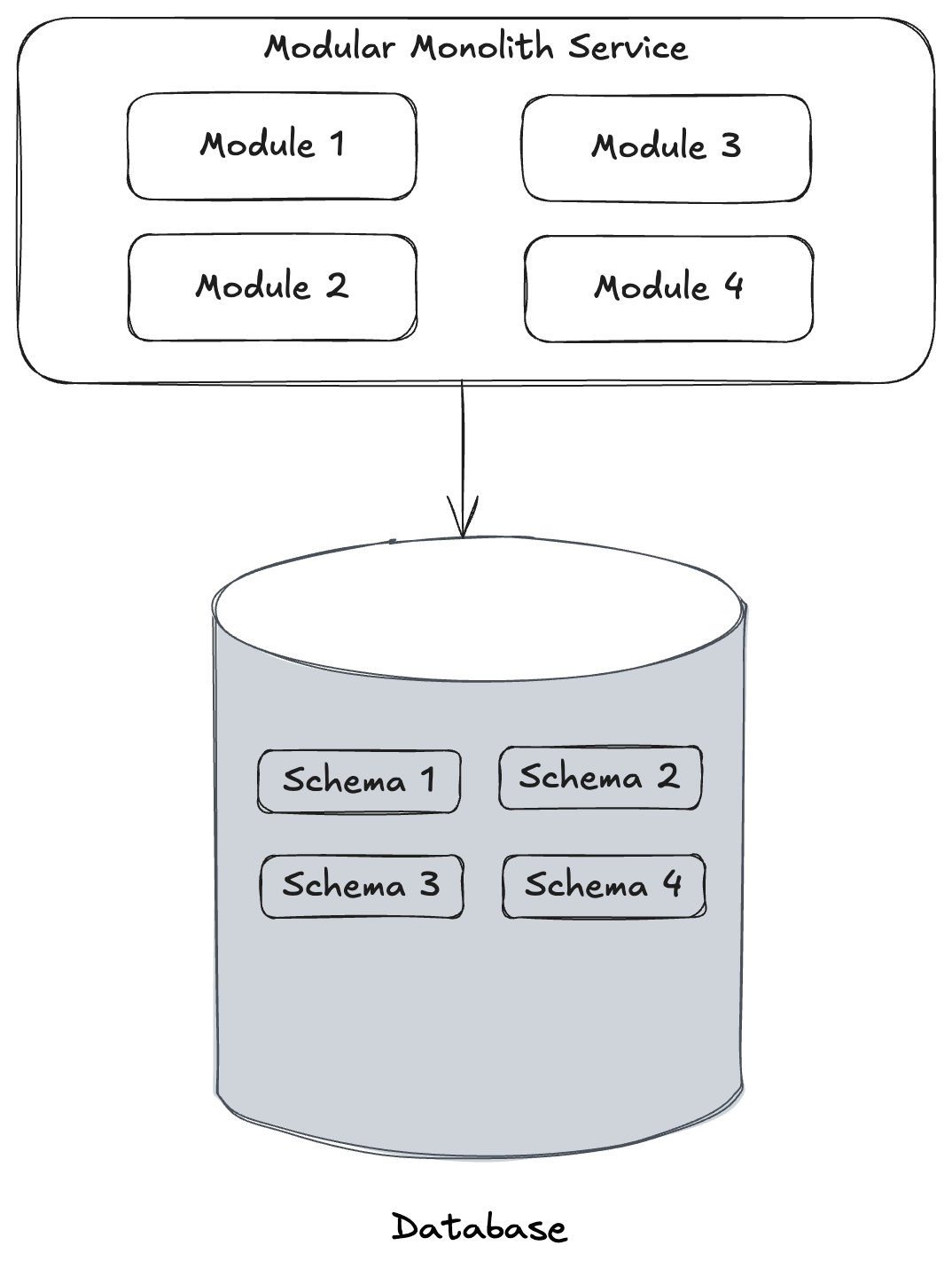
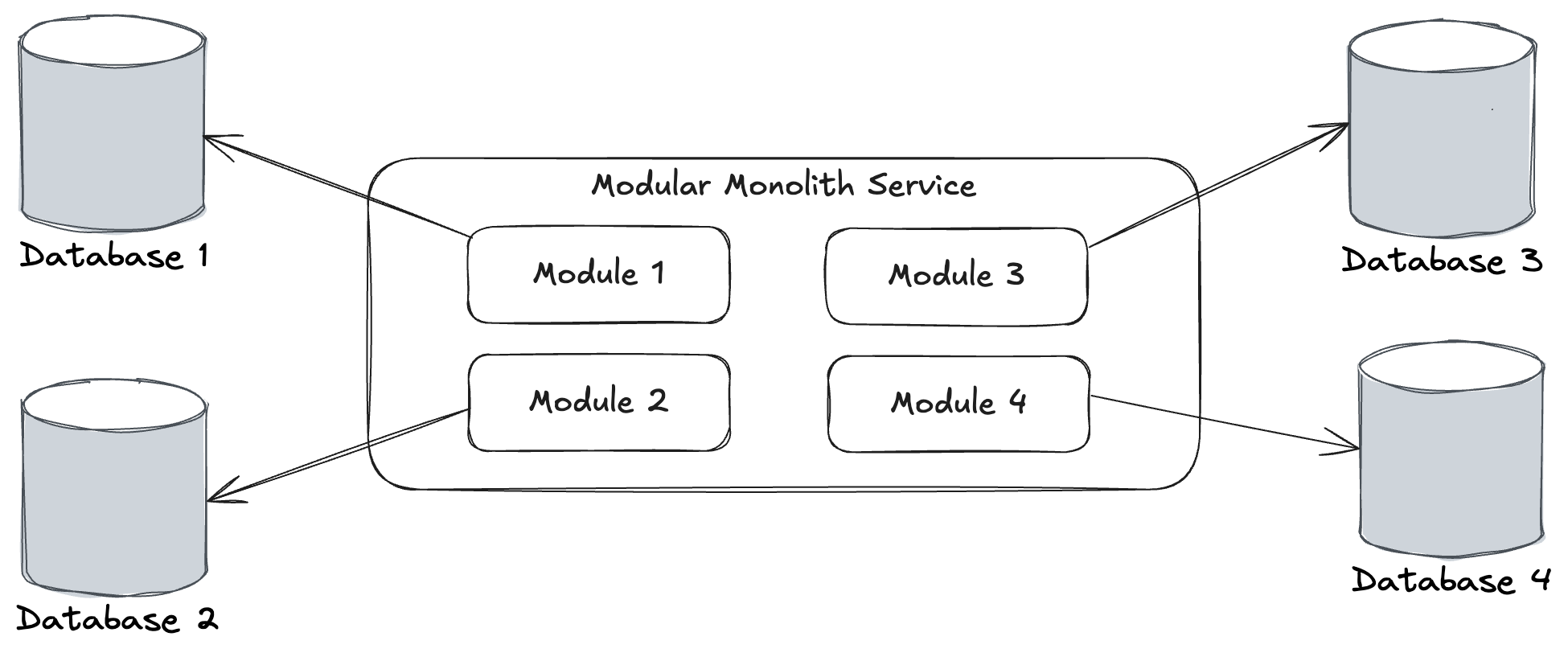
 The Shade Tree Developer