Http Services with Wolverine

For folks that have followed me for awhile, I’m back with yet another alternative, HTTP web service framework with Wolverine.Http — but I swear that I learned a whole slew of lessons from FubuMVC‘s failure a decade ago. Wolverine.Http shown here is very much a citizen within the greater ASP.Net Core ecosystem and happily interoperates with a great deal of Minimal API and the rest of ASP.Net Core.

For folks who have no idea what a “fubu” is, Wolverine’s HTTP add on shown here is potentially a way to build more efficient web services in .NET with much less boilerplate and noise code than the equivalent functionality in ASP.Net Core MVC or Minimal API. And especially less code ceremony and indirection than you get with the usage of any kind of mediator tooling in conjunction with MVC or Minimal API.

Server side applications are frequently built with some mixture of HTTP web services, asynchronous processing, and asynchronous messaging. Wolverine by itself can help you with the asynchronous processing through its local queue functionality, and it certainly covers all common asynchronous messaging requirements.

For a simplistic example, let’s say that we’re inevitably building a “Todo” application where we want a web service endpoint that allows our application to create a new Todo entity, save it to a database, and raise an TodoCreated event that will be handled later and off to the side by Wolverine.

Even in this simple example usage, that endpoint should be developed such that the creation of the new Todo entity and the corresponding TodoCreated event message either succeed or fail together to avoid putting the system into an inconsistent state. That’s a perfect use case for Wolverine’s transactional outbox. While the Wolverine team believes that Wolverine’s outbox functionality is significantly easier to use outside of the context of message handlers than other .NET messaging tools, it’s still easiest to use within the context of a message handler, so let’s just build out a Wolverine message handler for the CreateTodo command:

public class CreateTodoHandler
{
    public static (Todo, TodoCreated) Handle(CreateTodo command, IDocumentSession session)
    {
        var todo = new Todo { Name = command.Name };
        
        // Just telling Marten that there's a new entity to persist,
        // but I'm assuming that the transactional middleware in Wolverine is
        // handling the asynchronous persistence outside of this handler
        session.Store(todo);

        return (todo, new TodoCreated(todo.Id));
    }   
}

Okay, but we still need to expose a web service endpoint for this functionality. We could utilize Wolverine within an MVC controller as a “mediator” tool like so:

public class TodoController : ControllerBase
{
    [HttpPost("/todoitems")]
    [ProducesResponseType(201, Type = typeof(Todo))]
    public async Task<ActionResult> Post(
        [FromBody] CreateTodo command, 
        [FromServices] IMessageBus bus)
    {
        // Delegate to Wolverine and capture the response
        // returned from the handler
        var todo = await bus.InvokeAsync<Todo>(command);
        return Created($"/todoitems/{todo.Id}", todo);
    }    
}

Or we could do the same thing with Minimal API:

// app in this case is a WebApplication object
app.MapPost("/todoitems", async (CreateTodo command, IMessageBus bus) =>
{
    var todo = await bus.InvokeAsync<Todo>(command);
    return Results.Created($"/todoitems/{todo.Id}", todo);
}).Produces<Todo>(201);

While the code above is certainly functional, and many teams are succeeding today using a similar strategy with older tools like MediatR, the Wolverine team thinks there are some areas to improve in the code above:

  1. When you look into the internals of the runtime, there’s some potentially unnecessary performance overhead as every single call to that web service does service locations and dictionary lookups that could be eliminated
  2. There’s some opportunity to reduce object allocations on each request — and that can be a big deal for performance and scalability
  3. It’s not that bad, but there’s some boilerplate code above that serves no purpose at runtime but helps in the generation of OpenAPI documentation through Swashbuckle

At this point, let’s look at some tooling in the WolverineFx.Http Nuget library that can help you incorporate Wolverine into ASP.Net Core applications in a potentially more successful way than trying to “just” use Wolverine as a mediator tool.

After adding the WolverineFx.Http Nuget to our Todo web service, I could use this option for a little bit more efficient delegation to the underlying Wolverine message handler:

// This is *almost* an equivalent, but you'd get a status
// code of 200 instead of 201. If you care about that anyway.
app.MapPostToWolverine<CreateTodo, Todo>("/todoitems");

The code up above is very close to a functional equivalent to our early Minimal API or MVC Controller usage, but there’s a couple differences:

  1. In this case the HTTP endpoint will return a status code of 200 instead of the slightly more correct 201 that denotes a creation. Most of use aren’t really going to care, but we’ll come back to this a little later
  2. In the call to MapPostToWolverine(), Wolverine.HTTP is able to make a couple performance optimizations that completely eliminates any usage of the application’s IoC container at runtime and bypasses some dictionary lookups and object allocation that would have to occur in the simple “mediator” approach

I personally find the indirection of delegating to a mediator tool to add more code ceremony and indirection than I prefer, but many folks like that approach because of how bloated MVC Controller types can become in enterprise systems over time. What if instead we just had a much cleaner way to code an HTTP endpoint that still helped us out with OpenAPI documentation?

That’s where the Wolverine.Http “endpoint” model comes into play. Let’s take the same Todo creation endpoint and use Wolverine to build an HTTP endpoint:

// Introducing this special type just for the http response
// gives us back the 201 status code
public record TodoCreationResponse(int Id) 
    : CreationResponse("/todoitems/" + Id);

// The "Endpoint" suffix is meaningful, but you could use
// any name if you don't mind adding extra attributes or a marker interface
// for discovery
public static class TodoCreationEndpoint
{
    [WolverinePost("/todoitems")]
    public static (TodoCreationResponse, TodoCreated) Post(CreateTodo command, IDocumentSession session)
    {
        var todo = new Todo { Name = command.Name };
        
        // Just telling Marten that there's a new entity to persist,
        // but I'm assuming that the transactional middleware in Wolverine is
        // handling the asynchronous persistence outside of this handler
        session.Store(todo);

        // By Wolverine.Http conventions, the first "return value" is always
        // assumed to be the Http response, and any subsequent values are
        // handled independently
        return (
            new TodoCreationResponse(todo.Id), 
            new TodoCreated(todo.Id)
        );
    }
}

The code above will actually generate the exact same OpenAPI documentation as the MVC Controller or Minimal API samples earlier in this post, but there’s significantly less boilerplate code needed to expose that information. Instead, Wolverine.Http relies on type signatures to “know” what the OpenAPI metadata for an endpoint should be. In conjunction with Wolverine’s Marten integration (or Wolverine’s EF Core integration too!), you potentially get a very low ceremony approach to writing HTTP services that also utilizes Wolverine’s durable outbox without giving up anything in regards to crafting effective and accurate OpenAPI metadata about your services.

Learn more about Wolverine.Http in the documentation (that’s hopefully growing really soon).

Wolverine’s Runtime Architecture

I’m working up the documentation website for Wolverine today, and just spent several hours putting together a better description of its runtime architecture. Before I even publish the real thing, here’s an early version of that.

The two key parts of a Wolverine application are messages:

// A "command" message
public record DebitAccount(long AccountId, decimal Amount);

// An "event" message
public record AccountOverdrawn(long AccountId);

And the message handling code for the messages, which in Wolverine’s case just means a function or method that accepts the message type as its first argument like so:

public static class DebitAccountHandler
{
    public static void Handle(DebitAccount account)
    {
        Console.WriteLine($"I'm supposed to debit {account.Amount} from account {account.AccountId}");
    }
}

Invoking a Message Inline

At runtime, you can use Wolverine to invoke the message handling for a message inline in the current executing thread with Wolverine effectively acting as a mediator:

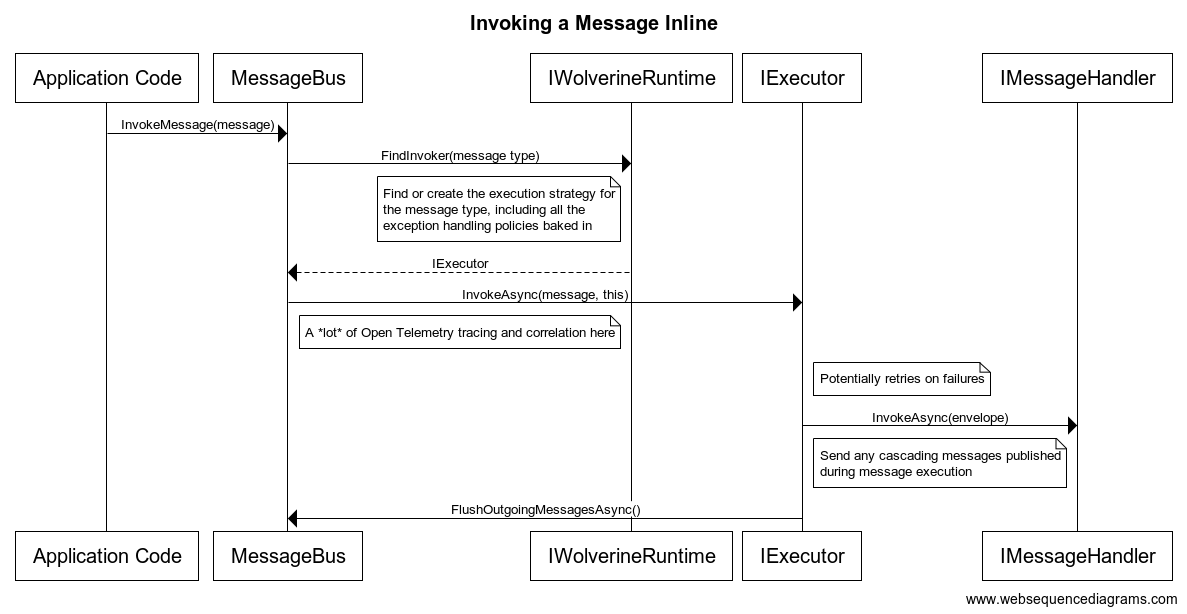
It’s a bit more complicated than that though, as the inline invocation looks like this simplified sequence diagram:

As you can hopefully see, even the inline invocation is adding some value beyond merely “mediating” between the caller and the actual message handler by:

  1. Wrapping Open Telemetry tracing and execution metrics around the execution
  2. Correlating the execution in logs to the original calling activity
  3. Providing some inline retry error handling policies for transient errors
  4. Publishing cascading messages from the message execution only after the execution succeeds as an in memory outbox

Asynchronous Messaging

You can, of course, happily publish messages to an external queue and consume those very same messages later in the same process.

The other main usage of Wolverine is to send messages from your current process to another process through some kind of external transport like a Rabbit MQ/Azure Service Bus/Amazon SQS queue and have Wolverine execute that message in another process (or back to the original process):

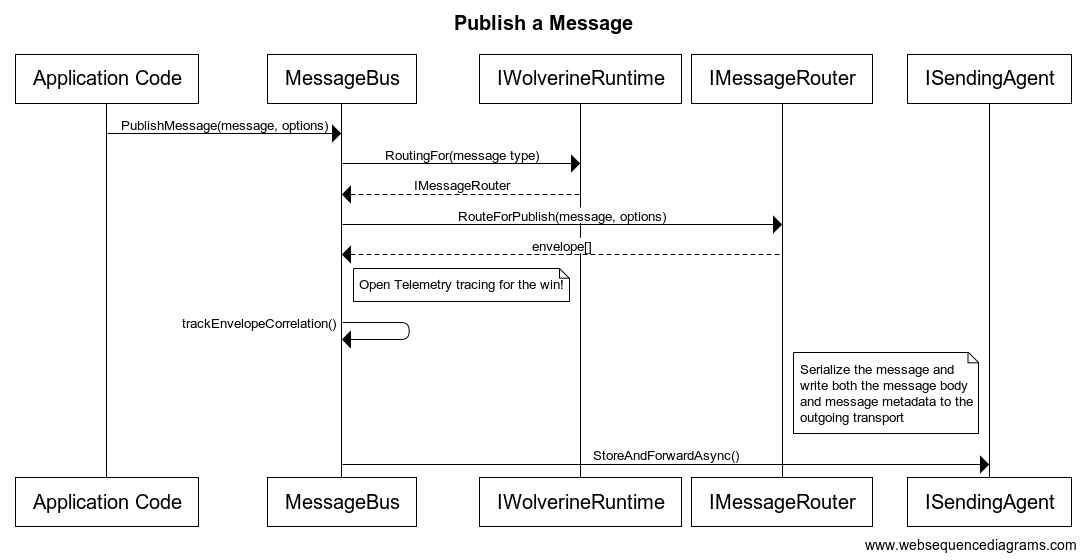
The internals of publishing a message are shown in this simplified sequence diagram:

Along the way, Wolverine has to:

  1. Serialize the message body
  2. Route the outgoing message to the proper subscriber(s)
  3. Utilize any publishing rules like “this message should be discarded after 10 seconds”
  4. Map the outgoing Wolverine Envelope representation of the message into whatever the underlying transport (Azure Service Bus et al.) uses
  5. Actually invoke the actual messaging infrastructure to send out the message

On the flip side, listening for a message follows this sequence shown for the “happy path” of receiving a message through Rabbit MQ:

During the listening process, Wolverine has to:

  1. Map the incoming Rabbit MQ message to Wolverine’s own Envelope structure
  2. Determine what the actualymessage type is based on the Envelope data
  3. Find the correct executor strategy for the message type
  4. Deserialize the raw message data to the actual message body
  5. Call the inner message executor for that message type
  6. Carry out quite a bit of Open Telemetry activity tracing, report metrics, and just plain logging
  7. Evaluate any errors against the error handling policies of the application or the specific message type

Endpoint Types

Not all transports support all three types of endpoint modes, and will helpfully assert when you try to choose an invalid option.

Inline Endpoints

Wolverine endpoints come in three basic flavors, with the first being Inline endpoints:

// Configuring a Wolverine application to listen to
// an Azure Service Bus queue with the "Inline" mode
opts.ListenToAzureServiceBusQueue("inline-receiver").ProcessInline();

With inline endpoints, as the name implies, calling IMessageBus.SendAsync() immediately sends the message to the external message broker. Likewise, messages received from an external message queue are processed inline before Wolverine acknowledges to the message broker that the message is received.

In the absence of a durable inbox/outbox, using inline endpoints is “safer” in terms of guaranteed delivery. As you might think, using inline agents can bottle neck the message processing, but that can be alleviated by opting into parallel listeners.

Buffered Endpoints

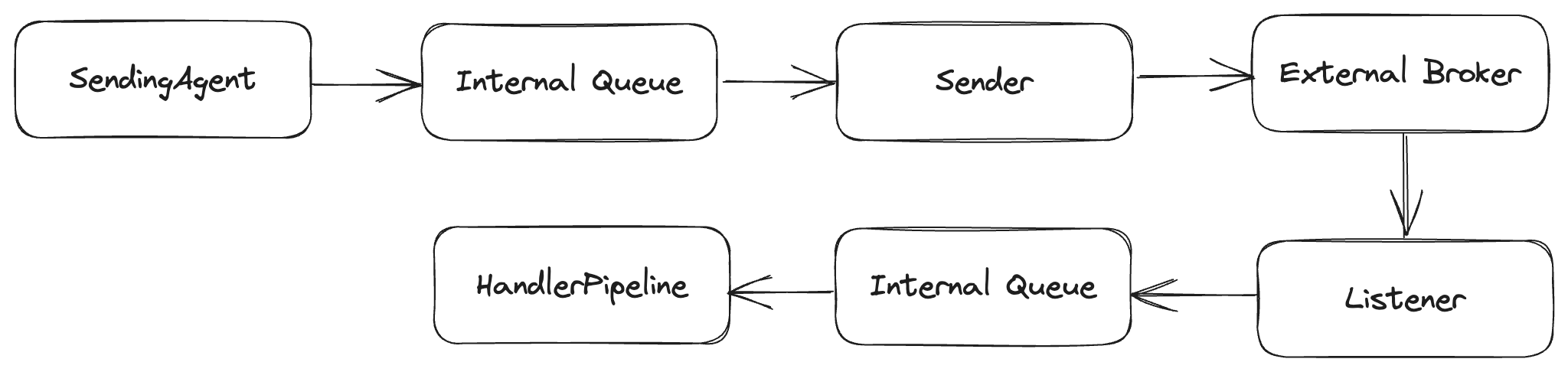
In the second Buffered option, messages are queued locally between the actual external broker and the Wolverine handlers or senders.

To opt into buffering, you use this syntax:

// I overrode the buffering limits just to show
// that they exist for "back pressure"
opts.ListenToAzureServiceBusQueue("incoming")
    .BufferedInMemory(new BufferingLimits(1000, 200));

At runtime, you have a local TPL Dataflow queue between the Wolverine callers and the broker:

On the listening side, buffered endpoints do support back pressure (of sorts) where Wolverine will stop the actual message listener if too many messages are queued in memory to avoid chewing up your application memory. In transports like Amazon SQS that only support batched message sending or receiving, Buffered is the default mode as that facilitates message batching.

Buffered message sending and receiving can lead to higher throughput, and should be considered for cases where messages are ephemeral or expire and throughput is more important than delivery guarantees. The downside is that messages in the in memory queues can be lost in the case of the application shutting down unexpectedly — but Wolverine tries to “drain” the in memory queues on normal application shutdown.

Durable Endpoints

Durable endpoints behave like buffered endpoints, but also use the durable inbox/outbox message storage to create much stronger guarantees about message delivery and processing. You will need to use Durable endpoints in order to truly take advantage of the persistent outbox mechanism in Wolverine. To opt into making an endpoint durable, use this syntax:

cs

// I overrode the buffering limits just to show
// that they exist for "back pressure"
opts.ListenToAzureServiceBusQueue("incoming")
    .UseDurableInbox(new BufferingLimits(1000, 200));

opts.PublishAllMessages().ToAzureServiceBusQueue("outgoing")
    .UseDurableOutbox();

Or use policies to do this in one fell swoop (which may not be what you actually want, but you could do this!):

opts.Policies.UseDurableOutboxOnAllSendingEndpoints();

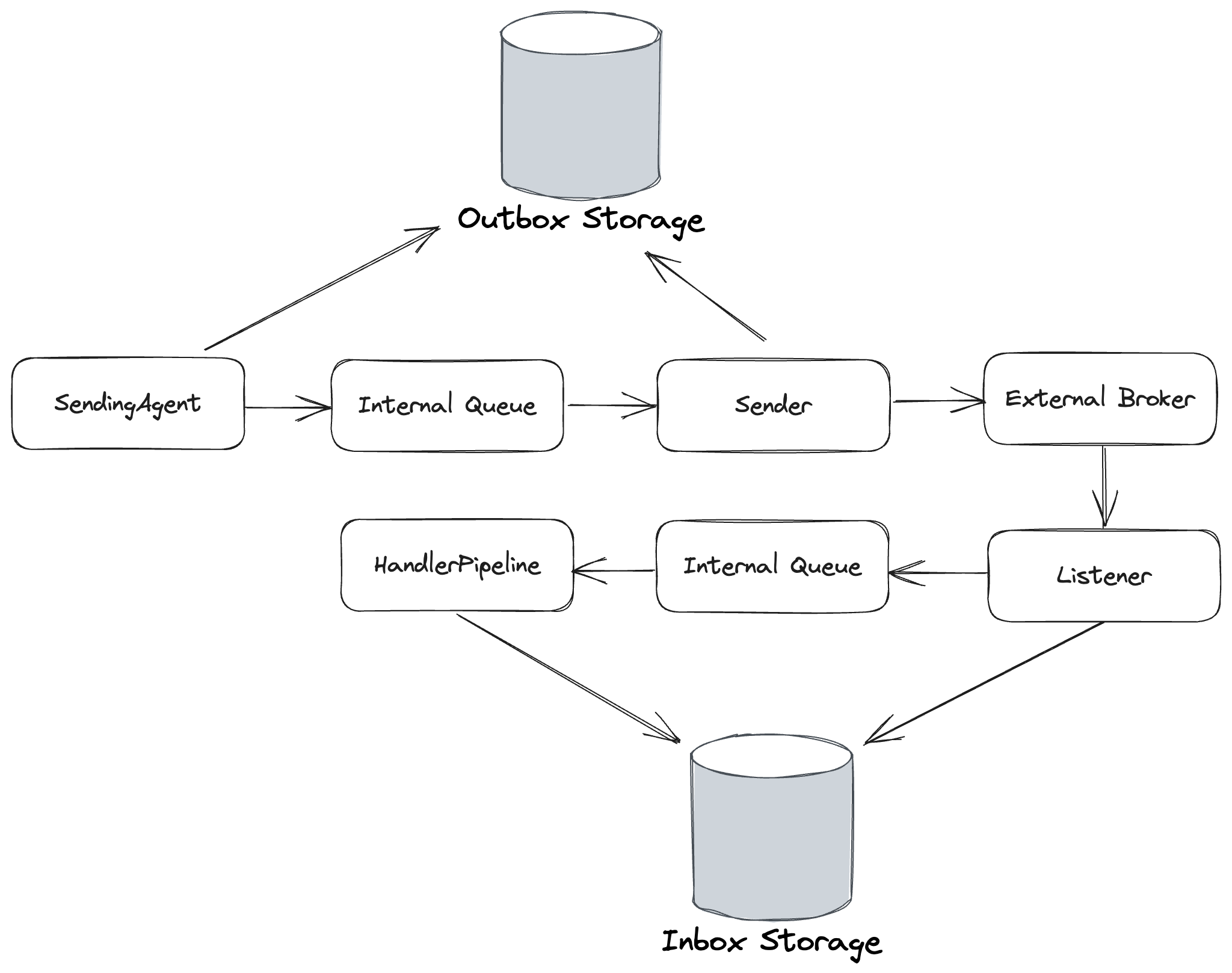
As shown below, the Durable endpoint option adds an extra step to the Buffered behavior to add database storage of the incoming and outgoing messages:

Outgoing messages are deleted in the durable outbox upon successful sending acknowledgements from the external broker. Likewise, incoming messages are also deleted from the durable inbox upon successful message execution.

The Durable endpoint option makes Wolverine’s local queueing robust enough to use for cases where you need guaranteed processing of messages, but don’t want to use an external broker.

How Wolverine Calls Your Message Handlers

Wolverine is a little different animal from the tools with similar features in the .NET ecosystem (pun intended:). Instead of the typical strategy of requiring you to implement an adapter interface of some sort in your code, Wolverine uses dynamically generated code to “weave” its internal adapter code and even middleware around your message handler code.

In ideal circumstances, Wolverine is able to completely remove the runtime usage of an IoC container for even better performance. The end result is a runtime pipeline that is able to accomplish its tasks with potentially much less performance overhead than comparable .NET frameworks that depend on adapter interfaces and copious runtime usage of IoC containers.

IoC Container Integration

Lamar started its life as “Blue Milk,” and was originally built specifically to support the “Jasper” framework which was eventually renamed and rebooted as “Wolverine.” Even though Lamar was released many years before Wolverine, it was always intended to help make Wolverine possible.

Wolverine is only able to use Lamar as its IoC container, and actually quietly registers Lamar with your .NET application within any call to UseWolverine(). Wolverine actually uses Lamar’s configuration model to help build out its dynamically generated code and can mostly go far enough to recreate what would be Lamar’s “instance plan” with plain old C# as a way of making the runtime operations a little bit leaner.

I’m doing it my way. Finally. God help me.

Today is my first full day as employee #1 at JasperFx Software as I (in collaboration with Oskar Dudycz and Babu Annamalai) starting a services/consulting/product company around the “Critter Stack” tools (Marten and Wolverine). Not much to say about the actual company until I’m ready for a hard launch later this month, but I’d like to take a few paragraphs just to describe how I’m taking a big leap into being self-employed for the first time at the tender age of 49.

Spinning up a company to try to make a living working on my OSS “portfolio” has been my main professional ambition for at least 15 years. I made a pretty serious effort to get there in the early 2010’s with the FubuMVC project. Since then, I’ve honestly felt adrift professionally after I had to admit that FubuMVC had utterly failed as a project. I’ve tried being the lead of a couple different architecture teams where I was hopefully a somewhat helpful mentor to other folks, but never really had any significant traction. I also got to do a little bit of software consulting that I genuinely enjoy, but that was never my official position.

I’ve always been risk averse to a fault, and that’s probably held me back in my personal career for years. A couple things changed in the last couple years that finally got me out the door to take the leap into doing my own thing:

  • Marten started taking off in adoption after the giant V4 release, especially around the event store functionality as folks discovered that Marten is a much easier way to start with event sourcing than most other tools
  • While Oskar has probably been pushing for commercializing Marten for years, a random conversation online with someone who worked at the time for a commercial competitor of Marten convinced me that there was a solid business opportunity that I might have been wasting
  • My wife has given me a tremendous amount of support and encouragement to finally go off and do this, and that’s probably been the biggest factor in me finally going off on my own
  • And lastly, I have to thank my “investors” below as the small inheritance I received from my late, very beloved grandparents are helping fund this endeavor:

Anyway, on with the new work. Expect a lot more content from me soon here and possibly on YouTube. And an official announcement about my new company when that’s ready to go.

Marten V6 is Out! And the road to Wolverine 1.0

Marten 6.0 came out last week. Rather than describe that, just take a look at Oskar’s killer release notes write up on GitHub for V6. This also includes some updates to the Marten documentation website. Oskar led the charge on this release, so big thanks are due to him — in no small part by allowing me to focus on Wolverine by taking the brunt of the “Critter Stack” Discord rooms. The healthiness of the Marten community shows up with a slew of new contributors in this release.

With Marten 6.0 out, it’s on to finally getting to Wolverine 1.0:

Wolverine has lingered for way, way too long for my taste in a pre-1.0 status, but it’s getting closer. A couple weeks ago I felt like Wolverine 1.0 was very close as soon as the documentation was updated, but then I kept hearing repeated feedback about how early adopters want or need first class database multi-tenancy support as part of their Wolverine + Marten experience — and lesser number wanting some sort of EF Core + Wolverine multi-tenancy, but I’m going to put that aside just for now.

Cool, so I started jotting down what first class support for multi-tenancy through multiple databases was going to entail:

  • Some way to communicate the message tenant information through to Wolverine with message metadata. Easy money, that didn’t take much.
  • A little bit of change to the Marten transactional middleware in Wolverine to be tenant aware. Cool, that’s pretty small. Especially after a last minute change I made in Marten 6.0 specifically to support Wolverine.
  • Uh, oh, the durable inbox/outbox support in Wolverine will require specific table storage in every single tenant database, and you’d probably also want an “any tenant” master database as well for transactions that aren’t for a specific tenant. Right off the bat, this is much more complex than the other bullet points above. Wolverine could try to stretch its current “durability agent” strategy for multiple databases, but it’s a little too greedy on database connection usage and I was getting some feedback from potential users who were concerned by exactly that issue. At that point, I thought it would be helpful to reduce the connection usage, which…
  • Led me to wanting an approach where only one running node was processing the inbox/outbox recovery instead of each node hammering the database with advisory locks to figure out if anything needed to be recovered from previous nodes that shut down before finishing their work. Which now led me to wanting…
  • Some kind of leadership election in Wolverine, which now means that Wolverine needs durable storage for all the active nodes and the assignments to each node — which is functionality I wanted to build out soon regardless for Marten’s “async projection” scalability.

So to get the big leadership election, durability agent assignment across nodes, and finally back to the multi-tenancy support in Wolverine, I’ve got a bit of work to get through. It’s going well so far, but it’s time consuming because of the sheer number of details and the necessity of rigorously testing bitwise before trying to put it all together end to end.

There are a few other loose ends for Wolverine 1.0, but the work described up above is the main battle right now before Wolverine efforts shift to documentation and finally a formal 1.0 release. Famous last words of a fool, but I’m hoping to roll out Wolverine 1.0 right now during the NDC Oslo conference in a couple weeks.

Isolating Side Effects from Wolverine Handlers

For easier unit testing, it’s often valuable to separate responsibilities of “deciding” what to do from the actual “doing.” The side effect facility in Wolverine is an example of this strategy. You will need Wolverine 0.9.17 that just dropped for this feature.

At times, you may with to make Wolverine message handlers (or HTTP endpoints) be pure functions as a way of making the handler code itself easier to test or even just to understand. All the same, your application will almost certainly be interacting with the outside world of databases, file systems, and external infrastructure of all types. Not to worry though, Wolverine has some facility to allow you to declare the side effects as return values from your handler.

To make this concrete, let’s say that we’re building a message handler that will take in some textual content and an id, and then try to write that text to a file at a certain path. In our case, we want to be able to easily unit test the logic that “decides” what content and what file path a message should be written to without ever having any usage of the actual file system (which is notoriously irritating to use in tests).

First off, I’m going to create a new “side effect” type for writing a file like this:

// ISideEffect is a Wolverine marker interface
public class WriteFile : ISideEffect
{
    public string Path { get; }
    public string Contents { get; }

    public WriteFile(string path, string contents)
    {
        Path = path;
        Contents = contents;
    }

    // Wolverine will call this method. 
    public Task ExecuteAsync(PathSettings settings)
    {
        if (!Directory.Exists(settings.Directory))
        {
            Directory.CreateDirectory(settings.Directory);
        }
        
        return File.WriteAllTextAsync(Path, Contents);
    }
}

And the matching message type, message handler, and a settings class for configuration:

// An options class
public class PathSettings
{
    public string Directory { get; set; } 
        = Environment.CurrentDirectory.AppendPath("files");
}

public record RecordText(Guid Id, string Text);

public class RecordTextHandler
{
    public WriteFile Handle(RecordText command)
    {
        return new WriteFile(command.Id + ".txt", command.Text);
    }
}

At runtime, Wolverine is generating this code to handle the RecordText message:

    public class RecordTextHandler597515455 : Wolverine.Runtime.Handlers.MessageHandler
    {
        public override System.Threading.Tasks.Task HandleAsync(Wolverine.Runtime.MessageContext context, System.Threading.CancellationToken cancellation)
        {
            var recordTextHandler = new CoreTests.Acceptance.RecordTextHandler();
            var recordText = (CoreTests.Acceptance.RecordText)context.Envelope.Message;
            var pathSettings = new CoreTests.Acceptance.PathSettings();
            var outgoing1 = recordTextHandler.Handle(recordText);
            
            // Placed by Wolverine's ISideEffect policy
            return outgoing1.ExecuteAsync(pathSettings);
        }
    }

To explain what is happening up above, when Wolverine sees that any return value from a message handler implements the Wolverine.ISideEffect interface, Wolverine knows that that value should have a method named either Execute or ExecuteAsync() that should be executed instead of treating the return value as a cascaded message. The method discovery is completely by method name, and it’s perfectly legal to use arguments for any of the same types available to the actual message handler like:

  • Service dependencies from the application’s IoC container
  • The actual message
  • Any objects created by middleware
  • CancellationToken
  • Message metadata from Envelope

Taking this functionality farther, here’s a new example from the WolverineFx.Marten library that exploits this new side effect model to allow you to start event streams or store/insert/update documents from a side effect return value without having to directly touch Marten‘s IDocumentSession:

public static class StartStreamMessageHandler
{
    // This message handler is creating a brand new Marten event stream
    // of aggregate type NamedDocument. No services, no async junk,
    // pure function mechanics. You could unit test the method by doing
    // state based assertions on the StartStream object coming back out
    public static StartStream Handle(StartStreamMessage message)
    {
        return MartenOps.StartStream<NamedDocument>(message.Id, new AEvent(), new BEvent());
    }
    
    public static StartStream Handle(StartStreamMessage2 message)
    {
        return MartenOps.StartStream<NamedDocument>(message.Id, new CEvent(), new BEvent());
    }
}

As I get a little more time and maybe ambition, I want to start blogging more about how Wolverine is quite different from the “IHandler of T” model tools like MediatR, MassTransit, or NServiceBus. The “pure function” usage above potentially makes for a big benefit in terms of testability and longer term maintainability.

Observability in Wolverine

Some colleagues and I are working on the technical modernization of a large system at work, and lately we’ve been talking quite a bit about the observability we want baked into the system going forward. To share a little bit of context about this particular system, it’s…

  • Very distributed, with asynchronous messaging between a dozen or so services plus calls to another half dozen external web services
  • It’s multi-tenanted
  • Performance and throughput needs to be carefully monitored and we should absolutely be concerned with customer specific SLAs

And of course, we’re also dogfooding Wolverine as our messaging framework and local mediator as part of our modernization work. One of my specific goals for the usability of Wolverine in grown up development usage is to provide all the necessary observability (error logging, activity logging, performance metrics) for production monitoring and troubleshooting. But also, bake that completely into Wolverine itself in such a way that developers don’t have to think too much about that and certainly don’t have to write very much repetitive boilerplate code in their daily work to get there.

To start a conversation about what Wolverine can already do, check out this partial application bootstrapping code from a demonstrator project I wrote to test out Wolverine’s Open Telemetry and metrics collection exports — in this case using Honeycomb to visualize and analyze the exported Open Telemetry data:

var host = Host.CreateDefaultBuilder(args)
    .UseWolverine((context, opts) =>
    {
        opts.ServiceName = "Metrics";

        // Open Telemetry *should* cover this anyway, but
        // if you want Wolverine to log a message for *beginning*
        // to execute a message, try this
        opts.Policies.LogMessageStarting(LogLevel.Debug);
        
        // For both Open Telemetry span tracing and the "log message starting..."
        // option above, add the AccountId as a tag for any command that implements
        // the IAccountCommand interface
        opts.Policies.Audit<IAccountCommand>(x => x.AccountId);
        
        // Setting up metrics and Open Telemetry activity tracing
        // to Honeycomb
        var honeycombOptions = context.Configuration.GetHoneycombOptions();
        honeycombOptions.MetricsDataset = "Wolverine:Metrics";
        
        opts.Services.AddOpenTelemetry()
            // enable metrics
            .WithMetrics(x =>
            {
                // Export metrics to Honeycomb
                x.AddHoneycomb(honeycombOptions);
            })
            
            // enable Otel span tracing
            .WithTracing(x =>
            {
                x.AddHoneycomb(honeycombOptions);
                x.AddSource("Wolverine");
            });

    })
    .UseResourceSetupOnStartup()
    .Build();

await host.RunAsync();

I’ve opted into a few optional things up above to export the Wolverine open telemetry tracing and metrics to Honeycomb. I’ve also opted to have Wolverine inject extra logging messages into the generated message handlers to log Debug level messages denoting the start of message processing.

Open Telemetry activities are automatically logged for all messages sent, received, and message execution. Significant events within Wolverine like message execution success, message failure exceptions, and messages moving to dead letter queues are logged through .NET’s standard ILogger abstraction with structured logging in mind. In all cases, if the log message is related to a specific message, the message’s correlation identifier that would point to Open Telemetry spans is written into the log message. In a future edition, Wolverine will make a larger investment in Open Telemetry and utilize Activity Events in addition to old fashioned logging.

Wolverine Metrics

Wolverine is automatically tracking several performance related metrics through the System.Diagnostics.Metrics types, which sets Wolverine users up for being able to export their system’s performance metrics to third party observability tools like Honeycomb or Datadog that support Open Telemetry metrics. The current set of metrics in Wolverine are shown below:

Metric NameMetric TypeDescription
wolverine-messages-sentCounterNumber of messages sent
wolverine-execution-timeHistogramExecution time in milliseconds
wolverine-messages-succeededCounterNumber of messages successfully processed
wolverine-dead-letter-queueCounterNumber of messages moved to dead letter queues
wolverine-effective-timeHistogramEffective time between a message being sent and being completely handled in milliseconds. Right now this works between Wolverine to Wolverine application sending and from NServiceBus applications sending to Wolverine applications through Wolverine’s NServiceBus interoperability.
wolverine-execution-failureCounterNumber of message execution failures. Tagged by exception type
wolverine-inbox-countObservable GaugeSamples the number of pending envelopes in the durable inbox (likely to change)
wolverine-outbox-countObservable GaugeSamples the number of pending envelopes in the durable outbox (likely to change)
wolverine-scheduled-countObservable GaugeSamples the number of pending scheduled envelopes in the durable inbox (likely to change)
Wolverine Metrics

In all cases, the metrics are tagged by message type. In the case of messages sent, succeeded, or failed, Wolverine is also tagging the metrics by the message destination (Rabbit MQ / Azure Service Bus / AWS SQS queue etc.).

In addition, you can add arbitrary tagging to the metrics. Taking an example inspired by something I know we’re going to want in my own company, let’s say that we want to tag the performance metrics by the business organization related to the message such that we could do a break down of system throughput and performance by organization.

First off, let’s say that we have an interface type like this that we can use to let Wolverine know that a message is related to a particular business organization:

public interface IOrganizationRelated
{
    string OrganizationCode { get; }
}

Next, I’ll write a simple Wolverine middleware type to add a metrics tag to the metric data collection:

public static class OrganizationTaggingMiddleware
{
    public static void Before(IOrganizationRelated command, Envelope envelope)
    {
        envelope.SetMetricsTag("org.code", command.OrganizationCode);
    }
}

and finally add that middleware to our system against all handlers where the message type implements IOrganizationRelated:

        using var host = await Host.CreateDefaultBuilder()
            .UseWolverine(opts =>
            {
                // Add this middleware to all handlers where the message can be cast to
                // IOrganizationRelated
                opts.Policies.AddMiddlewareByMessageType(typeof(OrganizationTaggingMiddleware));
            }).StartAsync();

To get Wolverine ready for a more formal, built in way to handle multi-tenancy, a recent version introduced formal TenantId tracking on Wolverine messages (this will be improved in Wolverine 0.9.16). The TenantId — if it exists — will also be tagged into the metrics (and Open Telemetry activity/span tracking) as “tenant.id”.

Here’s a possible usage of this:

    public static async Task publish_operation(IMessageBus bus, string tenantId, string name)
    {
        // All outgoing messages or executed messages from this 
        // IMessageBus object will be tagged with the tenant id
        bus.TenantId = tenantId;
        await bus.PublishAsync(new SomeMessage(name));
    }

As of the forthcoming 0.9.16, the TenantId value will be automatically propagated through any messages sent as a response to the original messages tagged with TenantId values.

Some More Thoughts on Open Telemetry

I’m personally wanting to make a big bet on Open Telemetry tracing and monitoring going forward. As much as possible, I want us to use out of the box tools to integrate Open Telemetry tracking for performance monitoring for operations like outgoing web service calls (through integration with HttpClient) or Wolverine’s own tracking.

Moreover, we currently have a great deal of repetitive code to support our robust logging strategy, and while having effectively instrumented code is certainly valuable, I find that the coding requirements detract from the readability of the code and often act as a deterrent against evolving the system. I’d like to get to the point where our developers spend very little time having to explicitly write instrumentation code within our systems and the actual functional code is easier to read and reason about by eliminating noise code.

Compound Handlers in Wolverine

Last week I started a new series of blog posts about Wolverine capabilities with:

Today I’m going to continue with a contrived example from the “payment ingestion service,” this time on what I’m so far calling “compound handlers” in Wolverine. When building a system with any amount of business logic or workflow logic, there’s some philosophical choices that Wolverine is trying to make:

  • To maximize testability, business or workflow logic — as much as possible — should be in pure functions that are easily testable in isolated unit tests. In other words, you should be able to test this code without integration tests or mock objects. Just data in, and state-based assertions.
  • Of course your message handler will absolutely need to read data from our database in the course of actually handling messages. It’ll also need to write data to the underlying database. Yet we still want to push toward the pure function approach for all logic. To get there, I like Jim Shore’s A-Frame metaphor for how code should be organized to isolate business logic away from infrastructure and into nicely testable code.
  • I certainly didn’t set out this way years ago when what’s now Wolverine was first theorized, but Wolverine is trending toward using more functional decomposition with fewer abstractions rather than “traditional” class centric C# usage with lots of interfaces, constructor injection, and IoC usage. You’ll see what I mean when we hit the actual code

I don’t think that mock objects are evil per se, but they’re absolutely over-used in our industry. All I’m trying to suggest in this post is to structure code such that you don’t have to depend on stubs or any other kind of fake to set up test inputs to business or workflow logic code.

Consider the case of a message handler that needs to process a command message to apply a payment to principal within an existing loan. Depending on the amount and the account in question, the handler may need to raise domain events for early principle payment penalties (or alerts or whatever you actually do in this situation). That logic is going to need to know about both the related loan and account information in order to make that decision. The handler will also make changes to the loan to reflect the payment made as well, and commit those changes back to the database.

Just to sum things up, this message handler needs to:

  1. Look up loan and account data
  2. Use that data to carry out the business logic
  3. Potentially persist the changed state

Alright, on to the handler, which I’m going to accomplish with a single class that uses two separate methods:

public record PayPrincipal(Guid LoanId, decimal Amount, DateOnly EffectiveDate);

public static class PayPrincipalHandler
{
    // Wolverine will call this method first by naming convention.
    // If you prefer being more explicit, you can use any name you like and decorate
    // this with [Before] 
    public static async Task<(Account, LoanInformation)> LoadAsync(PayPrincipal command, IDocumentSession session,
        CancellationToken cancellation)
    {
        Account? account = null;
        var loan = await session
            .Query<LoanInformation>()
            .Include<Account>(x => x.AccountId, a => account = a)
            .Where(x => x.Id == command.LoanId)
            .FirstOrDefaultAsync(token: cancellation);

        if (loan == null) throw new UnknownLoanException(command.LoanId);
        if (account == null) throw new UnknownAccountException(loan.AccountId);
        
        return (account, loan);
    }

    // This is the main handler, but it's able to use the data built
    // up by the first method
    public static IEnumerable<object> Handle(
        // The command
        PayPrincipal command,
        
        // The information loaded from the LoadAsync() method above
        LoanInformation loan, 
        Account account,
        
        // We need this only to mark items as changed
        IDocumentSession session)
    {
        // The next post will switch this to event sourcing I think

        var status = loan.AcceptPrincipalPayment(command.Amount, command.EffectiveDate);
        switch (status)
        {
            case PrincipalStatus.BehindSchedule:
                // Maybe send an alert? Act on this in some other way?
                yield return new PrincipalBehindSchedule(loan.Id);
                break;
            
            case PrincipalStatus.EarlyPayment:
                if (!account.AllowsEarlyPayment)
                {
                    // Maybe just a notification?
                    yield return new EarlyPrincipalPaymentDetected(loan.Id);
                }

                break;
        }

        // Mark the loan as being needing to be persisted
        session.Store(loan);
    }
}

Wolverine itself is weaving in the call first to LoadAsync(), and piping the results of that method to the inputs of the inner Handle() method, which now gets to be almost a pure function with just the call to IDocumentSession.Store() being “impure” — but at least that one single method is relatively painless to mock.

The point of doing this is really just to make the main Handle() method where the actual business logic is happening be very easily testable with unit tests as you can just push in the Account and Loan information. Especially in cases where there’s likely many permutations of inputs leading to different behaviors, it’s very advantageous to be able to walk right up to just the business rules and push inputs right into that, then do assertions on the messages returned from the Handle() function and/or assert on modifications to the Loan object.

TL:DR — Repository abstractions over persistence tooling can cause more harm than good.

Also notice that I directly used a reference to the Marten IDocumentSession rather than wrapping some kind of IRepository<Loan> or IAccountRepository abstraction right around Marten. That was very purposeful. I think those abstractions — especially narrow, entity-centric abstractions around basic CRUD or load methods cause more harm than good in nontrivial enterprise systems. In the case above, I was using a touch of advanced, Marten-specific behavior to load related documents in one network round trip as a performance optimization. That’s the exact kind of powerful ability of specific persistence tools that’s thrown away by generic “IRepository of T” strategies “just in case we decide to change database technologies later” that I believe to be harmful in larger enterprise systems. Moreover, I think that kind of abstraction bloats the codebase and leads to poorly performing systems.

Wolverine 0.9.13: Contextual Logging and More

We’re dogfooding Wolverine at work and the Critter Stack Discord is pretty active right now. All of that means that issues and opportunities to improve Wolverine are coming in fast right now. I just pushed Wolverine 0.9.13 (the Nugets are all named “WolverineFx” something because someone is squatting on the “Wolverine” name in Nuget).

First, quick thanks to Robin Arrowsmith for finding and fixing an issue with Wolverine’s Azure Service Bus support. And a more general thank you to the nascent Wolverine community for being so helpful working with me in Discord to improve Wolverine.

A few folks are reporting various issues with Wolverine handler discovery. To help alleviate whatever those issues turn out to be, Wolverine has a new mechanism to troubleshoot “why is my handler not being found by Wolverine?!?” issues.

We’re converting a service at work that lives within a giant distributed system that’s using NServiceBus for messaging today, so weirdly enough, there’s some important improvements for Wolverine’s interoperability with NServiceBus.

This will be worth a full blog post soon, but there’s some ability to add contextual logging about your domain (account numbers, tenants, product numbers, etc.) to Wolverine’s open telemetry and/or logging support. My personal goal here is to have all the necessary and valuable correlation between system activity, performance, and logged problems without forcing the development team to write repetitive code throughout their message handler code.

And one massive bug fix for how Wolverine generates runtime code in conjunction with your IoC service registrations for objects created by Wolverine itself. That’s a huge amount of technical mumbo jumbo that amounts to “even though Jeremy really doesn’t approve, you can inject Marten IDocumentSession or EF Core DbContext objects into repository classes while still using Wolverine transactional middleware and outbox support.” See this issue for more context. It’s a hugely important fix for folks who choose to use Wolverine with a typical, .NET Onion/Clean architecture with lots of constructor injection, repository wrappers, and making the garbage collection work like crazy at runtime.

Critter Stack Roadmap (Marten, Wolverine, Weasel)

This post is mostly an attempt to gather feedback from anyone out there interested enough to respond. Comment here, or better yet, tell us and the community what you’re interested in in the Critter Stack Discord community.

The so called “Critter Stack” is Marten, Wolverine, and a host of smaller, shared supporting projects within the greater JasperFx umbrella. Marten has been around for while now, just hit the “1,000 closed pull request” milestone, and will reach the 4 million download mark sometime next week. Wolverine is getting some early adopter love right now, and the feedback is being very encouraging to me right now.

The goal for this year is to make the Critter Stack the best technical choice for a CQRS with Event Sourcing style architecture across every technical ecosystem — and a strong candidate for server side development on the .NET platform for other types of architectural strategies. That’s a bold goal, and there’s a lot to do to fill in missing features and increase the ability of the Critter Stack to scale up to extremely large workloads. To keep things moving, the core team banged out our immediate road map for the next couple months:

  1. Marten 6.0 within a couple weeks. This isn’t a huge release in terms of API changes, but sets us up for the future
  2. Wolverine 1.0 shortly after. I think I’m to the point of saying the main priority is finishing the documentation website and conducting some serious load and chaos testing against the Rabbit MQ and Marten integrations (weirdly enough the exact technical stack we’ll be using at my job)
  3. Marten 6.1: Formal event subscription mechanisms as part of Marten (ability to selectively publish events to a listener of some sort or a messaging broker). You can do this today as shown in Oskar’s blog post, but it’s not a first class citizen and not as efficient as it should be. Plus you’d want both “hot” and “cold” subscriptions.
  4. Wolverine 1.1: Direct support for the subscription model within Marten so that you have ready recipes to publish events from Marten with Wolverine’s messaging capabilities. Technically, you can already do this with Wolverine + Marten’s outbox integration, but that only works through Wolverine handlers. Adding the first class recipe for “Marten to Wolverine messaging” I think will make it awfully easy to get up and going with event subscriptions fast.

Right now, Marten 6 and Wolverine 1.0 have lingered for awhile, so it’s time to get them out. After that, subscriptions seem to be the biggest source of user questions and requests right now, so that’s the obvious next thing to do. After that though, here’s a rundown of some of the major initiatives we could pursue in either Marten or Wolverine this year (and some straddle the line):

  • End to end multi-tenancy support in Wolverine, Marten, and ASP.Net Core. Marten has strong support for multi-tenancy, but users have to piece things together themselves together within their applications. Wolverine’s Marten integration is currently limited to only one Marten database per application
  • Hot/cold storage for active vs archived events. This is all about massive scalability for the event sourcing storage
  • Sharding the asynchronous projections to distribute work across multiple running nodes. More about scaling the event sourcing
  • Zero down time projection rebuilds. Big user ask. Probably also includes trying to optimize the heck out of the performance of this feature too
  • More advanced message broker feature support. AWS SNS support. Azure Service Bus topics support. Message batching in Rabbit MQ
  • Improving the Linq querying in Marten. At some point soon, I’d like to try to utilize the sql/json support within Postgresql to try to improve the Linq query performance and fill in more gaps in the support. Especially for querying within child collections. And better Select() transform support. That’s a neverending battle.
  • Optimized serverless story in Wolverine. Not exactly sure what this means, but I’m thinking to do something that tries to drastically reduce the “cold start” time
  • Open Telemetry support within Marten. It’s baked in with Wolverine, but not Marten yet. I think that’s going to be an opt in feature though
  • More persistence options within Wolverine. I’ll always be more interested in the full Wolverine + Marten stack, but I’d be curious to try out DynamoDb or CosmosDb support as well

There’s tons of other things to possibly do, but that list is what I’m personally most interested in our community getting to this year. No way there’s enough bandwidth for everything, so it’s time to start asking folks what they want out of these tools in the near future.

Useful Tricks with Lamar for Integration Testing

Earlier this week I started a new blog series on Wolverine & Marten:

Earlier this week I started a new series of blog posts about Wolverine capabilities with:

Today I’m taking a left turn in Albuquerque to talk about how to deal with injecting fake services in integration test scenarios for external service gateways in Wolverine applications using some tricks in the underlying Lamar IoC container — or really just anything that turns out to be difficult to deal with in automated tests.

Since this is a headless service, I’m not too keen on introducing Alba or WebApplicationFactory and all their humongous tail of ASP.Net Core dependencies. Instead, I made a mild change to the Program file of the main application to revert back to the “old” .NET 6 style of bootstrapping instead of the newer, implied Program.Main() style strictly to facilitate integration testing:

public static class Program
{
    public static Task<int> Main(string[] args)
    {
        return CreateHostBuilder().RunOaktonCommands(args);
    }

    // This method is a really easy way to bootstrap the application
    // in testing later
    public static IHostBuilder CreateHostBuilder()
    {
        return Host.CreateDefaultBuilder()
            .UseWolverine((context, opts) =>
            {
                // And a lot of necessary configuration here....
            });
    }
}

Now, I’m going to start a new xUnit.Net project to test the main application (NUnit or MSTest would certainly be viable as well). In the testing project, I want to test the payment ingestion service from the prior blog posts with basically the exact same set up as the main application, with the exception of replacing the service gateway for the “very unreliable 3rd party service” with a stub that we can control at will during testing. That stub could look like this:

// More on this later...
public interface IStatefulStub
{
    void ClearState();
}

public class ThirdPartyServiceStub : IThirdPartyServiceGateway, IStatefulStub
{
    public Dictionary<Guid, LoanInformation> LoanInformation { get; } = new();
    
    public Task<LoanInformation> FindLoanInformationAsync(Guid loanId, CancellationToken cancellation)
    {
        if (LoanInformation.TryGetValue(loanId, out var information))
        {
            return Task.FromResult(information);
        }

        // I suppose you'd throw a more specific exception type, but I'm lazy, so....
        throw new ArgumentOutOfRangeException(nameof(loanId), "Unknown load id");
    }

    public Task PostPaymentScheduleAsync(PaymentSchedule schedule, CancellationToken cancellation)
    {
        PostedSchedules.Add(schedule);
        return Task.CompletedTask;
    }

    public List<PaymentSchedule> PostedSchedules { get; } = new();
    public void ClearState()
    {
        PostedSchedules.Clear();
        LoanInformation.Clear();
    }
}

Now that we have a usable stub for later, let’s build up a test harness for our application. Right off the bat, I’m going to say that we won’t even try to run integration tests in parallel, so I’m going for a shared context that bootstraps the applications IHost:

public class AppFixture : IAsyncLifetime
{
    public async Task InitializeAsync()
    {
        // This is bootstrapping the actual application using
        // its implied Program.Main() set up
        Host = await Program.CreateHostBuilder()
            // This is from Lamar, this will override the service registrations
            // no matter what order registrations are done. This was specifically
            // intended for automated testing scenarios
            .OverrideServices(services =>
            {
                // Override the existing application's registration with a stub
                // for the third party service gateway
                services.AddSingleton<IThirdPartyServiceGateway>(ThirdPartyService);
            }).StartAsync();

    }

    // Just a convenient way to get at this later
    public ThirdPartyServiceStub ThirdPartyService { get; } = new();

    public IHost Host { get; private set; }
 
    public Task DisposeAsync()
    {
        return Host.StopAsync();
    }
}

So a couple comments about the code up above:

  • I’m delegating to the Program.CreateHostBuilder() method from our real application to create an IHostBuilder that is exactly the application itself. I think it’s important to do integration tests as close to the real application as possible so you don’t get false positives or false negatives from some sort of different bootstrapping or configuration of the application.
  • That being said, it’s absolutely going to be a pain in the ass to use the real “unreliable 3rd party service” in integration testing, so it would be very convenient to have a nice, easily controlled stub or “spy” we can use to capture data sent to the 3rd party or to set up responses from the 3rd party service
  • And no, we don’t know if your application actually works end to end if we use the whitebox testing approach, and there is very likely going to be unforeseen issues when we integrate with the real 3rd party service. All that being said, it’s very helpful to first know that our code works exactly the way we intended it to before we tackle fully end to end tests.
  • But if this were a real project, I’d spike the actual 3rd party gateway code ASAP because that’s likely where the major project risk is. In the real life project this was based on, that gateway code was not under my purview at first and I might have gotten myself temporarily banned from the client site after finally snapping at the developer “responsible” for that after about a year of misery. Moving on!
  • Lamar is StructureMap’s descendent, but it’s nowhere near as loosey-goosey flexible about runtime service overrides as StructureMap. That was very purposeful on my part as that led to Lamar having vastly better (1-3 orders of magnitude improvement) performance, and also to reduce my stress level by simplifying the Lamar usage over StructureMap’s endlessly complicated rules for service overrides. Long story short, that requires you to think through in advance a little bit about what services are going to be overridden in tests and to frankly use that sparingly compared to what was easy in StructureMap years ago.

Next, I’ll add the necessary xUnit ICollectionFixture type that I almost always forget to do at first unless I’m copy/pasting code from somewhere else:

[CollectionDefinition("integration")]
public class ScenarioCollection : ICollectionFixture<AppFixture>
{
     
}

Now, I like to have a base class for integration tests that just adds a tiny bit of reusable helpers and lifecycle methods to clean up the system state before all tests:

public abstract class IntegrationContext : IAsyncLifetime
{
    public IntegrationContext(AppFixture fixture)
    {
        Host = fixture.Host;
        Store = Host.Services.GetRequiredService<IDocumentStore>();
        ThirdPartyService = fixture.ThirdPartyService;
    }

    public ThirdPartyServiceStub ThirdPartyService { get; set; }

    public IHost Host { get; }
    public IDocumentStore Store { get; }

    async Task IAsyncLifetime.InitializeAsync()
    {
        // Using Marten, wipe out all data and reset the state
        // back to exactly what we described in InitialAccountData
        await Store.Advanced.ResetAllData();
        
        // Clear out all the stateful stub state too!
        // First, I'm getting at the broader Lamar service
        // signature to do Lamar-specific things...
        var container = (IContainer)Host.Services;

        // Find every possible service that's registered in Lamar that implements
        // the IStatefulStub interface, resolve them, and loop though them 
        // like so
        foreach (var stub in container.Model.GetAllPossible<IStatefulStub>())
        {
            stub.ClearState();
        }
    }
 
    // This is required because of the IAsyncLifetime 
    // interface. Note that I do *not* tear down database
    // state after the test. That's purposeful
    public Task DisposeAsync()
    {
        return Task.CompletedTask;
    }

}

And now, some comments about that bit of code. You generally want a clean slate of system state going into each test, and our stub for the 3rd party system is stateful, so we’d want to clear it out between tests to keep from polluting the next test. That what the `IStatefulStub` interface and the calls to GetAllPossible() is helping us do with the Lamar container. If the system grows and we use more stubs, we can use that mechanism to have a one stop shop to clear out any stateful objects in the container between tests.

Lastly, here’s a taste of how the full test harness might be used:

public class ASampleTestHarness : IntegrationContext
{
    public ASampleTestHarness(AppFixture fixture) : base(fixture)
    {
    }

    [Fact]
    public async Task how_the_test_might_work()
    {
        // Do the Arrange and Act part of the tests....
        await Host.InvokeMessageAndWaitAsync(new PaymentValidated(new Payment()));

        // Our test *should* have posted a single payment schedule
        // within the larger workflow, and this will blow up if there's
        // none or many
        var schedule = ThirdPartyService.PostedSchedules.Single();
        
        // Write assertions against the expected data for the schedule maybe?
    }
}

The InvokeMessageAndWaitAsync() is baked into Wolverine’s test automation support.

Summary and next time…

I don’t like piecing together special application bootstrapping in the test automation projects, as that tends to drift apart from the actual application over time. Instead, I’d rather use the application’s own bootstrapping — in this case how it builds up an IHostBuilder — then apply some limited number of testing overrides.

Lamar has a couple helpers for test automation, including the OverrideServices() method and the GetAllPossible() helper that can be useful for clearing out state between tests in stubs or caches or who knows what else in a systematic way.

So far I’ve probably mostly blogged about things that Wolverine does that other tools like NServiceBus, MassTransit, or MediatR do as well. Next time out, I want to go completely off road where those tools can’t follow and into Wolverine’s “compound handler” strategy for maximum testability using Jim Shore’s A-Frame Architecture approach.