Resiliency with Wolverine

Yesterday I started a new series of blog posts about Wolverine capabilities with:

To review, I was describing a project I worked on years ago that involved some interactions with a very unreliable 3rd party web service system to handle payments originating from a flat file:
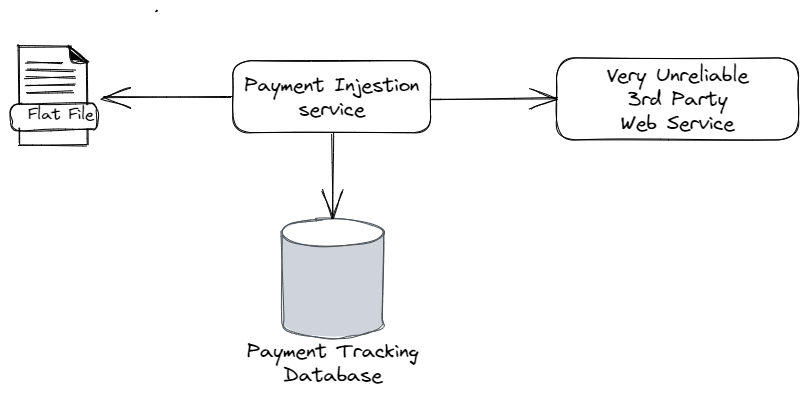
Just based on that diagram above, and admittedly some bad experiences in the shake down cruise of the historical system that diagram was based on, here’s some of the things that can go wrong:

  • The system blows up and dies while the payments from a particular file are only half way processed
  • Transient errors from database connectivity. Network hiccups
  • File IO errors from reading the flat files (I tend to treat direct file system access a lot like a poisonous snake due to very bad experiences early in my career)
  • HTTP errors from timeouts calling the web service
  • The 3rd party system is under distress and performing very poorly, such that a high percentage of requests are timing out
  • The 3rd party system can be misconfigured after code migrations on its system so that it’s technically “up” and responsive, but nothing actually works
  • The 3rd party system is completely down

Man, it’s a scary world sometimes!

Let’s say right now that our goal is as much as possible to have a system that is:

  1. Able to recover from errors without losing any ongoing work
  2. Doesn’t allow the system to permanently get into an inconsistent state — i.e. a file is marked as completely read, but somehow some of the payments from that file got lost along the way
  3. Rarely needs manual intervention from production support to recover work or restart work
  4. Heavens forbid, when something does happen that the system can’t recover from, it notifies production support

Now let’s go onto how to utilize Wolverine features to satisfy those goals in the face of all the potential problems I identified.

What if the system dies halfway through a file?

If you read through the last post, I used the local queueing mechanism in Wolverine to effectively create a producer/consumer workflow. Great! But what if the current process manages to die before all the ongoing work is completed? That’s where the durable inbox support in Wolverine comes in.

Pulling Marten in as our persistence strategy (but EF Core with either Postgresql or Sql Server is fully supported for this use case as well), I’m going to set up the application to opt into durable inbox mechanics for all locally queued messages like so (after adding the WolverineFx.Marten Nuget):

using Marten;
using Microsoft.Extensions.Configuration;
using Microsoft.Extensions.DependencyInjection;
using Microsoft.Extensions.Hosting;
using Oakton;
using Wolverine;
using Wolverine.Marten;
using WolverineIngestionService;

return await Host.CreateDefaultBuilder()
    .UseWolverine((context, opts) =>
    {
        // There'd obviously be a LOT more set up and service registrations
        // to be a real application

        var connectionString = context.Configuration.GetConnectionString("marten");
        opts.Services
            .AddMarten(connectionString)
            .IntegrateWithWolverine();

        // I want all local queues in the application to be durable
        opts.Policies.UseDurableLocalQueues();
        opts.LocalQueueFor<PaymentValidated>().Sequential();
        opts.LocalQueueFor<PostPaymentSchedule>().Sequential();
    }).RunOaktonCommands(args);

And with those changes, all in flight messages in the local queues are also stored durably in the backing database. If the application process happens to fail in flight, the persisted messages will fail over to either another running node or be picked up by restarting the system process.

So far, so good? Onward…

Getting Over transient hiccups

Sometimes database interactions will fail with transient errors and will very well succeed if retried later. This is especially common when the database is under stress. Wolverine’s error handling policies easily accommodate that, and in this case I’m going to add some retry capabilities for basic database exceptions like so:

        // Retry on basic database exceptions with some cooldown time in
        // between retries
        opts
            .Policies
            .OnException<NpgsqlException>()
            .Or<MartenCommandException>()
            .RetryWithCooldown(100.Milliseconds(), 250.Milliseconds(), 500.Milliseconds());

        opts
            .OnException<TimeoutException>()
            .RetryWithCooldown(250.Milliseconds(), 500.Milliseconds());

Notice how I’ve specified some “cooldown” times for subsequent failures. This is more or less an example of exponential back off error handling that’s meant to effectively throttle a distressed subsystem to allow it to catch up and recover.

Now though, not every exception implies that the message may magically succeed at a later time, so in that case…

Walk away from bad apples

Over time we can recognize exceptions that pretty well mean that the message can never succeed. In that case we should just throw out the message instead of allowing it to suck down resources by being retried multiple times. Wolverine happily supports that as well. Let’s say that payment messages can never work if it refers to an account that cannot be found, so let’s do this:

        // Just get out of there if the account referenced by a message
        // does not exist!
        opts
            .OnException<UnknownAccountException>()
            .Discard();

I should also note that Wolverine is writing to your application log when this happens.

Circuit Breakers to give the 3rd party system a timeout

As I’ve repeatedly said in this blog series so far, the “very unreliable 3rd party system” was somewhat less than reliable. What we found in practice was that the service would fail in bunches when it fell behind, but could recover over time. However, what would happen — even with the exponential back off policy — was that when the system was distressed it still couldn’t recover in time and continuing to pound it with retries just led to everything ending up in dead letter queues where it eventually required manual intervention to recover. That was exhausting and led to much teeth gnashing (and fingers pointed at me in angry meetings). In response to that, Wolverine comes with circuit breaker support as shown below:

        // These are the queues that handle calls to the 3rd party web service
        opts.LocalQueueFor<PaymentValidated>()
            .Sequential()
            
            // Add the circuit breaker
            .CircuitBreaker(cb =>
            {
                // If the conditions are met to stop processing messages,
                // Wolverine will attempt to restart in 5 minutes
                cb.PauseTime = 5.Minutes();

                // Stop listening if there are more than 20% failures 
                // over the tracking period
                cb.FailurePercentageThreshold = 20;

                // Consider the failures over the past minute
                cb.TrackingPeriod = 1.Minutes();
                
                // Get specific about what exceptions should
                // be considered as part of the circuit breaker
                // criteria
                cb.Include<TimeoutException>();

                // This is our fault, so don't shut off the listener
                // when this happens
                cb.Exclude<InvalidRequestException>();
            });
        
        opts.LocalQueueFor<PostPaymentSchedule>()
            .Sequential()
            
            // Or the defaults might be just fine
            .CircuitBreaker();

With the set up above, if Wolverine detects too high a rate of message failures in a given time, it will completely stop message processing for that particular local queue. Since we’ve isolated the message processing for the two types of calls to the 3rd party web service, we’re allowing everything else to continue when the circuit breaker stops message processing. Do note that the circuit breaker functionality will try to restart message processing later after the designated pause time. Hopefully the pause time allows for the 3rd party system to recover — or for production support to make it recover. All of this without making all the backed up messages continuously fail and end up landing in the dead letter queues where it will take manual intervention to recover the work in progress.

Hold the line, the 3rd party system is broken!

On top of every thing else, the “very unreliable 3rd party system” was easily misconfigured at the drop of a hat such that it would become completely nonfunctional even though it appeared to be responsive. When this happened, every single message to that service would fail. So again, instead of letting all our pending work end up in the dead letter queue, let’s instead completely pause all message handling on the current local queue (wherever the error happened) if we can tell from the exception that the 3rd party system is nonfunctional like so:

        // If we encounter this specific exception with this particular error code,
        // it means that the 3rd party system is 100% nonfunctional even though it appears
        // to be up, so let's pause all processing for 10 minutes
        opts.OnException<ThirdPartyOperationException>(e => e.ErrorCode == 235)
            .Requeue().AndPauseProcessing(10.Minutes());

Summary and next time!

It’s helpful to assign work within message handlers in such a way to maximize your error handling. Think hard about what actions in your system are prone to failure and may deserve to be their own individual message handler and messaging endpoint to allow for exact error handling policies like the way I used a circuit breaker on the queues that handled calls to the unreliable 3rd party service.

For my next post in this series, I think I want to make a diversion into integration testing using a stand in stub for the 3rd party service using the application setup with Lamar.

Producer/Consumer Pattern with Wolverine

This is going to be the start of a series of short blog posts to show off some Wolverine capabilities. You may very well point out that there are some architectural anti-patterns in the system I’m describing, and I would actually agree. I’ll try to address that as we go along, but just know this is based on a very real system and reflects real world compromises that I was unhappy about at that time. Onward.

Wolverine has a strong in process queueing mechanism based around the TPL Dataflow library — a frequently overlooked gem in the .NET ecosystem. Today I want to show how that capability allows you to reliably implement the producer/consumer pattern for parallelizing work with some sort of constrained resource. Consider this system I helped design and build several years ago:

It’s a somewhat typical “ingestion” service to read flat files representing payments to a series of client loans ultimately managed and tracked in what I called the “Very Unreliable 3rd Party Web Service” up above. Our application is responsible for reading, parsing, and validating the payments from a flat file that’s inevitably dropped in a secured FTP site (my least favorite mechanism for doing large scale integrations, but sadly common). Once the data is parsed, we need to implement this workflow for each payment:

  1. Validate the required data elements and reject any that are missing necessary information
  2. Retrieve information about the related accounts and loans from the 3rd party service into our service
  3. Do further validations and determine how the payment is to be applied to the loan (how much goes toward interest, fees, or principal)
  4. Persist a more or less audit log of all the results
  5. Post the application of the payment to the 3rd party system

Now, let’s say that our application is receiving lots of these flat files throughout the day and it’s actually important for the business that these files be processed quickly. But there’s a catch in our potential throughput, the 3rd party web service can only handle one read request and one transactional request at one time without becoming unstable because of its oddball threading model (this sounds contrived, but it was unfortunately true).

I’m going to say this is a perfect place to use the consumer/producer model where we’ll:

  • Constrain the calls to the 3rd party web service to a dedicated activity thread that executes one at a time
  • Do the other work (parsing, validating, determining the payment schedule) in other activity threads where parallelization is possible

Admittedly starting in the middle of the process, let’s say that our Wolverine application detects a new file to the FTP site and publishes a new event to a message handler that will be the “Producer” to create individual payment workflows within our system:

    // This is a "producer" that is creating payment messages
    public static IEnumerable<object> Handle(
        FileDetected command, 
        IFileParser parser, 
        IPaymentValidator validator)
    {
        foreach (var payment in parser.ReadFile(command.FileName))
        {
            if (validator.TryValidate(payment, out var reasons))
            {
                yield return new PaymentValidated(payment);
            }
            else
            {
                yield return new PaymentRejected(payment, reasons);
            }
        }
    }

For each file, we’ll publish individual messages for each payment to parallelize work. That leads to the next stage of work to look up information from the 3rd party service:

    public static async Task<SchedulePayment> Handle(
        PaymentValidated @event, 
        IThirdPartyServiceGateway gateway,
        CancellationToken cancellation)
    {
        var information = await gateway.FindLoanInformationAsync(@event.Payment.LoanId, cancellation);
        return new SchedulePayment(@event.Payment, information);
    }

Note that the only work that particular handler is doing is calling the 3rd party service and handing off the results to yet another handler I’ll show next. Because the access to the 3rd party service is so constrained — and likely a performance bottleneck — we don’t want to be doing anything else in this handler but looking up data and passing it along.

On to the next handler where we’ll do a bit of pure business logic to “schedule” the payment and how it will be applied to the loan in terms of what gets applied to interest, fees, or principle related to the loan balance.

    public static PostPaymentSchedule Handle(SchedulePayment command, PaymentSchedulerRules rules)
    {
        // Carry out a ton of business rules about how the payment
        // is scheduled against interest, fees, principal, and early payment penalties
        var schedule = rules.CreateSchedule(command.Payment, command.LoanInformation);
        return new PostPaymentSchedule(schedule);
    }

Finally, we’ll have one last handler thread to actually post the payment schedule to the 3rd party service:

    public static async Task Handle(
        PostPaymentSchedule command, 
        IThirdPartyServiceGateway gateway,
        CancellationToken cancellation)
    {
        // I'm leaving it async here because I'm going to add a lot more to this
        // in later posts
        await gateway.PostPaymentScheduleAsync(command.Schedule, cancellation);
    }

To rewind, we have these four command or event messages:

  1. FileDetected – can be processed in parallel
  2. PaymentValidated – has to be processed single file
  3. SchedulePayment – can be processed in parallel
  4. PostPaymentSchedule – has to be processed single file

Moving to Wolverine setup, by default each locally handled message type is published to its own local queue with the parallelization set to the detected number of processors on the hosting server — but we can happily override that to handle any number of message types in the same local queue or to change the processing of an individual queue. In this case we’re going to change the message handling for PaymentValidated and PostPaymentSchedule to be processed sequentially:

using Microsoft.Extensions.Hosting;
using Oakton;
using Wolverine;
using WolverineIngestionService;

return await Host.CreateDefaultBuilder()
    .UseWolverine(opts =>
    {
        // There'd obviously be a LOT more set up and service registrations
        // to be a real application
        
        opts.LocalQueueFor<PaymentValidated>().Sequential();
        opts.LocalQueueFor<PostPaymentSchedule>().Sequential();
    }).RunOaktonCommands(args);

And just like that, we’ve got a producer/consumer system that is able to communicate through local queues with Wolverine. From the dotnet run -- describe diagnostics for this application, you can see the listeners:

┌────────────────────────┬────────────────────────┬──────────────────┬────────────────────────┬────────────────────────┐
│ Uri                    │ Name                   │ Mode             │ Execution              │ Serializers            │
├────────────────────────┼────────────────────────┼──────────────────┼────────────────────────┼────────────────────────┤
│ local://default/       │ default                │ BufferedInMemory │ MaxDegreeOfParallelism │ NewtonsoftSerializer   │
│                        │                        │                  │ : 16, EnsureOrdered:   │ (application/json)     │
│                        │                        │                  │ False                  │                        │
│ local://durable/       │ durable                │ Durable          │ MaxDegreeOfParallelism │ NewtonsoftSerializer   │
│                        │                        │                  │ : 16, EnsureOrdered:   │ (application/json)     │
│                        │                        │                  │ False                  │                        │
│ local://replies/       │ replies                │ BufferedInMemory │ MaxDegreeOfParallelism │ NewtonsoftSerializer   │
│                        │                        │                  │ : 16, EnsureOrdered:   │ (application/json)     │
│                        │                        │                  │ False                  │                        │
│ local://wolverineinges │ wolverineingestionserv │ BufferedInMemory │ MaxDegreeOfParallelism │ NewtonsoftSerializer   │
│ tionservice.filedetect │ ice.filedetected       │                  │ : 16, EnsureOrdered:   │ (application/json)     │
│ ed/                    │                        │                  │ False                  │                        │
│ local://wolverineinges │ wolverineingestionserv │ BufferedInMemory │ MaxDegreeOfParallelism │ NewtonsoftSerializer   │
│ tionservice.paymentval │ ice.paymentvalidated   │                  │ : 1, EnsureOrdered:    │ (application/json)     │
│ idated/                │                        │                  │ True                   │                        │
│ local://wolverineinges │ wolverineingestionserv │ BufferedInMemory │ MaxDegreeOfParallelism │ NewtonsoftSerializer   │
│ tionservice.postpaymen │ ice.postpaymentschedul │                  │ : 1, EnsureOrdered:    │ (application/json)     │
│ tschedule/             │ e                      │                  │ True                   │                        │
│ local://wolverineinges │ wolverineingestionserv │ BufferedInMemory │ MaxDegreeOfParallelism │ NewtonsoftSerializer   │
│ tionservice.schedulepa │ ice.schedulepayment    │                  │ : 16, EnsureOrdered:   │ (application/json)     │
│ yment/                 │                        │                  │ False                  │                        │
└────────────────────────┴────────────────────────┴──────────────────┴────────────────────────┴────────────────────────┘

and the message routing:

┌───────────────────────────────────────────────┬────────────────────────────────────────────────────────┬──────────────────┐
│ Message Type                                  │ Destination                                            │ Content Type     │
├───────────────────────────────────────────────┼────────────────────────────────────────────────────────┼──────────────────┤
│ WolverineIngestionService.FileDetected        │ local://wolverineingestionservice.filedetected/        │ application/json │
│ WolverineIngestionService.PaymentValidated    │ local://wolverineingestionservice.paymentvalidated/    │ application/json │
│ WolverineIngestionService.PostPaymentSchedule │ local://wolverineingestionservice.postpaymentschedule/ │ application/json │
│ WolverineIngestionService.SchedulePayment     │ local://wolverineingestionservice.schedulepayment/     │ application/json │
└───────────────────────────────────────────────┴────────────────────────────────────────────────────────┴──────────────────┘

Summary and next time…

So far, most folks seem to be considering Wolverine as an in process mediator tool or less frequently as an asynchronous messaging tool between processes. However, Wolverine also has a strong model for asynchronous processing through its local queueing model. It’s not shown in this post, but the command/event/message handling is fully instrumented with logging, Open Telemetry tracing, and all of Wolverine’s error handling capabilities.

Next time out, I’m going to use this same system to demonstrate some of Wolverine’s resiliency features that were absolutely inspired by my experiences building and supporting the system this post is based on.

Command Line Diagnostics in Wolverine

Wolverine 0.9.12 just went up on Nuget with new bug fixes, documentation improvements, improved Rabbit MQ usage of topics, local queue usage, and a lot of new functionality around the command line diagnostics. See the whole release notes here.

In this post, I want to zero into “command line diagnostics.” Speaking from a mix of concerns about being both a user of Wolverine and one of the people needing to support other people using Wolverine online, here’s a not exhaustive list of real challenges I’ve already seen or anticipate as Wolverine gets out into the wild more in the near future:

  • How is Wolverine configured? What extensions are found?
  • What middleware is registered, and is it hooked up correctly?
  • How is Wolverine handling a specific message exactly?
  • How is Wolverine HTTP handling an HTTP request for a specific route?
  • Is Wolverine finding all the handlers? Where is it looking?
  • Where is Wolverine trying to send each message?
  • Are we missing any configuration items? Is the database reachable? Is the url for a web service proxy in our application valid?
  • When Wolverine has to interact with databases or message brokers, are those servers configured correctly to run the application?

That’s a big list of potentially scary issues, so let’s run down a list of command line diagnostic tools that come out of the box with Wolverine to help developers be more productive in real world development. First off, Wolverine’s command line support is all through the Oakton library, and you’ll want to enable Oakton command handling directly in your main application through this line of code at the very end of a typical Program file:

// This is an extension method within Oakton
// And it's important to relay the exit code
// from Oakton commands to the command line
// if you want to use these tools in CI or CD
// pipelines to denote success or failure
return await app.RunOaktonCommands(args);

You’ll know Oakton is configured correctly if you’ll just go to the command line terminal of your preference at the root of your project and type:

dotnet run -- help

In a simple Wolverine application, you’d get these options out of the box:

The available commands are:
                                                                                                    
  Alias       Description                                                                           
━━━━━━━━━━━━━━━━━━━━━━━━━━━━━━━━━━━━━━━━━━━━━━━━━━━━━━━━━━━━━━━━━━━━━━━━━━━━━━━━━━━━━━━━━━━━━━━━━━━━
  check-env   Execute all environment checks against the application                                
  codegen     Utilities for working with JasperFx.CodeGeneration and JasperFx.RuntimeCompiler       
  describe    Writes out a description of your running application to either the console or a file  
  help        List all the available commands                                                       
  resources   Check, setup, or teardown stateful resources of this system                           
  run         Start and run this .Net application                                                   
  storage     Administer the Wolverine message storage                                                       
                                                                                                    

Use dotnet run -- ? [command name] or dotnet run -- help [command name] to see usage help about a specific command

Let me admit that there’s a little bit of “magic” in the way that Wolverine uses naming or type conventions to “know” how to call into your application code. It’s great (in my opinion) that Wolverine doesn’t force you to pollute your code with framework concerns or require you to shape your code around Wolverine’s APIs the way most other .NET frameworks do.

Cool, so let’s move on to…

Describe the Configured Application

The annoying –framework flag is only necessary if your application targets multiple .NET frameworks, but no sane person would ever do that for a real application.

Partially for my own sanity, there’s a lot more support for Wolverine in the describe command. To see this in usage, consider the sample DiagnosticsApp from the Wolverine codebase. If I use the dotnet run --framework net7.0 -- describe command from that project, I get this copious textual output.

Just to summarize, what you’ll see in the command line report is:

  • “Wolverine Options” – the basics properties as configured, including what Wolverine thinks is the application assembly and any registered extensions
  • “Wolverine Listeners” – a tabular list of all the configured listening endpoints, including local queues, within the system and information about how they are configured
  • “Wolverine Message Routing” – a tabular list of all the message routing for known messages published within the system
  • “Wolverine Sending Endpoints” – a tabular list of all known, configured endpoints that send messages externally
  • “Wolverine Error Handling” – a preview of the active message failure policies active within the system
  • “Wolverine Http Endpoints” – shows all Wolverine HTTP endpoints. This is only active if WolverineFx.HTTP is used within the system

The latest Wolverine did add some optional message type discovery functionality specifically to make this describe command be more usable by letting Wolverine know about more message types that will be sent at runtime, but cannot be easily recognized as such strictly from configuration using a mix of marker interface types and/or attributes:

// These are all published messages that aren't
// obvious to Wolverine from message handler endpoint
// signatures
public record InvoiceShipped(Guid Id) : IEvent;
public record CreateShippingLabel(Guid Id) : ICommand;

[WolverineMessage]
public record AddItem(Guid Id, string ItemName);

Environment Checks

Have you ever made a deployment to production just to find out that a database connection string was wrong? Or the credentials to a message broker were wrong? Or your service wasn’t running under an account that had read access to a file share your application needed to scan? Me too!

Wolverine adds several environment checks so that you can use Oakton’s Environment Check functionality to self-diagnose potential configuration issues with:

dotnet run -- check-env

You could conceivably use this as part of your continuous delivery pipeline to quickly verify the application configuration for an application and fail fast & roll back if the checks fail.

How is Wolverine calling my message handlers?!?

Wolverine admittedly involves some “magic” about how it calls into your message handlers, and it’s not unlikely you may be confused about whether or how some kind of registered middleware is working within your system. Or maybe you’re just mildly curious about how Wolverine works at all.

To that end, you can preview — or just generate ahead of time for better “cold starts” — the dynamic source code that Wolverine generates for your message handlers or HTTP handlers with:

dotnet run -- codegen preview

Or just write the code to the file system so you can look at it to your heart’s content with your IDE with:

dotnet run -- codegen write

Which should write the source code files to /Internal/Generated/WolverineHandlers. Here’s a sample from the same diagnostics app sample:

// <auto-generated/>
#pragma warning disable

namespace Internal.Generated.WolverineHandlers
{
    public class CreateInvoiceHandler360502188 : Wolverine.Runtime.Handlers.MessageHandler
    {


        public override System.Threading.Tasks.Task HandleAsync(Wolverine.Runtime.MessageContext context, System.Threading.CancellationToken cancellation)
        {
            var createInvoice = (IntegrationTests.CreateInvoice)context.Envelope.Message;
            var outgoing1 = IntegrationTests.CreateInvoiceHandler.Handle(createInvoice);
            // Outgoing, cascaded message
            return context.EnqueueCascadingAsync(outgoing1);

        }

    }
}

Database or Message Broker Setup

Your application will require some configuration of external resources if you’re using any mix of Wolverine’s transactional inbox/outbox support which targets Postgresql or Sql Server or message brokers like Rabbit MQ, Amazon SQS, or Azure Service Bus. Not to worry (too much), Wolverine exposes some command line support for making any necessary configuration setup in these resources with the Oakton resources command.

In the diagnostics app, we could ensure that our connected Postgresql database has all the necessary schema tables and the Rabbit MQ broker has all the necessary queues, exchanges, and bindings that out application needs to function with:

dotnet run -- resources setup

In testing or normal development work, I may also want to reset the state of these resources to delete now obsolete messages in either the database or the Rabbit MQ queues, and we can fortunately do that with:

dotnet run -- resources clear

There are also resource options for:

  • teardown — remove all the database objects or message broker objects that the Wolverine application placed there
  • statistics — glean some information about the number of records or messages in the stateful resources
  • check — do environment checks on the configuration of the stateful resources. This is purely a diagnostic function
  • list — just show you information about the known, stateful resources

Summary

Is any of this wall of textual reports being spit out at the command line sexy? Not in the slightest. Will this functionality help development teams be more productive with Wolverine? Will this functionality help myself and other Wolverine team members support remote users in the future? I’m hopeful that the answer to the first question is “yes” and pretty confident that it’s a “hell, yes” to the second question.

I would also hope that folks see this functionality and agree with my assessment that Wolverine (and Marten) are absolutely appropriate for real life usage and well beyond the toy project phase.

Anyway, more on Wolverine next week starting with an exploration of Wolverine’s local queuing support for asynchronous processing.

Wolverine’s New HTTP Endpoint Model

UPDATE: If you pull down the sample code, it’s not quite working with Swashbuckle yet. It *does* publish the metadata and the actual endpoints work, but it’s not showing up in the OpenAPI spec. Always something.

I just published Wolverine 0.9.10 to Nuget (after a much bigger 0.9.9 yesterday). There’s several bug fixes, some admitted breaking changes to advanced configuration items, and one significant change to the “mediator” behavior that’s described at the section at the very bottom of this post.

The big addition is a new library that enables Wolverine’s runtime model directly for HTTP endpoints in ASP.Net Core services without having to jump through the typical sequence of delegating directly from a Minimal API method directly to Wolverine’s mediator functionality like this:

app.MapPost("/items/create", (CreateItemCommand cmd, IMessageBus bus) => bus.InvokeAsync(cmd));

app.MapPost("/items/create2", (CreateItemCommand cmd, IMessageBus bus) => bus.InvokeAsync<ItemCreated>(cmd));

Instead, Wolverine now has the WolverineFx.Http library to directly use Wolverine’s runtime model — including its unique middleware approach — directly from HTTP endpoints.

Shamelessly stealing the Todo sample application from the Minimal API documentation, let’s build a similar service with WolverineFx.Http, but I’m also going to switch to Marten for persistence just out of personal preference.

To bootstrap the application, I used the dotnet new webapi model, then added the WolverineFx.Marten and WolverineFx.HTTP nugets. The application bootstrapping for basic integration of Wolverine, Marten, and the new Wolverine HTTP model becomes:

using Marten;
using Oakton;
using Wolverine;
using Wolverine.Http;
using Wolverine.Marten;

var builder = WebApplication.CreateBuilder(args);

// Adding Marten for persistence
builder.Services.AddMarten(opts =>
    {
        opts.Connection(builder.Configuration.GetConnectionString("Marten"));
        opts.DatabaseSchemaName = "todo";
    })
    .IntegrateWithWolverine()
    .ApplyAllDatabaseChangesOnStartup();

// Wolverine usage is required for WolverineFx.Http
builder.Host.UseWolverine(opts =>
{
    // This middleware will apply to the HTTP
    // endpoints as well
    opts.Policies.AutoApplyTransactions();
    
    // Setting up the outbox on all locally handled
    // background tasks
    opts.Policies.UseDurableLocalQueues();
});

// Learn more about configuring Swagger/OpenAPI at https://aka.ms/aspnetcore/swashbuckle
builder.Services.AddEndpointsApiExplorer();
builder.Services.AddSwaggerGen();

var app = builder.Build();

// Configure the HTTP request pipeline.
if (app.Environment.IsDevelopment())
{
    app.UseSwagger();
    app.UseSwaggerUI();
}

// Let's add in Wolverine HTTP endpoints to the routing tree
app.MapWolverineEndpoints();

return await app.RunOaktonCommands(args);

Do note that the only thing in that sample that pertains to WolverineFx.Http itself is the call to IEndpointRouteBuilder.MapWolverineEndpoints().

Let’s move on to “Hello, World” with a new Wolverine http endpoint from this class we’ll add to the sample project:

public class HelloEndpoint
{
    [WolverineGet("/")]
    public string Get() => "Hello.";
}

At application startup, WolverineFx.Http will find the HelloEndpoint.Get() method and treat it as a Wolverine http endpoint with the route pattern GET: / specified in the [WolverineGet] attribute.

As you’d expect, that route will write the return value back to the HTTP response and behave as specified by this Alba specification:

[Fact]
public async Task hello_world()
{
    var result = await _host.Scenario(x =>
    {
        x.Get.Url("/");
        x.Header("content-type").SingleValueShouldEqual("text/plain");
    });
    
    result.ReadAsText().ShouldBe("Hello.");
}

Moving on to the actual Todo problem domain, let’s assume we’ve got a class like this:

public class Todo
{
    public int Id { get; set; }
    public string? Name { get; set; }
    public bool IsComplete { get; set; }
}

In a sample class called TodoEndpoints let’s add an HTTP service endpoint for listing all the known Todo documents:

[WolverineGet("/todoitems")]
public static Task<IReadOnlyList<Todo>> Get(IQuerySession session) 
    => session.Query<Todo>().ToListAsync();

As you’d guess, this method will serialize all the known Todo documents from the database into the HTTP response and return a 200 status code. In this particular case the code is a little bit noisier than the Minimal API equivalent, but that’s okay, because you can happily use Minimal API and WolverineFx.Http together in the same project. WolverineFx.Http, however, will shine in more complicated endpoints.

Consider this endpoint just to return the data for a single Todo document:

// Wolverine can infer the 200/404 status codes for you here
// so there's no code noise just to satisfy OpenAPI tooling
[WolverineGet("/todoitems/{id}")]
public static Task<Todo?> GetTodo(int id, IQuerySession session, CancellationToken cancellation) 
    => session.LoadAsync<Todo>(id, cancellation);

At this point it’s effectively de rigueur for any web service to support OpenAPI documentation directly in the service. Fortunately, WolverineFx.Http is able to glean most of the necessary metadata to support OpenAPI documentation with Swashbuckle from the method signature up above. The method up above will also cleanly set a status code of 404 if the requested Todo document does not exist.

Now, the bread and butter for WolverineFx.Http is using it in conjunction with Wolverine itself. In this sample, let’s create a new Todo based on submitted data, but also publish a new event message with Wolverine to do some background processing after the HTTP call succeeds. And, oh, yeah, let’s make sure this endpoint is actively using Wolverine’s transactional outbox support for consistency:

[WolverinePost("/todoitems")]
public static async Task<IResult> Create(CreateTodo command, IDocumentSession session, IMessageBus bus)
{
    var todo = new Todo { Name = command.Name };
    session.Store(todo);

    // Going to raise an event within out system to be processed later
    await bus.PublishAsync(new TodoCreated(todo.Id));
    
    return Results.Created($"/todoitems/{todo.Id}", todo);
}

The endpoint code above is automatically enrolled in the Marten transactional middleware by simple virtue of having a dependency on Marten’s IDocumentSession. By also taking in the IMessageBus dependency, WolverineFx.Http is wrapping the transactional outbox behavior around the method so that the TodoCreated message is only sent after the database transaction succeeds.

Lastly for this page, consider the need to update a Todo from a PUT call. Your HTTP endpoint may vary its handling and response by whether or not the document actually exists. Just to show off Wolverine’s “composite handler” functionality and also how WolverineFx.Http supports middleware, consider this more complex endpoint:

public static class UpdateTodoEndpoint
{
    public static async Task<(Todo? todo, IResult result)> LoadAsync(UpdateTodo command, IDocumentSession session)
    {
        var todo = await session.LoadAsync<Todo>(command.Id);
        return todo != null 
            ? (todo, new WolverineContinue()) 
            : (todo, Results.NotFound());
    }

    [WolverinePut("/todoitems")]
    public static void Put(UpdateTodo command, Todo todo, IDocumentSession session)
    {
        todo.Name = todo.Name;
        todo.IsComplete = todo.IsComplete;
        session.Store(todo);
    }
}

In the WolverineFx.Http model, any bit of middleware that returns an IResult object is tested by the generated code to execute any IResult object returned from middleware that is not the built in WolverineContinue type and stop all further processing. This is intended to enable validation or authorization type middleware where you may need to filter calls to the inner HTTP handler.

With the sample application out of the way, here’s a rundown of the significant things about this library:

  • It’s actually a pretty small library in the greater scheme of things and all it really does is connect ASP.Net Core’s endpoint routing to the Wolverine runtime model — and Wolverine’s runtime model is likely going to be somewhat more efficient than Minimal API and much more efficient that MVC Core
  • It can be happily combined with Minimal API, MVC Core, or any other ASP.Net Core model that exploits endpoint routing, even within the same application
  • Wolverine is allowing you to use the Minimal API IResult model
  • The JSON serialization is strictly System.Text.Json and uses the same options as Minimal API within an ASP.Net Core application
  • It’s possible to use Wolverine middleware strategy with the HTTP endpoints
  • Wolverine is trying to glean necessary metadata from the method signatures to feed OpenAPI usage within ASP.Net Core without developers having to jump through hoops adding attributes or goofy TypedResult noise code just for Swashbuckle
  • This model plays nicely with Wolverine’s transactional outbox model for common cases where you need to both make database changes and publish additional messages for background processing in the same HTTP call. That’s a bit of important functionality that I feel is missing or is clumsy at best in many leading .NET server side technologies.

For the handful of you reading this that still remember FubuMVC, Wolverine’s HTTP model retains some of FubuMVC’s old strengths in terms of still not ramming framework concerns into your application code, but learned some hard lessons from FubuMVC’s ultimate failure:

  • FubuMVC was an ambitious, sprawling framework that was trying to be its own ecosystem with its own bootstrapping model, logging abstractions, and even IoC abstractions. WolverineFx.Http is just a citizen within the greater ASP.Net Core ecosystem and uses common .NET abstractions, concepts, and idiomatic naming conventions at every possible turn
  • FubuMVC relied too much on conventions, which was great when the convention was exactly what you needed, and kinda hurtful when you needed something besides the exact conventions. Not to worry, WolverineFx.Http let’s you drop right down to the HttpContext level at will or use any of the IResult objects in existing ASP.Net Core whenever the Wolverine conventions don’t fit.
  • FubuMVC could technically be used with old ASP.Net MVC, but it was a Frankenstein’s monster to pull off. Wolverine can be mixed and matched at will with either Minimal API, MVC Core, or even other OSS projects that exploit ASP.Net Core endpoint routing.
  • Wolverine is trying to play nicely in terms of OpenAPI metadata and security related metadata for usage of standard ASP.Net Core middleware like the authorization or authentication middleware
  • FubuMVC’s “Behavior” model gave you a very powerful “Russian Doll” middleware ability that was maximally flexible — and also maximally inefficient in runtime. Wolverine’s runtime model takes a very different approach to still allow for the “Russian Doll” flexibility, but to do so in a way that is more efficient at runtime than basically every other commonly used framework today in the .NET community.
  • When things went boom in FubuMVC, you got monumentally huge stack traces that could overwhelm developers who hadn’t had a week’s worth of good night sleeps. It sounds minor, but Wolverine is valuable in the sense that the stack traces from HTTP (or message handler) failures will have very minimal Wolverine related framework noise in the stack trace for easier readability by developers.

Big Change to In Memory Mediator Model

I’ve been caught off guard a bit by how folks have mostly been interested in Wolverine as an alternative to MediatR with typical usage like this where users just delegate to Wolverine in memory within a Minimal API route:

app.MapPost("/items/create2", (CreateItemCommand cmd, IMessageBus bus) => bus.InvokeAsync<ItemCreated>(cmd));

With the corresponding message handler being this:

public class ItemHandler
{
    // This attribute applies Wolverine's EF Core transactional
    // middleware
    [Transactional]
    public static ItemCreated Handle(
        // This would be the message
        CreateItemCommand command,

        // Any other arguments are assumed
        // to be service dependencies
        ItemsDbContext db)
    {
        // Create a new Item entity
        var item = new Item
        {
            Name = command.Name
        };

        // Add the item to the current
        // DbContext unit of work
        db.Items.Add(item);

        // This event being returned
        // by the handler will be automatically sent
        // out as a "cascading" message
        return new ItemCreated
        {
            Id = item.Id
        };
    }
}

Prior to the latest release, the ItemCreated event in the handler above when used from IMessageBus.InvokeAsync<ItemCreated>() was not published as a message because my original assumption was that in that case you were using the return value explicitly as a return value. Early users have been surprised that the ItemCreated was not published as a message, so I just changed the behavior to do so to make the cascading message behavior be more consistent and what folks seem to actually want.

New Wolverine Release & Future Plans

After plenty of keystone cops shenanigans with CI automation today that made me question my own basic technical competency, there’s a new Wolverine 0.9.8 release on Nuget today with a variety of fixes and some new features. The documentation website was also re-published.

First, some thanks:

  • Wojtek Suwala made several fixes and improvements to the EF Core integration
  • Ivan Milosavljevic helped fix several hanging tests on CI, built the MemoryPack integration, and improved the FluentValidation integration
  • Anthony made his first OSS contribution (?) to help fix quite a few issues with the documentation
  • My boss and colleague Denys Grozenok for all his support with reviewing docs and reporting issues
  • Kebin for improving the dead letter queue mechanics

The highlights:

Dogfooding baby!

Conveniently enough, I’m part of a little officially sanctioned skunkworks team at work experimenting with converting a massive distributed monolithic application to the full Marten + Wolverine “critter stack.” I’m very encouraged by the effort so far, and it’s driven some recent features in Wolverine’s execution model to handle complexity in enterprise systems. More on that soon.

It’s also pushing the story for interoperability with NServiceBus on the other end of Rabbit MQ queues. Strangely enough, no one is interested in trying to convert a humongous distributed system to Wolverine in one round of work. Go figure.

When will Wolverine hit 1.0?

There’s a little bit of awkwardness in that Marten V6.0 (don’t worry, that’s a much smaller release than 4/5) needs to be released first and I haven’t been helping Oskar & Babu with that recently, but I think we’ll be able to clear that soon.

My “official” plan is to finish the documentation website by the end of February and make the 1.0 release by March 1st. Right now, Wolverine is having its tires kicked by plenty of early users and there’s plenty of feedback (read: bugs or usability issues) coming in that I’m trying to address quickly. Feature wise, the only things I’m hoping to have done by 1.0 are:

  • Using more native capabilities of Azure Service Bus, Rabbit MQ, and AWS SQS for dead letter queues and delayed messaging. That’s mostly to solidify some internal abstractions.
  • It’s a stretch goal, but have Wolverine support Marten’s multi-tenancy through a database per tenant strategy. We’ll want that for internal MedeAnalytics usage, so it might end up being a priority
  • Some better integration with ASP.Net Core Minimal API

Wolverine meets EF Core and Sql Server

Heads up, you will need at least Wolverine 0.9.7 for these samples!

I’ve mostly been writing about Wolverine samples that involve its “critter stack” compatriot Marten as the persistence tooling. I’m obviously deeply invested in making that “critter stack” the highest productivity combination for server side development basically anywhere.

Today though, let’s go meet potential Wolverine users where they actually live and finally talk about how to integrate Entity Framework Core (EF Core) and SQL Server into Wolverine applications.

All of the samples in this post are from the EFCoreSample project in the Wolverine codebase. There’s also some newly published documentation about integrating EF Core with Wolverine now too.

Alright, let’s say that we’re building a simplistic web service to capture information about Item entities (so original) and we’ve decided to use SQL Server as the backing database and use EF Core as our ORM for persistence — and also use Wolverine as an in memory mediator because why not?

I’m going to start by creating a brand new project with the dotnet new webapi template. Next I’m going to add some Nuget references for:

  1. Microsoft.EntityFrameworkCore.SqlServer
  2. WolverineFx.SqlServer
  3. WolverineFx.EntityFrameworkCore

Now, let’s say that I have a simplistic DbContext class to define my EF Core mappings like so:

public class ItemsDbContext : DbContext
{
    public ItemsDbContext(DbContextOptions<ItemsDbContext> options) : base(options)
    {
    }

    public DbSet<Item> Items { get; set; }

    protected override void OnModelCreating(ModelBuilder modelBuilder)
    {
        // Your normal EF Core mapping
        modelBuilder.Entity<Item>(map =>
        {
            map.ToTable("items");
            map.HasKey(x => x.Id);
            map.Property(x => x.Name);
        });
    }
}

Now let’s switch to the Program file that holds all our application bootstrapping and configuration:

using ItemService;
using Microsoft.EntityFrameworkCore;
using Oakton;
using Oakton.Resources;
using Wolverine;
using Wolverine.EntityFrameworkCore;
using Wolverine.SqlServer;

var builder = WebApplication.CreateBuilder(args);

// Just the normal work to get the connection string out of
// application configuration
var connectionString = builder.Configuration.GetConnectionString("sqlserver");

#region sample_optimized_efcore_registration

// If you're okay with this, this will register the DbContext as normally,
// but make some Wolverine specific optimizations at the same time
builder.Services.AddDbContextWithWolverineIntegration<ItemsDbContext>(
    x => x.UseSqlServer(connectionString));

builder.Host.UseWolverine(opts =>
{
    // Setting up Sql Server-backed message storage
    // This requires a reference to Wolverine.SqlServer
    opts.PersistMessagesWithSqlServer(connectionString);

    // Enrolling all local queues into the
    // durable inbox/outbox processing
    opts.Policies.UseDurableLocalQueues();
});

// This is rebuilding the persistent storage database schema on startup
builder.Host.UseResourceSetupOnStartup();

builder.Services.AddControllers();
builder.Services.AddEndpointsApiExplorer();
builder.Services.AddSwaggerGen();

var app = builder.Build();

// Make sure the EF Core db is set up
await app.Services.GetRequiredService<ItemsDbContext>().Database.EnsureCreatedAsync();

// Configure the HTTP request pipeline.
if (app.Environment.IsDevelopment())
{
    app.UseSwagger();
    app.UseSwaggerUI();
}

app.MapControllers();

app.MapPost("/items/create", (CreateItemCommand command, IMessageBus bus) => bus.InvokeAsync(command));

// Opt into using Oakton for command parsing
await app.RunOaktonCommands(args);

In the code above, I’ve:

  1. Added a service registration for the new ItemsDbContext EF Core class, but I did so with a special Wolverine wrapper that adds some optimizations for us, quietly adds some mapping to the ItemsDbContext at runtime for the Wolverine message storage, and also enables Wolverine’s transactional middleware and stateful saga support for EF Core.
  2. I added Wolverine to the application, and used the PersistMessagesWithSqlServer() extension method to tell Wolverine to add message storage for SQL Server in the default dbo schema (that can be overridden). This also adds Wolverine’s durable agent for its transactional outbox and inbox running as a background service in an IHostedService
  3. I directed the application to build out any missing database schema objects on application startup through the call to builder.Host.UseResourceSetupOnStartup(); If you’re curious, this is using Oakton’s stateful resource model.
  4. For the sake of testing this little bugger, I’m having the application build the implied database schema from the ItemsDbContext as well

Moving on, let’s build a simple message handler that creates a new Item, persists that with EF Core, and raises a new ItemCreated event message:

    public static ItemCreated Handle(
        // This would be the message
        CreateItemCommand command,

        // Any other arguments are assumed
        // to be service dependencies
        ItemsDbContext db)
    {
        // Create a new Item entity
        var item = new Item
        {
            Name = command.Name
        };

        // Add the item to the current
        // DbContext unit of work
        db.Items.Add(item);

        // This event being returned
        // by the handler will be automatically sent
        // out as a "cascading" message
        return new ItemCreated
        {
            Id = item.Id
        };
    }

Simple enough, but a couple notes about that code:

  • I didn’t explicitly call the SaveChangesAsync() method on our ItemsDbContext to commit the changes, and that’s because Wolverine sees that the handler has a dependency on an EF Core DbContext type, so it automatically wraps its EF Core transactional middleware around the handler
  • The ItemCreated object returned from the message handler is a Wolverine cascaded message, and will be sent out upon successful completion of the original CreateItemCommand message — including the transactional middleware that wraps the handler.
  • And oh, by the way, we want the ItemCreated message to be persisted in the underlying Sql Server database as part of the transaction being committed so that Wolverine’s transactional outbox functionality makes sure that message gets processed (eventually) even if the process somehow fails between publishing the new message and that message being successfully completed.

I should also note that as a potentially significant performance optimization, Wolverine is able to persist the ItemCreated message when ItemsDbContext.SaveChangesAsync() is called to enroll in EF Core’s ability to batch changes to the database rather than incurring the cost of extra network hops if we’d used raw SQL.

Hopefully that’s all pretty easy to follow, even though there’s some “magic” there. If you’re curious, here’s the actual code that Wolverine is generating to handle the CreateItemCommand message (just remember that auto-generated code tends to be ugly as sin):

// <auto-generated/>
#pragma warning disable
using Microsoft.EntityFrameworkCore;

namespace Internal.Generated.WolverineHandlers
{
    // START: CreateItemCommandHandler1452615242
    public class CreateItemCommandHandler1452615242 : Wolverine.Runtime.Handlers.MessageHandler
    {
        private readonly Microsoft.EntityFrameworkCore.DbContextOptions<ItemService.ItemsDbContext> _dbContextOptions;

        public CreateItemCommandHandler1452615242(Microsoft.EntityFrameworkCore.DbContextOptions<ItemService.ItemsDbContext> dbContextOptions)
        {
            _dbContextOptions = dbContextOptions;
        }


        public override async System.Threading.Tasks.Task HandleAsync(Wolverine.Runtime.MessageContext context, System.Threading.CancellationToken cancellation)
        {
            await using var itemsDbContext = new ItemService.ItemsDbContext(_dbContextOptions);
            var createItemCommand = (ItemService.CreateItemCommand)context.Envelope.Message;
            var outgoing1 = ItemService.CreateItemCommandHandler.Handle(createItemCommand, itemsDbContext);
            // Outgoing, cascaded message
            await context.EnqueueCascadingAsync(outgoing1).ConfigureAwait(false);

        }

    }

So that’s EF Core within a Wolverine handler, and using SQL Server as the backing message store. One of the weaknesses of some of the older messaging tools in .NET is that they’ve long lacked a usable outbox feature outside of the context of their message handlers (both NServiceBus and MassTransit have just barely released “real” outbox features), but that’s a frequent need in the applications at my own shop and we’ve had to work around these limitations. Fortunately though, Wolverine’s outbox functionality is usable outside of message handlers.

As an example, let’s implement basically the same functionality we did in the message handler, but this time in an ASP.Net Core Controller method:

    [HttpPost("/items/create2")]
    public async Task Post(
        [FromBody] CreateItemCommand command,
        [FromServices] IDbContextOutbox<ItemsDbContext> outbox)
    {
        // Create a new Item entity
        var item = new Item
        {
            Name = command.Name
        };

        // Add the item to the current
        // DbContext unit of work
        outbox.DbContext.Items.Add(item);

        // Publish a message to take action on the new item
        // in a background thread
        await outbox.PublishAsync(new ItemCreated
        {
            Id = item.Id
        });

        // Commit all changes and flush persisted messages
        // to the persistent outbox
        // in the correct order
        await outbox.SaveChangesAndFlushMessagesAsync();
    }  

In the sample above I’m using the Wolverine IDbContextOutbox<T> service to wrap the ItemsDbContext and automatically enroll the EF Core service in Wolverine’s outbox. This service exposes all the possible ways to publish messages through Wolverine’s normal IMessageBus entrypoint.

Here’s a slightly different possible usage where I directly inject ItemsDbContext, but also a Wolverine IDbContextOutbox service:

    [HttpPost("/items/create3")]
    public async Task Post3(
        [FromBody] CreateItemCommand command,
        [FromServices] ItemsDbContext dbContext,
        [FromServices] IDbContextOutbox outbox)
    {
        // Create a new Item entity
        var item = new Item
        {
            Name = command.Name
        };

        // Add the item to the current
        // DbContext unit of work
        dbContext.Items.Add(item);

        // Gotta attach the DbContext to the outbox
        // BEFORE sending any messages
        outbox.Enroll(dbContext);
        
        // Publish a message to take action on the new item
        // in a background thread
        await outbox.PublishAsync(new ItemCreated
        {
            Id = item.Id
        });

        // Commit all changes and flush persisted messages
        // to the persistent outbox
        // in the correct order
        await outbox.SaveChangesAndFlushMessagesAsync();
    }   

That’s about all there is, but to sum it up:

  • Wolverine is able to use SQL Server as its persistent message store for durable messaging
  • There’s a ton of functionality around managing the database schema for you so you can focus on just getting stuff done
  • Wolverine has transactional middleware that can be applied automatically around your handlers as a way to simplify your message handlers while also getting the durable outbox messaging
  • EF Core is absolutely something that’s supported by Wolverine

Automating Integration Tests using the “Critter Stack”

This builds on the previous blog posts in this list:

Integration Testing, but How?

Some time over the holidays Jim Shore released an updated version of his excellent paper Testing Without Mocks: A Pattern Language. He also posted this truly massive thread with some provocative opinions about test automation strategies:

I think it’s a great thread over all, and the paper is chock full of provocative thoughts about designing for testability. Moreover, some of the older content in that paper is influencing the direction of my own work with Wolverine. I’ve also made it recommended reading for the developers in my own company.

All that being said, I strongly disagree with approach the approach he describes for integration testing with “nullable infrastructure” and eschewing DI/IoC for composition in favor of just willy nilly hard coding things because “DI us scary” or whatever. My strong preference and also where I’ve had the most success is to purposely choose to rely on development technologies that lend themselves to low friction, reliable, and productive integration testing.

And as it just so happens, the “critter stack” tools (Marten and Wolverine) that I work on are purposely designed for testability and include several features specifically to make integration testing more effective for applications using these tools.

Integration Testing with the Critter Stack

From my previous blog posts linked up above, I’ve been showing a very simplistic banking system to demonstrate the usage of Wolverine with Marten. For a testing scenario, let’s go back to part of this message handler for a WithdrawFromAccount message that will effect changes on an Account document entity and potentially send out other messages to perform other actions:

    [Transactional] 
    public static async Task Handle(
        WithdrawFromAccount command, 
        Account account, 
        IDocumentSession session, 
        IMessageContext messaging)
    {
        account.Balance -= command.Amount;
     
        // This just marks the account as changed, but
        // doesn't actually commit changes to the database
        // yet. That actually matters as I hopefully explain
        session.Store(account);
 
        // Conditionally trigger other, cascading messages
        if (account.Balance > 0 && account.Balance < account.MinimumThreshold)
        {
            await messaging.SendAsync(new LowBalanceDetected(account.Id));
        }
        else if (account.Balance < 0)
        {
            await messaging.SendAsync(new AccountOverdrawn(account.Id), new DeliveryOptions{DeliverWithin = 1.Hours()});
         
            // Give the customer 10 days to deal with the overdrawn account
            await messaging.ScheduleAsync(new EnforceAccountOverdrawnDeadline(account.Id), 10.Days());
        }
        
        // "messaging" is a Wolverine IMessageContext or IMessageBus service 
        // Do the deliver within rule on individual messages
        await messaging.SendAsync(new AccountUpdated(account.Id, account.Balance),
            new DeliveryOptions { DeliverWithin = 5.Seconds() });
    }

For a little more context, I’ve set up a Minimal API endpoint to delegate to this command like so:

// One Minimal API endpoint that just delegates directly to Wolverine
app.MapPost("/accounts/withdraw", (WithdrawFromAccount command, IMessageBus bus) => bus.InvokeAsync(command));

In the end here, I want a set of integration tests that works through the /accounts/withdraw endpoint, through all ASP.NET Core middleware, all configured Wolverine middleware or policies that wrap around that handler above, and verifies the expected state changes in the underlying Marten Postgresql database as well as any messages that I would expect to go out. And oh, yeah, I’d like those tests to be completely deterministic.

First, a Shared Test Harness

I’m starting to be interested in moving back to NUnit for the first time in years strictly for integration testing because I’m starting to suspect it would give you more control over the test fixture lifecycle in ways that are frequently valuable in integration testing.

Now, before writing the actual tests, I’m going to build an integration test harness for this system. I prefer to use xUnit.Net these days as my test runner, so we’re going to start with building what will be a shared fixture to run our application within integration tests. To be able to test through HTTP endpoints, I’m also going to add another JasperFx project named Alba to the testing project (See Alba for Effective ASP.Net Core Integration Testing for more information):

public class AppFixture : IAsyncLifetime
{
    public async Task InitializeAsync()
    {
        // Workaround for Oakton with WebApplicationBuilder
        // lifecycle issues. Doesn't matter to you w/o Oakton
        OaktonEnvironment.AutoStartHost = true;
        
        // This is bootstrapping the actual application using
        // its implied Program.Main() set up
        Host = await AlbaHost.For<Program>(x =>
        {
            // I'm overriding 
            x.ConfigureServices(services =>
            {
                // Let's just take any pesky message brokers out of
                // our integration tests for now so we can work in
                // isolation
                services.DisableAllExternalWolverineTransports();
                
                // Just putting in some baseline data for our database
                // There's usually *some* sort of reference data in 
                // enterprise-y systems
                services.InitializeMartenWith<InitialAccountData>();
            });
        });
    }

    public IAlbaHost Host { get; private set; }

    public Task DisposeAsync()
    {
        return Host.DisposeAsync().AsTask();
    }
}

There’s a bit to unpack in that class above, so let’s start:

  • A .NET IHost can be expensive to set up in memory, so in any kind of sizable system I will try to share one single instance of that between integration tests.
  • The AlbaHost mechanism is using WebApplicationFactory to bootstrap our application. This mechanism allows us to make some modifications to the application’s normal bootstrapping for test specific setup, and I’m exploiting that here.
  • The `DisableAllExternalWolverineTransports()` method is a built in extension method in Wolverine that will disable all external sending or listening to external transport options like Rabbit MQ. That’s not to say that Rabbit MQ itself is necessarily impossible to use within automated tests — and Wolverine even comes with some help for that in testing as well — but it’s certainly easier to create our tests without having to worry about messages coming and going from outside. Don’t worry though, because we’ll still be able to verify the messages that should be sent out later.
  • I’m using Marten’s “initial data” functionality that’s a way of establishing baseline data (reference data usually, but for testing you may include a baseline set of test user data maybe). For more context, `InitialAccountData` is shown below:
public class InitialAccountData : IInitialData
{
    public static Guid Account1 = Guid.NewGuid();
    public static Guid Account2 = Guid.NewGuid();
    public static Guid Account3 = Guid.NewGuid();
    
    public Task Populate(IDocumentStore store, CancellationToken cancellation)
    {
        return store.BulkInsertAsync(accounts().ToArray());
    }

    private IEnumerable<Account> accounts()
    {
        yield return new Account
        {
            Id = Account1,
            Balance = 1000,
            MinimumThreshold = 500
        };
        
        yield return new Account
        {
            Id = Account2,
            Balance = 1200
        };

        yield return new Account
        {
            Id = Account3,
            Balance = 2500,
            MinimumThreshold = 100
        };
    }
}

Next, just a little more xUnit.Net overhead. To make a shared fixture across multiple test classes with xUnit.Net, I add this little marker class:

[CollectionDefinition("integration")]
public class ScenarioCollection : ICollectionFixture<AppFixture>
{
    
}

I have to look this up every single time I use this functionality.

For integration testing, I like to a have a slim base class that I tend to quite originally call “IntegrationContext” like this one:

public abstract class IntegrationContext : IAsyncLifetime
{
    public IntegrationContext(AppFixture fixture)
    {
        Host = fixture.Host;
        Store = Host.Services.GetRequiredService<IDocumentStore>();
    }
    
    public IAlbaHost Host { get; }
    public IDocumentStore Store { get; }
    
    public async Task InitializeAsync()
    {
        // Using Marten, wipe out all data and reset the state
        // back to exactly what we described in InitialAccountData
        await Store.Advanced.ResetAllData();
    }

    // This is required because of the IAsyncLifetime 
    // interface. Note that I do *not* tear down database
    // state after the test. That's purposeful
    public Task DisposeAsync()
    {
        return Task.CompletedTask;
    }
}

Other than simply connecting real test fixtures to the ASP.Net Core system under test (the IAlbaHost), this IntegrationContext utilizes another bit of Marten functionality to completely reset the database state back to only the data defined by the InitialAccountData so that we always have known data in the database before tests execute.

By and large, I find NoSQL databases to be more easily usable in automated testing than purely relational databases because it’s generally easier to tear down and rebuild databases with NoSQL. When I’m having to use a relational database in tests, I opt for Jimmy Bogard’s Respawn library to do the same kind of reset, but it’s substantially more work to use than Marten’s built in functionality.

In the case of Marten, we very purposely designed in the ability to reset the database state for integration testing scenarios from the very beginning. Add this functionality to the easy ability to run the underlying Postgresql database in a local Docker container for isolated testing, and I’ll claim that Marten is very usable within test automation scenarios with no real need to try to stub out the database or use some kind of low fidelity fake in memory database in testing.

See My Opinions on Data Setup for Functional Tests for more explanation of why I’m doing the database state reset before all tests, but never immediately afterward. And also why I think it’s important to place test data setup directly into tests rather than trying to rely on any kind of external, expected data set (when possible).

From my first pass at writing the sample test that’s coming in the next section, I discovered the need for one more helper method on IntegrationContext to make HTTP calls to the system while also tracking background Wolverine activity as shown below:

    // This method allows us to make HTTP calls into our system
    // in memory with Alba, but do so within Wolverine's test support
    // for message tracking to both record outgoing messages and to ensure
    // that any cascaded work spawned by the initial command is completed
    // before passing control back to the calling test
    protected async Task<(ITrackedSession, IScenarioResult)> TrackedHttpCall(Action<Scenario> configuration)
    {
        IScenarioResult result = null;
        
        // The outer part is tying into Wolverine's test support
        // to "wait" for all detected message activity to complete
        var tracked = await Host.ExecuteAndWaitAsync(async () =>
        {
            // The inner part here is actually making an HTTP request
            // to the system under test with Alba
            result = await Host.Scenario(configuration);
        });

        return (tracked, result);
    }

The method above gives me access to the complete history of Wolverine messages during the activity including all outgoing messages spawned by the HTTP call. It also delegates to Alba to run HTTP requests in memory and gives me access to the Alba wrapped response for easy interrogation of the response later (which I don’t need in the following test, but would frequently in other tests).

See Test Automation Support from the Wolverine documentation for more information on the integration testing support baked into Wolverine.

Writing the first integration test

The first “happy path” test that verifies that calling the web service through to the Wolverine message handler for withdrawing from an account without going into any kind of low balance conditions might look like this:

public class when_debiting_an_account : IntegrationContext
{
    public when_debiting_an_account(AppFixture fixture) : base(fixture)
    {
    }

    [Fact]
    public async Task should_increase_the_account_balance_happy_path()
    {
        // Drive in a known data, so the "Arrange"
        var account = new Account
        {
            Balance = 2500,
            MinimumThreshold = 200
        };

        await using (var session = Store.LightweightSession())
        {
            session.Store(account);
            await session.SaveChangesAsync();
        }

        // The "Act" part of the test.
        var (tracked, _) = await TrackedHttpCall(x =>
        {
            // Send a JSON post with the DebitAccount command through the HTTP endpoint
            // BUT, it's all running in process
            x.Post.Json(new WithdrawFromAccount(account.Id, 1300)).ToUrl("/accounts/debit");

            // This is the default behavior anyway, but still good to show it here
            x.StatusCodeShouldBeOk();
        });
        
        // Finally, let's do the "assert"
        await using (var session = Store.LightweightSession())
        {
            // Load the newly persisted copy of the data from Marten
            var persisted = await session.LoadAsync<Account>(account.Id);
            persisted.Balance.ShouldBe(1300); // Started with 2500, debited 1200
        }

        // And also assert that an AccountUpdated message was published as well
        var updated = tracked.Sent.SingleMessage<AccountUpdated>();
        updated.AccountId.ShouldBe(account.Id);
        updated.Balance.ShouldBe(1300);

    }
}

The test above follows the basic “arrange, act, assert” model. In order, the test:

  1. Writes a brand new Account document to the Marten database
  2. Makes an HTTP call to the system to POST a WithdrawFromAccount command to our system using our TrackedHttpCall method that also tracks Wolverine activity during the HTTP call
  3. Verify that the Account data was changed in the database the way we expected
  4. Verify that an expected outgoing message was published as part of the activity

It was a lot of initial set up to get to the point where we could write tests, but I’m going to argue in the next section that we’ve done a lot to reduce the friction in writing additional integration tests for our system in a reliable way.

Avoiding the Selenium as Golden Hammer Anti-Pattern

Playwright or Cypress.io may prove to be better options than Selenium over time (I’m bullish on Playwright myself), but the main point is really that only depending on end to end tests through the browser can easily be problematic and inefficient.

Before I go back to defending why I think the testing approach and tooling shown in this post is very effective, let’s build up an all too real strawman of inefficient and maybe even ineffective test automation:

  • All your integration tests are blackbox, end to end tests that use Selenium to drive a web browser
  • These tests can only be executed externally to the application when the application is deployed to a development or testing environment. In the worst case scenario — which is also unfortunately common — the Selenium tests cannot be easily executed locally on demand
  • The tests are prone to failures due to UI changes
  • The tests are prone to intermittent “blinking” failures due to asynchronous behavior in the UI where test assertions happen before actions are completed in the application. This is a source of major friction and poor results in large scale Selenium testing that has been endemic in every single shop or project where I’ve used or seen Selenium used over the past decade — including in my current role.
  • The end to end tests are slow compared to finer grained unit tests or smaller whitebox integration tests that do not have to use the browser
  • Test failures are often difficult to diagnose since the tests are running out of process without direct access to the actual application. Some folks try to alleviate this issue with screenshots of the browser or in more advanced usages, trying to correlate the application logs to the test runs
  • Test failures often happen because related test databases are not in the expected state

I’m laying it on pretty thick here, but I think that I’m getting my point across that only relying on Selenium based browser testing is potentially very inefficient and sometimes ineffective. Now, let’s consider how the “critter stack” tools and the testing approach I used up above solve some of the issues I raised just above:

  • Postgresql itself is very easy to run in Docker containers or if you have to, to deploy locally. That makes it friendly for automated testing where you really, really want to have isolated testing infrastructure and avoid sharing any kind of stateful resource between testing processes
  • Marten in particular has built in support for setting up known database states going into automated tests. This is invaluable for integration testing
  • Executing directly against HTTP API endpoints is much faster than browser testing with something like Selenium. Faster executing tests == faster feedback cycles == better development throughput and delivery period
  • Running the tests completely in process with the application such as we did with Alba makes debugging test failures much easier for developers than trying to solve Selenium failures in a CI environment
  • Using the Alba + xUnit.Net (or NUnit etc) approach means that the integration tests can live with the application code and can be executed on demand whenever. That shifts the testing “left” in the development cycle compared to the slower Selenium running on CI only cycle. It also helps developers quickly spot check potential issues.
  • By embedding the integration tests directly in the codebase, you’re much less likely to get the drift between the application itself and automated tests that frequently arises from Selenium centric approaches.
  • This approach makes developers be involved with the test automation efforts. I strongly believe that it’s impossible for large scale test automation to work whatsoever without developer involvement
  • Whitebox tests are simply much more efficient than the blackbox model. This statement is likely to get me yelled at by real testing professionals, but it’s still true

This post took way, way too long to write compared to how I thought it would go. I’m going to make a little bonus followup on using Lamar of all things for other random test state resets.

Wolverine delivers the instrumentation you want and need

I’ve been able to talk and write a bit about Wolverine in the last couple weeks. This builds on the previous blog posts in this list:

By no means am I trying to imply that you shouldn’t attempt useful performance or load testing prior to deployment, it’s just that actual users and clients are unpredictable and it’s better to be prepared to respond to unexpected performance issues.

Wolverine is absolutely meant for “grown up development”, which pretty well makes strong support for project instrumentation a necessity both at development time and in production environments. To that end, here’s a few things I think about instrumentation that hopefully explain Wolverine’s approach to instrumentation:

  1. It’s effectively impossible in many cases to comprehensively performance or load test your applications in absolutely accurate ways ahead of actual customer usage. Maybe more accurately, we’re going to be completely blindsided by exactly how the customers of our system use our system or what the client datasets are going to be like in reality. Rather than gnash our teeth in futility over our lack of omniscience, we should strive to have very solid performance metric collection in our system that can spot potential performance issues and even describe why or how the performance problems exist.
  2. Logging code can easily overload the “real” application code with repetitive noise code and make the code as a whole harder to read and understand. This is especially true for code where developers are relying on copious debugging statements maybe a bit in lieu of strong testing. Personally, I want all the necessary application logging without having to obfuscate the application code with copious amounts of explicit logging statement. I’ll occasionally bump into folks who have a strong preference to eschew any kind of application framework and write the most explicit code possible. Put me in the opposite camp. I want my application code as clean as possible and to delegate as much tedious overhead functionality as possible to an application framework.
  3. And finally, Open Telemetry might as well be a de facto requirement in all enterprise-y applications at this point, especially for distributed applications — which is exactly what Wolverine was originally designed to do!

Alright, on to what Wolverine already does out of the box.

Logging Integration

Wolverine does all of its logging through the standard .NET ILogger abstractions, and that integration happens automatically out of the box with any standard Wolverine setup using the UseWolverine() extension method like so:

builder.Host.UseWolverine(opts =>
{
    // Whatever Wolverine configuration your system needs...
});

So what’s logged? Out of the box:

  • Every message that’s sent, received, or processed successfully
  • Any kind of message processing failure
  • Any kind of error handling continuation like retries, “requeues,” or moving a message to the dead letter queue
  • All transport events like circuits closing or reopening
  • Background processing events in the durable inbox/outbox processing
  • Basically everything meaningful

When I look at my own shop’s legacy systems that heavily leverage NServiceBus for message handling, I see a lot of explicit logging code that I think would be absolutely superfluous when we move that code to Wolverine instead. Also, it’s de rigueur for newer .NET frameworks to come out of the box with ILogger integration, but that’s still something that’s frequently an explicit step in older .NET frameworks like many of Wolverine’s older competitors.

Open Telemetry

Full support for Open Telemetry tracing including messages received, sent, and processed is completely out of the box in Wolverine through the System.Diagnostics.DiagnosticSource library. You do have to write just a tiny bit of explicit code to export any collected telemetry data. Here’s some sample code from a .NET application’s Program file to do exactly that, with a Jaeger exporter as well just for fun:

// builder.Services is an IServiceCollection object
builder.Services.AddOpenTelemetryTracing(x =>
{
    x.SetResourceBuilder(ResourceBuilder
            .CreateDefault()
            .AddService("OtelWebApi")) // <-- sets service name
        .AddJaegerExporter()
        .AddAspNetCoreInstrumentation()

        // This is absolutely necessary to collect the Wolverine
        // open telemetry tracing information in your application
        .AddSource("Wolverine");
});

I should also say though, that the above code required a handful of additional dependencies just for all the Open Telemetry this or that:

    <ItemGroup>
        <PackageReference Include="OpenTelemetry" Version="1.3.0"/>
        <PackageReference Include="OpenTelemetry.Api" Version="1.3.0"/>
        <PackageReference Include="OpenTelemetry.Exporter.Jaeger" Version="1.3.0"/>
        <PackageReference Include="OpenTelemetry.Extensions.Hosting" Version="1.0.0-rc8"/>
        <PackageReference Include="OpenTelemetry.Instrumentation.AspNetCore" Version="1.0.0-rc8"/>
    </ItemGroup>

Wolverine itself does not have any direct dependencies on any OpenTelemetry Nuget. In no small part because that stuff all seems a bit unstable right now:(.

Metrics

Wolverine also has quite a few out of the box metrics that are directly exposed by System.Diagnostics.Meter, but alas, I’m out of time for tonight and that’s worthy of its own post all by itself. Next time out!

My OSS Plans for 2023

Before I start, I am lucky to be part of a great group of OSS collaborators across the board. In particular, thanks to Oskar, Babu, Khalid, Hawxy, and Eric Smith for helping make 2022 a hugely productive and satisfying year in OSS work for me. I’m looking forward to working with y’all more in the times ahead.

In recent years I’ve kicked off my side project work with an overly optimistic and hopelessly unrealistic list of ambitions for my OSS projects. You can find the 2022 and 2021 versions still hanging around, only somewhat fulfilled. I’m going to put down my markers for what I hope to accomplish in 2023 — and because I’m the kind of person who obsesses more about the list of things to do rather than looking back at accomplishments, I’ll take some time to review what was done in many of these projects in 2022. Onward.

Marten is going gang busters, and 2022 was a very encouraging year for the Marten core team & I. The sizable V5.0 release dropped in March with some significant usability improvements, multi-tenancy with a database per tenant(s) support, and other goodness specifically to deal with apparent flaws in the gigantic V4.0 release from late 2021.

For 2023, the V6 release will come soon, mostly with changes to underlying dependencies.

Beyond that, I think that V7 will be a massively ambitious release in terms of important new features — hopefully in time for Event Sourcing Live 2023. If I had a magic wand that would magically give us all enough bandwidth to pull it off, my big hopes for Marten V7 are:

  • The capability to massively scale the Event Store functionality in Marten to much, much larger systems
  • Improved throughput and capacity with asynchronous projections
  • A formal, in the box subscription model
  • The ability to shard document database entities
  • Dive into the Linq support again, but this time use Postgresql V15 specific functionality to make the generated queries more efficient — especially for any possible query that goes through child collections. I haven’t done the slightest bit of detailed analysis on that one yet though
  • The ability to rebuild projections with zero downtime and/or faster projection rebuilds

Marten will also be impacted by the work being done with…

After a couple years of having almost given up on it, I restarted work pretty heavily on what had been called Jasper. While building a sample application for a conference talk, Oskar & I realized there was some serious opportunity for combining Marten and the then-Jasper for very low ceremony CQRS architectures. Now, what’s the best way to revitalize an OSS project that was otherwise languishing and basically a failure in terms of adoption? You guessed it, rename the project with an obvious theme related to an already successful OSS project and get some new, spiffier graphics and better website! And basically all new internals, new features, quite a few performance improvements, better instrumentation capabilities, more robust error handling, and a unique runtime model that I very sincerely believe will lead to better developer productivity and better application performance than existing tools in the .NET space.

Hence, Wolverine is the new, improved message bus and local mediator (I like to call that a “command bus” so as to not suffer the obvious comparisons to MediatR which I feel shortchanges Wolverine’s much greater ambitions). Right now I’m very happy with the early feedback from Wolverine’s JetBrains webinar (careful, the API changed a bit since then) and its DotNetRocks episode.

Right now the goal is to make it to 1.0 by the end of January — with the proviso that Marten V6 has to go first. The remaining work is mostly to finish the documentation website and a handful of tactical feature items mostly to prove out some of the core abstractions before minting 1.0.

Luckily for me, a small group of us at work have started a proof of concept for rebuilding/converting/migrating a very large system currently using NHibernate, Sql Server, and NServiceBus to Wolverine + Marten. That’s going to be an absolutely invaluable learning experience that will undoubtedly shape the short term work in both tools.

Beyond 1.0, I’m hoping to effectively use Wolverine to level up on a lot of technologies by adding:

  • Some other transport options (Kafka? Kinesis? EventBridge?)
  • Additional persistence options with Cosmos Db and Dynamo Db being the likely candidates so far
  • A SignalR transport
  • First class serverless support using Wolverine’s runtime model, with some way of optimizing the cold start
  • An option to use Wolverine’s runtime model for ASP.Net Core API endpoints. I think there’s some opportunity to allow for a low ceremony, high performance alternative for HTTP API creation while still being completely within the ASP.Net Core ecosystem

I hope that Wolverine is successful by itself, but the real goal of Wolverine is to allow folks to combine it with Marten to form the….

“Critter Stack”

The hope with Marten + Wolverine is to create a very effective platform for server-side .NET development in general. More specifically, the goal of the “critter stack” combination is to become the acknowledged industry leader for building systems with a CQRS plus Event Sourcing architectural model. And I mean across all development platforms and programming languages.

Pride goeth before destruction, and an haughty spirit before a fall.

Proverbs 16:18 KJV

And let me just more humbly say that there’s a ways to go to get there, but I’m feeling optimistic right now and want to set out sights pretty high. I especially feel good about having unintentionally made a huge career bet on Postgresql.

Lamar recently got its 10.0 release to add first class .NET 7.0 support (while also dropping anything < .NET 6) and a couple performance improvements and bug fixes. There hasn’t been any new functionality added in the last year except for finally getting first class support for IAsyncDisposable. It’s unlikely that there will be much development in the new year for Lamar, but we use it at work, I still think it has advantages over the built in DI container from .NET, and it’s vital for Wolverine. Lamar is here to stay.

Alba

Alba 7.0 (and a couple minor releases afterward) added first class .NET 7 support, much better support for testing Minimal API routes that accept and/or return JSON, and other tactical fixes (mostly by Hawxy).

See Alba for Effective ASP.Net Core Integration Testing for more information on how Alba improved this year.

I don’t have any specific plans for Alba this year, but I use Alba to test pieces of Marten and Wolverine and we use it at work. If I manage to get my way, we’ll be converting as many slow, unreliable Selenium based tests to fast running Alba tests against HTTP endpoints in 2023 at work. Alba is here to stay.

Not that this is germane to this post, but the very lightly traveled road behind that sign has a straightaway section where you can see for a couple miles at a time. I may or may not have tried to find out exactly how fast my first car could really go on that stretch of road at one point.

Oakton had a significant new feature set around the idea of “stateful resources” added in 2022, specifically meant for supporting both Marten and Wolverine. We also cleaned up the documentation website. The latest version 6.0 brought Oakton up to .NET 7 while also using shared dependencies with the greater JasperFx family (Marten, Wolverine, Lamar, etc.). I don’t exactly remember when, but it also got better “help” presentation by leveraging Spectre.Console more.

I don’t have any specific plans for Oakton, but it’s the primary command line parser and command line utility library for both Marten, Wolverine, and Lamar, so it’s going to be actively maintained.

And finally, I’ve registered my own company called “Jasper Fx Software.” It’s going much slower than I’d hoped, but at some point early in 2023 I’ll have my shingle out to provide support contracts, consulting, and custom development with the tools above. It’s just a side hustle for now, but we’ll see if that can become something viable over time.

To be clear about this, the Marten core team & I are very serious about building a paid, add-on model to Marten + Wolverine and some of the new features I described up above are likely to fall under that umbrella. I’m sneaking that in at the end of this, but that’s probably the main ambition for me personally in the new year.

What about?…

If it’s not addressed in this post, it’s either dead (StructureMap) or something I consider just to be a supporting player (Weasel). Storyteller alas, is likely not coming back. Unless it does as something renamed to “Bobcat” as a tool specifically designed to help automate tests for Marten or Wolverine where xUnit.Net by itself doesn’t do so hot. And if Bobcat does end up existing, it’ll leverage existing tools as much as possible.

Wolverine and “Clone n’ Go!” Development

I’ve been able to talk and write a bit about Wolverine in the last couple weeks. This builds on the previous blog posts in this list:

When I start with a brand new codebase, I want to be able to be up and going mere minutes after doing an initial clone of the Git repository. And by “going,” I mean being able to run all the tests and running any kind of application in the codebase.

In most cases an application codebase I work with these days is going to have infrastructure dependencies. Usually a database, possibly some messaging infrastructure as well. Not to worry, because Wolverine has you covered with a lot of functionality out of the box to get your infrastructural dependencies configured in the shape you need to start running your application.

Before I get into Wolverine specifics, I’m assuming that the basic developer box has some baseline infrastructure installed:

  • The latest .NET SDK
  • Docker Desktop
  • Git itself
  • Node.js — not used by this post at all, but it’s almost impossible to not need Node.js at some point these days

Yet again, I want to go back to the simple banking application from previous posts that was using both Marten and Rabbit MQ for external messaging. Here’s the application bootstrapping:

using AppWithMiddleware;
using IntegrationTests;
using JasperFx.Core;
using Marten;
using Oakton;
using Wolverine;
using Wolverine.FluentValidation;
using Wolverine.Marten;
using Wolverine.RabbitMQ;

var builder = WebApplication.CreateBuilder(args);

builder.Services.AddMarten(opts =>
{
    // This would be from your configuration file in typical usage
    opts.Connection(Servers.PostgresConnectionString);
    opts.DatabaseSchemaName = "wolverine_middleware";
})
    // This is the wolverine integration for the outbox/inbox,
    // transactional middleware, saga persistence we don't care about
    // yet
    .IntegrateWithWolverine()
    
    // Just letting Marten build out known database schema elements upfront
    // Helps with Wolverine integration in development
    .ApplyAllDatabaseChangesOnStartup();

builder.Host.UseWolverine(opts =>
{
    // Middleware introduced in previous posts
    opts.Handlers.AddMiddlewareByMessageType(typeof(AccountLookupMiddleware));
    opts.UseFluentValidation();

    // Explicit routing for the AccountUpdated
    // message handling. This has precedence over conventional routing
    opts.PublishMessage<AccountUpdated>()
        .ToLocalQueue("signalr")

        // Throw the message away if it's not successfully
        // delivered within 10 seconds
        .DeliverWithin(10.Seconds())
        
        // Not durable
        .BufferedInMemory();
    
    var rabbitUri = builder.Configuration.GetValue<Uri>("rabbitmq-broker-uri");
    opts.UseRabbitMq(rabbitUri)
        // Just do the routing off of conventions, more or less
        // queue and/or exchange based on the Wolverine message type name
        .UseConventionalRouting()
        
        // This tells Wolverine to set up any missing Rabbit MQ queues, exchanges,
        // or bindings needed by the application if they are missing
        .AutoProvision() 
        .ConfigureSenders(x => x.UseDurableOutbox());
});

var app = builder.Build();

// One Minimal API that just delegates directly to Wolverine
app.MapPost("/accounts/debit", (DebitAccount command, IMessageBus bus) => bus.InvokeAsync(command));

// This is important, I'm opting into Oakton to be my
// command line executor for extended options
return await app.RunOaktonCommands(args);

After cloning this codebase, I should be able to quickly run a docker compose up -d command from the root of the codebase to set up dependencies like this:

version: '3'
services:
  postgresql:
    image: "clkao/postgres-plv8:latest"
    ports:
     - "5433:5432"
    environment:
      - POSTGRES_DATABASE=postgres
      - POSTGRES_USER=postgres
      - POSTGRES_PASSWORD=postgres
  
  rabbitmq:
    image: "rabbitmq:3-management"
    ports:
     - "5672:5672"
     - "15672:15672"

As it is, the Wolverine setup I showed above would allow you to immediately be up and running because:

  • In its default setting Marten is able to detect and build out missing database schema objects in the underlying application database at runtime
  • The Postgresql database schema objects necessary for Wolverine’s transactional outbox are created at bootstrapping time if they’re missing by Marten with the combination of the IntegrateWithWolverine() call and the ApplyAllDatabaseChangesOnStartup() declaration.
  • Any missing Rabbit MQ queues or exchanges are created at runtime due to the AutoProvision() declaration we made in the Rabbit MQ integration with Wolverine

Cool, right?

But there’s more! Wolverine heavily uses the related Oakton library for expanded command line utilities that can be helpful for diagnosing configuration issues, checking up on infrastructure, or applying infrastructure set up at deployment time instead of depending on doing things at runtime.

If I go to the root of the main project and type dotnet run -- help, I’ll get a list of the available command line options like this:

The available commands are:

  Alias           Description
━━━━━━━━━━━━━━━━━━━━━━━━━━━━━━━━━━━━━━━━━━━━━━━━━━━━━━━━━━━━━━━━━━━━━━━━━━━━━━━━━━━━━━━━━━━━━━━━━━━━━━━━━━━━━━━━━━━━━━━━━━━━━━━━━━━━━━━━━━
  check-env       Execute all environment checks against the application
  codegen         Utilities for working with JasperFx.CodeGeneration and JasperFx.RuntimeCompiler
  db-apply        Applies all outstanding changes to the database(s) based on the current configuration
  db-assert       Assert that the existing database(s) matches the current configuration
  db-dump         Dumps the entire DDL for the configured Marten database
  db-patch        Evaluates the current configuration against the database and writes a patch and drop file if there are any differences
  describe        Writes out a description of your running application to either the console or a file
  help            List all the available commands
  marten-apply    Applies all outstanding changes to the database based on the current configuration
  marten-assert   Assert that the existing database matches the current Marten configuration
  marten-dump     Dumps the entire DDL for the configured Marten database
  marten-patch    Evaluates the current configuration against the database and writes a patch and drop file if there are any differences
  projections     Marten's asynchronous projection and projection rebuilds
  resources       Check, setup, or teardown stateful resources of this system
  run             Start and run this .Net application
  storage         Administer the envelope storage


Use dotnet run -- ? [command name] or dotnet run -- help [command name] to see usage help about a specific command

Let me call out just a few highlights:

  • `dotnet run — resources setup` would do any necessary set up of both the Marten or Rabbit MQ items. Likewise, if we were using Sql Server as the backing storage and integrating that with Wolverine as the outbox storage, this command would set up the necessary Sql Server tables and functions if they were missing. This generically applies as well to Wolverine’s Azure Service Bus or Amazon SQS integrations
  • `dotnet run — check-env` would run a set of environment checks to verify that the application can connect to the configured Rabbit MQ broker, the Postgresql database, and any other checks you may have. This is a great way to make deployments “fail fast”
  • `dotnet run — storage clear` would delete any persisted messages in the Wolverine inbox/outbox to remove old messages that might interfere with successful testing

Questions, comments, feedback? Hopefully this shows that Wolverine is absolutely intended for “grown up development” in real life.