Coaching my daughter’s 1st/2nd grade basketball team is a trip. I don’t know that the girls are necessarily learning much, but one thing I’d love for them to understand is to “follow your shot” and try for a rebuild for a second shot if the ball doesn’t go in on their first shot. That’s the tortured metaphor/excuse for the marten playing basketball for this post:-)
I’m currently helping a JasperFx Software client to retrofit in some concurrency protection to their existing system that uses Marten for event sourcing by utilizing Marten’s FetchForWriting API deep in the guts of a custom repository to prevent their system from being put into an inconsistent state.
Great, right! Except that there’s not a very real possibility that their application will throw Marten’s ConcurrencyException when an operation fails in Marten’s optimistic concurrency checks.
Our next trick is building in some selective retries for the commands that could probably succeed if they just started over from the new system state after first triggering the concurrency check — and that’s an absolutely perfect use case for the built in Wolverine error handling policies!
This particular system was built around MediatR that doesn’t have any built in error handling policies, and we’ll probably end up rigging up some kind of pipeline behavior or even a flat out decorator MediatR. I did call out the error handling in Wolverine as an advantage in the Wolverine for MediatR Users guide.
In the ubiquitous “Incident Service” example we use in documentation here and there, we have a message handler for trying to automatically assign a priority to an in flight customer reported “Incident” like this:
public static class TryAssignPriorityHandler
{
    // Wolverine will call this method before the "real" Handler method,
    // and it can "magically" connect that the Customer object should be delivered
    // to the Handle() method at runtime
    public static Task<Customer?> LoadAsync(Incident details, IDocumentSession session)
    {
        return session.LoadAsync<Customer>(details.CustomerId);
    }

    // There's some database lookup at runtime, but I've isolated that above, so the
    // behavioral logic that "decides" what to do is a pure function below.
    [AggregateHandler]
    public static (Events, OutgoingMessages) Handle(
        TryAssignPriority command,
        Incident details,
        Customer customer)
    {
        var events = new Events();
        var messages = new OutgoingMessages();

        if (details.Category.HasValue && customer.Priorities.TryGetValue(details.Category.Value, out var priority))
        {
            if (details.Priority != priority)
            {
                events.Add(new IncidentPrioritised(priority, command.UserId));

                if (priority == IncidentPriority.Critical)
                {
                    messages.Add(new RingAllTheAlarms(command.IncidentId));
                }
            }
        }

        return (events, messages);
    }
}
The handler above depends on the current state of the Incident in the system, and it’s somewhat possible that two or more people or transactions are happily trying to modify the same Incident at the same time. The Wolverine aggregate handler workflow triggered by the [AggregateHandler] usage up above happily builds in optimistic concurrency protection such that an attempt to save the pending transaction will throw an exception if something else has modified that Incident between the command starting and the call to persist all changes.
Now, depending on the command, you may want to either:
Immediately discard the command message because it’s not obsolete
Just have the command message retried from scratch, either immediately, with a little delay, or even scheduled for a much later time
Wolverine will happily do that for you. While you can happily set global error handling, you can also fine tune the specific error handling for specific message handlers, exception types, and even exception details as shown below:
public static class TryAssignPriorityHandler
{
    public static void Configure(HandlerChain chain)
    {
        // It's a fall through, so you would only do *one*
        // of these options!

        // It can never succeed, so just discard it instead of wasting
        // time on retries or dead letter queues
        chain.OnException<ConcurrencyException>().Discard();

        // Do some selective retries with a progressive wait
        // in between tries, and if that fails, move it to the dead
        // letter storage
        chain.OnException<ConcurrencyException>()
            .RetryWithCooldown(50.Milliseconds(), 100.Milliseconds(), 250.Milliseconds())
            .Then
            .MoveToErrorQueue();

        // Or throw it away after a few tries...
        chain.OnException<ConcurrencyException>()
            .RetryWithCooldown(50.Milliseconds(), 100.Milliseconds(), 250.Milliseconds())
            .Then
            .Discard();
    }

    // rest of the handler code...
If you’re processing messages through the asynchronous messaging in Wolverine — and this includes from local, in memory queues too — you have the full set of error policies. If you’re consuming Wolverine as a “Mediator” tool where you may be delegating to Wolverine like so:
Wolverine can still use any “Retry” or “Discard” error handling policies, and if Wolverine does a retry, it effectively starts from a completely clean slate so you don’t have to worry about any dirty state from scoped services used by the initial failed attempt to process the message.
Summary
Wolverine puts a ton of emphasis on allowing our users to build low ceremony code that’s highly testable, but we also aren’t compromising on resiliency or observability. While being a “mediator” isn’t really what our hopes and dreams for Wolverine were originally, it does it quite credibly and even brings some of the error handling resiliency that you may be used to in asynchronous messaging frameworks but aren’t always a feature of smaller “mediator” tools.
I happened to see this post from Milan Jovanović today about a little backlash to the MediatR library. For my part, I think MediatR is just a victim of its own success and any backlash is mostly due to folks misusing it very badly in unnecessarily complicated ways (that’s my experience). That aside, yes, I absolutely feel that Wolverine is a much stronger toolset that covers a much broader set of use cases while doing a lot more than MediatR to potentially simplify your application code and do more to promote testability, so here goes this post.
MediatR is an extraordinarily successful OSS project in the .NET ecosystem, but it’s a very limited tool and the Wolverine team frequently fields questions from folks converting to Wolverine from MediatR. Offhand, the common reasons to do so are:
Many people are using MediatR and a separate asynchronous messaging framework like MassTransit or NServiceBus while Wolverine handles the same use cases as MediatR andasynchronous messaging as well with one single set of rules for message handlers
Wolverine’s programming model can easily result in significantly less application code than the same functionality would with MediatR
It’s important to note that Wolverine allows for a completely different coding model than MediatR or other “IHandler of T” application frameworks in .NET. While you can use Wolverine as a near exact drop in replacement for MediatR, that’s not taking advantages of Wolverine’s capabilities.
MediatR is an example of what I call an “IHandler of T” framework, just meaning that the primary way to plug into the framework is by implementing an interface signature from the framework like this simple example in MediatR:
public class Ping : IRequest<Pong>
{
    public string Message { get; set; }
}

public class PingHandler : IRequestHandler<Ping, Pong>
{
    private readonly TextWriter _writer;

    public PingHandler(TextWriter writer)
    {
        _writer = writer;
    }

    public async Task<Pong> Handle(Ping request, CancellationToken cancellationToken)
    {
        await _writer.WriteLineAsync($"--- Handled Ping: {request.Message}");
        return new Pong { Message = request.Message + " Pong" };
    }
}
Now, if you assume that TextWriter is a registered service in your application’s IoC container, Wolverine could easily run the exact class above as a Wolverine handler. While most Hollywood Principle application frameworks usually require you to implement some kind of adapter interface, Wolverine instead wraps around your code, with this being a perfectly acceptable handler implementation to Wolverine:
// No marker interface necessary, and records work well for this kind of little data structure
public record Ping(string Message);
public record Pong(string Message);

// It is legal to implement more than message handler in the same class
public static class PingHandler
{
    public static Pong Handle(Ping command, TextWriter writer)
    {
        _writer.WriteLine($"--- Handled Ping: {request.Message}");
        return new Pong(command.Message);
    }
}
So you might notice a couple of things that are different right away:
While Wolverine is perfectly capable of using constructor injection for your handlers and class instances, you can eschew all that ceremony and use static methods for just a wee bit fewer object allocations
Like MVC Core and Minimal API, Wolverine supports “method injection” such that you can pass in IoC registered services directly as arguments to the handler methods for a wee bit less ceremony
There are no required interfaces on either the message type or the handler type
Wolverine discovers message handlers through naming conventions (or you can also use marker interfaces or attributes if you have to)
You can use synchronous methods for your handlers when that’s valuable so you don’t have to scatter return Task.CompletedTask(); all over your code
Moreover, Wolverine’s best practice as much as possible is to use pure functions for the message handlers for the absolute best testability
There are more differences though. At a minimum, you probably want to look at Wolverine’s compound handler capability as a way to build more complex handlers.
Wolverine was built with the express goal of allowing you to write very low ceremony code. To that end we try to minimize the usage of adapter interfaces, mandatory base classes, or attributes in your code.
Wolverine’s IMessageBus.InvokeAsync() is the direct equivalent to MediatR’s IMediator.Send(), but, the Wolverine usage also builds in support for some of Wolverine’s error handling policies such that you can build in selective retries.
MediatR’s INotificationHandler
Point blank, you should not be using MediatR’s INotificationHandler for any kind of background work that needs a true delivery guarantee (i.e., the notification will get processed even if the process fails unexpectedly). This has consistently been one of the very first things I tell JasperFx customers when I start working with any codebase that uses MediatR.
MediatR’s INotificationHandler concept is strictly fire and forget, which is just not suitable if you need delivery guarantees of that work. Wolverine on the other hand supports both a “fire and forget” (Buffered in Wolverine parlance) or a durable, transactional inbox/outbox approach with its in memory, local queues such that work will not be lost in the case of errors. Moreover, using the Wolverine local queues allows you to take advantage of Wolverine’s error handling capabilities for a much more resilient system that you’ll achieve with MediatR.
INotificationHandler in Wolverine is just a message handler. You can publish messages anytime through the IMessageBus.PublishAsync() API, but if you’re just needing to publish additional messages (either commands or events, to Wolverine it’s all just a message), you can utilize Wolverine’s cascading message usage as a way of building more testable handler methods.
MediatR IPipelineBehavior to Wolverine Middleware
MediatR uses its IPipelineBehavior model as a “Russian Doll” model for handling cross cutting concerns across handlers. Wolverine has its own mechanism for cross cutting concerns with its middleware capabilities that are far more capable and potentially much more efficient at runtime than the nested doll approach that MediatR (and MassTransit for that matter) take in its pipeline behavior model.
The Fluent Validation example is just about the most complicated middleware solution in Wolverine, but you can expect that most custom middleware that you’d write in your own application would be much simpler.
Let’s just jump into an example. With MediatR, you might try to use a pipeline behavior to apply Fluent Validation to any handlers where there are Fluent Validation validators for the message type like this sample:
    public class ValidationBehaviour<TRequest, TResponse> : IPipelineBehavior<TRequest, TResponse> where TRequest : IRequest<TResponse>
    {
        private readonly IEnumerable<IValidator<TRequest>> _validators;
        public ValidationBehaviour(IEnumerable<IValidator<TRequest>> validators)
        {
            _validators = validators;
        }
        public async Task<TResponse> Handle(TRequest request, CancellationToken cancellationToken, RequestHandlerDelegate<TResponse> next)
        {
            if (_validators.Any())
            {
                var context = new ValidationContext<TRequest>(request);
                var validationResults = await Task.WhenAll(_validators.Select(v => v.ValidateAsync(context, cancellationToken)));
                var failures = validationResults.SelectMany(r => r.Errors).Where(f => f != null).ToList();
                if (failures.Count != 0)
                    throw new ValidationException(failures);
            }
            return await next();
        }
    }
It’s cheating a little bit, because Wolverine has both an add on for incorporating Fluent Validation middleware for message handlers and a separate one for HTTP usage that relies on the ProblemDetails specification for relaying validation errors. Let’s still dive into how that works just to see how Wolverine really differs — and why we think those differences matter for performance and also to keep exception stack traces cleaner (don’t laugh, we really did design Wolverine quite purposely to avoid the really nasty kind of Exception stack traces you get from many other middleware or “behavior” using frameworks).
Let’s say that you have a Wolverine.HTTP endpoint like so:
public record CreateCustomer
(
    string FirstName,
    string LastName,
    string PostalCode
)
{
    public class CreateCustomerValidator : AbstractValidator<CreateCustomer>
    {
        public CreateCustomerValidator()
        {
            RuleFor(x => x.FirstName).NotNull();
            RuleFor(x => x.LastName).NotNull();
            RuleFor(x => x.PostalCode).NotNull();
        }
    }
}

public static class CreateCustomerEndpoint
{
    [WolverinePost("/validate/customer")]
    public static string Post(CreateCustomer customer)
    {
        return "Got a new customer";
    }
}
In the application bootstrapping, I’ve added this option:
app.MapWolverineEndpoints(opts =>
{
    // more configuration for HTTP...

    // Opting into the Fluent Validation middleware from
    // Wolverine.Http.FluentValidation
    opts.UseFluentValidationProblemDetailMiddleware();
}
Just like with MediatR, you would need to register the Fluent Validation validator types in your IoC container as part of application bootstrapping. Now, here’s how Wolverine’s model is very different from MediatR’s pipeline behaviors. While MediatR is applying that ValidationBehaviour to each and every message handler in your application whether or not that message type actually has any registered validators, Wolverine is able to peek into the IoC configuration and “know” whether there are registered validators for any given message type. If there are any registered validators, Wolverine will utilize them in the code it generates to execute the HTTP endpoint method shown above for creating a customer. If there is only one validator, and that validator is registered as a Singleton scope in the IoC container, Wolverine generates this code:
    public class POST_validate_customer : Wolverine.Http.HttpHandler
    {
        private readonly Wolverine.Http.WolverineHttpOptions _wolverineHttpOptions;
        private readonly Wolverine.Http.FluentValidation.IProblemDetailSource<WolverineWebApi.Validation.CreateCustomer> _problemDetailSource;
        private readonly FluentValidation.IValidator<WolverineWebApi.Validation.CreateCustomer> _validator;

        public POST_validate_customer(Wolverine.Http.WolverineHttpOptions wolverineHttpOptions, Wolverine.Http.FluentValidation.IProblemDetailSource<WolverineWebApi.Validation.CreateCustomer> problemDetailSource, FluentValidation.IValidator<WolverineWebApi.Validation.CreateCustomer> validator) : base(wolverineHttpOptions)
        {
            _wolverineHttpOptions = wolverineHttpOptions;
            _problemDetailSource = problemDetailSource;
            _validator = validator;
        }


        public override async System.Threading.Tasks.Task Handle(Microsoft.AspNetCore.Http.HttpContext httpContext)
        {
            // Reading the request body via JSON deserialization
            var (customer, jsonContinue) = await ReadJsonAsync<WolverineWebApi.Validation.CreateCustomer>(httpContext);
            if (jsonContinue == Wolverine.HandlerContinuation.Stop) return;

            // Execute FluentValidation validators
            var result1 = await Wolverine.Http.FluentValidation.Internals.FluentValidationHttpExecutor.ExecuteOne<WolverineWebApi.Validation.CreateCustomer>(_validator, _problemDetailSource, customer).ConfigureAwait(false);

            // Evaluate whether or not the execution should be stopped based on the IResult value
            if (result1 != null && !(result1 is Wolverine.Http.WolverineContinue))
            {
                await result1.ExecuteAsync(httpContext).ConfigureAwait(false);
                return;
            }


            // The actual HTTP request handler execution
            var result_of_Post = WolverineWebApi.Validation.ValidatedEndpoint.Post(customer);

            await WriteString(httpContext, result_of_Post);
        }

    }
The point here is that Wolverine is trying to generate the most efficient code possible based on what it can glean from the IoC container registrations and the signature of the HTTP endpoint or message handler methods. The MediatR model has to effectively use runtime wrappers and conditional logic at runtime.
Do note that Wolverine has built in middleware for logging, validation, and transactional middleware out of the box. Most of the custom middleware that folks are building for Wolverine are much simpler than the validation middleware I talked about in this guide.
Vertical Slice Architecture
MediatR is almost synonymous with the “Vertical Slice Architecture” (VSA) approach in .NET circles, but Wolverine arguably enables a much lower ceremony version of VSA. The typical approach you’ll see is folks delegating to MediatR commands or queries from either an MVC Core Controller like this (stolen from this blog post):
public class AddToCartRequest : IRequest<Result>
{
    public int ProductId { get; set; }
    public int Quantity { get; set; }
}

public class AddToCartHandler : IRequestHandler<AddToCartRequest, Result>
{
    private readonly ICartService _cartService;

    public AddToCartHandler(ICartService cartService)
    {
        _cartService = cartService;
    }

    public async Task<Result> Handle(AddToCartRequest request, CancellationToken cancellationToken)
    {
        // Logic to add the product to the cart using the cart service
        bool addToCartResult = await _cartService.AddToCart(request.ProductId, request.Quantity);

        bool isAddToCartSuccessful = addToCartResult; // Check if adding the product to the cart was successful.
        return Result.SuccessIf(isAddToCartSuccessful, "Failed to add the product to the cart."); // Return failure if adding to cart fails.
    }

public class CartController : ControllerBase
{
    private readonly IMediator _mediator;

    public CartController(IMediator mediator)
    {
        _mediator = mediator;
    }

    [HttpPost]
    public async Task<IActionResult> AddToCart([FromBody] AddToCartRequest request)
    {
        var result = await _mediator.Send(request);

        if (result.IsSuccess)
        {
            return Ok("Product added to the cart successfully.");
        }
        else
        {
            return BadRequest(result.ErrorMessage);
        }
    }
}
While the introduction of MediatR probably is a valid way to sidestep the common code bloat from MVC Core Controllers, with Wolverine we’d recommend just using the Wolverine.HTTP mechanism for writing HTTP endpoints in a much lower ceremony way and ditch the “mediator” step altogether. Moreover, we’d even go so far as to drop repository and domain service layers and just put the functionality right into an HTTP endpoint method if that code isn’t going to be reused any where else in your application.
public static class AddToCartRequestEndpoint
{
    // Remember, we can do validation in middleware, or
    // even do a custom Validate() : ProblemDetails method
    // to act as a filter so the main method is the happy path

    [WolverinePost("/api/cart/add")]
    public static Update<Cart> Post(
        AddToCartRequest request,

        // See
        [Entity] Cart cart)
    {
        return cart.TryAddRequest(request) ? Storage.Update(cart) : Storage.Nothing(cart);
    }
}
We of course believe that Wolverine is more optimized for Vertical Slice Architecture than MediatR or any other “mediator” tool by how Wolverine can reduce the number of moving parts, layers, and code ceremony.
Just know that Wolverine has a very different relationship with your application’s IoC container than MediatR. Wolverine’s philosophy all along has been to keep the usage of IoC service location at runtime to a bare minimum. Instead, Wolverine wants to mostly use the IoC tool as a service registration model at bootstrapping time.
Summary
Wolverine has some overlap with MediatR, but it’s a quite different animal altogether with a very different approach and far more functionality like the integrated transactional inbox/outbox support that’s important for building resilient server side systems. The Wolverine.HTTP mechanism cuts down the number of code artifacts compared to MediatR + MVC Core or Minimal API. Moreover, the way that you write Wolverine handlers, its integration with persistence tooling, and its middleware strategies can just much more to simplify your application code compared to just about anything else in the .NET ecosystem.
And lastly, let me just admit that I would be thrilled beyond belief if Wolverine had 1/100 the usage that MediatR already has by the end of this year. When you see a lot of posts about “why X is better than Y!” (why Golang is better than JavaScript!) it’s a clear sign that the “Y” in question is already a hugely successful project and the “X” isn’t there yet.
JasperFx Software is in business to help our clients make the most of the “Critter Stack” tools, Event Sourcing, CQRS, Event Driven Architecture, Test Automation, and server side .NET development in general. We’d be happy to talk with your company and see how we could help you be more successful!
In the first video, we started diving in on a new sample “Incident Service” that’s admittedly heavily in flight that shows how to use Marten with both Event Sourcing and as a Document Database over PostgreSQL and its integration with Wolverine as a higher level HTTP web service and asynchronous messaging platform.
We covered a lot, but here’s some of the highlights:
Hopefully showing off how easy it is to get started with Marten and Wolverine both, especially with Marten’s ability to lay down its own database schema as needed in its default mode. Later videos will show off how Wolverine does the same for any database schemas it needs and even message broker setup.
Utilizing Wolverine.HTTP for web services and how it can be used for a very low code ceremony approach for “Vertical Slice Architecture” and how it promotes testability in code without all the hassle of a complex Clean Architecture project structure or reams of abstractions scattered about in your code. It also leads to simpler code than the more common “MVC Core/Minimal API + MediatR” approach to Vertical Slice Architecture.
How Wolverine’s emphasis on pure function handlers leads to business or workflow logic being easy to test
The Critter Stack’s support for command line diagnostics and development time tools, including a way to “unwind the magic” with Wolverine so it can show you exactly how it’s calling your code
Here’s the first video:
In the second video, we got into:
Wolverine’s “aggregate handler workflow” style of CQRS command handlers and how you can do that with easily testable pure functions
Using Marten’s ability to stream JSON data directly to HTTP for the most efficient possible “read side” query endpoints
Wolverine’s message scheduling capability
Marten’s utilization of PostgreSQL partitioning for maximizing scalability
I can’t say for sure where we’ll go next, but there will be a part 3 to this series in the next couple weeks and hopefully a series of shorter video content soon too! We’re certainly happy to take requests!
JasperFx Software works with our customers to help wring the absolute best results out of our customer’s usage of the “Critter Stack.” We build several improvements in collaboration with our customers last year to both Marten and Wolverine specifically to improve scalability of large systems using Event Sourcing. If you’re concerned about whether or not your approach to Event Sourcing will actually scale, definitely look at the Critter Stack, and give JasperFx a shout for help making it all work.
Alright, you’re using Event Sourcing with the whole Critter Stack, and you want to get the best scalability possible in the face of an expected onslaught of incoming events. There’s some “opt in” features in Marten especially that you can take advantage of to get your system going a little bit faster and handle bigger databases.
Using the near ubiquitous “Incident Service” example originally built by Oskar Dudycz, the “Critter Stack” community is building out a new version in the Wolverine codebase that when (and if) finished, will hopefully show off an end to end example of using an event sourced workflow.
In this application we’ll need to track common events for the workflow of a customer reported Incident like when it’s logged, categorised, collects notes, and hopefully gets closed. Coming into this, we think it’s going to get very heavy usage so we expect to have tons of events streaming into the database. We’ve also been told by our business partners that we only need to retain closed incidents in the active views of the user interface for a certain amount of time — but we never want to lose data permanently.
All that being said, let’s look at a few options we can enable in Marten right off the bat:
builder.Services.AddMarten(opts =>
{
    var connectionString = builder.Configuration.GetConnectionString("Marten");
    opts.Connection(connectionString);
    opts.DatabaseSchemaName = "incidents";

    // We're going to refer to this one soon
    opts.Projections.Snapshot<Incident>(SnapshotLifecycle.Inline);

    // Use PostgreSQL partitioning for hot/cold event storage
    opts.Events.UseArchivedStreamPartitioning = true;

    // Recent optimization that will specifically make command processing
    // with the Wolverine "aggregate handler workflow" a bit more efficient
    opts.Projections.UseIdentityMapForAggregates = true;

    // This is big, use this by default with all new development
    // Long story
    opts.Events.AppendMode = EventAppendMode.Quick;
})

// Another performance optimization if you're starting from
// scratch
.UseLightweightSessions()

// Run projections in the background
.AddAsyncDaemon(DaemonMode.HotCold)

// This adds configuration with Wolverine's transactional outbox and
// Marten middleware support to Wolverine
.IntegrateWithWolverine();
There are three options here I want to bring to your attention:
UseLightweightSessions() directs Marten to use IDocumentSession sessions by default (what’s injected by your DI container) to avoid any performance overhead from identity map tracking in the session. Don’t use this of course if you really do want or need the identity map tracking.
opts.Events.UseArchivedStreamPartitioning = true sets us up for Marten’s “hot/cold” event storage scheme using PostgreSQL native partitioning. More on this in the section on stream archiving below. Read more about this feature in the Marten documentation.
Setting UseIdentityMapForAggregates = true opts into some recent performance optimizations for updating Inline aggregates through Marten’s FetchForWriting API. More detail on this here. Long story short, this makes Marten and Wolverine do less work and make fewer database round trips to support the aggregate handler workflow I’m going to demonstrate below.
Events.AppendMode = EventAppendMode.Quick makes the event appending operations upon saving a Marten session a lot faster, like 50% faster in our testing. It also makes Marten’s “async daemon” feature work smoothly. The downside is that you lose access to some event metadata during Inline projections — which most people won’t care about, but again, we try not to break existing users.
The “Aggregate Handler Workflow”
I have typically described this as Wolverine’s version of the Decider Pattern, but no, I’m now saying that this is a significantly different approach that I believe will lead to better results in larger systems than the “Decider” in that it manages complexity better and handles several technical details that the “Decider” pattern does not. Plus you won’t end up with the humongous switch statements with the Wolverine “Aggregate Handler Workflow” that a Decider function can easily become with any level of domain complexity.
Using Wolverine’s aggregate handler workflow, a command handler that may result in a new event being appended to Marten will look like this one for categorizing an incident:
public static class CategoriseIncidentEndpoint
{
    // This is Wolverine's form of "Railway Programming"
    // Wolverine will execute this before the main endpoint,
    // and stop all processing if the ProblemDetails is *not*
    // "NoProblems"
    public static ProblemDetails Validate(Incident incident)
    {
        return incident.Status == IncidentStatus.Closed
            ? new ProblemDetails { Detail = "Incident is already closed" }

            // All good, keep going!
            : WolverineContinue.NoProblems;
    }

    // This tells Wolverine that the first "return value" is NOT the response
    // body
    [EmptyResponse]
    [WolverinePost("/api/incidents/{incidentId:guid}/category")]
    public static IncidentCategorised Post(
        // the actual command
        CategoriseIncident command,

        // Wolverine is generating code to look up the Incident aggregate
        // data for the event stream with this id
        [Aggregate("incidentId")] Incident incident)
    {
        // This is a simple case where we're just appending a single event to
        // the stream.
        return new IncidentCategorised(incident.Id, command.Category, command.CategorisedBy);
    }
}
The UseIdentityMapForAggregates = true flag optimizes the code above by allowing Marten to use the exact same Incident aggregate object that was originally passed into the Post() method above as the starting basis for updating the Incident data stored in the database. The application of the Inline projection to update the Incident will start with our originally fetched value, apply any new events on top of that, and update the Incident in the same transaction as the events being captured. Without that flag, Marten would have to fetch the Incident starting data from the database all over again when it applies the projection updates while committing the Marten unit of work containing the events.
There’s plenty of rocket science and sophisticated techniques to improving performance, but one simple thing that almost always works out is not repetitively fetching the exact same data from the database if you don’t have to — and that’s the point of the UseIdentityMapForAggregates optimization.
Hot/Cold Storage
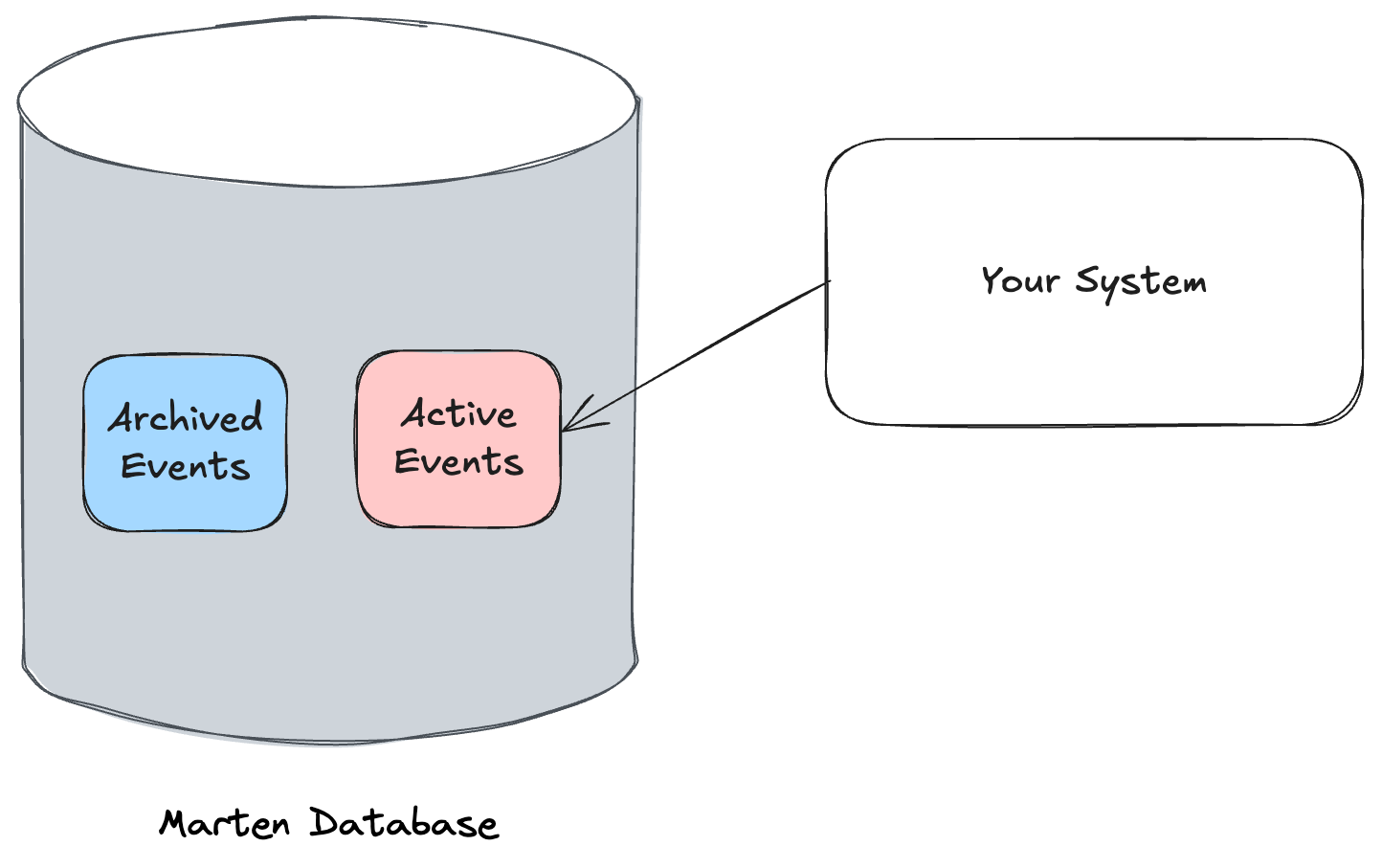
Here’s an exciting, relatively new feature in Marten that was planned for years before JasperFx was able to build this for a client late last year. The UseArchivedStreamPartitioning flag sets up your Marten database for “hot / code storage”:
Again, it might require some brain surgery to really improve performance sometimes, but an absolute no-brainer that’s frequently helpful is to just keep your transactional database tables as small and sprightly as possible over time by moving out obsolete or archived data — and that’s exactly what we’re going to do here.
When an Incident event stream is closed, we want to keep that Incident data shown in the user interface for 3 days, then we’d like all the data for that Incident to get archived. Here’s the sample command handler for the CloseIncident command:
public record CloseIncident(
    Guid ClosedBy,
    int Version
);

public static class CloseIncidentEndpoint
{
    [WolverinePost("/api/incidents/close/{id}")]
    public static (UpdatedAggregate, Events, OutgoingMessages) Handle(
        CloseIncident command,
        [Aggregate]
        Incident incident)
    {
        /* More logic for later
        if (current.Status is not IncidentStatus.ResolutionAcknowledgedByCustomer)
               throw new InvalidOperationException("Only incident with acknowledged resolution can be closed");

           if (current.HasOutstandingResponseToCustomer)
               throw new InvalidOperationException("Cannot close incident that has outstanding responses to customer");

         */


        if (incident.Status == IncidentStatus.Closed)
        {
            return (new UpdatedAggregate(), [], []);
        }

        return (

            // Returning the latest view of
            // the Incident as the actual response body
            new UpdatedAggregate(),

            // New event to be appended to the Incident stream
            [new IncidentClosed(command.ClosedBy)],

            // Getting fancy here, telling Wolverine to schedule a
            // command message for three days from now
            [new ArchiveIncident(incident.Id).DelayedFor(3.Days())]);
    }
}
The ArchiveIncident message is being published by this handler using Wolverine’s scheduled message capability so that it will be executed in exactly 3 days time from the current time (you could get fancier and set an exact time to end of business on that day if you wanted).
Note that even when doing the message scheduling, we can still use Wolverine’s cascading message feature. The point of doing this is to keep our handler a pure function that doesn’t have to invoke services, create side effects, or do anything that would force us into asynchronous methods and all of the inherent complexity and noise that inevitably causes.
The ArchiveIncident command handler might just be this:
public record ArchiveIncident(Guid IncidentId);

public static class ArchiveIncidentHandler
{
    // Just going to code this one pretty crudely
    // I'm assuming that we have "auto-transactions"
    // turned on in Wolverine so we don't have to much
    // with the asynchronous IDocumentSession.SaveChangesAsync()
    public static void Handle(ArchiveIncident command, IDocumentSession session)
    {
        session.Events.Append(command.IncidentId, new Archived("It'd done baby!"));
        session.Delete<Incident>(command.IncidentId);
    }
}
When that command executes in three days time, it will delete the projected Incident document from the database and mark the event stream as archived, which will cause PostgreSQL to move that data into the “cold” archived storage.
To close the loop, all normal database operations in Marten specifically filter out archived data with a SQL filter so that they will always be querying directly against the much smaller “active” partition table.
To sum this up, if you use the event archival partitioning and are able to be aggressive about archiving event streams, you can hugely improve the performance of your event sourced application even after you’ve captured a huge number of events because the actual table that Marten is reading and writing from will be relatively stable in side.
As the late, great Stuart Scott would have told us, that’s cooler than the other side of the pillow!
Why aren’t these all defaults?!?
It’s an imperfect world. Every one of the three flags I showed here either subtly change underlying behavior or force additive changes to your application database. The UseIdentityMapForAggregates flag has to be an “opt in” because using that will absolutely give unexpected results for Marten users who mutate the projected aggregate inside of their command handlers (basically anyone doing any type of AggregateRoot base class approach).
Likewise, Marten was originally built using a session with the somewhat more expensive identity map mechanics built in to mimic the commercial tool we were originally trying to replace. I’ve always regretted this decision, but once this has escaped into real systems, changing the underlying behavior absolutely breaks some existing code.
Lastly, introducing the hot/cold partitioning of the event & stream tables to an existing database will cause an expensive database migration, and we certainly don’t want to be inflicting that on unsuspecting users doing an upgrade.
It’s a lot of overhead and compromise, but we’ve chosen to maintain backward compatibility for existing users over enabling out of the box performance improvements.
But wait, there’s more!
Marten has been able to grow quite a bit in capability after I started JasperFx Software as a company to support it. Doing that has allowed us to partner with shops pushing the limits on Marten and Wolverine, and the feedback, collaboration, and yes, compensation has allowed us to push the Critter Stack’s capabilities a lot in the last 18 months.
Sometime in the current quarter, we’re also going to be building and releasing a new “Stream Compacting” feature as another way to deal with archiving data from very long event streams. And yes, a lot of the Event Sourcing community will lecture you about how you should “keep your streams” short, and while there may be some truth to that, that advice is partially around using less capable technical event sourcing solutions. We strive to make Marten & Wolverine more robust so you don’t have to be omniscient and perfect in your upfront modeling.
JasperFx Software already has a strong track record in our short life of helping our customers be more successful using Event Sourcing, Event Driven Architecture, and Test Automation. Much of the content from these new guides came directly out of our client work. We’re certainly ready to partner with your shop as well!
I’ve had a chance the past two weeks to really buckle down and write more tutorials and guides for Wolverine by itself and the full “Critter Stack” combination with Marten. I’ll admit to being a little disappointed by the download numbers on Wolverine right now, but all that really means is that there’s a lot of untapped potential for growth!
If you do any work on the server side with .NET, or are looking for a technical platform to use for event sourcing, event driven architecture, web services, or asynchronous messaging, Wolverine is going to help you build systems that are resilient, easy to change, and highly testable without having to incur the code complexity common to Clean/Onion/Hexagonal Architecture approaches.
Please don’t make a direct comparison of Wolverine to MediatR as a straightforward “Mediator” tool, or to MassTransit or NServiceBus as an Asynchronous Messaging framework, or to MVC Core as a straight up HTTP service framework. Wolverine does far more than any of those other tools to help you write your actual application code.
On to the new guides for Wolverine:
Converting from MediatR – We’re getting more and more questions from users who are coming from MediatR to Wolverine to take advantage of Wolverine capabilities like a transactional outbox that MediatR lacks. Going much further though, this guide tries to explain how to first shift to Wolverine, some important features that Wolverine provides that MediatR does not , and how to lean into Wolverine to make your code a lot simpler and easier to test.
Vertical Slice Architecture – Wolverine has quite a bit of “special sauce” that makes it a unique fit for “Vertical Slice Architecture” (VSA). We believe that Wolverine does more to make a VSA coding style effective than any other server side tooling in the .NET ecosystem. If you haven’t looked at Wolverine recently, you’ll want to check this out because Wolverine just got even more ways to simplify code and improve testability in vertical slices without having to resort to the kind of artifact bloat that’s nearly inevitable with prescriptive Clean/Onion Architecture approaches.
Modular Monolith Architecture – I’ll freely admit that Wolverine was originally optimized for micro-services, and we’ve had to scramble a bit in the recent 3.6.0 release and today’s 3.7.0 release to improve Wolverine’s support for how folks are wanting to do asynchronous workflows between modules in a modular monolith approach. In this guide we’ll talk about how best to use Wolverine for modular monolith architectures, dealing with eventual consistency, database tooling usage, and test automation.
CQRS and Event Sourcing with Marten – Marten is already the most robust and most commonly used toolset for Event Sourcing in the .NET ecosystem. Combined with Wolverine to form the full “Critter Stack,” we think it is one of the most productive toolsets for building resilient and scalable systems using CQRS with Event Sourcing and this guide will show you how the Critter Stack gets that done. There’s also a big section on building integration testing harnesses for the Critter Stack with some of their test support. There are some YouTube videos coming soon that cover this same ground and using some of the same samples.
Railway Programming – Wolverine has some lightweight facilities for “Railway Programming” inside of message handlers or HTTP endpoints that can help code complex workflows with simpler individual steps — and do that without incurring loads of generics and custom “result” types. And for a bonus, this guide even shows you how Wolverine’s Railway Programming usage helps you generate OpenAPI metadata from type signatures without having to clutter up your code with noisy attributes to keep the ReST police off your back.
I personally need a break from writing documentation, but we’ll pop up soon with additional guides for:
Moving from NServiceBus or MassTransit to Wolverine
Wolverine 3.6 just went out tonight as a big release with bug fixes and quite a few significant features to improve Wolverine‘s usability for modular monolith architectures and to further improve Wolverine’s already outstanding usability for vertical slice architecture.
Highlights:
New Persistence Helpers feature to make handlers or http endpoint code event cleaner
The new “Separated” option to better use multiple handlers for the same message type that’s been a source of friction for Wolverine users using modular monolithic approaches to event driven architecture
A huge update to the Message Routing documentation to reflect some new features and existing diagnostics
// Use "Id" as the default member
[WolverinePost("/api/todo/update")]
public static Update<Todo2> Handle(
    // The first argument is always the incoming message
    RenameTodo command,

    // By using this attribute, we're telling Wolverine
    // to load the Todo entity from the configured
    // persistence of the app using a member on the
    // incoming message type
    [Entity] Todo2 todo)
{
    // Do your actual business logic
    todo.Name = command.Name;

    // Tell Wolverine that you want this entity
    // updated in persistence
    return Storage.Update(todo);
}
In the code above, the little method tries to load an entity from the application’s persistence tooling (EF Core, Marten, and RavenDb are supported so far) because of the [Entity] attribute, and the return value of Update<Todo2> will result in the Todo2 entity being updated by the same persistence tooling. That’s arguably an easy method to read and reason about, it was definitely easy to write, it’s easy to unit test, and didn’t require umpteen separate “Clean/Onion Architecture” projects and layers to get to testable code that isn’t directly coupled to infrastructure.
The “Critter Stack” had a huge 2024, and I listed off some of the highlights of the improvements we made in Critter Stack Year in Review for 2024. For 2025, we’ve reordered our priority order from what I was writing last summer. I think we might genuinely focus more on sample applications, tutorials, and videos early this year than we do on coding new features.
There’s also a separate post on JasperFx Software in 2025. Please do remember that JasperFx Software is available for either ongoing support contracts for Marten and/or Wolverine and consulting engagements to help you wring the most possible value out of the tools — or to just help you with any old server side .NET architecture you have.
Marten
At this point, I believe that Marten is by far and away the most robust and most productive tooling for Event Sourcing in the .NET ecosystem. Moreover, if you believe Nuget download numbers, it’s also the most heavily used Event Sourcing tooling in .NET. I think most of the potential growth for Marten this year will simply be a result of developers hopefully being more open to using Event Sourcing as that technique becomes better known. I don’t have hard numbers to back this up, but my feeling is that Marten’s main competitor is shops choosing to roll their own Event Sourcing frameworks in house rather than any other specific tool.
I think we’re putting off the planned Marten 8.0 release for now. Instead, we’ll mostly be focused on dealing with whatever issues come up from our users and JasperFx clients with Marten 7 for the time being.
More sample applications and matching tutorials for Marten
Possibly adding a “Marten Events to EF Core” projection model?
Formal support for PostgreSQL PostGIS spatial data? I don’t know what that means yet though
When we’re able to reconsider Marten 8 this year, that will include:
A reorganization of the JasperFx building blocks to remove duplication between Marten, Wolverine, and other tools
Stream-lining the Projection API
Yet more scalability and performance improvements to the async daemon. There’s some potential features that we’re discussing with JasperFx clients that might drive this work
After the insane pace of Marten changes we made last year, I see Marten development and the torrid pace of releases (hopefully) slowing quite a bit in 2025.
Wolverine
Wolverine doesn’t yet have anywhere near the usage of Marten and exists in a much more crowded tooling space to boot. I’m hopeful that we can greatly increase Wolverine usage in 2025 by further differentiating it from its competitor tools by focusing on how Wolverine allows teams to write backend systems with much lower ceremony code without sacrificing testability, robustness, or maintainability.
We’re shelving any thoughts about a Wolverine 4.0 release early this year, but that’s opened the flood gates for planned enhancements to Wolverine 3.*:
Wolverine 3.6 is heavily in flight for release this month, and will be a pretty large release bringing some needed improvements for Wolverine within “Modular Monolith” usage, yet more special sauce for lower “Vertical Slice Architecture” usage, enhancements to the “aggregate handler workflow” integration with Marten, and improved EF Core integration
Multi-Tenancy support for EF Core in line with what Wolverine can already do with its Marten integration
CosmosDb integration for Transactional Inbox/Outbox support, saga storage, transactional middleware
More options for runtime message routing
Authoring more sample applications to show off how Wolverine allows for a different coding model than other messaging or mediator or HTTP endpoint tools
I think there’s a lot of untapped potential for Wolverine, and I’ll personally be focused on growing its usage in the community this year. I’m hoping the better EF Core integration, having more database options, and maybe even yet more messaging options can help us grow.
I honestly don’t know what is going to happen with Wolverine & Aspire. Aspire doesn’t really play nicely with frameworks like Wolverine right now, and I think it would take custom Wolverine/Aspire adapter libraries to get a truly good experience. My strong preference right now is to just use Docker Compose for local development, but it’s Microsoft’s world and folks like me building OSS tools just have to live in it.
Ermine & Other New Critters
Sigh, “Ermine” is the code name for a long planned port of Marten’s event sourcing functionality to Sql Server. I would still love to see this happen in 2025, but it’s going to be pushed off for a little bit. With plenty of input from other Marten contributors, I’ve done some preliminary work trying to centralize plenty of Marten’s event sourcing internals to a potentially shared assembly.
We’ve also at least considered extending Marten’s style of event sourcing to other databases, with CosmosDb, RavenDb, DynamoDb, SqlLite, and Oracle (people still use it apparently) being kicked around as options.
“Critter Watch”
This is really a JasperFx Software initiative to create a commercial tool that will be a dedicated management portal and performance monitoring tool (meant to be used in conjunction with Grafana/Prometheus/et al) for the “Critter Stack”. I’ll share concrete details of this when there are some, but Babu & I plan to be working in earnest on “Critter Watch” in the 1st quarter.
Note about Blogging
I’m planning to blog much less in the coming year and focus more on either writing more robust tutorials or samples within technical documentation sites and finally joining the modern world and moving to YouTube or Twitch video content creation.
You can contact JasperFx at any time by dropping us an email at sales@jasperfx.net.
2024 was a good year for JasperFx Software LLC for the simple fact that we’ve proven to have an effective business model and some staying power for the future. Along the way, we partnered with clients in eight different countries on two continents deal with a variety of technical challenges through both formal support contracts and consulting contracts.
Besides the obvious focus on our client’s usage of the “Critter Stack” (Marten, Wolverine, and some smaller tools like Alba), we’ve frequently assisted with:
Multi-tenancy strategies, which has run the gamut from multiple databases, multiple message brokers, integration within applications, to simply finding ways to reduce downtime necessary to add new tenants
Scaling and performance, especially with event sourcing
Concurrency issues of all kinds
Creating effective test automation strategies, both in terms of how to create testable code for efficient unit testing and helping bootstrap integration testing approaches
Dealing with technical debt and formulating plans for application modernization
Underpinning all of that is assisting with any number of issues that arise from our client’s usage of Event Sourcing or Event Driven Architecture approaches as those are still relatively new to our industry and many developers are not yet experienced with these approaches.
If you have any concerns about your server side .NET architecture or systems, need help with your usage of Event Sourcing, Event Driven Architecture, or Test Driven Development and other Test Automation strategies, JasperFx Software is ready to help. And of course, we’re the home of the “Critter Stack” tools that provide the strongest and most feature rich support for Event Sourcing in the .NET ecosystem and provide formal, ongoing support plans for these tools.
In 2025 our goal as a company is to grow in revenue and in size to better serve our support customers and stay on top of our ever increasing technical toolset. We’re still keenly focused on delivering the long discussed “Critter Watch” tooling as our first commercial product to serve as a global management console and correlated production monitoring tool for Critter Stack applications. A secondary goal is to increase the reach of the “Critter Stack” tooling, especially the Event Sourcing functionality, to additional database technologies.
And of course, JasperFx Software is available for any kind of consulting engagement around the Critter Stack tools, event sourcing, event driven architecture, test automation, or just any kind of server side .NET architecture.
Absurdly enough, the Marten community made one major release (7.0 was a big change) and 35 different releases of new functionality. Some significant, some just including a new tactical convenience method or two. I think Marten ends the 2024 calendar year with the 7.35.0 release today.
The big highlight is some work for a JasperFx Software client who needs to run some multi-stream projections asynchronously (as one probably should), but needs their user interface client in some scenarios to be showing the very latest information. That’s now possible with the QueryForNonStaleData<T>()` API shown below:
var builder = Host.CreateApplicationBuilder();
builder.Services.AddMarten(opts =>
{
    opts.Connection(builder.Configuration.GetConnectionString("marten"));
    opts.Projections.Add<TripProjection>(ProjectionLifecycle.Async);
}).AddAsyncDaemon(DaemonMode.HotCold);

using var host = builder.Build();
await host.StartAsync();

// DocumentStore() is an extension method in Marten just
// as a convenience method for test automation
await using var session = host.DocumentStore().LightweightSession();

// This query operation will first "wait" for the asynchronous projection building the
// Trip aggregate document to catch up to at least the highest event sequence number assigned
// at the time this method is called
var latest = await session.QueryForNonStaleData<Trip>(5.Seconds())
    .OrderByDescending(x => x.Started)
    .Take(10)
    .ToListAsync();
Of course, there is a non-zero risk of that operation timing out, so it’s not a silver bullet and you’ll need to be aware of that in your usage, but hey, it’s a way around needing to adopt eventual consistency while also providing a good user experience in your client by not appearing to have lost data.
The highlight for me personally is that as of this second, the open issue count for Marten on GitHub is sitting at 37 (bugs, enhancement requests, 8.0 planning, documentation TODOs), which is the lowest that number has been for 7/8 years. Feels good.
While there’s still just a handful of technical deliverables I’m trying to get out in this calendar year, I’m admittedly running on mental fumes rolling into the holiday season. Thinking back about how much was delivered for the “Critter Stack” (Marten, Weasel, and Wolverine) this year is making me feel a lot better about giving myself some mental recharge time during the holidays. Happily for me, most of the advances in the Critter Stack this year were either from the community (i.e., not me) or done in collaboration and with the sponsorship of JasperFx Software customers for their systems.
Marten 7.0 brought a new “partial update” model based on native PostgreSQL functions that no longer required the PLv8 add on. Hat tip to Babu Annamalai for that feature!
The very basic database execution pipeline underneath Marten was largely rewritten to be far more parsimonious with how it uses database connections and to take advantage of more efficient Npgsql usage. That included using the very latest improvements to Npgsql for batching queries and moving to positional parameters instead of named parameters. Small ball optimizations for sure, but being more parsimonious with connections has been advantageous
Marten’s “quick append” model sacrifices a little bit of metadata tracking for a whole lot of throughput improvements (we’ve measured a 50% improvement) when appending events. This mode will be a default in Marten 8. This also helps stabilize “event skipping” in the async daemon under heavy loads. I think this was a big win that we need to broadcast more
Random optimizations in the “inline projection” model in Marten to reduce database round trips
Performance optimizations for CQRS command handlers where you want to fetch the final state of a projected aggregate that has been “advanced” as part of the command handler. Mostly in Marten, but there’s a helper in Wolverine too.
Marten’s async daemon feature for running asynchronous projections was rewritten in Marten 7.0 with some throughput improvements and a little better ability to spread work across a clustered application
Wolverine 3.0 brought a full rewrite of its leader election system that seems to have made a huge improvement in its ability to deal with stale nodes and failover. Much to my relief.
Marten got a big feature to allow for dynamic addition of tenant databases as part of its multi-tenancy through separate databases model. Wolverine got into the action as it is also able to follow suit and spin up a transactional inbox/outbox for dynamically registered tenant databases at runtime with no downtime.
The PostgreSQL backed messaging transport can be “per tenant” for multi-tenancy
Complex Workflows
I’m probably way too sloppy or at least not being precise about the differences between stateful sagas and process managers and tend to call any stateful, long lived workflow a “saga”. I’m not losing any sleep over that.
Marten 7.0 brought a near rewrite of Marten’s LINQ subsystem that closed a lot of gaps in functionality that we previously had. It also spawned plenty of regression bugs that we’ve had to address in the meantime, but the frequency of LINQ related issues has dramatically fallen
“Sticky” message listeners so that only one node in a cluster listens to a certain messaging endpoint. This is super helpful for processes that are stateful. This also helps for multi-tenancy.
Wolverine got a GCP Pubsub transport
And we finally released the Pulsar transport
Way more options for Rabbit MQ conventional message routing
Rabbit MQ header exchange support
Test Automation Support
Hey, the “Critter Stack” community takes testability, test automation, and TDD very seriously. To that end, we’ve invested a lot into test automation helpers this year.
Quite a few random little extension methods on IHost here and there for test automation
Strong Typed Identifiers
Despite all my griping along the way and frankly threatening bodily harm to the authors of some of the most popular libraries for strong typed identifiers, Marten has gotten a lot of first class support for strong typed identifiers in both the document database and event store features. There will surely be more to come because it’s a permutation hell problem where people stumble into yet more scenarios with these damn things.
But whatever, we finally have it. And quite a bit of the most time consuming parts of that work has been de facto paid for by JasperFx clients, which takes a lot of the salt out of the wound for me!
Modular Monolith Usage
This is going to be a major area of improvement for Wolverine here at the tail end of the year because suddenly everybody and their little brother wants to use this architectural pattern in ways that aren’t yet great with Wolverine.
There was actually quite a few more refinements made to both tools, but I’ve exhausted the time I allotted myself to write this, so let’s wrap up.
Summary
Last January I wrote that an aspiration for 2024 was to:
Continue to push Marten & Wolverine to be the best possible technical platform for building event driven architectures
At this point I believe that the “Critter Stack” is already the best set of technical tooling in the .NET ecosystem for building a system using an Event Driven Architecture, especially if Event Sourcing is a significant part of your persistence strategy. There are other messaging frameworks that have more messaging options, but Wolverine already does vastly more to help you productively write code that’s testable, resilient, easier to reason about, and well instrumented than older messaging tools in the .NET space. Likewise, Wolverine.HTTP is the lowest ceremony coding model for ASP.Net Core web service development, and the only one that has a first class transactional outbox integration. In terms of just Event Sourcing, I do not believe that Marten has any technical peer in the .NET ecosystem.
But of course there are plenty of things we can do better, and we’re not standing still in 2025 by any means. After some rest, I’ll pop back in January with some aspirations and theoretical roadmap for the “Critter Stack” in 2025. Details then, but expect that to include more database options and yes, long simmering plans for commercialization. And the overarching technical goal in 2025 for the “Critter Stack” is to be the best technical platform on the planet for Event Driven Architecture development.





 The Shade Tree Developer