My OSS Plans for 2023

Before I start, I am lucky to be part of a great group of OSS collaborators across the board. In particular, thanks to Oskar, Babu, Khalid, Hawxy, and Eric Smith for helping make 2022 a hugely productive and satisfying year in OSS work for me. I’m looking forward to working with y’all more in the times ahead.

In recent years I’ve kicked off my side project work with an overly optimistic and hopelessly unrealistic list of ambitions for my OSS projects. You can find the 2022 and 2021 versions still hanging around, only somewhat fulfilled. I’m going to put down my markers for what I hope to accomplish in 2023 — and because I’m the kind of person who obsesses more about the list of things to do rather than looking back at accomplishments, I’ll take some time to review what was done in many of these projects in 2022. Onward.

Marten is going gang busters, and 2022 was a very encouraging year for the Marten core team & I. The sizable V5.0 release dropped in March with some significant usability improvements, multi-tenancy with a database per tenant(s) support, and other goodness specifically to deal with apparent flaws in the gigantic V4.0 release from late 2021.

For 2023, the V6 release will come soon, mostly with changes to underlying dependencies.

Beyond that, I think that V7 will be a massively ambitious release in terms of important new features — hopefully in time for Event Sourcing Live 2023. If I had a magic wand that would magically give us all enough bandwidth to pull it off, my big hopes for Marten V7 are:

  • The capability to massively scale the Event Store functionality in Marten to much, much larger systems
  • Improved throughput and capacity with asynchronous projections
  • A formal, in the box subscription model
  • The ability to shard document database entities
  • Dive into the Linq support again, but this time use Postgresql V15 specific functionality to make the generated queries more efficient — especially for any possible query that goes through child collections. I haven’t done the slightest bit of detailed analysis on that one yet though
  • The ability to rebuild projections with zero downtime and/or faster projection rebuilds

Marten will also be impacted by the work being done with…

After a couple years of having almost given up on it, I restarted work pretty heavily on what had been called Jasper. While building a sample application for a conference talk, Oskar & I realized there was some serious opportunity for combining Marten and the then-Jasper for very low ceremony CQRS architectures. Now, what’s the best way to revitalize an OSS project that was otherwise languishing and basically a failure in terms of adoption? You guessed it, rename the project with an obvious theme related to an already successful OSS project and get some new, spiffier graphics and better website! And basically all new internals, new features, quite a few performance improvements, better instrumentation capabilities, more robust error handling, and a unique runtime model that I very sincerely believe will lead to better developer productivity and better application performance than existing tools in the .NET space.

Hence, Wolverine is the new, improved message bus and local mediator (I like to call that a “command bus” so as to not suffer the obvious comparisons to MediatR which I feel shortchanges Wolverine’s much greater ambitions). Right now I’m very happy with the early feedback from Wolverine’s JetBrains webinar (careful, the API changed a bit since then) and its DotNetRocks episode.

Right now the goal is to make it to 1.0 by the end of January — with the proviso that Marten V6 has to go first. The remaining work is mostly to finish the documentation website and a handful of tactical feature items mostly to prove out some of the core abstractions before minting 1.0.

Luckily for me, a small group of us at work have started a proof of concept for rebuilding/converting/migrating a very large system currently using NHibernate, Sql Server, and NServiceBus to Wolverine + Marten. That’s going to be an absolutely invaluable learning experience that will undoubtedly shape the short term work in both tools.

Beyond 1.0, I’m hoping to effectively use Wolverine to level up on a lot of technologies by adding:

  • Some other transport options (Kafka? Kinesis? EventBridge?)
  • Additional persistence options with Cosmos Db and Dynamo Db being the likely candidates so far
  • A SignalR transport
  • First class serverless support using Wolverine’s runtime model, with some way of optimizing the cold start
  • An option to use Wolverine’s runtime model for ASP.Net Core API endpoints. I think there’s some opportunity to allow for a low ceremony, high performance alternative for HTTP API creation while still being completely within the ASP.Net Core ecosystem

I hope that Wolverine is successful by itself, but the real goal of Wolverine is to allow folks to combine it with Marten to form the….

“Critter Stack”

The hope with Marten + Wolverine is to create a very effective platform for server-side .NET development in general. More specifically, the goal of the “critter stack” combination is to become the acknowledged industry leader for building systems with a CQRS plus Event Sourcing architectural model. And I mean across all development platforms and programming languages.

Pride goeth before destruction, and an haughty spirit before a fall.

Proverbs 16:18 KJV

And let me just more humbly say that there’s a ways to go to get there, but I’m feeling optimistic right now and want to set out sights pretty high. I especially feel good about having unintentionally made a huge career bet on Postgresql.

Lamar recently got its 10.0 release to add first class .NET 7.0 support (while also dropping anything < .NET 6) and a couple performance improvements and bug fixes. There hasn’t been any new functionality added in the last year except for finally getting first class support for IAsyncDisposable. It’s unlikely that there will be much development in the new year for Lamar, but we use it at work, I still think it has advantages over the built in DI container from .NET, and it’s vital for Wolverine. Lamar is here to stay.

Alba

Alba 7.0 (and a couple minor releases afterward) added first class .NET 7 support, much better support for testing Minimal API routes that accept and/or return JSON, and other tactical fixes (mostly by Hawxy).

See Alba for Effective ASP.Net Core Integration Testing for more information on how Alba improved this year.

I don’t have any specific plans for Alba this year, but I use Alba to test pieces of Marten and Wolverine and we use it at work. If I manage to get my way, we’ll be converting as many slow, unreliable Selenium based tests to fast running Alba tests against HTTP endpoints in 2023 at work. Alba is here to stay.

Not that this is germane to this post, but the very lightly traveled road behind that sign has a straightaway section where you can see for a couple miles at a time. I may or may not have tried to find out exactly how fast my first car could really go on that stretch of road at one point.

Oakton had a significant new feature set around the idea of “stateful resources” added in 2022, specifically meant for supporting both Marten and Wolverine. We also cleaned up the documentation website. The latest version 6.0 brought Oakton up to .NET 7 while also using shared dependencies with the greater JasperFx family (Marten, Wolverine, Lamar, etc.). I don’t exactly remember when, but it also got better “help” presentation by leveraging Spectre.Console more.

I don’t have any specific plans for Oakton, but it’s the primary command line parser and command line utility library for both Marten, Wolverine, and Lamar, so it’s going to be actively maintained.

And finally, I’ve registered my own company called “Jasper Fx Software.” It’s going much slower than I’d hoped, but at some point early in 2023 I’ll have my shingle out to provide support contracts, consulting, and custom development with the tools above. It’s just a side hustle for now, but we’ll see if that can become something viable over time.

To be clear about this, the Marten core team & I are very serious about building a paid, add-on model to Marten + Wolverine and some of the new features I described up above are likely to fall under that umbrella. I’m sneaking that in at the end of this, but that’s probably the main ambition for me personally in the new year.

What about?…

If it’s not addressed in this post, it’s either dead (StructureMap) or something I consider just to be a supporting player (Weasel). Storyteller alas, is likely not coming back. Unless it does as something renamed to “Bobcat” as a tool specifically designed to help automate tests for Marten or Wolverine where xUnit.Net by itself doesn’t do so hot. And if Bobcat does end up existing, it’ll leverage existing tools as much as possible.


Transactional Outbox/Inbox with Wolverine and why you care

I’ve been able to talk and write a bit about Wolverine in the last couple weeks. This builds on the last two blog posts in this list:

Alright, back to the sample message handler from my previous two blog posts here’s the shorthand version:

    [Transactional] 
    public static async Task Handle(
        DebitAccount command, 
        Account account, 
        IDocumentSession session, 
        IMessageContext messaging)
    {
        account.Balance -= command.Amount;
     
        // This just marks the account as changed, but
        // doesn't actually commit changes to the database
        // yet. That actually matters as I hopefully explain
        session.Store(account);
 
        // Conditionally trigger other, cascading messages
        if (account.Balance > 0 && account.Balance < account.MinimumThreshold)
        {
            await messaging.SendAsync(new LowBalanceDetected(account.Id));
        }
        else if (account.Balance < 0)
        {
            await messaging.SendAsync(new AccountOverdrawn(account.Id));
         
            // Give the customer 10 days to deal with the overdrawn account
            await messaging.ScheduleAsync(new EnforceAccountOverdrawnDeadline(account.Id), 10.Days());
        }
    }

and just for the sake of completion, here is a longer hand, completely equivalent version of the same handler:

[Transactional] 
public static async Task Handle(
    DebitAccount command, 
    Account account, 
    IDocumentSession session, 
    IMessageContext messaging)
{
    account.Balance -= command.Amount;
     
    // This just marks the account as changed, but
    // doesn't actually commit changes to the database
    // yet. That actually matters as I hopefully explain
    session.Store(account);
 
    if (account.Balance > 0 && account.Balance < account.MinimumThreshold)
    {
        await messaging.SendAsync(new LowBalanceDetected(account.Id));
    }
    else if (account.Balance < 0)
    {
        await messaging.SendAsync(new AccountOverdrawn(account.Id));
         
        // Give the customer 10 days to deal with the overdrawn account
        await messaging.ScheduleAsync(new EnforceAccountOverdrawnDeadline(account.Id), 10.Days());
    }
}

To review just a little bit, that Wolverine style message handler at runtime is committing changes to an Account in the underlying database and potentially sending out additional messages based on the state of the Account. For folks who are experienced with asynchronous messaging systems who hear me say that Wolverine does not support any kind of 2 phase commits between the database and message brokers, you’re probably already concerned with some potential problems in that code above:

  • Maybe the database changes fail, but there are “ghost” messages already queued that pertain to data changes that never actually happened
  • Maybe the messages actually manage to get through to their downstream handlers and are applied erroneously because the related database changes have not yet been applied. That’s a race condition that absolutely happens if you’re not careful (ask me how I know 😦 )
  • Maybe the database changes succeed, but the messages fail to be sent because of a network hiccup or who knows what problem happens with the message broker

Needless to say, there’s genuinely a lot of potential problems from those handful lines of code up above. Some of you reading this have probably already said to yourself that this calls for using some sort of transactional outbox — and Wolverine thinks so too!

The general idea of an “outbox” is to obviate the lack of true 2 phase commits by ensuring that outgoing messages are held until the database transaction is successful, then somehow guaranteeing that the messages will be sent out afterward. In the case of Wolverine and its integration with Marten, the order of operations in the message handler (in either version) shown above is to:

  1. Tell Marten that the Account document needs to be persisted. Nothing happens at this point other than marking the document as changed
  2. The handler creates messages that are registered with the current IMessageContext. Again, the messages do not actually go out here, instead they are routed by Wolverine to know exactly how and where they should be sent later
  3. The Wolverine + Marten [Transactional] middleware is calling the Marten IDocumentSession.SaveChangesAsync() method that makes the changes to the Account document and also creates new database records to persist any outgoing messages in the underlying Postgresql application database in one single, native database transaction. Even better, with the Marten integration, all the database operations are even happening in one single batched database call for maximum efficiency.
  4. When Marten successfully commits the database transaction, it tells Wolverine to “flush” the outgoing messages to the sending agents in Wolverine (depending on configuration and exact transport type, the messages might be sent “inline” or batched up with other messages to go out later).

To be clear, Wolverine also supports a transactional outbox with EF Core against either Sql Server or Postgresql. I’ll blog and/or document that soon.

The integration with Marten that’s in the WolverineFx.Marten Nuget isn’t that bad (I hope). First off, in my application bootstrapping I chain the IntegrateWithWolverine() call to the standard Marten bootstrapping like this:

using Wolverine.Marten;

var builder = WebApplication.CreateBuilder(args);

builder.Services.AddMarten(opts =>
{
    // This would be from your configuration file in typical usage
    opts.Connection(Servers.PostgresConnectionString);
    opts.DatabaseSchemaName = "wolverine_middleware";
})
    // This is the wolverine integration for the outbox/inbox,
    // transactional middleware, saga persistence we don't care about
    // yet
    .IntegrateWithWolverine()
    
    // Just letting Marten build out known database schema elements upfront
    // Helps with Wolverine integration in development
    .ApplyAllDatabaseChangesOnStartup();

For the moment, I’m going to say that all the “cascading messages” from the DebitAccount message handler are being handled by local, in memory queues. At this point — and I’d love to have feedback on the applicability or usability of this approach — each endpoint has to be explicitly enrolled into the durable outbox or inbox (for incoming, listening endpoints) mechanics. Knowing both of those things, I’m going to add a little bit of configuration to make every local queue durable:

builder.Host.UseWolverine(opts =>
{
    // Middleware introduced in previous posts
    opts.Handlers.AddMiddlewareByMessageType(typeof(AccountLookupMiddleware));
    opts.UseFluentValidation();
    
    // The nomenclature might be inconsistent here, but the key
    // point is to make the local queues durable
    opts.Policies
        .AllLocalQueues(x => x.UseDurableInbox());
});

If instead I chose to publish some of the outgoing messages with Rabbit MQ to other processes (or just want the messages queued), I can add the WolverineFx.RabbitMQ Nuget and change the bootstrapping to this:

builder.Host.UseWolverine(opts =>
{
    // Middleware introduced in previous posts
    opts.Handlers.AddMiddlewareByMessageType(typeof(AccountLookupMiddleware));
    opts.UseFluentValidation();

    var rabbitUri = builder.Configuration.GetValue<Uri>("rabbitmq-broker-uri");
    opts.UseRabbitMq(rabbitUri)
        // Just do the routing off of conventions, more or less
        // queue and/or exchange based on the Wolverine message type name
        .UseConventionalRouting()
        .ConfigureSenders(x => x.UseDurableOutbox());
});

I just threw a bunch of details at you all, so let me try to anticipate a couple questions you might have and also try to answer them:

  • Do the messages get delivered before the transaction completes? No, they’re held in memory until the transaction completes, then get sent
  • What happens if the message delivery fails? The Wolverine sending agents run in a hosted service within your application. When message delivery fails, the sending agent will try it again up to a configurable amount of times (100 is the default). Read the next question though before the “100” number bugs you:
  • What happens if the whole message broker is down? Wolverine’s sending agents have a crude circuit breaker and will stop trying to send message batches if there are too many failures in a period of time, then resume sending after a periodic “ping” message gets though. Long story short, Wolverine will buffer outgoing messages in the application database until Wolverine is able to reach the message broker.
  • What happens if the application process fails between the transaction succeeding and the message getting to the broker? The message will be recovered and sent by either another active node of the application if running in a cluster, or by restarting the single application process.
  • So you can do this in a cluster without sending the message multiple times? Yep.
  • What if you have zillions of stored messages and you restart the application, will it overwhelm the process and cause harm? It’s paged, distributes a bit between nodes, and there’s some back pressure to keep it from having too many outgoing messages in memory.
  • Can I use Sql Server instead? Yes. But for the moment, it’s like the scene in Blues Brothers when Elwood asks what kinds of music they have and the waitress replies “we have both kinds, Country and Western.”
  • Can I tell Wolverine to throw away a message that’s old and maybe out of date if it still hasn’t been processed? Yes, and I’ll show a bit of that in the next post.
  • What about messages that are routed to a non-durable endpoint as part of an outbox’d transaction? Good question! Wolverine is still holding those messages in memory until the message being processed successfully finishes, then kicks them out to in memory sending agents. Those sending agents have their own internal queues and retry loops for maximum resiliency. And actually for that matter, Wolverine has a built in in memory outbox to at least deal with ordering between the message processing and actually sending outgoing messages.

Next Time

WordPress just cut off the last section, so I’ll write a short follow up on mixing in non-durable message queues with message expirations. Next week I’ll keep on this sample application by discussing how Wolverine & its friends try really hard for a “clone n’go” developer workflow where you can be up and running mere minutes with all the database & message broker infrastructure up and going after a fresh clone of the codebase.

Marten and Friend’s (Hopefully) Big Future!

Marten was conceived and launched way back in 2016 as an attempt to quickly improve the performance and stability of a mission critical web application by utilizing Postgresql and its new JSON capabilities as a replacement for a 3rd party document database – and do that in a hurry before the next busy season. My former colleagues and I did succeed in that endeavor, but more importantly for the longer run, Marten was also launched as an open source project on GitHub and quickly attracted attention from other developers. The addition of an originally small feature set for event sourcing dramatically increased interest and participation in Marten. 

Fast forward to today, and we have a vibrant community of engaged users and a core team of contributors that are constantly improving the tool and discussing ideas about how to make it even better. The giant V4 release last year brought an overhaul of almost all the library internals and plenty of new capabilities. V5 followed early in 2022 with more multi-tenancy options and better tooling for development lifecycles and database management based on early issues with V4. 

At this point, I’d list the strong points of Marten that we’ve already achieved as:

  • A very useful document database option that provides the powerful developer productivity you expect from NoSQL solutions while also supporting a strong consistency model that’s usually missing from NoSQL databases. 
  • A wide range of viable hosting options by virtue of being on top of Postgresql. No cloud vendor lock-in with Marten!
  • Quite possibly the easiest way to build an application using Event Sourcing in .NET with both event storage and user defined view projections in the box
  • A great local development story through the simple ability to run Postgresql in a Docker container and Marten’s focus on an “it just works” style database schema management subsystem
  • The aforementioned core team and active user base makes Marten a viable OSS tool for teams wanting some reassurance that Marten is going to be well supported in the future

Great! But now it’s time to talk about the next steps we’re planning to take Marten to even greater heights in the forthcoming Marten V6 that’s being planned now. The overarching theme is to remove the most common hurdles for not choosing Marten. By and large, I think the biggest themes for Marten are:

  1. Scalability, so Marten can be used for much larger data sets. From user feedback, Marten is able to handle data sets of 10 million events today, but there’s opportunities to go far, far larger than that.
  2. Improvements to operational support. Database migrations when documents change, rebuilding projections without downtime, usage metrics, and better support for using multiple databases for multi-tenancy
  3. Marten is in good shape as a purely storage option for Event Sourcing, but users are very often asking for an array of subscription options to propagate events captured by Marten
  4. More powerful options for aggregating event data into more complex projected views
  5. Improving the Linq and other querying support is a seemingly never-ending battle
  6. The lack of professional support for Marten. Obviously a lot of shops and teams are perfectly comfortable with using FOSS tools knowing that they may have to roll up their sleeves and pitch in with support, but other shops are not comfortable with this at all and will not allow FOSS usage for critical functions. More on this later.

First though, Marten is getting a new “critter” friend in the larger JasperFx project family:

Wolverine is a new/old OSS command bus and messaging tool for .NET. It’s what was formerly being developed as Jasper, but the Marten team decided to rebrand the tool as a natural partner with Marten (both animals plus Weasel are members of the Mustelidae family). While both Marten and Wolverine are happily usable without each other, we think that the integration of these tools gives us the opportunity to build a full fledged platform for building applications in .NET using a CQRS architecture with Event Sourcing. Moreover, we think there’s a significant gap in .NET for this kind of tooling and we hope to fill that. 

So, onto future plans…

There’s a couple immediate ways to improve the scalability of Marten we’re planning to build in Marten V6. The first idea is to utilize Postgresql table sharding in a couple different ways. 

First, we can enable sharding on document tables based on user defined criteria through Marten configuration. The big challenge there is to provide a good migration strategy for doing this as it requires at least a 3 step process of copying the existing table data off to the side before creating the new tables. 

The next idea is to shard the event storage tables as well, with the immediate idea being to shard off of archived status to effectively create a “hot” storage of recent events and a “cold” storage of older events that are much less frequently accessed. This would allow Marten users to keep the active “hot” event storage to a much smaller size and therefore greatly improve potential performance even as the database continues to grow.

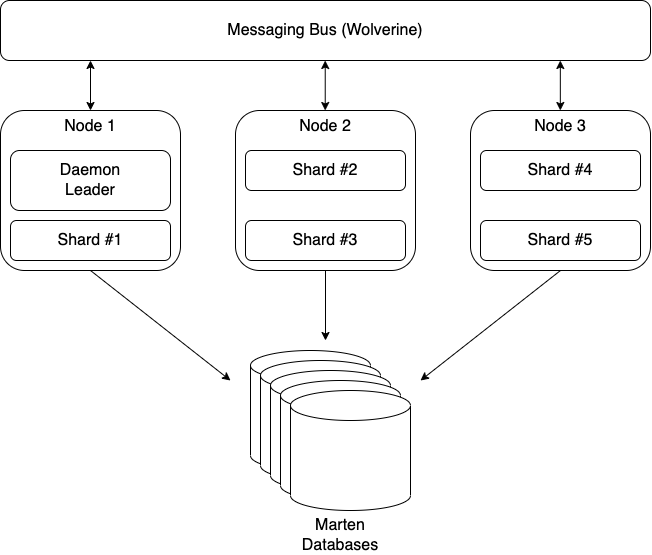
We’re not done “sharding” yet, but this time we need to shift to the asynchronous projection support in Marten. The core team has some ideas to improve the throughput of the asynchronous projection code as it is, but today it’s limited to only running on one single application node with “hot/cold” rollover support. With some help from Wolverine, we’re hoping to build a “sharded” asynchronous projection that can shard the processing of single projections and distribute the projection work across potentially many nodes as shown in the following diagram:

The asynchronous projection sharding is going to be a big deal for Marten all by itself, but there’s some other potentially big wins for Marten V6 with better tooling for projection rebuilds and asynchronous projections in general:

  1. Some kind of user interface to monitor and manage the asynchronous projections
  2. Faster projection rebuilds
  3. Zero downtime projection rebuilds

Marten + Wolverine == “Critter Stack” 

Again, both Marten and Wolverine will be completely usable independently, but we think there’s some potential synergy through the combination. One of the potential advantages of combining the tools is to use Wolverine’s messaging to give Marten a full fledged subscription model for Marten events. All told we’re planning three different mechanisms for propagating Marten events to the rest of your system:

  1. Through Wolverine’s transactional outbox right at the point of event capture when you care more about immediate delivery than strict ordering (this is already working)
  2. Through Martens asynchronous daemon when you do need strict ordering
  3. If this works out, through CDC event streaming straight from the database to Kafka/Pulsar/Kinesis

That brings me to the last topic I wanted to talk about in this post. Marten and Wolverine in their current form will remain FOSS under the MIT license, but it’s past time to make a real business out of these tools.

I don’t know how this is exactly going to work out yet, but the core Marten team is actively planning on building a business around Marten and now Wolverine. I’m not sure if this will be the front company, but I personally have formed a new company named “Jasper Fx Software” for my own activity – but that’s going to be limited to just being side work for at least awhile. 

The general idea – so far – is to offer:

  • Support contracts for Marten 
  • Consulting services, especially for help modeling and maximizing the usage of the event sourcing support
  • Training workshops
  • Add on products that add the advanced features I described earlier in this post

Maybe success leads us to offering a SaaS model for Marten, but I see that as a long way down the road.

What think you gentle reader? Does any of this sound attractive? Should we be focusing on something else altogether?

Projecting Marten Events to a Flat Table

Marten 5.8 dropped over the weekend with mostly bug fixes, but one potentially useful new feature for projecting event data to plain old SQL tables. One of the strengths of Marten that we’ve touted from the beginning was the ability to mix document database features with event sourcing and old fashioned relational tables all with one database in a single application as your needs dictate.

Let’s dive right into a sample usage of this. If you’re a software developer long enough and move around just a little bit, you’re going to get sucked into building a workflow for importing flat files of dubious quality from external partners or customers. I’m going to claim that event sourcing is a good fit for this problem domain for event sourcing (and also suggesting this pretty strongly at work). That being said, here’s what the event types might look like that are recording the progress of a file import:

public record ImportStarted(
    DateTimeOffset Started,
    string ActivityType,
    string CustomerId,
    int PlannedSteps);

public record ImportProgress(
    string StepName,
    int Records,
    int Invalids);

public record ImportFinished(DateTimeOffset Finished);

public record ImportFailed;

At some point, we’re going to want to apply some metrics to the execution history to understand the average size of the incoming files, what times of the day have more or less traffic, and performance information broken down by file size, file type, and who knows what. This sounds to me like a perfect use case for SQL queries against a flat table.

Enter Marten 5.8’s new functionality. First off, let’s do this simply by writing some explicit SQL in a new projection that we can replay against the existing events when we’re ready. I’m going to use Marten’s EventProjection as a base class in this case:

public class ImportSqlProjection: EventProjection
{
    public ImportSqlProjection()
    {
        // Define the table structure here so that 
        // Marten can manage this for us in its schema
        // management
        var table = new Table("import_history");
        table.AddColumn<Guid>("id").AsPrimaryKey();
        table.AddColumn<string>("activity_type").NotNull();
        table.AddColumn<DateTimeOffset>("started").NotNull();
        table.AddColumn<DateTimeOffset>("finished");

        SchemaObjects.Add(table);

        // Telling Marten to delete the table data as the 
        // first step in rebuilding this projection
        Options.DeleteDataInTableOnTeardown(table.Identifier);
    }

    public void Project(IEvent<ImportStarted> e, IDocumentOperations ops)
    {
        ops.QueueSqlCommand("insert into import_history (id, activity_type, started) values (?, ?, ?)",
            e.StreamId, e.Data.ActivityType, e.Data.Started
        );
    }

    public void Project(IEvent<ImportFinished> e, IDocumentOperations ops)
    {
        ops.QueueSqlCommand("update import_history set finished = ? where id = ?",
            e.Data.Finished, e.StreamId
        );
    }

    public void Project(IEvent<ImportFailed> e, IDocumentOperations ops)
    {
        ops.QueueSqlCommand("delete from import_history where id = ?", e.StreamId);
    }
}

A couple notes about the code above:

  • We’ve invested a huge amount of time in Marten and the related Weasel library building in robust schema management. The Table model I’m using up above comes from Weasel, and this allows a Marten application using this projection to manage the table creation in the underlying database for us. This new table would be part of all Marten’s built in schema management functionality.
  • The QueueSqlCommand() functionality came in a couple minor releases ago, and gives you the ability to add raw SQL commands to be executed as part of a Marten unit of work transaction. It’s important to note that the QueueSqlCommand() method doesn’t execute inline, rather it adds the SQL you enqueue to be executed in a batch query when you eventually call the holding IDocumentSession.SaveChangesAsync(). I can’t stress this enough, it has consistently been a big performance gain in Marten to batch up queries to the database server and reduce the number of network round trips.
  • The Project() methods are a naming convention with Marten’s EventProjection. The first argument is always assumed to be the event type. In this case though, it’s legal to use Marten’s IEvent<T> envelope type to allow you access to event metadata like timestamps, version information, and the containing stream identity.

Now, let’s use Marten’s brand new FlatTableProjection recipe to do a little more advanced version of the earlier projection:

public class FlatImportProjection: FlatTableProjection
{
    // I'm telling Marten to use the same database schema as the events from
    // the Marten configuration in this application
    public FlatImportProjection() : base("import_history", SchemaNameSource.EventSchema)
    {
        // We need to explicitly add a primary key
        Table.AddColumn<Guid>("id").AsPrimaryKey();

        TeardownDataOnRebuild = true;

        Project<ImportStarted>(map =>
        {
            // Set values in the table from the event
            map.Map(x => x.ActivityType).NotNull();
            map.Map(x => x.CustomerId);
            map.Map(x => x.PlannedSteps, "total_steps")
                .DefaultValue(0);
            
            map.Map(x => x.Started);

            // Initial values
            map.SetValue("status", "started");
            map.SetValue("step_number", 0);
            map.SetValue("records", 0);
        });

        Project<ImportProgress>(map =>
        {
            // Add 1 to this column when this event is encountered
            map.Increment("step_number");

            // Update a running sum of records progressed
            // by the number of records on this event
            map.Increment(x => x.Records);

            map.SetValue("status", "working");
        });

        Project<ImportFinished>(map =>
        {
            map.Map(x => x.Finished);
            map.SetValue("status", "completed");
        });

        // Just gonna delete the record of any failures
        Delete<ImportFailed>();

    }
}

A couple notes on this version of the code:

  • FlatFileProjection is adding columns to its table based on the designated column mappings. You can happily customize the FlatFileProjection.Table object to add indexes, constraints, or defaults.
  • Marten is able to apply schema migrations and manage the table from the FlatFileProjection as long as it’s registered with Marten
  • When you call Map(x => x.ActivityType), Marten is by default mapping that to a kebab-cased derivation of the member name for the column, so “activity_type”. You can explicitly map the column name yourself.
  • The call to Map(expression) chains a fluent builder for the table column if you want to further customize the table column with default values or constraints like the NotNull()
  • In this case, I’m building a database row per event stream. The FlatTableProjection can also map to arbitrary members of each event type
  • The Project<T>(lambda) configuration leads to a runtime, code generation of a Postgresql upsert command so as to not be completely dependent upon events being captured in the exact right order. I think this will be more robust in real life usage than the first, more explicit version.

The FlatTableProjection in its first incarnation is not yet able to use event metadata because I got impatient to finish up 5.8 and punted on that for now. I think it’s safe to say this feature will evolve when it hits some real world usage.

Command Line Support for Marten Projections

Marten 5.7 was published earlier this week with mostly bug fixes. The one, big new piece of functionality was an improved version of the command line support for event store projections. Specifically, Marten added support for multi-tenancy through multiple databases and the ability to use separate document stores in one application as part of our V5 release earlier this year, but the projections command didn’t really catch up and support that — but now it can with Marten v5.7.0.

From a sample project in Marten we use to test this functionality, here’s part of the Marten setup that has a mix of asynchronous and inline projections, as well as uses the database per tenant strategy:

services.AddMarten(opts =>
{
    opts.AutoCreateSchemaObjects = AutoCreate.All;
    opts.DatabaseSchemaName = "cli";

    // Note this app uses multiple databases for multi-tenancy
 opts.MultiTenantedWithSingleServer(ConnectionSource.ConnectionString)
        .WithTenants("tenant1", "tenant2", "tenant3");

    // Register all event store projections ahead of time
    opts.Projections
        .Add(new TripAggregationWithCustomName(), ProjectionLifecycle.Async);
    
    opts.Projections
        .Add(new DayProjection(), ProjectionLifecycle.Async);
    
    opts.Projections
        .Add(new DistanceProjection(), ProjectionLifecycle.Async);

    opts.Projections
        .Add(new SimpleAggregate(), ProjectionLifecycle.Inline);

    // This is actually important to register "live" aggregations too for the code generation
    opts.Projections.SelfAggregate<SelfAggregatingTrip>(ProjectionLifecycle.Live);
}).AddAsyncDaemon(DaemonMode.Solo);

At this point, let’s introduce the Marten.CommandLine Nuget dependency to the system just to add Marten related command line options directly to our application for typical database management utilities. Marten.CommandLine brings with it a dependency on Oakton that we’ll actually use as the command line parser for our built in tooling. Using the now “old-fashioned” pre-.NET 6 manner of running a console application, I add Oakton to the system like this:

public static Task<int> Main(string[] args)
{
    // Use Oakton for running the command line
    return CreateHostBuilder(args).RunOaktonCommands(args);
}

When you use the dotnet command line options, just keep in mind that the “–” separator you’re seeing me here is used to separate options directly to the dotnet executable itself on the left from arguments being passed to the application itself on the right of the “–” separator.

Now, turning to the command line at the root of our project, I’m going to type out this command to see the Oakton options for our application:

dotnet run -- help

Which gives us this output:

If you’re wondering, the commands db-apply and marten-apply are synonyms that’s there as to not break older users when we introduced the now, more generic “db” commands.

And next I’m going to see the usage for the projections command with dotnet run -- help projections, which gives me this output:

For the simplest usage, I’m just going to list off the known projections for the entire system with dotnet run -- projections --list:

Which will show us the four registered projections in the main IDocumentStore, and tells us that there are no registered projections in the separate IOtherStore.

Now, I’m just going to continuously run the asynchronous projections for the entire application — while another process is constantly pumping random events into the system so there’s always new work to be doing — with dotnet run -- projections, which will spit out this continuously updating table (with an assist from Spectre.Console):

What I hope you can tell here is that every asynchronous projection is actively running for each separate tenant database. The blue “High Water Mark” is telling us where the current event store for each database is at.

And finally, for the main reason why I tackled the projections command line overhaul last week, folks needed a way to rebuild projections for every database when using a database per tenant strategy.

While the new projections command will happily let you rebuild any combination of database, store, and projection name by flags or even an interactive mode, we can quickly trigger a full rebuild of all the asynchronous projections with dotnet run -- projections --rebuild, which is going to loop through every store and database like so:

For the moment, the rebuild works on all the projections for a single database at a time. I’m sure we’ll attempt some optimizations of the rebuilding process and try to understand how much we can really parallelize more, but for right now, our users have an out of the box way to rebuild projections across separate databases or separate stores.

This *might* be a YouTube video soon just to kick off my new channel for Marten/Jasper/Oakton/Alba/Lamar content.

Low Code Ceremony Sagas with Jasper & Marten

You’ll need at least Jasper v2.0.0-alpha-4 if you want to recreate the saga support in this post. All the sample code for this post is in an executable sample on GitHub. Jasper does support sagas with EF Core and Sql Server or Postgresql, but Marten is where most of the effort is going just at the moment.

The Saga pattern is a way to solve the issue of logical, long-running transactions that necessarily need to span over multiple operations. In the approaches I’ve encountered throughout my career, this has generally meant persisting a “saga state” of some sort in a database that is used within a message handling framework to “know” what steps have been completed, and what’s outstanding.

Jumping right into an example, consider a very simple order management service that will have steps to:

  1. Create a new order
  2. Complete the order
  3. Or alternatively, delete new orders if they have not been completed within 1 minute

For the moment, I’m going to ignore the underlying persistence and just focus on the Jasper message handlers to implement the order saga workflow with this simplistic saga code:

using Baseline.Dates;
using Jasper;

namespace OrderSagaSample;

public record StartOrder(string Id);

public record CompleteOrder(string Id);

public record OrderTimeout(string Id) : TimeoutMessage(1.Minutes());

public class Order : Saga
{
    public string? Id { get; set; }

    // By returning the OrderTimeout, we're triggering a "timeout"
    // condition that will process the OrderTimeout message at least
    // one minute after an order is started
    public OrderTimeout Start(StartOrder order, ILogger<Order> logger)
    {
        Id = order.Id; // defining the Saga Id.

        logger.LogInformation("Got a new order with id {Id}", order.Id);
        // creating a timeout message for the saga
        return new OrderTimeout(order.Id);
    }

    public void Handle(CompleteOrder complete, ILogger<Order> logger)
    {
        logger.LogInformation("Completing order {Id}", complete.Id);

        // That's it, we're done. This directs Jasper to delete the
        // persisted saga state after the message is done.
        MarkCompleted();
    }

    public void Handle(OrderTimeout timeout, ILogger<Order> logger)
    {
        logger.LogInformation("Applying timeout to order {Id}", timeout.Id);

        // That's it, we're done. Delete the saga state after the message is done.
        MarkCompleted();
    }
}

I’m just aiming for a quick sample rather than exhaustive documentation here, but a few notes:

  • Jasper leans a bit on type and naming conventions to discover message handlers and to “know” how to call these message handlers. Some folks will definitely not like the magic, but this approach leads to substantially less code and arguably complexity compared to existing .Net tools
  • Jasper supports the idea of scheduled messages, and the new TimeoutMessage base class up there is just a way to utilize that support for “saga timeout” conditions
  • Jasper generally tries to adapt to your application code rather than force a lot of mandatory framework artifacts into your message handler code

Now let’s move over to the service bootstrapping and add Marten in as our persistence mechanism in the Program file:

using Jasper;
using Jasper.Persistence.Marten;
using Marten;
using Oakton;
using Oakton.Resources;
using OrderSagaSample;

var builder = WebApplication.CreateBuilder(args);

// Not 100% necessary, but enables some extra command line diagnostics
builder.Host.ApplyOaktonExtensions();

// Adding Marten
builder.Services.AddMarten(opts =>
    {
        var connectionString = builder.Configuration.GetConnectionString("Marten");
        opts.Connection(connectionString);
        opts.DatabaseSchemaName = "orders";
    })

    // Adding the Jasper integration for Marten.
    .IntegrateWithJasper();


builder.Services.AddEndpointsApiExplorer();
builder.Services.AddSwaggerGen();

// Do all necessary database setup on startup
builder.Services.AddResourceSetupOnStartup();

// The defaults are good enough here
builder.Host.UseJasper();

var app = builder.Build();

// Just delegating to Jasper's local command bus for all
app.MapPost("/start", (StartOrder start, ICommandBus bus) => bus.InvokeAsync(start));
app.MapPost("/complete", (CompleteOrder start, ICommandBus bus) => bus.InvokeAsync(start));
app.MapGet("/all", (IQuerySession session) => session.Query<Order>().ToListAsync());
app.MapGet("/", (HttpResponse response) =>
{
    response.Headers.Add("Location", "/swagger");
    response.StatusCode = 301;
});

app.UseSwagger();
app.UseSwaggerUI();

return await app.RunOaktonCommands(args);

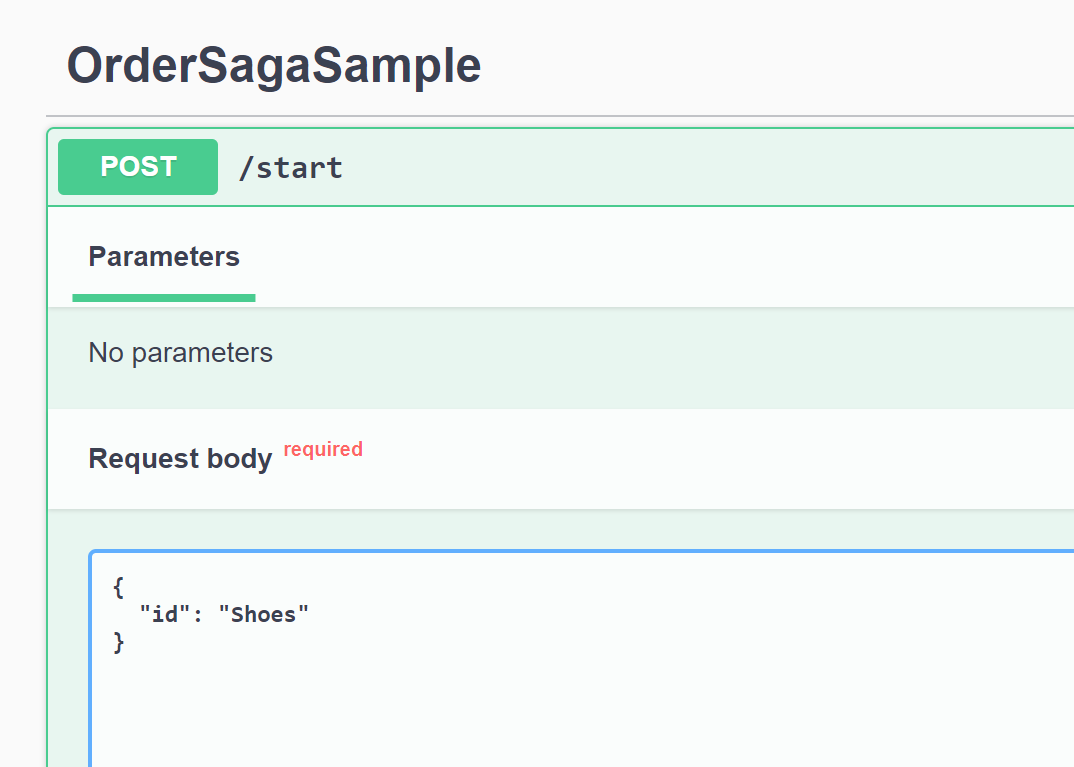
Off screen, I’ve started up a docker container for Postgresql to get a blank database. With that running, I’ll start the application up with the usual dotnet run command and open up the Swagger page:

You’ll get a lot of SQL in your terminal on the first run as Marten sets up the database for you, that’s perfectly normal.

I’m going to first create a new order for “Shoes” and execute the /create endpoint:

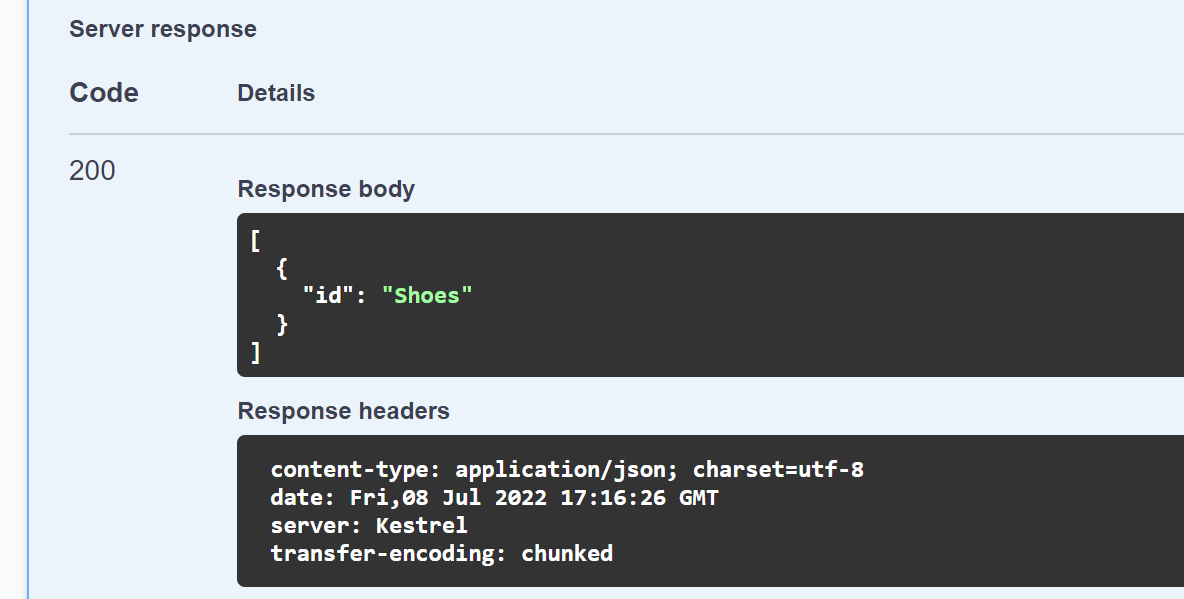
And verify that it’s persisted by checking the /all endpoint:

If I’m quick enough, I’ll post {"Id": "Shoes"} to /complete, and then verify through the /all endpoint that the “Shoes” order has been completed.

Otherwise, if I’m too slow to complete the order, the timeout message will be applied to our order and you’ll see evidence of that in the logging output like so:

And that’s it, one working saga implementation with database backed persistence through Marten. The goal of Jasper is to make this kind of server side development as low ceremony and easy to use as possible, so any feedback about what you do or don’t like in this sample would be very helpful.

Related Posts

I’ve spit out quite a bit of blogging content the past several weeks on both Marten and Jasper:

A Vision for Stateful Resources at Development or Deployment Time

As is not atypical, I found a couple little issues with both Oakton and Jasper in the course of writing this post. To that end, if you want to use the functionality shown here yourself, just make sure you’re on at least Oakton 4.6.1 and Jasper 2.0-alpha-3.

I’ve spit out quite a bit of blogging content the past several weeks on both Marten and Jasper:

I’ve been showing some new integration between Jasper, Marten, and Rabbit MQ. This time out, I want to show the new “stateful resource” model in a third tool named Oakton to remove development and deployment time friction when using these tools on a software project. Oakton itself is a command line processing tool, that more importantly, can be used to quickly add command line utilities directly to your .Net executable.

Drawing from a sample project in the Jasper codebase, here’s the configuration for an issue tracking application that uses Jasper, Marten, and RabbitMQ with Jasper’s inbox/outbox integration using Postgresql:

using IntegrationTests;
using Jasper;
using Jasper.Persistence.Marten;
using Jasper.RabbitMQ;
using Marten;
using MartenAndRabbitIssueService;
using MartenAndRabbitMessages;
using Oakton;
using Oakton.Resources;

var builder = WebApplication.CreateBuilder(args);

builder.Host.ApplyOaktonExtensions();

builder.Host.UseJasper(opts =>
{
    // I'm setting this up to publish to the same process
    // just to see things work
    opts.PublishAllMessages()
        .ToRabbitExchange("issue_events", exchange => exchange.BindQueue("issue_events"))
        .UseDurableOutbox();

    opts.ListenToRabbitQueue("issue_events").UseInbox();

    opts.UseRabbitMq(factory =>
    {
        // Just connecting with defaults, but showing
        // how you *could* customize the connection to Rabbit MQ
        factory.HostName = "localhost";
        factory.Port = 5672;
    });
});

// This is actually important, this directs
// the app to build out all declared Postgresql and
// Rabbit MQ objects on start up if they do not already
// exist
builder.Services.AddResourceSetupOnStartup();

// Just pumping out a bunch of messages so we can see
// statistics
builder.Services.AddHostedService<Worker>();

builder.Services.AddMarten(opts =>
{
    // I think you would most likely pull the connection string from
    // configuration like this:
    // var martenConnectionString = builder.Configuration.GetConnectionString("marten");
    // opts.Connection(martenConnectionString);

    opts.Connection(Servers.PostgresConnectionString);
    opts.DatabaseSchemaName = "issues";

    // Just letting Marten know there's a document type
    // so we can see the tables and functions created on startup
    opts.RegisterDocumentType<Issue>();

    // I'm putting the inbox/outbox tables into a separate "issue_service" schema
}).IntegrateWithJasper("issue_service");

var app = builder.Build();

app.MapGet("/", () => "Hello World!");

// Actually important to return the exit code here!
return await app.RunOaktonCommands(args);

Just to describe what’s going on up above, the .NET code above is going to depend on:

  1. A Postgresql database with the necessary tables and functions that Marten needs to be able to persist issue data
  2. Additional tables in the Postgresql database for persisting the outgoing and incoming messages in the inbox/outbox usage
  3. A Rabbit MQ broker with the necessary exchanges, queues, and bindings for the issue application as it’s configured

In a perfect world, scratch that, in an acceptable world, a developer should be able to start from a fresh clone of this issue tracking codebase and be able to run the system and/or any integration tests locally almost immediately with very minimal friction along the way.

At this point, I’m a big fan of trying to run development infrastructure in Docker where it’s easy to spin things up on demand, and just as quickly shut it all down when you no longer need it. To that end, let’s just say we’ve got a docker-compose.yml file for both Postgresql and Rabbit MQ. Having that, I’ll type docker compose up -d from the command line to spin up both infrastructure elements.

Cool, but now I need to have the database schemas built out with Marten tables and the Jasper inbox/outbox tables plus the Rabbit MQ queues for the application. This is where Oakton and its new “stateful resource” model comes into play. Jasper’s Rabbit MQ plugin and the inbox/outbox storage both expose Oakton’s IStatefulResource interface for easy setup. Likewise, Marten has support for this model as well (in this case it’s just a very slim wrapper around Marten’s longstanding database schema management functionality).

If you’re not familiar with this, the double dash “–” argument in dotnet run helps .NET to know which arguments (“run”) apply to the dotnet executable and the arguments to the right of the “–” that are passed into the application itself.

Opening up the command line terminal of your preference to the root of the project, I type dotnet run -- help to see what options are available in our Jasper application through the usage of Oakton:

There’s a couple commands up there that will help us out with the database management, but I want to focus on the resources command. To that end, I’m going to type dotnet run -- resources list just to see what resources our issue tracker application has:

Just through the configuration up above, the various Jasper elements have registered “stateful resource” adapters to for Oakton for the underlying Marten database, the inbox/outbox data (Envelope Storage above), and Rabbit MQ.

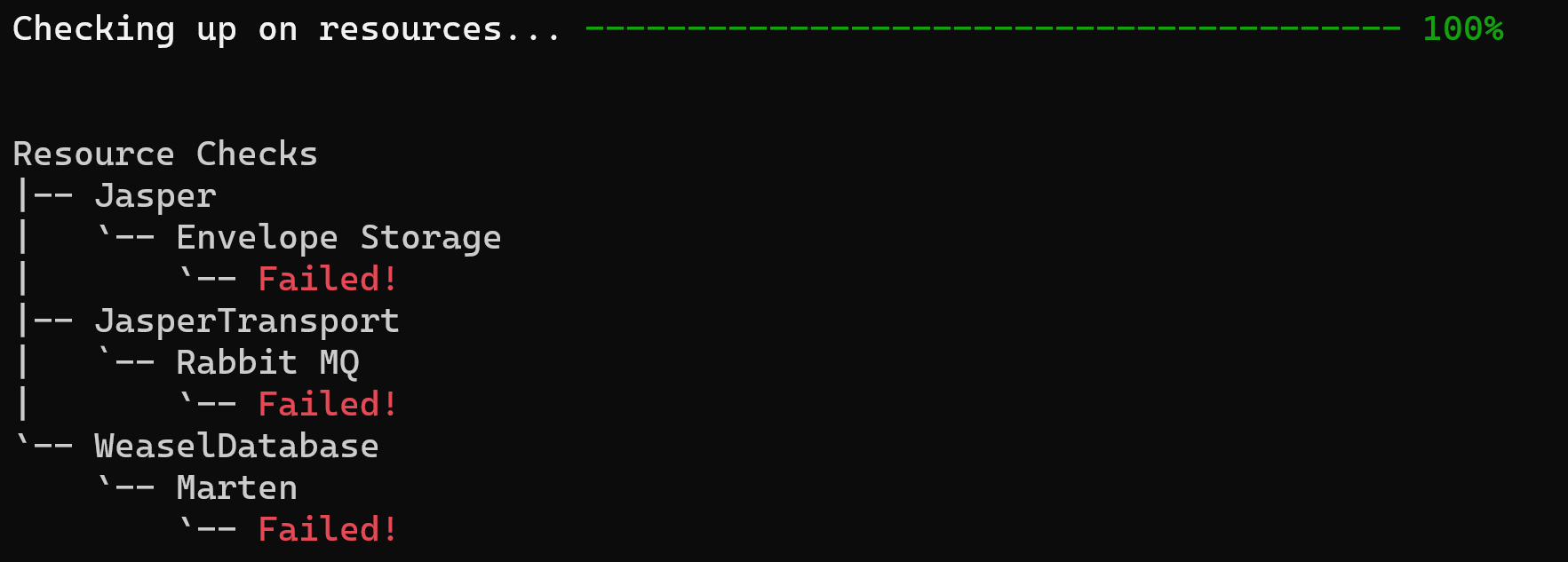
In the next case, I’m going to use dotnet run -- resources check to see if all our infrastructure is configured the way our application needs — and I’m going to do this without first starting the database or the message broker, so this should fail spectacularly!

Here’s the summary output:

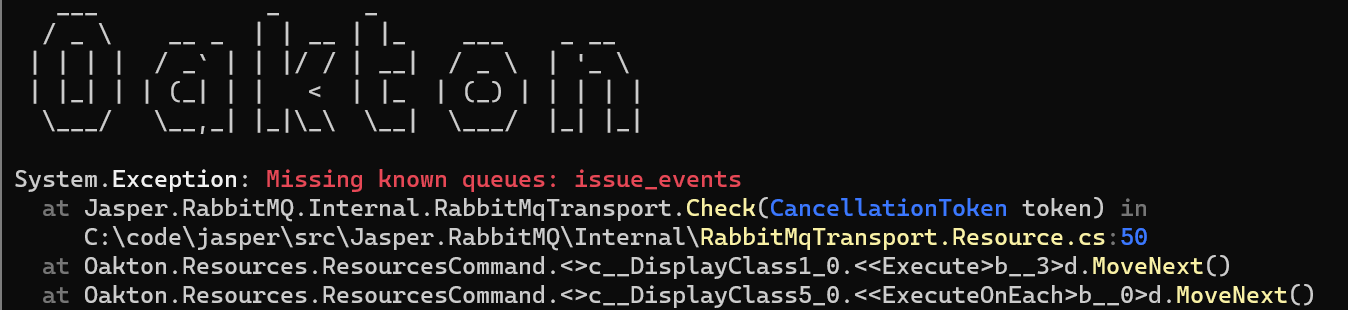
If you were to scroll up a bit, you’d see a lot of exceptions thrown describing what’s wrong (helpfully color coded by Spectre.Console) including this one explaining that an expected Rabbit MQ queue is missing:

So that’s not good. No worries though, I’ll start up the docker containers, then go back to the command line and type:

dotnet run -- resources setup

And here’s some of the output:

Forget the command line…

If you’ll notice the single line of code `builder.Services.AddResourceSetupOnStartup();` in the bootstrapping code above, that’s adding a hosted service to our application from Oakton that will verify and apply all configured set up to the known Marten database, the inbox/outbox storage, and the required Rabbit MQ objects. No command line chicanery necessary. I’m hopeful that this will enable developers to be more productive by dealing with this kind of environmental setup directly inside the application itself rather than recreating the definition of what’s necessary in external scripts.

This was a fair amount of work, so I’d be very welcome to any kind of feedback here.

Using Rabbit MQ with Jasper

I’ve spit out quite a bit of blogging content the past several weeks on both Marten and Jasper:

As a follow up today, I’d like to introduce Rabbit MQ integration with Jasper as the actual transport between processes. I’m again going to use a “Ping/Pong” sample of sending messages between two processes (you may want to refer to my previous ping/pong post). You can find the sample code for this post on GitHub.

Sending messages betwixt processes

The message types and Jasper handlers are basically identical to those in my last post if you want a reference. In the Pinger application, I’ve added a reference to the Jasper.RabbitMQ Nuget library, which adds transitive references to Jasper itself and the Rabbit MQ client library. In the application bootstrapping, I’ve got this to connect to Rabbit MQ, send Ping messages to a Rabbit MQ exchange named *pings*, and add a hosted service just to send a new Ping message once a second:

using System.Net.NetworkInformation;
using Jasper;
using Jasper.RabbitMQ;
using Oakton;
using Pinger;

return await Host.CreateDefaultBuilder(args)
    .UseJasper(opts =>
    {
        // Listen for messages coming into the pongs queue
        opts
            .ListenToRabbitQueue("pongs")

            // This won't be necessary by the time Jasper goes 2.0
            // but for now, I've got to help Jasper out a little bit
            .UseForReplies();

        // Publish messages to the pings queue
        opts.PublishMessage<Ping>().ToRabbitExchange("pings");

        // Configure Rabbit MQ connection properties programmatically
        // against a ConnectionFactory
        opts.UseRabbitMq(rabbit =>
        {
            // Using a local installation of Rabbit MQ
            // via a running Docker image
            rabbit.HostName = "localhost";
        })
            // Directs Jasper to build any declared queues, exchanges, or
            // bindings with the Rabbit MQ broker as part of bootstrapping time
            .AutoProvision();

        // This will send ping messages on a continuous
        // loop
        opts.Services.AddHostedService<PingerService>();
    }).RunOaktonCommands(args);

On the Ponger side, I’ve got this setup:

using Baseline.Dates;
using Jasper;
using Jasper.RabbitMQ;
using Oakton;

return await Host.CreateDefaultBuilder(args)
    .UseJasper(opts =>
    {
        // Going to listen to a queue named "pings", but disregard any messages older than
        // 15 seconds
        opts.ListenToRabbitQueue("pings", queue => queue.TimeToLive(15.Seconds()));

        // Configure Rabbit MQ connections and optionally declare Rabbit MQ
        // objects through an extension method on JasperOptions.Endpoints
        opts.UseRabbitMq() // This is short hand to connect locally
            .DeclareExchange("pings", exchange =>
            {
                // Also declares the queue too
                exchange.BindQueue("pings");
            })
            .AutoProvision()

            // Option to blow away existing messages in
            // all queues on application startup
            .AutoPurgeOnStartup();
    })
    .RunOaktonCommands(args);

When running the applications side by side, I’ll get output like this from Pinger:

Got pong #55
info: Jasper.Runtime.JasperRuntime[104]
      Successfully processed message PongMessage#01818741-30c2-4ab7-9fa8-d7870d194754 from rabbitmq://queue/pings
info: Jasper.Runtime.JasperRuntime[204]
      Sending agent for rabbitmq://exchange/pings has resumed
Got pong #56
info: Jasper.Runtime.JasperRuntime[104]
      Successfully processed message PongMessage#01818741-34b3-4d34-910a-c9fc4c191bfc from rabbitmq://queue/pings
info: Jasper.Runtime.JasperRuntime[204]
      Sending agent for rabbitmq://exchange/pings has resumed

and this from Ponger:

Got ping #57
info: Jasper.Runtime.JasperRuntime[104]
      Successfully processed message PingMessage#01818741-389e-4ddd-96cf-fb8a76e4f5f1 from rabbitmq://queue/pongs
info: Jasper.Runtime.JasperRuntime[204]
      Sending agent for rabbitmq://queue/pongs has resumed
Got ping #58
info: Jasper.Runtime.JasperRuntime[104]
      Successfully processed message PingMessage#01818741-3c8e-469f-a330-e8c9e173dc40 from rabbitmq://queue/pongs
info: Jasper.Runtime.JasperRuntime[204]
      Sending agent for rabbitmq://queue/pongs has resumed

and of course, since Jasper is a work in progress, there’s a bunch of erroneous or at least misleading messages about a sending agent getting resumed that I need to take care of…

So what’s in place right now that can be inferred from the code samples above? The Jasper + Rabbit MQ integration today provides:

  • A way to subscribe to incoming messages from a Rabbit MQ queue. It’s not shown here, but you have all the options you’d expect to configure Rabbit MQ prefetch counts, message handling parallelism, and opt into persistent, inbox messaging
  • Mechanisms to declare Rabbit MQ queues, exchanges, and bindings as well as the ability to fine tune Rabbit MQ options for these objects
  • Create declared Rabbit MQ objects at system startup time
  • Automatically purge old messages out of Rabbit MQ queues on start up. It’s not shown here, but you can do this on a queue by queue basis as well
  • Create publishing rules from a Jasper process to direct outgoing messages to Rabbit MQ exchanges or directly to queues

What’s also available but not shown here is opt in, conventional routing to route outgoing messages to Rabbit MQ exchanges based on the message type names or to automatically declare and configure subscriptions to Rabbit MQ queues based on the message types of the messages that this process handles. This conventional routing is suspiciously similar (copied from) MassTransit because:

  1. I like MassTransit’s conventional routing functionality
  2. Bi-directional wire compatibility mostly out of the box with MassTransit is a first class goal for Jasper 2.0

Why Rabbit MQ? What about other things?

Jasper has focused on Rabbit MQ as the main transport option out of the box because that’s what my shop already uses (and I’m most definitely trying to get us to use Jasper at work), it has a great local development option through Docker hosting, and frankly because it’s easy to use. Jasper also supports Pulsar of all things, and will definitely have a Kafka integration before 2.0. Other transports will be added based on user requests, and that’s also a good place for other folks to get involved.

I had someone asking about using Jasper with Amazon SQS, and that’s such a simple model, that I might build that out as a reference for other folks.

What’s up next?

Now that I’ve introduced Jasper, its outbox functionality, and its integration with Rabbit MQ, my next post is visiting the utilities baked into Jasper itself for dealing with stateful resources like databases or broker configuration at development and production time. This is going to include a lot of command line functionality baked into your application.

Building a More Useful Outbox for Reliable Messaging

I blog not at all, or a lot at once. Nothing in between. In the past couple weeks I’ve written:

As a follow up to those posts, Jasper comes with a robust transactional inbox/outbox implementation that partially runs as a background service using .NET’s hosted service mechanism. Jasper’s version of this functionality differs quite a bit in both implementation from other toolsets in the .NET space. Here’s a rundown so far:

  • When used, Jasper is persisting the outgoing message, metadata, and the intended destination in the hosting service’s application database (or at least that’s the way it’s intended to work).
  • A background service is running in every node to ensure that these outgoing messages don’t get marooned or fail to be sent out
  • Pending messages do not get “lost” if the process dies or is shut down unexpectedly
  • Pending messages are resumed if a process is just restarted
  • If running in a cluster, the other nodes can detect that another node is no longer running, and take on the persisted, outbound messages from that original node
  • So far, the outbox has support for either Postgresql or Sql Server as the backing database.
  • Not surprisingly, there’s much deeper integration with Marten, but there’s also support for using the outbox with EF Core
  • Jasper’s outbox is actually usable completely outside of Jasper command handlers. You might have to write a little more explicit code to use it within ASP.Net Core controllers or Minimal API methods for example, but it’s perfectly usable in those scenarios. This is unique to Jasper and currently unsupported in the most popular service bus tools in .NET at the time I’m writing this post.
  • Jasper comes with some database schema management baked in for the necessary database objects needed to integrate the outbox to make things easier to get up and going.
  • There’s also some command line tooling baked into Jasper that will hopefully be helpful at development or deployment time to manage the persisted message storage

Now, on to some sample code!

To reuse a code sample from earlier this week, let’s say we’re building a new web service for potential customers to make online reservations for their favorite restaurants. We’re also going to be using Jasper as a command and/or message bus (and Marten as the backing persistence infrastructure), so we might have a command handler for confirming a reservation like this simple example:

public static class ConfirmReservationHandler
{
    [Transactional]
    public static async Task<ReservationConfirmed> Handle(ConfirmReservation command, IDocumentSession session)
    {
        var reservation = await session.LoadAsync<Reservation>(command.ReservationId);

        reservation!.IsConfirmed = true;

        session.Store(reservation);

        // Kicking out a "cascaded" message
        return new ReservationConfirmed(reservation.Id);
    }
}

As I described in an earlier post, that handler — in conjunction with some Jasper middleware brought in by the [Transactional] attribute — is making database changes and publishing a corresponding message about those very changes. Those two actions are an atomic unit of logical work. They need to either both succeed, or not happen at all. We also need the message to only go out after the database changes succeed. Otherwise, there’s a possible race condition between the database changes being committed and the ReservationConfirmed message being processed in another thread with incorrect or inconsistent system data. And take my word for it on that last point, because I’ve seen that happen and directly cause production bugs.

Let’s quickly rule out an old fashioned two phase commit because that brings a lot of headaches I could do without for the rest of my career. As I mentioned in some of my earlier posts, Jasper comes out of the box with a transactional outbox built in for specifically the scenario shown in the handler above. Jasper has an add on Nuget library called Jasper.Persistence.Marten that adds some helpful integration between Jasper’s built in inbox/outbox “durability agent” and Marten. The setup code for that integration is just this:

// Normal Marten integration
builder.Services.AddMarten(opts =>
{
    opts.Connection("Host=localhost;Port=5433;Database=postgres;Username=postgres;password=postgres");
})
    // NEW! Adding Jasper outbox integration to Marten in the "messages"
    // database schema
    .IntegrateWithJasper("messages");

and Jasper’s own integration setup:

builder.Host.UseJasper(opts =>
{
    // more Jasper configuration for error handling etc.
});

To add some context, here’s the actual code (with some reformatting and annotations from me) that Jasper builds up at runtime around our command handler:

public class ConfirmReservationHandler615381178 : MessageHandler
{
    private readonly OutboxedSessionFactory _outboxedSessionFactory;

    public ConfirmReservationHandler615381178(OutboxedSessionFactory outboxedSessionFactory)
    {
        _outboxedSessionFactory = outboxedSessionFactory;
    }

    public override async Task HandleAsync(IExecutionContext context, CancellationToken cancellation)
    {
        var confirmReservation = (ConfirmReservation)context.Envelope.Message;

        // This is creating a Marten session that's hooked into the Jasper outbox for
        // the incoming ConfirmReservation message being processed here
        await using var documentSession = _outboxedSessionFactory.OpenSession(context);

        var reservationConfirmed = await ConfirmReservationHandler.Handle(confirmReservation, documentSession)
            .ConfigureAwait(false);
        // Outgoing, cascaded message
        await context.EnqueueCascadingAsync(reservationConfirmed).ConfigureAwait(false);

        // Commit the unit of work *and* start sending the ReservationConfirmed message
        await documentSession.SaveChangesAsync(cancellation).ConfigureAwait(false);
    }
}

There’s a lot going on up above behind the scenes, but the key elements of the message handler workflow code with the outbox above are:

  • The outgoing message will not actually be sent to its destination (a Rabbit MQ exchange? a local queue? a Pulsar topic?) until the database changes succeed. That’s true for messages directly sent to Jasper’s IMessagePublisher or IExecutionContext services within a command handler method as well.
  • The outgoing messages and all necessary metadata (including the destination) are persisted to a database table inside the exact same database transaction as the changes to the persistent model in the handler above. In the case of the Marten integration, the messages are persisted in the same database command as the Reservation document changes as a way to improve performance by reducing network round trips to the database server.
  • After the transaction succeeds, the previously registered Jasper outbox is notified by a Marten session listener to start publishing the outgoing “cascaded” messages in Jasper’s background sending queues which span across command executions.
  • If the transaction fails, no messages will be sent out

A Vision for Low Ceremony CQRS with Event Sourcing

Let me just put this stake into the ground. The combination of Marten and Jasper will quickly become the most productive and lowest ceremony tooling for event sourcing and CQRS architectures on the .NET stack.

And for any George Strait fans out there, this song may be relevant to the previous paragraph:)

CQRS and Event Sourcing

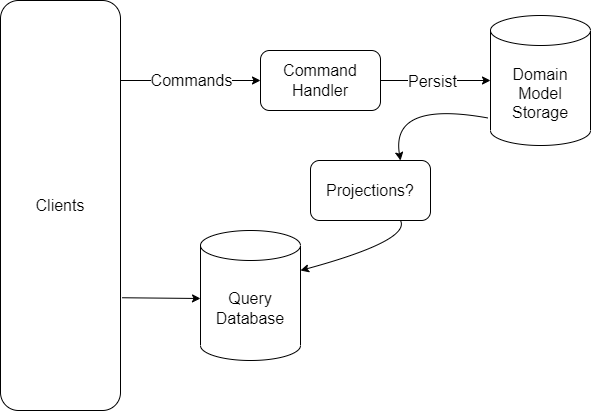
Just to define some terminology, the Command Query Responsibility Separation (CQRS) pattern was first described by Greg Young as an approach to software architecture where you very consciously separate “writes” that change the state of the system from “reads” against the system state. The key to CQRS is to use separate models of the system state for writing versus querying. That leads to something I think of as the “scary view of CQRS”:

The “scary” view of CQRS

The “query database” in my diagram is meant to be an optimized storage for the queries needed by the system’s clients. The “domain model storage” is some kind of persisted storage that’s optimized for writes — both capturing new data and presenting exactly the current system state that the command handlers would need in order to process or validate incoming commands.

Many folks have a visceral, negative reaction to this kind of CQRS diagram as it does appear to be more complexity than the more traditional approach where you have a single database model — almost inevitably in a relational database of some kind — and both reads and writes work off the same set of database tables. Hell, I walked out of an early presentation by Greg Young about what later became to be known as CQRS at QCon 2008 shaking my head thinking this was all nuts.

Here’s the deal though, when we’re writing systems against the one, true database model, we’re potentially spending a lot of time mapping incoming messages to the stored model, and probably even more time transforming the raw database model into a shape that’s appropriate for our system’s clients in a way that also creates some decoupling between clients and the ugly, raw details of our underlying database. The “scary” CQRS architecture arguably just brings that sometimes hidden work and complexity into the light of day.

Now let’s move on to Event Sourcing. Event sourcing is a style of system persistence where each state change is captured and stored as an explicit event object. There’s all sorts of value from keeping the raw change events around for later, but you of course do need to compile the events into derived, or “projected” models that represent the current system state. When combining event sourcing into a CQRS architecture, some projected models from the raw events can serve as both the “write model” inside of incoming commands, while others can be built as the “query model” that clients will use to query our system.

At the end of this section, I want to be clear that event sourcing and CQRS can be used independently of each other, but to paraphrase Forrest Gump, event sourcing and CQRS go together like peas and carrots.

Now, the event sourcing side of this especially might sound a little scary if you’re not familiar with some of the existing tooling, so let’s move on first to Marten…

Marten has a mature feature set for event sourcing already, and we’re grown quite a bit in capability toward our support for projections (read-only views of the raw events). If you’ll peek back at the “scary” view of CQRS above, Marten’s projection support solves the problem of keeping the raw events synchronized to both any kind of “write model” for incoming commands and the richer “query model” views for system clients within a single database. In my opinion, Marten removes the “scary” out of event sourcing and we’re on our way to being the best possible “event sourcing in a box” solution for .NET.

As that support has gotten more capable and robust though, our users have frequently been asking about how to subscribe to events being captured in Marten and how to relay those events reliably to some other kind of infrastructure — which could be a completely separate database, outgoing message queues, or some other kind of event streaming scenario.

Oskar Dudycz and I have been discussing how to solve this in Marten, and we’ve come up with these three main mechanisms for supporting subscriptions to event data:

  1. Some or all of the events being captured by Marten should be forwarded automatically at the time of event capture (IDocumentSession.SaveChangesAsync())
  2. When strict ordering is required, we’ll need some kind of integration into Marten’s async daemon to relay events to external infrastructure
  3. For massive amounts of data with ambitious performance targets, use something like Debezium to directly stream Marten events from Postgresql to Kafka/Pulsar/etc.

Especially for the first item in that list above, we need some kind of outbox integration with Marten sessions to reliably relay events from Marten to outgoing transports while keeping the system in a consistent state (i.e., don’t publish the events if the transaction fails).

Fortunately, there’s a functional outbox implementation for Marten in…

To be clear, Jasper as a project was pretty well mothballed by the combination of COVID and the massive slog toward Marten 4.0 (and then a smaller slog to 5.0). However, I’ve been able to get back to Jasper and yesterday kicked out a new Jasper 2.0.0-alpha-2 release and (Re) Introducing Jasper as a Command Bus.

For this post though, I want to explore the potential of the Jasper + Marten combination for CQRS architectures. To that end, a couple weeks I published Marten just got better for CQRS architectures, which showed some new APIs in Marten to simplify repetitive code around using Marten event sourcing within CQRS architectures. Part of the sample code in that post was this MVC Core controller that used some newer Marten functionality to handle an incoming command:

public async Task CompleteCharting(
    [FromBody] CompleteCharting charting, 
    [FromServices] IDocumentSession session)
{
    var stream = await session
        .Events.FetchForExclusiveWriting<ProviderShift>(charting.ShiftId);
 
    // Validation on the ProviderShift aggregate
    if (stream.Aggregate.Status != ProviderStatus.Charting)
    {
        throw new Exception("The shift is not currently charting");
    }
     
    // We "decided" to emit one new event
    stream.AppendOne(new ChartingFinished(stream.Aggregate.AppointmentId.Value, stream.Aggregate.BoardId));
 
    await session.SaveChangesAsync();
}

To review, that controller method:

  1. Takes in a command message of type CompleteCharting
  2. Loads the current state of the aggregate ProviderShift model referred to by the incoming command, and does so in a way that takes care of concurrency for us by waiting to get an exclusive lock on the particular ProviderShift
  3. Assuming that the validation against the ProviderShift succeeds, emits a new ChartingFinished event
  4. Saves the pending work with a database transaction

In that post, I pointed out that there were some potential flaws or missing functionality with this approach:

  1. We probably want some error handling to retry the operation if we hit concurrency exceptions or timeout trying to get the exclusive lock. In other words, we have to plan for concurrency exceptions
  2. It’d be good to be able to automatically publish the new ChartingFinished event to a queue to take further action within our system (or an external service if we were using messaging here)
  3. Lastly, I’d argue there’s some repetitive code up there that could be simplified

To address these points, I’m going to introduce Jasper and its integration with Marten (Jasper.Persistence.Marten) to the telehealth portal sample from my previous blog post.

I’m going to move the actual handling of the CompleteCharting to a Jasper handler shown below that is functionally equivalent to the controller method shown earlier (except I switched the concurrency protection to being optimistic):

// This is auto-discovered by Jasper
public class CompleteChartingHandler
{
    [MartenCommandWorkflow] // this opts into some Jasper middlware 
    public ChartingFinished Handle(CompleteCharting charting, ProviderShift shift)
    {
        if (shift.Status != ProviderStatus.Charting)
        {
            throw new Exception("The shift is not currently charting");
        }

        return new ChartingFinished(charting.AppointmentId, shift.BoardId);
    }
}

And the controller method gets simplified down to just relaying the command to Jasper:

    public Task CompleteCharting(
        [FromBody] CompleteCharting charting, 
        [FromServices] ICommandBus bus)
    {
        // Just delegating to Jasper here
        return bus.InvokeAsync(charting, HttpContext.RequestAborted);
    }

There’s some opportunity for some mechanisms to make the code above be a little less repetitive and efficient. Maybe by riding on Minimal APIs. That’s for a later date though:)

By using the new [MartenCommandWorkflow] attribute, we’re directing Jasper to surround the command handler with middleware that handles much of the Marten mechanics by:

  1. Loading the aggregate ProviderShift for the incoming CompleteCharting command (I’m omitting some details here for brevity, but there’s a naming convention that can be explicitly overridden to pluck the aggregate identity off the incoming command)
  2. Passing that ProviderShift aggregate into the Handle() method above
  3. Applying the returned event to the event stream for the ProviderShift
  4. Committing the outstanding changes in the active Marten session

The Handle() code above becomes an example of a Decider function. Even better yet, it’s completely decoupled from any kind of infrastructure and fully synchronous. I’m going to argue that this approach will make command handlers much easier to unit test, definitely easier to write, and easier to read later just because you’re only focused on the business logic.

So that covers the repetitive code problem, but let’s move on to automatically publishing the ChartingCompleted event and some error handling. I’m going to add Jasper through the application’s bootstrapping code as shown below:

builder.Host.UseJasper(opts =>
{
    // I'm choosing to process any ChartingFinished event messages
    // in a separate, local queue with persistent messages for the inbox/outbox
    opts.PublishMessage<ChartingFinished>()
        .ToLocalQueue("charting")
        .DurablyPersistedLocally();
    
    // If we encounter a concurrency exception, just try it immediately 
    // up to 3 times total
    opts.Handlers.OnException<ConcurrencyException>().RetryNow(3); 
    
    // It's an imperfect world, and sometimes transient connectivity errors
    // to the database happen
    opts.Handlers.OnException<NpgsqlException>()
        .RetryWithCooldown(50.Milliseconds(), 100.Milliseconds(), 250.Milliseconds());
});

Jasper comes with some pretty strong exception handling policy capabilities you’ll need to do grown up development. In this case, I’m just setting up some global policies in the application to retry message failures on either Marten concurrency exceptions or the inevitable, transient Postgresql connectivity hiccups. In the case of the concurrency exception, you may just need to start the work over to ensure you’re starting from the most recent aggregate changes. I used globally applied policies here, but Jasper will also allow you to override that on a message type by message type basis.

Lastly, let’s add the Jasper outbox integration for Marten and opt into automatic event publishing with this bit of configuration chained to the standard AddMarten() usage:

builder.Services.AddMarten(opts =>
{
    // Marten configuration...
})
    // I added this to enroll Marten in the Jasper outbox
    .IntegrateWithJasper()
    
    // I also added this to opt into events being forward to
    // the Jasper outbox during SaveChangesAsync()
    .EventForwardingToJasper();

And that’s actually that. The configuration above will add the Jasper outbox tables to the Marten database for us, and let Marten’s database schema management manage those extra database objects.

Back to the command handler (mildly elided):

public class CompleteChartingHandler
{
    [MartenCommandWorkflow] 
    public ChartingFinished Handle(CompleteCharting charting, ProviderShift shift)
    {
        // validation code goes here!

        return new ChartingFinished(charting.AppointmentId, shift.BoardId);
    }
}

By opting into the outbox integration and event forwarding to Jasper from Marten, when this command handler is executed, the ChartingFinished events will be published — in this case just to an in-memory queue, but it could also be to an external transport — with Jasper’s outbox implementation that guarantees that the message will be delivered at least once as long as the database transaction to save the new event succeeds.

Conclusion and What’s Next?

There’s a tremendous amount of work in the rear window to get to the functionality that I demonstrated here, and a substantial amount of ambition in the future to drive this forward. I would love any possible feedback both positive and negative. Marten is a team effort, but Jasper’s been mostly my baby for the past 3-4 years, and I’d be happy for anybody who would want to get involved with that. I’m way behind in documentation for Jasper and somewhat for Marten, but that’s in flight.

My next couple posts to follow up on this are to:

  • Do a deeper dive into Jasper’s outbox and explain why it’s different and arguably more useful than the outbox implementations in other leading .NET tools
  • Introduce the usage of Rabbit MQ with Jasper for external messaging
  • Take a detour into the development and deployment time command line utilities built into Jasper & Marten through Oakton