Testing Asynchronous Projections in Marten

Hey, did you know that JasperFx Software offers formal support plans for Marten and Wolverine? Not only are we making the “Critter Stack” tools be viable long term options for your shop, we’re also interested in hearing your opinions about the tools and how they should change. We’re also certainly open to help you succeed with your software development projects on a consulting basis whether you’re using any part of the Critter Stack or some completely different .NET server side tooling.

As a kind of follow up to my post yesterday on Wolverine’s Baked In Integration Testing Support, I want to talk about some improvements to Marten that just went live in Marten 7.5 that are meant to make asynchronous projections much easier to test.

First off, let’s say that you have a simplistic document that can “self-aggregate” itself as a “Snapshot” in Marten like this:

public record InvoiceCreated(string Description, decimal Amount);

public record InvoiceApproved;
public record InvoiceCancelled;
public record InvoicePaid;
public record InvoiceRejected;

public class Invoice
{
    public Invoice()
    {
    }

    public static Invoice Create(IEvent<InvoiceCreated> created)
    {
        return new Invoice
        {
            Amount = created.Data.Amount,
            Description = created.Data.Description,

            // Capture the timestamp from the event
            // metadata captured by Marten
            Created = created.Timestamp,
            Status = InvoiceStatus.Created
        };
    }

    public int Version { get; set; }

    public decimal Amount { get; set; }
    public string Description { get; set; }
    public Guid Id { get; set; }
    public DateTimeOffset Created { get; set; }
    public InvoiceStatus Status { get; set; }

    public void Apply(InvoiceCancelled _) => Status = InvoiceStatus.Cancelled;
    public void Apply(InvoiceRejected _) => Status = InvoiceStatus.Rejected;
    public void Apply(InvoicePaid _) => Status = InvoiceStatus.Paid;
    public void Apply(InvoiceApproved _) => Status = InvoiceStatus.Approved;
}

For asynchronous projections of any kind, we have a little bit of complication for testing. In a classic “Arrange, Act, Assert” test workflow, we’d like to exercise our projection — and mind you, I strongly recommend that testing happen within its integration with Marten rather than some kind of solitary unit tests with fakes — with a workflow like this:

  1. Pump in some new events to Marten
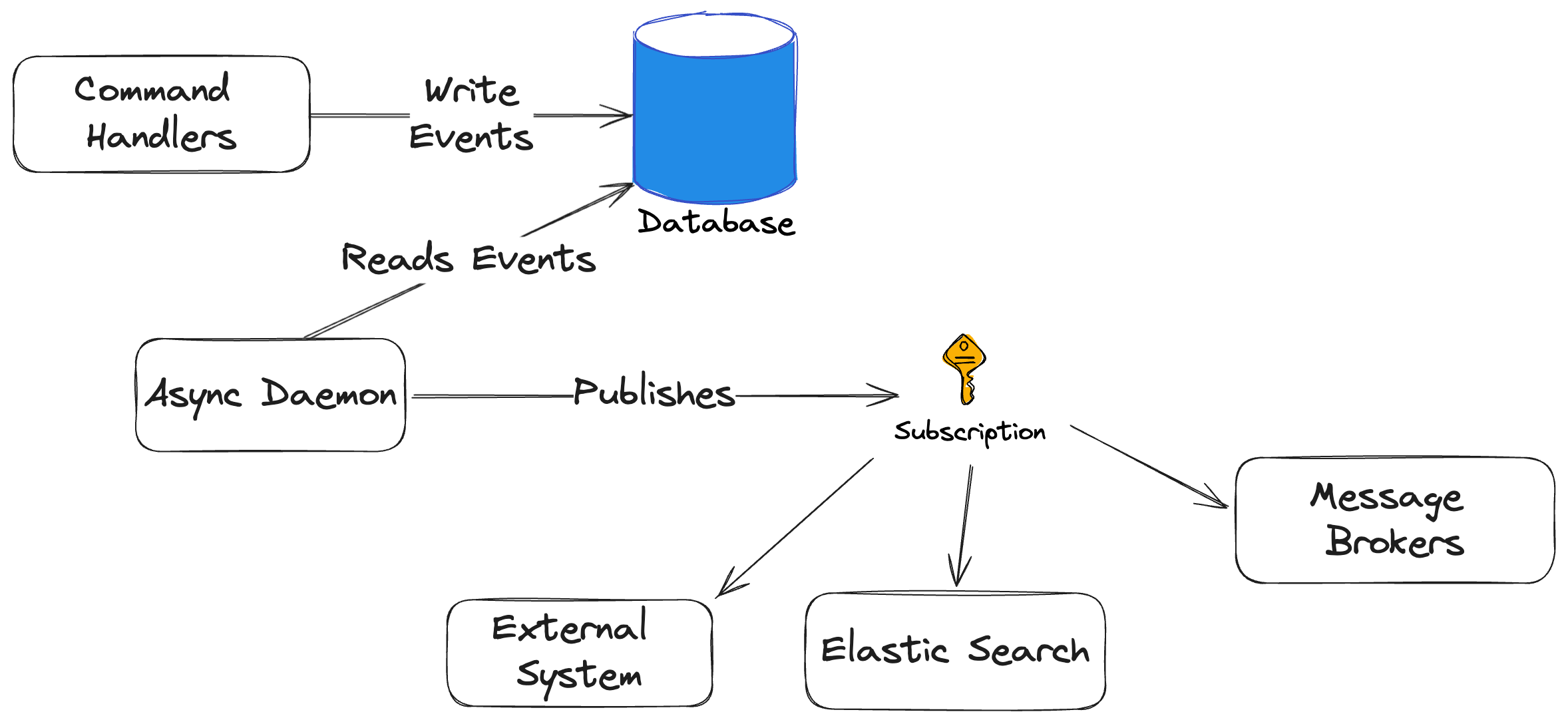
  2. Somehow magically wait for Marten’s asynchronous daemon running in a background thread progress to the point where it’s handled all of our newly appended events for all known, running projections
  3. Load the expected documents that should have been persisted or updated from our new events by the projections running in the daemon, and run some assertions on the expected system state

For right now, I want to worry about the second bullet point and introduce a new (old, but it actually works correctly now) WaitForNonStaleProjectionDataAsync API introduced in Marten 7.5. You can see the new API used in this test from the new documentation on Testing Projections:

[Fact]
public async Task test_async_aggregation_with_wait_for()
{
    // In your tests, you would most likely use the IHost for your
    // application as it is normally built
    using var host = await Host.CreateDefaultBuilder()
        .ConfigureServices(services =>
        {
            services.AddMarten(opts =>
                {
                    opts.Connection(
                        "Host=localhost;Port=5432;Database=marten_testing;Username=postgres;password=postgres;Command Timeout=5");
                    opts.DatabaseSchemaName = "incidents";

                    // Notice that the "snapshot" is running inline
                    opts.Projections.Snapshot<Invoice>(SnapshotLifecycle.Async);
                })

                // Using Solo in tests will help it start up a little quicker
                .AddAsyncDaemon(DaemonMode.Solo);
        }).StartAsync();

    var store = host.Services.GetRequiredService<IDocumentStore>();

    var invoiceId = Guid.NewGuid();

    // Pump in events
    using (var session = store.LightweightSession())
    {
        session.Events.StartStream<Invoice>(invoiceId, new InvoiceCreated("Blue Shoes", 112.24m));
        await session.SaveChangesAsync();

        session.Events.Append(invoiceId,new InvoiceApproved());
        session.Events.Append(invoiceId,new InvoicePaid());
        await session.SaveChangesAsync();
    }

    // Now, this is going to pause here in this thread until the async daemon
    // running in our IHost is completely caught up to at least the point of the
    // last event captured at the point this method was called
    await store.WaitForNonStaleProjectionDataAsync(5.Seconds());

    // NOW, we should expect reliable results by just loading the already
    // persisted documents built by rebuilding the projection
    await using var query = store.QuerySession();

    // Load the document that was "projected" from the events above
    // and immediately persisted to the document store
    var invoice = await query.LoadAsync<Invoice>(invoiceId);

    // Run assertions
    invoice.Description.ShouldBe("Blue Shoes");
    invoice.Status.ShouldBe(InvoiceStatus.Paid);
}

Time. What about System Time?

See Andrew Lock’s blog post Avoiding flaky tests with TimeProvider and ITimer for more information on using TimeProvider in tests.

In the example projection, I’ve been capturing the timestamp in the Invoice document from the Marten event metadata:

public static Invoice Create(IEvent<InvoiceCreated> created)
{
    return new Invoice
    {
        Amount = created.Data.Amount,
        Description = created.Data.Description,

        // Capture the timestamp from the event
        // metadata captured by Marten
        Created = created.Timestamp,
        Status = InvoiceStatus.Created
    };
}

But of course, if that timestamp has some meaning later on and you have any kind of business rules that may need to key off that time, it’s very helpful to be able to control the timestamps that Marten is assigning to create predictable automated tests. As of Marten 7.5, Marten uses the newer .NET TimeProvider behind the scenes, and you can replace it in testing like so:

[Fact]
public async Task test_async_aggregation_with_wait_for_and_fake_time_provider()
{
    // Hang on to this for later!!!
    var eventsTimeProvider = new FakeTimeProvider();

    // In your tests, you would most likely use the IHost for your
    // application as it is normally built
    using var host = await Host.CreateDefaultBuilder()
        .ConfigureServices(services =>
        {
            services.AddMarten(opts =>
                {
                    opts.Connection(
                        "Host=localhost;Port=5432;Database=marten_testing;Username=postgres;password=postgres;Command Timeout=5");
                    opts.DatabaseSchemaName = "incidents";

                    // Notice that the "snapshot" is running inline
                    opts.Projections.Snapshot<Invoice>(SnapshotLifecycle.Async);

                    opts.Events.TimeProvider = eventsTimeProvider;
                })

                // Using Solo in tests will help it start up a little quicker
                .AddAsyncDaemon(DaemonMode.Solo);
        }).StartAsync();

    var store = host.Services.GetRequiredService<IDocumentStore>();

    var invoiceId = Guid.NewGuid();

    // Pump in events
    using (var session = store.LightweightSession())
    {
        session.Events.StartStream<Invoice>(invoiceId, new InvoiceCreated("Blue Shoes", 112.24m));
        await session.SaveChangesAsync();

        session.Events.Append(invoiceId,new InvoiceApproved());
        session.Events.Append(invoiceId,new InvoicePaid());
        await session.SaveChangesAsync();
    }

    // Now, this is going to pause here in this thread until the async daemon
    // running in our IHost is completely caught up to at least the point of the
    // last event captured at the point this method was called
    await store.WaitForNonStaleProjectionDataAsync(5.Seconds());

    // NOW, we should expect reliable results by just loading the already
    // persisted documents built by rebuilding the projection
    await using var query = store.QuerySession();

    // Load the document that was "projected" from the events above
    // and immediately persisted to the document store
    var invoice = await query.LoadAsync<Invoice>(invoiceId);

    // Run assertions, and we'll use the faked timestamp
    // from our time provider
    invoice.Created.ShouldBe(eventsTimeProvider.Start);
}

In the sample above, I used the FakeTimeProvider from the Microsoft.Extensions.TimeProvider.Testing Nuget package.

Summary

We take testability and automated testing very seriously throughout the entire “Critter Stack.” The testing of asynchronous projections has long been a soft spot that we hope is improved by the new capabilities in this post. As always, feel free to pop into the Critter Stack Discord for any questions.

“Partial” Document Updates in Marten 7

Just continuing a loose series about recent improvements in the big Marten 7.0 release:

As part of the big Marten 7 release a couple weeks ago, core team member Babu Annamalai made a huge contribution with a brand new model for making “partial” document updates that’s backed with native PostgreSQL operations. See Babu’s post Marten native partial updates – patching for much more information and details about everything that’s supported now.

Let’s put this into perspective with a quick sample. Here’s a simplistic Wolverine handler that updates a single member on a stored document:

 public static async Task Handle(ApproveInvoice command, IDocumentSession session)
    {
        // Load the invoice
        var invoice = await session.LoadAsync<Invoice>(command.InvoiceId);
        invoice.Approved = true;
        
        // Tell Marten to persist the new version
        session.Store(invoice);
        
        // Commit the one pending change
        await session.SaveChangesAsync();
    }

In the code above, I’m loading the whole document, changing one property, and committing the changes back to the database. Under the covers we’re making two round trips to the database, deserializing the starting state of the Invoice document, then serializing the end state of the Invoice document.

With the new patching support, let’s rewrite that handler to this:

 public static async Task Handle(ApproveInvoice command, IDocumentSession session)
    {
        // Tell Marten what to change
        session.Patch<Invoice>(command.InvoiceId).Set(x => x.Approved, true);

        // Commit the one pending change
        await session.SaveChangesAsync();
    }

In that second version, we’re doing a lot less work. There’s only one database call to overwrite the Approved value within the existing Invoice document. While it’s a nontrivial operation to reach inside the JSON in the database, we’re not having to do any serialization in memory.

Marten technically had this feature set already, but our older support depended on the PLv8 extension to PostgreSQL that’s more or less deprecated now. Babu’s work for Marten 7 brings this very important feature set back into play for the majority of users who don’t want to or can’t utilize the older PLv8 backed support.

LINQ Query Improvements in Marten 7

Working inside of the LINQ provider code that’s ultimately interpreting C# code and trying to turn that into the most efficient Pgpsql code possible somehow makes me think about Alice in Wonderland where I’m definitely in the role of “Alice.”

Just continuing a loose series about recent improvements in the big Marten 7.0 release:

A major set of emphasis for the Marten 7 release was to address the large accretion of LINQ related issues with a mostly new LINQ provider subsystem. In terms of improvements or just changes, we:

  • Completely removed the Remotion.Linq dependency (and the results of that are mixed so far)
  • Reworked the SQL generation for child collection querying
  • Greatly expanded the usage of .NET Dictionary types within LINQ queries
  • Expanded the reach of Select() transformations quite a bit — and that code hadn’t been touched or improved in any substantial way since Marten 1.0. You can see the list of patterns that Marten now supports in the acceptance test code.
  • Allowed for filtering of Include() queries, which has been a longstanding user “ask”

Child Collection Improvements

Alright, so back to the real problem. When Marten today encounters a LINQ query like this one:

var results = theSession.Query<Top>().Where(x =>
    x.Middles.Any(m => m.Color == Colors.Green && m.Bottoms.Any(b => b.Name == "Bill")));

Marten versions 4-6 had to generate a complicated SQL query using PostgreSQL Common Table Expressions to explode out the child collections into flat rows that can then be filtered to matching child rows, then finally uses a sub query filter on the original table to find the right rows. To translate, all that mumbo jumbo I said translates to “a big ass, slow query that doesn’t allow PostgreSQL to utilize its fancy GIN index support for faster JSONB querying.”

The Marten v7 support is smart enough to “know” when it can generate more efficient SQL for certain child collection filtering. In the case above, Marten v7 can use the PostgreSQL containment operator to utilize the GIN indexing support and just be simpler in general with SQL like this:

electd.id, d.data frompublic.mt_doc_top asd whereCAST(d.data ->> 'Middles'asjsonb) @> &1 LIMIT &2  &3: [{"Color":2,"Bottoms":[{"Name":"Bill"}]}]  

Another little micro-optimization we did for Marten V7 was to have as much SQL generation as possible use positional parameters (“&1”) as opposed to named parameters (“:p0”) that PostgreSQL itself expects to skip some SQL preprocessing in memory that we were forcing Npgsql to do for us earlier.

From early adopter feedback, some child collection queries in real systems have been a touch over an order of magnitude faster from V6 to V7 because of this change.

One more sample that I’m especially proud of. Let’s say you use this LINQ query:

var result = await theSession.Query<Root>()    
    .Where(r => r.ChildsLevel1.Count(c1 => c1.Name == "child-1.1") == 1)    
    .ToListAsync();

This one’s a little more complicated because you need to do a test of the number of matching child elements within a child collection. Again, Marten V6 will use a nasty and not terribly efficient common table expression approach to give you the right data. For Marten v7, we specifically asked the Marten user base if we could abandon support for any PostgreSQL versions lower than PostgreSQL 12 so we could use PostgreSQL’s JSONPath query support within our LINQ provider. That change got us to this SQL for the LINQ query from up above:

select d.id, d.data from public.mt_doc_root as d where jsonb_array_length(jsonb_path_query_array(d.data, '$.ChildsLevel1[*] ? (@.Name == $val1)', $1)) = $2
  &1: {"val1":"child-1.1"}
  &2: 1

That’s the child collection querying, which was absolutely a first class goal and time consuming task along the way.

Dictionary Queries

There was a large effort to improve Marten’s ability to query through Dictionary<TKey, TValue> members of a parent document type for V7 — which immediately led to plenty more user reported bugs we had to fix during the V7 pre-release cycle.

Here’a an example that’s now possible querying through Dictionary.ContainsKey():

        var results = await theSession
            .Query<Target>()
            
            // This is querying through a dictionary
            .Where(x => x.GuidDict.ContainsKey(guid))
            .ToListAsync();

And some SelectMany() action:

        var pairs = await theSession
            .Query<Target>()
            .SelectMany(x => x.StringDict.Keys)
            .ToListAsync();

And selecting the dictionary:

        var data = await theSession
            .Query<SelectDict>()
            .Select(x => x.Dict)
            .ToListAsync();

And querying through dictionary values:

        var values = await theSession.Query<Target>().SelectMany(x => x.StringDict.Values)
            .Where(x => x == "value2")
            .OrderBy(x => x)
            .ToListAsync();

Filtered Include

Marten’s Include() functionality is an important way to improve system performance by fetching related documents in one database round trip. Many folks through the years have asked for a way to limit the number of “included” documents returned in these queries by specifying a Where() filter against the included document type. That very functionality landed in Marten V7 with this syntax shown below from our testing code:

        var holders = await theSession.Query<TargetHolder>()
            // Limit the fetched Target documents from the Include()
            // by specifying a filter on Target documents
            .Include<Target>(x => x.TargetId, x => list.Add(x), t => t.Color == Colors.Blue)
            .ToListAsync();

Summary

While there are still some regression bugs coming in from the LINQ provider work (but they’re getting way more “edge case-y” and “WTH *would* you do that?”), I’m feeling good about the LINQ provider subsystem in Marten as a better foundation for us moving forward.

And for the appropriate coding soundtrack for me when I need to duck into the LINQ provider code in Marten to fix bugs:

Resiliency and Low Level Improvements in Marten 7

Just continuing a loose series about recent improvements in the big Marten 7.0 release:

I hate to tell you all this, but sometimes there’s going to be occasional hiccups with your system in production. Just sticking with using Marten and its connectivity to PostgreSQL under the covers, you could easily have:

  • Occasional network issues that cause transactions to fail
  • A database could be temporarily too busy and throw exceptions
  • Concurrency issues from trying to write to the same rows in the underlying database (Marten isn’t particularly prone to this, but I needed another example)

These typical transient errors happen, but that doesn’t mean that the operation that just failed couldn’t happily succeed if you just retried it in a little bit. To that end, Marten 7 replaced our previous homegrown resiliency approach (that didn’t really work anyway) with a reliance on the popular Polly library.

The default settings for Marten are shown below:

// Default Polly setup
var strategy = new ResiliencePipelineBuilder().AddRetry(new()
{
    ShouldHandle = new PredicateBuilder().Handle<NpgsqlException>().Handle<MartenCommandException>().Handle<EventLoaderException>(),
    MaxRetryAttempts = 3,
    Delay = TimeSpan.FromMilliseconds(50),
    BackoffType = DelayBackoffType.Exponential
}).Build();

The Marten docs here will tell you how to customize these policies at your discretion.

To put this into context, if you call IDocumentSession.SaveChangesAsync() to commit a unit of work, and there’s an exception that matches the criteria shown above, Polly will re-execute the queued operations from scratch with a brand new connection so the retry can succeed after the database or network has settled down.

Moreover, we followed the Polly recommendations on performance to utilize “static Lambdas” within the Marten internals to reduced the number of object allocations within Marten 7’s execution pipeline compared to the Marten 6 and earlier pipeline. It’s kind of ugly code, but you can see where and how we used Polly in QuerySession.Execution.cs.

Another big change for Marten 7 was how Marten is going to manage database connection lifecycles inside of Marten sessions. Prior to Marten 7, Marten sessions would open a database connection and keep it open until the session was ultimately disposed. This decision was originally made to optimize the integration between Marten and Dapper when Marten’s functionality was very limited.

Now though, Marten will only open a database connection within a session immediately before any operation that involves a database connection, and close that connection immediately after the operation is over (really just returning the underlying connection to the connection pool managed by Npgsql). With this change, it is now safe to run read-only queries through IQuerySession (or lightweight IDocumentSession) objects in multiple threads. That should make Marten be more effective within Hot Chocolate integrations:

  • Marten sessions can actually be thread safe so that you can let the default IoC registration behavior for Marten sessions happily work within Hot Chocolate requests where it wants to parallelize queries
  • Marten usage will be far, far less prone to connection leaks when developers create sessions without disposing them properly

And even if you’re not using Hot Chocolate at all, Marten 7 will be more parsimonious over all with how it uses database connections which should help with scalability of your system — and definitely will help with cloud hosting options that charge by the number of database connections used!

Final Thoughts

In the past month or so I’ve had more interaction with developers than usual who are highly suspicious of open source tooling and especially of alternative open source tooling in .NET that isn’t directly supported by Microsoft. It’s a fair point to some degree, because “Google/Bing-bility” is a highly underrated quality of a development tool. Some of that fear was thinking that the responsible developers behind a non mainstream tool are just going to get tired of it and abandon it on a whim when a shinier object comes around so it’s not even worth the time to care about those alternatives from the “cool kids.”

What I would like to point out with Marten in particular is that it’s nearly a decade old as a project (the document db features in Marten actually predate CosmosDb in .NET world) and still very active and growing. The work in this post is all about making fine grained refinements to the core project and I would hope demonstrate a dedication on the part of the whole community toward continuously improving Marten for serious work. In other words, I think development shops can absolutely feel confident in placing a technical bet on Marten.

Recent Critter Stack Multi-Tenancy Improvements

Hey, did you know that JasperFx Software offers formal support plans for Marten and Wolverine? Not only are we making the “Critter Stack” tools be viable long term options for your shop, we’re also interested in hearing your opinions about the tools and how they should change. We’re also certainly open to help you succeed with your software development projects on a consulting basis whether you’re using any part of the Critter Stack or some completely different .NET server side tooling.

Marten 7.0 was released over the weekend, and Wolverine 2.0 followed yesterday mostly to catch up with the Marten dependency. One of the major improvements in this round of “Critter Stack” releases was to address a JasperFx client’s need for dynamically adding new tenant databases at runtime without having to do any kind of system deployment.

Doing that successfully meant adding a couple capabilities throughout the “Critter Stack.” First off, Marten needed a new multi-tenancy configuration strategy that allowed users to keep a list of valid tenant id and database connection strings for those tenants in a database table. Enter Marten 7’s new Master Table Tenancy Model. You can see the usage in this sample from the documentation:

using var host = await Host.CreateDefaultBuilder()
    .ConfigureServices(services =>
    {
        services.AddMarten(sp =>
            {
                var configuration = sp.GetRequiredService<IConfiguration>();
                var masterConnection = configuration.GetConnectionString("master");
                var options = new StoreOptions();

                // This is opting into a multi-tenancy model where a database table in the
                // master database holds information about all the possible tenants and their database connection
                // strings
                options.MultiTenantedDatabasesWithMasterDatabaseTable(x =>
                {
                    x.ConnectionString = masterConnection;

                    // You can optionally configure the schema name for where the mt_tenants
                    // table is stored
                    x.SchemaName = "tenants";

                    // If set, this will override the database schema rules for
                    // only the master tenant table from the parent StoreOptions
                    x.AutoCreate = AutoCreate.CreateOrUpdate;

                    // Optionally seed rows in the master table. This may be very helpful for
                    // testing or local development scenarios
                    // This operation is an "upsert" upon application startup
                    x.RegisterDatabase("tenant1", configuration.GetConnectionString("tenant1"));
                    x.RegisterDatabase("tenant2", configuration.GetConnectionString("tenant2"));
                    x.RegisterDatabase("tenant3", configuration.GetConnectionString("tenant3"));

                    // Tags the application name to all the used connection strings as a diagnostic
                    // Default is the name of the entry assembly for the application or "Marten" if
                    // .NET cannot determine the entry assembly for some reason
                    x.ApplicationName = "MyApplication";
                });

                // Other Marten configuration

                return options;
            })
            // All detected changes will be applied to all
            // the configured tenant databases on startup
            .ApplyAllDatabaseChangesOnStartup();;
    }).StartAsync();

With this tenancy model, Marten is able to discover newly added tenant databases at runtime as needed during normal transactions. And don’t fret about the extra activity, Marten is able to cache that information in memory to avoid making too many unnecessary database calls.

But what about if I need to decommission and remove a customer database? What if we need to move a tenant database at runtime? Can Marten create databases on the fly for us? How will I do that?!? And sorry, my reply is that will require at least an application restart for now, and any kind of fancier management for advanced multi-tenancy will likely go into the forthcoming “Critter Stack Pro” paid model later this year.

That’s part one. The next issue was that for users who also used Marten’s asynchronous projection feature, the “async daemon” subsystem in Marten needed to be able to discover new tenant databases in the background and ensure that all the asynchronous projections for these newly discovered databases are running in the background somewhere in the application. This led to a partial rewrite of the “async daemon” subsystem for Marten 7, but you can see the positive effect of that work in this test that “proves” that Marten is able to spin up projection building agents in the background at runtime:

    [Fact]
    public async Task add_tenant_database_and_verify_the_daemon_projections_are_running()
    {
        // In this code block, I'm adding new tenant databases to the system that I
        // would expect Marten to discover and start up an asynchronous projection
        // daemon for all three newly discovered databases
        var tenancy = (MasterTableTenancy)theStore.Options.Tenancy;
        await tenancy.AddDatabaseRecordAsync("tenant1", tenant1ConnectionString);
        await tenancy.AddDatabaseRecordAsync("tenant2", tenant2ConnectionString);
        await tenancy.AddDatabaseRecordAsync("tenant3", tenant3ConnectionString);

        // This is a new service in Marten specifically to help you interrogate or
        // manipulate the state of running asynchronous projections within the current process
        var coordinator = _host.Services.GetRequiredService<IProjectionCoordinator>();
        var daemon1 = await coordinator.DaemonForDatabase("tenant1");
        var daemon2 = await coordinator.DaemonForDatabase("tenant2");
        var daemon3 = await coordinator.DaemonForDatabase("tenant3");

        // Just proving that the configured projections for the 3 new databases
        // are indeed spun up and running after Marten's new daemon coordinator
        // "finds" the new databases
        await daemon1.WaitForShardToBeRunning("TripCustomName:All", 30.Seconds());
        await daemon2.WaitForShardToBeRunning("TripCustomName:All", 30.Seconds());
        await daemon3.WaitForShardToBeRunning("TripCustomName:All", 30.Seconds());
    }

Now, switching over to Wolverine 2.0 and its contribution to the party, the third part to make this dynamic tenant database discovery work throughout the entire “Critter Stack” was for Wolverine to be able to also discover the new tenant databases at runtime and spin up its “durability agents” for background message scheduling and its transactional inbox/outbox support. It’s admittedly not well at all documented yet, but Wolverine has an internal system for leader election and “agent assignment” between running nodes in an application cluster to distribute work. Wolverine uses this subsystem to distribute the transactional inbox/outbox work for each tenant database across the application cluster. Look for more information on this capability as JasperFx Software will be exploiting this for a different customer engagement this year.

Marten 7 makes “Write Model” Projections Super

Marten 7.0 was released this week with a bevy of improvements and some important new features. One important area of concentration was a series of changes sponsored by a JasperFx Software client to improve Marten‘s scalability and to achieve more seamless deployments that involve changes to event store projections.

To show off this new work, I’d like to review CQRS command handler from my earlier Building a Critter Stack Application series. In that series, we had a command handler that attempted to apply changes to an existing event stream representing an Incident within our system:

public static async Task Handle(
    CategoriseIncident command, 
    IDocumentSession session, 
    CancellationToken cancellationToken)
{
    // Find the existing state of the referenced Incident
    // but also set Marten up for optimistic version checking on
    // the incident upon the call to SaveChangesAsync()
    var stream = await session
        .Events
        .FetchForWriting<IncidentDetails>(command.Id, cancellationToken);
 
    // Don't worry, we're going to clean this up later
    if (stream.Aggregate == null)
    {
        throw new ArgumentOutOfRangeException(nameof(command), "Unknown incident id " + command.Id);
    }
     
    // We need to validate whether this command actually 
    // should do anything
    if (stream.Aggregate.Category != command.Category)
    {
        var categorised = new IncidentCategorised
        {
            Category = command.Category,
            UserId = SystemId
        };
 
        stream.AppendOne(categorised);
         
        // This call may throw a ConcurrencyException!
        await session.SaveChangesAsync(cancellationToken);
    }
}

Mostly, I want to call your attention to this Marten API:

    var stream = await session
        .Events
        .FetchForWriting<IncidentDetails>(command.Id, cancellationToken);

The FetchForWriting() API is an important building block for using Marten inside of a CQRS command handler where you need to quickly fetch the “write model” for an event stream that represents enough of the state of that stream to make decisions about next steps.

This API completely hides away how Marten is deriving that aggregated state as well as setting the command handler up to easily opt into Marten’s optimistic concurrency features. Before 7.0, this API can either be doing “Live” aggregation where Marten fetches the raw events and applies them in memory to create the aggregated state, or uses an “Inline” aggregation where Marten is always updating the projected aggregate at the time that new events are captured.

Both of those strategies give you the all important strong consistency between the raw event data and the aggregated state, but the “Live” mode can be expensive with bigger or longer event streams and the “Inline” mode adds some expense to every single transaction with Marten that involves capturing new events.

With an important assist from the new numeric revisioning strategy, Marten 7.0 now enables users to utilize the asynchronous projection feature in Marten as a potentially much more efficient way to achieve strong consistency between the raw event data and the aggregated state served up by FetchForWriting() API.

In the sample incident tracking, help desk application, we have this projection for calculating the IncidentDetails model:

public class IncidentDetailsProjection: SingleStreamProjection<IncidentDetails>
{
    public static IncidentDetails Create(IEvent<IncidentLogged> logged) =>
        new(logged.StreamId, logged.Data.CustomerId, IncidentStatus.Pending, Array.Empty<IncidentNote>());

    public IncidentDetails Apply(IncidentCategorised categorised, IncidentDetails current) =>
        current with { Category = categorised.Category };

    public IncidentDetails Apply(IncidentPrioritised prioritised, IncidentDetails current) =>
        current with { Priority = prioritised.Priority };

    public IncidentDetails Apply(AgentAssignedToIncident prioritised, IncidentDetails current) =>
        current with { AgentId = prioritised.AgentId };

    public IncidentDetails Apply(IncidentResolved resolved, IncidentDetails current) =>
        current with { Status = IncidentStatus.Resolved };

    public IncidentDetails Apply(ResolutionAcknowledgedByCustomer acknowledged, IncidentDetails current) =>
        current with { Status = IncidentStatus.ResolutionAcknowledgedByCustomer };

    public IncidentDetails Apply(IncidentClosed closed, IncidentDetails current) =>
        current with { Status = IncidentStatus.Closed };
}

Now, we have these three options for the projection registration that are all going to be supported by the FetchForWriting() API:

builder.Services.AddMarten(opts =>
{
    // Do note that the three options below are all mutually
    // exclusive
    
    // Pre 7.0, our options were to either run the projection inline like this:
    opts.Projections.Add<IncidentDetailsProjection>(ProjectionLifecycle.Inline);
    
    // or rely on in memory calculation like:
    opts.Projections.Add<IncidentDetailsProjection>(ProjectionLifecycle.Live);
    
    // NOW though, with 7.0, we have this option:
    opts.Projections.Add<IncidentDetailsProjection>(ProjectionLifecycle.Async);

    // other configuration
})

Running the “write model” aggregation of the IncidentDetails projection gives us some immediate benefits:

  • There’s less work going on at the time of writing new event data to an incident stream if we don’t also have to do the work of updating the IncidentDetails model. That may make our system more responsive to users or outside clients of our application’s services
  • At the time that FetchForWriting() is called, Marten starts with whatever the current persisted state of the IncidentDetails aggregate document that is saved in the database, and apply any newer events on top of the persisted state for a strongly consistent model with the raw events
  • There’s some significant batching happening in the asynchronous daemon process that can be more efficient overall than the “Inline” projection calculation can be. That could be considerable for systems that need to capture events against multiple streams in the same transaction (that came up very recently from a user in our Discord room)
  • As I’m about to show next, this “Async” aggregation gives Marten the ability to allow for zero downtime deployments even if our IncidentDetails projection changes. It even allows for the ability to do blue/green deployments where the newer and older versions of IncidentDetails can coexist at runtime on the same database before the older version is completely retired!

I would like to point out that the mechanism for FetchForWriting() with asynchronous projections is batching up the necessary database queries in one round trip. I would like to argue that this is indicative of our attention to detail with Marten and a sign that Marten represents some serious minded engineering that you can feel good about as a technical dependency for important systems.

In the course of our system, someone up high decides we need to track whether issues are being duplicated. Maybe we add a new event like so:

public record IncidentDuplicated(Guid OtherId);

And update our projection to use this new event like so:

    public IncidentDetails Apply(IncidentDuplicated duplicated, IncidentDetails current) =>
        current with { DuplicateIds = current.DuplicateIds.Concat(new[] { duplicated.OtherId }).ToArray() };

To make this sample make more sense, let’s say that there were also some breaking changes to the IncidentDetails projection that made it incompatible with the old projected model.

Now, we’d like to utilize this new version of the projection immediately — but, wait! The existing system already has the old projection model persisted in database tables! If you used the “Inline” lifecycle, you would have to shut down the system, and rebuild the projection from scratch to replace the persisted data.

Now though, with Marten 7.0, we can instead make one more change to our projection and add this line to mark it as version 2:

    public IncidentDetailsProjection()
    {
        ProjectionVersion = 2;
    }

And finally, we’ll deploy our new version of the application — but because we’re being fancy, we’ll deploy in a blue/green way to only some of the application nodes while the older version of the application runs on other nodes.

When the application starts up with the new version of IncidentDetails, Marten will (this can vary based on your configuration, but let’s assume defaults for now):

  • Treat the V2 version of IncidentDetailsProjection as being completely separate from the original version. This means that Marten will create parallel tables for the V2 version of IncidentDetails and start calculating the IncidentDetailsProjection V2 from the starting position of the event store in the background (this is worth a much longer conversation later). Marten pulls this off by just adding an “_#” suffix to the tables and functions for the document where “#” is the version number if the version is greater than 1.
  • When FetchForWriting() is called on an individual stream, it might be effectively doing a “Live” aggregation until the projection catches up in the background with the “high water mark” of the event store, but at least you have zero required downtime for your IncidentDetails “write model.”
  • Marten’s async daemon subsystem got some spiffy improvements for V7, so now when you use the HotCold mode, the daemon just makes sure that every single projection for every individual database is running on exactly one node at a time, so the newly revisioned projection will be started up and actively run on one of the nodes that is running the latest revision of the system.

In the older version of the application still running on some nodes, Marten can happily just skip the “unknown” IncidentDuplicated events when it encounters them in the running asynchronous projections there rather than failing with repetitive exceptions.

Summary

Hey, this was a humongous set of improvements that I through out pretty quickly. All told, I’d summarize this by saying that Marten V7:

  1. Provides potentially better system throughput and scalability
  2. Allows for zero downtime deployments when a “write model” projection is revisioned (we’ve still got some work to do for multi-stream projections)
  3. Even manages to support blue/green deployments for much more flexibility in promoting changes to your systems that use Marten

Revisioned Documents in Marten 7

A new feature in the big Marten 7.0 release this weekend is an alternative to add numeric revisions to a document as a way of enforcing optimistic concurrency checks.

First off, from Martin Fowler’s seminal Patterns of Enterprise Application Architecture (which is just visible to me on my book case across the room as I write this even though it’s 20 years old now), an Optimistic Offline Lock is:

Prevents conflicts between concurrent business transactions by detecting a conflict and rolling back the transaction.

David Rice

In a simple usage, let’s say we’re building some kind of system to make reservations for restaurants. Logically, we’d have a document named Reservation, and we’ve decided that we want to use the numeric revisioning on this document. That document type could look something like this:

// By implementing the IRevisioned
// interface, we're telling Marten to 
// use numeric revisioning with this 
// document type and keep the version number
// on the Version property
public class Reservation: IRevisioned
{
    public Guid Id { get; set; }

    // other properties

    public int Version { get; set; }
}

Now, let’s see this in action just a little bit:

    public static async Task try_revisioning(IDocumentSession session, Reservation reservation)
    {
        // This will create a new document with Version = 1
        session.Insert(reservation);

        // "Store" is an upsert, but if the revisioned document
        // is all new, the Version = 1 after changes are committed
        session.Store(reservation);

        // If Store() is called on an existing document
        // this will just assign the next revision
        session.Store(reservation);

        // *This* operation will enforce the optimistic concurrency
        // The supplied revision number should be the *new* revision number,
        // but will be rejected with a ConcurrencyException when SaveChanges() is
        // called if the version
        // in the database is equal or greater than the supplied revision
        session.UpdateRevision(reservation, 3);

        // This operation will update the document if the supplied revision
        // number is greater than the known database version when
        // SaveChanges() is called, but will do nothing if the known database
        // version is equal to or greater than the supplied revision
        session.TryUpdateRevision(reservation, 3);

        // Any checks happen only here
        await session.SaveChangesAsync();
    }

Summary

In the end, this is another alternative to the older Guid based version tracking that Marten has supported since 1.0. I don’t know about you, but I can certainly read and understand an integer much more easily than a random string of letters, numbers, and dashes.

In reality though, this feature was specifically built as a prerequisite to some serious improvements to the asynchronous projection support in Marten. Time and ambition permitting, the next Marten 7.0 blog post will show how Marten can support the strongly consistent “write model” projections you need for command processing while also being performant and allowing for zero downtime projection rebuilds.

Marten 7.0 is Released!

Marten 7.0 is released to the wild as of right now! Before getting into the highlights of what’s improved in this release, let’s go right to thanking some of the folks who made big contributions to this release either through code, testing, or feedback:

  • Oskar Dudycz and Babu Annamalai for being part of the core Marten team for most of its life
  • JT for all his feedback on the event sourcing feature set and being an early tester for us on the new LINQ support
  • Anne Erdtsieck for a slew of contributions both to Marten and the related Wolverine integration
  • Ben Edwards for advising us on event sourcing changes
  • Günther Foidl for making several suggestions on Marten’s execution pipeline, Npgsql usage, and for reviewing several very details pull requests
  • Mateusz Nowak for adding health checks to our asynchronous projection daemon
  • Zyrrio for sponsoring Marten!
  • Vedran Zakanj for sponsoring Marten and also contributing ideas around schema management
  • And a huge thanks to Lucas Wyland for specifically sponsoring the improved LINQ provider work with an equally huge apology from me on how long that took to finish

And to many more community members who helped improve Marten throughout this very long release cycle.

Highlights

This was a huge release, if not nearly as disruptive as Marten 4 was several years ago. I do not anticipate a lot of issues for users upgrading from Marten 6 to Marten 7, but see the migration guide for more details.

The highlights of Marten 7 are:

  • The LINQ query support was given a large overhaul that both expanded its supported use cases and led to significantly improved performance of many common sub collection queries — which has been a large complaint and request for improvement from the Marten community for several years
  • A “Partial” document update capability using native PostgreSQL functionality with no JavaScript in sight! That’s been a long requested capability.
  • The very basic database execution pipeline underneath Marten was largely rewritten to be far more parsimonious with how it uses database connections and to take advantage of more efficient Npgsql usage. We think these changes will make Marten both more efficient overall (these changes reduced the number of object allocations by quite a bit) and help system health through using fewer database connections
  • We introduced Polly for resiliency to transient errors like network hiccups or a temporarily overloaded database and actually made Marten able to properly execute retries of database writes and database reads
  • The “async daemon” subsystem was somewhat rewritten with substantial improvements for application scalability. The asynchronous projection support also has an all new scheme for resiliency that we think will be a big improvement for our users
  • An option to utilize Marten’s recommended FetchForWriting() API for “write model” aggregation with asynchronous projections. This may sound like a lot of mumbo jumbo, but it’s vital because this enables the next bullet point
  • The ability to do zero downtime deployments of some projection changes as well as to do blue/green deployments of revisioned projections. Much more on this later this week.
  • A new alternative for “revisioned” documents with a numeric version as an alternative to Marten’s existing GUID based versioning scheme for optimistic concurrency
  • We’ll see how big of a deal this turns out to be, but Marten 7 enables the usage of Project Aspire with Marten
  • Improved support for dynamically adding new tenant databases within Marten’s multi-tenancy support

As time permits, I will be writing deep dive blog posts on each of the individual bullet points above over the next couple weeks — partially as a way to force the completion of some not perfectly updated documentation!

You can Place a Technical Bet on Marten

There’s frequently an understandable hesitation on the part of software shops to take a bet on an open source tool as a critical piece of their technical infrastructure — and that’s sometimes worse in the .NET ecosystem where OSS adoption isn’t as widespread. All that aside, I’m here to tell you that you can feel safe making a large technical bet on Marten because:

  • Marten is already a very mature project that has been in production usage since its 1.0 release in 2016
  • While Marten doesn’t have every single issue around production support, deployments, and schema management fixed yet, we’ve got a detailed roadmap to shore up any remaining weaknesses of the tool and we’re in this for the long haul!
  • PostgreSQL itself is a very successful open source project that continuously innovates and provides a very solid technical foundation for Marten itself
  • Marten has a vibrant user community as you can see from the community involvement with GitHub and our Discord chat rooms.
  • We’ve invested a lot of time into refining Marten’s usability over the years and we think that attention to detail shines through
  • JasperFx Software offers support contracts and consulting work for Marten users
  • In conjunction with Wolverine’s integration with Marten, the full “Critter Stack” provides a very efficient and usable stack for Event Driven Architecture using Event Sourcing and a CQRS architecture
  • While Marten 7.0 made some significant improvements for scalability, the forthcoming “Critter Stack Pro” commercial add on tooling will take Marten to much larger data sets and transactional throughput
  • Because Marten does target .NET, it’s worth pointing out that at this point, Microsoft has no technical offerings for Event Sourcing and that will absolutely contribute to Marten’s viability

What’s Next and Summary

A lot of big, important, long requested, long planned features and improvements did not make the cut for V7. I blogged last week about the current roadmap for the entire Critter Stack. Moreover, some open bugs didn’t make it into 7.0 as well. And let’s be honest, there’s going to be a slew of bug reports streaming in this week when folks try out new 7.0 features and encounter usage permutations we didn’t anticipate. I’ve finally learned my lesson and made this release after having gotten some rest to be ready for whatever the issues turn out to be in the morning.

Wolverine 2.0 will also follow shortly, but the roadmap for that is pretty well just upgrading to Marten 7, dumping .NET 6, and fixing some low hanging fruit issues and requests before a release in the next couple days.

We’ll jump on whatever those Marten 7 issues turn out to be and all the questions about “what about *my* use case I don’t see on your list!” starting tomorrow, but for right now, this was a huge release filled with all kinds of substantial improvements that for the first time included significant client sponsored requests and please don’t steal my sunshine!

Talking with Isaac Levin on Coffee & Open Source

Isaac Levin was kind enough to have me on his Coffee & Open Source show to talk about a variety of topics around technology and my involvement with OSS work.

I need to update my profile here and there, that picture was taken on my late grandparents farm around Christmas of 2010 outside the titular Jasper, MO

I’d say that my time in OSS has long been valuable in terms of increased technical skillset and occasionally through opportunities that arose because of my OSS tools. It’s just now though that I’m finally living out my longstanding dream to make my “Critter Stack” OSS work (Marten & Wolverine) be my actual job as part of JasperFx Software.

Just to call a few highlights and to add to our conversation after having some time to think about things:

  • I made a double edged bit of advice at the end to “take your shot” when you have a technical idea that could become your job, but followed by an exhortation to stop working on something that isn’t bringing you joy or opportunities.
  • Unfortunately, failure is an awesomely effective teacher — if you let it be. I feel like the Critter Stack tools are succeeding right now, and plenty of that is due to some harsh lessons learned from my earlier failures in OSS.
  • OSS projects can succeed with a mix of having a conceptual idea or approach that appeals to enough folks, a dedicated core team of contributors like Oskar and Babu, and an enthusiastic and patient community that helps with suggestions, bug reports, and contributions. I called out Wolverine especially as a tool whose usability has largely been driven by the feedback of several early adopters. Moreover, one of the hard lessons learned from my earlier failure with FubuMVC is how important it is to get enough user feedback to sand off rough edges with a tool’s usability or documentation.
  • I personally find it very gratifying to be working on my projects, carrying out my vision, and generally having my hand on the steering wheel of Marten and Wolverine. I’m also enjoying the hands on consulting engagements I’m doing with the current JasperFx clients and making a positive difference for them. The obvious takeaway for me — and probably for a great number of you out there as well — is that I am much happier when I feel like I have significant ownership over the work and that my contributions are respected and valued by the customer, management, product owner, or colleagues. I’ve been consistently miserable in jobs or roles where I didn’t have either of those two things.

A Swag at the Critter Stack Road Map for Early 2024

From some notes that Oskar, Babu, and I banged out this past week, so keep your expectations for the quality of prose here! Notes in bold are my updates since this original document was banged out last weekend.

Marten 7.0

Try to release Marten 7.0 no later than early next week. This is admittedly based on JasperFx client deliverables.

  1. In flight work with async daemon and dynamic tenant databases. I think at this point it’s just finishing off that big PR. Done.
  2. Blue/green & zero downtime deployment. Ongoing work that just needs more testing at this point. This includes the projection version stuff. Actually all working locally, but my development branch is rebased on the daemon stuff, so I’d like that to go in first. Done.
  3. Update docs — Work in progress!
  4. Maybe try Project Aspire one more time? I think this could float to 7.1 as well. Likely to float to 7.1, but let’s see how this next week goes
  5. Triage bugs and minor issues

“Critter Stack Pro” work that might force breaking changes to Marten APIs. At *least* do some spikes:

  • Distributed async projections. This one’s the big one. Proceeding well, did cause a few changes to Marten so far
  • Projection Snapshots – I’d really like to see this mostly land in Critter Stack Pro. Probably not happening until 2nd quarter 2024
  • First class subscriptions from the event store to Wolverine transports – might be in Wolverine 2.0 proper. Dunno. Not sure yet
  • Async projection optimizations – Probably not happening until 2nd quarter 2024
    • 2nd level caching for aggregates
    • Rebuild single stream projections stream by stream
    • Allow for selective identity map usage of reference types. 
    • Batched data lookups – so you can keep projections from doing chatty data access
    • Allow grouping logic to express optimization hints like “no data access required” or “requires aggregate state”. That could be used to optimize projection rebuilds

Wolverine 2.0

  • Discovery and activation of new tenant databases at runtime (client deliverable). Done.
  • Update to Marten 7
  • Project Aspire? Wolverine 2.1? This is a little more involved, so I’m not sure yet when this lands. Probably in Wolverine 2.1.

Marten 7.1

  1. Open Telemetry Support – Sean Farrow is working on this. I don’t think it’s going to be a breaking change, so could float to 7.1. Very Basic
  2. Sharding the event store tables – I’d love to do this sooner, and would love to stretch this in. I’m saying that we would tackle the is archived / not archived sharding in a first pass, then come back w/ fancier sharding possibilities later. This would have a potentially huge positive implication for Marten event store scalability.
  3. The ability to “emit” new events in the async daemon during the course of processing asynchronous projections. I think this is going to take some spikes and analysis, so we gotta commit to this ASAP if it’s going into 7.0. This is falling to Marten 7.1
  4. Strong-typed identifiers – it’s a ton of work I really don’t want to take on in a rush (Jeremy)
  5. First class subscriptions. Hot, cold, replay, whatever. I just want a little more time and space. Does this require any breaking changes in the daemon we might want to deal with right now though? Very likely dropping to Marten 7.1
  6. Custom event type naming strategy – it’s a breaking change to the API I think. I don’t think it’s huge though – little pluggable strategy. Can be additive.
  7. Optimize inline projections in FetchForWriting()? Idea here is to force aggregates that are calculated Inline (or Async maybe) that are queried in FetchForWriting() be forced to use the identity map for just that document type. That does a lot to optimize the typical “aggregate handler workflow” by avoiding the current double fetching of the document when you are using lightweight sessions. Strong candidate to drop down to 7.1

Marten 7.Later

  • Downcasters – I vote to put this into Critter Stack Pro all the way

Marten 8.0???

  • More advanced Event Store partitioning

Wolverine 2.1

  • Likely a focus on the Wolverine.HTTP backlog
  • Options for strict ordering requirements of event or message processing