That’s of course supposed to be a 1992 Ford Mustang GT with the 5.0L V8 that high school age me thought was the coolest car I could imagine ever owning (I most certainly never did of course). Queue “Ice, Ice Baby” and sing “rolling, in my 5.0”in your head because here we go…
Wolverine 5.0 went live on Nuget earlier today after about three months of pretty intensive development from *20* different contributors with easily that many more folks having contributed to discussions and GitHub issues that helped get us here. I’m just not going to be able to list everyone, so let me just thank the very supportive Wolverine community, the 19 other contributors, and the JasperFx clients who contributed to this release.
This release came closely on the heels of Wolverine 4.0 earlier this year, with the primary reasons for a new major version release being:
A big change in the internals as we replaced the venerable TPL DataFlow library with the System.Threading.Channels library in every place that Wolverine uses in memory queueing. We did this as a precursor to a hugely important new feature commissioned by a JasperFx Software client (who really needs to get that feature in for their “scale out” so it was definitely about time I got this out today).
Some breaking API changes in the “publinternals” of Wolverine to support “CritterWatch”, our long planned and I promise finally in real development add on tooling for Critter Stack observability and management
With that being said, the top line new changes to Wolverine that I’ll be trying to blog about next week are:
The new Partitioned Sequential Messaging feature is a potentially huge step forward for building a Wolverine system that can efficiently and resiliently handle concurrent access to sensitive resources.
For a partial list of significant, smaller improvements:
Wolverine can utilize Marten batch querying for the declarative data access, and that includes working with multiple Marten event streams in one logical operation. This is part of the Critter Stack’s response to the “Dynamic Consistency Boundary” idea from some of the commercial event sourcing tools
You can finally use strong typed identifiers with the “aggregate handler workflow”
An overhaul of the dead letter queue administration services that was part of our ongoing work for CritterWatch
Optimistic concurrency support for EF Core backed Sagas from the community
Ability to target multiple Azure Service Bus namespaces from a single application and improvements to using Azure Service Bus namespace per tenant
Improvements to Rabbit MQ for advanced usage
What’s Next?
As happens basically every time, several features that were planned for 5.0 and some significant open issues didn’t make the 5.0 cut. The bigger effort to optimize the cold start time for both Marten and Wolverine will hopefully happen later this year. I think the next minor point release will target some open issues around Wolverine.HTTP (multi-part uploads, actual content negotiation) and the Kafka transport. I would like to take a longer look sometime at how the CritterStack combination can better support operations that cross stream boundaries.
But in the meantime, I’m shifting to open Marten issues before hopefully spending a couple weeks trying to jump start CritterWatch development again.
I usually end these kinds of major release announcements with a link to Don’t Steal My Sunshine as an exhortation to hold off on reporting problems or asking for whatever didn’t make the release. After referring to “Ice, Ice Baby” in the preface to this and probably getting that bass line stuck in your head, here’s the song you want to hear now anyway — which I feel much less of after getting this damn release out:
I was the guest speaker today on the .NET Data Community Standup doing a talk on how the “Critter Stack” (Marten, Wolverine, and Weasel) support a style of database migrations and even configuration for messaging brokers that greatly reduces development time friction for more productive teams.
The general theme is “it should just work” so developers and testers can get their work done and even iterate on different approaches without having to spend much time fiddling with database or other infrastructure configuration.
And I also shared some hard lessons learned from previous OSS project failures that made the Critter Stack community so adamant that the default configurations “should just work.”
Until today’s Marten 8.12 release, Marten’s Async Daemon and a great deal of Wolverine‘s internals were both built around the venerable TPL DataFlow library. I had long considered a move to the newer System.Threading.Channels library, but put that off for the previous round of major releases because there was just so much other work to do and Channels isn’t exactly a drop in replacement for the “block” model in TPL DataFlow that we use so heavily in the Critter Stack.
But of course, a handful of things happened to make me want to finally tackle that conversion:
A JasperFx Software client was able to produce behavior under load that proved that the TPL DataFlow ActionBlock wasn’t perfectly sequential even when it was configured with strict ordering
That same client commissioned work on what will be the “partitioned sequential messaging” feature in Wolverine 5.0 that enables Wolverine to group messages on user defined criteria to greatly eliminate concurrent access problems in Critter Stack applications under heavy load
Long story short, we rewired Marten’s Async Daemon and all of Wolverine’s internals to use Channels, but underneath a new set of (thin) abstractions and wrappers that mimics the TPL DataFlow “ITargetBlock” idea. Our new blocks allow us to compose producer/consumer chains in some places, while also enabling our new “partitioned sequential messaging” feature that will hit in Wolverine 5.0.
To the best of my recollection and internet sleuthing today, development on Marten started in October of 2015 after my then colleague Corey Kaylor had kicked around an idea the previous summer to utilize the new JSONB feature in PostgreSQL 9.4 as a way to replace our then problematic usage of a third party NoSQL database in a production application (RavenDb, but some of that was on us (me) and RavenDb was young at the time). Digging around today, I found the first post I wrote when we first announced a new tool called Marten later that month.
At this point I feel pretty confident in saying that Marten is the leading Event Sourcing tool for the .NET platform. It’s definitely the most capable toolset for Event Sourcing you can use in .NET and arguably the only single truly “batteries included” option* — especially if you consider its combination with Wolverine into the “Critter Stack.” On top of that, it still fulfills its intended original role as a robust and easy to use document database with a much better local development story and transactional model than most NoSQL options that tend to be either cloud only or have weaker support for data consistency than Marten’s PostgreSQL foundation.
If you’ll indulge just a little bit of navel gazing today, I’d like to walk back through some of the notable history of Marten and thank some fellow travelers along the way. As I mentioned before, Corey Kaylor was the project cofounder and “Marten as a Document Database” was really his original idea. Oskar Dudycz was a massive contributor and really co-leader of Marten for many years, especially around Marten’s now focus on Event Sourcing (You can follow his current work with Event Sourcing and PostgreSQL on Node.JS with Emmett). Babu Annamalai has been a core team member of Marten for most of its life and has done yeoman work around our DevOps infrastructure and website as well as making large contributions to the code. Jaedyn Tonee has been one of our most active community members and now a core team member and contributor. Anne Erdtsieck adds some younger blood, enthusiasm, and a lot of helpful documentation. Jeffry Gonzalez is helping me a great deal with community efforts and now the CritterWatch tooling.
Beyond that, Marten has benefitted from far, far more community involvement than any other OSS project I’ve ever been a part of. I think we’re sitting at around ~250 official contributors to the codebase (a massive number for a .NET OSS project), but that undercounts the true community when you also account for everybody who has made suggestions, given feedback, or taken the time to create actionable GitHub issues that have led to improvements in Marten.
More recently, JasperFx Software‘s engagements with our customers using Marten has directly led to a very large number of technical improvements like partitioning support, first class subscriptions, multi-tenancy improvements, and quite a bit of the integration with Wolverine for scalability and first class messaging support.
Some Project History
When I started the initial PoC work on what is now Marten in late 2015, I was just getting over my funk from a previous multi-year OSS effort failing and furiously doing conceptual planning for a new application framework codenamed “Jasper” that was going to learn from everything that I thought went wrong with FubuMVC (“Jasper” was later rebooted as “Wolverine” to fit into the “Critter Stack” naming theme and also to act as a natural complement to Marten).
To tell this story one last time, as I was doing the initial work I was using the codename “Jasper.Data.” Corey called me one day and in his laconic manner asked me what codename I was going to use and even said “not something lame like Jasper.Data.” I said um, no, and remembering the story of how Selenium is the “cure for mercury poisoning” naming I quickly googled for the “natural predators of Ravens,” which is how we stumbled on the name “Marten” from that moment on as our planned drop in replacement for RavenDb.
As I said earlier, I was really smarting from the FubuMVC project failure, and a big part of my own lessons learned was that I should have been much more aggressive in projection promotion and community building from the very beginning instead of just being a mad scientist. It turned out that there were at least a couple other efforts out there to build something like Marten, but I still had some leftover name recognition from the CodeBetter and ALT.NET days (don’t bother looking for that, it’s all long gone now) and Marten won out quickly over those other nascent projects and even attracted an important cadre of early, active contributors.
Our 1.0 release was in mid 2016 just in time for Marten to go into production in an application with heavy traffic that fall.
A couple years previous I had spent about a month doing some proof of concept work on a possible PostgreSQL backed event store on NodeJS, so I had some interest in Event Sourcing as a possible feature set and tossed in a small event store feature set off to the side of the Marten 1.0 release that was mostly about the Document Database feature set. To be honest, I was just irritated at the wasted effort from the earlier NodeJS work that was abandoned and didn’t want it to be a complete loss. I had zero idea at that time that the Event Sourcing feature set in what I thought was going to be a little side project mostly for work was going to turn out to be the most important and positively impactful technical effort of my career.
As it turned out, we abandoned our plans at that time to jump from .NET to NodeJS when the left-pad incident literally happened the exact same day we were going to meet one last time to decide if we really wanted to do that (we, as it turned out, did not want to do that). At the same time, David Fowler and co in the AspNetCore team finally started talking about “Project K” that while cut down, did become what we now know as .NET Core and in my opinion — even thought that team drives me bonkers sometimes — saved .NET as a technical platform and gave .NET a much brighter future.
Marten 2.0 came out in 2017 with performance improvements, our first built in multi-tenancy feature set, and some customization of JSON serialization for the first time.
Marten 3.0 released in late 2018 with the incorporation of our first “official” core team. The release itself wasn’t that big of a deal, but the formation of an actual core team paid huge dividends for the project over time.
Marten went quiet for awhile as I left the company who had originally sponsored Marten development, but the community and I released the then mammoth Marten 4.0 release in late 2021 that I hoped at the time would permanently fix every possible bit of the technical foundation and set us up for endless success. Schema management, LINQ internals, multi-tenancy, low level mechanics, and a nearly complete overhaul of the Event Sourcing support were part of that release. At that point it was already clear that Marten was now an Event Sourcing tool that also had a Document Database feature set instead of vice versa.
Narrator voice: V4 was not the end of development and did not fix every possible bit of the Marten technical foundation.
Marten 5.0 followed just 6 months later to fix some usability issues we’d introduced in 4.0 with our first foray into standardized AddMarten() bootstrapping and .NET IHost integration. Also importantly, 5.0 introduced Marten’s support for multi-tenancy through separate databases in addition to our previous “conjoined” tenancy model.
Marten 7.0 was released in March of last year, and represented the single largest feature release I think we’d ever done. In this release we did a near rewrite of the LINQ support and extended its use cases while in some cases dramatically improving query performance. The very lowest level database execution pipeline was greatly improved by introducing Polly for resiliency and using every possible advanced trick in Npgsql for improving query batching or command execution. The important async daemon got some serious improvements to how it could distribute work across an application cluster, with that being even more effective when combined with Wolverine for load distribution. Babu added a new native PostgreSQL “partial update” feature we’d wanted for years as the PLV8 engine had fallen out of favor. Heck, 7.0 even added a new model for dynamically adding new tenant databases at runtime with no downtime and a true blue/green deployment model for versioned projections as part of the Event Sourcing feature set. JT added PostgreSQL read replica support that’s completely baked into Marten.
Feel free to correct me if I’m wrong, but I don’t believe there is another event sourcing tool on the planet that can match the CritterStack’s ability to do blue/green deployments with active event projections while not sacrificing strong data consistency.
There was an absurd amount of feature development during 2024 and early 2025 that included:
PostgreSQL partitioning support for scalability and performance
Full Open Telemetry and Metrics support throughout Marten
The “Quick Append” option for faster event store operations
A “side effect” model within projections that folks had wanted for years
Convenience mechanisms to make event archiving easier
New mechanisms to manage tenant data at runtime
Non-stale querying of asynchronously projected event data
The FetchLatest() API for optimized fetching or advancement of single stream projections. This was very important to optimize common CQRS command handler usages
And a lot more…
Marten 8.0 released this June, and I’ll admit that it mostly involved restructuring the shared dependencies underneath both Marten and Wolverine. There was also a large effort to yank quite a bit of the event store functionality and key abstractions out to a shared library that will theoretically be used in a future critter tool to do SQL Server backed event sourcing.
And about that…
Why not SQL Server?!?
If Marten is 10 years old, then that means it’s been 10 years of receiving well (and sometimes not) intentioned advice that Marten should have been either built on SQL Server instead of PostgreSQL or that we should have sprinkled abstractions every which way so that we or community contributors would be able to just casually override a pluggable interface to swap PostgreSQL out for SQL Server or Oracle or whatever. \
Here’s the way I see this after all these years:
The PostgreSQL feature set for JSON is still far ahead of where SQL Server is, and Marten depends on a lot of that special PostgreSQL sauce. Maybe the new SQL Server JSON Type will change that equation, but…
I’ve already invested far more time than I think I should have getting ready to build a planned SQL Server backed port of Marten and I’m not convinced that that effort will end up being worth the sunk cost 😦
The “just use abstractions” armchair architecting isn’t really viable, and I think that would have exploded the internal complexity of several Marten subsystems. And honestly, I was adamant that we were going YAGNI on Marten extensibility upfront so we’d actually get something built after having gone to the opposite extreme with a prior OSS effort
PostgreSQL is gaining traction fast in the .NET community and it’s actually much rarer now to get pushback from potential users on PostgreSQL usage — even in the normally very Microsoft-centric .NET world
Marten’s Future
Other than possible performance optimizations, I think that Marten itself will slow down quite a bit in terms of feature development in the near future. That changes anytime a JasperFx client of course, but for the most part, I think most of the Critter Stack effort for the remainder of the year goes into the in flight “CritterWatch” tool that will be a management and observability console application for Critter Stack systems in production.
Summary
I can’t say that back in 2015 I had any clue that Marten would end up being so important to my career. I will say that when I was interviewing with Calavista in 2018 I did a presentation on early Marten as part of that process that most certainly helped me get that position. At the time, my soon to be colleague interviewing me asked me what professional effort I was most proud of, and I answered “Marten” even then.
I had long wanted to branch out and start a company around my OSS efforts, but had largely given up on that dream until someone I just barely know from conferences reached out to me to ask why in the world we hadn’t already commercialized Marten because he thought it was a better choice even then the leading commercial tool. That little DM exchange — along with endless encouragement and support from my wife of course — gave me a bit of confidence and a jolt to get going. Knowing that Marten needed some integration into messaging and a better story for CQRS within an application, Wolverine came back to life originally as a purposeful complement to Marten, which led to our now “Critter Stack” that is the only real end to end technical stack for Event Sourcing in the .NET ecosystem.
Anyway, the whole morale of this little story is that the most profound effort of my now long technical career was largely an accident and only possible with a helluva lot of help, support, and feedback from other people. From my side, I’d say that the one single personal strength that does set me apart from most developers and directly contributed to Marten’s success is simply having a much longer attention span than most of my peers:). Make of *that* what you will.
* Yes, you can use the commercial KurrentDb library within a .NET application, but that only provides a small subset of Marten’s capabilities and requires a lot more repetitive code to use than Marten does.
A JasperFx Software client was asking recently about the features for software controlled load balancing and “sticky” agents I’m describing in this post. Since these features are both critical for Wolverine functionality and maybe not perfectly documented already, it’s a great topic for a new blog post!Both because it’s helpful to understand what’s going on under the covers if you’re running Wolverine in production and also in case you want to build your own software managed load distribution for your own virtual agents.
Wolverine was rebooted around in 2022 as a complement to Marten to extend the newly named “Critter Stack” into a full Event Driven Architecture platform and arguably the only single “batteries included” technical stack for Event Sourcing on the .NET platform.
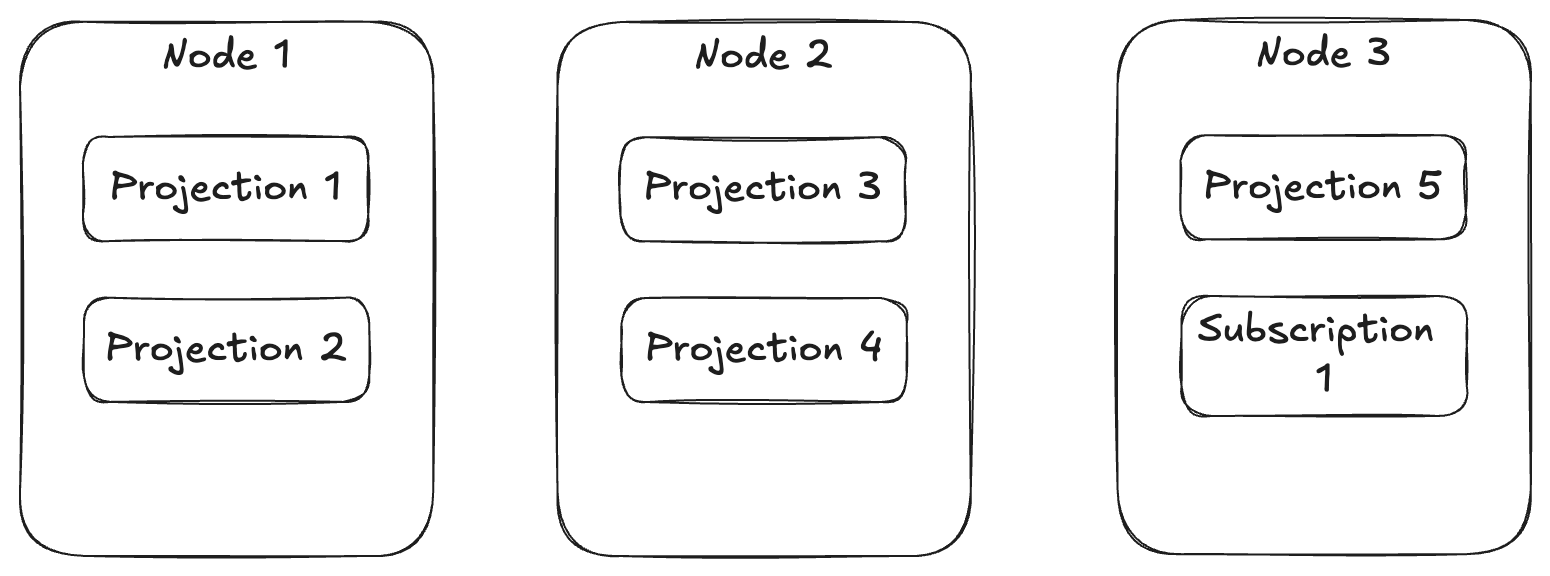
One of the things that Wolverine does for Marten is to provide a first class event subscription function where Wolverine can either asynchronously process events captured by Marten in strict order or forward those events to external messaging brokers. Those first class event subscriptions and the existing asynchronous projection support from Marten can both be executed in only one process at a time because the processing is stateful. As you can probably imagine, it would be very helpful for your system’s scalability and performance if those asynchronous projections and subscriptions could be spread out over an executing cluster of system nodes.
Fortunately enough, Wolverine works with Marten to provide its subscription and projection distribution to assign different asynchronous projections and event subscriptions to run on different nodes so you have a bit more even spread of work throughout your running application cluster like this illustration:
To support that capability above, Wolverine uses a combination of its Leader Election that allows Wolverine to designate one — and only one — node within an application cluster as the “leader” and it’s “agent family” feature that allows for assigning stateful agents across a running cluster of nodes. In the case above, there’s a single agent for every configured projection or subscription in the application that Wolverine will try to spread out over the application cluster.
Just for the sake of completeness, if you have configured Marten for multi-tenancy through separate databases, Wolverine’s projection/subscription distribution will distribute by database rather than by individual projection or subscription + database.
Alright, so here’s the things you might want to know about the subsystem above:
You need to have some sort of Wolverine message persistence configured for your application. You might already be familiar with that for the transactional inbox or outbox storage, but there’s also storage to persist information about the running nodes and agents within your system that’s important for both the leader election and agent assignments
There has to be some sort of “control endpoint” configured for Wolverine to be able to communicate between specific nodes. There is a built in “database control” transport that can act as a fallback mechanism, but all of this back and forth communication works better with transports like Wolverine’s Rabbit MQ integration that can quietly use non-durable queues per node for this intra-node communication. And in case you’re wondering, the Rabbit MQ
Wolverine’s leader election process tries to make sure that there is always a single node that is running the “leader agent” that is monitoring the other running node status and all the known agents
Wolverine’s agent (some other frameworks call these “virtual actors“) subsystem consisting of the IAgentFamily and IAgent interfaces
Building Your Own Agents
Let’s say you have some kind of stateful process in your system that you want to always be running like something that polls against an external system maybe. And then because this is a somewhat common scenario, let’s say that you need a completely separate polling mechanism against different outside entities or tenants.
First, we need to implement this Wolverine interface to be able to start and stop agents in your application:
/// <summary>
///     Models a constantly running background process within a Wolverine
///     node cluster
/// </summary>
public interface IAgent : IHostedService
{
    /// <summary>
    ///     Unique identification for this agent within the Wolverine system
    /// </summary>
    Uri Uri { get; }

    /// <summary>
    /// Is the agent running, stopped, or paused? Not really used
    /// by Wolverine *yet*
    /// </summary>
    AgentStatus Status { get; }
}
IHostedService up above is the same old interface from .NET for long running processes, and Wolverine just adds a Uri and currently unused Status property (that hopefully gets used by “CritterWatch” someday soon for health checks). You could even use the BackgroundService from .NET itself as a base class.
Next, you need a way to tell Wolverine what agents exist and a strategy for distributing the agents across a running application cluster by implementing this interface:
/// <summary>
///     Pluggable model for managing the assignment and execution of stateful, "sticky"
///     background agents on the various nodes of a running Wolverine cluster
/// </summary>
public interface IAgentFamily
{
    /// <summary>
    ///     Uri scheme for this family of agents
    /// </summary>
    string Scheme { get; }

    /// <summary>
    ///     List of all the possible agents by their identity for this family of agents
    /// </summary>
    /// <returns></returns>
    ValueTask<IReadOnlyList<Uri>> AllKnownAgentsAsync();

    /// <summary>
    ///     Create or resolve the agent for this family
    /// </summary>
    /// <param name="uri"></param>
    /// <param name="wolverineRuntime"></param>
    /// <returns></returns>
    ValueTask<IAgent> BuildAgentAsync(Uri uri, IWolverineRuntime wolverineRuntime);

    /// <summary>
    ///     All supported agent uris by this node instance
    /// </summary>
    /// <returns></returns>
    ValueTask<IReadOnlyList<Uri>> SupportedAgentsAsync();

    /// <summary>
    ///     Assign agents to the currently running nodes when new nodes are detected or existing
    ///     nodes are deactivated
    /// </summary>
    /// <param name="assignments"></param>
    /// <returns></returns>
    ValueTask EvaluateAssignmentsAsync(AssignmentGrid assignments);
}
In this case, you can plug custom IAgentFamily strategies into Wolverine by just registering a concrete service in your DI container against that IAgentFamily interface. Wolverine does a simple IServiceProvider.GetServices<IAgentFamily>() during its boostrapping to find them.
As you can probably guess, the Scheme should be unique, and the Uri structure needs to be unique across all of your agents. EvaluateAssignmentsAsync() is your hook to create distribution strategies, with a simple “just distribute these things evenly across my cluster” strategy possible like this example from Wolverine itself:
    public ValueTask EvaluateAssignmentsAsync(AssignmentGrid assignments)
    {
        assignments.DistributeEvenly(Scheme);
        return ValueTask.CompletedTask;
    }
If you go looking for it, the equivalent in Wolverine’s distribution of Marten projections and subscriptions is a tiny bit more complicated in that it uses knowledge of node capabilities to support blue/green semantics to only distribute work to the servers that “know” how to use particular agents (like version 3 of a projection that doesn’t exist on “blue” nodes):
    public ValueTask EvaluateAssignmentsAsync(AssignmentGrid assignments)
    {
        assignments.DistributeEvenlyWithBlueGreenSemantics(SchemeName);
        return new ValueTask();
    }
The AssignmentGrid tells you the current state of your application in terms of which node is the leader, what all the currently running nodes are, and which agents are running on which nodes. Beyond the even distribution, the AssignmentGrid has fine grained API methods to start, stop, or reassign agents.
To wrap this up, I’m trying to guess at the questions you might have and see if I can cover all the bases:
Is some kind of persistence necessary? Yes, absolutely. Wolverine has to have some way to “know” what nodes are running and which agents are really running on each node.
How does Wolverine do health checks for each node? If you look in the wolverine_nodes table when using PostgreSQL or Sql Server, you’ll see a heartbeat column with a timestamp. Each Wolverine application is running a polling operation that updates its heartbeat timestamp and also checks that there is a known leader node. In normal shutdown, Wolverine tries to gracefully mark the current node as offline and send a message to the current leader node if there is one telling the leader that the node is shutting down. In real world usage though, Kubernetes or who knows what is frequently killing processes without a clean shutdown. In that case, the leader node will be able to detect stale nodes that are offline, eject them from the node persistence, and redistribute agents.
Can Wolverine switch over the leadership role? Yes, and that should be relatively quick. Plus Wolverine would keep trying to start a leader election if none is found. But yet, it’s an imperfect world where things can go wrong and there will 100% be the ability to either kickstart or assign the leader role from the forthcoming CritterWatch user interface.
How does the leadership election work? Crudely and relatively effectively. All of the storage mechanics today have some kind of sequential node number assignment for all newly persisted nodes. In a kind of simplified “Bully Algorithm,” Wolverine will always try to send “try assume leadership” messages to the node with the lowest sequential node number which will always be the longest running node. When a node does try to take leadership, it uses whatever kind of global, advisory lock function the current persistence uses to get sole access to write the leader node assignment to itself, but will back out if the current node detects from storage that the leadership is already running on another active node.
Can I extract the Wolverine leadership election for my own usage? Not easily at all, sorry. I don’t have the link anywhere handy, but there is I believe a couple OSS libraries in .NET that implement the Raft consensus algorithm for leader election. I honestly don’t remember why I didn’t think that was suitable for Wolverine though. Leadership election is most certainly not something for the feint of heart.
Summary
I’m not sure how useful this post was for most users, but hopefully it’s helpful to some. I’m sure I didn’t hit every possible question or concern you might have, so feel free to reach out in Discord or comments here with any questions.
Little update since the last check in on Wolverine 5.0. I think right now that Wolverine 5.0 hits by next Monday (October 6th). To be honest, besides documentation updates, the biggest work is just pushing more on the CritterWatch backend this week to see if that forces any breaking changes in the Wolverine internals.
Big improvements and expansion to Wolverine’s interoperability story against NServiceBus, MassTransit, CloudEvents, and whatever custom interoperability folks need to do
A first class Redis messaging transport from the community
Modernization and upgrades to the GCP Pubsub transport
The ability to mix and match database storage with Wolverine for modular monoliths
A bit batch of optimization for the Marten integration including improvements for multi-stream operations as our response to the “Dynamic Boundary Consistency” idea from other tools
The utilization of System.Threading.Channels in place of the TPL DataFlow library
What’s unfortunately out:
Any effort to optimize the cold start times for Marten and Wolverine. Just a bandwidth problem, plus I think this can get done without breaking changes
And we’ll see:
Random improvements for Azure Service Bus and Kafka usage
HTTP improvements for content negotiation and multi-part uploads
Yet more improvements to the “aggregate handler workflow” with Marten to allow for yet more strong typed identifier usage
The items in the 3rd list don’t require any breaking changes, so could slide to Wolverine 5.1 if necessary.
All in all, I’d argue this turned out to be a big batch of improvements with very few breaking API changes and almost nothing that would impact the average user.
We’re targeting October 1st for the release of Wolverine 5.0. At this point, I think I’d like to say that we’re not going to be adding any new features to Wolverine 4.* except for JasperFx Software client needs. And also, not that I have any pride about this, I don’t think we’re going to address bugs in 4.* if those bugs do not impact many people.
Working over some of the baked in Dead Letter Queue administration, which is being done in conjunction with ongoing “CritterWatch” work
I think we’re really close to the point where it’s time to play major release triage and push back any enhancements that wouldn’t require any breaking changes to the public API, so anything not yet done or at least started probably slides to a future 5.* minor release. The one exception might be trying to tackle the “cold start optimization.” The wild card in this is that I’m desperately trying to work through as much of the CritterWatch backend plumbing as possible right now as that work is 100% causing some changes and improvements to Wolverine 5.0
What about CritterWatch?
If you understand why the image above appears in this section, I would hope you’d feel some sympathy for me here:-)
I’ve been able to devote some serious time to CritterWatch the past couple weeks, and it’s starting to be “real” after all this time. Jeffry Gonzalez and I will be marrying up the backend and a real frontend in the next couple weeks and who knows, we might be able to demo something to early adopters in about a month or so. After Wolverine 5.0 is out, CritterWatch will be my and JasperFx’s primary technical focus the rest of the year.
Just to rehash, the MVP for CritterWatch is looking like:
The basic shell and visualization of what your monitored Critter Stack applications are, including messaging
Every possible thing you need to manage Dead Letter Queue messages in Wolverine — but I’d warn you that it’s focused on Wolverine’s database backed DLQ
Monitoring and a control panel over Marten event projections and subscriptions and everything you need to keep those running smoothly in production
First, let’s say that we’re just using Wolverine locally within the current system with a setup like this:
var builder = Host.CreateApplicationBuilder();
builder.Services.AddWolverine(opts =>
{
    // The only thing that matters here is that you have *some* kind of
    // envelope persistence for Wolverine configured for your application
    var connectionString = builder.Configuration.GetConnectionString("postgres");
    opts.PersistMessagesWithPostgresql(connectionString);
});
The only point being that we have some kind of message persistence set up in our Wolverine application because the message or execution scheduling depends on persisted envelope storage.
Wolverine actually does support in memory scheduling without any persistence, but that’s really only useful for scheduled error handling or fire and forget type semantics because you’d lose everything if the process is stopped.
So now let’s move on to simply telling Wolverine to execute a message locally at a later time with the IMessageBus service:
public static async Task use_message_bus(IMessageBus bus)
{
    // Send a message to be sent or executed at a specific time
    await bus.SendAsync(new DebitAccount(1111, 100),
        new(){ ScheduledTime = DateTimeOffset.UtcNow.AddDays(1) });

    // Same mechanics w/ some syntactical sugar
    await bus.ScheduleAsync(new DebitAccount(1111, 100), DateTimeOffset.UtcNow.AddDays(1));

    // Or do the same, but this time express the time as a delay
    await bus.SendAsync(new DebitAccount(1111, 225), new() { ScheduleDelay = 1.Days() });

    // And the same with the syntactic sugar
    await bus.ScheduleAsync(new DebitAccount(1111, 225), 1.Days());
}
In the system above, all messages are being handled locally. To actually process the scheduled messages, Wolverine is as you’ve probably guessed, polling the message storage (PostgreSQL in the case above), and looking for any messages that are ready to be played. Here’s a few notes on the mechanics:
Every node within a cluster is trying to pull in scheduled messages, but there’s some randomness in the timing to keep every node from stomping on each other
Any one node will only pull in a limited “page” of scheduled jobs at a time so that if you happen to be going bonkers scheduling thousands of messages at one time, Wolverine can share the load across nodes and keep any one node from blowing up
The scheduled messages are in Wolverine’s transactional inbox storage with a Scheduled status. When Wolverine decides to “play” the messages, they move to an Incoming status before finally getting marked as Handled when they are successful
When scheduled messages for local execution are “played” in a Wolverine node, they are put into the local queue for that message, so all the normal rules for ordering or parallelization for that queue still apply.
Now, let’s move on to scheduling message delivery to external brokers. Just say you have any external routing rules like this:
using var host = await Host.CreateDefaultBuilder()
    .UseWolverine(opts =>
    {
        opts.UseRabbitMq()
            // Opt into conventional Rabbit MQ routing
            .UseConventionalRouting();
    }).StartAsync();
And go back to the same syntax for sending messages, but this time the message will get routed to a Rabbit MQ exchange:
This time, Wolverine is still using its transactional inbox, but with a twist. When Wolverine knows that it is scheduling message delivery to an outside messaging mechanism, it actually schedules a local ScheduledEnvelope message that when executed, sends the original message to the outbound delivery point. In this way, Wolverine is able to support scheduled message delivery to every single messaging transport that Wolverine supports with a common mechanism.
With idiomatic Wolverine usage, you do want to try to keep most of your handler methods as “pure functions” for easier testing and frankly less code noise due to async/await mechanics. To that end, there’s a couple helpers to schedule messages in Wolverine using its cascading messages syntax:
public IEnumerable<object> Consume(MyMessage message)
{
    // Go West in an hour
    yield return new GoWest().DelayedFor(1.Hours());

    // Go East at midnight local time
    yield return new GoEast().ScheduledAt(DateTime.Today.AddDays(1));
}
The extension methods above would give you the raw message wrapped in a Wolverine DeliveryMessage<T> object where T is the wrapped message type. You can still use that type to write assertions in your unit tests.
There’s also another helper called “timeout messages” that help you create scheduled messages by subclassing a Wolverine base class. This is largely associated with sagas just because it’s commonly a need for timing out saga workflows.
Error Handling
The scheduled message support is also useful in error handling. Consider this code:
using var host = await Host.CreateDefaultBuilder()
    .UseWolverine(opts =>
    {
        opts.Policies.OnException<TimeoutException>().ScheduleRetry(5.Seconds());
        opts.Policies.OnException<SecurityException>().MoveToErrorQueue();

        // You can also apply an additional filter on the
        // exception type for finer grained policies
        opts.Policies
            .OnException<SocketException>(ex => ex.Message.Contains("not responding"))
            .ScheduleRetry(5.Seconds());
    }).StartAsync();
In the case above, Wolverine uses the message scheduling to take a message that just failed, move it out of the current receiving endpoint so other messages can proceed, then retries it no sooner than 5 seconds later (it won’t be real time perfect on the timing). This is an important difference than the RetryWithCooldown() mechanism that is effectively just doing an await Task.Delay(timespan) inline to purposely slow down the application.
As an example of how this might be useful, I’ve had to work with 3rd party systems where users can create a pessimistic lock on a bank account, so any commands against that account would always fail because of that lock. If you can tell that the command failure is because of a pessimistic lock in the exception message, you might tell Wolverine to retry that message an hour later when hopefully the lock is released, but clear out the current receiving endpoint and/or queue for other work that can proceed.
Testing with Scheduled Messaging
We’re having some trouble with the documentation publishing for some reason that we haven’t figured out yet, but there will be docs soon on this new feature.
Finally, on to some new functionality! Wolverine 4.12 just added some improvements to Wolverine’s tracked session testing feature specifically to help you with scheduled messages.
First, for some background, let’s say you have these simple handlers:
public static DeliveryMessage<ScheduledMessage> Handle(TriggerScheduledMessage message)
{
    // This causes a message to be scheduled for delivery in 5 minutes from now
    return new ScheduledMessage(message.Text).DelayedFor(5.Minutes());
}

public static void Handle(ScheduledMessage message) => Debug.WriteLine("Got scheduled message");
And now this test using the tracked session which shows the new first class support for scheduled messaging:
[Fact]
public async Task deal_with_locally_scheduled_execution()
{
    // In this case we're just executing everything in memory
    using var host = await Host.CreateDefaultBuilder()
        .UseWolverine(opts =>
        {
            opts.PersistMessagesWithPostgresql(Servers.PostgresConnectionString, "wolverine");
            opts.Policies.UseDurableInboxOnAllListeners();
        }).StartAsync();

    // Should finish cleanly, even though there's going to be a message that is scheduled
    // and doesn't complete
    var tracked = await host.SendMessageAndWaitAsync(new TriggerScheduledMessage("Chiefs"));

    // Here's how you can query against the messages that were detected to be scheduled
    tracked.Scheduled.SingleMessage<ScheduledMessage>()
        .Text.ShouldBe("Chiefs");

    // This API will try to immediately play any scheduled messages immediately
    var replayed = await tracked.PlayScheduledMessagesAsync(10.Seconds());
    replayed.Executed.SingleMessage<ScheduledMessage>().Text.ShouldBe("Chiefs");
}
And a similar test, but this time where the scheduled messages are being routed externally:
var port1 = PortFinder.GetAvailablePort();
var port2 = PortFinder.GetAvailablePort();

using var sender = await Host.CreateDefaultBuilder()
    .UseWolverine(opts =>
    {
        opts.PublishMessage<ScheduledMessage>().ToPort(port2);
        opts.ListenAtPort(port1);
    }).StartAsync();

using var receiver = await Host.CreateDefaultBuilder()
    .UseWolverine(opts =>
    {
        opts.ListenAtPort(port2);
    }).StartAsync();

// Should finish cleanly
var tracked = await sender
    .TrackActivity()
    .IncludeExternalTransports()
    .AlsoTrack(receiver)
    .InvokeMessageAndWaitAsync(new TriggerScheduledMessage("Broncos"));

tracked.Scheduled.SingleMessage<ScheduledMessage>()
    .Text.ShouldBe("Broncos");

var replayed = await tracked.PlayScheduledMessagesAsync(10.Seconds());
replayed.Executed.SingleMessage<ScheduledMessage>().Text.ShouldBe("Broncos");
Here’s what’s new in the code above:
ITrackedSession.Scheduled is a bit special collection of all activity that happened during the tracked activity that led to messages being scheduled. You can use this just to interrogate what scheduled messages resulted from the original activity.
ITrackedSession.PlayScheduledMessagesAsync() will “play” all scheduled messages right now and return a new ITrackedSession for those messages. This method will immediately execute any messages that were scheduled for local execution and tries to immediately send any messages that were scheduled for later delivery to external transports.
The new support in the existing tracked session feature further extends Wolverine’s already extensive test automation story. This new work was done at the behest of a JasperFx Software client who is quite aggressive in their test automation. Certainly reach out to us at sales@jasperfx.net for any help you might want with your own efforts!
Earlier this week I did a live stream on the upcoming Wolverine 5.0 release where I just lightly touched on the concept for our planned SignalR integration with Wolverine. While there wasn’t that much to show yesterday, a big pull request just landed and I think the APIs and the approach has gelled enough that it’s worth a sneak peak.
First though, the new SignalR transport in Wolverine is being built now to support our planned “CritterWatch” tool shown below:
As it’s planned out right now, the “CritterWatch” server application communicating via SignalR to constantly push updated information to any open browser dashboards about system performance. On the other side of things, CritterWatch users will be able to submit quite a number of commands or queries from the browser to CritterWatch, when will then have to relay commands and queries to the various “Critter Stack” applications being monitored through asynchronous messaging. And of course, we expect the responses or status updates to be constantly flowing from the monitored services to CritterWatch which will then relay information or updates to the browsers, again by SignalR.
Long story short, there’s going to be a lot of asynchronous messaging back and forth between the three logical applications above, and this is where a new SignalR transport for Wolverine comes into play. Having the SignalR transport gives us a standardized way to send a number of different logical messages from the browser to the server and take advantage of everything that the normal Wolverine execution pipeline gives us, including relatively clean handler code compared to other messaging or “mediator” tools, baked in observability and traceability, and Wolverine’s error resiliency. Going back the other way, the SignalR transport gives us a standardized way to publish information right back to the client from our server.
Enough of that, let’s jump into some code. From the integration testing code, let’s say we’ve got a small web app configured like this:
var builder = WebApplication.CreateBuilder();

builder.WebHost.ConfigureKestrel(opts =>
{
    opts.ListenLocalhost(Port);
});

// Note to self: take care of this in the call
// to UseSignalR() below
builder.Services.AddSignalR();
builder.Host.UseWolverine(opts =>
{
    opts.ServiceName = "Server";

    // Hooking up the SignalR messaging transport
    // in Wolverine
    opts.UseSignalR();

    // These are just some messages I was using
    // to do end to end testing
    opts.PublishMessage<FromFirst>().ToSignalR();
    opts.PublishMessage<FromSecond>().ToSignalR();
    opts.PublishMessage<Information>().ToSignalR();
});

var app = builder.Build();

// Syntactic sure, really just doing:
// app.MapHub<WolverineHub>("/messages");
app.MapWolverineSignalRHub();

await app.StartAsync();

// Remember this, because I'm going to use it in test code
// later
theWebApp = app;
With that configuration, when you call IMessageBus.PublishAsync(new Information("here's something you should know")); in your system, Wolverine will be routing that message through SignalR, where it will be received in a client with the default “ReceiveMessage” operation. The JSON delivered to the client will be wrapped with the CloudEvents specification like this:
{
“type”: “information”,
“data”: {
“message”: “here’s something you should know”
}
}
Likewise, Wolverine will expect messages posted to the server from the browser to be embedded in that lightweight CloudEvents compliant wrapper.
We are not coincidentally adding CloudEvents support for extended interoperability in Wolverine 5.0 as well.
For testing, the new WolverineFx.SignalR Nuget will also have a separate messaging transport using the SignalR Client just to facilitate testing, and you can see that usage in some of the testing code:
// This starts up a new host to act as a client to the SignalR
// server for testing
public async Task<IHost> StartClientHost(string serviceName = "Client")
{
    var host = await Host.CreateDefaultBuilder()
        .UseWolverine(opts =>
        {
            opts.ServiceName = serviceName;

            // Just pointing at the port where Kestrel is
            // hosting our server app that is running
            // SignalR
            opts.UseClientToSignalR(Port);

            opts.PublishMessage<ToFirst>().ToSignalRWithClient(Port);

            opts.PublishMessage<RequiresResponse>().ToSignalRWithClient(Port);

            opts.Publish(x =>
            {
                x.MessagesImplementing<WebSocketMessage>();
                x.ToSignalRWithClient(Port);
            });
        }).StartAsync();

    _clientHosts.Add(host);

    return host;
}
And now to show a little Wolverine-esque spin, let’s say that you have a handler being invoked by a browser sending a message through SignalR to a Wolverine server application, and as part of that handler, you need to send a response message right back to the original calling SignalR connection to the right browser instance.
Conveniently enough, you have this helper to do exactly that in a pretty declarative way:
    public static ResponseToCallingWebSocket<WebSocketResponse> Handle(RequiresResponse msg)
        => new WebSocketResponse(msg.Name).RespondToCallingWebSocket();
And just for fun, here’s the test that proves the above code works:
[Fact]
public async Task send_to_the_originating_connection()
{
    var green = await StartClientHost("green");
    var red = await StartClientHost("red");
    var blue = await StartClientHost("blue");

    var tracked = await red.TrackActivity()
        .IncludeExternalTransports()
        .AlsoTrack(theWebApp)
        .SendMessageAndWaitAsync(new RequiresResponse("Leo Chenal"));

    var record = tracked.Executed.SingleRecord<WebSocketResponse>();

    // Verify that the response went to the original calling client
    record.ServiceName.ShouldBe("red");
    record.Message.ShouldBeOfType<WebSocketResponse>().Name.ShouldBe("Leo Chenal");
}
And for one least trick, let’s say you want to work with grouped connections in SignalR so you can send messages to a subset of connected clients. In this case, I went down the Wolverine “Side Effect” route, as you can see in these example handlers:
// Declaring that you need the connection that originated
// this message to be added to the named SignalR client group
public static AddConnectionToGroup Handle(EnrollMe msg)
    => new(msg.GroupName);

// Declaring that you need the connection that originated this
// message to be removed from the named SignalR client group
public static RemoveConnectionToGroup Handle(KickMeOut msg)
    => new(msg.GroupName);

// The message wrapper here sends the raw message to
// the named SignalR client group
public static object Handle(BroadCastToGroup msg)
    => new Information(msg.Message)
        .ToWebSocketGroup(msg.GroupName);
I should say that all of the code samples are taken from our test coverage. At this point the next step is to pull this into our CritterWatch codebase to prove out the functionality. The first thing up with that is building out the server side of what will be CritterWatch’s “Dead Letter Queue Console” for viewing, querying, and managing the DLQ records for any of the Wolverine applications being monitored by CritterWatch.
For more context, here’s the live stream on Wolverine 5:
I’ll be doing a live stream tomorrow (Thursday) August 4th to preview some of the new improvements coming soon with Wolverine 5.0. The highlights are:
The new “Partitioned Sequential Messaging” feature and why you’re going to love this feature that’s going to help make Wolverine based systems much more able to sidestep problems with concurrency
Improvements to the code generation and IoC usage within Wolverine.HTTP
The new SignalR transport and integration, and how we think this is going to make it easier to build asynchronous workflows between web clients and your backend services
More powerful interoperability w/ non-Wolverine services
How the Marten integration with Wolverine is going to be more performant by reducing network chattiness
Some thoughts about improving the code start times for Wolverine and Marten
And of course anything else folks want to discuss on the live stream as well.
Check it out here, and the recording will be up later tomorrow anyway: