Storyteller 5.0 – Streamlined CLI, Netstandard 2.0, and easier debugging

I published the Storyteller 5.0 release last night. I punted on doing any kind of big user interface overhaul for now, and just released the back end improvements on their own with some vague idea that there’d be an improved or at least restyled user interface later this year.

The key improvements are:

  • Netstandard 2.0 support
  • An easier getting started story
  • Streamlined command line usage
  • Easier “F5 debugging” for specifications in your IDE
  • No changes whatsoever to your Fixture code from 4.0

Getting Started with Storyteller 5

Previous versions of Storyteller have been problematic for new users getting started and setting up projects with the right Nuget dependencies. I felt like things got a little better with the dotnet cli, but the enduring problem with that is how few .Net developers seem to be using it or familiar with it. When you use Storyteller 5, you need two dependencies in your Storyteller specification project:

  1. A reference to the Storyteller 5.0 assembly via Nuget
  2. The dotnet-storyteller command line tool referenced as a dotnet cli tool in your project, and that’s where most of the trouble come in.

To start up a new Storyteller 5.0 specification project, first make the directory where you want the project to live. Next, use the dotnet new console command to create a new project with a csproj file and a Program.cs file.

In your csproj file, replace the contents with this, or just add the package reference for Storyteller and the cli tool reference for dotnet-storyteller as shown below:


    netcoreapp2.0
    EXE


Next, we need to get into the entry point to this new console application change the Program.Main() method to activate the Storyteller engine within this new project:

    public class Program
    {
        public static int Main(string[] args)
        {
            return StorytellerAgent.Run(args);
        }
    }

Internally, the StorytellerAgent is using Oakton to parse the arguments and carry out one of these commands:

  ------------------------------------------------------------------------------
    Available commands:
  ------------------------------------------------------------------------------
       agent -> Used by dotnet storyteller to remote control the Storyteller specification engine
         run -> Executes Specifications and Writes Results
        test -> Try to start and warmup the system under test for diagnostics
    validate -> Use to validate specifications for syntax errors or missing grammars or fixtures
  ------------------------------------------------------------------------------

If you execute the console application with no arguments like this:

|> dotnet run

It will execute all the specifications and write the results to a file named “stresults.htm.”

You can customize the running behavior by passing in optional flags with the pattern dotnet run -- run --flag flagvalue like this example that just writes the results file to a different location:

|> dotnet run -- run Arithmetic -r ./artifacts/results.htm

If you’re not already familiar with the dotnet cli, what’s going on here is that anything to the right of the “–” double dash is considered to be the command line arguments passed into your application’s Main() method. The “run” argument tells the StorytellerAgent that you actually want to run specifications and it’s unfortunately not redundant and very much mandatory if you want to customize how Storyteller runs specifications.

See the Storyteller 5.0 quickstart project for a working example.

Running the Storyteller Specification Editor

Assuming that you’ve got the cli tools reference to dotnet-storyteller and you’ve executed `dotnet restore` at least once (compiling through VS.Net or Rider does this for you), the only thing you need to do to launch the specification editor tool is this from the command line:

|> dotnet storyteller

F5 Debugging

Debugging complicated Storyteller specifications has been its Achille’s Heel from the very beginning. You can always attach a debugger to a running Storyteller process, but that’s clumsy (quicker in Rider than VS.Net, but still). As a cheap but effective improvement in v5, you can run a single specification from the command line with this signature:

|> dotnet run -- run "Suite1 / ChildSuite1 / Specification Name"

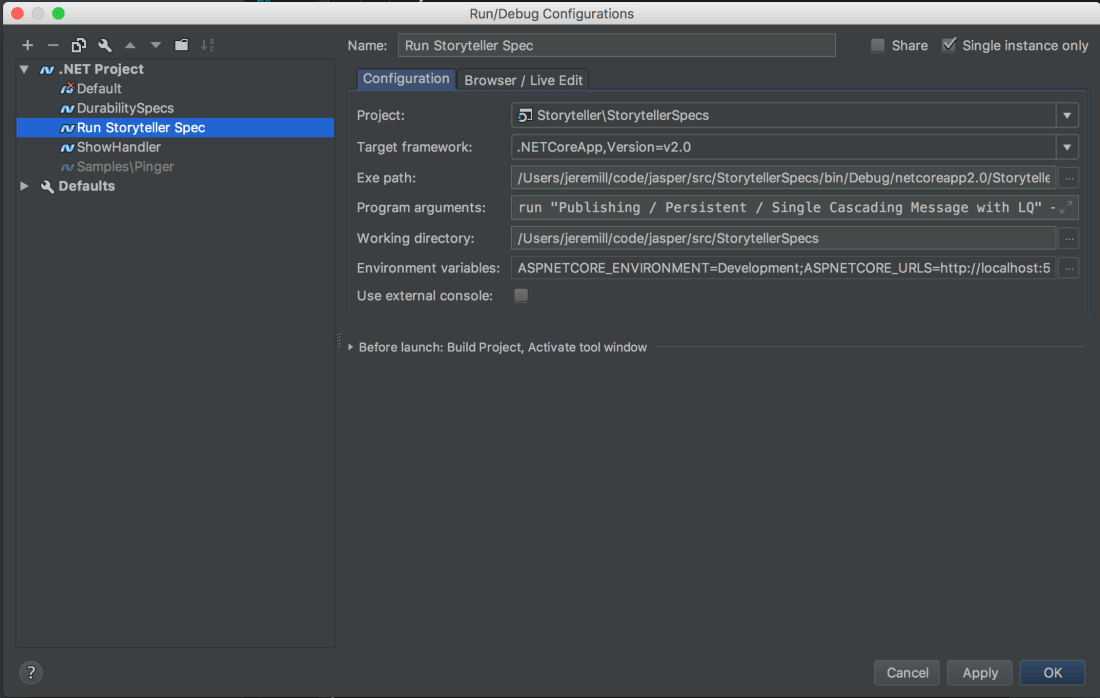
This is admittedly pretty ugly, but remember that you can tell either Rider or VS.Net to pass arguments to your console application when your press F5 to run an application in debug mode. I utilize this quite a bit in Jasper development to troubleshoot individual specifications. Here’s what the configuration looks like for this in Rider:


RunSingleSpec

See the “Program arguments” specifically. Once the path to the specification is configured, I can just hit F5 and jump right into a debugging session running just that specification.

We looked pretty hard at supporting the dotnet test tooling so you could run Storyteller specifications from either Visual Studio.Net’s or Rider/ReSharper’s test runners, but all I could think about after trying to reverse engineer xUnit’s tooling around that was a certain Monty Python scene.

Introducing BlueMilk: StructureMap’s Replacement & Jasper’s Special Sauce

BlueMilk is the codename for a new project that’s an outgrowth from our new Jasper framework. Specifically, BlueMilk is extracting the runtime code generation and compilation “Special Sauce” support code that’s in Jasper now into a stand alone library. Building upon the runtime code generation, the logical next step was to make BlueMilk into the intended successor to the venerable StructureMap project as a fast, minimal IoC container on its own, but also supports inlining the service activation code into Jasper’s message and HTTP request handlers.

I think these are the key points for BlueMilk:

  1. Support the essential functionality and configuration API of StructureMap to be an offramp for folks invested in StructureMap that want to move to a faster option in their Netstandard2 applications
  2. Align much closer with the ASP.Net team’s DI compliance behavior. In some cases like object lifecycles, this is a breaking change with StructureMap’s traditional behavior and I don’t entirely agree with their choices, but .Net is their world and all us scrappy community OSS authors are just living in it.
  3. Easy integration into ASP.Net Core applications by directly supporting their abstractions (IServiceCollection, IServiceProvider, ServiceDescriptor, IServiceScope, etc.) out of the box.
  4. Trade in some of the runtime flexibility that StructureMap had in favor of better performance (and fewer ways for users to get themselves in a tangle)
  5. Expose the runtime code generation and compilation model (originally built for Marten, but we took it out later) in a separate library because a few folks have expressed some interest in having just that without using Jasper

There’s a preliminary Nuget up this morning (0.1.0) that supports some of StructureMap’s behavior and all of the ASP.Net Core compliance. You can use a container like this:

// Idiomatic StructureMap
var container = new Container(_ =>
{
    _.For<IWidget>().Use<AWidget>().Named("A");
    
    // StructureMap's old type scanning
    _.Scan(s =>
    {
        s.TheCallingAssembly();
        s.WithDefaultConventions();
    });
});

var widget = container.GetInstance<IWidget>();

// ASP.Net Core DI compatible
IServiceProvider container2 = new Container(_ =>
{
    _.AddTransient<IWidget, AWidget>();
    _.AddSingleton(new MoneyWidget());
});

var widget2 = container.GetService<IWidget>();


My Thoughts on Project Scope

I only started working on BlueMilk by itself over the holidays, so it’s not like anything is truly set in concrete, but this list is what I think the scope would be. My philosophy here is to jettison many of the features in StructureMap that cause internal complexity, performance issues, or generate loads of user questions and edge case bugs.

Core Functionality

  1. All ASP.Net Core DI compliance — lifecycle management (note that it’s different than StructureMap’s lifecycle definitions), object disposal, basic service resolution, open generic support, dealing with enumerable types
  2. StructureMap’s basic support for service location
  3. Nested Containers (scoped container)
  4. Type Scanning from StructureMap
  5. Service resolution by name
  6. Lazy & Func<T> resolution
  7. WhatDoIHave() and other diagnostics — no IoC or any other kind of framework author should release a tool without something like this for the sake of their own sanity
  8. Auto-find missing registrations — one of my biggest gripes about the built in container

Later

  1. Inline dependencies
  2. AutoFactory support — I think this could work out very well with the code generation model
  3. Construction Policies
  4. Some of StructureMap’s attribute configuration

Leaving Behind unless someone else really wants to build *and* help support it

  • Interception — Maybe. I’m not super excited about supporting it
  • Child containers and profiles. Utter nightmare to support. Edge case hell. Crazy amount of complexity internally. The only way we use them in work is for per-test isolation, and we can live without them in that case
  • Changing configuration at runtime (Container.Configure()).
  • Passing arguments at runtime. One of the biggest sources of heartburn for me supporting StructureMap. I think the better autofactory support in BlueMilk could be a far better alternative anyway.

Why do this?

One of my fervent goals with Jasper from the very beginning was to maximize performance to the point where its throughput was barely distinguishable from laboriously writing highly optimized bespoke code by hand. I wanted users to have all the productivity benefits of a good framework that takes care of common infrastructure needs without sacrificing performance. I know that some folks will disagree, but I still think there’s ample reasons to use an IoC container to handle quite a bit of the object composition, service activation, object scoping, and service cleanup.

If you allow that assumption of IoC usage, that left me with a couple options and thoughts:

  • I think it’s hugely disadvantageous to .Net frameworks to have to support multiple IoC containers. My experience is that basically every single framework abstraction I have ever seen for an IoC container has been problematic. If you are going to support multiple IoC containers in your application framework, my experience from FubuMVC and from watching the unfolding consternation over ASP.Net Core’s DI compliance is to restrict your framework from making all but a handful of assumptions about IoC container behavior.
  • I could just use my own StructureMap container because I understand it front to back and it fits the way that I personally work and all the .Net developers in my shop know it. The only problem there is that StructureMap has fallen behind in terms of performance. I think I have a decent handle on what it would take to reverse that with a potential 5.0, but I’m just not up for doing the work, I’m exhausted keeping up with user questions, and I really want to get out of supporting StructureMap.
  • I tried a couple times to just use the new built-in ASP.Net Core DI tool, but it’s extremely limited and I was getting frustrated with how many things were missing and how much more hand holding it took to be usable compared to StructureMap.

If you saw my Jasper’s Special Sauce post last week, you know that we are already using the service registration information to opt into inlining all the object construction and disposal directly into the generated message handlers whenever possible. The code that did that was effectively the beginning of a real IoC container, so it wasn’t that big of a jump to pulling all of that code into its own library and building it into the IoC tool that I wanted a theoretical StructureMap 5.0 to be.


Jasper’s Roslyn-Powered “Special Sauce”

As a follow on to my introductory post on the new OSS Jasper messaging framework, here’s an explanation of what’s different about Jasper’s internal approach compared to existing .Net frameworks as well as an argument to why I think it’s a better way.

This is an admittedly long blog post with a lot of background contextual information first. If you’re only here for the “Jasper does crazy stuff with Roslyn” part of it, just skip to the “Special Sauce” section.

In this post, I’m talking about:

  • What makes a tool a framework vs. a library
  • A discussion about the runtime architecture of current .Net frameworks
  • Design challenges for middleware strategies
  • Jasper’s “Special Sauce” approach and why I think it’s a new, better way

What do you mean when you say “Framework?”

First off, Jasper is unmistakably and unapologetically a framework and not just a library. What’s the difference? A library is something your code uses to perform tasks, with the assumption being that your application code is in control and the library code is passive. The Marten persistence tool I work on, logging libraries like NLog or log4net are all examples of library projects. Frameworks on the other hand, follow the Hollywood Principle to handle common workflow events and dealing with technical infrastructure while calling your code just for the actual application logic. Besides Jasper, ASP.Net MVC, NancyFx, or MediatR in the .Net world or Angular.js or Ember.js in the JS world are examples of frameworks (I personally don’t think it’s a clear cut distinction for React on whether or not it’s a framework or a library).

In the case of Jasper, in the process of handling an incoming message it:

  • Logs the arrival of the message
  • Determines from the raw message byte[] array what .Net message type it represents and what deserialization strategy it should use
  • Deserializes the raw data into an actual .Net object that the application code expects
  • Calls any configured middleware for that message type, before finally passing the message to all of the known application handlers for that message type
  • Dispose any IDisposable objects that were created during the message processing
  • Finally, logs the completion, successful or not, and sends out any outgoing messages that “cascaded” from handling the original message if it’s successful
  • If a message fails, process error handling policies to either retry the message, put it back on the queue, stick it into the dead letter queue, or retry it after a delay.

Using Jasper as your messaging framework allows you to focus on just the work that’s specific to your application and let Jasper handle the tedious chores.

The State of the Art in .Net

When a messaging framework needs to process an incoming command or an HTTP framework handles an HTTP request, the common steps are something like this:

  1. Route the incoming data to the proper HTTP route or message type handler
  2. Translate the incoming data to the form that the application handler needs to consume (a message type or a DTO type passed into an HTTP request handler)
  3. Build or find the application specific message or HTTP handlers, along with any other related services
  4. Call the application specific handlers
  5. After the message or HTTP request is complete, do any necessary clean up by disposing services that were created for the request. Stuff like closing and disposing open connections to the database used in handling the message or request.

For right now, let’s focus on 3.) and 4.) up above. We need some way to both discover message handlers or HTTP controllers in the application code and then to execute those handlers or controllers at runtime. I’ve seen and used two different general mechanisms to tackle these issues. The first is to require framework developers to write all their message handlers with some kind of standard interface like this one below:

public interface IHandler
{
    Task Process(T message, Context context);
}

It’s simple to understand, and makes a lot of the underlying mechanics in your framework easier. This strategy is also easy to combine with an IoC container to handle by handler discovery with something like StructureMap’s ConnectImplementationsToTypesClosing type scanning convention. Likewise, using an IoC tool makes object creation, scoping, and cleanup relatively simple. It does have the downside of being a little bit intrusive into application code and it’s not quite as flexible as the next alternative.

The other way to call application code is to use some sort of Reflection to dynamically call handlers. This has the advantage of greater flexibility in how the application specific handlers can be created and possibly reducing coupling from the application specific code to the framework infrastructure. ASP.Net MVC is an example of this approach, as was the earlier FubuMVC project I led earlier. The FubuMVC “hello world” endpoint that would just return text as “string/plain” when the “/” route is called looked like this:

    public class HomeEndpoint
    {
        public string Index()
        {
            return "Hello, world.";
        }
    }

The advantage here is that the code can be subjectively “cleaner,” by which I mean to be an absence of framework artifacts like marker interfaces, mandatory base classes, fluent interfaces, or mandatory attributes. This approach by necessity depends on naming conventions that are frequently derided as “magic” by some folks and when used well, praised as “clean” code by people like me. There’s room in the world for both types of folks.

Another significant advantage is being able to be flexible on the method signatures and even use techniques like “method injection” as ASP.Net Core MVC supports with its [FromServices] attribute in this sample below:

public IActionResult About([FromServices] IDateTime dateTime)
{
    ViewData["Message"] = "Currently on the server the time is " + dateTime.Now;

    return View();
}

From a technical perspective, the challenge is in how you invoke the application handlers if there is no mandatory interface or base class. Traditionally, your options are:

  • Just use Reflection. It’s slow, but it’s the simplest to use
  • Emit dynamic assemblies with IL at runtime. The early versions of StructureMap used that, and I thought it was excruciating. It’s laborious to code and not very approachable for other contributors to your project. I think you get serious neckbeard points for using this successfully.
  • Use .Net Expressions to dynamically generate and compile Lambda’s. StructureMap does this, and I’m guessing that most other .Net IoC tools do as well. AutoMapper does as well. This model is more approachable than IL, but it’s still not something that most .Net developers can — or would want to — use productively. It also creates horrendously awful stack traces in exception messages. If you do use this technique, definitely check out FastExpressionCompiler.

What about middleware?

By this point, any .Net framework worth its salt is going to support what I used to call the Russian Doll Model of nested handlers with something like ASP.Net Core’s (or OWIN’s) concept of middleware. The purpose is to allow developers to move common, cross-cutting concerns like exception handling, validation, or security to middleware and out of each individual message handler or HTTP controller method. Used judiciously, this can make application code simpler and more robust by simply having fewer things for developers to remember to do. Used badly — and trust me, I’ve seen it used horrendously with my very own FubuMVC “behaviors” model — copious usage of middleware will make your application sluggish, potentially hard to understand, and devilishly hard to debug.

One of the common usages of middleware is to manage transactional boundaries between one or more nested handlers like my shop did several years ago in this post with FubuMVC and RavenDb. A sequence diagram of a typical framework’s internal runtime workflow would look something like this:
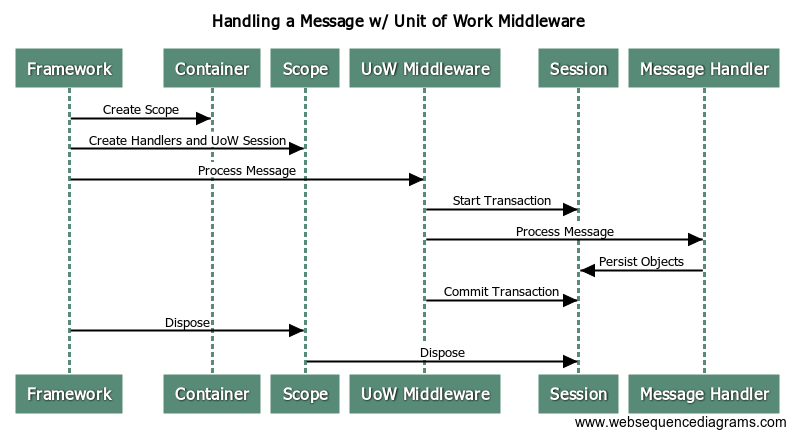
UoWwithMiddleware

Most .Net frameworks that I’m aware of will use a scope (nested container in StructureMap parlance, IServiceScope in ASP.Net Core, LifetimeScope in Autofac) per message or HTTP request. Using a container scope allows the framework to easily control the scoping of services like a Marten IDocumentSession or an EF DbContext that should be shared by all other services participating in the logical transaction. The container scope usage also allows the framework to clean up resources by calling Dispose() on all the IDisposable objects created during the processing of the message.

As a framework author and as a user of a framework, you’ve got a couple challenges with middleware:

  • Understanding what middleware is applicable to each message type or HTTP route. Sooner or later, it’s going to be necessary to visualize the layers of middleware to debug some problem or other
  • Properly scoping services that are shared between different middleware or the message handlers. ASP.Net Core does this by sharing the container scope as part of the HttpContext and doing a lot of service location at different places in the runtime. FubuMVC and some versions of NServiceBus build the middleware objects and the handlers wrapped inside of them per HTTP request or message being processed. I can tell you from experience helping folks using StructureMap to write ASP.Net Core middleware that their approach can be problematic. The FubuMVC approach was sluggish and did way too many object allocations in memory.
  • The stack traces can be epically bad and noisy, making developer troubleshooting more difficult than it should be
  • Hopefully, the container scope and handler object creation isn’t that expensive, but it’s still object allocations that could be potentially eliminated

Jasper’s Special Sauce

Jasper was largely conceived as a next generation replacement for the earlier FubuMVC framework, and takes a lot of lessons and bias — both positive and negative — from our usage of FubuMVC over the past decade. Roughly speaking, we wanted to support a superset of the message handler signatures (and HTTP endpoint signatures too, but that’s a subject for another day), with the addition of support for method injection of dependencies and support for static methods or classes as well for perfectly stateless handlers. We also wanted to keep roughly the same kind of compose-ability with per message type middleware we had with FubuMVC, but this time be able to provide much more visibility to how the middleware was composed at runtime for easier debugging. At the same time, we knew that FubuMVC suffered from performance problems from the sheer number of objects it created and destroyed in its runtime pipeline. For my personal sanity, I knew that we needed to make the exception stack traces coming out of Jasper have a lot less noise.

Very early on, we theorized that we could heavily use the forthcoming runtime code generation and compilation capability in Roslyn to write the tightest possible “glue” code at runtime that handles the intermediation between the Jasper framework, the associated middleware, and the application handlers.

The actual message handlers activated and executed by Jasper’s internal pipeline all inherit from this base class:

    public abstract class MessageHandler
    {
        // Error handling policies for the message type
        // and other configuration kind of things that
        // the Handle method might need
        public HandlerChain Chain { get; set; }

        // This method actually processes the incoming Envelope
        public abstract Task Handle(IInvocationContext input);
    }

Removing the actual middleware noise cleaned up the exception stack traces dramatically. Surfacing the generated code up to users serves as a cheap, but effective visualization of what’s going on internally for developers. Finally, we were sure that this strategy would greatly improve our performance by drastically reducing memory allocations and method delegations in our internals. And wouldn’t you know it, the NServiceBus team who had earlier borrowed FubuMVC’s “Behavior” model, made the same kind of change to using generated code (but with Expression’s) and reported an absurd improvement in their measured performance. Jasper uses a similar approach to NServiceBus 6, but I think we go much farther and that our code generation model will be much more approachable to outsiders than having to deal with Expressions.

In the next section I’ll show what the code generation does, and talk about how to write the fastest possible code with Jasper.

Sample Messaging Scenario

To see the code generation in action, let’s say that we need to handle a CreateItemCommand message, and save a corresponding ItemCreatedEvent document using Marten as our backing store.

The command and event objects look like this:

    public class CreateItemCommand
    {
        public string Name { get; set; }
    }

    public class ItemCreatedEvent
    {
        public Item Item { get; set; }
    }

In its crudest form, the message handler in Jasper using a traditional class instance that takes all of its dependencies in via constructor injection:

    public class CreateItemHandler
    {
        private readonly IDocumentStore _store;

        // store is the Marten IDocumentStore
        public CreateItemHandler(IDocumentStore store)
        {
            _store = store;
        }

        public async Task Handle(CreateItemCommand command)
        {
            using (var session = _store.LightweightSession())
            {
                var item = new Item {Name = command.Name};
                session.Store(item);
                await session.SaveChangesAsync();
            }
        }
    }

At runtime, Jasper will generate this code for the actual MessageHandler:

    public class ShowHandler_CreateItemCommand : Jasper.Bus.Model.MessageHandler
    {
        private readonly IDocumentStore _documentStore;

        public ShowHandler_CreateItemCommand(IDocumentStore documentStore)
        {
            _documentStore = documentStore;
        }


        public override Task Handle(Jasper.Bus.Runtime.Invocation.IInvocationContext context)
        {
            var createItemHandler 
                = new ShowHandler.CreateItemHandler(_documentStore);
            var createItemCommand = (ShowHandler.CreateItemCommand)context.Envelope.Message;
            return createItemHandler.Handle(createItemCommand);
        }

    }

Notice anything missing here from the “typical” framework pipeline I talked about in previous sections? That missing thing is any trace whatsoever of an IoC container at runtime. It turns out that the very fastest IoC container for object resolution is no container. With that in mind, any time that Jasper can figure out from the underlying service registrations how to do all the object construction and disposal per message inside of the generated Handle() method, it will not use the IoC container whatsoever. While there are plenty of cases that Jasper can’t quite handle yet and has to resort to generate code that does service location, we’re working very hard to close those gaps.

There’s a couple other things to note in the code up above:

  • The MessageHandler objects are compiled and created at runtime, and they are singleton scoped inside the application
  • The IDocumentStore dependency is known to be a singleton in the service registrations, so it is injected into the MessageHandler during its construction so there doesn’t have to be any kind of service lookup for that at runtime

Jasper can also support method injection of service dependencies in the message handler actions, so we could just pull in IDocumentStore as a method argument and simplify the code a little bit. Once you do that though, the ShowHandler class is entirely stateless, so let’s go a little bit farther and just make ShowHandler a static class like so:

    public static class CreateItemHandler
    {
        public static async Task Handle(CreateItemCommand command, IDocumentStore store)
        {
            using (var session = store.LightweightSession())
            {
                var item = new Item {Name = command.Name};
                session.Store(item);
                await session.SaveChangesAsync();
            }
        }
    }

Okay, the “static” keyword is a little bit of noise, but we got rid of the private field for the store and the constructor function, so it’s a little bit tighter. Using that handler above will result in Jasper generating this code:

    public class ShowHandler_CreateItemCommand : Jasper.Bus.Model.MessageHandler
    {
        private readonly IDocumentStore _documentStore;

        public ShowHandler_CreateItemCommand(IDocumentStore documentStore)
        {
            _documentStore = documentStore;
        }


        public override Task Handle(Jasper.Bus.Runtime.Invocation.IInvocationContext context)
        {
            var createItemCommand = (ShowHandler.CreateItemCommand)context.Envelope.Message;
            return ShowHandler.CreateItemHandler.Handle(createItemCommand, _documentStore);
        }

    }

The key thing up above being that switching to a static method in our message handler means one less object allocation for the message handler objects.

Finally, the one single bit of middleware that we built to prove out this whole strategy just happens to be some Marten transactional support. There are other ways to apply the middleware, but for right now I’ll just decorate the method with a [MartenTransaction] attribute from the Jasper.Marten library to apply that middleware handling around the handler. For fun, let’s even say that the act of handling the command emits a new event message that will be “cascaded” as an outgoing message when the original message has been completely processed. To do that, just return the event from your handler method. If the middleware is handling the call to IDocumentSession.SaveChangesAsync()/RollbackAsync() for me, I can simplify the message handler code in my application down even further to this now:

    public class CreateItemHandler
    {
        [MartenTransaction]
        public static ItemCreatedEvent Handle(
            CreateItemCommand command, 
            IDocumentSession session)
        {
            var item = new Item {Name = command.Name};
            session.Store(item);

            return new ItemCreatedEvent{Item = item};
        }
    }

If you notice, we’re able to use a synchronous method signature here instead of being forced to repetitively all return Task.CompletedTask; every which way because Jasper is smart enough to handle those mechanics for us in its code generation. It’s even smart enough to (imperfectly) switch from a method with an “async Task” signature to a method that can return a Task from the last line of code or “Task.CompletedTask.”

The handler above, with the Marten transaction middleware wrapped in, gives us this compiled code:

    public class ShowHandler_CreateItemCommand : Jasper.Bus.Model.MessageHandler
    {
        private readonly IDocumentStore _documentStore;

        public ShowHandler_CreateItemCommand(IDocumentStore documentStore)
        {
            _documentStore = documentStore;
        }


        public override async Task Handle(Jasper.Bus.Runtime.Invocation.IInvocationContext context)
        {
            var createItemCommand = (ShowHandler.CreateItemCommand)context.Envelope.Message;
            using (var documentSession = _documentStore.OpenSession())
            {
                var outgoing1 = ShowHandler.CreateItemHandler.Handle(createItemCommand, documentSession);
                context.EnqueueCascading(outgoing1);
                await documentSession.SaveChangesAsync();
            }

        }

    }

So, yeah, there’s some magic going on with conventions that some folks absolutely hate, but if it’s easy to get at the generated code internally and you can just read and even debug into that, are conventions really that scary anymore?

Our hope is that the code generation model leads to applications written with Jasper being just as performant as purely bespoke code, but with far less effort on the developer’s part. We think that our runtime codegen model gives Jasper the best of all possible worlds by allowing for very clean, flexible code without sacrificing anything in terms of performance.

It’s a ways away, but I’m well underway in the process of ripping the code generation support out into its own library under the BlueMilk moniker and growing that into a streamlined, performant replacement for StructureMap as well. I’ll blog next week about the vision and maybe the timeline for BlueMilk by itself.

Introducing Jasper — Asynchronous Messaging for .Net

IMG_1017

For my take on when you would use a tool like Jasper, see How Should Microservice’s Communicate?

“Jasper” is the codename for a new messaging and command execution framework that my shop has been building out to both integrate with and eventually replace our existing messaging infrastructure as we migrate applications to Netstandard 2.0, ASP.Net Core, and yes, adopt a microservices architecture. While we’ve been working very hard on it over the past 6 months, I’ve been hesitant to talk about it too much online. That ends today with the release of the first usable alpha (0.5.0) to Nuget today.

We’ve already done a great deal of work and it’s fairly feature rich, but I’m really just hoping to start drumming up some community interest and getting whatever feedback I can. Production-worthy versions of Jasper should hopefully be ready this spring.

Okay, so what problems does it solve over just using queues?

It’s ostensibly about NServiceBus (for right now, let’s call that the most similar competitor to Jasper), but Sure, You Can Just Use RabbitMQ sums it up perfectly. Jasper already supports functionality to:

Why would you want to use Jasper over [fill in the blank tool]?

I hate this part of talking about any kind of OSS activity or choice, but I know it’s coming, so let’s get to it:

  • Jasper’s execution pipeline is leaner than any other .Net framework that I’m aware of, and we’re theorizing that this will lead to Jasper having better performance, less memory utilization, less GC thrashing, and easier to understand stacktraces than other .Net frameworks. My very next blog post will be showing off our “special sauce” usage of Roslyn code generation and runtime compilation that makes this all possible.
  • Jasper requires much less coupling from your application code to the framework, especially compared to the typical .Net framework that requires you to implement their own interfaces or base classes, tangle your code with fluent interfaces, or force you to spray attributes all over your code. Some of you aren’t going to like that, but my preference is always cleaner code. There’s plenty of room in the world for both of us;)
  • It’s FOSS
  • Jasper plays nicely with ASP.Net Core and even comes with recipes for quick integration into ASP.Net Core applications

Ping/Pong Hello World

The obligatory “hello, world” project in messaging is to send a “ping” message from one service to another, with the expectation that the receiving system will send back a “pong.” So let’s start by saying we have a couple message types like these:

    public class PingMessage
    {
        public string Name { get; set; }
    }

    public class PongMessage
    {
        public string Name { get; set; }
    }

Note: Jasper does not require you to share .Net types between systems, but it’s the easiest way to get started so here you go.

Starting with the “Ponger” service (if the code is cut off in the blog post, it’s all in this project on GitHub), just follow these steps:

  1. “dotnet new console” to create a new console app
  2. Add a Nuget reference to Jasper.CommandLine that will also bring in the core Jasper Nuget as well

From there, the entire “Ponger” service is the following code:

    class Program
    {
        static int Main(string[] args)
        {
            return JasperAgent.Run(args, _ =>
            {
                _.Logging.UseConsoleLogging = true;

                _.Transports.LightweightListenerAt(2601);
            });
        }
    }

    public class PingHandler
    {
        public object Handle(PingMessage message)
        {
            ConsoleWriter.Write(ConsoleColor.Cyan, "Got a ping with name: " + message.Name);

            var response = new PongMessage
            {
                Name = message.Name
            };

            // Send a Pong response back to the original sender
            return Respond.With(response).ToSender();
        }
    }

Now, moving on to the “Pinger” service. Follow the same steps to start a new .Net console project and add a reference to the Jasper.CommandLine Nuget.

From there, we can utilize ASP.Net Core’s support for background services to send a new ping message every second:

    public class PingSender : BackgroundService
    {
        private readonly IServiceBus _bus;

        public PingSender(IServiceBus bus)
        {
            _bus = bus;
        }

        protected override Task ExecuteAsync(CancellationToken stoppingToken)
        {
            int count = 1;

            return Task.Run(async () =>
            {
                while (!stoppingToken.IsCancellationRequested)
                {
                    Thread.Sleep(1000);

                    await _bus.Send(new PingMessage
                    {
                        Name = "Message" + count++
                    });
                }
            }, stoppingToken);
        }
    }

Next, we need a simple message handler that receives the pong replies and writes the receipt to the console output:

    // Handles the Pong responses
    public class PongHandler
    {
        public void Handle(PongMessage message)
        {
            ConsoleWriter.Write(ConsoleColor.Cyan, "Got a pong back with name: " + message.Name);
        }
    }

Now, there’s a little more work to configure the Pinger application:

    class Program
    {
        static int Main(string[] args)
        {
            return JasperAgent.Run(args, _ =>
            {
                // Way too verbose logging suitable
                // for debugging
                _.Logging.UseConsoleLogging = true;

                // Listen for incoming messages
                // at port 2600
                _.Transports.LightweightListenerAt(2600);

                // Using static routing rules to start
                _.Publish.Message()
                    .To("tcp://localhost:2601");

                // Just adding the PingSender
                _.Services.AddSingleton<IHostedService, PingSender>();
            });
        }
    }

If I start up the Pinger application with “dotnet run” at the command line, I get output like this:

Running service 'Pinger'
Application Assembly: Pinger, Version=1.0.0.0, Culture=neutral, PublicKeyToken=null
Hosting environment: Production
Content root path: /Users/user/code/jasper/src/Pinger/bin/Debug/netcoreapp2.0/
Listening for loopback messages
Listening at tcp://YOURMACHINE:2600/

Active sending agent to ws://default/
Active sending agent to tcp://localhost:2601/
Active sending agent to loopback://replies/
Active sending agent to loopback://retries/
Application started. Press Ctrl+C to shut down.

Which, because the Ponger application hasn’t been started, will start spitting out messages like:

Failure trying to send a message batch to tcp://localhost:2601/

And after enough failures trying to send messages, you’ll finally see this:

Sending agent for tcp://localhost:2601/ is latched

Now, after starting the Ponger service with its own “dotnet run,” you should see the following output back in the Pinger console output after Jasper detects that the downstream system for the Ping messages is available:

Sending agent for tcp://localhost:2601/ has resumed

And finally, a whole bunch of console messages about ping and pong messages zipping back and forth.

Other Common Questions

  • Is this in production yet? Yes, a super, duper early version of Jasper is in production in a low volume system.
  • Is it ready for production usage? No, it’s not really proven out yet in real usage. I think we’ll be able to start converting applications to Jasper this month, so it hopefully won’t be long. The sooner that folks poke and prod it, then supply feedback, the faster it’s ready to go.
  • What .Net frameworks does it support? Netstandard 2.0 only.
  • Where’s the code? On GitHub.
  • Are there any docs yet? Yeah, but there’s plenty of room for improvement on the Jasper website.
  • Where can I ask questions or just make fun of this thing? There’s a Gitter room ready
  • What about the license? The permissive MIT license.
  • Is it just you? Nope, several of my colleagues have contributed code, ideas, and feedback so far.
  • Do you want more contributors? Hell, yeah. The more the merrier.
  • Why roll your own? See the first section of this post. We’re not starting from scratch by any means, otherwise I don’t think we would have opted to build something brand new.
  • What’s with the boring name? It’s my hometown, it’s easy to remember, and it can’t possibly offend anyone like “fubu” did.
  • What’s the story with IoC integration? Uh, yeah, it’s StructureMap 4.5 only just at the moment, but that’s a much longer discussion for another blog post. A huge design goal of Jasper is to try to minimize the usage of an IoC container outside of the initial bootstrapping and application shutdown, so I’m not sure you’re going to care all that much.

What’s next?

I’m actually slowing down on new development on Jasper for awhile, but I’ll be flooding the interwebs with blog posts on Jasper while I also plug holes in the documentation. The next big thing at work is to start the trial conversion of one of our applications to Jasper. For longer term items in our backlog, just see the GitHub issue list. The next development task is probably going to have to be replicating the integration we’ve done with Postgresql and Marten for Sql Server.

RabbitMQ, Kafka, and Azure Service Bus integrations will follow later this year.

My OSS Plans for 2018

I’m going back to work tomorrow after a 2+ week break for the holidays. As quite a bit of my official job and self identity as a developer revolves around developing OSS tools, I’m taking a minute to write up what my goals and agenda is for the new year.

I’m looking to start pacing myself much better over the next year. I had the brilliant idea last year that I was going to try to sprint through and “finish” all the outstanding OSS work I had on my plate and spend the next year coasting. Long story short, that turned out to be a really bad idea that left me pretty burned out near the end of the year. This year I’m giving up on the idea that any of my OSS tools will ever truly be “done” and treat OSS work like an on and off again long distance race rather than a series of sprints.

So here’s my theoretical OSS work this year:

  • Jasper — My immediate goal is to get an alpha released this week to start seeing if there’s any community interest. Immediately after that, my team will start doing a trial conversion of some of our applications at work to use Jasper. I’m not sure if this is going to be a big, OSS deal like FubuMVC in terms of my effort, or just something we built for work.
  • Marten — I mostly just want to keep the ball rolling, whittle down the open issue list, and keep the issue list under 25 (a single page in GitHub) open issues at any time. There are plenty of new features in the backlog to do this year, but I’d like to avoid any kind of huge efforts like the 2.0 release last summer.
  • BlueMilk — This is definitely inconsistent with reducing my workload, but I’m kinda, sorta well underway with pulling the runtime codegen & compilation “special sauce” out of Jasper and into its own library. Oh, and it’s also meant to be a streamlined replacement for StructureMap. Way more on this one later.
  • Storyteller — I actually have a 5.0 alpha published that I’m using personally with some engine improvements and better specification debugging. Depending on time and my ambition level, I’ll either kick that out as is or I might try for a semi-rebuild of the UI to more modern React/Redux usage and possibly try to restyle it from being Bootstrap based to Material UI instead. That’s mostly for the learning experience with client side tooling to keep up with what our development teams face on their projects.
  • StructureMap — I’ve been trying for years to get out of supporting StructureMap. I have no intentions of doing any additional work on StructureMap, but I’ll at least try to keep up on user questions and pull requests.
  • Oakton — I feel like this is “done,” with the possible exception of supporting async commands
  • Alba — The only thing definite is to adapt an outstanding pull request and bump it to 2.0 and only target ASP.Net Core 2.0. Alba didn’t take off like I thought it would and it’s been a struggle to get any of our internal teams to use it much, so it’s probably not going much farther.
  • FubuMVC — It’s been “dead” for several years as a public OSS project, but I’ve been supporting it and even enhancing since. My only goal this year with FubuMVC is to make progress within our shop on replacing it with ASP.Net Core MVC on the HTTP side and Jasper on the messaging side.


OT: My personal ranking of the Star Wars movies

I think I need to see The Last Jedi at least a couple more times to be certain (my son & I loved it), but I see these rankings popping up everywhere and here’s my list. Queue the comic book guy voice…

  1. Empire Strikes Back — This is still a no brainer for the huge reveal, the constant feeling of tension during the escape through the asteroid field, the Hoth battle, and Yoda. My all time favorite movie experience was seeing this as a 6yo. We couldn’t get tickets for the early show, so my parents took me to play mini golf and my first trip to Taco Bell to pass time before the movie. I can’t even begin to tell you how cool that was to see that as a late movie. I told my Dad about how much I remember that night a couple years ago. He looked at me funny for a second and said all he remembered was having to dig through the car seats to find enough loose change to pay for the night.
  2. A New Hope — C’mon, you just can’t beat the one that started it all. Remember too, this was actually a little better move before the prequels kind of ruined the back story of Vader and Obi Wan. My second favorite movie experience was seeing the original movie at the Webb City drive in a couple summers later with a cooler of grape welch’s soda (that sounds nasty now, but as a kid…)
  3. The Last Jedi — No spoilers, but I thought it was great overall. I get the criticism that maybe it dragged a bit in the middle, but there were several good scenes in the middle too. I thought there were definitely callbacks to Empire Strikes Back, but the outcomes were very different and sometimes unexpected. It didn’t feel as derivative as The Force Awakens. Really surprised by how good Mark Hamill was in the movie. My daughter is only 8 mos old, but there’s definitely going to be a year she goes as Rey for Halloween
  4. Rogue One — The last third of it is the best battle sequence in the whole series. I’m nerdy enough that I enjoyed spotting all the easter eggs. Loved Alan Tudyk as the droid, but he’s still “Wash” to me.
  5. The Force Awakens — Loved it, just liked Rogue One and the new movie a little better. My favorite scene was the initial reveal of the Millenium Falcon.
  6. Return of the Jedi — This would have been a better movie if he’s stayed with the Wookies instead of the Ewoks, but oh well. It was a blast in the theater at the time.
  7. Revenge of the Sith — There were a handful of action scenes that were good. Maybe less of the super annoying dialogue than the other prequels.
  8. Attack of the Clones — Actually going to say that this was a much better movie in the IMAX release when they had to cut a lot of the “Anakin whines” dialogue.
  9. The Phantom Menace — Duel of the Fates and I still like the drag racing scene. The dialogue was atrocious and the plot was weak. I remember reading spoilers online before it came out about the Midi-chlorians and thinking that was so stupid that it couldn’t possibly be true, but there it was.

Automated Test Pyramid in our Typical Development Stack

Let’s start by making the statement that automating end to end, full stack tests against a non trivial web application with any degree of asynchronous behavior is just flat out hard. My shop has probably over done it with black box, end to end tests using Selenium in the past and it’s partially given automated testing a bad name to the point where many teams are hesitant to try it. As a reaction to those experiences, we’re trying to convince our teams to rebalance our testing efforts away from writing so many expensive, end to end tests and unit tests that overuse mock objects to writing far more intermediate level integration tests that provide a much better effort to reward ratio.

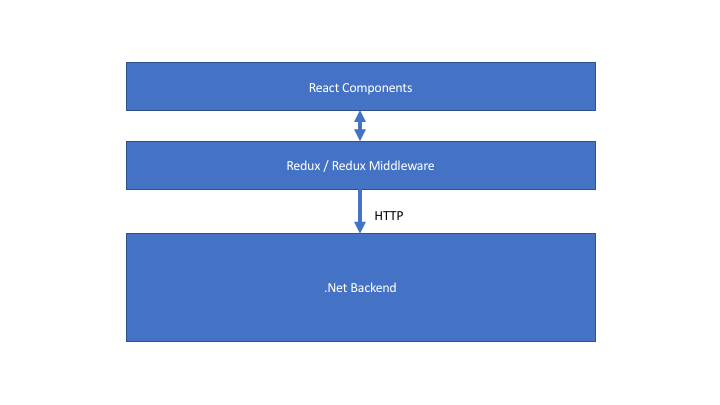
As part of that effort, consider our theoretical, preferred technical stack for new web application development consisting of a React/Redux front end, an ASP.Net Core application running on the web server, and some kind of database. The typical Microsoft layered architecture (minus the obligatory cylinder for the database that I just forgot to add) would look like this:

Slide1

Now, let’s talk about how we would want to devise our automated testing strategy for this technical stack (our test pyramid, if you will). First though, let me state some of my philosophy around automated testing:

  • I think that the primary purpose of automated testing is to try to find and remove problems in your code rather than try to prove that the system works perfectly. That’s actually an important argument because it’s a prerequisite for accepting white box testing — which frequently tends to be a much more efficient approach — as a valid approach compared to only accepting end to end, black box tests.
  • The secondary purpose of automated tests is to act as a regression test cycle that makes it “safe” for a team to continuously evolve or extend the codebase. That usage as a regression cycle is highly dependent upon the automated tests being fast, reliable, and not too brittle when the system is changed. The big bang, end to end Selenium based tests tend to fall down on all three of those criteria.
  • In most cases, you want to try to pick the testing approach that gives you the fastest feedback cycle while still telling you something useful

Here’s more on what I  think makes for a successful test automation strategy.

Now, to make that more concrete in regards to our technical stack shown above, I’d recommend:

  • Writing unit tests directly against the React components using something like Enzyme where that’s valuable. My personal approach is to make most of my React components pretty dumb and hopefully just be pure function components where you might not worry about tests, but I think that’s a case by case decision. As an aside, I think that React is easily the most testable user interface tooling I’ve ever used and maybe the first one I’ve ever used that took testability so seriously.
  • Write unit tests with Mocha or Jest directly against the Redux reducers. This removes problems in the user interface state logic.
  • Since there is coupling between your Redux store and the React components, I would strongly suggest some level of integration testing between the Redux tore and the React components, especially if you depend on transformations within the react-redux wiring. I thought I got quite a bit of value out of doing that in my Storyteller user interface, and it should be even better swapping out in-browser testing with Karma in favor of using Enzyme for the React components.
  • Continue to write unit tests with xUnit tests against elements of the .Net code wherever that makes sense, with the caveat being that if you find yourself writing tests with mock objects that seem to be just duplicating the implementation of the real code, it’s time to switch to an integration test. Here’s my thoughts and guidance for staying out of trouble with mock objects. Some day, I’d like to go through and rewrite my old CodeBetter-era posts on testability design, but that’s not happening any time soon.
  • Intermediate level integration testing against HTTP endpoints using Alba (or something similar), or testing message handling, or even integration testing of a service within the application using its dependencies. I’m assuming the usage of any kind of backing database within these tests. If these tests involve a lot of data setup, I’d personally recommend switching from xUnit to Storyteller where it’s easier to deal with test data state and the test lifecycle. The key here is to remove problems that occur between the .Net code and the backing database in a much faster way than you could ever possibly do with end to end, Selenium-based tests.
  • Write a modicum of black box, end to end tests with Selenium just to try to find and prevent integration errors between the entire stack. The key here isn’t to eliminate these kinds of tests altogether, but rather to rebalance our efforts toward more efficient mechanisms wherever we can.

The big thing that’s missing in that bullet list above is some kind of testing that can weed out problems that arise in the interaction and integration of the React/Redux front end and the .Net middle tier + the backing database. Tomorrow I’ll drop a follow up blog post with an experimental approach to using Storyteller to author data centric, subcutaneous tests from the Redux store layer down through the backing database as an alternative to writing so many functional tests with Selenium driving the front end.

A Tangential Rant about Selenium

First off, I have nothing against Selenium itself and other than the early diamond dependency hell before it ilmerged Newtonsoft.Json (it’s always Newtonsoft’s fault) and various browser updates breaking it. I’ve had very few issues with the Selenium library by itself. That being said, every so often I’ll have an interaction with a tester at work who thinks that automated testing begins and ends with writing Selenium scripts against a running application that drives me up the wall. Like clockwork, I’ll spend some energy trying to talk about issues like data set up, using a testing DSL tool like Cucumber or my own Storyteller to make the specs more readable, and worrying about how to keep the tests from being too brittle and they’ll generally ignore all of that because the Selenium tutorials make it seem so easy.

The typical Selenium tutorial tends to be simplistic and gives newbies a false sense about how difficult automated testing is and what it involves. Working through a tutorial on Selenium that requires you to control some kind of contact form, then post it to the server and check the values on the next page without any kind of asynchronous behavior and then saying that you’re ready to do test automation against real systems is like saying you know how to play chess because you know how the horse-y guy moves on the board.


Publish / Subscribe Messaging in our Ecosystem

Long story short, several of my colleagues and I are building a new framework for managing asynchronous messaging between .Net services with the codename “Jasper” as a modernized replacement for our existing FubuMVC based messaging infrastructure. Once I get a good couple weeks of downtime during the holidays, I’ll be making the first big public alpha nuget of Jasper and start blogging up a storm about the project, but for right now, here’s this post about Jasper’s intended dynamic subscription model.

As part of our larger effort at work to move toward a microservices architecture, some of us did a big internal presentation last week about the progress so far in our new messaging infrastructure we intend to use next year as we transition to Netstandard2 and all the modern .Net stuff. I went over my time slot before we could talk about our proposal for how we plan to handle publish/subscribe messaging and service discovery. I promised this post in the hopes of getting some feedback.

The Basic Architecture

Inside of our applications, when we need to publish or send a message to other systems, we would use some code like this:

public Task SendMessage(IServiceBus bus)
{
    // In this case, we're sending an "InvoiceCreated"
    // message
    var @event = new InvoiceCreated
    {
        Time = DateTime.UtcNow,
        Purchaser = "Guy Fieri",
        Amount = 112.34,
        Item = "Cookbook"
    };

    // Mandatory that there is subscribers for this message
    return bus.Send(@event);

    // or send the message to any subscribers for this type
    // of message, but don't enforce the existence of any
    // subscribers
    return bus.Publish(@event);
    
}

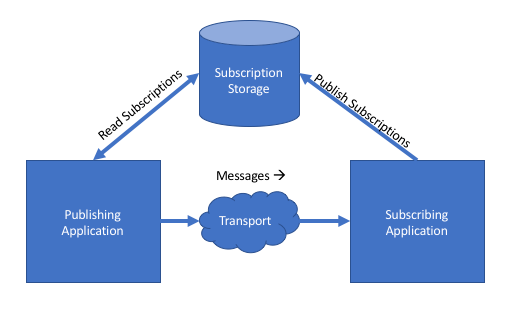
The system publishing messages itself doesn’t need to know or even how to send that message to whatever the downstream system is. The infrastructure code underneath bus.Send() knows how to look up any registered subscribers for the “InvoiceCreated” event message in some kind of subscription storage and route the message accordingly.

The basic architecture is shown below:

subscriptions

Just to make this clear, there’s no technical reason why the “subscription storage” has to be a shared resource — and therefore a single point of failure — between the systems.

Now that we’ve got the barebones basics, here are the underlying problems we’re trying to solve to make that diagram above work in real life.

The Problem Statement

Consider a fairly large scale technical ecosystem composed of many services that need to work together by exchanging messages in an asynchronous manner. You’ve got a couple challenges to consider:

  • How do the various applications “know” where and how to send or publish messages?
  • How do you account for the potential change in message payloads or representations between systems?
  • How could you create a living document that accurately describes how information flows between the systems?
  • How can you add new systems that need to publish or receive messages without having to do intrusive work on the existing systems to accomodate the new system?
  • How might you detect mismatches in capabilities between all the systems without having to just let things blow up in production?

Before I lay out our working theory about how we’ll do all of the above in our development next year, let’s talk about the downsides of doing all of that very badly. When I was still wet behind the ears as a developer, I worked at a very large manufacturing company (one of the “most admired” companies in the US at the time) that had an absolutely wretched “n-squared” problem where integration between lots of applications was done in an ad hoc manner with more or less hard coded, one off mechanisms between applications. Every time we needed a new integration, we had to effectively do all new work and break into all of the applications involved in the new data exchange.

I survived that experience with plenty of scars and I’m sure many of you have similar experiences. To solve this problem going forward, my shop has come up with the “dynamic subscription” model (the docs in that link are a bit out of date) in our forthcoming “Jasper” messaging framework.

Our Proposed Goals and Approach

A lot of this is already built out today, but it’s not in production yet and now’s a perfect time for feedback (hint, hint colleagues of mine). The primary goals in the Jasper approach is to:

  • Eliminate any need for a central broker or any other kind of single point of failure
  • Reduce direct coupling and between services
  • Make it easy to update, browse, or delete subscriptions
  • Provide tooling to validate the subscriptions across services
  • Allow developers to quickly visualize how messages flow in our ecosystem between senders and receivers

Now, to put this into action. First, each application should declare the messages it needs to subscribe to with code like this:

    public class MyAppRegistry : JasperRegistry
    {
        public MyAppRegistry()
        {
            // Override where you want the incoming messages
            // to be sent.
            Subscribe.At("tcp://server1:2222");

            // Declare which messages this system wants to 
            // receive
            Subscribe.To();
            Subscribe.To();
        }
    }

Note: the “JasperRegistry” type fulfills the same role for configuring a Jasper application as the WebHostBuilder and Startup classes do in ASP.Net Core applications.

When the application configured by the “MyAppRegistry” shown above is bootstrapped, it calculates its subscription requirements that include:

  • The logical name of the message type. By default this is derived from the .Net type, but doesn’t have to be. We use the logical name to avoid forcing you to share an assembly with the DTO message types
  • All of the representations of the message type that this application understands and can accept. This is done to enable version messaging between our applications and to enable alternative serialization or even custom reading/writing strategies later
  • The server address where the upstream applications should send the messages. We’re envisioning that this address will be the load balancer address when we’re hosting on premises in a single data center, or left blank for when we get to jump to cloud hosting when we’ll do some additional work to figure out the network address of the subscriber that’s most appropriate within the data center where the sender is hosted.

At deployment time, whenever a service is going to be updated, our theory is that you’ll have a step in your deployment process that will publish the subscription requirements to the proper subscription storage. If you’re using the built in command line support, and your Jasper application compiles to an executable called “MyApp.exe,” you could use this command line signature to publish subscriptions:

MyApp.exe subscriptions publish

At this point, we’re working under the assumption that we’ll be primarily using Consul as our subscription storage mechanism, but we also have a Postgresql-backed option as well. We think that Consul is a good fit here because of the way that it won’t create a single point of failure while also allowing us to replicate the subscription information between nodes through its own gossip protocol.

Validating Subscriptions

To take this capability farther, Jasper will allow you to declare what messages are published by a system like so:

    public class MyAppRegistry : JasperRegistry
    {
        public MyAppRegistry()
        {
            Publish.Message();
            Publish.Message();
            Publish.Message();
        }
    }

Note: You can also use an attribute directly on the published message types if you prefer, or use a convention for the braver.

When a Jasper application starts up, it combines the declaration of published message types with the known representations or message versions found in the system, and combines that information with the subscription requirements into what Jasper calls the “ServiceCapabilities” model (think of this as Swagger for Jasper messaging, or OpenAPI just in case Darrel Miller ever reads this;)).

Again, if your Jasper application compiles through dotnet publish to a file called “MyApp.exe”, you’ll get a couple more command line functions. First, to dump a JSON representation of the service to a file system folder, you can do this:

MyApp.exe subscriptions export --directory ~/subscriptions

My thinking here was that you could have a Git repository where all the services export their service capabilities at deployment time, because, that would enable you to use this command later:

MyApp.exe subscriptions validate --file subscription-report.json

The command above would read in all the service capability files in that directory, and analyze all the known message publishing and subscriptions to create a report with:


  1. All the valid message routes from sender to receiver by message type, the address of the receiver, and the representation or version of the message
  2. Any message types that are subscribed to, but not published by any service
  3. Message types that are published by one or more services, but not subscribed to by any other system
  4. Invalid message routing through mismatches in either accepted or published versions or transport mismatches (like if the sender can send messages only through TCP, but the receiver can only receive via HTTP)

Future Work

I thought we were basically done with this feature, but it’s not in production yet and we did come up with some additional items or changes before we go live:

  • Build a subscription control panel that’ll be a web front end that allows you to analyze or even edit subscriptions in the subscription storage
  • Publish the full service capabilities to the subscription storage (we only publish the subscriptions today)
  • Get a bit more intelligent with Consul and how we would use message routing if running nodes of the named services are hosted in different data centers
  • Create the idea of message “ownership,” as in “only this system should be processing this command message type”
  • Some kind of cache busting in the running Jasper nodes to refresh the subscription information in memory whenever the subscription storage changes

Marten 2.4.0 — now plays nicer with others

I was able to push a Marten 2.4.0 release and updated documentation yesterday with several bug fixes and some new small, but important features. The key additions are:

  1. Opening up a Marten session with a existing native Npgsql connection and/or transaction. When you do this, you can also direct Marten whether or not it “owns” the transaction lifecycle and whether or not Marten is responsible for committing or rolling back the transaction on IDocumentSession.SaveChanges(). Since this was a request from one of the Particular Software folks, I’m assuming you’ll shortly see Marten-backed saga persistence in NServiceBus soon;-)
  2. Opening a Marten session that enlists in the current TransactionScope. Do note that this feature is only available when either targeting the full .Net framework (> .Net 4.6) or Netstandard 2.0.
  3. Ejecting a document from a document session. Other folks have asked for that over time, but strangely enough, it got done quickly when I wanted it for something I was building. Weird how it works that way sometimes.
  4. Taking advantage of Marten’s schema management capabilities to register “feature schema objects” for additional database schema objects.

I don’t know the timing, but there were some new features that got left out because I got impatient to push this release, and we’ve had some recent feature requests that aren’t too crazy. Marten will return next in “2.5.0.”


Choosing Persistence Tooling, 2017 Edition

A couple years ago I wrote a long post title My Thoughts on Choosing and Using Persistence Tools about my personal decision tree on how I choose database and persistence tooling if left to my own devices.

This has been a common topic at work lately as our teams need to select persistence or database tooling for various projects in our new “microservice” strategy (i.e., don’t build more stuff into our already too large systems from here on out). As a lazy way of creating blog content, I thought I’d share the “guidance” that my team published a couple months back — even though it’s already been superseded a bit by the facts on the ground.

We’ve since decided to scale back our usage of Postgresql in new projects (for the record, this isn’t because of any purely technical reasons with Postgresql or Marten), but I think we’ve finally got some consensus to at least move away from a single centralized database in favor of application databases and improve our database build and test automation, so that’s a win. As for my recommendations on tooling selection, it looks like I’m having to relent on Entity Framework in our ecosystem due to developer preferences and familiarity.


Databases and Persistence

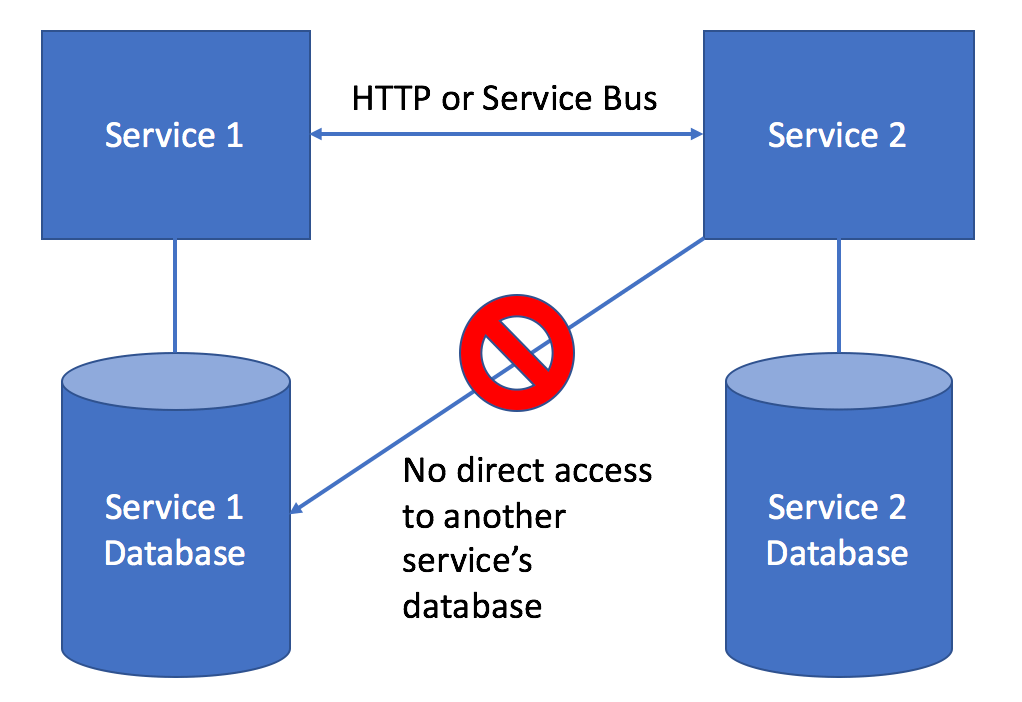
Most services will need to have some sort of persistent state, and that’s usually going to be in the form of a database. Even before considering which database engine or persistence approach you should take in your microservice, the first piece of advice is to favor application specific databases that are completely owned and only accessed by your microservice. 

The pattern of data access between services and databases is reflected by this diagram:

application-database

As much as possible, we want to avoid ever sharing a database between applications because of the implicit, tight coupling that creates between two or more services. If your service needs to query information that is owned by another service, favor using either exposing HTTP services from the upstream service or using the request/reply feature of our service bus tools.

Ideally, the application database for a microservice should be:

  • An integrated part of the microservice’s continuous integration and deployment pipeline. The microservice database should be built out by the normal build script for your microservice so that brand new developers can quickly be running the service from a fresh clone of the codebase.
  • Versioned together with any application code in the same source control repository to establish a strong link between the application code and database schema structure
  • Quick to tear down and rebuild from scratch or through incremental migrations

Database and Persistence Tooling Options

The following might be a lie. Like any bigger shop that’s been around for awhile, we’ve got some of everything (NHibernate, raw ADO.net, sproc’s, a forked copy of PetaPoco, etc.)

The two most common approaches in our applications is either:

  1.     Using Dapper as a micro-ORM to access Sql Server
  2.     Using Marten to treat Postgresql as a document database – slowly, but surely replacing our historical usages of RavenDb. 

Use Marten if your service data is complex or naturally hierarchical. If any of these things are true about your service’s persisted domain model, we recommend reaching for Marten:

  • Your domain model is hierarchical and a single logical entity used within the system would have to be stored across multiple tables in a relational database. Marten effectively bypasses the need to map a domain model to a relational database
  • There’s any opportunity to stream JSON data directly from the database to HTTP response streams to avoid the performance hit of using serializers, AutoMapper like tools, or ORM mapping layers
  • You expect your domain model to change rapidly in the future
  • You opt to use event sourcing to persist some kind of long running workflow

Choose Dapper + Sql Server if:

  • Your domain model is going to closely match the underlying database table structure, with simple CRUD-intensive systems being a good example.
  • Definitely use a more relational database approach if the application involves reporting functionality – but you can also do that with Marten/Postgresql
  • Your service will involve set-based logic that is more easily handled by relational database operations

If it feels like your service doesn’t fit into the decision tree above, opt for Sql Server as that has been our traditional standard.

Other choices may be appropriate on a case by case basis. Raw ADO.Net usage is not recommended from a productivity standpoint. Heavy, full featured ORM’s like Entity Framework or NHibernate are also not recommended by the architecture team. If you feel like EF would be advantageous for your domain model, then Marten might be an alternative with less friction.

The architecture team strongly discourages the usage of stored procedures in most circumstances.

For additional resources and conversation,