Publish / Subscribe Messaging in our Ecosystem

Long story short, several of my colleagues and I are building a new framework for managing asynchronous messaging between .Net services with the codename “Jasper” as a modernized replacement for our existing FubuMVC based messaging infrastructure. Once I get a good couple weeks of downtime during the holidays, I’ll be making the first big public alpha nuget of Jasper and start blogging up a storm about the project, but for right now, here’s this post about Jasper’s intended dynamic subscription model.

As part of our larger effort at work to move toward a microservices architecture, some of us did a big internal presentation last week about the progress so far in our new messaging infrastructure we intend to use next year as we transition to Netstandard2 and all the modern .Net stuff. I went over my time slot before we could talk about our proposal for how we plan to handle publish/subscribe messaging and service discovery. I promised this post in the hopes of getting some feedback.

The Basic Architecture

Inside of our applications, when we need to publish or send a message to other systems, we would use some code like this:

public Task SendMessage(IServiceBus bus)
{
    // In this case, we're sending an "InvoiceCreated"
    // message
    var @event = new InvoiceCreated
    {
        Time = DateTime.UtcNow,
        Purchaser = "Guy Fieri",
        Amount = 112.34,
        Item = "Cookbook"
    };

    // Mandatory that there is subscribers for this message
    return bus.Send(@event);

    // or send the message to any subscribers for this type
    // of message, but don't enforce the existence of any
    // subscribers
    return bus.Publish(@event);
    
}

The system publishing messages itself doesn’t need to know or even how to send that message to whatever the downstream system is. The infrastructure code underneath bus.Send() knows how to look up any registered subscribers for the “InvoiceCreated” event message in some kind of subscription storage and route the message accordingly.

The basic architecture is shown below:
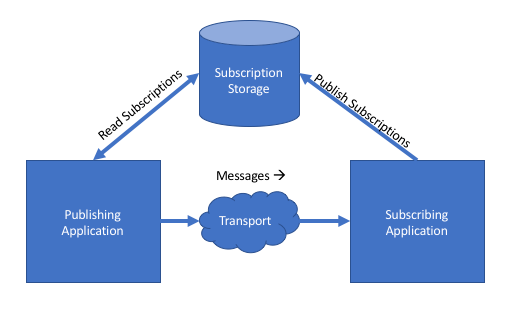
subscriptions

Just to make this clear, there’s no technical reason why the “subscription storage” has to be a shared resource — and therefore a single point of failure — between the systems.

Now that we’ve got the barebones basics, here are the underlying problems we’re trying to solve to make that diagram above work in real life.

The Problem Statement

Consider a fairly large scale technical ecosystem composed of many services that need to work together by exchanging messages in an asynchronous manner. You’ve got a couple challenges to consider:

  • How do the various applications “know” where and how to send or publish messages?
  • How do you account for the potential change in message payloads or representations between systems?
  • How could you create a living document that accurately describes how information flows between the systems?
  • How can you add new systems that need to publish or receive messages without having to do intrusive work on the existing systems to accomodate the new system?
  • How might you detect mismatches in capabilities between all the systems without having to just let things blow up in production?

Before I lay out our working theory about how we’ll do all of the above in our development next year, let’s talk about the downsides of doing all of that very badly. When I was still wet behind the ears as a developer, I worked at a very large manufacturing company (one of the “most admired” companies in the US at the time) that had an absolutely wretched “n-squared” problem where integration between lots of applications was done in an ad hoc manner with more or less hard coded, one off mechanisms between applications. Every time we needed a new integration, we had to effectively do all new work and break into all of the applications involved in the new data exchange.

I survived that experience with plenty of scars and I’m sure many of you have similar experiences. To solve this problem going forward, my shop has come up with the “dynamic subscription” model (the docs in that link are a bit out of date) in our forthcoming “Jasper” messaging framework.

Our Proposed Goals and Approach

A lot of this is already built out today, but it’s not in production yet and now’s a perfect time for feedback (hint, hint colleagues of mine). The primary goals in the Jasper approach is to:

  • Eliminate any need for a central broker or any other kind of single point of failure
  • Reduce direct coupling and between services
  • Make it easy to update, browse, or delete subscriptions
  • Provide tooling to validate the subscriptions across services
  • Allow developers to quickly visualize how messages flow in our ecosystem between senders and receivers

Now, to put this into action. First, each application should declare the messages it needs to subscribe to with code like this:

    public class MyAppRegistry : JasperRegistry
    {
        public MyAppRegistry()
        {
            // Override where you want the incoming messages
            // to be sent.
            Subscribe.At("tcp://server1:2222");

            // Declare which messages this system wants to 
            // receive
            Subscribe.To();
            Subscribe.To();
        }
    }

Note: the “JasperRegistry” type fulfills the same role for configuring a Jasper application as the WebHostBuilder and Startup classes do in ASP.Net Core applications.

When the application configured by the “MyAppRegistry” shown above is bootstrapped, it calculates its subscription requirements that include:

  • The logical name of the message type. By default this is derived from the .Net type, but doesn’t have to be. We use the logical name to avoid forcing you to share an assembly with the DTO message types
  • All of the representations of the message type that this application understands and can accept. This is done to enable version messaging between our applications and to enable alternative serialization or even custom reading/writing strategies later
  • The server address where the upstream applications should send the messages. We’re envisioning that this address will be the load balancer address when we’re hosting on premises in a single data center, or left blank for when we get to jump to cloud hosting when we’ll do some additional work to figure out the network address of the subscriber that’s most appropriate within the data center where the sender is hosted.

At deployment time, whenever a service is going to be updated, our theory is that you’ll have a step in your deployment process that will publish the subscription requirements to the proper subscription storage. If you’re using the built in command line support, and your Jasper application compiles to an executable called “MyApp.exe,” you could use this command line signature to publish subscriptions:

MyApp.exe subscriptions publish

At this point, we’re working under the assumption that we’ll be primarily using Consul as our subscription storage mechanism, but we also have a Postgresql-backed option as well. We think that Consul is a good fit here because of the way that it won’t create a single point of failure while also allowing us to replicate the subscription information between nodes through its own gossip protocol.

Validating Subscriptions

To take this capability farther, Jasper will allow you to declare what messages are published by a system like so:

    public class MyAppRegistry : JasperRegistry
    {
        public MyAppRegistry()
        {
            Publish.Message();
            Publish.Message();
            Publish.Message();
        }
    }

Note: You can also use an attribute directly on the published message types if you prefer, or use a convention for the braver.

When a Jasper application starts up, it combines the declaration of published message types with the known representations or message versions found in the system, and combines that information with the subscription requirements into what Jasper calls the “ServiceCapabilities” model (think of this as Swagger for Jasper messaging, or OpenAPI just in case Darrel Miller ever reads this;)).

Again, if your Jasper application compiles through dotnet publish to a file called “MyApp.exe”, you’ll get a couple more command line functions. First, to dump a JSON representation of the service to a file system folder, you can do this:

MyApp.exe subscriptions export --directory ~/subscriptions

My thinking here was that you could have a Git repository where all the services export their service capabilities at deployment time, because, that would enable you to use this command later:

MyApp.exe subscriptions validate --file subscription-report.json

The command above would read in all the service capability files in that directory, and analyze all the known message publishing and subscriptions to create a report with:


  1. All the valid message routes from sender to receiver by message type, the address of the receiver, and the representation or version of the message
  2. Any message types that are subscribed to, but not published by any service
  3. Message types that are published by one or more services, but not subscribed to by any other system
  4. Invalid message routing through mismatches in either accepted or published versions or transport mismatches (like if the sender can send messages only through TCP, but the receiver can only receive via HTTP)

Future Work

I thought we were basically done with this feature, but it’s not in production yet and we did come up with some additional items or changes before we go live:

  • Build a subscription control panel that’ll be a web front end that allows you to analyze or even edit subscriptions in the subscription storage
  • Publish the full service capabilities to the subscription storage (we only publish the subscriptions today)
  • Get a bit more intelligent with Consul and how we would use message routing if running nodes of the named services are hosted in different data centers
  • Create the idea of message “ownership,” as in “only this system should be processing this command message type”
  • Some kind of cache busting in the running Jasper nodes to refresh the subscription information in memory whenever the subscription storage changes
Marten 2.4.0 — now plays nicer with others

I was able to push a Marten 2.4.0 release and updated documentation yesterday with several bug fixes and some new small, but important features. The key additions are:

  1. Opening up a Marten session with a existing native Npgsql connection and/or transaction. When you do this, you can also direct Marten whether or not it “owns” the transaction lifecycle and whether or not Marten is responsible for committing or rolling back the transaction on IDocumentSession.SaveChanges(). Since this was a request from one of the Particular Software folks, I’m assuming you’ll shortly see Marten-backed saga persistence in NServiceBus soon;-)
  2. Opening a Marten session that enlists in the current TransactionScope. Do note that this feature is only available when either targeting the full .Net framework (> .Net 4.6) or Netstandard 2.0.
  3. Ejecting a document from a document session. Other folks have asked for that over time, but strangely enough, it got done quickly when I wanted it for something I was building. Weird how it works that way sometimes.
  4. Taking advantage of Marten’s schema management capabilities to register “feature schema objects” for additional database schema objects.

I don’t know the timing, but there were some new features that got left out because I got impatient to push this release, and we’ve had some recent feature requests that aren’t too crazy. Marten will return next in “2.5.0.”


Choosing Persistence Tooling, 2017 Edition

A couple years ago I wrote a long post title My Thoughts on Choosing and Using Persistence Tools about my personal decision tree on how I choose database and persistence tooling if left to my own devices.

This has been a common topic at work lately as our teams need to select persistence or database tooling for various projects in our new “microservice” strategy (i.e., don’t build more stuff into our already too large systems from here on out). As a lazy way of creating blog content, I thought I’d share the “guidance” that my team published a couple months back — even though it’s already been superseded a bit by the facts on the ground.

We’ve since decided to scale back our usage of Postgresql in new projects (for the record, this isn’t because of any purely technical reasons with Postgresql or Marten), but I think we’ve finally got some consensus to at least move away from a single centralized database in favor of application databases and improve our database build and test automation, so that’s a win. As for my recommendations on tooling selection, it looks like I’m having to relent on Entity Framework in our ecosystem due to developer preferences and familiarity.


Databases and Persistence

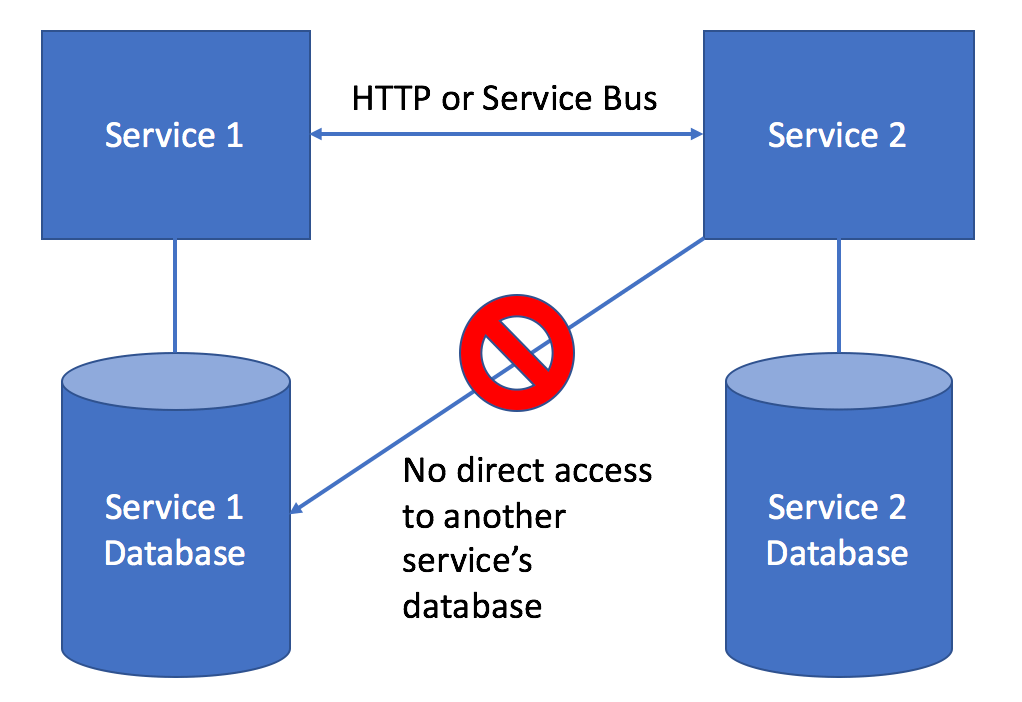
Most services will need to have some sort of persistent state, and that’s usually going to be in the form of a database. Even before considering which database engine or persistence approach you should take in your microservice, the first piece of advice is to favor application specific databases that are completely owned and only accessed by your microservice. 

The pattern of data access between services and databases is reflected by this diagram:

application-database

As much as possible, we want to avoid ever sharing a database between applications because of the implicit, tight coupling that creates between two or more services. If your service needs to query information that is owned by another service, favor using either exposing HTTP services from the upstream service or using the request/reply feature of our service bus tools.

Ideally, the application database for a microservice should be:

  • An integrated part of the microservice’s continuous integration and deployment pipeline. The microservice database should be built out by the normal build script for your microservice so that brand new developers can quickly be running the service from a fresh clone of the codebase.
  • Versioned together with any application code in the same source control repository to establish a strong link between the application code and database schema structure
  • Quick to tear down and rebuild from scratch or through incremental migrations

Database and Persistence Tooling Options

The following might be a lie. Like any bigger shop that’s been around for awhile, we’ve got some of everything (NHibernate, raw ADO.net, sproc’s, a forked copy of PetaPoco, etc.)

The two most common approaches in our applications is either:

  1.     Using Dapper as a micro-ORM to access Sql Server
  2.     Using Marten to treat Postgresql as a document database – slowly, but surely replacing our historical usages of RavenDb. 

Use Marten if your service data is complex or naturally hierarchical. If any of these things are true about your service’s persisted domain model, we recommend reaching for Marten:

  • Your domain model is hierarchical and a single logical entity used within the system would have to be stored across multiple tables in a relational database. Marten effectively bypasses the need to map a domain model to a relational database
  • There’s any opportunity to stream JSON data directly from the database to HTTP response streams to avoid the performance hit of using serializers, AutoMapper like tools, or ORM mapping layers
  • You expect your domain model to change rapidly in the future
  • You opt to use event sourcing to persist some kind of long running workflow

Choose Dapper + Sql Server if:

  • Your domain model is going to closely match the underlying database table structure, with simple CRUD-intensive systems being a good example.
  • Definitely use a more relational database approach if the application involves reporting functionality – but you can also do that with Marten/Postgresql
  • Your service will involve set-based logic that is more easily handled by relational database operations

If it feels like your service doesn’t fit into the decision tree above, opt for Sql Server as that has been our traditional standard.

Other choices may be appropriate on a case by case basis. Raw ADO.Net usage is not recommended from a productivity standpoint. Heavy, full featured ORM’s like Entity Framework or NHibernate are also not recommended by the architecture team. If you feel like EF would be advantageous for your domain model, then Marten might be an alternative with less friction.

The architecture team strongly discourages the usage of stored procedures in most circumstances.

For additional resources and conversation,

Jasper’s Getting Started Story – Take 1

IMG_1017

I’ve been kicking around the idea for a possible resurrection of FubuMVC as a mostly new framework with the codename “Jasper”  for several years with some of my colleagues. This year myself and several members of our architecture team at work have started making that a reality as the centerpiece of our longer term microservices strategy.

In the end, Jasper will be a lightweight service bus for asynchronous messaging, a high performance alternative to MVC for HTTP API’s, and a substitute for MediatR inside of ASP.Net Core applications (those three usages share much more infrastructure code than you might imagine and the whole thing is still going to be much, much smaller than FubuMVC was at the end). For the moment, we’re almost entirely focused on the messaging functionality.

I haven’t kicked out an up to date Nuget yet, but there’s quite a bit of documentation and I’m just hoping to get some feedback out of that right now. If you’re at all interested in Jasper, feel free to raise GitHub issues or join our Gitter room.

The only thing I’m trying to accomplish in this post is to get a sanity check from other folks on whether or not the bootstrapping looks usable.

Getting Started

This is taken directly from the getting started documentation.

Note! Jasper only targets Netstandard 1.5 and higher at this time, and we’ve been holding off on upgrading to ASP.Net Core v2.0.

Jasper is a framework for building server side services in .Net. Jasper can be used as an alternative web framework for .Net, a service bus for messaging, as a “mediator” type pipeline within a different framework, or any combination thereof. Jasper can be used as either your main application framework that handles all the configuration and bootstrapping, or as an add on to ASP.Net Core applications.

To create a new Jasper application, start by building a new console application:

dotnet new console -n MyApp

While this isn’t expressly necessary, you probably want to create a new JasperRegistry that will define the active options and configuration for your application:

public class MyAppRegistry : JasperRegistry
{
    public MyAppRegistry()
    {
        // Configure or select options in this constructor function
    }
}

See Configuring Jasper Applications for more information about using the JasperRegistry class.

Now, to bootstrap your application, add the Jasper.CommandLine library to your project and this code to the entrypoint of your console application:


using Jasper.CommandLine;

namespace MyApp
{
    class Program
    {
        static int Main(string[] args)
        {
            // This bootstraps and runs the Jasper
            // application as defined by MyAppRegistry
            // until the executable is stopped
            return JasperAgent.Run<MyAppRegistry>(args);
        }
    }
}

By itself, this doesn’t really do much, so let’s add Kestrel as a web server for serving HTTP services and start listening for messages from other applications using Jasper’s built in, lightweight transport:

public class MyAppRegistry : JasperRegistry
{
    public MyAppRegistry()
    {
        Http.UseKestrel().UseUrls("http://localhost:3001");
        Transports.Lightweight.ListenOnPort(2222);
    }
}

Now, when you run the console application you should see output like this:

Hosting environment: Production
Content root path: /Users/jeremill/code/jasper/src/MyApp/bin/Debug/netcoreapp1.1
Listening for messages at loopback://delayed/
Listening for messages at jasper://localhost:2333/replies
Listening for messages at jasper://localhost:2222/incoming
Now listening on: http://localhost:3001
Application started. Press Ctrl+C to shut down.

See Bootstrapping for more information about idiomatic Jasper bootstrapping.

That covers bootstrapping Jasper by itself, but next let’s see how you can add Jasper to an idiomatic ASP.Net Core application.

Adding Jasper to an ASP.Net Core Application

If you prefer to use typical ASP.Net Core bootstrapping or want to add Jasper messaging support to an existing project, you can use the UseJasper() extension method on ASP.Net Core’s IWebHostBuilder as shown below:

var host = new WebHostBuilder()
    .UseKestrel()
    .UseJasper<ServiceBusApp>()
    .Build();

host.Run();

See Adding Jasper to an ASP.Net Core Application for more information about configuring Jasper through ASP.Net Core hosting.

Your First HTTP Endpoint

The obligatory “Hello World” http endpoint is just this:

public class HomeEndpoint
{
    public string Get()
    {
        return "Hello, world.";
    }
}

As long as that class is in the same assembly as your JasperRegistry class, Jasper will find it and make the “Get” method handle the root url of your application.

See HTTP Services for more information about Jasper’s HTTP handling features.

Your First Message Handler

Let’s say you’re building an invoicing application and your application should handle an InvoiceCreated event. The skeleton for the message handler for that event would look like this:

public class InvoiceCreated
{
    public Guid InvoiceId { get; set; }
}

public class InvoiceHandler
{
    public void Handle(InvoiceCreated created)
    {
        // do something here with the created variable...
    }
}

See Message Handlers for more information on message handler actions.


Retrospective on Marten at 2 Years Old

I made the very first commit to Marten two years ago this week. Looking at the statistics, it’s gotten just shy of 2,000 commits since then from almost 60 contributors. It’s not setting any kind of world records for usage, but it’s averaging a healthy (for a .Net OSS project) 100+ downloads a day.

Marten was de facto sponsored by my shop because we intended all along to use it as a way to replace RavenDb in our ecosystem with Postgresql. Doing Marten out in the open as an open source project hosted in GitHub has turned out to be hugely advantageous because we’ve had input, contributions, and outright user testing from so many external folks before we even managed to put Marten into our biggest projects. Arguably — and this frustrates me more than a little bit — Marten has been far more successful in other shops that in my own.

I’ve been very pleasantly surprised by how the Marten community came together and how much positive contribution we’ve gotten on new features, documentation, and answering user questions in our Gitter room. At this point, I don’t feel like Marten is just my project anymore and that we’ve genuinely got a healthy group of contributors and folks answering user questions (which is contributing greatly to my mental health).

Early adopters are usually the best users to deal with because they’re more understanding and patient than the folks that come much later when and if your tool succeeds. There’s been a trend that I absolutely love in Marten where we’ve been able to collect a lot of bug reports as a pull request with failing tests that show you exactly what’s wrong. For a project that’s so vulnerable to permutation problems, that’s been a life send. Moreover, we’ve had enough users using it in lots of different things that’s led to the discovery and resolution of a lot of functionality and usability problems.

I’m a little bit disappointed by the uptake in Marten usage, because I think it’s hugely advantageous for developer productivity over ORM’s like Entity Framework and definitely more productive in many problem domains than using a relational database straight up. I don’t know if that’s mostly because the .Net community just isn’t very accepting of tools like this that are outside of the mainstream, we haven’t been able to break through in terms of promoting it, or if it just isn’t that compelling to the average .Net developer. I strongly suspect that Marten would be far more successful if it had been built on top of Sql Server, and we might test that theory if Sql Server ever catches up to Postgresql in terms of JSON and Javascript support (it’s not even close yet).

For some specific things:

  • Postgresql is great for developers just out of the sheer ease of installing it in developer or testing environments
  • I thought going into Marten that the Linq support would be the most problematic thing. After working on the Linq support for quite awhile, I now think that the Linq support is the most problematic and time consuming thing to work on and it’s likely that folks will never stop coming up with new usage scenarios
  • The Linq support would be so much easier and probably more performant when Postgresql gets their proposed JsonPath querying feature. Again, I don’t think that Sql Server’s JSON support is adequate to support Marten’s feature set, but they at least went for JsonPath in their Json querying.
  • A lot of other people contributed here too, but Marten has been a great learning experience on asynchronous code that’s helping me out quite a bit in other projects
  • The event sourcing feature has been a mixed bag for me. My shop hasn’t ended up adopting it, so I’m not dogfooding that work at all — but guess what seems to be the most popular part of Marten to the outside world? The event sourcing support wouldn’t be viable if we didn’t have so much constructive feedback and help from other people.
  • I think it was advantageous to have the documentation done very early and constantly updated as we went
  • After my FubuMVC flop, I swore that if I tried to do another big OSS project that I’d try much harder to build community, document it early, and promote it more effectively. To that end, you can see or hear more about Marten on DotNetRocks, the NoSQL podcast, the Cross Cutting Concerns podcast, a video on Channel 9Herding Code, a recent conversation on Hanselminutes, and a slew of blog posts as we went.

Let my close by thanking the Marten community. I might fight burnout occasionally or get grumpy about the internal politics around Marten at work, but y’all have been fantastic to interact with and I really enjoy the Marten community.

Introducing Oakton — Command line parsing minus the usual cruft

As the cool OSS kids would say, “I made another thing.” Oakton is a library that I maintain that I use for command line parsing in the console applications I build and maintain. For those who’ve followed me for a long time, Oakton is an improved version of the command line parsing in FubuCore that now targets Netstandard 1.3 as well as .Net 4.5.1 and 4.6 on the full framework.

What sets Oakton apart from the couple dozen other tools like this in the .Net ecosystem is how it allows you to cleanly separate the command line parsing from your actual command parsing so that you can write cleaner code and more easily test your command execution in automated tests.

Here’s the quick start example from the documentation that’ll have prettier code output. Let’s say you just want a command that will print out a name with an optional title and the option to override the color of the text.

A command in Oakton comes in two parts, a concrete input class that just establishes the required arguments and optional flags through public fields or settable properties:

    public class NameInput
    {
        [Description("The name to be printed to the console output")]
        public string Name { get; set; }
        
        [Description("The color of the text. Default is black")]
        public ConsoleColor Color { get; set; } = ConsoleColor.Black;
        
        [Description("Optional title preceeding the name")]
        public string TitleFlag { get; set; }
    }

The [Description] attributes are optional and embed usage messages for the integrated help output.

Now then, the actual command would look like this:

    [Description("Print somebody's name")]
    public class NameCommand : OaktonCommand
    {
        public NameCommand()
        {
            // The usage pattern definition here is completely
            // optional
            Usage("Default Color").Arguments(x => x.Name);
            Usage("Print name with specified color").Arguments(x => x.Name, x => x.Color);
        }

        public override bool Execute(NameInput input)
        {
            var text = input.Name;
            if (!string.IsNullOrEmpty(input.TitleFlag))
            {
                text = input.TitleFlag + " " + text;
            }
            
            // This is a little helper in Oakton for getting
            // cute with colors in the console output
            ConsoleWriter.Write(input.Color, text);


            // Just telling the OS that the command
            // finished up okay
            return true;
        }
    }

Again, the [Description] attributes and the Usage property in the constructor function are all optional, but add more information to the user help display. You’ll note that your command is completely decoupled from any and all text parsing and does nothing but do work against the single input argument. That’s done very intentionally and we believe that this sets Oakton apart from most other command line parsing tools in .Net that too freely commingle parsing with the actual functionality.

Finally, you need to execute the command in the application’s main function:

    class Program
    {
        static int Main(string[] args)
        {
            // As long as this doesn't blow up, we're good to go
            return CommandExecutor.ExecuteCommand&lt;NameCommand&gt;(args);
        }
    }

Oakton is fairly full-featured, so you have the options to:

  1. Expose help information in your tool
  2. Support all the commonly used primitive types like strings, numbers, dates, and booleans
  3. Use idiomatic Unix style naming and usage conventions for optional flags
  4. Support multiple commands in a single tool with different arguments and flags (because the original tooling was too inspired by the git command line)


So a couple questions:

  • Does the .Net world really need a new library for command line parsing? Nope, there’s dozens out there and a semi-official one somewhere inside of ASP.Net Core. It’s no big deal on my part though because other than the docs I finally wrote up this week, this code is years old and “done.”
  • Where’s the code? The GitHub repo is here.
  • Is it documented, because you used to be terrible at that? Yep, the docs are at http://jasperfx.github.io/oakton.
  • If I really want to use this, where can I ask questions? You can always use GitHub issues, or try the Gitter room.
  • Are there any real world examples of this actually being used? Yep, try Marten.CommandLine, the dotnet-stdocs tool, and Jasper.CommandLine.
  • What’s the license? Apache v2.

Where does the name “Oakton” come from?

A complete lack of creativity on my part. Oakton is a bustling non-incorporated area not far from my grandparent’s farm on the back way to Lamar, MO that consists of a Methodist church, a cemetery, the crumbling ruins of the general store, and maybe 3-4 farmhouses. Fun fact, when I was really small, I tagged along with my grandfather when he’d take tractor parts to get fixed by the blacksmith that used to be there.

Proposal for StructureMap 5

EDIT 9/12: Meh, I had a couple twitter exchanges and Gitter questions today that reminded me why I’ve been wanting to walk away from StructureMap. Having to support not just SM but really how SM is used internally inside of tools like ASP.Net MVC Core, MediatR, and half a hundred other frameworks is just wearing me down too much. If anyone else is interested in taking on any of this, I’ll happily help out, but otherwise I think I’m just going to leave this alone. Besides, there’s the new built in IoC in ASP.Net and 30 or so other OSS competitors.


So I’ve been more or less burned out on StructureMap development and support for quite some time (it’s been better lately though). That being said, there’s a ton of people using it (it averages just shy of a 1,000 downloads a day).  It has also been put through the ringer from a lot of users, which remarkably enough, exposes and leads to fixing a lot of bugs and usability problems — and if you don’t believe me, check out this folder of all the tests for bug regressions and fixes.

StructureMap 4.* has a couple ongoing issues that should get addressed some day if the project is going to keep going on:

  1. StructureMap has fallen behind many or most of the other IoC containers in the public performance benchmarks. I think those benchmarks are mostly over simplified BS, but still, there’s the pride factor
  2. ASP.Net Core DI compliance has been a huge pain in the ass to the point where I’ve openly wondered if the ASP.Net team has purposely tried to sabotage and wipe out all the existing ecosystem of IoC containers in .Net
  3. The child container behavior (which I don’t personally use) has been problematic as StructureMap’s more creative users have found several permutations of this and that where the child container model has broken down a bit

So, here’s my thoughts about a possible direction for a future StructureMap 5.0:

  • Keep API backwards almost completely backward compatible with StructureMap 4.* except for a few places impacted by the next bullet point
  • Completely redesign the internal data structures as a performance optimization. The current structure isn’t terribly different from the very earliest StructureMap versions and there’s absolutely room to cut out some performance fat there
  • Take a dependency on Microsoft.Extensions.DependencyInjection.Abstractions and merge in the functionality that today is in StructureMap.Microsoft.DependencyInjection so that it’s easier to get the compliance against ASP.Net Core right by having everything in one place. My thought here too is that we would somehow use their configuration abstractions, but supplemented with the existing StructureMap configuration options somehow as a kind of buddy class extension. Not sure how that one’s gonna work out yet.
  • Look for opportunities to make the dynamic Expressions that are built up to actually create objects be more efficient by inlining some operations and generally reducing the number of times it bounces through dictionary structures. I know a lot more about building dynamic Expressions that I did several years ago when I moved StructureMap off of IL generation, so surely there’s some opportunity there

Alright, so my personal conundrum is simply wondering do I care enough to do this as an exercise in crafting performant data structures and micro-optimization, or call StructureMap 4.5 the end of the road and just continue to try to address bugs and user questions for the time being.

I’d kind of like to hear from some StructureMap users or contributors to see how much they’d want the performance and ASP.Net Core compatibility, and then see if anyone would want to help out if we go with this.


How we did (and did not) improve performance and efficiency in Marten 2.0

Marten 2.0 was released yesterday, and one of the improvements is somewhat significantly runtime performance and far better memory utilization in applications that use Marten. For today’s blog post, here’s what we did and tried to get there:

  • Avoiding Json strings whenever possible. Some time last year Ayende wrote a “review” of Marten on his blog before almost immediately retracting it. While I didn’t agree with most of his criticisms, he did call out Marten for being inefficient in its Json serialization by reading and writing the full Json strings instead of opting for more efficient mechanisms of reading or writing via byte arrays or Stream’s. The “write” side of this problem was largely solved in Marten 2.0, but after some related changes in the underlying Npgsql library, the “read” side of Marten uses TextReader’s as the input to Json serialization, therefore bypassing the need to create then immediately tear down string objects. These changes reduced the memory allocations in Marten almost by half, with maybe a 15-20% improvement in performance.
  • StringBuilder for all SQL command build up. I know what you’re thinking, “duh, StringBuilder is way more efficient than string concatenation,” but Marten got off the ground by mostly using string interpolation and concatenation. For 2.0, I went back over all that code and switched to StringBuilder’s, which has the nice impact of reducing memory utilization quite a bit (it didn’t make that much difference in performance). I absolutely don’t regret starting with simpler, cruder mechanisms to get things working before pulling in this optimization.
  • FastExpressionCompiler – Marten heavily uses dynamically generated Expression’s that are then compiled to Func or Action’s for document persistence and loading. The excellent FastExpressionCompiler library from Maksim Volkau replaces the built in Expression compilation with a new model that results both in delegates that are faster in runtime, and also reduces the compilation time of these expressions. Using FastExpressionCompiler makes Marten bootstrap faster, which made a huge improvement in Marten’s test suite execution. I measured about a 10% throughput performance in Marten’s benchmarks just by using this library
  • Newtonsoft.Json 9 to 10 and back to 9 – Newtonsoft.Json 10 was measurably slower in the Marten benchmarks, so we reverted back to 9.0.1. Bummer. You can always opt for Jil or other alternatives for considerably faster json serialization, but we found too many cases where Jil errored out on document types that Newtonsoft.Json handled just fine, so we stuck with Newtonsoft as the default based on the idea that the code should at least work;)


What’s left to do for performance?

  • I’m sure we could get better with our mechanics for byte[] or char[] pooling and probably some buffering in the ADO.Net manipulation during async methods
  • We know there are some places where the Linq provider generates Sql that isn’t as efficient as it could be. We might try to tackle this tactically in use case by use case, but I’m hoping for the version of Postgresql after 10 to get their improved Json querying functionality based on JsonPath before we do anything big to the Linq support.

Marten 2.0 is Out!

banner


I was just able to push the official Marten 2.0 nuget — and update the documentation after the Github outage today settled down;) The “2.0” moniker reflects the fact that there are some breaking API changes, but it’s doubtful that a typical user would even see them. A few operations moved off of IDocumentStore.Advanced and the Linq extensibility interface changed somewhat.

I’m going to be lazy and leave blog posts with actual content for later this week, but the highlights are:

  • Better performance and less memory usage — I’ll blog about what we did tomorrow
  • Much more flexibility in the event store and hopefully improved usability
  • Explicit insert and update document operations as opposed to the default “upsert” functionality
  • Multi-tenancy support within a single database
  • Persist and query documents serialized with camel casing (or snake casing) — a big request from several users who wanted to be able to stream the raw document json in Http services
  • The ability to run Marten with PLV8 disabled in environments where that extension is not (yet) available *cough* Azure *cough*

It’s not the slightest bit interesting to end users, but there was a massive change to the Marten internals for checking, updating, and creating schema objects in the underlying Postgresql database. That change has made it much easier to introduce changes of all kinds into Marten, and should allow for an easy extensibility model later.

The entire list of changes and contributions is here on the Github milestone page.

Thank you to…

I’m going to miss someone here, but the long list of folks who deserve some thanks for this release:

  • A special thanks to Joona-Pekka for tackling documentation updates and some uglier fixes in this release
  • James Hopper
  • Szymon Kulec for his help in the performance updates
  • Jarrod Alexander
  • Babu Annamalai for getting us running on AppVeyor, TravisCI, and up on the VS2017 project system
  • Eric Green, Daniel Wertheim, Wastaz, Marc Piechura, and Jeff Doolittle for their input to the event store functionality in this release
  • Bibodha Neupane (my colleague who’s been dogfooding the multi-tenancy support on one of our projects)
  • James Farrer
  • Michał Gajek
  • Eric J. Smith
  • Drew Peterson

and other folks that I surely missed.

Marten has probably been the best OSS project I’ve ever been a part of in terms of community input and involvement and I’m looking forward to seeing where it goes next.


What’s next?

Marten 2.1 will actually drop pretty soon with some in flight functionality that wasn’t quite ready today. And since nothing in this world attracts user bugs like a major version release, assume that a bug fix release is shortly forthcoming;)


Message Handlers in the new Jasper Service Bus

A couple months ago I blogged a little bit about a yet another OSS service bus project my shop is building out for messaging in .Net Core systems called Jasper that services as a wire compatible successor to the tooling we use in older .Net applications. While it’s already in production systems at work and doing fine, I have no clue if it’ll have any success as an OSS project. At the very least I’m going to squeeze some blog posts out of the process of building it and here we are.

Service bus frameworks are definitely an example of the Hollywood Principle where a framework handles much of the event handling and workflow while delegating to your application specific code through some kind of interface or idiom. In most of the cases I’ve seen over the years in .Net, you’ll see some kind of interface like the one below that allows you to plug your message handlers into your service bus infrastructure:

public interface IHandler
{
    Task Handle(T message);
}

I’ve certainly used this approach in a handful of cases, and there’s even some direct support for auto-registering this kind of service strategy inside of StructureMap if you want to roll your own framework. It’s easy to understand, adds some level of discoverability, and might help guide users. It’s also somewhat limiting in flexibility and the copious usage of generics can easily lead users into some bad places — and I say that partially based on a decade of helping folks with generics on the StructureMap user lists.

Jasper takes a different approach that relies much more on naming conventions and method signatures. To make that concrete, here’s the very simplest form of message handlers you can use in Jasper and if you don’t mind, let me leave how could this possibly work efficiently for a followup post (spoiler alert: Roslyn is awesome):

public class ExampleHandler
{
    public void Handle(Message1 message)
    {
        // Do work synchronously
    }

    public Task Handle(Message2 message)
    {
        // Do work asynchronously
        return Task.CompletedTask;
    }
}

Out of the box, Jasper finds and uses message handling methods by searching for concrete classes whose names are suffixed with either “Handler” or “Consumer” (there’s some historical reasons for having both) and then discovers message handling actions by analyzing the public methods on those classes for message handling candidates.

Right off the bat, you can see that Jasper allows you to write either synchronous or asynchronous methods to handle messages, so no more phantom “return Task.CompletedTask;” lines cluttering up your code.

Moreover, you can wring out a little more performance in your system by using static methods instead:

public static class StaticHandler
{
    public static Task Handle(Message3 message)
    {
        return Task.CompletedTask;
    }
}

It might be advantageous to use this approach to reduce memory allocations at run time and should give you slightly more efficient IL. Of course, any handler method, static or otherwise, isn’t terribly helpful unless you can get at the services within your application that you’ll need to invoke to process the message.

To that end Jasper gives you a couple possibilities. First, you can do the idiomatic, constructor injection approach like this:

public class ServiceUsingHandler
{
    private readonly IService _service;

    public ServiceUsingHandler(IService service)
    {
        _service = service;
    }

    public void Handle(Message1 message)
    {
        // do something with _service to handle this thing
    }
}

At the moment, Jasper would revert to spinning up a StructureMap nested container and uses that to build out the ServiceUsingHandler objects something like this:

// _root is a reference to the application's root
// container
using (var nested = _root.GetNestedContainer())
{
    var serviceUsingHandler = nested.GetInstance();
    var message1 = (Message1)context.Envelope.Message;
    serviceUsingHandler.Handle(message1, widget);
}

Using that approach enables Jasper to build objects of your handler classes with whatever dependencies you would need. Alternatively, you can also use “method injection” in your handlers like this:

public void Handle(
    Message2 message, 
    IService service, 
    Envelope envelope
)
{
    // handle the message
}

In the example above, Jasper “knows” how to resolve both the IService and Envelope dependencies before calling into the Handle() method. The Envelope object is Jasper’s version of an envelope wrapper that gives you more metadata about the current message. Instead of pushing everything through the constructor function, you can opt for potentially simpler and cleaner code by opting for method injection instead. In the case of the Envelope, that is not even available through the IoC container.

More about this in a later post, but ironically as the author of literally the oldest IoC container in .the .Net ecosystem, I’m trying hard to reduce Jasper’s usage of IoC containers at runtime.

The last thing I wanted to show here was Jasper’s concept of cascading messages that we used with some success in the earlier FubuMVC service bus. It’s very common for the handling of the original message to trigger additional “cascading” messages. In most service bus frameworks, that’d probably be something like this:

public class MessageHandler
{
    // Successfully handling Message1 will generate
    // a Message2 going out
    public Message2 Handle(Message1 message, IServiceBus bus)
    {
        bus.Send(new Message2());
    }
}

You can absolutely do that in Jasper as well, but we also support a policy where object(s) returned from a handler method are considered to be outgoing messages that are sent out as part of considering the message request complete. In its simplest usage, that may look like this:

public class MessageHandler
{
    // Successfully handling Message1 will generate
    // a Message2 going out
    public Message2 Handle(Message1 message)
    {
        return new Message2();
    }

    // Same thing, but async
    public Task Handle(Message1 message)
    {
        
    }
}

To get a little more complex, let’s say that your neck deep in CQRS jargon and when your service receives a “Command1” you raise one or more domain events that are handled separately. With cascading messages, that can look like this:

public IEnumerable<object> Handle(Command1 command)
{
    yield return new Event1();
    yield return new Event2();
}

In this case, each object returned is an outgoing message. I like the cascading message approach because it makes your message handlers easier to test with pure state-based testing.

There’s plenty more going on with this feature, but my wife really needs me to get out the office to go help with the little ones, so there’s going to have to more later;)