Talking Integration Testing w/ .Net at CodeMash 2019

I’m officially approved by all pertinent bosses and spouses to go, so I’ll be speaking at CodeMash 2019 (think this is the 6th time for me). I’m doing a pre-compiler workshop this time around that’s going to be all new material. If you’re reading this and it’s not already January, feel very, very free to make requests or suggestions on scenarios you’d be interested in seeing as part of the workshop;)

Successful Integration Testing in .Net

Description

In the very early days of Agile development and Test Driven Development, we strove to structure our code such that we could write isolated unit tests with little or no coupling to infrastructure. Great, and it helped, but frequently that led to more complicated code internals and you still had issues from interactions with said infrastructure. What if instead, we could more effectively do quick, reliable integration testing? Could that simplify some of our code — especially when combined with microservice architectures? Do we need to reconsider where our efforts go in the old “testing pyramid?” How does ASP.Net Core support far better server side testing than previous versions? Where does HTTP contract testing fit in? Can Docker help us out? Should we pursue other techniques besides just trying to use Selenium? What about using alternative NoSQL style databases? Or if I’m stuck with relational databases, what can we do to soften the aggravations?

I’ll try to address all these questions and tackle automated testing best practices in this workshop.

Marten 3.0 is Released and Introducing the new Core Team

banner

Hey, look at that, Marten 3.0 is live on Nuget. It didn’t turn out to be a huge release, but we needed to accommodate the Npgsql 4.* dependency and I felt like that was a breaking change, so here we go. You can see the full list of bug fixes and changes in this list. Besides the usage of Npgsql 4, our biggest change was making the default schema object creation mode to this:

AutoCreateSchemaObjects = AutoCreate.CreateOrUpdate

Meaning that Marten even in its default mode will not drop any existing tables, even in development mode. You can still opt into the full “sure, I’ll blow away a table and start over if it’s incompatible” mode, but we felt like this option was safer after a few user problems were reported with the previous rules. See Schema Migrations and Patches for more information.

More exciting for me because I think it’s a mark of Marten becoming a real grownup open source project, Marten now has an official core contributor team who can review and approve pull requests:

All of them have been contributing to Marten for quite awhile and have been absolutely invaluable to supporting our community. Please join me in welcoming them all to the new team and looking forward to wherever Marten goes next.


Changing Jasper’s Direction

I usually won’t publish blog posts on weekends because nobody reads them, but in this case I’m just jotting down my own thoughts.

I’ve been working off and on for about 4-5 years on a new .Net framework called Jasper (see the “Jasper” tag for my previous posts). Jasper was originally envisioned as a better version of FubuMVC, including both its web framework side and its later functionality as a pretty full fledged service bus that could do publish/subscribe messaging through its own lightweight in process queue (LightningQueues) without any other additional infrastructure.

For the last half of 2017 and the early part of 2018 some of my colleagues and I worked a lot on Jasper specifically as a service bus that could be backwards compatible with older FubuMVC applications and be usable in a large, on premise deployed ecosystem. To that end, most of Jasper’s code deals with messaging concerns, including quite a bit of functionality that overlaps with big, grown up messaging tools like RabbitMQ or Azure Service Bus.

After getting back into Jasper again the past couple weeks I think these things:

  • The backwards compatibility with FubuMVC doesn’t matter anymore and could be eliminated
  • If I were using Jasper for messaging at any kind of scope, I’d want to be using Rabbit MQ or Azure Service Bus anyway
  • I’m personally way more interested myself in getting back to the HTTP side of things or learning Azure technologies through integration with Jasper
  • The codebase is big and probably a little daunting
  • In my opinion, the special thing about Jasper is its particular flavor of the Russian Doll runtime pipeline, extensibility, and the way it allows you to write very simple code in your application.
  • It’s extremely hard to get developers to use any kind of alternative framework, but it’s far less difficult to get developers to try out OSS libraries that complement, extend, or improve the mainstream framework they’re already working with.

I’m still mulling things over, but at this point I wanna switch directions so that Jasper is mostly about its runtime pipeline as a “command processor” that can be used 3 (maybe 4) ways:

  1. As a standalone, in memory service bus and command dispatcher (which it already does today, as is, and quite robustly, thank you) that you could embed in any kind of .Net Core application. For example, Jasper could be used in combination with ASP.Net Core the same way that folks use MediatR today.
  2. As an alternative way to write HTTP services in ASP.Net Core that’s effectively Jasper’s own lightweight HTTP router connected to Jasper’s runtime pipeline for command execution (it’s not documented at all other than a single blog post, but much of the basics are already in place). This could be used in place of or side by side with MVC Core or any other kind of ASP.Net Core middleware.
  3. As a connector between publish/subscribe queues like RabbitMQ or Azure Service Bus and Jasper’s command execution. Basically, Jasper handles all the things like serialization and messaging workflow described in Sure, You Can Just Use RabbitMQ — which Jasper’s existing messaging support generally does right now as is. What would change here is mostly subtraction as Jasper would rely much more on RabbitMQ/Azure Service Bus/etc. for message routing instead of the custom code that exists in Jasper’s codebase today.

That still sounds like a potentially huge tool, but there’s maybe a lot more in common between those 3 things than it appears. Jasper’s sharing all the command execution mechanics, the IoC integration, logging set up, and even sharing content negotiation (serialization) between items 1, 2, & 3 above.

Nuget wise, after whacking some code listed later in this post and the recent reorganization of the codebase anyway, I think Jasper is divided into these Nugets:

  • Jasper — The core library. Has the TCP transport (its tiny), the core runtime pipeline, the in memory bus and command execution functionality, the HTTP handler support, anything to do with extension discovery, and the integration into ASP.Net Core hosting. As much as possible, Jasper tries to rely on common pieces like the basic logging, hosting, and configuration elements of ASP.Net Core, so there’s no good reason in my mind to separate out the HTTP support from the core
  • Jasper.Persistence.Marten — integrates Marten/Postgresql into a Jasper application. Marten-backed saga persistence, durable messaging, and the outbox support
  • Jasper.Persistence.SqlServer — Sql Server backed message and saga persistence, including the outbox support. I’m not sure what to do with saga persistence here yet
  • Jasper.RabbitMQ — the RabbitMQ transport for Jasper
  • Jasper.AzureServiceBus — future
  • Jasper.TestSupport.Storyteller — tooling to host and monitor Jasper applications in Storytellerspecifications
  • Jasper.TestSupport.Alba — tooling to run Alba specifications directly against a Jasper runtime
  • Jasper.MvcCoreExtender — future, use MVC Core constructs in Jasper HTTP services and possibly act as a performance accelerator to existing MVC Core applications

So here’s my current thinking on what does or does not change:

Remove

  • The HTTP transport that uses Kestrel as another bus transport alternative. It needs a little more work anyway and I don’t see anyone using it
  • Anything to do with the dynamic subscription model, and that’s quite a bit
  • The Consul extension. Most of it is for the subscriptions that goes away, and the rest of it could be done by just piping Consul through ASP.Net Configuration
  • Request/Reply or Send/Await mechanics in the service bus. Only there for fubu compatibility we no longer care about. It’d be long gone as is but too many tests depend on it. Ugh.
  • The model binding support. I don’t think it’d be commonly used and I’d rather cede that to MVC Core
  • Node registration and discovery. Use what’s already in Azure or AWS for this kind of thing and let’s thin down Jasper

Keep

  • The lightweight TCP protocol stays, but it’s documented clearly as most appropriate for small to medium workloads or for local testing or for just a simple getting started story
  • The outbox mechanics w/ either Marten or Sql Server
  • The current in memory worker queues, with possible thought toward making them extensible for concerns like throttling in the future
  • The serialization and content negotiation
  • Jasper’s command line integration via Oakton. I think it’s turning out to be a cheap way to build in diagnostics and maintenance tasks right into your app.
  • The environment check support. I’m not aware of any equivalent in ASP.Net Core yet
  • Jasper’s internal HTTP router. I think it’s going to end up being much faster than the one built into ASP.net Core

Enhance or Add

Replace

  • The built in error handling/retry/circuit breaker stuff in Jasper is battle tested through years of usage in production as part of FubuMVC, but I want to see if there’s a way to replace it with Polly to shrink the codebase and add a lot more capabilities. It’s not a slam dunk though

Making the Jasper build faster and more reliable with Docker and other stuff

Maybe a little embarrassingly, most of my efforts in Jasper this summer has been around making all the automated test suites run faster and far more reliably. I first invested a dreadful amount of time toward making the main xUnit test library run tests in parallel.

Next, Jasper has extensions that integrate Consul, RabbitMQ, Sql Server, and Postgresql via Marten. As you can probably imagine, that makes integration testing a little bit of a mess with all the infrastructure dependencies. The prevailing trend — at least in my circles — these days is to try to leverage Docker for infrastructure needs within build automation. To that end, I first tried to use the Docker.Net library in the manner I wrote about in *A* way to use Docker for integration tests (which I need to update because our team had to tweak for CI usage).

That worked okay, but you’d still hit occasional timeouts and there were a few tests that needed both one of the databases and Rabbit MQ running. Instead, I switched to just having a tiny Docker compose file like this:

version: '3'
services:
  postgresql:
    image: "clkao/postgres-plv8:latest"
    ports:
     - "5433:5432"
  consul:
    image: "consul:latest"
    ports:
     - "8500:8500"
     - "8600:8600"
  rabbitmq:
    image: "rabbitmq:latest"
    ports:
     - "5672:5672"
  sqlserver:
    image: "microsoft/mssql-server-linux:2017-latest"
    ports:
     - "1433:1433"
    environment:
     - "ACCEPT_EULA=Y"
     - "SA_PASSWORD=P@55w0rd"
     - "MSSQL_PID=Developer"

which I’m showing mostly to call out “that was easy, why didn’t I do this ages ago?” In my build script for Jasper, it just makes sure to call “docker-compose up -d” once before running any of the integration test suites.

I also folded all the test libraries for the various integrations into a single test library called “IntegrationTests,” but used the xUnit [Collection] attributes and base context classes to effectively allow each of the extension libraries to be tested in parallel threads, but single threaded within the set of tests targeting each extension library.

All told, the combination of:

  1. Upgrading to netcoreapp2.1 for all test libraries
  2. Ensuring that the main xUnit testing library can run specifications in parallel
  3. Integrating the Docker infrastructure set up inside the build script itself
  4. Letting the tests for the Consul, Postgresql, MSSQL, and RabbitMQ integrations run in parallel in the combined integration testing library
  5. Moving any “flaky” tests that were vulnerable to timing or threading issues to Storyteller where it’s more robust
  6. Fixing the real underlying issues in the code around some of the “flaky” tests:-(

made the automated build far faster and more reliable than it was before I started that effort and I’m one of those people who thinks that’s extremely important for the success of a project.


*A* way to use Docker for integration tests

This approach was partially stolen from an approach I found in the Akka.Net code for integration testing. The Sql Server bits are taken from a blog post from David Neal. Lastly, I started down this path for integration testing inside the Jasper codebase, but have since switched to just using a Docker compose file in that case. 

Integration testing with databases kind of sucks. I know it, you know it, the American people know it. It’s also really valuable to do if you can pull it off, so here we are. What are some of the problems with testing databases? Let’s see:

  • It’s more effective when you have isolated databases per developer and environment
  • You should really have some kind of build automation that syncs your test database up with the current version of your schema
  • Ideally, you’d really like it to be as easy as possible for a developer to do a clean clone of your codebase and quickly have integration tests up and running without a lot of teeth gnashing over setting up either a local database or getting their own schema somewhere on a shared database server

With all that in mind, my current client project is trying to get away with running Sql Server in a Docker container that’s spun up on demand by the Docker.DotNet library within the integration tests.

The first step is a little base class helper I originally wrote (and discarded) to define a Docker container instance:

    internal abstract class DockerServer
    {
        public string ImageName { get; }
        public string ContainerName { get; }

        protected DockerServer(string imageName, string containerName)
        {
            ImageName = imageName;
            ContainerName = containerName; // + "-" + Guid.NewGuid().ToString();
        }

        public async Task Start(IDockerClient client)
        {
            if (StartAction != StartAction.none) return;


            var images =
                await client.Images.ListImagesAsync(new ImagesListParameters { MatchName = ImageName });


            if (images.Count == 0)
            {
                Console.WriteLine($"Fetching Docker image '{ImageName}'");

                await client.Images.CreateImageAsync(
                    new ImagesCreateParameters { FromImage = ImageName, Tag = "latest" }, null,
                    new Progress());
            }

            var list = await client.Containers.ListContainersAsync(new ContainersListParameters
            {
                All = true
            });

            var container = list.FirstOrDefault(x => x.Names.Contains("/" + ContainerName));
            if (container == null)
            {
                await createContainer(client);

            }
            else
            {
                if (container.State == "running")
                {
                    Console.WriteLine($"Container '{ContainerName}' is already running.");
                    StartAction = StartAction.external;
                    return;
                }
            }


            var started = await client.Containers.StartContainerAsync(ContainerName, new ContainerStartParameters());
            if (!started)
            {
                throw new InvalidOperationException($"Container '{ContainerName}' did not start!!!!");
            }

            var i = 0;
            while (!await isReady())
            {
                i++;

                if (i > 20)
                {
                    throw new TimeoutException($"Container {ContainerName} does not seem to be responding in a timely manner");
                }

                await Task.Delay(5.Seconds());
            }

            Console.WriteLine($"Container '{ContainerName}' is ready.");

            StartAction = StartAction.started;
        }

        public StartAction StartAction { get; private set; } = StartAction.none;

        private async Task createContainer(IDockerClient client)
        {
            Console.WriteLine($"Creating container '{ContainerName}' using image '{ImageName}'");

            var hostConfig = ToHostConfig();
            var config = ToConfig();

            await client.Containers.CreateContainerAsync(new CreateContainerParameters(config)
            {
                Image = ImageName,
                Name = ContainerName,
                Tty = true,
                HostConfig = hostConfig,
            });
        }

        public async Task Stop(IDockerClient client)
        {
            await client.Containers.StopContainerAsync(ContainerName, new ContainerStopParameters());
        }

        public Task Remove(IDockerClient client)
        {
            return client.Containers.RemoveContainerAsync(ContainerName,
                new ContainerRemoveParameters { Force = true });
        }

        protected abstract Task isReady();

        public abstract HostConfig ToHostConfig();

        public abstract Config ToConfig();

        public override string ToString()
        {
            return $"{nameof(ImageName)}: {ImageName}, {nameof(ContainerName)}: {ContainerName}";
        }
    }

I know, it’s a bit long, but in essence it just gives you the ability to define a simple Docker container you want to be running during tests and enough smarts to download missing images, start new containers on your box as necessary, and wait around until that Docker container is really ready.

To extend that approach to Sql Server, we use this class (partially elided):

    internal class SqlServerContainer : DockerServer
    {
        public SqlServerContainer() : base("microsoft/mssql-server-linux:latest", "dev-mssql")
        {
        }

        public static readonly string ConnectionString = "Server=127.0.0.1,1434;User Id=sa;Password=P@55w0rd;Timeout=5";

        // Gotta wait until the database is really available
        // or you'll get oddball test failures;)
        protected override async Task isReady()
        {
            try
            {
                using (var conn =
                    new SqlConnection(ConnectionString))
                {
                    await conn.OpenAsync();

                    return true;
                }
            }
            catch (Exception)
            {
                return false;
            }
        }

        // Watch the port mapping here to avoid port
        // contention w/ other Sql Server installations
        public override HostConfig ToHostConfig()
        {
            return new HostConfig
            {
                PortBindings = new Dictionary<string, IList>
                {
                    {
                        "1433/tcp",
                        new List
                        {
                            new PortBinding
                            {
                                HostPort = $"1434",
                                HostIP = "127.0.0.1"
                            }
                        }
                    },


                },

            };
        }

        public override Config ToConfig()
        {
            return new Config
            {
                Env = new List { "ACCEPT_EULA=Y", "SA_PASSWORD=P@55w0rd", "MSSQL_PID=Developer" }
            };
        }

        public static void RebuildSchema()
        {
            DropSchema();
            InitializeSchema();
        }

        public static void DropSchema()
        {
            // drops the configured schema from the database
        }

        public static void InitializeSchema()
        {
            // rebuilds the schema objects
        }
    }

Now, in tests we take advantage of the IClassFixture mechanism in xUnit.Net to ensure that our Sql Server container is spun up and executing before any integration test runs. First, add a class that just manages the lifetime of the Docker container that will be the shared context in integration tests:

    public class IntegrationFixture
    {
        private readonly IDockerClient _client;
        private readonly SqlServerContainer _container;
        
        public IntegrationFixture()
        {
            _client = DockerServers.BuildDockerClient();
            _container = new SqlServerContainer();

            _container.Start(_client).Wait(300.Seconds());


            SqlServerContainer.RebuildSchema();
        }
    }

With that in place, integration tests in our codebase need to implement IClassFixture<IntegrationFixture> and take that in with a constructor function like this:

    public class an_integration_test_class : IClassFixture<IntegrationFixture>
    {
        public an_integration_test_class(IntegrationFixture fixture)
        {
        }
        
        // Add facts
    }

If this is really common, you might slap together a base class for your integration tests that automatically implements the IClassFixture<IntegrationFixture> interface so you don’t have to think about that every time.

It’s too early to say this is a huge success, but so far, so good. We’ve had some friction around our CI build process with the Docker usage.

Do note that I purposely avoided shutting down the Docker container for Sql Server in any kind of testing teardown. I do that so that developers are able to interrogate the state of the database after tests to help troubleshoot inevitable testing failures.

Why this over using a Docker Compose file that would need to be executed before running any of the tests? I’m not sure I’d give you any hard and fast opinion on when or when not to do that, but in this case it’s helpful for Visual Studio.Net-centric devs to just be able to run tests from VS.Net without having to think about any other additional set up. I did choose to use Docker Compose files in Jasper where I had four different containers, and a handful of tests that need more than one of those containers.

Marten 2.10.0 and 3.0.0-alpha-2 are released.

The latest set of changes to Marten were just published as Marten 2.10.0 and Marten 3.0.0-alpha-2, with the only real difference being that the 3.0 alpha supports Npgsql 4. The complete list of changes is here. The latest docs have also been published. I counted 15 users total (not including me) in this release as either contributors or just folks who took the time to write up an actionable bug report (and don’t minimize the importance of that because it helps a ton). Thank you to all the Marten contributors and all the folks who answer questions in the Gitter room.

Do note that I quietly and unilaterally exercised my rights as the project’s benevolent dictator to finally remove Marten’s targeting for Netstandard1.* as it was annoying the crap out of me and I didn’t think many folks would care. As of 2.10.0, Marten targets net46 and netstandard2.0.

I hope that more serious work on the 3.0 release starts up again soon, but we’ll see.

OSS Plans for 2018 at the Halfway Point

This might be just navel gazing, but I do have some announcements in here too. 

I’ve made some remarks in the past year that I wanted to drastically scale back my OSS work after I finished the big things that are in flight. I think I’ve changed my mind to just finding a sustainable pace and continuing on. What I’ve realized after getting over some creeping burnout is that:

  • It’s frequently more challenging than ordinary dev work and it helps to keep my skillset sharp now that I’m officially a “real architect” again
  • I get to interact with a lot of smart folks and learn about a lot of other kinds of development approaches and projects. That’s pretty key for me because I haven’t been able to do many development conferences or events the past several years
  • The OSS projects are the one professional thing I get to have control over
  • I just enjoy doing it

I wrote a post in January trying to lay out for myself what I hoped or planned to do this year in the various OSS projects I run. At the halfway point of the year, I just wanna do a little update and see for myself where and how plans have changed.

  • Jasper – The project doesn’t have any real adoption yet, but I think it’s rounding into shape with some compelling features and qualities for microservice development in .Net and reliable messaging. I should have a v0.9 release out shortly with quite a few improvements that went in this spring before I changed jobs in May. Jasper will hopefully hit 1.0 before the end of the year. In terms of development work remaining, I might play around with flushing out the FubuMVC-style HTTP service routing as an alternative to MVC. I also hope to add quite a bit of integration with Jasper to Azure technologies as a learning exercise for myself to finally get some cloud computing skills and join the modern world.
  • Lamar (was BlueMilk) – Lamar 1.0 was released a couple weeks ago and I’ve had plenty of early user feedback that’s already led to some fixes. I released Lamar 1.1 yesterday that specifically targets the “cold start” time for applications using Lamar. This release especially improves the start time for ASP.Net Core applications using Lamar
  • Marten – Of all the things I work on, Marten has the most adoption and the biggest community by far, so I’ve mostly just tried to keep my head above water taking in pull requests and doing occasional bug fixes. If this week goes well, I’ll be starting preliminary work on a Marten 3.0 release for later this year to try to clear out the backlog of feature requests. My goal for Marten this year is to somehow whittle the open GitHub issue list down to a single page and keep it there.
  • Storyteller – Storyteller is the one project of mine that I actually get to regularly use.  I’m hoping to use it extensively on a project at work for Behavior Driven Development type specifications with our client’s business logic. I released a v5 earlier this year that just streamlined the command line usage and getting started story for new projects that target the latest .Net SDK project system. If the year goes well, I’d like to do a rewrite of the specification editor user interface. This is partially to add some missing functionality Storyteller needs to be truly usable by non-developers, but mostly to give me a chance to level up in the latest Javascript tools.
  • AlbaAlba is a little library that helps you write HTTP contract tests against ASP.Net Core applications. The obvious comparison in .Net is to TestServer in ASP.Net Core, but I’d say it’s more like Pact from Ruby or PlaySpecification in Scala. I just released Alba.AspNetCore2 v1.4.1 that made Alba work with ASP.Net Core 2.1. I might get into Alba this year and put it on top of TestServer and call it a big bag of extensions for TestServer instead of being its own thing (even though they barely overlap in functionality).
  • Oakton – Andy Dote made a pull request for asynchronous commands that formed the basis for the Oakton 1.5.0 release. At this point, I think Oakton is essentially done, and you’ll find it underneath several of the projects in the rest of this list
  • StructureMap — All I’m doing at this point is trying to answer user questions as they come in, and that flow has slowed way down. I’m asking folks to consider moving to Lamar or another IoC container for newer development.

Lamar 1.0: Faster, modernized successor to StructureMap

EDIT: 6/15/2018: Fixed an erroneous link and don’t you know it, there’s already a Lamar 1.0.2 up on Nuget (might take a second for indexing to catch up first) with some fixes  to user reported problems.

Lamar is a new OSS library written in C# that is a new IoC container meant to replace the venerable, but increasingly creaky StructureMap library. Lamar is also Jasper‘s “special sauce” that provides runtime code generation and compilation that helps make Jasper’s runtime pipeline very efficient compared to its competitors. You can happily use the code generation and compilation without the IoC functionality. Thank you to Mark Warpool, Jordan Zaerr, Mark Wuhrith and many others for their help and early feedback.

I’m happy to announce that Lamar and Lamar.Microsoft.DependencyInjection (the ASP.Net Core adapter) were both published as v1.0.0 to Nuget this morning. It’s been beaten up a bit by early adopters and I finished off the last couple features around type scanning that I wanted for a v1 feature set, so here we go. I’m pretty serious about semantic versioning, so you can take this release as a statement that the public API signatures are stable. The documentation website is completely up to date with the v1 API and ready to go. If you’re kicking the tires on Lamar and run into any trouble, check out the Gitter room for Lamar.

To get going, check out Lamar’s Getting Started page.

Lamar as IoC Container

To get started, just add Lamar to your project through Nuget.

Most of the time you use an IoC container these days, it’s probably mostly hidden inside of some kind of application framework. However, if you wanted to use Lamar all by itself you would first bootstrap a Lamar container with all its service registrations something like this:


var container = new Container(x =>
{
    // Using StructureMap style registrations
    x.For<IClock>().Use<Clock>();
    
    // Using ASP.Net Core DI style registrations
    x.AddTransient<IClock, Clock>();
    
    // and lots more services in all likelihood
});

Now, to resolve services from your container:


// StructureMap style

// Get a required service
var clock = container.GetInstance<IClock>();

// Try to resolve a service if it's registered
var service = container.TryGetInstance<IService>();

// ASP.Net Core style
var provider = (IServiceProvider)container;

// Get a required service
var clock2 = provider.GetRequiredService<IClock>();

// Try to resolve a service if it's registered
var service2 = provider.GetService<IService>();

Definitely note that the old StructureMap style of service resolution is semantically different than ASP.Net Core’s DI resolution methods. That’s been the cause of much user aggravation over the years.


Brief History of Lamar

I’ve become increasingly tired and frustrated with supporting StructureMap for the past several years. I also realized that StructureMap had fallen behind many other IoC tools in performance, and I really didn’t think that was going to be easy to address without some large scale structural changes in StructureMap.

Most of my ambition in OSS over the past couple years has been on Jasper (Marten was something we needed at work at the time and I had no idea it would turn out to be as successful as it has been). I’ve been planning for years to use Roslyn’s ability to generate code on the fly as a way to make Jasper’s runtime pipeline as fast as possible without losing much flexibility and extensibility. What is now Lamar’s code generation and compilation model was originally just a subsystem of Jasper for its runtime.

Because I was so focused on Jasper’s performance and throughput, I knew I would want to move beyond StructureMap as its IoC container. I tried the built in DI container from ASP.Net Core for a little bit, but its limited feature set was just too annoying.

Hence, Lamar was born as a new IoC container project called “‘BlueMilk” that would:

  • Completely comply with ASP.Net Core’s requirements for IoC container behavior and functionality
  • Retain quite a bit of functionality from StructureMap that I wanted
  • Provide an “off ramp” for folks that depend on StructureMap today now that I’m wanting to stop support on StructureMap
  • Ditch a lot of features from StructureMap that I never use personally and cause me a great deal of heartburn supporting
  • Support Jasper’s “Special Sauce” code weaving
  • Be as fast as possible

What’s Special about Lamar?

First off, how it works is unique compared to the at least 20-30 other OSS IoC containers in .Net.  is the usage of dynamic generation of C# code at runtime and subsequent compilation via Roslyn in memory. Most other containers build and compile Expressions to Func objects in memory. You might have to take my word for this, but that’s an awful model to work with efficiently.

Other containers depend on emitting IL and that’s just not something I ever care to do again.

It’s hard to explain, but when used in conjunction with Jasper, Lamar can in many cases use inline code generation to completely replace any kind of service location calls in Jasper’s runtime handling of messages or HTTP requests.

Why would I use this over the built in DI container?

Just to be clear, Lamar is completely compliant with all of ASP.Net Core’s DI behavioral rules and expectations. Lamar even directly implements several of the DI abstractions itself this time around rather than depending on adapter libraries that kinda, sorta force your IoC container to act like what the ASP.Net Core team arbitrarily decided was the new standard for everybody.

As you may already know, ASP.Net Core comes with a simplistic DI container out of the box and many teams are frankly going to be perfectly fine with that as it is. It’s fast and has a good cold start time.

All the same, I tried to live with the built in container as it was and got way too annoyed with all the features I missed from StructureMap, and hence, Lamar was born.

Lamar has a much richer feature set that I think absolutely has some significant value for productivity over the built in container including, but not limited to:

And for those of you hyperventilating because “oh my gosh, that sounds like some magic and [conference speaker/MVP/celebrity programmer] says that all code must be painfully explicit or the world is going to end!”, you’ll definitely want to check out all of Lamar’s diagnostic facilities that help you unravel problems and understand what’s going on within Lamar.

StructureMap to Lamar

Lamar supports a subset of StructureMap’s functionality and API. There are some behavioral differences to be aware of though:

  • The lifetime support is simplified and reflects the ASP.Net Core semantics rather than the old StructureMap lifecycle support
  • Registry is now ServiceRegistry
  • You can use a mix of StructureMap-style registration and ASP.Net Core style registrations natively
  • There is no semantic difference between Add() and Use() like there was in StructureMap. Last one in wins. Just like ASP.Net Core expects.
  • Lamar supports nested containers like most .Net frameworks expect, but child containers or profiles will probably not be supported
  • Lamar doesn’t yet support setter injection (if you want it, just be prepared for an “I take pull requests” response)
  • The Container.With().GetInstance() functionality is never going to be supported in Lamar. I’m theorizing that a formal auto-factory feature later will be a better alternative anyway
  • Lamar only supports decorators for interception so far


Other Information:

Lamar was originally called “BlueMilk”


Planning the Next Couple Marten Releases

I think we’ve got things lined up for a Marten 2.9 release in the next week with these highlights:

  • Fixes for netcoreapp2.1. A user found some issues with the Linq support so here we go.
  • The upgrade to Npgsql 4.0
  • Eliminating Netstandard 1.3 support. Marten will continue to target .Net 4.6 & Netstandard 2.0, and we’ll be running tests for net46, netcoreapp2.0, and netcoreapp2.1.
  • Some improvements on exception messages in the event store support
  • Upgrades to Newtonsoft.Json — but if the performance isn’t better than the baseline, I’ll leave it where it is

Brainstorming What’s Next

I’ve been admittedly putting  most of my OSS energy into other projects (Jasper/Lamar) for the past year, but the Marten community has been happily proceeding anyway. One of my goals for OSS work this year is to get the Marten issue list count (bugs, questions, and feature ideas) under 25 and keep it there so it’s only a single page in the GitHub website.

We’ve got a big backlog of issues and feature requests. For a potential Marten 2.9, I’d like to suggest:

That’s all for the document store, so now let’s talk about the event sourcing. I don’t have a huge amount of ideas because I don’t get to use it on real projects (yet), but here’s what I think just from responding to user problems:

  • The async daemon is up for some love, and I think I’ve learned some things from Jasper work that will be beneficial back in Marten. First, I think we can finally get a model where Marten itself can handle distributing the ownership of the projections between multiple application nodes so you can more easily deploy the async daemon. After a tip from one of my new colleagues at Calavista, I also want to pursue using “tombstone” events as placeholders on event capture failures to make the async daemon potentially quite a bit more efficient at runtime.
  • I think this would be an add on, but I have an idea for an alternative to ViewProjection that would let you write your projection as just methods on a class that take in any combination of the actual event, the IDocumentSession, the containing EventStream, or Event<T> metadata, then use Lamar to do its thing to generate the actual adapter to Marten’s projection model. I think this could end up being more efficient than ViewProjection is now at runtime, and certainly lead to cleaner code by eliminating the nested lambdas.
  • Event Store partitioning?
  • Event Store metadata extensions?

EDIT 6/8/2018: We had some discussions about this list on Gitter and I definitely forgot some big things here:

  • The async daemon and projections in general needs to be multi-tenancy friendly
  • Other users are interested in the multi-tenancy via database per tenant that got cut from 2.0 at the last minute

Any thoughts about any of this? Other requests? Comments are open, or head to Gitter to join the conversation about Marten.


Marten 3.0 with Sql Server Support????

I want to hold the line that there won’t be any kind of huge Marten 3.0 until there’s enough improvements to the JSON support in Sql Server vNext to justify an effort to finally make Marten database engine neutral. I’m also hoping that Marten 3.0 could completely switch all the Linq support to using queries based on SQL/Json too. See this blog post for why Marten does not yet support Sql Server.

Compiling Code At Runtime with Lamar – Part 2

In my previous post, I introduced Lamar‘s ability and utilities for generating code in memory and compiling that code into usable, in memory assemblies with the Roslyn compiler. In this post I’m going to try to explain the more complicated “frames” model with Lamar that provides the backbone for the related Jasper framework’s middleware and runtime pipeline strategy.

The purpose of the “frames” model is to be able to generate dynamic methods by declaring a list of logical operations in generated code via Frame objects, then let Lamar handle:

  • Finding any missing dependencies of those frames
  • Determine what the necessary variable inputs are
  • Ordering all the frames based on dependency order just prior to generating the code

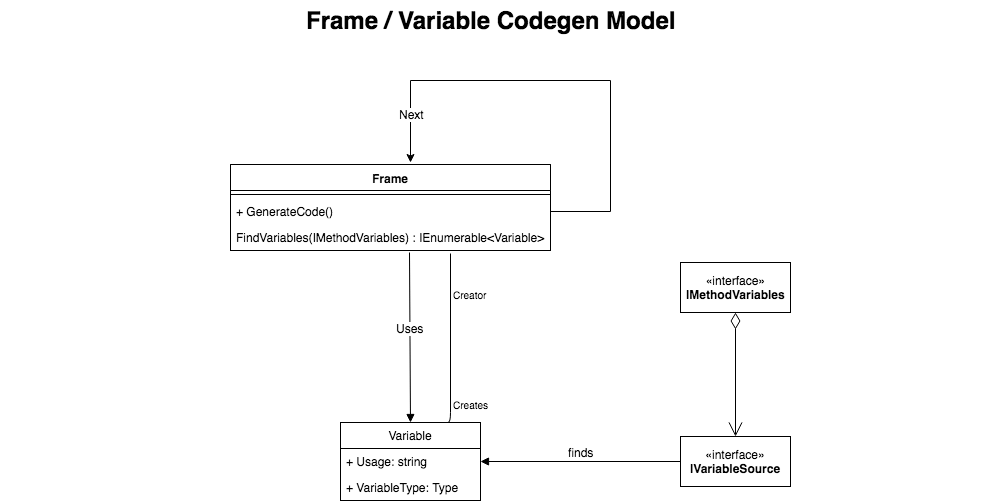
Before diving into an example, here’s a little class diagram of the main types:

LamarCodeGenClassDiagram

The various types represent:

  • Frame – Named after the StackFrame objects within stack traces in .Net. Models a logical action done in the generated code. Concrete examples in Lamar or Jasper would be calling a method on an object, calling a constructor function, or specific frame objects to create wrapped transaction boundaries or exception handling boundaries.
  • Variable – pretty well what it sounds like. This type models a variable within the generated method, but also includes information about what Frame created it to help order the dependencies
  • IVariableSource – mechanism to “find” or create variables. Examples in Lamar include resolving a service from an IoC container, passing along a method argument, or the example below that tells you the current time
  • IMethodVariables – interface that is used by Frame classes to go find their necessary Variable dependencies.

Alrighty then, let’s make this concrete. Let’s say that we want to generate and use dynamic instances of this interface:

public interface ISaySomething
{
    void Speak();
}

Moreover, I want a version of ISaySomething that will call the following method and write the current time to the console:

public static class NowSpeaker
{
    public static void Speak(DateTime now)
    {
        Console.WriteLine(now.ToString("o"));
    }
}

Our dynamic class for ISaySomething will need to pass the current time to the now parameter of that method. To help out here, there’s some built in helpers in Lamar specifically to write in the right code to get the current time to a variable of DateTime or DateTimeOffset that is named “now.”

To skip ahead a little bit, let’s generate a new class and object with the following code:

// Configures the code generation rules
// and policies
var rules = new GenerationRules("GeneratedNamespace");

// Adds the "now : DateTime" variable rule to 
// our generated code
rules.Sources.Add(new NowTimeVariableSource());

// Start the definition for a new generated assembly
var assembly = new GeneratedAssembly(rules);

// Add a new generated type called "WhatTimeIsIt" that will
// implement the 
var type = assembly.AddType("WhatTimeIsIt", typeof(ISaySomething));

// Getting the definition for the method named "Speak"
var method = type.MethodFor(nameof(ISaySomething.Speak));

// Adding a frame that calls the NowSpeaker.Speak() method and
// adding it to the generated method
var @call = new MethodCall(typeof(NowSpeaker), nameof(NowSpeaker.Speak));
method.Frames.Add(@call);

// Compile the new code!
assembly.CompileAll();

After all that, if we interrogate the source code for the generated type above (type.SourceCode), we’d see this ugly generated code:

    public class WhatTimeIsIt : Lamar.Testing.Samples.ISaySomething
    {


        public void Speak()
        {
            var now = System.DateTime.UtcNow;
            Lamar.Testing.Samples.NowSpeaker.Speak(now);
        }

    }

Some notes about the generated code:

  • Lamar was able to stick in some additional code to pass the current time into a new variable, and call the Speak(DateTime now) method with that value.
  • Lamar is smart enough to put that code before the call to the method (that kind of matters here)
  • The generated code uses full type names in almost all cases to avoid type collisions rather than trying to get smart with using statements in the generated code

So now let’s look at how Lamar was able to add the code to pass along DateTime.UtcNow. First off, let’s look at the code that just writes out the date variable:

public class NowFetchFrame : SyncFrame
{
    public NowFetchFrame(Type variableType)
    {
        // there's some sleight of hand here that's marking
        // this new Variable as created by this frame object
        // so that the dependency relationship is made
        Variable = new Variable(variableType, "now", this);
    }
    
    public Variable Variable { get; }
    
    public override void GenerateCode(
        GeneratedMethod method, 
        ISourceWriter writer)
    {
        writer.WriteLine($"var {Variable.Usage} 
            = {Variable.VariableType.FullName}.{nameof(DateTime.UtcNow)};");
        Next?.GenerateCode(method, writer);
    }
}

In the frame above, you’ll see that the GenerateCode() method writes its code into the source, then immediately turns around and tells the next Frame – if there is one – to generated its code. As the last step to write out the new source code, Lamar:

  1. Goes through an effort to find any missing frames and variables
  2. Sorts them with a topological sort (what frames depend on what other frames or variables, what variables are used or created by what frames)
  3. Organizes the frames into a single linked list
  4. Calls GenerateCode() on the first frame

In the generated method up above, the call to NowSpeaker.Speak(now) depends on the now variable which is in turn created by the NowFetchFrame, and that’s enough information for Lamar to order things and generate the final code.

Lastly, we had to use a custom IVariableSource to teach Lamar how to resolve the now variable. That code looks like this:

public class NowTimeVariableSource : IVariableSource
{
    public bool Matches(Type type)
    {
        return type == typeof(DateTime) || type == typeof(DateTimeOffset);
    }

    public Variable Create(Type type)
    {
        if (type == typeof(DateTime))
        {
            return new NowFetchFrame(typeof(DateTime)).Variable;
        }

        if (type == typeof(DateTimeOffset))
        {
            return new NowFetchFrame(typeof(DateTimeOffset)).Variable;
        }

        throw new ArgumentOutOfRangeException(nameof(type), "Only DateTime and DateTimeOffset are supported");
    }
}

Out of the box, the Lamar + Jasper combination uses variable sources for:

  • Services from the internal IoC container of the application
  • Method arguments
  • Variables that can be derived from a method argument like HttpContext.Request
  • The “now” convention shown here

Summary

I don’t know how popular this thing is going to be, but it’s powering the dynamic code generation of Jasper’s runtime pipeline and it’s the key to Jasper’s efficiency compared to other .Net tools with similar functionality. The early feedback I got was that this model was very abstract and hard to follow. I’m open to suggestions, but the very nature of needing to do the recursive dependency detection and ordering kind of necessitates a model like this in my opinion.