Lamar asks: Do I stay or do I go?

I happened to look into the Lamar issue list on GitHub late this afternoon at the end of a very long work day. What I saw was nothing to feel good about. A huge memory usage problem (probably related to Roslyn but I don’t know that for sure), a user who’s been very difficult in the past telling me he switched to another tool because it was easier to use and faster, bugs that unfortunately point to a huge flaw in Lamar’s basic premise, and folks really wanting a feature I’ve put off because it’s going to be a lot of work.

Lamar started its life as a subsystem of Jasper, the project that’s been my main side-project for the past couple years and my biggest ambition for several years before that. Jasper’s special sauce is the way that it uses Lamar to generate and compile code at runtime to glue together the runtime pipeline in the most efficient way possible. At the same time, it was killing me to support StructureMap and I wanted out of it, but didn’t want to leave a huge mess of folks with an abandoned project, so I turned Lamar into an IoC tool that was purposely meant to be a smooth transition for StructureMap users to an improved and more efficient IoC tool.

Right now, it’s becoming clear that the basic model of Lamar to use the runtime code generation isn’t working out. First because of what looks like some severe memory issues related to the runtime compilation, and second because it turns out that it’s very, very common for folks to use internal .Net types in IoC containers which pretty well defeats the entire code generation model. Lamar has workarounds for this to fall back to dynamic expressions for internal types, but it’s not optimized for that and Lamar’s performance degrades badly when folks use internal types.

As I see it, my choices with Lamar are to:

  • Retool it to use dynamic Expression compilation all the way down in the IoC engine usage like basically every other IoC tool including the older StructureMap library. That takes care of the performance issues most likely and knocks out the bugs due to internal types, but just sounds miserable.
  • Deal with the memory problems by trying to engage with the actual Roslyn team to figure out what’s going on and work around it. Which doesn’t solve the internal type issue.
  • Use pre-generated code build by Lamar during testing time baked into the real application for production deployments. There’s a bit more than a proof of concept already baked in, but this still doesn’t fix the internal problem

On the Jasper side I could:

  • Try to make it work with the built in IoC container but still try to do its “no IoC at runtime because it’s all codegen’d” model with a cutdown version of Lamar

Or, just call the whole thing off because while I would argue that Jasper shows a lot of promise technically and I still believe in its potential, it has zero adoption and I most likely won’t get to use it myself in any projects in the next year. If I give up on Jasper, I’m likely to do the same to Lamar. In that case, I’ll write off Lamar as a failed project concept, apologize profusely to all the folks that started to use it to replace StructureMap, and walk away.

Nobody needs to feel sorry for me here, so no need to try to cheer me up about any of this, but, I wouldn’t mind some feedback on whether it’s worth keeping Lamar around and what you think about the proposed improvements.

My integration testing challenges this week

EDIT 3/12: All these tests are fixed, and it wasn’t as bad as I’d thought it was going to be, but the extra logging and faster change code/run test under debugger cycle definitely helped.

This was meant to be a short post, or at least an easy to write post on my part, but it spilled out from integration testing and into some Storyteller mechanics, semi-advanced xUnit.Net usage, ASP.Net Core logging integration, and even a tepid defense of compositional architectures wrapped around an IoC container.

I’ve been working feverishly the past couple of months to push Jasper to a 1.0 release. As (knock on wood) the last big epic, I’ve been working on a large overhaul and redesign of the message persistence behind Jasper’s durable messaging. The existing code was fairly well covered by integration tests, so I felt confident that I could make the large scale changes and use the big bang integration tests to ensure the intended functionality still worked as designed.

I assume that y’all can guess how this has turned out. After a week of code changes and fixing any and all unit test and intermediate integration test failures, I got to the point where I was ready to run the big bang integration tests and, get this, they didn’t pass on the first attempt! I know, shocking right? Moreover, the tests involve all kinds of background processing and even multiple logical applications (think ASP.Net Core IWebHost objects) being started up and shut down during the tests, so it wasn’t exactly easy to spot the source of my test failures.

I thought it’d be worth talking about how I first stopped and invested in improving my test harness to make it faster to launch the test harness and to capture a lot more information about what’s going on in all the multithreading/asynchronous madness going on but…

First, an aside on Debugger Hell

You probably want to have some kind of debugger in your IDE of choice. You also want to be reasonably good using that tool, know how to use its features, and conversant in its supported keyboard shortcuts. You also want to try really hard to avoid needing to use your debugger too often because that’s just not an efficient way to get things done. Many folks in the early days of Agile development, including me, described debugger usage as a code or testing “smell.” And while “smell” is mostly used today as a pejorative to put down something that you just don’t like, it was originally just meant as a warning you should pay more attention to in your code or approach.

In the case of debugger usage, it might be telling you that your testing approach needs to be more fine grained or that you are missing crucial test coverage at lower levels. In my case, I’ll be looking for places where I’m missing smaller tests on elements of the bigger system and fill in those gaps before getting too worked up trying to solve the big integration test failures.

Storyteller Test Harness

For these big integration tests, I’m using Storyteller as my testing tool (think Cucumber,  but much more optimized for integration testing as opposed to being cute). With Storyteller, I’ve created a specification language that lets me script out message failover scenarios like the one shown below (which is currently failing as I write this):
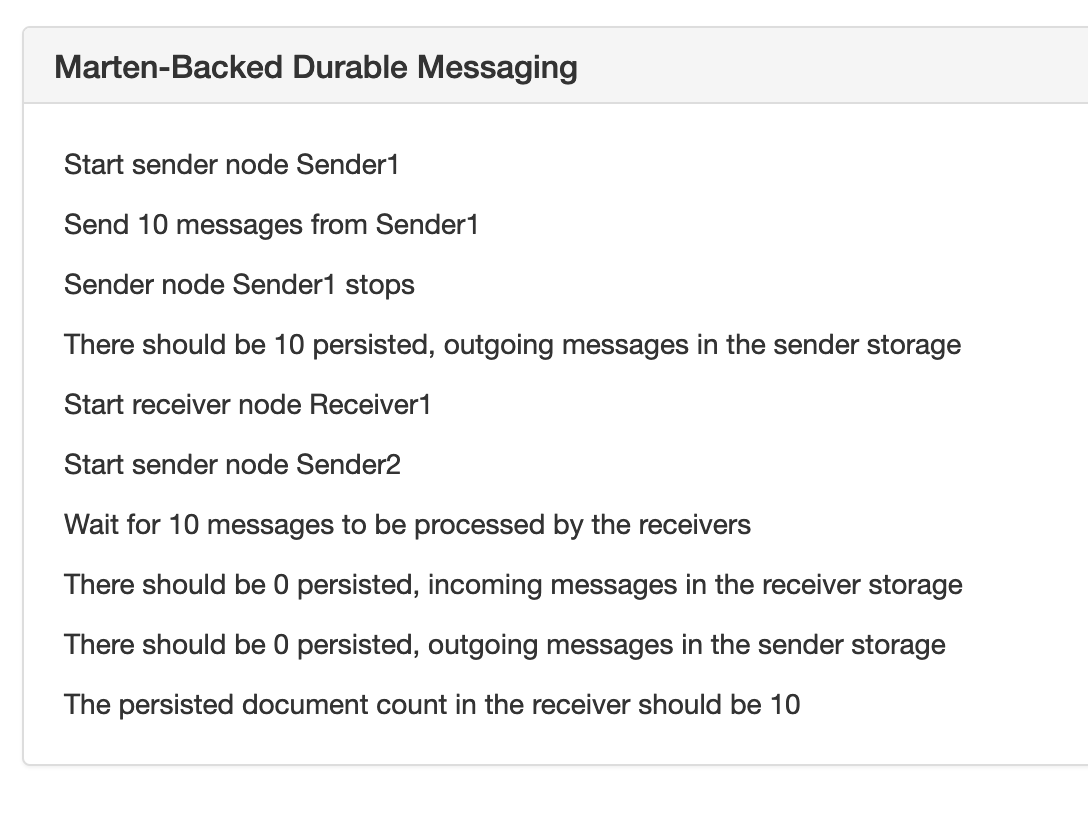
JasperFailoverSpec

In the specification above, I’m starting and stopping Jasper applications to prove out Jasper’s ability to fail over and recover pending work from one running node to another using its Marten message persistence option. At runtime, Jasper has a background “durability agent” constantly running that is polling the database to determine if there is any unclaimed work to do or known application nodes are down (using advisory locks through Postgresql if anybody would ever be interested in a blog post about just that). Hopefully that’s enough description just to know that this isn’t particularly an easy scenario to test or code.

In my initial attempts to diagnose the failing Storyteller tests I bumped into a couple problems and sources of friction:

  1. It was slow and awkward mechanically to get the tests running under the debugger (that’s been a long standing problem with Storyteller and I’m finally happy with the approach shown later in this post)
  2. I could tell quickly that exceptions were being thrown and logged in the background processing, but I wasn’t capturing that log output in any kind of usable way

Since I’m pretty sure that the tests weren’t going to get resolved quickly and that I’d probably want to write even more of these damn tests, I believed that I first needed to invest in better visibility into what was happening inside the code and a much quicker way to cycle into the debugger. To that end, I took a little detour and worked on some Storyteller improvements that I’ve been meaning to do for quite a while.

Incorporating Logging into Storyteller Results

Jasper uses the ASP.Net Core logging abstractions for its own internal logging, but I didn’t have anything configured except for Debug and Console tracing to capture the logs being generated at runtime. Even with the console output, what I really wanted was all the log information correlated with both the individual test execution and which receiver or sender application the logging was from.

Fortunately, Storyteller has an extensibility model to capture custom logging and instrumentation directly into its test results. It turned out to be very simple to whip together an adapter for ASP.Net Core logging that captured the logging information in a way that can be exposed by Storyteller.

You can see the results in the image below. The table below is just showing all the logging messages received by ILogger within the “Receiver1” application during one test execution. The yellow row is an exception that was logged during the execution that I might not have been able to sense otherwise.

AspNetLoggingInStoryteller

For the implementation, ASP.Net Core exposes the ILoggerProvider service such that you can happily plug in as many logging strategies as you want to an application in a combinatorial way. On the Storyteller side of things, you have the Report interface that let’s you plug in custom logging that can expose HTML output into Storyteller’s results.

Implementing that crudely came out as a single class that implements both adapter interface (here’s a gist of the whole thing):

public class StorytellerAspNetCoreLogger : Report, ILoggerProvider

The actual logging just tracks all the calls to ILogger.Log() as little model objects in memory:

public void Log<TState>(LogLevel logLevel, EventId eventId, TState state, Exception exception, Func<TState, Exception, string> formatter)
{
    var logRecord = new LogRecord
    {
        Category = _categoryName,
        Level = logLevel.ToString(),
        Message = formatter(state, exception),
        ExceptionText = exception?.ToString()
    };

    // Just keep all the log records in an in memory list
    _parent.Records.Add(logRecord);
}

Fortunately enough, in the Storyteller Fixture code for the test harness I bootstrap the receiver and sender applications per test execution, so it’s really easy to just add the new StorytellerAspNetCoreLogger to both the Jasper applications and the Storyteller test engine:

var registry = new ReceiverApp();
registry.Services.AddSingleton<IMessageLogger>(_messageLogger);

var logger = new StorytellerAspNetCoreLogger(key);

// Tell Storyteller about the new logger so that it'll be
// rendered as part of Storyteller's results
Context.Reporting.Log(logger);

// This is bootstrapping a Jasper application through the 
// normal ASP.Net Core IWebHostBuilder
return JasperHost
    .CreateDefaultBuilder()
    .ConfigureLogging(x =>
    {
        x.SetMinimumLevel(LogLevel.Debug);
        x.AddDebug();
        x.AddConsole();
        
        // Add the logger to the new Jasper app
        // being built up
        x.AddProvider(logger);
    })

    .UseJasper(registry)
    .StartJasper();

And voila, the logging information is now part of the test results in a useful way so I can see a lot more information about what’s happening during the test execution.

It sucks that my code is throwing exceptions instead of just working, but at least I can see what the hell is going wrong now.

Get the debugger going quickly

To be honest, the friction of getting Storyteller tests running under a debugger has always been a drawback to Storyteller — especially compared to how fast that workflow is with tools like xUnit.Net that integrate seamlessly into your IDE. You’ve always been able to just attach your debugger to the running Storyteller process, but I’ve always found that to be clumsy and slow — especially when you’re trying to quickly cycle between attempted fixes and re-running the tests.

I made some attempts in Storyteller 5 to improve the situation (after we gave up on building a dotnet test adapter because that model is bonkers), but that still takes some set up time to make it work and even I have to always run to the documentation to remember how to do it. Sometime this weekend the solution for a quick xUnit.Net execution wrapper around Storyteller popped into my head and it honestly took about 15 minutes flat to get things working so that I could kick off individual Storyteller specifications from xUnit.Net as shown below:
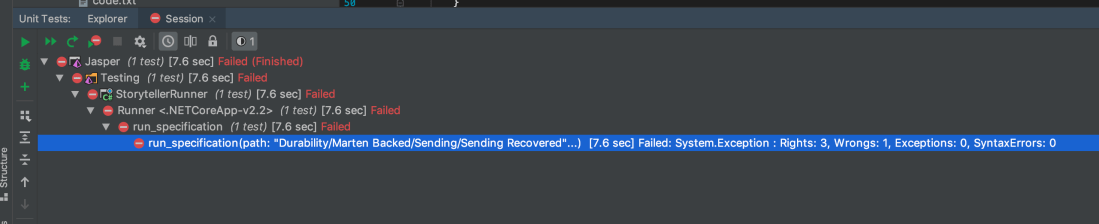
StorytellerWithinXUnit

Maybe that’s not super exciting, but the end result is that I can rerun a specification after making changes with or without debugging with nothing but a simple keyboard shortcut in the IDE. That’s a dramatically faster feedback cycle than what I had to begin with.

Implementation wise, I just took advantage of xUnit.Net’s [MemberData] feature for parameterized tests and Storyteller’s StorytellerRunner class that was built to allow users to run specifications from their own code. After adding a new xUnit.Net test project and referencing the original Storyteller specification project named “StorytellerSpecs, ” I added the code file shown below in its entirety::

// This only exists as a hook to dispose the static
// StorytellerRunner that is hosting the underlying
// system under test at the end of all the spec
// executions
public class StorytellerFixture : IDisposable
{
    public void Dispose()
    {
        Runner.SpecRunner.Dispose();
    }
}

public class Runner : IClassFixture<StorytellerFixture>
{
    internal static readonly StoryTeller.StorytellerRunner SpecRunner;

    static Runner()
    {
        // I'll admit this is ugly, but this establishes where the specification
        // files live in the real StorytellerSpecs project
        var directory = AppContext.BaseDirectory
            .ParentDirectory()
            .ParentDirectory()
            .ParentDirectory()
            .ParentDirectory()
            .AppendPath("StorytellerSpecs")
            .AppendPath("Specs");

        SpecRunner = new StoryTeller.StorytellerRunner(new SpecSystem(), directory);
    }

    // Discover all the known Storyteller specifications
    public static IEnumerable<object[]> GetFiles()
    {
        var specifications = SpecRunner.Hierarchy.Specifications.GetAll();
        return specifications.Select(x => new object[] {x.path}).ToArray();
    }

    // Use a touch of xUnit.Net magic to be able to kick off and
    // run any Storyteller specification through xUnit
    [Theory]
    [MemberData(nameof(GetFiles))]
    public void run_specification(string path)
    {
        var results = SpecRunner.Run(path);
        if (!results.Counts.WasSuccessful())
        {
            SpecRunner.OpenResultsInBrowser();
            throw new Exception(results.Counts.ToString());
        }
    }
}

And that’s that. Something I’ve wanted to have for ages and failed to build, done in 15 minutes because I happened to remember something similar we’d done at work and realized how absurdly easy xUnit.Net made this effort.

Summary

  • Sometimes it’s worthwhile to take a step back from trying to solve a problem through debugging and invest in better instrumentation or write some automation scripts to make the debugging cycles faster rather than just trying to force your way through the solution
  • Inspiration happens at random times
  • Listen to that niggling voice in your head sometimes that’s telling you that you should be doing things differently in your code or tests
  • Using a modular architecture that’s composed by an IoC container the way that ASP.net Core does can sometimes be advantageous in integration testing scenarios. Case in point is how easy it was for me to toss in an all new logging provider that captured the log information directly into the test results for easier test failure resolution

And when I get around to it, these little Storyteller improvements will end up in Storyteller itself.

Jasper meets Azure Service Bus and gets better with Rabbit MQ

This is just a super quick update on Jasper so I can prove to the world that it’s actually moving forward. I’ll hopefully have a lot more on Jasper in the next couple weeks when I push the next big alpha.

I posted a new release of Jasper last week (v0.9.8.6) that has some better transport support for using Jasper commands with real messaging infrastructure:

I’d definitely love any feedback on the configuration of either transport option. I’m aiming to allow users to have access to every last bit of advanced features that either transport exposes, while also enabling users to quickly swap out transport mechanisms between executing locally, on test, and in production as necessary.


What’s Next

I really want to get to a 1.0 release soon because this has dragged on so much longer than I’d hoped. Right now I’m focused on improving the message persistence options and add automatic messaging idempotent rules.


My OSS Plans for 2019

I wrote a similar post last year on My OSS Plans for 2018, and it wasn’t too far off what actually happened. I did switch jobs last May, and until recently, that dramatically slowed down my rate of OSS contributions and my ambition level for OSS work. I still enjoy building things, I’m in what’s supposed to be a mostly non-coding role now (but I absolutely still do), and working on OSS projects is just a good way to try to keep my technical skills up. So here we go:

Marten — I’m admittedly not super active with Marten these days as it’s a full fledged community driven project now. There has been a pile up of Linq related issues lately and the issue backlog is getting a bit big, so it really wouldn’t hurt for me to be more active. I happen to love Stephen King’s Dark Tower novels (don’t bother with the movie), but he used to complain that they were hard for him to get into the right head space to write more about Roland and his Ka-tet. That’s basically how I feel about the Linq provider in Marten, but it’s over due for some serious love.

Lamar (was BlueMilk) — Users are reporting some occasional memory usage problems that I think point to issues in Roslyn itself, but in the meantime I’ve got some workarounds in mind to at least alleviate the issue (maybe, hopefully, knock on wood). The one and only big feature idea for this year I have in mind is to finally do the “auto-factory” feature that I hope will knock out a series of user requests for more dynamic behavior.

Alba — I took some time at CodeMash this year and did a pretty substantial 3.0 release that repositioned Alba as a productivity helper on top of TestServer to hopefully eliminate a whole lot of compatibility issues with ASP.Net Core. I don’t know that I have any other plans for Alba this year, but it’s the one tool I work on that I actually get to use at work, so there might be some usability improvements over time.

Storyteller — I’d really love to sink into a pretty big rewrite of the user interface and some incremental — but perfectly backward compatible — improvements to the engine. After a couple years of mostly doing integration work, I suddenly have some UI centric projects ahead of me and I could definitely use some refresher on building web UIs. More on this in a later post.

Jasper — I think I’m finally on track for a 1.0 release in the next couple months, but I’m a little unsure if I want to wait for ASP.Net Core 3.0 or not. After that, it’s mostly going to be trying to build some community around Jasper. Most of my side project time and effort the past three years has been toward Jasper, I have conceptual notes on its architecture that go back at least 5 years, and counting its predecessor project FubuMVC, this has been a 10 year effort for me. Honestly, I think I’m going to finish the push to 1.0 just to feel some sense of completion.

Oakton — I feel like it’s basically done

StructureMap — I answer questions here and there, but otherwise it’s finished/abandoned

FubuMVC — Dead, but little bits and pieces of it live on in Oakton, Alba, and Jasper


Building a Hybrid Jasper/MVC Core Application

This was originally a tutorial on Jasper’s documentation website. Assuming you even remember FubuMVC and ask me what’s going to be different about Jasper this time around, one of the first things I’ll bring up is that it’s perfectly possible to mix and match HTTP actions handled by either Jasper or MVC Core (or Carter for that matter) within the same application.

Jasper is trying very hard to be merely a citizen within the greater ASP.Net Core ecosystem than its own standalone framework. To that end, Jasper plays nicely with ASP.Net Core, as shown in this example that adds Jasper to an MVC Core application.

Start by creating a new project with this command line:

dotnet new webapi

Now, add a Nuget reference to Jasper. In your Program.Main() method, make these changes noted in comments:

public class Program
{
    // Return an int for a status code
    public static int Main(string[] args)
    {
        // Calling RunJasper() opts into Jasper's expansive
        // command line skeleton with diagnostics you probably
        // want
        return CreateWebHostBuilder(args).RunJasper(args);
    }

    public static IWebHostBuilder CreateWebHostBuilder(string[] args) =>
        WebHost.CreateDefaultBuilder(args)
            .UseStartup<Startup>()

            // Add Jasper with all its defaults
            .UseJasper();
}

Next, go into the generated Startup class and make the changes shown here with comments:

public class Startup
{
    public Startup(IConfiguration configuration)
    {
        Configuration = configuration;
    }

    public IConfiguration Configuration { get; }

    // This method gets called by the runtime. Use this method to add services to the container.
    public void ConfigureServices(IServiceCollection services)
    {
        services.AddMvc().SetCompatibilityVersion(CompatibilityVersion.Version_2_2);
        services.AddDbContext<UserDbContext>();
    }

    // This method gets called by the runtime. Use this method to configure the HTTP request pipeline.
    public void Configure(IApplicationBuilder app, IHostingEnvironment env, JasperOptions messaging)
    {
        // This is optional, but it's awfully helpful
        // to configure the message bus part of Jasper directly
        // from configuration
        messaging.ListenForMessagesFrom(Configuration["ListeningEndpoint"]);
        messaging.AddSubscription(Subscription.All(Configuration["OtherServiceUri"]));


        if (env.IsDevelopment())
        {
            app.UseDeveloperExceptionPage();
        }
        else
        {
            // The default HSTS value is 30 days. You may want to change this for production scenarios, see https://aka.ms/aspnetcore-hsts.
            app.UseHsts();
        }

        app.UseHttpsRedirection();

        // The ordering here is meaningful, but we think that
        // Jasper's routing is more efficient, so let it try
        // first
        app.UseJasper();

        app.UseMvc();
    }
}

In this case, I’m assuming that there’s one single messaging listener and all published messages will get sent to the same location. Both of those Uri values are in the appsettings.json file shown below:

{
  "Logging": {
    "LogLevel": {
      "Default": "Warning"
    }
  },
  "AllowedHosts": "*",
  "ListeningEndoint": "tcp://localhost:2100",
  "OtherServiceUri": "tcp://localhost:2200"
}

Now, after running the application from a straight up call to dotnet run (and maybe remembering to force your csproj to copy the appsettings.json file around), you should get a lot of command line output like this:

dbug: Microsoft.AspNetCore.Hosting.Internal.WebHost[3]
      Hosting starting
info: Microsoft.AspNetCore.DataProtection.KeyManagement.XmlKeyManager[0]
      User profile is available. Using '/Users/jeremydmiller/.aspnet/DataProtection-Keys' as key repository; keys will not be encrypted at rest.
dbug: Microsoft.AspNetCore.DataProtection.Repositories.FileSystemXmlRepository[37]
      Reading data from file '/Users/jeremydmiller/.aspnet/DataProtection-Keys/key-fdd38e0a-635d-4d73-93bf-7197b3bf71a8.xml'.
dbug: Microsoft.AspNetCore.DataProtection.Repositories.FileSystemXmlRepository[37]
      Reading data from file '/Users/jeremydmiller/.aspnet/DataProtection-Keys/key-506cdf5d-957b-4bdd-8b07-3edf5a109e9a.xml'.
dbug: Microsoft.AspNetCore.DataProtection.Repositories.FileSystemXmlRepository[37]
      Reading data from file '/Users/jeremydmiller/.aspnet/DataProtection-Keys/key-122b0ab4-2cb0-49ac-ae79-98a3ca730514.xml'.
dbug: Microsoft.AspNetCore.DataProtection.KeyManagement.XmlKeyManager[18]
      Found key {fdd38e0a-635d-4d73-93bf-7197b3bf71a8}.
dbug: Microsoft.AspNetCore.DataProtection.KeyManagement.XmlKeyManager[18]
      Found key {506cdf5d-957b-4bdd-8b07-3edf5a109e9a}.
dbug: Microsoft.AspNetCore.DataProtection.KeyManagement.XmlKeyManager[18]
      Found key {122b0ab4-2cb0-49ac-ae79-98a3ca730514}.
dbug: Microsoft.AspNetCore.DataProtection.KeyManagement.DefaultKeyResolver[13]
      Considering key {fdd38e0a-635d-4d73-93bf-7197b3bf71a8} with expiration date 2019-02-26 20:28:23Z as default key.
dbug: Microsoft.AspNetCore.DataProtection.TypeForwardingActivator[0]
      Forwarded activator type request from Microsoft.AspNetCore.DataProtection.AuthenticatedEncryption.ConfigurationModel.AuthenticatedEncryptorDescriptorDeserializer, Microsoft.AspNetCore.DataProtection, Version=2.1.1.0, Culture=neutral, PublicKeyToken=adb9793829ddae60 to Microsoft.AspNetCore.DataProtection.AuthenticatedEncryption.ConfigurationModel.AuthenticatedEncryptorDescriptorDeserializer, Microsoft.AspNetCore.DataProtection, Culture=neutral, PublicKeyToken=adb9793829ddae60
dbug: Microsoft.AspNetCore.DataProtection.AuthenticatedEncryption.ManagedAuthenticatedEncryptorFactory[11]
      Using managed symmetric algorithm 'System.Security.Cryptography.Aes'.
dbug: Microsoft.AspNetCore.DataProtection.AuthenticatedEncryption.ManagedAuthenticatedEncryptorFactory[10]
      Using managed keyed hash algorithm 'System.Security.Cryptography.HMACSHA256'.
dbug: Microsoft.AspNetCore.DataProtection.KeyManagement.KeyRingProvider[2]
      Using key {fdd38e0a-635d-4d73-93bf-7197b3bf71a8} as the default key.
dbug: Microsoft.AspNetCore.DataProtection.Internal.DataProtectionStartupFilter[0]
      Key ring with default key {fdd38e0a-635d-4d73-93bf-7197b3bf71a8} was loaded during application startup.
dbug: Microsoft.AspNetCore.Mvc.MvcJsonOptions[0]
      Compatibility switch AllowInputFormatterExceptionMessages in type MvcJsonOptions is using compatibility value True for version Version_2_2
dbug: Microsoft.AspNetCore.Mvc.MvcOptions[0]
      Compatibility switch AllowCombiningAuthorizeFilters in type MvcOptions is using compatibility value True for version Version_2_2
dbug: Microsoft.AspNetCore.Mvc.MvcOptions[0]
      Compatibility switch AllowBindingHeaderValuesToNonStringModelTypes in type MvcOptions is using compatibility value True for version Version_2_2
dbug: Microsoft.AspNetCore.Mvc.MvcOptions[0]
      Compatibility switch AllowValidatingTopLevelNodes in type MvcOptions is using compatibility value True for version Version_2_2
dbug: Microsoft.AspNetCore.Mvc.MvcOptions[0]
      Compatibility switch InputFormatterExceptionPolicy in type MvcOptions is using compatibility value MalformedInputExceptions for version Version_2_2
dbug: Microsoft.AspNetCore.Mvc.MvcOptions[0]
      Compatibility switch SuppressBindingUndefinedValueToEnumType in type MvcOptions is using compatibility value True for version Version_2_2
dbug: Microsoft.AspNetCore.Mvc.MvcOptions[0]
      Compatibility switch EnableEndpointRouting in type MvcOptions is using compatibility value True for version Version_2_2
dbug: Microsoft.AspNetCore.Mvc.MvcOptions[0]
      Compatibility switch MaxValidationDepth in type MvcOptions is using compatibility value 32 for version Version_2_2
dbug: Microsoft.AspNetCore.Mvc.MvcOptions[0]
      Compatibility switch AllowShortCircuitingValidationWhenNoValidatorsArePresent in type MvcOptions is using compatibility value True for version Version_2_2
dbug: Microsoft.AspNetCore.Mvc.ApiBehaviorOptions[0]
      Compatibility switch SuppressMapClientErrors in type ApiBehaviorOptions is using default value False
dbug: Microsoft.AspNetCore.Mvc.ApiBehaviorOptions[0]
      Compatibility switch SuppressUseValidationProblemDetailsForInvalidModelStateResponses in type ApiBehaviorOptions is using default value False
dbug: Microsoft.AspNetCore.Mvc.ApiBehaviorOptions[0]
      Compatibility switch AllowInferringBindingSourceForCollectionTypesAsFromQuery in type ApiBehaviorOptions is using default value False
dbug: Microsoft.AspNetCore.Mvc.RazorPages.RazorPagesOptions[0]
      Compatibility switch AllowAreas in type RazorPagesOptions is using compatibility value True for version Version_2_2
dbug: Microsoft.AspNetCore.Mvc.RazorPages.RazorPagesOptions[0]
      Compatibility switch AllowMappingHeadRequestsToGetHandler in type RazorPagesOptions is using compatibility value True for version Version_2_2
dbug: Microsoft.AspNetCore.Mvc.RazorPages.RazorPagesOptions[0]
      Compatibility switch AllowDefaultHandlingForOptionsRequests in type RazorPagesOptions is using compatibility value True for version Version_2_2
dbug: Microsoft.AspNetCore.Mvc.Razor.RazorViewEngineOptions[0]
      Compatibility switch AllowRecompilingViewsOnFileChange in type RazorViewEngineOptions is using explicitly configured value True
dbug: Microsoft.AspNetCore.Mvc.MvcViewOptions[0]
      Compatibility switch SuppressTempDataAttributePrefix in type MvcViewOptions is using compatibility value True for version Version_2_2
dbug: Microsoft.AspNetCore.Mvc.MvcViewOptions[0]
      Compatibility switch AllowRenderingMaxLengthAttribute in type MvcViewOptions is using compatibility value True for version Version_2_2
dbug: Microsoft.AspNetCore.Mvc.ModelBinding.ModelBinderFactory[12]
      Registered model binder providers, in the following order: Microsoft.AspNetCore.Mvc.ModelBinding.Binders.BinderTypeModelBinderProvider, Microsoft.AspNetCore.Mvc.ModelBinding.Binders.ServicesModelBinderProvider, Microsoft.AspNetCore.Mvc.ModelBinding.Binders.BodyModelBinderProvider, Microsoft.AspNetCore.Mvc.ModelBinding.Binders.HeaderModelBinderProvider, Microsoft.AspNetCore.Mvc.ModelBinding.Binders.FloatingPointTypeModelBinderProvider, Microsoft.AspNetCore.Mvc.ModelBinding.Binders.EnumTypeModelBinderProvider, Microsoft.AspNetCore.Mvc.ModelBinding.Binders.SimpleTypeModelBinderProvider, Microsoft.AspNetCore.Mvc.ModelBinding.Binders.CancellationTokenModelBinderProvider, Microsoft.AspNetCore.Mvc.ModelBinding.Binders.ByteArrayModelBinderProvider, Microsoft.AspNetCore.Mvc.ModelBinding.Binders.FormFileModelBinderProvider, Microsoft.AspNetCore.Mvc.ModelBinding.Binders.FormCollectionModelBinderProvider, Microsoft.AspNetCore.Mvc.ModelBinding.Binders.KeyValuePairModelBinderProvider, Microsoft.AspNetCore.Mvc.ModelBinding.Binders.DictionaryModelBinderProvider, Microsoft.AspNetCore.Mvc.ModelBinding.Binders.ArrayModelBinderProvider, Microsoft.AspNetCore.Mvc.ModelBinding.Binders.CollectionModelBinderProvider, Microsoft.AspNetCore.Mvc.ModelBinding.Binders.ComplexTypeModelBinderProvider
dbug: Microsoft.AspNetCore.Server.Kestrel.Core.KestrelServer[2]
      Failed to locate the development https certificate at '(null)'.
dbug: Microsoft.AspNetCore.Server.Kestrel.Core.KestrelServer[0]
      Using development certificate: CN=localhost (Thumbprint: 81C087389BE208DFD502D193565DB7503A96E805)
dbug: Microsoft.AspNetCore.Server.Kestrel[0]
      No listening endpoints were configured. Binding to http://localhost:5000 and https://localhost:5001 by default.
dbug: Microsoft.AspNetCore.Hosting.Internal.WebHost[4]
      Hosting started
dbug: Microsoft.AspNetCore.Hosting.Internal.WebHost[0]
      Loaded hosting startup assembly MvcCoreHybrid, Version=1.0.0.0, Culture=neutral, PublicKeyToken=null
Running service 'MvcCoreHybrid'
Application Assembly: MvcCoreHybrid, Version=1.0.0.0, Culture=neutral, PublicKeyToken=null
Hosting environment: Development
Content root path: /Users/jeremydmiller/code/jasper/src/MvcCoreHybrid
Hosted Service: Jasper.JasperActivator
Hosted Service: Jasper.Messaging.Logging.MetricsCollector
Hosted Service: Jasper.Messaging.BackPressureAgent
Listening for loopback messages

Active sending agent to tcp://localhost:2200/
Active sending agent to loopback://retries/

Application started. Press Ctrl+C to shut down.

If you stop that, and now see what other command line utilities Jasper has added to your project, type:

dotnet run -- help

And you’ll see a lot of new options:

  -----------------------------------------------------------------------------------------------------------------------------------------------------------------
    Available commands:
  -----------------------------------------------------------------------------------------------------------------------------------------------------------------
        code -> Display or export the runtime, generated code in this application
    describe -> Preview the configuration of the Jasper application without running the application or starting Kestrel
         run -> Runs the configured Jasper application
    services -> Display the known Lamar service registrations
    validate -> Validate the configuration and environment for this Jasper application
  -----------------------------------------------------------------------------------------------------------------------------------------------------------------

See Jasper Command Line Support for more information about Jasper’s command line support.

Jasper as Lightweight Service Bus

I’ve suddenly got some momentum going on Jasper, and I’m trying to keep up a steady pace of blog posts about it to try to get some visibility and see about possibly attracting some community around it. This tutorial is admittedly just taken from the documentation website.

Using its own built in TCP Transport, Jasper can be used as a very lightweight service bus to send messages asynchronously between Jasper applications. In this tutorial, we’re going to create two Jasper services that exchange messages with each either.

Note! While this was originally meant for production applications — and its predecessor implementation from FubuMVC has been in production under significant load for 5-6 years, we think this functionality will be mostly useful for testing scenarios where your production transport is unusable locally. Looking at you Azure Service Bus.

For the purpose of this tutorial, we’re going to heavily leverage the dotnet command line tools, so if you would, open your favorite command line tool.

The first step is just to ensure you have the latest Jasper project templates by installing JasperTemplates as shown below:

dotnet new -i JasperTemplates

Next, let’s build up a new .Net solution with these three projects:

  1. Messages — just a class library that holds shared message types we’ll be sending back and forth.
  2. Pinger — a Jasper service that will send PingMessage messages every 5 seconds
  3. Ponger — a Jasper service that will receive PingMessage messages, and send a corresponding PongMessage back to the original sender service

Note! You do not have to use shared libraries of message DTO classes in order to use messaging between Jasper applications, but it’s the simplest possible way to get started, so here it is.

To build out this new solution, you can use the following command line script and then open the newly created PingAndPong.sln file:

mkdir PingAndPong
cd PingAndPong

dotnet new classlib --name Messages
dotnet new jasper.service --name Pinger
dotnet new jasper.service --name Ponger

dotnet add Pinger/Pinger.csproj reference Messages/Messages.csproj

dotnet new sln

dotnet sln PingAndPong.sln add Messages/Messages.csproj Pinger/Pinger.csproj Ponger/Ponger.csproj

In the Messages Project

All we need to do in the Messages project is to add these message types for later:

public class PingMessage
{
    public Guid Id { get; set; }
    public string Name { get; set; }
}

public class PongMessage
{
    public Guid Id { get; set; }
    public string Name { get; set; }
}

In the Ponger Project

We need to make a couple changes to Ponger. First, open the generated JasperConfig class and add the line of code shown below to tell Ponger to listen for messages on port 3051:

    internal class JasperConfig : JasperRegistry
    {
        public JasperConfig()
        {
            Transports.LightweightListenerAt(3051);
        }
    }

Next, we need to handle the PingMessage message, and send a PongMessage back to the original sender:

public class PingHandler
{
    public Response Handle(PingMessage message)
    {
        ConsoleWriter.Write(ConsoleColor.Cyan, "Got a ping with name: " + message.Name);

        var response = new PongMessage
        {
            Name = message.Name
        };

        // Don't know if you'd use this very often,
        // but this is a special syntax that will send
        // the "response" back to the original sender
        return Respond.With(response).ToSender();
    }
}

In the Pinger Project

In Pinger, we need a handler for the PongMessage messages coming back, so add this class:

public class PongHandler
{
    public void Handle(PongMessage message)
    {
        ConsoleWriter.Write(ConsoleColor.Cyan, "Got a pong back with name: " + message.Name);
    }
}

We also need something that just runs in the background and sends PingMessage messages out. For that, we’ll use an implementation of ASP.Net Core’s IHostedService:

    // In this case, BackgroundService is a base class
    // for the IHostedService that is *supposed* to be
    // in a future version of ASP.Net Core that I shoved
    // into Jasper so we could use it now. The one in Jasper
    // will be removed later when the real one exists in
    // ASP.Net Core itself
    public class PingSender : BackgroundService
    {
        private readonly IMessageContext _bus;

        public PingSender(IMessageContext bus)
        {
            _bus = bus;
        }

        protected override Task ExecuteAsync(CancellationToken stoppingToken)
        {
            var count = 1;

            return Task.Run(async () =>
            {
                while (!stoppingToken.IsCancellationRequested)
                {
                    await Task.Delay(1000, stoppingToken);

                    await _bus.Send(new PingMessage
                    {
                        Name = "Message" + count++
                    });
                }
            }, stoppingToken);
        }
    }

Lastly in Pinger, open the JasperConfig class and add a single line of code shown below that directs Jasper to listen for messages using its TCP Transport at port 3050. We’ll also make a static publishing rule to publish all messages to the Ponger service. Lastly, we need to register the PingSender with the system so that it runs continuously when the application is started.

All that is shown below:

    internal class JasperConfig : JasperRegistry
    {
        public JasperConfig()
        {
            
            // Directs Jasper to use the TCP listener and
            // bind to port 3050. 
            Transports.LightweightListenerAt(3050);
            
            // Send all published messages to this location
            Publish.AllMessagesTo("tcp://localhost:3051");

            Services.AddSingleton<IHostedService, PingSender>();
        }
    }

Running Pinger and Ponger

Now you’ll want a pair of command windows open, one to the root directory of Pinger and one to Ponger.

Since it’s a little bit cleaner, start up Ponger first with a simple call to dotnet run from the Ponger directory and you should see output like this:

ComputerName:Ponger user$ dotnet run
dbug: Microsoft.AspNetCore.Hosting.Internal.WebHost[3]
      Hosting starting
Jasper 'Nullo' startup is being used to start the ASP.Net Core application
dbug: Microsoft.AspNetCore.Hosting.Internal.WebHost[4]
      Hosting started
dbug: Microsoft.AspNetCore.Hosting.Internal.WebHost[0]
      Loaded hosting startup assembly Ponger, Version=1.0.0.0, Culture=neutral, PublicKeyToken=null
Running service 'JasperConfig'
Application Assembly: Ponger, Version=1.0.0.0, Culture=neutral, PublicKeyToken=null
Hosting environment: Production
Content root path: /Users/jeremydmiller/code/PingAndPong/Ponger/bin/Debug/netcoreapp2.1/
Hosted Service: Jasper.JasperActivator
Hosted Service: Jasper.Messaging.Logging.MetricsCollector
Hosted Service: Jasper.Messaging.BackPressureAgent
Listening for loopback messages

Active sending agent to loopback://retries/
Handles messages:
  PingMessage: HandlerType: Ponger.PingHandler, Method: Jasper.Messaging.Runtime.Invocation.Response Handle(Messages.PingMessage)

Application started. Press Ctrl+C to shut down.

Then start Pinger with the same dotnet run command from the root of the Pinger project and well, you’ll get a boatload of logging like this:

dbug: Jasper.Messages[101]
      Received PongMessage#0168be78-ddcd-43b6-8fc4-15cc855354c3 at tcp://localhost:3050/ from tcp://localhost:3051/
Got a pong back with name: Message18
dbug: Jasper.Messages[102]
      Started processing PongMessage#0168be78-ddcd-43b6-8fc4-15cc855354c3
dbug: Jasper.Messages[103]
      Finished processing PongMessage#0168be78-ddcd-43b6-8fc4-15cc855354c3
info: Jasper.Messages[104]
      Successfully processed message PongMessage#0168be78-ddcd-43b6-8fc4-15cc855354c3 from tcp://localhost:3051/
dbug: Jasper.Messages[100]
      Sent PingMessage#0168be78-e0ed-4eec-8081-05e7b1f36006 to tcp://localhost:3051/
info: Jasper.Transports[204]
      Sending agent for tcp://localhost:3051/ has resumed
dbug: Jasper.Transports[200]
      Successfully sent 1 messages to tcp://localhost:3051/
dbug: Jasper.Transports[202]
      Received 1 message(s) from tcp://localhost:3051/
dbug: Jasper.Messages[101]
      Received PongMessage#0168be78-e1b9-4bc8-bc58-98cdccf9824b at tcp://localhost:3050/ from tcp://localhost:3051/
dbug: Jasper.Messages[102]
      Started processing PongMessage#0168be78-e1b9-4bc8-bc58-98cdccf9824b
Got a pong back with name: Message19
dbug: Jasper.Messages[103]
      Finished processing PongMessage#0168be78-e1b9-4bc8-bc58-98cdccf9824b
info: Jasper.Messages[104]
      Successfully processed message PongMessage#0168be78-e1b9-4bc8-bc58-98cdccf9824b from tcp://localhost:3051/
dbug: Jasper.Messages[100]
      Sent PingMessage#0168be78-e4da-4c36-95e3-aa9d15ee0ff2 to tcp://localhost:3051/
info: Jasper.Transports[204]
      Sending agent for tcp://localhost:3051/ has resumed
dbug: Jasper.Transports[200]
      Successfully sent 1 messages to tcp://localhost:3051/
dbug: Jasper.Transports[202]
      Received 1 message(s) from tcp://localhost:3051/
dbug: Jasper.Messages[101]
      Received PongMessage#0168be78-e5a7-4e03-9894-4c3f61ed7413 at tcp://localhost:3050/ from tcp://localhost:3051/
dbug: Jasper.Messages[102]
      Started processing PongMessage#0168be78-e5a7-4e03-9894-4c3f61ed7413
Got a pong back with name: Message20
dbug: Jasper.Messages[103]
      Finished processing PongMessage#0168be78-e5a7-4e03-9894-4c3f61ed7413
info: Jasper.Messages[104]
      Successfully processed message PongMessage#0168be78-e5a7-4e03-9894-4c3f61ed7413 from tcp://localhost:3051/
dbug: Jasper.Messages[100]
      Sent PingMessage#0168be78-e8c5-4130-a919-81bfe235becb to tcp://localhost:3051/
info: Jasper.Transports[204]
      Sending agent for tcp://localhost:3051/ has resumed
dbug: Jasper.Transports[200]
      Successfully sent 1 messages to tcp://localhost:3051/
dbug: Jasper.Transports[202]
      Received 1 message(s) from tcp://localhost:3051/
dbug: Jasper.Messages[101]
      Received PongMessage#0168be78-e991-41b9-b1f0-16ee2fa75377 at tcp://localhost:3050/ from tcp://localhost:3051/
dbug: Jasper.Messages[102]
      Started processing PongMessage#0168be78-e991-41b9-b1f0-16ee2fa75377
Got a pong back with name: Message21

Alright, you’ve got a fully functional system of two services who constantly chat with each other. For more information about the topics we covered in this tutorial, see the documentation for Messaging

New Jasper Alpha for HTTP Services

Jasper is the name of an OSS project I’ve been working on for a disturbingly long time that’s the spiritual successor to FubuMVC. In more concrete terms, Jasper is built around what I think is a unique Roslyn-powered command execution pipeline that can be used as any combination of:

  1. An alternative to MVC Core for authoring HTTP services
  2. An in-memory service bus or command executor ala MediatR, but with more functionality
  3. A lightweight service bus
  4. A full fledged service bus when used in conjunction with real messaging infrastructure like Rabbit MQ or Azure Service Bus (Jasper fills the mediator rule between your code and the underlying transport)

To get you started on Jasper and to see what it’s capable, there’s actually a set of tutorials so far:

  1. Getting Started
  2. Jasper as an In Memory Command Executor / Mediator
  3. Using Jasper as a Lightweight Service Bus
  4. Building HTTP Services with Jasper
  5. Hybrid Jasper/MVC Core Application


What’s changed recently?

I changed Jasper’s direction a little bit starting last September. I’ve gone through the internals and tried very hard to replace any bit of code or infrastructure that was specific to Jasper that I thought could be adequately replaced by stuff built into ASP.Net Core. To that end, a lot of Jasper’s custom bootstrapping code was thrown out and replaced by fully embracing ASP.Net Core’s IWebHostBuilder infrastructure — even when Jasper is running “headless” with no real HTTP server.

I also replaced Jasper’s built in error handling and retry policies it had inherited from FubuMVC with a few extensions to Polly so users have the full power of Polly available to them — and I and any eventual Jasper community have a lot less code to document and support;)

I had quite a bit of free time at CodeMash and NDC London recently, so was able to work quite a bit on Jasper’s HTTP service support, including the new “MVC Extender” functionality that allows you to mix and match MVC Core elements into Jasper endpoints.


What’s Next

There’s going to be another pre-1.0 alpha within the next two weeks that will focus mostly on the messaging functionality. I can justify some day job time on it in the next couple weeks where I’ll be working on improving the Rabbit MQ integration, finishing the Azure Service Bus integration, and testing out the custom Azure AppInsights extension.

Beyond that? Performance optimization maybe, but I’d like to push for a 1.0 release soon and try to start building some interest and community around it. The only thing that will slow that down is to see if I wanna try to make Jasper 1.0 wait for ASP.Net Core 3.0 because every single OSS tool I maintain that depends on ASP.Net Core has been broken by every single ASP.Net Core release.


I’m very interested in whatever feedback you might have, either here, on twitter, or the Gitter room for Jasper.


Jasper as an In-Memory Bus Part 1

I just finished the work in Jasper I’d described in Changing Jasper’s Direction and released a new Jasper 0.9 Nuget and a matching dotnet new template package with the newly streamlined structure. Hopefully, this represents the first big step on the march to a 1.0 release and production readiness by the end of this year. I’m going to start blogging a lot more examples on Jasper in hopes of building some community and possibly attracting some other contributors.

Today I want to talk about using Jasper as an in memory bus (like MediatR) within an ASP.Net Core application. To make Jasper less scary, let’s start with an ASP.Net Core application built with the dotnet new webapi template. After adding a dependency to Jasper via Nuget, you can add Jasper to your new application with this code:

    public class Program
    {
        public static void Main(string[] args)
        {
            CreateWebHostBuilder(args).Build().Run();
        }

        public static IWebHostBuilder CreateWebHostBuilder(string[] args) =>
            WebHost.CreateDefaultBuilder(args)
                .UseStartup()
                
                // This is all you have to do to use Jasper
                // with all its default behavior
                .UseJasper();
    }

Do note that this quietly replaces the default ASP.net Core DI container with Lamar that is absolutely required for Jasper usage. Also note that this is choosing to use Jasper with all its default behavior. Lastly, this simplified configuration approach will only discover message handlers within the same assembly with your main application. See this page for more information on configuring Jasper.

Now, let’s say we need to have an HTTP endpoint that will receive a command to create a new user within our system like this:

    public class CreateUser
    {
        public string FirstName { get; set; }
        public string LastName { get; set; }
        public string Email { get; set; }
    }

Since we’ve decided that we want the actual work to be done by a Jasper message handler instead of just burying it within the normal MVC controller cruft, let’s write our first Jasper message handler that will handle this message by just writing a message to the console:

    public class UserHandler
    {
        public void Handle(CreateUser user)
        {
            Console.WriteLine("Hey, I got a new user!");
        }
    }

Or to stay with using async anytime the handler involved any kind of IO, use an asynchronous version:

    public class UserHandler
    {
        public Task Handle(CreateUser user)
        {
            return Console.Out.WriteLineAsync("Hey, I got a user");
        }
    }

Now, switching to the MVC Core side, let’s add the controller action that receives a JSON POST for CreateUser and delegates to Jasper:

    public class UserController : ControllerBase
    {
        private readonly IMessageContext _messages;

        public UserController(IMessageContext messages)
        {
            _messages = messages;
        }

        [HttpPost("user")]
        public async Task CreateUser([FromBody] CreateUser user)
        {
            // Process the message NOW MISTER
            await _messages.Invoke(user);

            // OR

            // Put the incoming message in the in
            // memory worker queues and Jasper
            // will process it when it can
            await _messages.Enqueue(user);

            // OR, not sure why you'd want to do this, but say
            // you want this processed in 5 minutes
            await _messages.Schedule(user, 5.Seconds());

            return Ok();
        }
    }

The IMessageContext interface is the entry point for all messaging within Jasper and is automatically registered in your application’s Lamar container as ContainerScoped().

Alrighty then, it’s not super exciting in functionality, but this is actually a working application that hopefully shows off a decent getting started story for adding Jasper to an ASP.net Core system. In my next set of posts we’ll embellish the message handling to show off Jasper’s durable messaging, “outbox” support, and middleware.

In the meantime, please feel free to kick the tires on Jasper and let the community know what you think works and what needs some improvement in the Gitter room.


Jasper vs. MediatR

As strictly an in-memory messaging bus, Jasper supports a superset of MediatR’s functionality, but with a very different runtime architecture. In terms of implementation, MediatR is purposely simplistic and mostly relies on Inversion of Control (IoC) containers’ support for discovering and resolving generic types implementing its ​adapter interfaces likeIRequestHandler. Jasper, on the other hand, does its own command discovery (using Lamar’s built in type scanning) and eschews the usage of adapter interfaces or base classes in favor of naming conventions.

Selfishly speaking, MediatR has been a big headache to me with StructureMap and Lamar support because it encourages users to be too ambitious with generics to work around MediatR’s limited support for runtime composition. I certainly hope that Jasper’s middleware strategy — if it ever gets significant usage in the wild — generates far less user confusion.

As far as advantages, MediatR is obviously more mature, heavily used, and well understood by folks (as long as they stay sane on the generics usage). Plus some folks will prefer MediatR’s more explicit interfaces versus Jasper’s usage of conventions. In my opinion, Jasper’s potential advantages are:

  • Cleaner code because Jasper adapts itself to your code rather than forcing you to use its constructs
  • Higher performance, especially when it’s idiomatic Jasper HTTP handlers versus the combination of ASP.Net Core controller actions + MediatR.
  • Jasper supports quite a bit more functionality, and gives you much more control over message priority, error handling, and durability
  • Jasper composition and middleware design allows users to intelligently order middleware and provides many more extensibility scenarios
  • It’s rudimentary right now (just dump out the generated code), but Jasper provides out of the box diagnostics to show you what middleware is applied for which message types

Changing Jasper’s Direction

I usually won’t publish blog posts on weekends because nobody reads them, but in this case I’m just jotting down my own thoughts.

I’ve been working off and on for about 4-5 years on a new .Net framework called Jasper (see the “Jasper” tag for my previous posts). Jasper was originally envisioned as a better version of FubuMVC, including both its web framework side and its later functionality as a pretty full fledged service bus that could do publish/subscribe messaging through its own lightweight in process queue (LightningQueues) without any other additional infrastructure.

For the last half of 2017 and the early part of 2018 some of my colleagues and I worked a lot on Jasper specifically as a service bus that could be backwards compatible with older FubuMVC applications and be usable in a large, on premise deployed ecosystem. To that end, most of Jasper’s code deals with messaging concerns, including quite a bit of functionality that overlaps with big, grown up messaging tools like RabbitMQ or Azure Service Bus.

After getting back into Jasper again the past couple weeks I think these things:

  • The backwards compatibility with FubuMVC doesn’t matter anymore and could be eliminated
  • If I were using Jasper for messaging at any kind of scope, I’d want to be using Rabbit MQ or Azure Service Bus anyway
  • I’m personally way more interested myself in getting back to the HTTP side of things or learning Azure technologies through integration with Jasper
  • The codebase is big and probably a little daunting
  • In my opinion, the special thing about Jasper is its particular flavor of the Russian Doll runtime pipeline, extensibility, and the way it allows you to write very simple code in your application.
  • It’s extremely hard to get developers to use any kind of alternative framework, but it’s far less difficult to get developers to try out OSS libraries that complement, extend, or improve the mainstream framework they’re already working with.

I’m still mulling things over, but at this point I wanna switch directions so that Jasper is mostly about its runtime pipeline as a “command processor” that can be used 3 (maybe 4) ways:

  1. As a standalone, in memory service bus and command dispatcher (which it already does today, as is, and quite robustly, thank you) that you could embed in any kind of .Net Core application. For example, Jasper could be used in combination with ASP.Net Core the same way that folks use MediatR today.
  2. As an alternative way to write HTTP services in ASP.Net Core that’s effectively Jasper’s own lightweight HTTP router connected to Jasper’s runtime pipeline for command execution (it’s not documented at all other than a single blog post, but much of the basics are already in place). This could be used in place of or side by side with MVC Core or any other kind of ASP.Net Core middleware.
  3. As a connector between publish/subscribe queues like RabbitMQ or Azure Service Bus and Jasper’s command execution. Basically, Jasper handles all the things like serialization and messaging workflow described in Sure, You Can Just Use RabbitMQ — which Jasper’s existing messaging support generally does right now as is. What would change here is mostly subtraction as Jasper would rely much more on RabbitMQ/Azure Service Bus/etc. for message routing instead of the custom code that exists in Jasper’s codebase today.

That still sounds like a potentially huge tool, but there’s maybe a lot more in common between those 3 things than it appears. Jasper’s sharing all the command execution mechanics, the IoC integration, logging set up, and even sharing content negotiation (serialization) between items 1, 2, & 3 above.

Nuget wise, after whacking some code listed later in this post and the recent reorganization of the codebase anyway, I think Jasper is divided into these Nugets:

  • Jasper — The core library. Has the TCP transport (its tiny), the core runtime pipeline, the in memory bus and command execution functionality, the HTTP handler support, anything to do with extension discovery, and the integration into ASP.Net Core hosting. As much as possible, Jasper tries to rely on common pieces like the basic logging, hosting, and configuration elements of ASP.Net Core, so there’s no good reason in my mind to separate out the HTTP support from the core
  • Jasper.Persistence.Marten — integrates Marten/Postgresql into a Jasper application. Marten-backed saga persistence, durable messaging, and the outbox support
  • Jasper.Persistence.SqlServer — Sql Server backed message and saga persistence, including the outbox support. I’m not sure what to do with saga persistence here yet
  • Jasper.RabbitMQ — the RabbitMQ transport for Jasper
  • Jasper.AzureServiceBus — future
  • Jasper.TestSupport.Storyteller — tooling to host and monitor Jasper applications in Storytellerspecifications
  • Jasper.TestSupport.Alba — tooling to run Alba specifications directly against a Jasper runtime
  • Jasper.MvcCoreExtender — future, use MVC Core constructs in Jasper HTTP services and possibly act as a performance accelerator to existing MVC Core applications

So here’s my current thinking on what does or does not change:

Remove

  • The HTTP transport that uses Kestrel as another bus transport alternative. It needs a little more work anyway and I don’t see anyone using it
  • Anything to do with the dynamic subscription model, and that’s quite a bit
  • The Consul extension. Most of it is for the subscriptions that goes away, and the rest of it could be done by just piping Consul through ASP.Net Configuration
  • Request/Reply or Send/Await mechanics in the service bus. Only there for fubu compatibility we no longer care about. It’d be long gone as is but too many tests depend on it. Ugh.
  • The model binding support. I don’t think it’d be commonly used and I’d rather cede that to MVC Core
  • Node registration and discovery. Use what’s already in Azure or AWS for this kind of thing and let’s thin down Jasper

Keep

  • The lightweight TCP protocol stays, but it’s documented clearly as most appropriate for small to medium workloads or for local testing or for just a simple getting started story
  • The outbox mechanics w/ either Marten or Sql Server
  • The current in memory worker queues, with possible thought toward making them extensible for concerns like throttling in the future
  • The serialization and content negotiation
  • Jasper’s command line integration via Oakton. I think it’s turning out to be a cheap way to build in diagnostics and maintenance tasks right into your app.
  • The environment check support. I’m not aware of any equivalent in ASP.Net Core yet
  • Jasper’s internal HTTP router. I think it’s going to end up being much faster than the one built into ASP.net Core

Enhance or Add

Replace

  • The built in error handling/retry/circuit breaker stuff in Jasper is battle tested through years of usage in production as part of FubuMVC, but I want to see if there’s a way to replace it with Polly to shrink the codebase and add a lot more capabilities. It’s not a slam dunk though

Compiling Code At Runtime with Lamar – Part 2

In my previous post, I introduced Lamar‘s ability and utilities for generating code in memory and compiling that code into usable, in memory assemblies with the Roslyn compiler. In this post I’m going to try to explain the more complicated “frames” model with Lamar that provides the backbone for the related Jasper framework’s middleware and runtime pipeline strategy.

The purpose of the “frames” model is to be able to generate dynamic methods by declaring a list of logical operations in generated code via Frame objects, then let Lamar handle:

  • Finding any missing dependencies of those frames
  • Determine what the necessary variable inputs are
  • Ordering all the frames based on dependency order just prior to generating the code

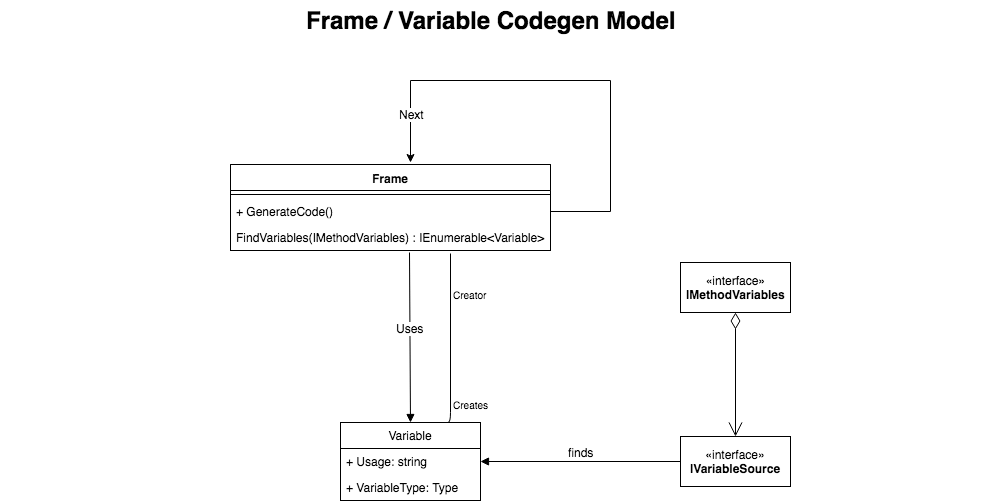
Before diving into an example, here’s a little class diagram of the main types:

LamarCodeGenClassDiagram

The various types represent:

  • Frame – Named after the StackFrame objects within stack traces in .Net. Models a logical action done in the generated code. Concrete examples in Lamar or Jasper would be calling a method on an object, calling a constructor function, or specific frame objects to create wrapped transaction boundaries or exception handling boundaries.
  • Variable – pretty well what it sounds like. This type models a variable within the generated method, but also includes information about what Frame created it to help order the dependencies
  • IVariableSource – mechanism to “find” or create variables. Examples in Lamar include resolving a service from an IoC container, passing along a method argument, or the example below that tells you the current time
  • IMethodVariables – interface that is used by Frame classes to go find their necessary Variable dependencies.

Alrighty then, let’s make this concrete. Let’s say that we want to generate and use dynamic instances of this interface:

public interface ISaySomething
{
    void Speak();
}

Moreover, I want a version of ISaySomething that will call the following method and write the current time to the console:

public static class NowSpeaker
{
    public static void Speak(DateTime now)
    {
        Console.WriteLine(now.ToString("o"));
    }
}

Our dynamic class for ISaySomething will need to pass the current time to the now parameter of that method. To help out here, there’s some built in helpers in Lamar specifically to write in the right code to get the current time to a variable of DateTime or DateTimeOffset that is named “now.”

To skip ahead a little bit, let’s generate a new class and object with the following code:

// Configures the code generation rules
// and policies
var rules = new GenerationRules("GeneratedNamespace");

// Adds the "now : DateTime" variable rule to 
// our generated code
rules.Sources.Add(new NowTimeVariableSource());

// Start the definition for a new generated assembly
var assembly = new GeneratedAssembly(rules);

// Add a new generated type called "WhatTimeIsIt" that will
// implement the 
var type = assembly.AddType("WhatTimeIsIt", typeof(ISaySomething));

// Getting the definition for the method named "Speak"
var method = type.MethodFor(nameof(ISaySomething.Speak));

// Adding a frame that calls the NowSpeaker.Speak() method and
// adding it to the generated method
var @call = new MethodCall(typeof(NowSpeaker), nameof(NowSpeaker.Speak));
method.Frames.Add(@call);

// Compile the new code!
assembly.CompileAll();

After all that, if we interrogate the source code for the generated type above (type.SourceCode), we’d see this ugly generated code:

    public class WhatTimeIsIt : Lamar.Testing.Samples.ISaySomething
    {


        public void Speak()
        {
            var now = System.DateTime.UtcNow;
            Lamar.Testing.Samples.NowSpeaker.Speak(now);
        }

    }

Some notes about the generated code:

  • Lamar was able to stick in some additional code to pass the current time into a new variable, and call the Speak(DateTime now) method with that value.
  • Lamar is smart enough to put that code before the call to the method (that kind of matters here)
  • The generated code uses full type names in almost all cases to avoid type collisions rather than trying to get smart with using statements in the generated code

So now let’s look at how Lamar was able to add the code to pass along DateTime.UtcNow. First off, let’s look at the code that just writes out the date variable:

public class NowFetchFrame : SyncFrame
{
    public NowFetchFrame(Type variableType)
    {
        // there's some sleight of hand here that's marking
        // this new Variable as created by this frame object
        // so that the dependency relationship is made
        Variable = new Variable(variableType, "now", this);
    }
    
    public Variable Variable { get; }
    
    public override void GenerateCode(
        GeneratedMethod method, 
        ISourceWriter writer)
    {
        writer.WriteLine($"var {Variable.Usage} 
            = {Variable.VariableType.FullName}.{nameof(DateTime.UtcNow)};");
        Next?.GenerateCode(method, writer);
    }
}

In the frame above, you’ll see that the GenerateCode() method writes its code into the source, then immediately turns around and tells the next Frame – if there is one – to generated its code. As the last step to write out the new source code, Lamar:

  1. Goes through an effort to find any missing frames and variables
  2. Sorts them with a topological sort (what frames depend on what other frames or variables, what variables are used or created by what frames)
  3. Organizes the frames into a single linked list
  4. Calls GenerateCode() on the first frame

In the generated method up above, the call to NowSpeaker.Speak(now) depends on the now variable which is in turn created by the NowFetchFrame, and that’s enough information for Lamar to order things and generate the final code.

Lastly, we had to use a custom IVariableSource to teach Lamar how to resolve the now variable. That code looks like this:

public class NowTimeVariableSource : IVariableSource
{
    public bool Matches(Type type)
    {
        return type == typeof(DateTime) || type == typeof(DateTimeOffset);
    }

    public Variable Create(Type type)
    {
        if (type == typeof(DateTime))
        {
            return new NowFetchFrame(typeof(DateTime)).Variable;
        }

        if (type == typeof(DateTimeOffset))
        {
            return new NowFetchFrame(typeof(DateTimeOffset)).Variable;
        }

        throw new ArgumentOutOfRangeException(nameof(type), "Only DateTime and DateTimeOffset are supported");
    }
}

Out of the box, the Lamar + Jasper combination uses variable sources for:

  • Services from the internal IoC container of the application
  • Method arguments
  • Variables that can be derived from a method argument like HttpContext.Request
  • The “now” convention shown here

Summary

I don’t know how popular this thing is going to be, but it’s powering the dynamic code generation of Jasper’s runtime pipeline and it’s the key to Jasper’s efficiency compared to other .Net tools with similar functionality. The early feedback I got was that this model was very abstract and hard to follow. I’m open to suggestions, but the very nature of needing to do the recursive dependency detection and ordering kind of necessitates a model like this in my opinion.