This post is mostly an attempt to gather feedback from anyone out there interested enough to respond. Comment here, or better yet, tell us and the community what you’re interested in in the Critter Stack Discord community.
The so called “Critter Stack” is Marten, Wolverine, and a host of smaller, shared supporting projects within the greater JasperFx umbrella. Marten has been around for while now, just hit the “1,000 closed pull request” milestone, and will reach the 4 million download mark sometime next week. Wolverine is getting some early adopter love right now, and the feedback is being very encouraging to me right now.
The goal for this year is to make the Critter Stack the best technical choice for a CQRS with Event Sourcing style architecture across every technical ecosystem — and a strong candidate for server side development on the .NET platform for other types of architectural strategies. That’s a bold goal, and there’s a lot to do to fill in missing features and increase the ability of the Critter Stack to scale up to extremely large workloads. To keep things moving, the core team banged out our immediate road map for the next couple months:
Marten 6.0 within a couple weeks. This isn’t a huge release in terms of API changes, but sets us up for the future
Wolverine 1.0 shortly after. I think I’m to the point of saying the main priority is finishing the documentation website and conducting some serious load and chaos testing against the Rabbit MQ and Marten integrations (weirdly enough the exact technical stack we’ll be using at my job)
Marten 6.1: Formal event subscription mechanisms as part of Marten (ability to selectively publish events to a listener of some sort or a messaging broker). You can do this today as shown in Oskar’s blog post, but it’s not a first class citizen and not as efficient as it should be. Plus you’d want both “hot” and “cold” subscriptions.
Wolverine 1.1: Direct support for the subscription model within Marten so that you have ready recipes to publish events from Marten with Wolverine’s messaging capabilities. Technically, you can already do this with Wolverine + Marten’s outbox integration, but that only works through Wolverine handlers. Adding the first class recipe for “Marten to Wolverine messaging” I think will make it awfully easy to get up and going with event subscriptions fast.
Right now, Marten 6 and Wolverine 1.0 have lingered for awhile, so it’s time to get them out. After that, subscriptions seem to be the biggest source of user questions and requests right now, so that’s the obvious next thing to do. After that though, here’s a rundown of some of the major initiatives we could pursue in either Marten or Wolverine this year (and some straddle the line):
End to end multi-tenancy support in Wolverine, Marten, and ASP.Net Core. Marten has strong support for multi-tenancy, but users have to piece things together themselves together within their applications. Wolverine’s Marten integration is currently limited to only one Marten database per application
Hot/cold storage for active vs archived events. This is all about massive scalability for the event sourcing storage
Sharding the asynchronous projections to distribute work across multiple running nodes. More about scaling the event sourcing
Zero down time projection rebuilds. Big user ask. Probably also includes trying to optimize the heck out of the performance of this feature too
More advanced message broker feature support. AWS SNS support. Azure Service Bus topics support. Message batching in Rabbit MQ
Improving the Linq querying in Marten. At some point soon, I’d like to try to utilize the sql/json support within Postgresql to try to improve the Linq query performance and fill in more gaps in the support. Especially for querying within child collections. And better Select() transform support. That’s a neverending battle.
Optimized serverless story in Wolverine. Not exactly sure what this means, but I’m thinking to do something that tries to drastically reduce the “cold start” time
Open Telemetry support within Marten. It’s baked in with Wolverine, but not Marten yet. I think that’s going to be an opt in feature though
More persistence options within Wolverine. I’ll always be more interested in the full Wolverine + Marten stack, but I’d be curious to try out DynamoDb or CosmosDb support as well
There’s tons of other things to possibly do, but that list is what I’m personally most interested in our community getting to this year. No way there’s enough bandwidth for everything, so it’s time to start asking folks what they want out of these tools in the near future.
Today I’m taking a left turn in Albuquerque to talk about how to deal with injecting fake services in integration test scenarios for external service gateways in Wolverine applications using some tricks in the underlying Lamar IoC container — or really just anything that turns out to be difficult to deal with in automated tests.
Since this is a headless service, I’m not too keen on introducing Alba or WebApplicationFactory and all their humongous tail of ASP.Net Core dependencies. Instead, I made a mild change to the Program file of the main application to revert back to the “old” .NET 6 style of bootstrapping instead of the newer, implied Program.Main() style strictly to facilitate integration testing:
public static class Program
{
    public static Task<int> Main(string[] args)
    {
        return CreateHostBuilder().RunOaktonCommands(args);
    }

    // This method is a really easy way to bootstrap the application
    // in testing later
    public static IHostBuilder CreateHostBuilder()
    {
        return Host.CreateDefaultBuilder()
            .UseWolverine((context, opts) =>
            {
                // And a lot of necessary configuration here....
            });
    }
}
Now, I’m going to start a new xUnit.Net project to test the main application (NUnit or MSTest would certainly be viable as well). In the testing project, I want to test the payment ingestion service from the prior blog posts with basically the exact same set up as the main application, with the exception of replacing the service gateway for the “very unreliable 3rd party service” with a stub that we can control at will during testing. That stub could look like this:
// More on this later...
public interface IStatefulStub
{
    void ClearState();
}

public class ThirdPartyServiceStub : IThirdPartyServiceGateway, IStatefulStub
{
    public Dictionary<Guid, LoanInformation> LoanInformation { get; } = new();

    public Task<LoanInformation> FindLoanInformationAsync(Guid loanId, CancellationToken cancellation)
    {
        if (LoanInformation.TryGetValue(loanId, out var information))
        {
            return Task.FromResult(information);
        }

        // I suppose you'd throw a more specific exception type, but I'm lazy, so....
        throw new ArgumentOutOfRangeException(nameof(loanId), "Unknown load id");
    }

    public Task PostPaymentScheduleAsync(PaymentSchedule schedule, CancellationToken cancellation)
    {
        PostedSchedules.Add(schedule);
        return Task.CompletedTask;
    }

    public List<PaymentSchedule> PostedSchedules { get; } = new();
    public void ClearState()
    {
        PostedSchedules.Clear();
        LoanInformation.Clear();
    }
}
Now that we have a usable stub for later, let’s build up a test harness for our application. Right off the bat, I’m going to say that we won’t even try to run integration tests in parallel, so I’m going for a shared context that bootstraps the applications IHost:
public class AppFixture : IAsyncLifetime
{
    public async Task InitializeAsync()
    {
        // This is bootstrapping the actual application using
        // its implied Program.Main() set up
        Host = await Program.CreateHostBuilder()
            // This is from Lamar, this will override the service registrations
            // no matter what order registrations are done. This was specifically
            // intended for automated testing scenarios
            .OverrideServices(services =>
            {
                // Override the existing application's registration with a stub
                // for the third party service gateway
                services.AddSingleton<IThirdPartyServiceGateway>(ThirdPartyService);
            }).StartAsync();

    }

    // Just a convenient way to get at this later
    public ThirdPartyServiceStub ThirdPartyService { get; } = new();

    public IHost Host { get; private set; }

    public Task DisposeAsync()
    {
        return Host.StopAsync();
    }
}
So a couple comments about the code up above:
I’m delegating to the Program.CreateHostBuilder() method from our real application to create an IHostBuilder that is exactly the application itself. I think it’s important to do integration tests as close to the real application as possible so you don’t get false positives or false negatives from some sort of different bootstrapping or configuration of the application.
That being said, it’s absolutely going to be a pain in the ass to use the real “unreliable 3rd party service” in integration testing, so it would be very convenient to have a nice, easily controlled stub or “spy” we can use to capture data sent to the 3rd party or to set up responses from the 3rd party service
And no, we don’t know if your application actually works end to end if we use the whitebox testing approach, and there is very likely going to be unforeseen issues when we integrate with the real 3rd party service. All that being said, it’s very helpful to first know that our code works exactly the way we intended it to before we tackle fully end to end tests.
But if this were a real project, I’d spike the actual 3rd party gateway code ASAP because that’s likely where the major project risk is. In the real life project this was based on, that gateway code was not under my purview at first and I might have gotten myself temporarily banned from the client site after finally snapping at the developer “responsible” for that after about a year of misery. Moving on!
Lamar is StructureMap’s descendent, but it’s nowhere near as loosey-goosey flexible about runtime service overrides as StructureMap. That was very purposeful on my part as that led to Lamar having vastly better (1-3 orders of magnitude improvement) performance, and also to reduce my stress level by simplifying the Lamar usage over StructureMap’s endlessly complicated rules for service overrides. Long story short, that requires you to think through in advance a little bit about what services are going to be overridden in tests and to frankly use that sparingly compared to what was easy in StructureMap years ago.
Next, I’ll add the necessary xUnit ICollectionFixture type that I almost always forget to do at first unless I’m copy/pasting code from somewhere else:
[CollectionDefinition("integration")]
public class ScenarioCollection : ICollectionFixture<AppFixture>
{

}
Now, I like to have a base class for integration tests that just adds a tiny bit of reusable helpers and lifecycle methods to clean up the system state before all tests:
public abstract class IntegrationContext : IAsyncLifetime
{
    public IntegrationContext(AppFixture fixture)
    {
        Host = fixture.Host;
        Store = Host.Services.GetRequiredService<IDocumentStore>();
        ThirdPartyService = fixture.ThirdPartyService;
    }

    public ThirdPartyServiceStub ThirdPartyService { get; set; }

    public IHost Host { get; }
    public IDocumentStore Store { get; }

    async Task IAsyncLifetime.InitializeAsync()
    {
        // Using Marten, wipe out all data and reset the state
        // back to exactly what we described in InitialAccountData
        await Store.Advanced.ResetAllData();

        // Clear out all the stateful stub state too!
        // First, I'm getting at the broader Lamar service
        // signature to do Lamar-specific things...
        var container = (IContainer)Host.Services;

        // Find every possible service that's registered in Lamar that implements
        // the IStatefulStub interface, resolve them, and loop though them
        // like so
        foreach (var stub in container.Model.GetAllPossible<IStatefulStub>())
        {
            stub.ClearState();
        }
    }

    // This is required because of the IAsyncLifetime
    // interface. Note that I do *not* tear down database
    // state after the test. That's purposeful
    public Task DisposeAsync()
    {
        return Task.CompletedTask;
    }

}
And now, some comments about that bit of code. You generally want a clean slate of system state going into each test, and our stub for the 3rd party system is stateful, so we’d want to clear it out between tests to keep from polluting the next test. That what the `IStatefulStub` interface and the calls to GetAllPossible() is helping us do with the Lamar container. If the system grows and we use more stubs, we can use that mechanism to have a one stop shop to clear out any stateful objects in the container between tests.
Lastly, here’s a taste of how the full test harness might be used:
public class ASampleTestHarness : IntegrationContext
{
    public ASampleTestHarness(AppFixture fixture) : base(fixture)
    {
    }

    [Fact]
    public async Task how_the_test_might_work()
    {
        // Do the Arrange and Act part of the tests....
        await Host.InvokeMessageAndWaitAsync(new PaymentValidated(new Payment()));

        // Our test *should* have posted a single payment schedule
        // within the larger workflow, and this will blow up if there's
        // none or many
        var schedule = ThirdPartyService.PostedSchedules.Single();

        // Write assertions against the expected data for the schedule maybe?
    }
}
I don’t like piecing together special application bootstrapping in the test automation projects, as that tends to drift apart from the actual application over time. Instead, I’d rather use the application’s own bootstrapping — in this case how it builds up an IHostBuilder — then apply some limited number of testing overrides.
Lamar has a couple helpers for test automation, including the OverrideServices() method and the GetAllPossible() helper that can be useful for clearing out state between tests in stubs or caches or who knows what else in a systematic way.
So far I’ve probably mostly blogged about things that Wolverine does that other tools like NServiceBus, MassTransit, or MediatR do as well. Next time out, I want to go completely off road where those tools can’t follow and into Wolverine’s “compound handler” strategy for maximum testability using Jim Shore’s A-Frame Architecture approach.
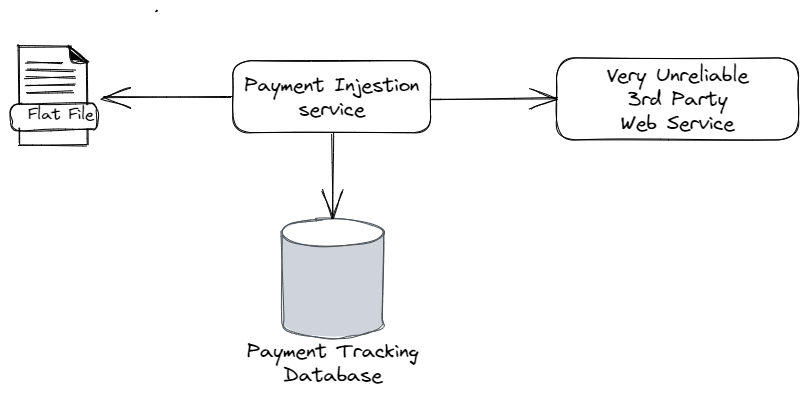
To review, I was describing a project I worked on years ago that involved some interactions with a very unreliable 3rd party web service system to handle payments originating from a flat file:
Just based on that diagram above, and admittedly some bad experiences in the shake down cruise of the historical system that diagram was based on, here’s some of the things that can go wrong:
The system blows up and dies while the payments from a particular file are only half way processed
Transient errors from database connectivity. Network hiccups
File IO errors from reading the flat files (I tend to treat direct file system access a lot like a poisonous snake due to very bad experiences early in my career)
HTTP errors from timeouts calling the web service
The 3rd party system is under distress and performing very poorly, such that a high percentage of requests are timing out
The 3rd party system can be misconfigured after code migrations on its system so that it’s technically “up” and responsive, but nothing actually works
The 3rd party system is completely down
Man, it’s a scary world sometimes!
Let’s say right now that our goal is as much as possible to have a system that is:
Able to recover from errors without losing any ongoing work
Doesn’t allow the system to permanently get into an inconsistent state — i.e. a file is marked as completely read, but somehow some of the payments from that file got lost along the way
Rarely needs manual intervention from production support to recover work or restart work
Heavens forbid, when something does happen that the system can’t recover from, it notifies production support
Now let’s go onto how to utilize Wolverine features to satisfy those goals in the face of all the potential problems I identified.
What if the system dies halfway through a file?
If you read through the last post, I used the local queueing mechanism in Wolverine to effectively create a producer/consumer workflow. Great! But what if the current process manages to die before all the ongoing work is completed? That’s where the durable inbox support in Wolverine comes in.
Pulling Marten in as our persistence strategy (but EF Core with either Postgresql or Sql Server is fully supported for this use case as well), I’m going to set up the application to opt into durable inbox mechanics for all locally queued messages like so (after adding the WolverineFx.Marten Nuget):
using Marten;
using Microsoft.Extensions.Configuration;
using Microsoft.Extensions.DependencyInjection;
using Microsoft.Extensions.Hosting;
using Oakton;
using Wolverine;
using Wolverine.Marten;
using WolverineIngestionService;

return await Host.CreateDefaultBuilder()
    .UseWolverine((context, opts) =>
    {
        // There'd obviously be a LOT more set up and service registrations
        // to be a real application

        var connectionString = context.Configuration.GetConnectionString("marten");
        opts.Services
            .AddMarten(connectionString)
            .IntegrateWithWolverine();

        // I want all local queues in the application to be durable
        opts.Policies.UseDurableLocalQueues();
        opts.LocalQueueFor<PaymentValidated>().Sequential();
        opts.LocalQueueFor<PostPaymentSchedule>().Sequential();
    }).RunOaktonCommands(args);
And with those changes, all in flight messages in the local queues are also stored durably in the backing database. If the application process happens to fail in flight, the persisted messages will fail over to either another running node or be picked up by restarting the system process.
So far, so good? Onward…
Getting Over transient hiccups
Sometimes database interactions will fail with transient errors and will very well succeed if retried later. This is especially common when the database is under stress. Wolverine’s error handling policies easily accommodate that, and in this case I’m going to add some retry capabilities for basic database exceptions like so:
        // Retry on basic database exceptions with some cooldown time in
        // between retries
        opts
            .Policies
            .OnException<NpgsqlException>()
            .Or<MartenCommandException>()
            .RetryWithCooldown(100.Milliseconds(), 250.Milliseconds(), 500.Milliseconds());

        opts
            .OnException<TimeoutException>()
            .RetryWithCooldown(250.Milliseconds(), 500.Milliseconds());
Notice how I’ve specified some “cooldown” times for subsequent failures. This is more or less an example of exponential back off error handling that’s meant to effectively throttle a distressed subsystem to allow it to catch up and recover.
Now though, not every exception implies that the message may magically succeed at a later time, so in that case…
Walk away from bad apples
Over time we can recognize exceptions that pretty well mean that the message can never succeed. In that case we should just throw out the message instead of allowing it to suck down resources by being retried multiple times. Wolverine happily supports that as well. Let’s say that payment messages can never work if it refers to an account that cannot be found, so let’s do this:
        // Just get out of there if the account referenced by a message
        // does not exist!
        opts
            .OnException<UnknownAccountException>()
            .Discard();
I should also note that Wolverine is writing to your application log when this happens.
Circuit Breakers to give the 3rd party system a timeout
As I’ve repeatedly said in this blog series so far, the “very unreliable 3rd party system” was somewhat less than reliable. What we found in practice was that the service would fail in bunches when it fell behind, but could recover over time. However, what would happen — even with the exponential back off policy — was that when the system was distressed it still couldn’t recover in time and continuing to pound it with retries just led to everything ending up in dead letter queues where it eventually required manual intervention to recover. That was exhausting and led to much teeth gnashing (and fingers pointed at me in angry meetings). In response to that, Wolverine comes with circuit breaker support as shown below:
        // These are the queues that handle calls to the 3rd party web service
        opts.LocalQueueFor<PaymentValidated>()
            .Sequential()

            // Add the circuit breaker
            .CircuitBreaker(cb =>
            {
                // If the conditions are met to stop processing messages,
                // Wolverine will attempt to restart in 5 minutes
                cb.PauseTime = 5.Minutes();

                // Stop listening if there are more than 20% failures
                // over the tracking period
                cb.FailurePercentageThreshold = 20;

                // Consider the failures over the past minute
                cb.TrackingPeriod = 1.Minutes();

                // Get specific about what exceptions should
                // be considered as part of the circuit breaker
                // criteria
                cb.Include<TimeoutException>();

                // This is our fault, so don't shut off the listener
                // when this happens
                cb.Exclude<InvalidRequestException>();
            });

        opts.LocalQueueFor<PostPaymentSchedule>()
            .Sequential()

            // Or the defaults might be just fine
            .CircuitBreaker();
With the set up above, if Wolverine detects too high a rate of message failures in a given time, it will completely stop message processing for that particular local queue. Since we’ve isolated the message processing for the two types of calls to the 3rd party web service, we’re allowing everything else to continue when the circuit breaker stops message processing. Do note that the circuit breaker functionality will try to restart message processing later after the designated pause time. Hopefully the pause time allows for the 3rd party system to recover — or for production support to make it recover. All of this without making all the backed up messages continuously fail and end up landing in the dead letter queues where it will take manual intervention to recover the work in progress.
Hold the line, the 3rd party system is broken!
On top of every thing else, the “very unreliable 3rd party system” was easily misconfigured at the drop of a hat such that it would become completely nonfunctional even though it appeared to be responsive. When this happened, every single message to that service would fail. So again, instead of letting all our pending work end up in the dead letter queue, let’s instead completely pause all message handling on the current local queue (wherever the error happened) if we can tell from the exception that the 3rd party system is nonfunctional like so:
        // If we encounter this specific exception with this particular error code,
        // it means that the 3rd party system is 100% nonfunctional even though it appears
        // to be up, so let's pause all processing for 10 minutes
        opts.OnException<ThirdPartyOperationException>(e => e.ErrorCode == 235)
            .Requeue().AndPauseProcessing(10.Minutes());
Summary and next time!
It’s helpful to assign work within message handlers in such a way to maximize your error handling. Think hard about what actions in your system are prone to failure and may deserve to be their own individual message handler and messaging endpoint to allow for exact error handling policies like the way I used a circuit breaker on the queues that handled calls to the unreliable 3rd party service.
For my next post in this series, I think I want to make a diversion into integration testing using a stand in stub for the 3rd party service using the application setup with Lamar.
Wolverine 0.9.12 just went up on Nuget with new bug fixes, documentation improvements, improved Rabbit MQ usage of topics, local queue usage, and a lot of new functionality around the command line diagnostics. See the whole release notes here.
In this post, I want to zero into “command line diagnostics.” Speaking from a mix of concerns about being both a user of Wolverine and one of the people needing to support other people using Wolverine online, here’s a not exhaustive list of real challenges I’ve already seen or anticipate as Wolverine gets out into the wild more in the near future:
How is Wolverine configured? What extensions are found?
What middleware is registered, and is it hooked up correctly?
How is Wolverine handling a specific message exactly?
How is Wolverine HTTP handling an HTTP request for a specific route?
Is Wolverine finding all the handlers? Where is it looking?
Where is Wolverine trying to send each message?
Are we missing any configuration items? Is the database reachable? Is the url for a web service proxy in our application valid?
When Wolverine has to interact with databases or message brokers, are those servers configured correctly to run the application?
That’s a big list of potentially scary issues, so let’s run down a list of command line diagnostic tools that come out of the box with Wolverine to help developers be more productive in real world development. First off, Wolverine’s command line support is all through the Oakton library, and you’ll want to enable Oakton command handling directly in your main application through this line of code at the very end of a typical Program file:
// This is an extension method within Oakton
// And it's important to relay the exit code
// from Oakton commands to the command line
// if you want to use these tools in CI or CD
// pipelines to denote success or failure
return await app.RunOaktonCommands(args);
You’ll know Oakton is configured correctly if you’ll just go to the command line terminal of your preference at the root of your project and type:
dotnet run -- help
In a simple Wolverine application, you’d get these options out of the box:
The available commands are:

  Alias       Description
━━━━━━━━━━━━━━━━━━━━━━━━━━━━━━━━━━━━━━━━━━━━━━━━━━━━━━━━━━━━━━━━━━━━━━━━━━━━━━━━━━━━━━━━━━━━━━━━━━━━
  check-env   Execute all environment checks against the application
  codegen     Utilities for working with JasperFx.CodeGeneration and JasperFx.RuntimeCompiler
  describe    Writes out a description of your running application to either the console or a file
  help        List all the available commands
  resources   Check, setup, or teardown stateful resources of this system
  run         Start and run this .Net application
  storage     Administer the Wolverine message storage


Use dotnet run -- ? [command name] or dotnet run -- help [command name] to see usage help about a specific command
Let me admit that there’s a little bit of “magic” in the way that Wolverine uses naming or type conventions to “know” how to call into your application code. It’s great (in my opinion) that Wolverine doesn’t force you to pollute your code with framework concerns or require you to shape your code around Wolverine’s APIs the way most other .NET frameworks do.
Cool, so let’s move on to…
Describe the Configured Application
The annoying –framework flag is only necessary if your application targets multiple .NET frameworks, but no sane person would ever do that for a real application.
Partially for my own sanity, there’s a lot more support for Wolverine in the describe command. To see this in usage, consider the sample DiagnosticsApp from the Wolverine codebase. If I use the dotnet run --framework net7.0 -- describe command from that project, I get this copious textual output.
Just to summarize, what you’ll see in the command line report is:
“Wolverine Options” – the basics properties as configured, including what Wolverine thinks is the application assembly and any registered extensions
“Wolverine Listeners” – a tabular list of all the configured listening endpoints, including local queues, within the system and information about how they are configured
“Wolverine Message Routing” – a tabular list of all the message routing for known messages published within the system
“Wolverine Sending Endpoints” – a tabular list of all known, configured endpoints that send messages externally
“Wolverine Error Handling” – a preview of the active message failure policies active within the system
“Wolverine Http Endpoints” – shows all Wolverine HTTP endpoints. This is only active if WolverineFx.HTTP is used within the system
The latest Wolverine did add some optional message type discovery functionality specifically to make this describe command be more usable by letting Wolverine know about more message types that will be sent at runtime, but cannot be easily recognized as such strictly from configuration using a mix of marker interface types and/or attributes:
// These are all published messages that aren't
// obvious to Wolverine from message handler endpoint
// signatures
public record InvoiceShipped(Guid Id) : IEvent;
public record CreateShippingLabel(Guid Id) : ICommand;

[WolverineMessage]
public record AddItem(Guid Id, string ItemName);
Environment Checks
Have you ever made a deployment to production just to find out that a database connection string was wrong? Or the credentials to a message broker were wrong? Or your service wasn’t running under an account that had read access to a file share your application needed to scan? Me too!
Wolverine adds several environment checks so that you can use Oakton’s Environment Check functionality to self-diagnose potential configuration issues with:
dotnet run -- check-env
You could conceivably use this as part of your continuous delivery pipeline to quickly verify the application configuration for an application and fail fast & roll back if the checks fail.
How is Wolverine calling my message handlers?!?
Wolverine admittedly involves some “magic” about how it calls into your message handlers, and it’s not unlikely you may be confused about whether or how some kind of registered middleware is working within your system. Or maybe you’re just mildly curious about how Wolverine works at all.
To that end, you can preview — or just generate ahead of time for better “cold starts” — the dynamic source code that Wolverine generates for your message handlers or HTTP handlers with:
dotnet run -- codegen preview
Or just write the code to the file system so you can look at it to your heart’s content with your IDE with:
dotnet run -- codegen write
Which should write the source code files to /Internal/Generated/WolverineHandlers. Here’s a sample from the same diagnostics app sample:
// <auto-generated/>
#pragma warning disable

namespace Internal.Generated.WolverineHandlers
{
    public class CreateInvoiceHandler360502188 : Wolverine.Runtime.Handlers.MessageHandler
    {


        public override System.Threading.Tasks.Task HandleAsync(Wolverine.Runtime.MessageContext context, System.Threading.CancellationToken cancellation)
        {
            var createInvoice = (IntegrationTests.CreateInvoice)context.Envelope.Message;
            var outgoing1 = IntegrationTests.CreateInvoiceHandler.Handle(createInvoice);
            // Outgoing, cascaded message
            return context.EnqueueCascadingAsync(outgoing1);

        }

    }
}
Database or Message Broker Setup
Your application will require some configuration of external resources if you’re using any mix of Wolverine’s transactional inbox/outbox support which targets Postgresql or Sql Server or message brokers like Rabbit MQ, Amazon SQS, or Azure Service Bus. Not to worry (too much), Wolverine exposes some command line support for making any necessary configuration setup in these resources with the Oakton resources command.
In the diagnostics app, we could ensure that our connected Postgresql database has all the necessary schema tables and the Rabbit MQ broker has all the necessary queues, exchanges, and bindings that out application needs to function with:
dotnet run -- resources setup
In testing or normal development work, I may also want to reset the state of these resources to delete now obsolete messages in either the database or the Rabbit MQ queues, and we can fortunately do that with:
dotnet run -- resources clear
There are also resource options for:
teardown — remove all the database objects or message broker objects that the Wolverine application placed there
statistics — glean some information about the number of records or messages in the stateful resources
check — do environment checks on the configuration of the stateful resources. This is purely a diagnostic function
list — just show you information about the known, stateful resources
Summary
Is any of this wall of textual reports being spit out at the command line sexy? Not in the slightest. Will this functionality help development teams be more productive with Wolverine? Will this functionality help myself and other Wolverine team members support remote users in the future? I’m hopeful that the answer to the first question is “yes” and pretty confident that it’s a “hell, yes” to the second question.
I would also hope that folks see this functionality and agree with my assessment that Wolverine (and Marten) are absolutely appropriate for real life usage and well beyond the toy project phase.
Anyway, more on Wolverine next week starting with an exploration of Wolverine’s local queuing support for asynchronous processing.
UPDATE: If you pull down the sample code, it’s not quite working with Swashbuckle yet. It *does* publish the metadata and the actual endpoints work, but it’s not showing up in the OpenAPI spec. Always something.
I just published Wolverine 0.9.10 to Nuget (after a much bigger 0.9.9 yesterday). There’s several bug fixes, some admitted breaking changes to advanced configuration items, and one significant change to the “mediator” behavior that’s described at the section at the very bottom of this post.
The big addition is a new library that enables Wolverine’s runtime model directly for HTTP endpoints in ASP.Net Core services without having to jump through the typical sequence of delegating directly from a Minimal API method directly to Wolverine’s mediator functionality like this:
Instead, Wolverine now has the WolverineFx.Http library to directly use Wolverine’s runtime model — including its unique middleware approach — directly from HTTP endpoints.
To bootstrap the application, I used the dotnet new webapi model, then added the WolverineFx.Marten and WolverineFx.HTTP nugets. The application bootstrapping for basic integration of Wolverine, Marten, and the new Wolverine HTTP model becomes:
using Marten;
using Oakton;
using Wolverine;
using Wolverine.Http;
using Wolverine.Marten;

var builder = WebApplication.CreateBuilder(args);

// Adding Marten for persistence
builder.Services.AddMarten(opts =>
    {
        opts.Connection(builder.Configuration.GetConnectionString("Marten"));
        opts.DatabaseSchemaName = "todo";
    })
    .IntegrateWithWolverine()
    .ApplyAllDatabaseChangesOnStartup();

// Wolverine usage is required for WolverineFx.Http
builder.Host.UseWolverine(opts =>
{
    // This middleware will apply to the HTTP
    // endpoints as well
    opts.Policies.AutoApplyTransactions();

    // Setting up the outbox on all locally handled
    // background tasks
    opts.Policies.UseDurableLocalQueues();
});

// Learn more about configuring Swagger/OpenAPI at https://aka.ms/aspnetcore/swashbuckle
builder.Services.AddEndpointsApiExplorer();
builder.Services.AddSwaggerGen();

var app = builder.Build();

// Configure the HTTP request pipeline.
if (app.Environment.IsDevelopment())
{
    app.UseSwagger();
    app.UseSwaggerUI();
}

// Let's add in Wolverine HTTP endpoints to the routing tree
app.MapWolverineEndpoints();

return await app.RunOaktonCommands(args);
Do note that the only thing in that sample that pertains to WolverineFx.Http itself is the call to IEndpointRouteBuilder.MapWolverineEndpoints().
Let’s move on to “Hello, World” with a new Wolverine http endpoint from this class we’ll add to the sample project:
public class HelloEndpoint
{
    [WolverineGet("/")]
    public string Get() => "Hello.";
}
At application startup, WolverineFx.Http will find the HelloEndpoint.Get() method and treat it as a Wolverine http endpoint with the route pattern GET: / specified in the [WolverineGet] attribute.
As you’d expect, that route will write the return value back to the HTTP response and behave as specified by this Alba specification:
[Fact]
public async Task hello_world()
{
    var result = await _host.Scenario(x =>
    {
        x.Get.Url("/");
        x.Header("content-type").SingleValueShouldEqual("text/plain");
    });

    result.ReadAsText().ShouldBe("Hello.");
}
Moving on to the actual Todo problem domain, let’s assume we’ve got a class like this:
public class Todo
{
    public int Id { get; set; }
    public string? Name { get; set; }
    public bool IsComplete { get; set; }
}
In a sample class called TodoEndpoints let’s add an HTTP service endpoint for listing all the known Todo documents:
[WolverineGet("/todoitems")]
public static Task<IReadOnlyList<Todo>> Get(IQuerySession session)
    => session.Query<Todo>().ToListAsync();
As you’d guess, this method will serialize all the known Todo documents from the database into the HTTP response and return a 200 status code. In this particular case the code is a little bit noisier than the Minimal API equivalent, but that’s okay, because you can happily use Minimal API and WolverineFx.Http together in the same project. WolverineFx.Http, however, will shine in more complicated endpoints.
Consider this endpoint just to return the data for a single Todo document:
// Wolverine can infer the 200/404 status codes for you here
// so there's no code noise just to satisfy OpenAPI tooling
[WolverineGet("/todoitems/{id}")]
public static Task<Todo?> GetTodo(int id, IQuerySession session, CancellationToken cancellation)
    => session.LoadAsync<Todo>(id, cancellation);
At this point it’s effectively de rigueur for any web service to support OpenAPI documentation directly in the service. Fortunately, WolverineFx.Http is able to glean most of the necessary metadata to support OpenAPI documentation with Swashbuckle from the method signature up above. The method up above will also cleanly set a status code of 404 if the requested Todo document does not exist.
Now, the bread and butter for WolverineFx.Http is using it in conjunction with Wolverine itself. In this sample, let’s create a new Todo based on submitted data, but also publish a new event message with Wolverine to do some background processing after the HTTP call succeeds. And, oh, yeah, let’s make sure this endpoint is actively using Wolverine’s transactional outbox support for consistency:
[WolverinePost("/todoitems")]
public static async Task<IResult> Create(CreateTodo command, IDocumentSession session, IMessageBus bus)
{
    var todo = new Todo { Name = command.Name };
    session.Store(todo);

    // Going to raise an event within out system to be processed later
    await bus.PublishAsync(new TodoCreated(todo.Id));

    return Results.Created($"/todoitems/{todo.Id}", todo);
}
The endpoint code above is automatically enrolled in the Marten transactional middleware by simple virtue of having a dependency on Marten’s IDocumentSession. By also taking in the IMessageBus dependency, WolverineFx.Http is wrapping the transactional outbox behavior around the method so that the TodoCreated message is only sent after the database transaction succeeds.
Lastly for this page, consider the need to update a Todo from a PUT call. Your HTTP endpoint may vary its handling and response by whether or not the document actually exists. Just to show off Wolverine’s “composite handler” functionality and also how WolverineFx.Http supports middleware, consider this more complex endpoint:
public static class UpdateTodoEndpoint
{
    public static async Task<(Todo? todo, IResult result)> LoadAsync(UpdateTodo command, IDocumentSession session)
    {
        var todo = await session.LoadAsync<Todo>(command.Id);
        return todo != null
            ? (todo, new WolverineContinue())
            : (todo, Results.NotFound());
    }

    [WolverinePut("/todoitems")]
    public static void Put(UpdateTodo command, Todo todo, IDocumentSession session)
    {
        todo.Name = todo.Name;
        todo.IsComplete = todo.IsComplete;
        session.Store(todo);
    }
}
In the WolverineFx.Http model, any bit of middleware that returns an IResult object is tested by the generated code to execute any IResult object returned from middleware that is not the built in WolverineContinue type and stop all further processing. This is intended to enable validation or authorization type middleware where you may need to filter calls to the inner HTTP handler.
With the sample application out of the way, here’s a rundown of the significant things about this library:
It’s actually a pretty small library in the greater scheme of things and all it really does is connect ASP.Net Core’s endpoint routing to the Wolverine runtime model — and Wolverine’s runtime model is likely going to be somewhat more efficient than Minimal API and much more efficient that MVC Core
It can be happily combined with Minimal API, MVC Core, or any other ASP.Net Core model that exploits endpoint routing, even within the same application
Wolverine is allowing you to use the Minimal API IResult model
The JSON serialization is strictly System.Text.Json and uses the same options as Minimal API within an ASP.Net Core application
It’s possible to use Wolverine middleware strategy with the HTTP endpoints
Wolverine is trying to glean necessary metadata from the method signatures to feed OpenAPI usage within ASP.Net Core without developers having to jump through hoops adding attributes or goofy TypedResult noise code just for Swashbuckle
This model plays nicely with Wolverine’s transactional outbox model for common cases where you need to both make database changes and publish additional messages for background processing in the same HTTP call. That’s a bit of important functionality that I feel is missing or is clumsy at best in many leading .NET server side technologies.
For the handful of you reading this that still remember FubuMVC, Wolverine’s HTTP model retains some of FubuMVC’s old strengths in terms of still not ramming framework concerns into your application code, but learned some hard lessons from FubuMVC’s ultimate failure:
FubuMVC was an ambitious, sprawling framework that was trying to be its own ecosystem with its own bootstrapping model, logging abstractions, and even IoC abstractions. WolverineFx.Http is just a citizen within the greater ASP.Net Core ecosystem and uses common .NET abstractions, concepts, and idiomatic naming conventions at every possible turn
FubuMVC relied too much on conventions, which was great when the convention was exactly what you needed, and kinda hurtful when you needed something besides the exact conventions. Not to worry, WolverineFx.Http let’s you drop right down to the HttpContext level at will or use any of the IResult objects in existing ASP.Net Core whenever the Wolverine conventions don’t fit.
FubuMVC could technically be used with old ASP.Net MVC, but it was a Frankenstein’s monster to pull off. Wolverine can be mixed and matched at will with either Minimal API, MVC Core, or even other OSS projects that exploit ASP.Net Core endpoint routing.
Wolverine is trying to play nicely in terms of OpenAPI metadata and security related metadata for usage of standard ASP.Net Core middleware like the authorization or authentication middleware
FubuMVC’s “Behavior” model gave you a very powerful “Russian Doll” middleware ability that was maximally flexible — and also maximally inefficient in runtime. Wolverine’s runtime model takes a very different approach to still allow for the “Russian Doll” flexibility, but to do so in a way that is more efficient at runtime than basically every other commonly used framework today in the .NET community.
When things went boom in FubuMVC, you got monumentally huge stack traces that could overwhelm developers who hadn’t had a week’s worth of good night sleeps. It sounds minor, but Wolverine is valuable in the sense that the stack traces from HTTP (or message handler) failures will have very minimal Wolverine related framework noise in the stack trace for easier readability by developers.
Big Change to In Memory Mediator Model
I’ve been caught off guard a bit by how folks have mostly been interested in Wolverine as an alternative to MediatR with typical usage like this where users just delegate to Wolverine in memory within a Minimal API route:
With the corresponding message handler being this:
public class ItemHandler
{
    // This attribute applies Wolverine's EF Core transactional
    // middleware
    [Transactional]
    public static ItemCreated Handle(
        // This would be the message
        CreateItemCommand command,

        // Any other arguments are assumed
        // to be service dependencies
        ItemsDbContext db)
    {
        // Create a new Item entity
        var item = new Item
        {
            Name = command.Name
        };

        // Add the item to the current
        // DbContext unit of work
        db.Items.Add(item);

        // This event being returned
        // by the handler will be automatically sent
        // out as a "cascading" message
        return new ItemCreated
        {
            Id = item.Id
        };
    }
}
Prior to the latest release, the ItemCreated event in the handler above when used from IMessageBus.InvokeAsync<ItemCreated>() was not published as a message because my original assumption was that in that case you were using the return value explicitly as a return value. Early users have been surprised that the ItemCreated was not published as a message, so I just changed the behavior to do so to make the cascading message behavior be more consistent and what folks seem to actually want.
After plenty of keystone cops shenanigans with CI automation today that made me question my own basic technical competency, there’s a new Wolverine 0.9.8 release on Nuget today with a variety of fixes and some new features. The documentation website was also re-published.
First, some thanks:
Wojtek Suwala made several fixes and improvements to the EF Core integration
Ivan Milosavljevic helped fix several hanging tests on CI, built the MemoryPack integration, and improved the FluentValidation integration
Anthony made his first OSS contribution (?) to help fix quite a few issues with the documentation
My boss and colleague Denys Grozenok for all his support with reviewing docs and reporting issues
Kebin for improving the dead letter queue mechanics
“Compound Handlers” — more on this later. From our efforts converting a large system to Wolverine this is going to help with message handler testability
The `AutoApplyTransactions()` option (for Marten or for EF Core). This also enables folks to mix and match EF Core & Marten against the same Postgresql database within the same application
I added .NET 6 support back in, but the CI is only testing against 7.0
Dogfooding baby!
Conveniently enough, I’m part of a little officially sanctioned skunkworks team at work experimenting with converting a massive distributed monolithic application to the full Marten + Wolverine “critter stack.” I’m very encouraged by the effort so far, and it’s driven some recent features in Wolverine’s execution model to handle complexity in enterprise systems. More on that soon.
It’s also pushing the story for interoperability with NServiceBus on the other end of Rabbit MQ queues. Strangely enough, no one is interested in trying to convert a humongous distributed system to Wolverine in one round of work. Go figure.
When will Wolverine hit 1.0?
There’s a little bit of awkwardness in that Marten V6.0 (don’t worry, that’s a much smaller release than 4/5) needs to be released first and I haven’t been helping Oskar & Babu with that recently, but I think we’ll be able to clear that soon.
My “official” plan is to finish the documentation website by the end of February and make the 1.0 release by March 1st. Right now, Wolverine is having its tires kicked by plenty of early users and there’s plenty of feedback (read: bugs or usability issues) coming in that I’m trying to address quickly. Feature wise, the only things I’m hoping to have done by 1.0 are:
Using more native capabilities of Azure Service Bus, Rabbit MQ, and AWS SQS for dead letter queues and delayed messaging. That’s mostly to solidify some internal abstractions.
It’s a stretch goal, but have Wolverine support Marten’s multi-tenancy through a database per tenant strategy. We’ll want that for internal MedeAnalytics usage, so it might end up being a priority
Some better integration with ASP.Net Core Minimal API
Marten was conceived and launched way back in 2016 as an attempt to quickly improve the performance and stability of a mission critical web application by utilizing Postgresql and its new JSON capabilities as a replacement for a 3rd party document database – and do that in a hurry before the next busy season. My former colleagues and I did succeed in that endeavor, but more importantly for the longer run, Marten was also launched as an open source project on GitHub and quickly attracted attention from other developers. The addition of an originally small feature set for event sourcing dramatically increased interest and participation in Marten.
Fast forward to today, and we have a vibrant community of engaged users and a core team of contributors that are constantly improving the tool and discussing ideas about how to make it even better. The giant V4 release last year brought an overhaul of almost all the library internals and plenty of new capabilities. V5 followed early in 2022 with more multi-tenancy options and better tooling for development lifecycles and database management based on early issues with V4.
At this point, I’d list the strong points of Marten that we’ve already achieved as:
A very useful document database option that provides the powerful developer productivity you expect from NoSQL solutions while also supporting a strong consistency model that’s usually missing from NoSQL databases.
A wide range of viable hosting options by virtue of being on top of Postgresql. No cloud vendor lock-in with Marten!
Quite possibly the easiest way to build an application using Event Sourcing in .NET with both event storage and user defined view projections in the box
A great local development story through the simple ability to run Postgresql in a Docker container and Marten’s focus on an “it just works” style database schema management subsystem
The aforementioned core team and active user base makes Marten a viable OSS tool for teams wanting some reassurance that Marten is going to be well supported in the future
Great! But now it’s time to talk about the next steps we’re planning to take Marten to even greater heights in the forthcoming Marten V6 that’s being planned now. The overarching theme is to remove the most common hurdles for not choosing Marten. By and large, I think the biggest themes for Marten are:
Scalability, so Marten can be used for much larger data sets. From user feedback, Marten is able to handle data sets of 10 million events today, but there’s opportunities to go far, far larger than that.
Improvements to operational support. Database migrations when documents change, rebuilding projections without downtime, usage metrics, and better support for using multiple databases for multi-tenancy
Marten is in good shape as a purely storage option for Event Sourcing, but users are very often asking for an array of subscription options to propagate events captured by Marten
More powerful options for aggregating event data into more complex projected views
Improving the Linq and other querying support is a seemingly never-ending battle
The lack of professional support for Marten. Obviously a lot of shops and teams are perfectly comfortable with using FOSS tools knowing that they may have to roll up their sleeves and pitch in with support, but other shops are not comfortable with this at all and will not allow FOSS usage for critical functions. More on this later.
First though, Marten is getting a new “critter” friend in the larger JasperFx project family:
Wolverine is a new/old OSS command bus and messaging tool for .NET. It’s what was formerly being developed as Jasper, but the Marten team decided to rebrand the tool as a natural partner with Marten (both animals plus Weasel are members of the Mustelidae family). While both Marten and Wolverine are happily usable without each other, we think that the integration of these tools gives us the opportunity to build a full fledged platform for building applications in .NET using a CQRS architecture with Event Sourcing. Moreover, we think there’s a significant gap in .NET for this kind of tooling and we hope to fill that.
So, onto future plans…
There’s a couple immediate ways to improve the scalability of Marten we’re planning to build in Marten V6. The first idea is to utilize Postgresql table sharding in a couple different ways.
First, we can enable sharding on document tables based on user defined criteria through Marten configuration. The big challenge there is to provide a good migration strategy for doing this as it requires at least a 3 step process of copying the existing table data off to the side before creating the new tables.
The next idea is to shard the event storage tables as well, with the immediate idea being to shard off of archived status to effectively create a “hot” storage of recent events and a “cold” storage of older events that are much less frequently accessed. This would allow Marten users to keep the active “hot” event storage to a much smaller size and therefore greatly improve potential performance even as the database continues to grow.
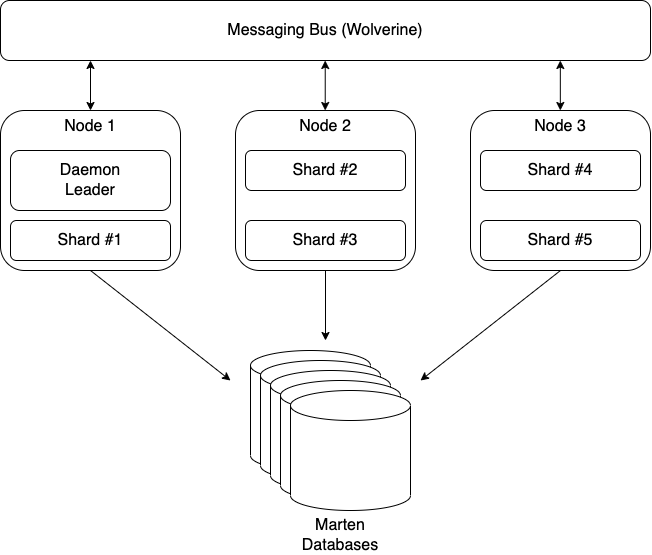
We’re not done “sharding” yet, but this time we need to shift to the asynchronous projection support in Marten. The core team has some ideas to improve the throughput of the asynchronous projection code as it is, but today it’s limited to only running on one single application node with “hot/cold” rollover support. With some help from Wolverine, we’re hoping to build a “sharded” asynchronous projection that can shard the processing of single projections and distribute the projection work across potentially many nodes as shown in the following diagram:
The asynchronous projection sharding is going to be a big deal for Marten all by itself, but there’s some other potentially big wins for Marten V6 with better tooling for projection rebuilds and asynchronous projections in general:
Some kind of user interface to monitor and manage the asynchronous projections
Faster projection rebuilds
Zero downtime projection rebuilds
Marten + Wolverine == “Critter Stack”
Again, both Marten and Wolverine will be completely usable independently, but we think there’s some potential synergy through the combination. One of the potential advantages of combining the tools is to use Wolverine’s messaging to give Marten a full fledged subscription model for Marten events. All told we’re planning three different mechanisms for propagating Marten events to the rest of your system:
Through Wolverine’s transactional outbox right at the point of event capture when you care more about immediate delivery than strict ordering (this is already working)
Through Martens asynchronous daemon when you do need strict ordering
If this works out, through CDC event streaming straight from the database to Kafka/Pulsar/Kinesis
That brings me to the last topic I wanted to talk about in this post. Marten and Wolverine in their current form will remain FOSS under the MIT license, but it’s past time to make a real business out of these tools.
I don’t know how this is exactly going to work out yet, but the core Marten team is actively planning on building a business around Marten and now Wolverine. I’m not sure if this will be the front company, but I personally have formed a new company named “Jasper Fx Software” for my own activity – but that’s going to be limited to just being side work for at least awhile.
The general idea – so far – is to offer:
Support contracts for Marten
Consulting services, especially for help modeling and maximizing the usage of the event sourcing support
Training workshops
Add on products that add the advanced features I described earlier in this post
Maybe success leads us to offering a SaaS model for Marten, but I see that as a long way down the road.
What think you gentle reader? Does any of this sound attractive? Should we be focusing on something else altogether?
I’m furiously working on what I hope is the last sprint toward a big new Jasper 2.0 release. Part of that work has been a big overhaul of the error handling strategies with an eye toward solving the real world problems I’ve personally experienced over the years doing asynchronous messaging in enterprise applications.
Whether you’re purposely using micro-services, having to integrate with 3rd party systems, or just the team down the hall’s services, it’s almost inevitable that an enterprise system will have to communicate with something else. Or at the very least have a need to do some kind of background processing within the same logical system. For all those reasons, it’s not unlikely that you’ll have to pull in some kind of asynchronous messaging tooling into your system.
It’s also an imperfect world, and despite your best efforts your software systems will occasionally encounter exceptions at runtime. What you really need to do is to plan around potential failures in your application, especially around integration points. Fortunately, your asynchronous messaging toolkit should have a robust set of error handling capabilities baked in — and this is maybe the single most important reason to use asynchronous messaging toolkits like MassTransit, NServiceBus, or the Jasper project I’m involved with rather than trying to roll your own one off message handling code or depend strictly on web communication via web services.
In no particular order, I think you need to have at least these goals in mind:
Craft your exception handling in such a way that it will very seldom require manual intervention to recover work in the system.
Build in resiliency to transient errors like networking hiccups or database timeouts that are common when systems get overtaxed.
Limit your temporal coupling to external systems both within your organization or from 3rd party systems. The point here is that you want your system to be at least somewhat functional even if external dependencies are unavailable. My off the cuff recommendation is to try to isolate calls to an external dependency within a small, atomic command handler so that you have a “retry loop” directly around the interaction with that dependency.
Prevent inconsistent state within your greater enterprise systems. I think of this as the “no leaky pipe” rule where you try to avoid any messages getting lost along the way, but it also applies to ordering operations sometimes. To illustrate this farther, consider the canonical example of recording a matching debit and withdrawal transaction between two banking accounts. If you process one operation, you have to do the other as well to avoid system inconsistencies. Asynchronous messaging makes that just a teeny bit harder maybe by introducing eventual consistency into the mix rather than trying to depend on two phase commits between systems — but who’s kidding who here, we’re probably all trying to avoid 2PC transactions like the plague.
Quick Introduction to Jasper
I’m using the Jasper framework for all the error handling samples here. Just to explain the syntax in the code samples, Jasper is configured at bootstrapping time with the JasperOptions type as shown in this sample below:
using var host = Host.CreateDefaultBuilder()
    .UseJasper(opts =>
    {
        opts.Handlers.OnException<TimeoutException>()
        // Just retry the message again on the
        // first failure
        .RetryOnce()

        // On the 2nd failure, put the message back into the
        // incoming queue to be retried later
        .Then.Requeue()

        // On the 3rd failure, retry the message again after a configurable
        // cool-off period. This schedules the message
        .Then.ScheduleRetry(15.Seconds())

        // On the 4th failure, move the message to the dead letter queue
        .Then.MoveToErrorQueue()

        // Or instead you could just discard the message and stop
        // all processing too!
        .Then.Discard().AndPauseProcessing(5.Minutes());
    }).StartAsync();
The exception handling policies are “fall through”, meaning that you probably want to put more specific rules before more generic rules. The rules can also be configured either globally for all message types, or for specific message types. In most of the code snippets the variable opts will refer to the JasperOptions for the application.
Transient or concurrency errors that hopefully go away?
Assuming that you’ve done enough testing to remove most of the purely functional errors in your system. Once you’ve reached that point, the most common kind of error in my experience with system development is transient errors like:
Network timeouts
Database connectivity errors, which could be related to network issues or connection exhaustion
Concurrent access errors
Resource locking issues
For these types of errors, I think I’d recommend some sort of exponential backoff strategy that attempts to retry the message inline, but with an increasingly longer pause in between attempts like so:
// Retry the message again, but wait for the specified time
// The message will be dead lettered if it exhausts the delay
// attempts
opts.Handlers
    .OnException<SqlException>()
    .RetryWithCooldown(50.Milliseconds(), 100.Milliseconds(), 250.Milliseconds());
What you’re doing here is retrying the message a certain number of times, but with a pause to slow down processing in the system to allow for more time for a distressed resource to stabilize before trying again. I’d also recommend this approach for certain types of concurrency exceptions where only one process at a time is allowed to work with a resource (a database row? a file? an event store stream?). This is especially helpful with optimistic concurrency strategies where you might just need to start processing over against the newly changed system state.
I’m leaving it out for the sake of brevity, but Jasper will also let you put a message back into the end of the incoming queue or even schedule the next attempt out of process for a later time.
You shall not pass! (because a subsystem is down)
A few years ago I helped design a series of connected applications in a large banking ecosystem that ultimately transferred money from incoming payments in a flat file to a commercial, off the shelf (COTS) system. The COTS system exposed a web service endpoint we could use for our necessary integrations. Fortunately, we designed the system so that inputs to this service happened in a message handler fed by a messaging queue, so we could retry just the final call to the COTS web service in case of its common transient failures.
Great! Except that what also happened was that this COTS system could very easily be put into an invalid state where it could not handle any incoming transactions. In our then naive “retry all errors up to 3 times then move into a dead letter queue” strategy, literally hundreds of transactions would get retried those three times, spam the hell out of the error logs and production monitoring systems, and all end up in the dead letter queue where a support person would have to manually move them back to the real queue later after the COTS system was fixed.
This is obviously not a good situation. For future projects, Jasper will let you pause all incoming messages from a receiving endpoint (like a message queue) if a particular type of error is encountered like this:
using var host = await Host.CreateDefaultBuilder()
    .UseJasper(opts =>
    {
        // The failing message is requeued for later processing, then
        // the specific listener is paused for 10 minutes
        opts.Handlers.OnException<SystemIsCompletelyUnusableException>()
            .Requeue().AndPauseProcessing(10.Minutes());

    }).StartAsync();
Using that capability above, if you have all incoming requests to use an external web service coming through a single queue and receiving endpoint, you will be able to pause all processing of that queue if you detect an error that implies that the external system is completely invalid, but also try to restart listening later. All without user intervention.
Jasper would also enable you to chain additional actions to take after encountering that exception to send other messages or maybe raise some kind of alert through email or text that the listening has been paused. At the very worst, you could also use some kind of log monitoring tool to raise alerts when it sees the log message from Jasper about a listening endpoint being paused.
Dealing with a distressed resource
All of the other error handling strategies I’ve discussed so far have revolved around a single message. But what if you’re seeing a high percentage of exceptions across all messages for a single endpoint, which may imply that some kind of resource like a database is overloaded?
To that end, we could use a circuit breaker approach to temporarily pause message handling when a high number of exceptions are happening across incoming messages. This might help alleviate the load on the distressed subsystem and allow it to catch up before processing additional messages. That usage in Jasper is shown below:
opts.Handlers.OnException<InvalidOperationException>()
    .Discard();

opts.ListenToRabbitQueue("incoming")
    .CircuitBreaker(cb =>
    {
        // Minimum number of messages encountered within the tracking period
        // before the circuit breaker will be evaluated
        cb.MinimumThreshold = 10;

        // The time to pause the message processing before trying to restart
        cb.PauseTime = 1.Minutes();

        // The tracking period for the evaluation. Statistics tracking
        cb.TrackingPeriod = 5.Minutes();

        // If the failure percentage is higher than this number, trip
        // the circuit and stop processing
        cb.FailurePercentageThreshold = 10;

        // Optional allow list
        cb.Include<SqlException>(e => e.Message.Contains("Failure"));
        cb.Include<SocketException>();

        // Optional ignore list
        cb.Exclude<InvalidOperationException>();
    });
}).StartAsync();
Nope, that message is bad, no soup for you!
Hey, sometimes you’re going to get an exception that implies that the incoming message is invalid and can never be processed. Maybe it applies to a domain object that no longer exists, maybe it’s a security violation. The point being the message can never be processed, so there’s no use in clogging up your system with useless retry attempts. Instead, you want that message shoved out of the way immediately. Jasper gives you two options:
using var host = await Host.CreateDefaultBuilder()
    .UseJasper(opts =>
    {
        // Bad message, get this thing out of here!
        opts.Handlers.OnException<InvalidMessageYouWillNeverBeAbleToProcessException>()
            .Discard();

        // Or keep it around in case someone cares about the details later
        opts.Handlers.OnException<InvalidMessageYouWillNeverBeAbleToProcessException>()
            .MoveToErrorQueue();

    }).StartAsync();
Related Topics
Now we come to the point of the post when I’m getting tired and wanting to get this finished, so it’s time to just mention some related concepts for later research.
For the sake of consistency within your distributed system, I think you almost have to be aware of the outbox pattern — and conveniently enough, Jasper has a robust implementation of that pattern. MassTransit also recently added a “real outbox.” I know that NServiceBus has an improved outbox planned, but I don’t have a link handy for that.
Again for consistency within your distributed system, I’d recommend you familiarize yourself with the concept of compensating actions, especially if you’re trying to use eventual consistency in your system and the secondary actions fail.
And lastly, I’m not the world’s foremost expert here, but you really want some kind of system monitoring that detects and alerts folks to distressed subsystems, circuit breakers tripping off, or dead letter queues growing quickly.
From a sample project in Marten we use to test this functionality, here’s part of the Marten setup that has a mix of asynchronous and inline projections, as well as uses the database per tenant strategy:
services.AddMarten(opts =>
{
    opts.AutoCreateSchemaObjects = AutoCreate.All;
    opts.DatabaseSchemaName = "cli";

    // Note this app uses multiple databases for multi-tenancy
 opts.MultiTenantedWithSingleServer(ConnectionSource.ConnectionString)
        .WithTenants("tenant1", "tenant2", "tenant3");

    // Register all event store projections ahead of time
    opts.Projections
        .Add(new TripAggregationWithCustomName(), ProjectionLifecycle.Async);

    opts.Projections
        .Add(new DayProjection(), ProjectionLifecycle.Async);

    opts.Projections
        .Add(new DistanceProjection(), ProjectionLifecycle.Async);

    opts.Projections
        .Add(new SimpleAggregate(), ProjectionLifecycle.Inline);

    // This is actually important to register "live" aggregations too for the code generation
    opts.Projections.SelfAggregate<SelfAggregatingTrip>(ProjectionLifecycle.Live);
}).AddAsyncDaemon(DaemonMode.Solo);
At this point, let’s introduce the Marten.CommandLine Nuget dependency to the system just to add Marten related command line options directly to our application for typical database management utilities. Marten.CommandLine brings with it a dependency on Oakton that we’ll actually use as the command line parser for our built in tooling. Using the now “old-fashioned” pre-.NET 6 manner of running a console application, I add Oakton to the system like this:
public static Task<int> Main(string[] args)
{
    // Use Oakton for running the command line
    return CreateHostBuilder(args).RunOaktonCommands(args);
}
When you use the dotnet command line options, just keep in mind that the “–” separator you’re seeing me here is used to separate options directly to the dotnet executable itself on the left from arguments being passed to the application itself on the right of the “–” separator.
Now, turning to the command line at the root of our project, I’m going to type out this command to see the Oakton options for our application:
dotnet run -- help
Which gives us this output:
If you’re wondering, the commands db-apply and marten-apply are synonyms that’s there as to not break older users when we introduced the now, more generic “db” commands.
And next I’m going to see the usage for the projections command with dotnet run -- help projections, which gives me this output:
For the simplest usage, I’m just going to list off the known projections for the entire system with dotnet run -- projections --list:
Which will show us the four registered projections in the main IDocumentStore, and tells us that there are no registered projections in the separate IOtherStore.
Now, I’m just going to continuously run the asynchronous projections for the entire application — while another process is constantly pumping random events into the system so there’s always new work to be doing — with dotnet run -- projections, which will spit out this continuously updating table (with an assist from Spectre.Console):
What I hope you can tell here is that every asynchronous projection is actively running for each separate tenant database. The blue “High Water Mark” is telling us where the current event store for each database is at.
And finally, for the main reason why I tackled the projections command line overhaul last week, folks needed a way to rebuild projections for every database when using a database per tenant strategy.
While the new projections command will happily let you rebuild any combination of database, store, and projection name by flags or even an interactive mode, we can quickly trigger a full rebuild of all the asynchronous projections with dotnet run -- projections --rebuild, which is going to loop through every store and database like so:
For the moment, the rebuild works on all the projections for a single database at a time. I’m sure we’ll attempt some optimizations of the rebuilding process and try to understand how much we can really parallelize more, but for right now, our users have an out of the box way to rebuild projections across separate databases or separate stores.
This *might* be a YouTube video soon just to kick off my new channel for Marten/Jasper/Oakton/Alba/Lamar content.
As is not atypical, I found a couple little issues with both Oakton and Jasper in the course of writing this post. To that end, if you want to use the functionality shown here yourself, just make sure you’re on at least Oakton 4.6.1 and Jasper 2.0-alpha-3.
I’ve spit out quite a bit of blogging content the past several weeks on both Marten and Jasper:
A Vision for Low Ceremony CQRS with Event Sourcing that combined some new functionality in Marten together with Jasper’s execution pipeline and middleware strategy to show how CQRS command handlers can be built with very minimal code ceremony
Ping/Pong Jasper Style as a quick little sample of using very basic Jasper messaging between processes
Using Rabbit MQ with Jasper. Basically the same thing as the previous post, but this time using Rabbit MQ to move messages around.
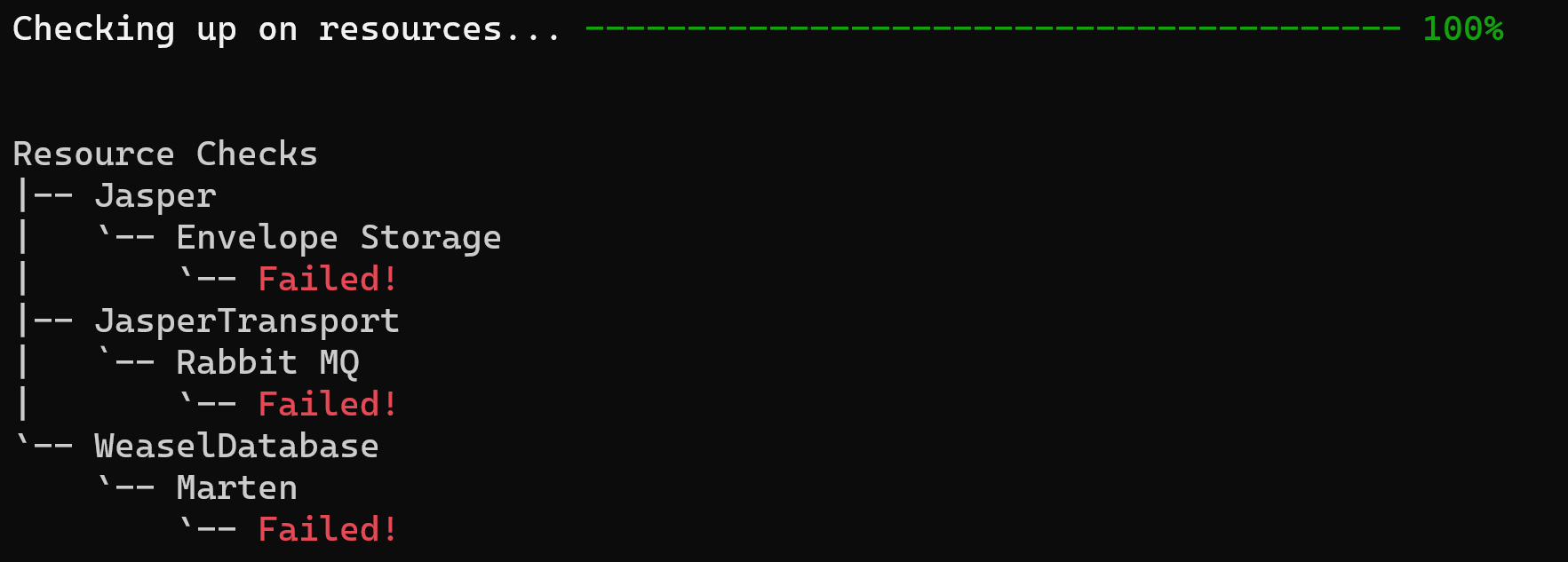
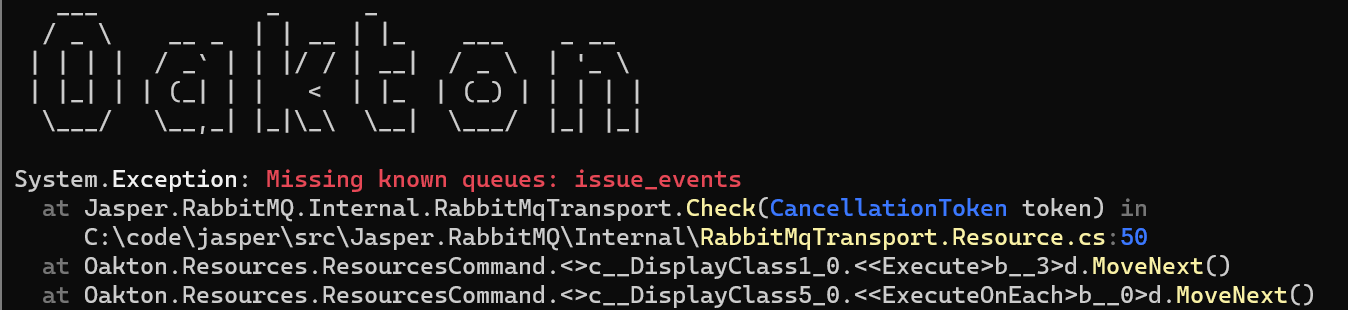
I’ve been showing some new integration between Jasper, Marten, and Rabbit MQ. This time out, I want to show the new “stateful resource” model in a third tool named Oakton to remove development and deployment time friction when using these tools on a software project. Oakton itself is a command line processing tool, that more importantly, can be used to quickly add command line utilities directly to your .Net executable.
Drawing from a sample project in the Jasper codebase, here’s the configuration for an issue tracking application that uses Jasper, Marten, and RabbitMQ with Jasper’s inbox/outbox integration using Postgresql:
using IntegrationTests;
using Jasper;
using Jasper.Persistence.Marten;
using Jasper.RabbitMQ;
using Marten;
using MartenAndRabbitIssueService;
using MartenAndRabbitMessages;
using Oakton;
using Oakton.Resources;

var builder = WebApplication.CreateBuilder(args);

builder.Host.ApplyOaktonExtensions();

builder.Host.UseJasper(opts =>
{
    // I'm setting this up to publish to the same process
    // just to see things work
    opts.PublishAllMessages()
        .ToRabbitExchange("issue_events", exchange => exchange.BindQueue("issue_events"))
        .UseDurableOutbox();

    opts.ListenToRabbitQueue("issue_events").UseInbox();

    opts.UseRabbitMq(factory =>
    {
        // Just connecting with defaults, but showing
        // how you *could* customize the connection to Rabbit MQ
        factory.HostName = "localhost";
        factory.Port = 5672;
    });
});

// This is actually important, this directs
// the app to build out all declared Postgresql and
// Rabbit MQ objects on start up if they do not already
// exist
builder.Services.AddResourceSetupOnStartup();

// Just pumping out a bunch of messages so we can see
// statistics
builder.Services.AddHostedService<Worker>();

builder.Services.AddMarten(opts =>
{
    // I think you would most likely pull the connection string from
    // configuration like this:
    // var martenConnectionString = builder.Configuration.GetConnectionString("marten");
    // opts.Connection(martenConnectionString);

    opts.Connection(Servers.PostgresConnectionString);
    opts.DatabaseSchemaName = "issues";

    // Just letting Marten know there's a document type
    // so we can see the tables and functions created on startup
    opts.RegisterDocumentType<Issue>();

    // I'm putting the inbox/outbox tables into a separate "issue_service" schema
}).IntegrateWithJasper("issue_service");

var app = builder.Build();

app.MapGet("/", () => "Hello World!");

// Actually important to return the exit code here!
return await app.RunOaktonCommands(args);
Just to describe what’s going on up above, the .NET code above is going to depend on:
A Postgresql database with the necessary tables and functions that Marten needs to be able to persist issue data
Additional tables in the Postgresql database for persisting the outgoing and incoming messages in the inbox/outbox usage
A Rabbit MQ broker with the necessary exchanges, queues, and bindings for the issue application as it’s configured
In a perfect world, scratch that, in an acceptable world, a developer should be able to start from a fresh clone of this issue tracking codebase and be able to run the system and/or any integration tests locally almost immediately with very minimal friction along the way.
At this point, I’m a big fan of trying to run development infrastructure in Docker where it’s easy to spin things up on demand, and just as quickly shut it all down when you no longer need it. To that end, let’s just say we’ve got a docker-compose.yml file for both Postgresql and Rabbit MQ. Having that, I’ll type docker compose up -d from the command line to spin up both infrastructure elements.
Cool, but now I need to have the database schemas built out with Marten tables and the Jasper inbox/outbox tables plus the Rabbit MQ queues for the application. This is where Oakton and its new “stateful resource” model comes into play. Jasper’s Rabbit MQ plugin and the inbox/outbox storage both expose Oakton’s IStatefulResource interface for easy setup. Likewise, Marten has support for this model as well (in this case it’s just a very slim wrapper around Marten’s longstanding database schema management functionality).
If you’re not familiar with this, the double dash “–” argument in dotnet run helps .NET to know which arguments (“run”) apply to the dotnet executable and the arguments to the right of the “–” that are passed into the application itself.
Opening up the command line terminal of your preference to the root of the project, I type dotnet run -- help to see what options are available in our Jasper application through the usage of Oakton:
There’s a couple commands up there that will help us out with the database management, but I want to focus on the resources command. To that end, I’m going to type dotnet run -- resources list just to see what resources our issue tracker application has:
Just through the configuration up above, the various Jasper elements have registered “stateful resource” adapters to for Oakton for the underlying Marten database, the inbox/outbox data (Envelope Storage above), and Rabbit MQ.
In the next case, I’m going to use dotnet run -- resources check to see if all our infrastructure is configured the way our application needs — and I’m going to do this without first starting the database or the message broker, so this should fail spectacularly!
Here’s the summary output:
If you were to scroll up a bit, you’d see a lot of exceptions thrown describing what’s wrong (helpfully color coded by Spectre.Console) including this one explaining that an expected Rabbit MQ queue is missing:
So that’s not good. No worries though, I’ll start up the docker containers, then go back to the command line and type:
dotnet run -- resources setup
And here’s some of the output:
Forget the command line…
If you’ll notice the single line of code `builder.Services.AddResourceSetupOnStartup();` in the bootstrapping code above, that’s adding a hosted service to our application from Oakton that will verify and apply all configured set up to the known Marten database, the inbox/outbox storage, and the required Rabbit MQ objects. No command line chicanery necessary. I’m hopeful that this will enable developers to be more productive by dealing with this kind of environmental setup directly inside the application itself rather than recreating the definition of what’s necessary in external scripts.
This was a fair amount of work, so I’d be very welcome to any kind of feedback here.