Wolverine Expands its Multi-Tenancy Story to HTTP

As folks read more about Wolverine and its multi-tenancy support, you may quickly notice that we’ve clearly focused much more on the Marten integration than we have with EF Core so far. You’ll also notice that Wolverine today does not yet have direct support for Finbuckle. At some point in the future I think that Wolverine will provide some Finbuckle integration into Wolverine’s runtime model and will probably use Finbuckle’s EF Core support to provide end to end multi-tenancy with EF Core. For right now though, I think that Marten actually has a much stronger story out of the box for multi-tenancy than EF Core does anyway.

Let’s say that you’re tasked with building an online SaaS solution where the same application service is going to be used by completely different sets of users from different client organizations. It’s going to be important to segregate data between these different client organizations so the various users for each client are only viewing and modifying data for their organization. Maybe you have to go all the way to creating a separate database for each client organization or “tenant,” or maybe you’re using programmatic ways to keep data segregated through your persistence tooling’s capabilities like Marten’s “conjoined tenancy” model. Having one shared system being able to serve different populations of users while keeping all their data correctly segregated is referred to generally as “multi-tenancy” in the software development world.

As an example, let’s consider the sample MultiTenantedTodoService project from the Wolverine codebase. That project is utilizing Marten with a database per tenant strategy using this project configuration for Marten:

var connectionString = "Host=localhost;Port=5433;Database=postgres;Username=postgres;password=postgres";

// Adding Marten for persistence
builder.Services.AddMarten(m =>
    {
        // With multi-tenancy through a database per tenant
        m.MultiTenantedDatabases(tenancy =>
        {
            // You would probably be pulling the connection strings out of configuration,
            // but it's late in the afternoon and I'm being lazy building out this sample!
            tenancy.AddSingleTenantDatabase("Host=localhost;Port=5433;Database=tenant1;Username=postgres;password=postgres", "tenant1");
            tenancy.AddSingleTenantDatabase("Host=localhost;Port=5433;Database=tenant2;Username=postgres;password=postgres", "tenant2");
            tenancy.AddSingleTenantDatabase("Host=localhost;Port=5433;Database=tenant3;Username=postgres;password=postgres", "tenant3");
        });
        
        m.DatabaseSchemaName = "mttodo";
    })
    .IntegrateWithWolverine(masterDatabaseConnectionString:connectionString);

Wolverine has had a strong story for multi-tenancy solutions within its message handling since its 1.0 release this summer (more on that later). I’m not showing this capability in this post, but Wolverine (with Marten) is able to create and use separate transactional outbox functionality for each and every separate tenant database. To the best of my knowledge, Wolverine is the only tool in the .NET world with that capability.

What had been missing had been direct support within Wolverine.HTTP handlers meaning that designing a simple HTTP endpoint that created a new Todo meant building an HTTP endpoint that picked out the tenant id from the route like so:

    [WolverinePost("/todoitems/{tenant}")]
    public static async Task<IResult> Create(string tenant, CreateTodo command, IMessageBus bus)
    {
        // At the 1.0 release, you would have to use Wolverine as a mediator
        // to get the full multi-tenancy feature set.
        
        // That hopefully changes in 1.1
        var created = await bus.InvokeForTenantAsync<TodoCreated>(tenant, command);

        return Results.Created($"/todoitems/{tenant}/{created.Id}", created);
    }

and immediately delegated to an inner Wolverine message handler through the InvokeForTenantAsync() usage shown up above. That handler code is simpler because Wolverine is handling all the multi-tenancy mechanics and looked like this:

    public static TodoCreated Handle(CreateTodo command, IDocumentSession session)
    {
        var todo = new Todo { Name = command.Name };
        session.Store(todo);

        return new TodoCreated(todo.Id);
    }

Alright, not too awful, and very reminiscent of systems that use the MediatR library within MVC Core controllers. However, it’s more moving parts and more code ceremony than I was hoping for out of Wolverine.

Likewise, to create a GET endpoint that returns all the completed Todo documents for the current tenant, maybe you did something like this that explicitly opened a Marten session for the tenant id detected from the request:

    [WolverineGet("/todoitems/{tenant}/complete")]
    public static Task<IReadOnlyList<Todo>> GetComplete(string tenant, IDocumentStore store)
    {
        using var session = store.QuerySession(tenant);
        return session.Query<Todo>().Where(x => x.IsComplete).ToListAsync();
    }

Again, not too much code, but there’s some repetitive code around opening the right session for the right tenant that would be easy for a developer to forget and maybe possible to sneak by testing some times. Also, I had to explicitly dispose the Marten query session — and failing to do so can easily lead to orphaned database connections and all kinds of hurting within your system at runtime. Don’t laugh or blow that off, because that’s happened to the unwary.

Enter Wolverine 1.7.0 on this past Friday. Now Wolverine.HTTP got stretched to include tenant id detection and “know” how to pass that tenant id along to the Marten sessions created within HTTP endpoints.

With Wolverine.HTTP 1.7, I opened the MultiTenantedTodoService Program file again and added this configuration:

// Let's add in Wolverine HTTP endpoints to the routing tree
app.MapWolverineEndpoints(opts =>
{
    // Letting Wolverine HTTP automatically detect the tenant id!
    opts.TenantId.IsRouteArgumentNamed("tenant");
    
    // Assert that the tenant id was successfully detected,
    // or pull the rip cord on the request and return a 
    // 400 w/ ProblemDetails
    opts.TenantId.AssertExists();
});

Using Wolverine.HTTP’s new tenant id detection capability, I’ve told Wolverine to pluck the tenant id out of an expected route argument named “tenant.” With its Marten integration, Wolverine is able to pass sessions into our HTTP endpoint methods that point to the correct tenant database.

Don’t worry, there are plenty of other options for tenant id detection than this simple mechanism I used for testing and the simple demonstration here.

Revisiting the endpoint for fetching all the completed Todo documents for a client, that code reduces down to this:

    [WolverineGet("/todoitems/{tenant}/complete")]
    public static Task<IReadOnlyList<Todo>> GetComplete(IQuerySession session) 
        => session
            .Query<Todo>()
            .Where(x => x.IsComplete)
            .ToListAsync();

Better yet, let’s revisit the endpoint for creating a new Todo and we’re now able to collapse this down to just a single endpoint method:

    [WolverinePost("/todoitems/{tenant}")]
    public static CreationResponse<TodoCreated> Create(
        // Only need this to express the location of the newly created
        // Todo object
        string tenant, 
        CreateTodo command, 
        IDocumentSession session)
    {
        var todo = new Todo { Name = command.Name };
        
        // Marten itself sets the Todo.Id identity
        // in this call
        session.Store(todo); 

        // New syntax in Wolverine.HTTP 1.7
        // Helps Wolverine 
        return CreationResponse.For(new TodoCreated(todo.Id), $"/todoitems/{tenant}/{todo.Id}");
    }

Notice that we really didn’t do anything with the tenant argument except as a helper to build the Url for a newly created Todo. Wolverine & Marten together took care of everything else for us creating the correct session for the correct tenant database.

Summary

The new Wolverine.HTTP multi-tenancy capability is going to allow users to write simpler code and less error prone code for teams needing multi-tenanted persistence.

Using Alba to Test ASP.Net Core Web Services

Hey, JasperFx Software is more than just some silly named open source frameworks. We’re also deeply experienced in test driven development, designing for testability, and making test automation work without driving into the ditch with over dependence on slow, brittle Selenium testing. Hit us up about what we could do to help you be more successful in your own test automation or TDD efforts.

I have been working furiously on getting an incremental Wolverine release out this week, with one of the new shiny features being end to end support for multi-tenancy (the work in progress GitHub issue is here) through Wolverine.Http endpoints. I hit a point today where I have to admit that I can’t finish that work today, but did see the potential for a blog post on the Alba library (also part of JasperFx’s OSS offerings) and how I was using Alba today to write integration tests for this new functionality, show how the sausage is being made, and even work in a test-first manner.

To put the desired functionality in context, let’s say that we’re building a “Todo” web service using Marten for persistence. Moreover, we’re expecting this system to have a massive number of users and want to be sure to isolate data between customers, so we plan on using Marten’s support for using a separate database for each tenant (think user organization in this case). Within that “Todo” system, let’s say that we’ve got a very simple web service endpoint to just serve up all the completed Todo documents for the current tenant like this one:

[WolverineGet("/todoitems/{tenant}/complete")]
public static Task<IReadOnlyList<Todo>> GetComplete(IQuerySession session) 
    => session
        .Query<Todo>()
        .Where(x => x.IsComplete)
        .ToListAsync();

Now, you’ll notice that there is a route argument named “tenant” that isn’t consumed at all by this web api endpoint. What I want Wolverine to do in this case is to infer that the value of that “tenant” value within the route is the current tenant id for the request, and quietly select the correct Marten tenant database for me without me having to write a lot of repetitive code.

Just a note, all of this is work in progress and I haven’t even pushed the code at the time of writing this post. Soon. Maybe tomorrow.

Stepping into the bootstrapping for this web service, I’m going to add these new lines of code to the Todo web service’s Program file to teach Wolverine.HTTP how to handle multi-tenancy detection for me:

// Let's add in Wolverine HTTP endpoints to the routing tree
app.MapWolverineEndpoints(opts =>
{
    // Letting Wolverine HTTP automatically detect the tenant id!
    opts.TenantId.IsRouteArgumentNamed("tenant");
    
    // Assert that the tenant id was successfully detected,
    // or pull the rip cord on the request and return a 
    // 400 w/ ProblemDetails
    opts.TenantId.AssertExists();
});

So that’s some of the desired, built in multi-tenancy features going into Wolverine.HTTP 1.7 some time soon. Back to the actual construction of these new features and how I used Alba this morning to drive the coding.

I started by asking around on social media about what other folks used as strategies to detect the tenant id in ASP.Net Core multi-tenancy, and came up with this list (plus a few other options):

  • Use a custom request header
  • Use a named route argument
  • Use a named query string value (I hate using the query string myself, but like cockroaches or scorpions in our Central Texas house, they always sneak in somehow)
  • Use an expected Claim on the ClaimsPrincipal
  • Mix and match the strategies above because you’re inevitably retrofitting this to an existing system
  • Use sub domain names (I’m arbitrarily skipping this one for now just because it was going to be harder to test and I’m pressed for time this week)

Once I saw a little bit of consensus on the most common strategies (and thank you to everyone who responded to me today), I jotted down some tasks in GitHub-flavored markdown (I *love* this feature) on what the configuration API would look like and my guesses for development tasks:

- [x] `WolverineHttpOptions.TenantId.IsRouteArgumentNamed("foo")` -- creates a policy
- [ ] `[TenantId("route arg")]`, or make `[TenantId]` on a route parameter for one offs. Will need to throw if not a route argument
- [x] `WolverineHttpOptions.TenantId.IsQueryStringValue("key") -- creates policy
- [x] `WolverineHttpOptions.TenantId.IsRequestHeaderValue("key") -- creates policy
- [x] `WolverineHttpOptions.TenantId.IsClaimNamed("key") -- creates policy
- [ ] New way to add custom middleware that's first inline
- [ ] Documentation on custom strategies
- [ ] Way to register the "preprocess context" middleware methods
- [x] Middleware or policy that blows it up with no tenant id detected. Use ProblemDetails
- [ ] Need an attribute to opt into tenant id is required, or tenant id is NOT required on certain endpoints

Knowing that I was going to need to quickly stand up different configurations of a test web service’s IHost, I started with this skeleton that I hoped would make the test setup relatively easy:

public class multi_tenancy_detection_and_integration : IAsyncDisposable, IDisposable
{
    private IAlbaHost theHost;

    public void Dispose()
    {
        theHost.Dispose();
    }

    // The configuration of the Wolverine.HTTP endpoints is the only variable
    // part of the test, so isolate all this test setup noise here so
    // each test can more clearly communicate the relationship between
    // Wolverine configuration and the desired behavior
    protected async Task configure(Action<WolverineHttpOptions> configure)
    {
        var builder = WebApplication.CreateBuilder(Array.Empty<string>());
        builder.Services.AddScoped<IUserService, UserService>();

        // Haven't gotten around to it yet, but there'll be some end to
        // end tests in a bit from the ASP.Net request all the way down
        // to the underlying tenant databases
        builder.Services.AddMarten(Servers.PostgresConnectionString)
            .IntegrateWithWolverine();
        
        // Defaults are good enough here
        builder.Host.UseWolverine();
        
        // Setting up Alba stubbed authentication so that we can fake
        // out ClaimsPrincipal data on requests later
        var securityStub = new AuthenticationStub()
            .With("foo", "bar")
            .With(JwtRegisteredClaimNames.Email, "guy@company.com")
            .WithName("jeremy");
        
        // Spinning up a test application using Alba 
        theHost = await AlbaHost.For(builder, app =>
        {
            app.MapWolverineEndpoints(configure);
        }, securityStub);
    }

    public async ValueTask DisposeAsync()
    {
        // Hey, this is important!
        // Make sure you clean up after your tests
        // to make the subsequent tests run cleanly
        await theHost.StopAsync();
    }

Now, the intermediate step of tenant detection even before Marten itself gets involved is to analyze the HttpContext for the current request, try to derive the tenant id, then set the MessageContext.TenantId in Wolverine for this current request — which Wolverine’s Marten integration will use a little later to create a Marten session pointing at the correct database for that tenant.

Just to measure the tenant id detection — because that’s what I want to build and test first before even trying to put everything together with a real database too — I built these two simple GET endpoints with Wolverine.HTTP:

public static class TenantedEndpoints
{
    [WolverineGet("/tenant/route/{tenant}")]
    public static string GetTenantIdFromRoute(IMessageBus bus)
    {
        return bus.TenantId;
    }

    [WolverineGet("/tenant")]
    public static string GetTenantIdFromWhatever(IMessageBus bus)
    {
        return bus.TenantId;
    }
}

That folks is the scintillating code that brings droves of readership to my blog!

Alright, so now I’ve got some support code for the “Arrange” and “Assert” part of my Arrange/Act/Assert workflow. To finally jump into a real test, I started with detecting the tenant id with a named route pattern using Alba with this code:

    [Fact]
    public async Task get_the_tenant_id_from_route_value()
    {
        // Set up a new application with the desired configuration
        await configure(opts => opts.TenantId.IsRouteArgumentNamed("tenant"));
        
        // Run a web request end to end in memory
        var result = await theHost.Scenario(x => x.Get.Url("/tenant/route/chartreuse"));
        
        // Make sure it worked!
        // ZZ Top FTW! https://www.youtube.com/watch?v=uTjgZEapJb8
        result.ReadAsText().ShouldBe("chartreuse");
    }

The code itself is a little wonky, but I had that quickly working end to end. I next proceeded to the query string strategy like this:

    [Fact]
    public async Task get_the_tenant_id_from_the_query_string()
    {
        await configure(opts => opts.TenantId.IsQueryStringValue("t"));
        
        var result = await theHost.Scenario(x => x.Get.Url("/tenant?t=bar"));
        
        result.ReadAsText().ShouldBe("bar");
    }

Hopefully you can see from the two tests above how that configure() method already helped me quickly write the next test. Sometimes — but not always so be careful with this — the best thing you can do is to first invest in a test harness that makes subsequent tests be more declarative, quicker to write mechanically, and easier to read later.

Next, let’s go to the request header strategy test:

    [Fact]
    public async Task get_the_tenant_id_from_request_header()
    {
        await configure(opts => opts.TenantId.IsRequestHeaderValue("tenant"));
        
        var result = await theHost.Scenario(x =>
        {
            x.Get.Url("/tenant");
            
            // Alba is helping set up the request header
            // for me here
            x.WithRequestHeader("tenant", "green");
        });
        
        result.ReadAsText().ShouldBe("green");
    }

Easy enough, and hopefully you see how Alba helped me get the preconditions into the request quickly in that test. Now, let’s go for a little more complicated test where I first ran into a little trouble and work with the Claim strategy:

    [Fact]
    public async Task get_the_tenant_id_from_a_claim()
    {
        await configure(opts => opts.TenantId.IsClaimTypeNamed("tenant"));
        
        var result = await theHost.Scenario(x =>
        {
            x.Get.Url("/tenant");
            
            // Add a Claim to *only* this request
            x.WithClaim(new Claim("tenant", "blue"));
        });
        
        result.ReadAsText().ShouldBe("blue");
    }

I hit a little friction at first because I didn’t have Alba set up exactly right at first, but since Alba runs your application code completely within process, it was very quick to step right into the code and figure out why the code wasn’t working at first (I’d forgotten to set up the SecurityStub shown above). Refreshing my memory on how Alba’s Security Extensions worked, I was able to get going again. Arguably, Alba’s ability to fake out or even work with your application’s security in tests is its best features.

So that’s been a lot of “happy path” tests, so now let’s break things by specifying Wolverine’s new behavior to validate that a request has a valid tenant id with these two new tests. First, a happy path:

    [Fact]
    public async Task require_tenant_id_happy_path()
    {
        await configure(opts =>
        {
            opts.TenantId.IsQueryStringValue("tenant");
            opts.TenantId.AssertExists();
        });

        // Got a 200? All good!
        await theHost.Scenario(x =>
        {
            x.Get.Url("/tenant?tenant=green");
        });
    }

Note that Alba would cause a test failure if the web request did not return a 200 status code.

And to lock down the binary behavior, here’s the “sad path” where Wolverine should be returning a 400 status code with ProblemDetails data:

    [Fact]
    public async Task require_tenant_id_sad_path()
    {
        await configure(opts =>
        {
            opts.TenantId.IsQueryStringValue("tenant");
            opts.TenantId.AssertExists();
        });

        var results = await theHost.Scenario(x =>
        {
            x.Get.Url("/tenant");
            
            // Tell Alba we expect a non-200 response
            x.StatusCodeShouldBe(400);
        });

        // Alba's helpers to deserialize JSON responses
        // to a strong typed object for easy
        // assertions
        var details = results.ReadAsJson<ProblemDetails>();
        
        // I like to refer to constants in test assertions sometimes
        // so that you can tweak error messages later w/o breaking
        // automated tests. And inevitably regret it when I 
        // don't do this
        details.Detail.ShouldBe(TenantIdDetection
            .NoMandatoryTenantIdCouldBeDetectedForThisHttpRequest);
    }

To be honest, it took me a few minutes to get the test above to pass because of some internal middleware mechanics I didn’t expect. As usual. All the same though, Alba helped me drive the code through “outside in” tests that ran quickly so I could iterate rapidly.

As always, I use Jeremy’s Only Law of Testing to decide on a mix of solitary or socialable tests in any particular scenario.

A bit about Alba

Alba itself is a descendant of some very old test helper code in FubuMVC, then was ported to OWIN (RIP, but I don’t miss you), then to early ASP.Net Core, and finally rebuilt as a helper around ASP.Net Core’s. built in TestServer and WebApplicationFactory. Alba has been continuously used for well over a decade now. If you’re looking for selling points for Alba, I’d say:

  • Alba makes your integration tests more declarative
  • There are quite a few helpers for common repetitive tasks in integration tests like reading JSON data with the application’s built in serialization
  • Simplifies test setup
  • It runs completely in memory where you can quickly spin up your application and jump right into debugging when necessary
  • Testing web services with Alba is much more efficient and faster than trying to do the same thing through inevitably slow, brittle, and laborious Selenium/Playwright/Cypress testing

Scheduled or Delayed Messages in Wolverine

Wolverine has first class support for delayed or scheduled message delivery. While I don’t think I’d recommend using Wolverine as a one for one replacement for a Hangfire or Quartz.Net, Wolverine’s functionality is great for:

  • Scheduling or delaying message retries on failures where you want the message retried, but definitely want that message out of the way of any subsequent messages in a queue
  • Enforcing “timeout” conditions for any kind of long running workflow
  • Explicit scheduling from within message handlers

Mechanically, you can publish a message with a delayed message delivery with Wolverine’s main IMessageBus entry point with this extension method:

public async Task schedule_send(IMessageContext context, Guid issueId)
{
    var timeout = new WarnIfIssueIsStale
    {
        IssueId = issueId
    };

    // Process the issue timeout logic 3 days from now
    await context.ScheduleAsync(timeout, 3.Days());

    // The code above is short hand for this:
    await context.PublishAsync(timeout, new DeliveryOptions
    {
        ScheduleDelay = 3.Days()
    });
}

Or using an absolute time with this overload of the same extension method:

public async Task schedule_send_at_5_tomorrow_afternoon(IMessageContext context, Guid issueId)
{
    var timeout = new WarnIfIssueIsStale
    {
        IssueId = issueId
    };

    var time = DateTime.Today.AddDays(1).AddHours(17);

    // Process the issue timeout at 5PM tomorrow
    // Do note that Wolverine quietly converts this
    // to universal time in storage
    await context.ScheduleAsync(timeout, time);
}

Now, Wolverine tries really hard to enable you to use pure functions for as many message handlers as possible, so there’s of course an option to schedule message delivery while still using cascading messages with the DelayedFor() and ScheduledAt() extension methods shown below:

public static IEnumerable<object> Consume(Incoming incoming)
{
    // Delay the message delivery by 10 minutes
    yield return new Message1().DelayedFor(10.Minutes());
    
    // Schedule the message delivery for a certain time
    yield return new Message2().ScheduledAt(new DateTimeOffset(DateTime.Today.AddDays(2)));
}

Lastly, there’s a special base class called TimeoutMessage that your message types can extend to add scheduling logic directly to the message itself for easy usage as a cascaded message. Here’s an example message type:

// This message will always be scheduled to be delivered after
// a one minute delay
public record OrderTimeout(string Id) : TimeoutMessage(1.Minutes());

Which is used within this sample saga implementation:

// This method would be called when a StartOrder message arrives
// to start a new Order
public static (Order, OrderTimeout) Start(StartOrder order, ILogger<Order> logger)
{
    logger.LogInformation("Got a new order with id {Id}", order.OrderId);

    // creating a timeout message for the saga
    return (new Order{Id = order.OrderId}, new OrderTimeout(order.OrderId));
}

How does it work?

The actual mechanics for how Wolverine is doing the scheduled delivery are determined by the destination endpoint for the message being published. In order of precedence:

  • If the destination endpoint has native message delivery capabilities, Wolverine uses that capability. Outbox mechanics still apply to when the outgoing message is released to the external endpoint’s sender. At the time of this post, the only transport with native scheduling support is Wolverine’s Azure Service Bus transport or the recently added Sql Server backed transport.
  • If the destination endpoint is durable, meaning that it’s enrolled in Wolverine’s transactional outbox, then Wolverine will store the scheduled messages in the outgoing envelope storage for later execution. In this case, Wolverine is polling for the ready to execute or deliver messages across all running Wolverine nodes. This option is durable in case of process exits.
  • In lieu of any other support, Wolverine has an in memory option that can do scheduled delivery or execution

Plans for Marten V7 and Beyond

As you might know, the Marten core team is in the process of building a new business around the “Critter Stack” tools (Marten + Wolverine and a couple smaller things). I think we’ll shortly be able to offer formal paid support contracts through JasperFx Software, and we’re absolutely open for business for any kind of immediate consulting on your software initiatives.

Call this a follow up from the Critter Stack roadmap from back in March. Everything takes longer than you wish it would, but at least Wolverine went 1.0 and I’m happy with how that’s been received so far and its uptake.

In the immediate future, we’re kicking out a Marten 6.1 release with a new health check integration and some bug fixes. Shortly afterward, we hope to get another 6.1.1 release out with as many bug fixes as we can address quickly to clear the way for the next big release. With that out of the way, let’s get on to the big initiatives for Marten!

Marten 7 Roadmap

Marten 6 was a lot of bug fixing and accommodating the latest version of Npgsql, our dependency for low level communication with PostgreSQL. Marten 7 is us getting on track for our strategic initiatives. Right now the goal is to move to an “open core” model for Marten where the current library and its capabilities stay open and free, but we will be building more advanced features for bigger workloads in commercial add on projects.

For the open core part of Marten, we’re aiming for:

  • Significant improvements to the LINQ provider support for better performing SQL and knocking down an uncomfortably long list of backlogged LINQ related issues and user requests. You can read more about that in Marten Linq Provider Improvements. Honestly, I think this is likely more work than the rest of the issues combined.
  • Maybe adding Strong Typed Identifiers as a logical follow on to the LINQ improvements. It’s been a frequent request, and I can see some significant opportunities for integration with Wolverine later
  • First class subscriptions in the event sourcing. This is going to be simplistic model for you to build your own persistent subscriptions to Marten events that’s a little more performant and robust than the current “IProjection for subscriptions” approach. More on this in the next section.
  • A way to parallelize the asynchronous projections in Marten for improved scalability based on Oskar’s strategy described in Scaling Marten.
  • .NET 8 integration. No idea what if anything that’s going to do to us.
  • Incorporating Npgsql 8. Also no idea if that’s going to be full of unwanted surprises or a walk in the park yet
  • A lightweight option for partial updates of Marten documents. We support this through our PLv8 add on, but that’s likely being deprecated and this comes up quite a bit from people moving to Marten from MongoDb

Critter Stack Enterprise-y Edition

Now, for the fun part, the long planned, long dreamed of commercial add ons for true enterprise Critter Stack usage. We have initial plans to build an all new library using both Marten and Wolverine that will be available under a commercial subscription.

Projection Scalability

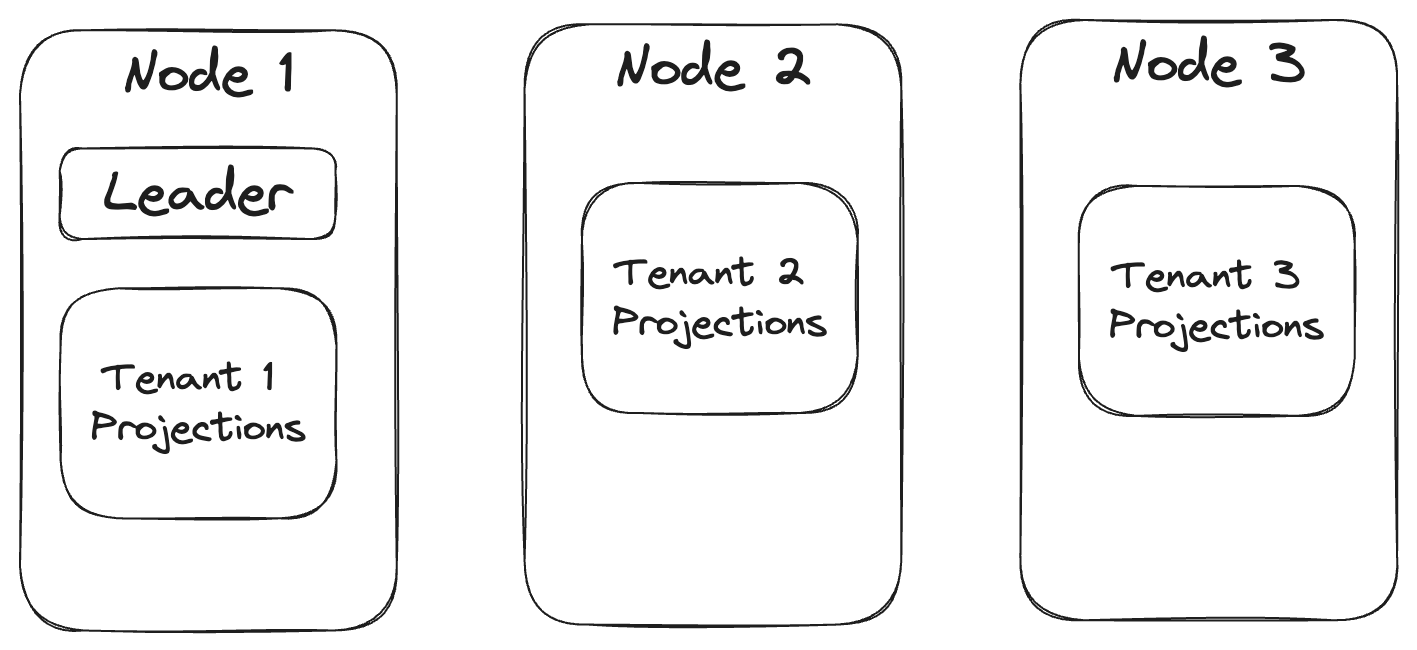
Most of the biggest issues with scaling Marten to bigger systems are related to the asynchronous projection support. The first goal is scalability through distributing projection work across all the running nodes within your application. Wolverine already has leader election and “agent assignment” functionality that was built with this specific need in mind. To make that a little more clear, let’s say that you’re using Marten with a database per tenant multi-tenancy strategy. With “Critter Stack Enterprise” (place holder until we get a better name), the projection work might be distributed across nodes by tenant something like this:

The “leader agent” would help redistribute work as nodes come online or offline.

Improving scalability by distributing load across nodes is a big step, but there’s more tricks to play with projection throughput that would be part of this work.

Zero Downtime, Blue/Green Deployments

With the new projection daemon alternative, we will also be introducing a new “blue/green deployment” scheme where you will be able to change existing projections, introduce all new projections, or introduce new event signatures without having to have a potentially long downtime for rebuilding projections the way you might have to with Marten today. I feel like we have some solid ideas for how to finally pull this off.

More Robust Subscription Recipes

I don’t have many specifics here, but I think there’s an opportunity to also support more robust subscription offerings out of the Marten events using existing or new Wolverine capabilities. I also think we can offer stricter ordering and delivery guarantees with the Marten + Wolverine combination than we ever could with Marten alone. And frankly, I think we can do something more robust than what our obvious competitor tools do today.

Additional Event Store Throughput Improvements

Some other ideas we’re kicking around:

  • Introduce 2nd level caching into the aggregation projections
  • Elastic scalability for rebuilding projections
  • Hot/cold event store archiving that could improve both performance and scalability
  • Optional usage of higher performance serializers in the event store. That mostly knocks out LINQ querying for the event data

Other Stuff

We have many more ideas, but I think that the biggest theme is going to be ratcheting up the scalability of the event sourcing functionality and CQRS usage in general. There’s also a possibility of taking Marten’s event store functionality into cross-platform usage this year as well.

Thoughts? Requests? Wanna run jump in line to hire JasperFx Software?

Wolverine’s Improved Azure Service Bus Support

Wolverine 1.6.0 came out today, and one of the main themes was a series of improvements to the Azure Service Bus integration with Wolverine. In addition to the basic support Wolverine already had support for messaging with Azure Service Bus queues, topics, and subscriptions, you can now use native scheduled delivery, session identifiers for FIFO delivery, and expanded options for conventional routing topology.

First though, to get started with Azure Service Bus and Wolverine, install the WolverineFx.AzureServiceBus with the Nuget mechanism of your choice:

dotnet add package WolverineFx.AzureServiceBus

Next, you’ll add just a little bit to your Wolverine bootstrapping like this:

using var host = await Host.CreateDefaultBuilder()
    .UseWolverine((context, opts) =>
    {
        // One way or another, you're probably pulling the Azure Service Bus
        // connection string out of configuration
        var azureServiceBusConnectionString = context
            .Configuration
            .GetConnectionString("azure-service-bus");

        // Connect to the broker in the simplest possible way
        opts.UseAzureServiceBus(azureServiceBusConnectionString)
            .AutoProvision()
            .UseConventionalRouting();
    }).StartAsync();

Native Message Scheduling

You can now use native Azure Service Bus scheduled delivery within Wolverine without any explicit configuration beyond what you already do to connect to Azure Service Bus. Putting that into perspective, if you have a message type name ValidateInvoiceIsNotLate that is routed to an Azure Service Bus queue or subscription, you can use this feature:

public async Task SendScheduledMessage(IMessageContext bus, Guid invoiceId)
{
    var message = new public async Task SendScheduledMessage(IMessageContext bus, Guid invoiceId)
{
    var message = new ValidateInvoiceIsNotLate
    {
        InvoiceId = invoiceId
    };

    // Schedule the message to be processed in a certain amount
    // of time
    await bus.ScheduleAsync(message, 30.Days());

    // Schedule the message to be processed at a certain time
    await bus.ScheduleAsync(message, DateTimeOffset.Now.AddDays(30));
}
    {
        InvoiceId = invoiceId
    };

    // Schedule the message to be processed in a certain amount
    // of time
    await bus.ScheduleAsync(message, 30.Days());

    // Schedule the message to be processed at a certain time
    await bus.ScheduleAsync(message, DateTimeOffset.Now.AddDays(30));
}

That would also apply to scheduled retry error handling if the endpoint is also Inline:

using var host = Host.CreateDefaultBuilder()
    .UseWolverine(opts =>
    {
        opts.Policies.OnException<TimeoutException>()
            // Just retry the message again on the
            // first failure
            .RetryOnce()

            // On the 2nd failure, put the message back into the
            // incoming queue to be retried later
            .Then.Requeue()

            // On the 3rd failure, retry the message again after a configurable
            // cool-off period. This schedules the message
            .Then.ScheduleRetry(15.Seconds())

            // On the next failure, move the message to the dead letter queue
            .Then.MoveToErrorQueue();

    }).StartAsync();

Topic & Subscription Conventions

The original conventional routing with Azure Service Bus just sent and listened to queues named after the message type within the application. Wolverine 1.6 adds an additional routing convention to publish outgoing messages to topics and listen for known handled messages with topics and subscriptions. In all cases, you can customize the convention naming and any element of the Wolverine listening, sending, or any of the effected Azure Service Bus topics or subscriptions.

The syntax for this option is shown below:

opts.UseAzureServiceBusTesting()
    .UseTopicAndSubscriptionConventionalRouting(convention =>
    {
        // Optionally control every aspect of the convention and
        // its applicability to types
        // as well as overriding any listener, sender, topic, or subscription
        // options
    })

    .AutoProvision()
    .AutoPurgeOnStartup();

Session Identifiers and FIFO Delivery

You can now take advantage of sessions and first-in, first out queues in Azure Service Bus with Wolverine. To tell Wolverine that an Azure Service Bus queue or subscription should require sessions, you have this syntax shown in an internal test:

_host = await Host.CreateDefaultBuilder()
    .UseWolverine(opts =>
    {
        opts.UseAzureServiceBusTesting()
            .AutoProvision().AutoPurgeOnStartup();

        opts.ListenToAzureServiceBusQueue("send_and_receive");
        opts.PublishMessage<AsbMessage1>().ToAzureServiceBusQueue("send_and_receive");

        opts.ListenToAzureServiceBusQueue("fifo1")
            
            // Require session identifiers with this queue
            .RequireSessions()
            
            // This controls the Wolverine handling to force it to process
            // messages sequentially
            .Sequential();
        
        opts.PublishMessage<AsbMessage2>()
            .ToAzureServiceBusQueue("fifo1");

        opts.PublishMessage<AsbMessage3>().ToAzureServiceBusTopic("asb3");
        opts.ListenToAzureServiceBusSubscription("asb3")
            .FromTopic("asb3")
            
            // Require sessions on this subscription
            .RequireSessions(1)
            
            .ProcessInline();
    }).StartAsync();

Wolverine is using the “group-id” nomenclature from the AMPQ standard, but for Azure Service Bus, this is directly mapped to the SessionId property on the Azure Service Bus client internally.

To publish messages to Azure Service Bus with a session id, you will need to of course supply the session id:

// bus is an IMessageBus
await bus.SendAsync(new AsbMessage3("Red"), new DeliveryOptions { GroupId = "2" });
await bus.SendAsync(new AsbMessage3("Green"), new DeliveryOptions { GroupId = "2" });
await bus.SendAsync(new AsbMessage3("Refactor"), new DeliveryOptions { GroupId = "2" });

You can also send messages with session identifiers through cascading messages as shown in a fake message handler below:

public static IEnumerable<object> Handle(IncomingMessage message)
{
    yield return new Message1().WithGroupId("one");
    yield return new Message2().WithGroupId("one");

    yield return new Message3().ScheduleToGroup("one", 5.Minutes());

    // Long hand
    yield return new Message4().WithDeliveryOptions(new DeliveryOptions
    {
        GroupId = "one"
    });
}

Using Sql Server as a Message Queue with Wolverine

Wolverine 1.4.0 was released last week (and a smaller 1.5.0, with a medium sized 1.6.0 coming Monday). The biggest new feature was a brand new option to use Microsoft Sql Server (or Azure Sql) as a durable message transport with Wolverine.

Let’s say your system is already using Sql Server for persistence, you need some durable, asynchronous messaging, and wouldn’t it be nice to not have to introduce any new infrastructure into the mix? Assuming you’ve decided to also use Wolverine, you can get started with this approach by adding the WolverineFx.SqlServer Nuget to your application:

dotnet add package WolverineFx.SqlServer

Here’s a sample application bootstrapping that shows the inclusion and configuration of Sql Server-backed queueing:

using var host = await Host.CreateDefaultBuilder()
    .UseWolverine((context, opts) =>
    {
        var connectionString = context
            .Configuration
            .GetConnectionString("sqlserver");
        
        // This adds both Sql Server backed
        // transactional inbox/outbox support
        // and the messaging transport support
        opts
           .UseSqlServerPersistenceAndTransport(connectionString, "myapp")
            
            // Tell Wolverine to build out all necessary queue or scheduled message
            // tables on demand as needed
            .AutoProvision()
            
            // Option that may be helpful in testing, but probably bad
            // in production!
            .AutoPurgeOnStartup();

        // Use this extension method to create subscriber rules
        opts.PublishAllMessages()
            .ToSqlServerQueue("outbound");

        // Use this to set up queue listeners
        opts.ListenToSqlServerQueue("inbound")

            // Optional circuit breaker usage
            .CircuitBreaker(cb =>
            {
                // fine tune the circuit breaker
                // policies here
            })
            
            // Optionally specify how many messages to 
            // fetch into the listener at any one time
            .MaximumMessagesToReceive(50);
    }).StartAsync();

The Sql Server transport is pretty simple, it basically just supports named queues right now. Here’s a couple useful properties of the transport that will hopefully make it more useful to you:

  • Scheduled message delivery is absolutely supported with the Sql Server Transport, and some care was taken to optimize the database load and throughput when using this feature
  • Sql Server backed queues can be either “buffered in memory” (Wolverine’s message batching) or be “durable” meaning that the queues are integrated into both the transactional inbox and outbox for durable systems
  • Wolverine can build database tables as necessary for the queue much like it does today for the transactional inbox and outbox. Moreover, the configured queue tables are also part of the stateful resource model in the Critter Stack world that provide quite a bit of command line management directly into your application.
  • The Sql Server backed queues support Wolverine’s circuit breaker functionality on listeners

This feature is something that folks have asked about in the past, but I’ve always been reticent to try because databases don’t make for great, 1st class queueing mechanisms. That being said, I’m working with a JasperFx Software client who wanted a more robust local queueing mechanism that could handle much more throughput for scheduled messaging, and thus, the new Sql Server Transport was born.

There will be a full fledged PostgreSQL backed queue at some point, and it might be a little more robust even based on some preliminary work from a Wolverine contributor, but that’s probably not an immediate priority.

Understanding Endpoints in Wolverine Messaging

In Wolverine terminology, an “Endpoint” is the configuration time model for any location or mechanism where Wolverine sends or receives messages, including local Wolverine queues within your application. Think of external resource like a Rabbit MQ exchange or an Amazon SQS queue. The Async API specification refers to this as a channel, and Wolverine may very well change its nomenclature in the future to be consistent with Async API. While there are somewhat different configuration options for a Rabbit MQ exchange versus an Azure Service Bus queue, there are some common elements. For the sake of this post (which is mostly ripped out of the Wolverine documentation), endpoints in Wolverine are processed on one of three modes:

  1. Inline – messages are sent immediately, and processed sequentially. While you can parallelize the listeners for better throughput, this is your most likely choice if message delivery order matters to you
  2. Buffered – kind of a batched, in memory mode
  3. Durable – batched in memory, but also backed every step of the way by Wolverine’s transactional inbox/outbox support

Choosing between these three modes is a matter of balancing throughput and delivery guarantees. With that, here’s a deeper dive into the three modes. Do note though, that not every transport type can support all three modes

Inline Endpoints

Wolverine endpoints come in three basic flavors, with the first being Inline endpoints:

// Configuring a Wolverine application to listen to
// an Azure Service Bus queue with the "Inline" mode
opts.ListenToAzureServiceBusQueue(queueName, q => q.Options.AutoDeleteOnIdle = 5.Minutes()).ProcessInline();

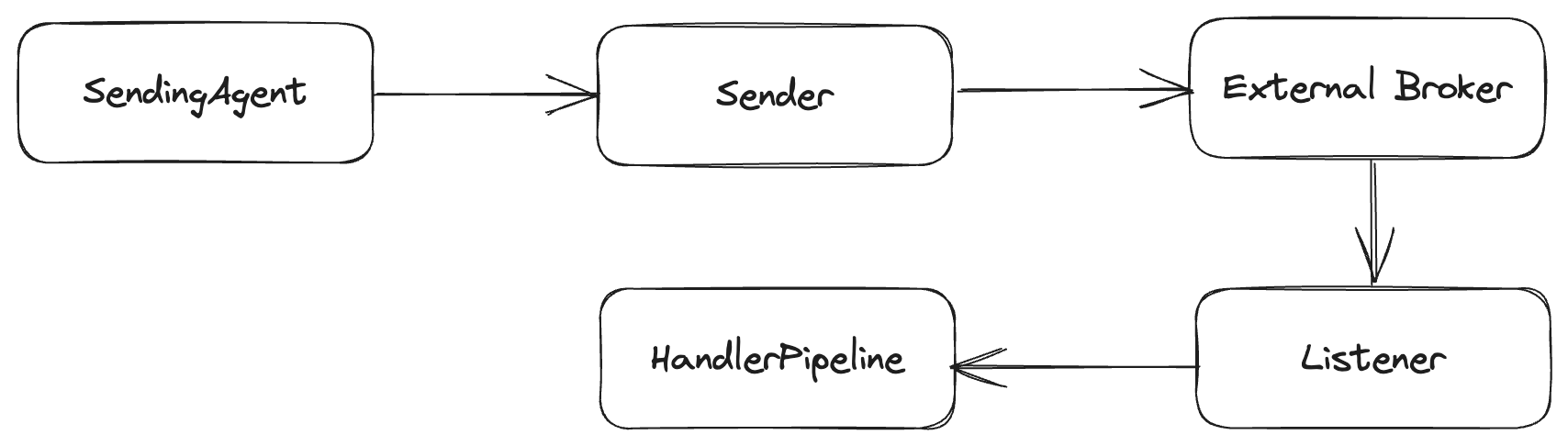
With inline endpoints, as the name implies, calling IMessageBus.SendAsync() immediately sends the message to the external message broker. Likewise, messages received from an external message queue are processed inline before Wolverine acknowledges to the message broker that the message is received.

Inline Endpoints

In the absence of a durable inbox/outbox, using inline endpoints is “safer” in terms of guaranteed delivery. As you might think, using inline agents can bottle neck the message processing, but that can be alleviated by opting into parallel listeners.

Buffered Endpoints

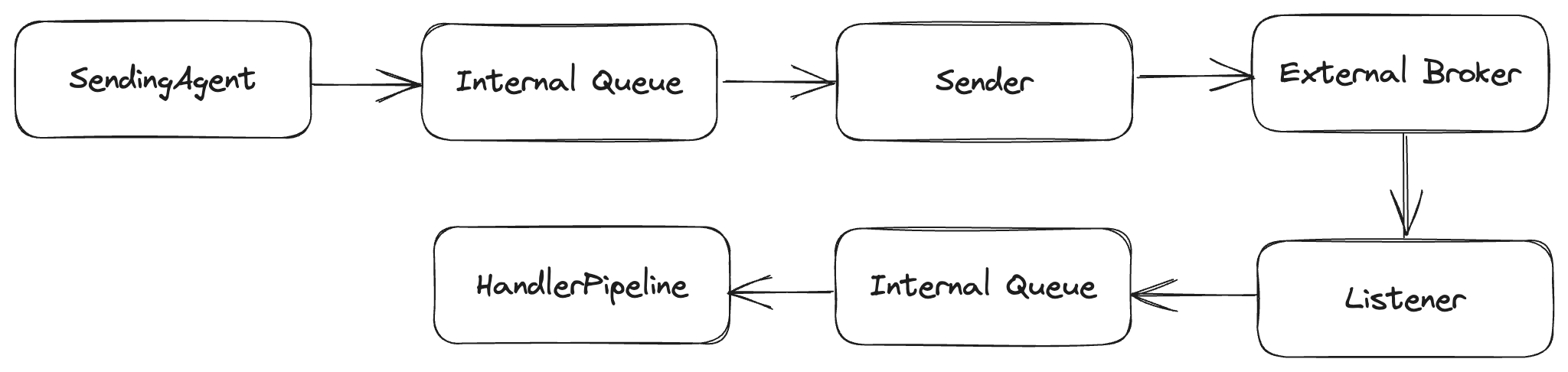
In the second Buffered option, messages are queued locally between the actual external broker and the Wolverine handlers or senders.

To opt into buffering, you use this syntax:

// I overrode the buffering limits just to show
// that they exist for "back pressure"
opts.ListenToAzureServiceBusQueue("incoming")
    .BufferedInMemory(new BufferingLimits(1000, 200));

At runtime, you have a local TPL Dataflow queue between the Wolverine callers and the broker:

Buffered Endpoints

On the listening side, buffered endpoints do support back pressure (of sorts) where Wolverine will stop the actual message listener if too many messages are queued in memory to avoid chewing up your application memory. In transports like Amazon SQS that only support batched message sending or receiving, Buffered is the default mode as that facilitates message batching.

Buffered message sending and receiving can lead to higher throughput, and should be considered for cases where messages are ephemeral or expire and throughput is more important than delivery guarantees. The downside is that messages in the in memory queues can be lost in the case of the application shutting down unexpectedly — but Wolverine tries to “drain” the in memory queues on normal application shutdown.

Durable Endpoints

Durable endpoints behave like buffered endpoints, but also use the durable inbox/outbox message storage to create much stronger guarantees about message delivery and processing. You will need to use Durable endpoints in order to truly take advantage of the persistent outbox mechanism in Wolverine. To opt into making an endpoint durable, use this syntax:

// I overrode the buffering limits just to show
// that they exist for "back pressure"
opts.ListenToAzureServiceBusQueue("incoming")
    .UseDurableInbox(new BufferingLimits(1000, 200));

opts.PublishAllMessages().ToAzureServiceBusQueue("outgoing")
    .UseDurableOutbox();

Or use policies to do this in one fell swoop (which may not be what you actually want, but you could do this!):

opts.Policies.UseDurableOutboxOnAllSendingEndpoints();

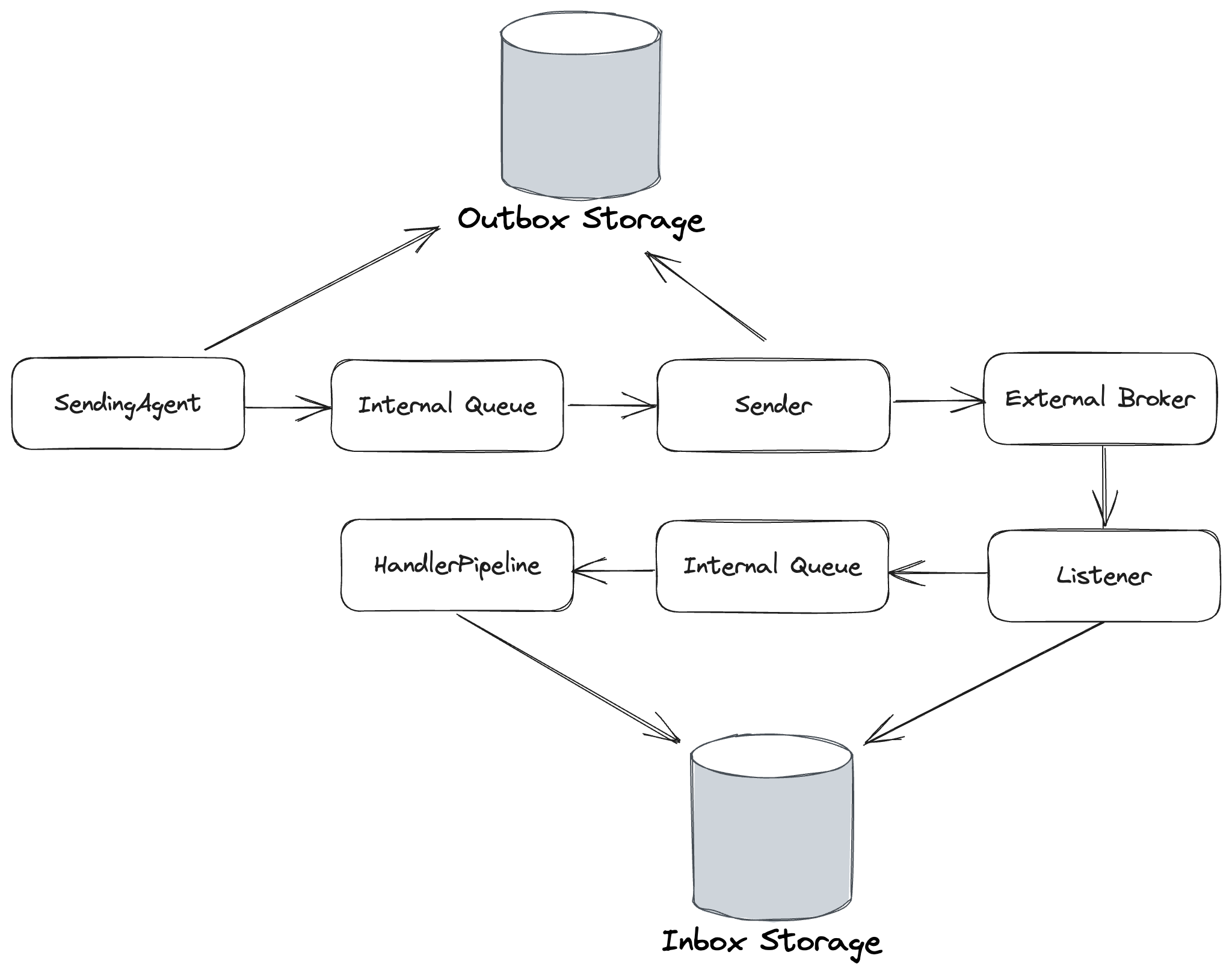
As shown below, the Durable endpoint option adds an extra step to the Buffered behavior to add database storage of the incoming and outgoing messages:

Durable Endpoints

Outgoing messages are deleted in the durable outbox upon successful sending acknowledgements from the external broker. Likewise, incoming messages are also deleted from the durable inbox upon successful message execution.

The Durable endpoint option makes Wolverine’s local queueing robust enough to use for cases where you need guaranteed processing of messages, but don’t want to use an external broker.

Explicitly Route Messages with Wolverine

TL;DR: Wolverine message handler signatures can lead to easier unit testing code than comparable “IHandler of T” frameworks.

Most of the time I think you can just allow Wolverine to handle message routing for you with some simple configured rules or conventions. However, once in awhile you’ll need to override those rules and tell Wolverine exactly where those messages should go.

I’ve been working (playing) with Midjourney quite a bit lately trying to make images for the JasperFx Software website. You can try it out to generate images for free, but the image generation gets a lower priority than their paying customers. Using that as an example, let’s say that we were using Wolverine to build our own Midjourney clone. At some point, there’s maybe an asynchronous message handler like this one that takes a request to generate a new image based on the user’s prompt, but routes the actual work to either a higher or lower priority queue based on whether the user is a premium customer:

    public record GenerateImage(string Prompt, Guid ImageId);

    public record ImageRequest(string Prompt, string CustomerId);

    public record ImageGenerated(Guid Id, byte[] Image);

    public class Customer
    {
        public string Id { get; set; }
        public bool PremiumMembership { get; set; }
    }

    public class ImageSaga : Saga
    {
        public Guid Id { get; set; }
        
        public string CustomerId { get; set; }

        public Task Handle(ImageGenerated generated)
        {
            // look up the customer, figure out how to send the
            // image to their client.
            throw new NotImplementedException("Not done yet:)");
            
            MarkCompleted();
        }
    }
    
    public static class GenerateImageHandler
    {
        // I'm assuming the usage of Marten middleware here
        // to handle transactions and the outbox mechanics
        public static async Task HandleAsync(
            ImageRequest request, 
            IDocumentSession session, 
            IMessageBus messageBus,
            CancellationToken cancellationToken)
        {
            var customer = await session
                .LoadAsync<Customer>(request.CustomerId, cancellationToken);

            // I'm starting a new saga to track the state of the 
            // image when we get the callback from the downstream
            // image generation service
            var imageSaga = new ImageSaga();
            session.Insert(imageSaga);

            var outgoing = new GenerateImage(request.Prompt, imageSaga.Id);
            if (customer.PremiumMembership)
            {
                // Send the message to a named endpoint we've configured for the faster
                // processing
                await messageBus.EndpointFor("premium-processing")
                    .SendAsync(outgoing);
            }
            else
            {
                // Send the message to a named endpoint we've configured for slower
                // processing
                await messageBus.EndpointFor("basic-processing")
                    .SendAsync(outgoing);
            }
        }
    }

A couple notes on the code above:

  • I’m assuming the usage of Marten for persistence (of course), with the auto transactional middleware policy applied
  • I’ve configured a PostgreSQL backed outbox for Wolverine
  • It’s likely a slow process, so I’m assuming there’s going to be an asynchronous callback from the actual image generator later. I’m leveraging Wolverine’s stateful saga support to track the customer of the original image for processing later

Wolverine V1.3 dropped today with a little improvement for exactly this scenario (based on some usage by a JasperFx client) so you can use cascading messages instead of having to deal directly with the IMessageBus service. Let’s rewrite the explicit code up above, but this time try to turn the actual routing logic into a pure function that could be easy to unit test:

    public static class GenerateImageHandler
    {
        // Using Wolverine's compound handlers to remove all the asynchronous
        // junk from the main Handle() method
        public static Task<Customer> LoadAsync(
            ImageRequest request, 
            IDocumentSession session,
            CancellationToken cancellationToken)
        {
            return session.LoadAsync<Customer>(request.CustomerId, cancellationToken);
        }
        
        
        public static (RoutedToEndpointMessage<GenerateImage>, ImageSaga) Handle(
            ImageRequest request, 
            Customer customer)
        {

            // I'm starting a new saga to track the state of the 
            // image when we get the callback from the downstream
            // image generation service
            var imageSaga = new ImageSaga
            {
                // I need to assign the image id in memory
                // to make this all work
                Id = CombGuidIdGeneration.NewGuid()
            };

            var outgoing = new GenerateImage(request.Prompt, imageSaga.Id);
            var destination = customer.PremiumMembership ? "premium-processing" : "basic-processing";
            
            return (outgoing.ToEndpoint(destination), imageSaga);
        }
    }

The handler above is the equivalent in functionality to the earlier version. It’s not really that much less code, but I think it’s a bit more declarative. What’s most important to me is the potential for unit testing the decision about where the customer requests go as shown in this fake test:

    [Fact]
    public void should_send_the_request_to_premium_processing_for_premium_customers()
    {
        var request = new ImageRequest("a wolverine ice skating in the country side", "alice");
        var customer = new Customer
        {
            Id = "alice",
            PremiumMembership = true
        };

        var (command, image) = GenerateImageHandler.Handle(request, customer);
        
        command.EndpointName.ShouldBe("premium-processing");
        command.Message.Prompt.ShouldBe(request.Prompt);
        command.Message.ImageId.ShouldBe(image.Id);
        
        image.CustomerId.ShouldBe(request.CustomerId);
    }

What I’m hoping you take away from that code sample is that testing the logic part of the ImageRequest message processing turns into a simple state-based test — meaning that you’re just pushing in the known inputs and measuring the values returned by the method. You’d still need to pair this unit test with a full integration test, but at least you’d know that the routing logic is correct before you wrestle with potential integration issues.

A-Frame Architecture with Wolverine

I’m weaseling into making a second blog post about a code sample that I mostly stole from just to meet my unofficial goal of 2-3 posts a week promoting the Critter Stack.

Last week I wrote a blog post ostensibly about Marten’s compiled query feature that also included this code sample that I adapted from Oskar’s excellent post on vertical slices:

using DailyAvailability = System.Collections.Generic.IReadOnlyList<Booking.RoomReservations.GettingRoomTypeAvailability.DailyRoomTypeAvailability>;
 
namespace Booking.RoomReservations.ReservingRoom;
 
public record ReserveRoomRequest(
    RoomType RoomType,
    DateOnly From,
    DateOnly To,
    string GuestId,
    int NumberOfPeople
);
 
public static class ReserveRoomEndpoint
{
    // More on this in a second...
    public static async Task<DailyAvailability> LoadAsync(
        ReserveRoomRequest request,
        IDocumentSession session)
    {
        // Look up the availability of this room type during the requested period
        return (await session.QueryAsync(new GetRoomTypeAvailabilityForPeriod(request))).ToList();
    }
 
    [WolverinePost("/api/reservations")]
    public static (CreationResponse, StartStream<RoomReservation>) Post(
        ReserveRoomRequest command,
        DailyAvailability dailyAvailability)
    {
        // Make sure there is availability for every day
        if (dailyAvailability.Any(x => x.AvailableRooms == 0))
        {
            throw new InvalidOperationException("Not enough available rooms!");
        }
 
        var reservationId = CombGuidIdGeneration.NewGuid().ToString();
 
        // I copied this, but I'd probably eliminate the record usage in favor
        // of init only properties so you can make the potentially error prone
        // mapping easier to troubleshoot in the future
        // That folks is the voice of experience talking
        var reserved = new RoomReserved(
            reservationId,
            null,
            command.RoomType,
            command.From,
            command.To,
            command.GuestId,
            command.NumberOfPeople,
            ReservationSource.Api,
            DateTimeOffset.UtcNow
        );
 
        return (
            // This would be the response body, and this also helps Wolverine
            // to create OpenAPI metadata for the endpoint
            new CreationResponse($"/api/reservations/{reservationId}"),
             
            // This return value is recognized by Wolverine as a "side effect"
            // that will be processed as part of a Marten transaction
            new StartStream<RoomReservation>(reservationId, reserved)
        );
    }
}

The original intent of that code sample was to show off how the full “critter stack” (Marten & Wolverine together) enables relatively low ceremony code that also promotes a high degree of testability. And does all of that without requiring developers to invest a lot of time in complicated , prescriptive architectures like a typical Clean Architecture structure.

Specifically today though, I want to zoom in on “testability” and talk about how Wolverine explicitly encourages code that exhibits what Jim Shore famously called the “A Frame Architecture” in its message handlers, but does so with functional decomposition rather than oodles of abstractions and layers.

Using the “A-Frame Architecture”, you roughly want to divide your code into three sets of functionality:

  1. The domain logic for your system, which I would say includes “deciding” what actions to take next.
  2. Infrastructural service providers
  3. Conductor or mediator code that invokes both the infrastructure and domain logic code to decouple the domain logic from infrastructure code

In the message handler above for the `ReserveRoomRequest` command, Wolverine itself is acting as the “glue” around the methods of the HTTP handler code above that keeps the domain logic (the ReserveRoomEndpoint.Post() method that “decides” what event should be captured) and the raw Marten infrastructure to load existing data and persist changes back to the database.

To illustrate that in action, here’s the full generated code that Wolverine compiles to actually handle the full HTTP request (with some explanatory annotations I made by hand):

    public class POST_api_reservations : Wolverine.Http.HttpHandler
    {
        private readonly Wolverine.Http.WolverineHttpOptions _wolverineHttpOptions;
        private readonly Marten.ISessionFactory _sessionFactory;

        public POST_api_reservations(Wolverine.Http.WolverineHttpOptions wolverineHttpOptions, Marten.ISessionFactory sessionFactory) : base(wolverineHttpOptions)
        {
            _wolverineHttpOptions = wolverineHttpOptions;
            _sessionFactory = sessionFactory;
        }


        public override async System.Threading.Tasks.Task Handle(Microsoft.AspNetCore.Http.HttpContext httpContext)
        {
            await using var documentSession = _sessionFactory.OpenSession();
            var (command, jsonContinue) = await ReadJsonAsync<Booking.RoomReservations.ReservingRoom.ReserveRoomRequest>(httpContext);
            if (jsonContinue == Wolverine.HandlerContinuation.Stop) return;

            // Wolverine has a convention to call methods named
            // "LoadAsync()" before the main endpoint method, and
            // to pipe data returned from this "Before" method
            // to the parameter inputs of the main method
            // as that actually makes sense
            var dailyRoomTypeAvailabilityIReadOnlyList = await Booking.RoomReservations.ReservingRoom.ReserveRoomEndpoint.LoadAsync(command, documentSession).ConfigureAwait(false);

            // Call the "real" HTTP handler method. 
            // The first value is the HTTP response body
            // The second value is a "side effect" that
            // will be part of the transaction around this
            (var creationResponse, var startStream) = Booking.RoomReservations.ReservingRoom.ReserveRoomEndpoint.Post(command, dailyRoomTypeAvailabilityIReadOnlyList);
            
            // Placed by Wolverine's ISideEffect policy
            startStream.Execute(documentSession);

            // This little ugly code helps get the correct
            // status code for creation for those of you 
            // who can't be satisfied by using 200 for everything ((Wolverine.Http.IHttpAware)creationResponse).Apply(httpContext);
            
            // Commit any outstanding Marten changes
            await documentSession.SaveChangesAsync(httpContext.RequestAborted).ConfigureAwait(false);

            // Write the response body as JSON
            await WriteJsonAsync(httpContext, creationResponse);
        }

    }

Wolverine by itself as acting as the mediator between the infrastructure concerns (loading & persisting data) and the business logic function which in Wolverine world becomes a pure function that are typically much easier to unit test than code that has direct coupling to infrastructure concerns — even if that coupling is through abstractions.

Testing wise, if I were actually building a real endpoint like that shown above, I would choose to:

  1. Unit test the Post() method itself by “pushing” inputs to it through the room availability and command data, then assert the expected outcome on the event published through the StartStream<Reservation> value returned by that method. That’s pure state-based testing for the easiest possible unit testing. As an aside, I would claim that this method is an example of the Decider pattern for testable event sourcing business logic code.
  2. I don’t think I’d bother testing the LoadAsync() method by itself, but instead I’d opt to use something like Alba to write an end to end test at the HTTP layer to prove out the entire workflow, but only after the unit tests for the Post() method are all passing.

Responsibility Driven Design

While the “A-Frame Architecture” metaphor is a relatively recent influence upon my design thinking, I’ve long been a proponent of Responsibility Driven Design (RDD) as explained by Rebecca Wirfs-Brock’s excellent A Brief Tour of Responsibility Driven Design. Don’t dismiss that paper because of its age, because the basic concepts and strategies for identifying different responsibilities in your system as a prerequisite for designing or structuring code put forth in that paper are absolutely useful even today.

Applying Responsibility Driven Development to the sample HTTP endpoint code above, I would say that:

  • The Marten IDocumentSession is a “service provider”
  • The Wolverine generated code acts as a “coordinator”
  • The Post() method is responsible for “deciding” what events should be emitted and persisted. One of the most helpful pieces of advice in RDD is to sometimes treat “deciding” to do an action as a separate responsibility from actually carrying out the action. That can lead to better isolating the decision making logic away from infrastructural concerns for easier testing

It’s also old as hell for software, but one of my personal favorite articles I ever wrote was Object Role Stereotypes for MSDN Magazine way back in 2008.

Wolverine has some new tricks to reduce boilerplate code in HTTP endpoints

Wolverine 1.2.0 rolled out this morning with some enhancements for HTTP endpoints. In the realm of HTTP endpoints, Wolverine’s raison d’être is to finally deliver a development experience to .NET developers that requires very low code ceremony, maximizes testability, and does all of that with good performance. Between some feedback from early adopters and some repetitive boilerplate code I saw doing a code review for a client last week (woot, I’ve actually got paying clients now!), Wolverine.Http got a couple new tricks to speed you up.

First off,

Here’s a common pattern in HTTP service development. Based on a route argument, you first load some kind of entity from persistence. If the data is not found, return a status code 404 that means the resource was not found, but otherwise continue working against that entity data you just loaded. Here’s a short hand way of doing that now with Wolverine “compound handlers“:

public record UpdateRequest(string Name, bool IsComplete);

public static class UpdateEndpoint
{
    // Find required Todo entity for the route handler below
    public static Task<Todo?> LoadAsync(int id, IDocumentSession session) 
        => session.LoadAsync<Todo>(id);
    
    [WolverinePut("/todos/{id:int}")]
    public static StoreDoc<Todo> Put(
        // Route argument
        int id,
        
        // The request body
        UpdateRequest request,
        
        // Entity loaded by the method above, 
        // but note the [Required] attribute
        [Required] Todo? todo)
    {
        todo.Name = request.Name;
        todo.IsComplete = request.IsComplete;

        return MartenOps.Store(todo);
    }
}

You’ll notice that the LoadAsync() method is looking up the Todo entity for the route parameter, where Wolverine would normally be passing that value to the matching Todo parameter of the main Put method. In this case though, because of the [Required] attribute, Wolverine.Http will stop processing with a 404 status code if the Todo cannot be found.

By contrast, here’s some sample code of a higher ceremony alternative that helped spawn this feature in the first place:

Note in the code above how the author had to pollute his code with attributes strictly for OpenAPI (Swagger) metadata because the valid response types cannot be inferred when you’re returning the IResult value that could frankly be just about anything in the world.

In the Wolverine 1.2 version above, Wolverine.Http is able to infer the exact same OpenAPI metadata as the busier Put() method in the image above. Also, and I think this is potentially valuable, the Wolverine 1.2 version turns the behavior into a purely synchronous version that is going to be mechanically easier to unit test.

So that’s required data, now let’s turn our attention to Wolverine’s new ProblemDetails support. While there is a Fluent Validation middleware package for Wolverine.Http that supports ProblemDetails in a generic way, I’m seeing usages where you just need to do some explicit validation for an HTTP endpoint. Wolverine 1.2 added this usage:

public class ProblemDetailsUsageEndpoint
{
    public ProblemDetails Before(NumberMessage message)
    {
        // If the number is greater than 5, fail with a
        // validation message
        if (message.Number > 5)
            return new ProblemDetails
            {
                Detail = "Number is bigger than 5",
                Status = 400
            };

        // All good, keep on going!
        return WolverineContinue.NoProblems;
    }

    [WolverinePost("/problems")]
    public static string Post(NumberMessage message)
    {
        return "Ok";
    }
}

public record NumberMessage(int Number);

Wolverine.Http now (as of 1.2.0) has a convention that sees a return value of ProblemDetails and looks at that as a “continuation” to tell the http handler code what to do next. One of two things will happen:

1. If the ProblemDetails return value is the same instance as WolverineContinue.NoProblems, just keep going
2. Otherwise, write the ProblemDetails out to the HTTP response and exit the HTTP request handling

Just as in the first [Required] usage, Wolverine is able to infer OpenAPI metadata about your endpoint to add a “produces ‘application/problem+json` with a 400 status code” item. And for those of you who like to get fancier or more specific with your HTTP status code usage, you can happily override that behavior with your own metadata attributes like so:

    // Use 418 as the status code instead
    [ProducesResponseType(typeof(ProblemDetails), 418)]