It’s just time for an update from my last post on Critter Stack Roadmap Update for February as the work has progressed in the past weeks and we have more clarity on what’s going to change.
Work is heavily underway right now for a round of related releases in the Critter Stack (Marten, Wolverine, and other tools) I was originally calling “Critter Stack 2025” involving these tools:
Ermine for Event Sourcing with SQL Server
“Ermine” is our next full fledged “Critter” that’s been a long planned port of a significant subset of Marten’s functionality to targeting SQL Server. At this point, the general thinking is:
Focus on porting the Event Sourcing functionality from Marten
Quite possibly build around the JSON field support in EF Core and utilize EF Core under the covers. Maybe.
Use a new common JasperFx.Events library that will contain the key abstractions, metadata tracking, and even projection support. This new library will be shared between Marten, Ermine, and theoretical later “critters” targeting CosmosDb or DynamoDb down the line
Maybe try to lift out more common database handling code from Marten, but man, there’s more differences between PostgreSQL and SQL Server than I think people understand and that might turn into a time sink
Support the same kind of “aggregate handler workflow” integration with Wolverine as we have with Marten today, and probably try to do this with shared code, but that’s just a detail
Is this a good idea to do at all? We’ll see. The work to generalize the Marten projection support has been a time sink so far. I’ve been told by folks for a decade that Marten should have targeted SQL Server, and that supporting SQL Server would open up a lot more users. I think this is a bit of a gamble, but I’m hopeful.
JasperFx Dependency Consolidation
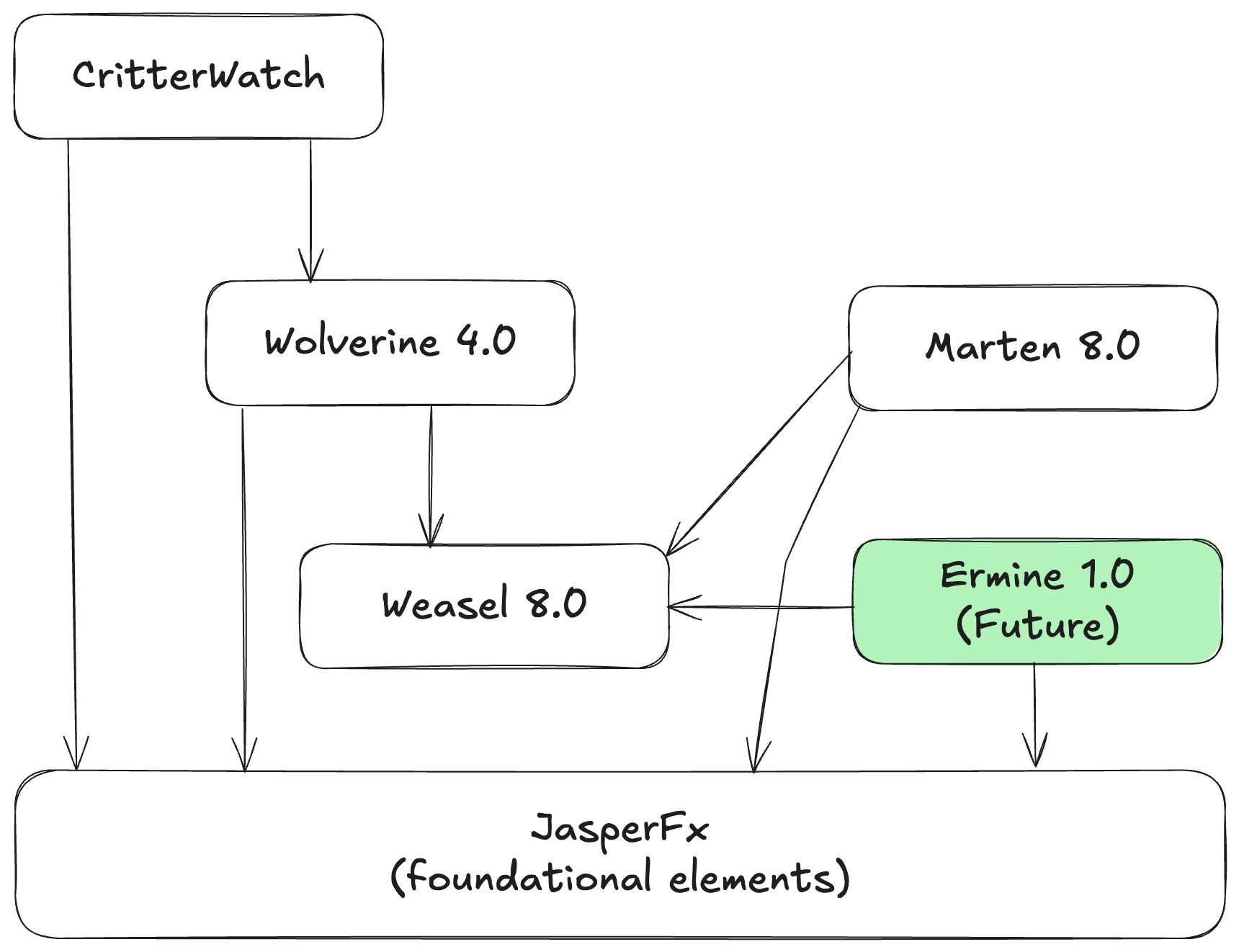
Most of the little, shared foundational elements of Marten, Wolverine, and soon to be Ermine have been consolidated into a single JasperFx library. That now includes what was:
JasperFx.Core (which in turn was renamed from “Baseline” after someone else squatted on that name and in turn was imported from ancient FubuCore for long term followers of mine)
The command line discovery, parsing, and execution model that is in Oakton today. That might be a touch annoying for the initial conversion, but in the little bit longer term that’s allowed us to combine several Nuget packages and simplify the project structure over all. TL;DR: fewer Nugets to install going forward.
Marten 8.0
I hope that Marten 8.0 is a much smaller release than Marten 7.0 was last year, but the projection model changes are turning out to be substantial. So far, this work has been done:
.NET 6/7 support has been dropped and the dependency tree simplified after that
Synchronous database access APIs have been eliminated
All other API signatures that were marked as [Obsolete] in the latest versions of Marten 7.* were removed
Marten.CommandLine was removed altogether, but the “db-*” commands are available as part of Marten’d dependency tree with no difference in functionality from the “marten-*” commands
Upgraded to the latest Npgsql 9
The projection subsystem overhaul is ongoing and substantial and frankly I’m kind of expecting Vizzini to show up in my home office and laugh at me for starting a land war in Southeast Asia. For right now I’ll just say that the key goals are:
The aforementioned reuse with Ermine and potential other Event Store implementations later
Making it as easy as possible to use explicit code instead as desired for the projections in addition to the existing conventional Apply / Create methods
Eliminate code generation for just the projections
Simplify the usage of “event slicing” for grouping events in multi-stream projections. I’m happy how this is shaping up so far, and I think this is going to end up being a positive after the initial conversion
Improve the throughput of the async daemon
There’s also a planned “stream compacting” feature happening, but it’s too early to talk about that much. Depending on how the projection work goes, there may be other performance related work as well.
Wolverine 4.0
Wolverine 4.0 is mostly about accomodating the work in other products, but there are some changes. Here’s what’s already been done:
Dropped .NET 7 support
Significant work for a single application being able to use multiple databases from within one application for folks getting clever with modular monoliths. In Wolverine 4.*, you’ll be able to mix and match any number of data stores with the corresponding transactional inbox/outbox support much better than Wolverine 3.* can do. This is 100% about modular monoliths, but also fit into the CritterWatch work
Work to provide information to CritterWatch
There are some other important features that might be part of Wolverine 4.0 depending on some ongoing negotiations with a potential JasperFx customer.
CritterWatch Minimal Viable Product Direction
“CritterWatch” is a long planned commercial add on product for Wolverine, Marten, and any future “critter” Event Store tools. The goal is to create both a management and monitoring dashboard for Wolverine messaging and the Event Sourcing processes in those systems.
The initial concept is shown below:
At least for the moment, the goal of the CritterWatch MVP is to deliver a standalone system that can be deployed either in the cloud or on a client premises. The MVP functionality set will:
Explain the configuration and capabilities of all your Critter Stack systems, including some visualization of how messages flow between your systems and the state of any event projections or subscriptions
Work with your OpenTelemetry tracking to correlate ongoing performance information to the artifacts in your system.
Visualize any ongoing event projections or subscriptions by telling you where each is running and how healthy they are — as well as give you the ability to pause, restart, rebuild, or rewind them as needed
Manage the dead letter queued (DLQ) messages of your system with the ability to query the messages and selectively replay or discard the DLQ messages
We have a world of other plans for CritterWatch, but the feature set above is the most requested features from the companies that are most interested in this tool first.
JasperFx Software is in business to help our clients make the most of the “Critter Stack” tools, Event Sourcing, CQRS, Event Driven Architecture, Test Automation, and server side .NET development in general. We’d be happy to talk with your company and see how we could help you be more successful!
In the first video, we started diving in on a new sample “Incident Service” that’s admittedly heavily in flight that shows how to use Marten with both Event Sourcing and as a Document Database over PostgreSQL and its integration with Wolverine as a higher level HTTP web service and asynchronous messaging platform.
We covered a lot, but here’s some of the highlights:
Hopefully showing off how easy it is to get started with Marten and Wolverine both, especially with Marten’s ability to lay down its own database schema as needed in its default mode. Later videos will show off how Wolverine does the same for any database schemas it needs and even message broker setup.
Utilizing Wolverine.HTTP for web services and how it can be used for a very low code ceremony approach for “Vertical Slice Architecture” and how it promotes testability in code without all the hassle of a complex Clean Architecture project structure or reams of abstractions scattered about in your code. It also leads to simpler code than the more common “MVC Core/Minimal API + MediatR” approach to Vertical Slice Architecture.
How Wolverine’s emphasis on pure function handlers leads to business or workflow logic being easy to test
The Critter Stack’s support for command line diagnostics and development time tools, including a way to “unwind the magic” with Wolverine so it can show you exactly how it’s calling your code
Here’s the first video:
In the second video, we got into:
Wolverine’s “aggregate handler workflow” style of CQRS command handlers and how you can do that with easily testable pure functions
Using Marten’s ability to stream JSON data directly to HTTP for the most efficient possible “read side” query endpoints
Wolverine’s message scheduling capability
Marten’s utilization of PostgreSQL partitioning for maximizing scalability
I can’t say for sure where we’ll go next, but there will be a part 3 to this series in the next couple weeks and hopefully a series of shorter video content soon too! We’re certainly happy to take requests!
I know, command line parsing libraries are about the least exciting tooling in the entire software universe, and there are dozens of perfectly competent ones out there. Oakton though, is heavily used throughout the entire “Critter Stack” (Marten, Weasel, and Wolverine plus other tools) to provide command line utilities directly to any old .NET Core application that happens to be bootstrapped with one of the many ways to arrive at an IHost. Oakton’s key advantage over other command line parsing tools is its ability to easily add extension commands to a .NET application in external assemblies. And of course, as part of the entire JasperFx / Critter Stack philosophy of developer tooling, Oakton’s very concept was originally created to enhance the testability of custom command line tooling. Unlike some other tools *cough* System.CommandLine *cough*.
Oakton also has some direct framework-ish elements for environment checks and the stateful resource model used very heavily all the way through Marten and Wolverine to provide the very best development time experience possible when using our tools.
Today the extended JasperFx / Critter Stack community released Oakton 6.2 with some new, hopefully important use cases. First off, the stateful resource model that we use to setup, teardown, or just check “configured stateful resources” in our system like database schemas or message broker queues just got the concept of dependencies between resources such that you can control which resources are setup first.
Next, Oakton finally got a couple easy to use recipes for utilizing IoC services in Oakton commands (it was possible, just maybe a little higher ceremony that some folks prefer). The first way, assuming that you’re running Oakton from one of the many flavors of IHostBuilder or IHost like so:
// This would be the last line in your Program.Main() method
// "app" in this case is a WebApplication object, but there
// are other extension methods for headless services
return await app.RunOaktonCommands(args);
You can build an Oakton command class that uses “setter injection” to get IoC services like so:
public class MyDbCommand : OaktonAsyncCommand<MyInput>
{
    // Just assume maybe that this is an EF Core DbContext
    [InjectService]
    public MyDbContext DbContext { get; set; }

    public override Task<bool> Execute(MyInput input)
    {
        // do stuff with DbContext from up above
        return Task.FromResult(true);
    }
}
Just know that when you do this and execute a command that has decorated properties for services, Oakton is:
Building your system’s IHost
Creating a new IServiceScope from your application’s DI container, or in other words, a scoped container
Building your command object and setting all the dependencies on your command object by resolving each dependency from the scoped container created in the previous step
Executing the command as normal
Disposing the scoped container and the IHost, effectively in a try/finally so that Oakton is always cleaning up after the application
In other words, Oakton is largely taking care of annoying issues like object disposal cleanup, scoping, and actually building the IHost if necessary.
Oakton’s Future
The Critter Stack Core team & I are charting a course for our entire ecosystem I’m calling “Critter Stack 2025” that’s hoping to greatly reduce the technical challenges in adopting our tool set. As part of that, what’s now Oakton is likely to move into a new shared library (I think it’s just going to be called “JasperFx”) between the various critters (and hopefully new critters for 2025!). Oakton itself will probably get a temporary life as a shim to the new location as a way to ease the transition for existing users. There’s a balance between actively improving your toolset for potential new users and not disturbing existing users too much. We’re still working on whatever that balance ends up being.
If you’re planning on coming to my workshop, you’ll want .NET 8, Git, and some kind of Docker Desktop on your box to run the sample code I’ll use in the workshop. If Docker doesn’t work for you, you maybe want a local install of PostgreSQL and Rabbit MQ.
Hey folks, I’ll be giving the first ever workshop on building an Event Driven Architecture with the full “Critter Stack” at DevUp 2024 in St. Louis next week on Wednesday the 14th bright and early at 8:30 AM.
We’ll be working through a sample backend web service that also communicates with other headless services using Event Sourcing within a general CQRS architectural approach with the whole “Critter Stack. We’ll use Marten (over PostgreSQL) for our persistence strategy using both its event sourcing support and as a document database. We’ll combine that with Wolverine as a server side framework for background processing, asynchronous messaging, and even as an alternative HTTP endpoint framework. Lastly, just for fun, there’ll be guest appearances from other JasperFx tools like Alba and Oakton for automated integration testing and command line execution respectively.
So why would you want to come to this and what might you get out of it? I’m hoping the takeaways — even if you don’t intend to use Marten or Wolverine — will be:
A good introduction to event sourcing as a technical approach and some of the real challenges you’ll face when building a system using event sourcing as a persistence strategy
An understanding of what goes into building a robust CQRS system including dealing with transient errors, observability, concurrency, and how to best segment message processing to achieve self-healing systems
Challenging the industry conventional wisdom about the efficacy of Hexagonal/Clean/Onion Architecture approaches really are when I show what a very low ceremony “vertical slice architecture” approach can be like with the Wolverine + Marten combination while still being robust, observable, highly testable, and still keeping infrastructure concerns out of the business logic
Some exposure to Open Telemetry and general observability tooling for distributed systems you absolutely want if you don’t already have that
Techniques for automating integration tests against an Event Driven Architecture
Because I’m absolutely in the business of promoting the “Critter Stack” tools, I’ll try to convince you that:
Marten is already the most robust and feature rich solution for event sourcing in the .NET ecosystem while also being arguably the easiest to get up and going with
How the Wolverine + Marten combination makes CQRS with Event Sourcing a much easier architectural pattern to use
Wolverine’s emphasis on low ceremony code approaches can help systems be more successfully maintained over time by simply having much less noise code and layering in your systems while still being robust
The “Critter Stack” has an excellent story for automated integration testing support that can do a lot to make your development efforts more successful
Both Marten & Wolverine can help your teams achieve a low “time to first pull request” by doing a lot to configure necessary infrastructure like databases or message brokers on the fly for a better development experience
I’m excited, because this is my first opportunity to do a workshop on the “Critter Stack” tools, and I think we’ve got a very compelling technical story to tell about the tools! And if nothing else, I’m looking forward to any feedback that might help us improve the tools down the line.
And for any *ahem* older folks from St. Louis in my talk, I personally at the time that Jorge Orta was out at first and the Cards should have won that game.
Hey, did you know that JasperFx Software is ready for formal support plans for Marten and Wolverine? Not only are we trying to make the “Critter Stack” tools be viable long term options for your shop, we’re also interested in hearing your opinions about the tools and how they should change.We’re also certainly open to help you succeed with your software development projects on a consulting basis whether you’re using any part of the Critter Stack or any other .NET server side tooling.
Let’s build a small web service application using the whole “Critter Stack” and their friends, one small step at a time. For right now, the “finished” code is at CritterStackHelpDesk on GitHub.
I’ve personally spent quite a bit of time helping teams and organizations deal with older, legacy codebases where it might easily take a couple days of working painstakingly through the instructions in a large Wiki page of some sort in order to make their codebase work on a local development environment. That’s indicative of a high friction environment, and definitely not what we’d ideally like to have for our own teams.
Thinking about the external dependencies of our incident tracking, help desk api we’ve utilized:
Marten for persistence, which requires our system to need PostgreSQL database schema objects
Wolverine’s PostgreSQL-backed transactional outbox support, which also requires its own set of PostgreSQL database schema objects
Rabbit MQ for asynchronous messaging, which requires queues, exchanges, and bindings to be set up in our message broker for the application to work
That’s a bit of stuff that needs to be configured within the Rabbit MQ or PostgreSQL infrastructure around our service in order to run our integration tests or the application itself for local testing.
Instead of the error prone, painstaking manual set up laboriously laid out in a Wiki page somewhere where you can’t remember where it is, let’s leverage the Critter Stack’s “Stateful Resource” model to quickly set our system up ready to run in development.
Building on our existing application configuration, I’m going to add a couple more lines of code to our system’s Program file:
// Depending on your DevOps setup and policies,
// you may or may not actually want this enabled
// in production installations, but some folks do
if (builder.Environment.IsDevelopment())
{
    // This will direct our application to set up
    // all known "stateful resources" at application bootstrapping
    // time
    builder.Services.AddResourceSetupOnStartup();
}
And that’s that. If you’re using the integration test harness like we did in an earlier post, or just starting up the application normally, the application will check for the existence of any of the following, and try to build out anything that’s missing from:
The known Marten document tables and all the database objects to support Marten’s event sourcing
The necessary tables and functions for Wolverine’s transactional inbox, outbox, and scheduled message tables (I’ll add a post later on those)
The known Rabbit MQ exchanges, queues, and bindings
Your application will have to have administrative privileges over all the resources for any of this to work of course, but you would have that at development time at least.
With this capability in place, the procedure for a new developer getting started with our codebase is to:
Does a clean git clone of our codebase on to his local box
Runs docker compose up to start up all the necessary infrastructure they need to run the system or the system’s integration tests locally
Just run the integration tests or start the system and go!
If you omit the call to builder.Services.AddResourceSetupOnStartup();, you could still go to the command line and use this command just once to set everything up:
dotnet run -- resources setup
To check on the status of any or all of the resources, you can use:
dotnet run -- resources check
which for the HelpDesk.API, gives you this:
If you want to tear down all the existing data — and at least attempt to purge any Rabbit MQ queues of all messages — you can use:
dotnet run -- resources clear
There’s a few other options you can read about in the Oakton documentation for the Stateful Resource model, but for right now, type dotnet run -- help resources and you can see Oakton’s built in help for the resources command that runs down the supported usage:
Summary and What’s Next
The Critter Stack is trying really hard to create a productive, low friction development ecosystem for your projects. One of the ways it tries to make that happen is by being able to set up infrastructural dependencies automatically at runtime so a developer and just “clone n’ go” without the excruciating pain of the multi-page Wiki getting started instructions so painfully common in legacy codebases.
This stateful resource model is also supported for Kafka transport (which is also local development friendly) and the cloud native Azure Service Bus transport and AWS SQS transport (Wolverine + AWS SQS does work with LocalStack just fine). In the cloud native cases, the credentials from the Wolverine application will have to have the necessary rights to create queues, topics, and subscriptions. In the case of the cloud native transports, there is an option to prefix all the names of the queues, topics, and subscriptions to still create an isolated environment per developer for a better local development story even when relying on cloud native technologies.
I think I’ll add another post to this series where I switch the messaging to one of the cloud native approaches.
As for what’s next in this increasingly long series, I think we still have logging, open telemetry and metrics, resiliency, and maybe a post on Wolverine’s middleware support. That list is somewhat driven by recency bias around questions I’ve been asked here or there about Wolverine.
Let’s build a small web service application using the whole “Critter Stack” and their friends, one small step at a time. For right now, the “finished” code is at CritterStackHelpDesk on GitHub.
Before I go on with anything else in this series, I think we should establish some automated testing infrastructure for our incident tracking, help desk service. While we’re absolutely going to talk about how to structure code with Wolverine to make isolated unit testing as easy as possible for our domain logic, there are some elements of your system’s behavior that are best tested with automated integration tests that use the system’s infrastructure.
In this post I’m going to show you how I like to set up an integration testing harness for a “Critter Stack” service. I’m going to use xUnit.Net in this post, and while the mechanics would be a little different, I think the basic concepts should be easily transferable to other testing libraries like NUnit or MSTest. I’m also going to bring in the Alba library that we’ll use for testing HTTP calls through our system in memory, but in this first step, all you need to understand is that Alba is helping to set up the system under test in our testing harness.
Heads up a little bit, I’m skipping to the “finished” state of the help desk API code in this post, so there’s some Marten and Wolverine concepts sneaking in that haven’t been introduced until now.
First, let’s start our new testing project with:
dotnet new xunit
Then add some additional Nuget references:
dotnet add package Shouldly
dotnet add package Alba
That gives us a skeleton of the testing project. Before going on, we need to add a project reference from our new testing project to the entry point project of our help desk API. As we are worried about integration testing right now, we’re going to want the testing project to be able to start the system under test project up by calling the normal Program.Main() entrypoint so that we’re running the application the way that the system is normally configured — give or take a few overrides.
Let’s stop and talk about this a little bit because I think this is an important point. I think integration tests are more “valid” (i.e. less prone to false positives or false negatives) as they more closely reflect the actual system. I don’t want completely separate bootstrapping for the test harness that may or may not reflect the application’s production bootstrapping (don’t blow that point off, I’ve seen countless teams do partial IoC configuration for testing that can vary quite a bit from the application’s configuration).
So if you’ll accept my argument that we should be bootstrapping the system under test with its own Program.Main() entry point, our next step is to add this code to the main service to enable the test project to access that entry point:
using System.Runtime.CompilerServices;

// You have to do this in order to reference the Program
// entry point in the test harness
[assembly:InternalsVisibleTo("Helpdesk.Api.Tests")]
Switching finally to our testing project, I like to create a class I usually call AppFixture that manages the lifetime of the system under test running in our test project like so:
public class AppFixture : IAsyncLifetime
{
    public IAlbaHost Host { get; private set; }

    // This is a one time initialization of the
    // system under test before the first usage
    public async Task InitializeAsync()
    {
        // Sorry folks, but this is absolutely necessary if you
        // use Oakton for command line processing and want to
        // use WebApplicationFactory and/or Alba for integration testing
        OaktonEnvironment.AutoStartHost = true;

        // This is bootstrapping the actual application using
        // its implied Program.Main() set up
        // This is using a library named "Alba". See https://jasperfx.github.io/alba for more information
        Host = await AlbaHost.For<Program>(x =>
        {
            x.ConfigureServices(services =>
            {
                // We'll be using Rabbit MQ messaging later...
                services.DisableAllExternalWolverineTransports();

                // We're going to establish some baseline data
                // for testing
                services.InitializeMartenWith<BaselineData>();
            });
        }, new AuthenticationStub());
    }

    public Task DisposeAsync()
    {
        if (Host != null)
        {
            return Host.DisposeAsync().AsTask();
        }

        return Task.CompletedTask;
    }
}
A few notes about the code above:
Alba is using the WebApplicationFactory under the covers to bootstrap our help desk API service using the in memory TestServer in place of Kestrel. WebApplicationFactory does allow us to modify the IoC service registrations for our system and override parts of the system’s normal configuration
In this case, I’m telling Wolverine to effectively stub out all external transports. In later posts we’ll use Rabbit MQ for example to publish messages to an external process, but in this test harness we’re going to turn that off and simple have Wolverine be able to “catch” the outgoing messages in our tests. See Wolverine’s test automation support documentation for more information about this.
The DisposeAsync() method is very important. If you want to make your integration tests be repeatable and run smoothly as you iterate, you need the tests to clean up after themselves and not leave locks on resources like ports or files that could stop the next test run from functioning correctly
Pay attention to the `OaktonEnvironment.AutoStartHost = true;` call, that’s 100% necessary if your application is using Oakton for command parsing. Sorry.
As will be inevitably necessary, I’m using Alba’s facility for stubbing out web authentication that allows us to both sidestep pesky authentication infrastucture in functional testing while also happily letting us pass along user claims as test inputs in individual tests
Bootstrapping the IHost for your application can be expensive, so I prefer to share that host across tests whenever possible, and I generally rely on having individual tests establish their inputs at beginning of each test. See the xUnit.Net documentation on sharing fixtures between tests for more context about the xUnit mechanics.
For the Marten baseline data, right now I’m just making sure there’s at least one valid Customer document that we’ll need later:
public class BaselineData : IInitialData
{
    public static Guid Customer1Id { get; } = Guid.NewGuid();

    public async Task Populate(IDocumentStore store, CancellationToken cancellation)
    {
        await using var session = store.LightweightSession();
        session.Store(new Customer
        {
            Id = Customer1Id,
            Region = "West Cost",
            Duration = new ContractDuration(DateOnly.FromDateTime(DateTime.Today.Subtract(100.Days())), DateOnly.FromDateTime(DateTime.Today.Add(100.Days())))
        });

        await session.SaveChangesAsync(cancellation);
    }
}
To simplify the usage a little bit, I like to have a base class for integration tests that I like to call IntegrationContext:
[Collection("integration")]
public abstract class IntegrationContext : IAsyncLifetime
{
    private readonly AppFixture _fixture;

    protected IntegrationContext(AppFixture fixture)
    {
        _fixture = fixture;
    }

    // more....

    public IAlbaHost Host => _fixture.Host;

    public IDocumentStore Store => _fixture.Host.Services.GetRequiredService<IDocumentStore>();

    async Task IAsyncLifetime.InitializeAsync()
    {
        // Using Marten, wipe out all data and reset the state
        // back to exactly what we described in BaselineData
        await Store.Advanced.ResetAllData();
    }

    // This is required because of the IAsyncLifetime
    // interface. Note that I do *not* tear down database
    // state after the test. That's purposeful
    public Task DisposeAsync()
    {
        return Task.CompletedTask;
    }

    // This is just delegating to Alba to run HTTP requests
    // end to end
    public async Task<IScenarioResult> Scenario(Action<Scenario> configure)
    {
        return await Host.Scenario(configure);
    }

    // This method allows us to make HTTP calls into our system
    // in memory with Alba, but do so within Wolverine's test support
    // for message tracking to both record outgoing messages and to ensure
    // that any cascaded work spawned by the initial command is completed
    // before passing control back to the calling test
    protected async Task<(ITrackedSession, IScenarioResult)> TrackedHttpCall(Action<Scenario> configuration)
    {
        IScenarioResult result = null;

        // The outer part is tying into Wolverine's test support
        // to "wait" for all detected message activity to complete
        var tracked = await Host.ExecuteAndWaitAsync(async () =>
        {
            // The inner part here is actually making an HTTP request
            // to the system under test with Alba
            result = await Host.Scenario(configuration);
        });

        return (tracked, result);
    }
}
The first thing I want to draw your attention to is the call to await Store.Advanced.ResetAllData(); in the InitializeAsync() method that will be called before each of our integration tests executing. In my approach, I strongly prefer to reset the state of the database before each test in order to start from a known system state. I’m also assuming that each test if necessary, will add additional state to the system’s Marten database as necessary for the test. This philosophically is what I’ve long called “Self-Contained Tests.” I also think it’s important to have the tests leave the database state alone after a test run so that if you are running tests one at a time you can use the left over database state to help troubleshoot why a test might have failed.
Other folks will try to spin up a separate database (maybe with TestContainers) per test or even a completely separate IHost per test, but I think that the cost of doing it that way is just too slow. I’d rather reset the system between tests and not incur the cost of recycling database containers and/or the system’s IHost. This comes at the cost of forcing your test suite to run tests in serial order, but I also think that xUnit.Net is not the best possible tool at parallel test runs, so I’m not sure you lose out on anything there.
And now for an actual test. We have an HTTP endpoint in our system we built early on that can process a LogIncident command, and create a new event stream for this new Incident with a single IncidentLogged event. I’ve skipped ahead a little bit and added a requirement that we capture a user id from an expected Claim on the ClaimsPrincipal for the current request that you’ll see reflected in the test below:
public class log_incident : IntegrationContext
{
    public log_incident(AppFixture fixture) : base(fixture)
    {
    }

    [Fact]
    public async Task create_a_new_incident()
    {
        // We'll need a user
        var user = new User(Guid.NewGuid());

        // Log a new incident by calling the HTTP
        // endpoint in our system
        var initial = await Scenario(x =>
        {
            var contact = new Contact(ContactChannel.Email);
            x.Post.Json(new LogIncident(BaselineData.Customer1Id, contact, "It's broken")).ToUrl("/api/incidents");
            x.StatusCodeShouldBe(201);

            x.WithClaim(new Claim("user-id", user.Id.ToString()));
        });

        var incidentId = initial.ReadAsJson<NewIncidentResponse>().IncidentId;

        using var session = Store.LightweightSession();
        var events = await session.Events.FetchStreamAsync(incidentId);
        var logged = events.First().ShouldBeOfType<IncidentLogged>();

        // This deserves more assertions, but you get the point...
        logged.CustomerId.ShouldBe(BaselineData.Customer1Id);
    }
}
Summary and What’s Next
The “Critter Stack” core team and our community care very deeply about effective testing, so we’ve invested from the very beginning in making integration testing as easy as possible with both Marten and Wolverine.
Alba is another little library from the JasperFx family that just makes it easier to write integration tests at the HTTP layer. Alba is perfect for doing integration testing of your web services. I definitely find it advantageous to be able to quickly bootstrap a web service project and run tests completely in memory on demand. That’s a much easier and quicker feedback cycle than trying to deploy the service and write tests that remotely interact with the web service through HTTP. And I shouldn’t even have to mention how absurdly slow it is in comparison to try to test the same web service functionality through the actual user interface with something like Selenium.
From the Marten side of things, PostgreSQL has a pretty small Docker image size, so it’s pretty painless to spin up on development boxes. Especially contrasted with situations where development teams share a centralized development database (shudder, hope not many folks still do that), having an isolated database for each developer that they can also tear down and rebuild at will certainly helps make it a lot easier to succeed with automated integration testing.
I think that document databases in general are a lot easier to deal with in automated testing than using a relational database with an ORM as the persistence tooling as it’s much less friction in setting up database schemas or to tear down database state. Marten goes a step farther than most persistence tools by having built in APIs to tear down database state or reset to baseline data sets in between tests.
We’ll dig deeper into Wolverine’s integration testing support later in this series with message handler testing, testing handlers that in turn spawn other messages, and dealing with external messaging in tests.
I think the next post is just going to be a quick survey of “Marten as Document Database” before I get back to Wolverine’s HTTP endpoint model.
Hey, did you know that JasperFx Software is ready for formal support plans for Marten and Wolverine? Not only are we trying to make the “Critter Stack” tools be viable long term options for your shop, we’re also interested in hearing your opinions about the tools and how they should change.We’re also certainly open to help you succeed with your software development projects on a consulting basis whether you’re using any part of the Critter Stack or any other .NET server side tooling.
Let’s build a small web service application using the whole “Critter Stack” and their friends, one small step at a time. For right now, the “finished” code is at CritterStackHelpDesk on GitHub.
Hey folks, I’m deviating a little bit from the planned order and taking a side trip while we’re finishing up a bug fix release to address some OpenAPI generation hiccups before I go on to Wolverine HTTP endpoints.
Admittedly, Wolverine and to a lesser extent Marten have a bit of a “magic” conventional approach. They also depend on external configuration items, external infrastructural tools like databases or message brokers that require their own configuration, and there’s always the possibility of assembly mismatches from users doing who knows what with their Nuget dependency tree.
To help unwind potential problems with diagnostic tools and to facilitate environment setup, the “Critter Stack” uses the Oakton library to integrate command line utilities right into your application.
Applying Oakton to Your Application
To get started, I’m going right back to the Program entry point of our incident tracking help desk application and adding just a couple lines of code. First, Oakton is a dependency of Wolverine, so there’s no additional dependency to add, but we’ll add a using statement:
using Oakton;
This is optional, but we’ll possibly want the extra diagnostics, so I’ll add this line of code near the top:
// This opts Oakton into trying to discover diagnostics
// extensions in other assemblies. Various Critter Stack
// libraries expose extra diagnostics, so we want this
builder.Host.ApplyOaktonExtensions();
and finally, I’m going to drop down to the last line of Program and replace the typical app.Run(); code with the command line parsing with Oakton:
// This is important for Wolverine/Marten diagnostics
// and environment management
return await app.RunOaktonCommands(args);
Do note that it’s important to return the exit code of the command line runner up above. If you choose to use Oakton commands in a build script, returning a non zero exit code signals the caller that the command failed.
Command Line Mechanics
Next, I’m going to open a command prompt to the root directory of the HelpDesk.Api project, and use this to get a preview of the command line options we now have:
dotnet run -- help
That should render some help text like this:
  Alias           Description
━━━━━━━━━━━━━━━━━━━━━━━━━━━━━━━━━━━━━━━━━━━━━━━━━━━━━━━━━━━━━━━━━━━━━━━━━━━━━━━━━━━━━━━━━━━━━━━━━━━━━━━━━━━━━━━━━━━━━━━━━━━━━━━━━━━━━━━━━━
  check-env       Execute all environment checks against the application
  codegen         Utilities for working with JasperFx.CodeGeneration and JasperFx.RuntimeCompiler
  db-apply        Applies all outstanding changes to the database(s) based on the current configuration
  db-assert       Assert that the existing database(s) matches the current configuration
  db-dump         Dumps the entire DDL for the configured Marten database
  db-patch        Evaluates the current configuration against the database and writes a patch and drop file if there are any differences
  describe        Writes out a description of your running application to either the console or a file
  help            List all the available commands
  marten-apply    Applies all outstanding changes to the database based on the current configuration
  marten-assert   Assert that the existing database matches the current Marten configuration
  marten-dump     Dumps the entire DDL for the configured Marten database
  marten-patch    Evaluates the current configuration against the database and writes a patch and drop file if there are any differences
  projections     Marten's asynchronous projection and projection rebuilds
  resources       Check, setup, or teardown stateful resources of this system
  run             Start and run this .Net application
  storage         Administer the Wolverine message storage
So that’s a lot, but let’s just start by explaining the basics of the command line for .NET applications. You can both pass arguments and flags to the dotnet application itself, and also to the application’s Program.Main(params string[] args) command. The key thing to know is that dotnet arguments and flags are segregated from the application’s arguments and flags by a double dash “–” separator. So for example the command, dotnet run --framework net8.0 -- codegen write is sending the framework flag to dotnet run, and the codegen write arguments to the application itself.
Stateful Resource Setup
Skipping a little bit to the end state of our help desk API project, we’ll have dependencies on:
Marten schema objects in the PostgreSQL database
Wolverine schema objects in PostgreSQL database (for the transactional inbox/outbox we’ll introduce later in this series)
Rabbit MQ exchanges for Wolverine to broadcast to later
One of the guiding philosophies of the Critter Stack is to minimize the “Time to Login Screen” (hat tip to Chad Myers) quality of your codebase. What this means is that we really want a new developer to our system (or a developer coming back after a long, well deserved vacation) to do a clean clone of our codebase, and very quickly be able to run the application and any integration tests end to end. To that end, Oakton exposes its “Stateful Resource” model as an adapter for tools like Marten and Wolverine to set up their resources to match their configuration.
Pretend just for a minute that you have all the necessary rights and permissions to configure database schemas and Rabbit MQ exchanges, queues, and bindings on whatever your Rabbit MQ broker is for development. Assuming that, you can have your copy of the help desk API completely up and ready to run through these steps at the command prompt starting at wherever you want the code to be:
git clone https://github.com/JasperFx/CritterStackHelpDesk.git
cd CritterStackHelpDesk
docker compose up -d
cd HelpDesk.Api
dotnet run -- resources setup
At the end of those calls, you should see this output:
The dotnet run -- resources setup command is able to do Marten database migrations for its event store storage and any document types it knows about upfront, the Wolverine envelope storage tables we’ll configure later, and the known Rabbit MQ exchange where we’ll configure for broadcasting integration events later.
The resources command has other options as shown below from dotnet run -- help resources:
You may need to pause a little bit between the call to docker compose and dotnet run to let Docker catch up!
Environment Checks
Years ago I worked on an early .NET system that still had a lot of COM dependencies that needed to be correctly registered outside of our application and used a shared database that was indifferently maintained as was common way back then. Needless to say, our deployments were chaotic as we never knew what shape the server was in when we deployed. We finally beat our deployment woes by implementing “environment tests” to our deployment scripts that would test out the environment dependencies (is the COM server there? can we connect to the database? is the expected XML file there?) and fail fast with descriptive messages when the server was in a crap state as we tried to deploy.
To that end, Oakton has its environment check model that both Marten and Wolverine utilize. In our help desk application, we already have a Marten dependency, so we know the application will not function correctly if either the database is unavailable or the connection string in the configuration just happens to be wrong or there’s a security set up issue or you get the picture.
So, picking up our application with every bit of infrastructure purposely turned off, I’ll run this command:
dotnet run -- check-env
and the result is a huge blob of exception text and the command will fail — allowing you to abort a build script that might be delegating to this command:
Next, I’m going to turn on all the infrastructure (and set up everything to match our application’s configuration with the second command) with a quick call to:
docker compose up -d
dotnet run -- resources setup
Now, I can run the environment checks again and get a green bill of health for our system:
Oakton’s describe command can give you some insights into your application, and tools like Marten or Wolverine can expose extensions to this model for further output. By typing this command at the project root:
dotnet run -- describe
We’ll get some basic information about our system like this preview of the configuration:
The loaded assemblies because you will occasionally get burned by unexpected Nuget behavior pulling in the wrong versions:
And sigh, because folks have frequently had some trouble understanding how Wolverine does its automatic handler discovery, we have this preview:
And quite a bit more information including:
Wolverine messaging endpoints
Wolverine’s local queues
Wolverine message routing
Wolverine exception handling policy configuration
Summary and What’s Next
Oakton is yet another command line parsing tool in .NET, of which there are at least dozens that are perfectly competent. What makes Oakton special though is its ability to add command line tools directly to the entry point of your application where you already have all your infrastructure configuration available. The main point I hope you take away from this is that the command line tooling in the “Critter Stack” can help your team development faster through the diagnostics and environment management features.
The “Critter Stack” is heavily utilizing Oakton’s extensibility model for:
The static description of the application configuration that may frequently be helpful for troubleshooting or just understanding your system
Stateful resource management of development dependencies like databases and message brokers. So far this is supported for Marten, both PostgreSQL and Sql Server dependencies of Wolverine, Rabbit MQ, Kafka, Azure Service Bus, and AWS SQS
Environment checks to test out the validity of your system and its ability to connect to external resources during deployment or during development
Any other utility you care to add to your system like resetting a baseline database state, adding users, or anything you care to do through Oakton’s command extensibility
As for what’s next, you’ll have to let me see when some bug fix releases get in place before I promise what exactly is going to be next in this series. I expect this series to at least go to 15-20 entries as I introduce more Wolverine scenarios, messaging, and quite a bit about automated testing. And also, I take requests!
If you’re curious, the JasperFx GitHub organization was originally conceived of as the reboot of the previous FubuMVC ecosystem, with the main project being “Jasper” and the smaller ancillary tools ripped out of the flotsam and jetsam of StructureMap and FubuMVC arranged around what was then called “Jasper,” which was named for my hometown. The smaller tools like Oakton, Alba, and Lamar are named after other small towns close to the titular Jasper, MO. As Marten took off and became by far and away the most important tool in our stable, we adopted the “Critter Stack” naming them as we pulled out Weasel into its own library and completely rebooted and renamed “Jasper” as Wolverine to be a natural complement to Marten.
And lastly, I’m not even sure that Oakton, MO will even show up on maps because it’s effectively a Methodist Church, a cemetery, the ruins of the general store, and a couple farm houses at a cross roads. In Missouri at least, towns cease to exist when they lose their post office. The area I grew up in is littered with former towns that fizzled out as the farm economy changed and folks moved to bigger towns later.
As long term Agile practitioners, the folks behind the whole JasperFx / “Critter Stack” ecosystem explicitly design our tools around the quality of “testability.” Case in point, Wolverine has quite a bit of integration test helpers for testing through message handler execution.
However, while helping a Wolverine user last week, they told me that they were bypassing those built in tools because they wanted to do an integration test of an HTTP service call that publishes a message to Wolverine. That’s certainly going to be a common scenario, so let’s talk about a strategy for reliably writing integration tests that both invoke an HTTP request and can observe the ongoing Wolverine activity to “know” when the “act” part of a typical “arrange, act, assert” test is complete.
In the Wolverine codebase itself, there’s a couple projects that we use to test the Wolverine.Http library:
WolverineWebApi — a web api project that has a lot of fake endpoints that tries to cover the whole gamut of usage scenarios for Wolverine.Http, including a couple use cases of publishing messages directly from HTTP endpoint handlers to asynchronous message handling inside of Wolverine core
Wolverine.Http.Tests — an xUnit.Net project that contains a mix of unit tests and integration tests through WolverineWebApi and Wolverine.Http itself
Back to the need to write integration tests that span work from HTTP service invocations through to Wolverine message processing, Wolverine.Http uses the Alba library (another JasperFx project!) to execute and run assertions against HTTP services. At least at the moment, xUnit.Net is my goto test runner library, so Wolverine.Http.Tests has this shared fixture that is shared between test classes:
public class AppFixture : IAsyncLifetime
{
    public IAlbaHost Host { get; private set; }

    public async Task InitializeAsync()
    {
        // Sorry folks, but this is absolutely necessary if you
        // use Oakton for command line processing and want to
        // use WebApplicationFactory and/or Alba for integration testing
        OaktonEnvironment.AutoStartHost = true;

        // This is bootstrapping the actual application using
        // its implied Program.Main() set up
        Host = await AlbaHost.For<Program>(x => { });
    }
A couple notes on this approach:
I think it’s very important to use the actual application bootstrapping for the integration testing rather than trying to have a parallel IoC container configuration for test automation as I frequently see out in the wild. That doesn’t preclude customizing that bootstrapping a little bit to substitute in fake, stand in services for problematic external infrastructure.
The approach I’m showing here with xUnit.Net does have the effect of making the tests execute serially, which might not be what you want in very large test suites
I think the xUnit.Net shared fixture approach is somewhat confusing and I always have to review the documentation on it when I try to use it
There’s also a shared base class for integrated HTTP tests called IntegrationContext, with a little bit of that shown below:
[CollectionDefinition("integration")]
public class IntegrationCollection : ICollectionFixture<AppFixture>
{
}

[Collection("integration")]
public abstract class IntegrationContext : IAsyncLifetime
{
    private readonly AppFixture _fixture;

    protected IntegrationContext(AppFixture fixture)
    {
        _fixture = fixture;
    }

    // more....
More germane to this particular post, here’s a helper method inside of IntegrationContext I wrote specifically to do integration testing that has to span an HTTP request through to asynchronous Wolverine message handling:
    // This method allows us to make HTTP calls into our system
    // in memory with Alba, but do so within Wolverine's test support
    // for message tracking to both record outgoing messages and to ensure
    // that any cascaded work spawned by the initial command is completed
    // before passing control back to the calling test
    protected async Task<(ITrackedSession, IScenarioResult)> TrackedHttpCall(Action<Scenario> configuration)
    {
        IScenarioResult result = null;

        // The outer part is tying into Wolverine's test support
        // to "wait" for all detected message activity to complete
        var tracked = await Host.ExecuteAndWaitAsync(async () =>
        {
            // The inner part here is actually making an HTTP request
            // to the system under test with Alba
            result = await Host.Scenario(configuration);
        });

        return (tracked, result);
    }
Now, for a sample usage of that test helpers, here’s a fake endpoint from WolverineWebApi that I used to prove that Wolverine.Http endpoints can publish messages through Wolverine’s cascading message approach:
    // This would have a string response and a 200 status code
    [WolverinePost("/spawn")]
    public static (string, OutgoingMessages) Post(SpawnInput input)
    {
        var messages = new OutgoingMessages
        {
            new HttpMessage1(input.Name),
            new HttpMessage2(input.Name),
            new HttpMessage3(input.Name),
            new HttpMessage4(input.Name)
        };

        return ("got it", messages);
    }
Psst. Notice how the endpoint method’s signature up above is a synchronous pure function which is cleaner and easier to unit test than the equivalent functionality would be in other .NET frameworks that would have required you to call asynchronous methods on some kind of IMessageBus interface.
To test this thing, I want to run an HTTP POST to the “/span” Url in our application, then prove that there were four matching messages published through Wolverine. Here’s the test for that functionality using our earlier TrackedHttpCall() testing helper:
    [Fact]
    public async Task send_cascaded_messages_from_tuple_response()
    {
        // This would fail if the status code != 200 btw
        // This method waits until *all* detectable Wolverine message
        // processing has completed
        var (tracked, result) = await TrackedHttpCall(x =>
        {
            x.Post.Json(new SpawnInput("Chris Jones")).ToUrl("/spawn");
        });

        result.ReadAsText().ShouldBe("got it");

        // "tracked" is a Wolverine ITrackedSession object that lets us interrogate
        // what messages were published, sent, and handled during the testing perioc
        tracked.Sent.SingleMessage<HttpMessage1>().Name.ShouldBe("Chris Jones");
        tracked.Sent.SingleMessage<HttpMessage2>().Name.ShouldBe("Chris Jones");
        tracked.Sent.SingleMessage<HttpMessage3>().Name.ShouldBe("Chris Jones");
        tracked.Sent.SingleMessage<HttpMessage4>().Name.ShouldBe("Chris Jones");
    }
There you go. In one fell swoop, we’ve got a reliable way to do integration testing against asynchronous behavior in our system that’s triggered by an HTTP service call — including any and all configured ASP.Net Core or Wolverine.Http middleware that’s part of the execution pipeline.
By “reliable” here in regards to integration testing, I want you to think about any reasonably complicated Selenium test suite and how infuriatingly often you get “blinking” tests that are caused by race conditions between some kind of asynchronous behavior and the test harness trying to make test assertions against the browser state. Wolverine’s built in integration test support can eliminate that kind of inconsistent test behavior by removing the race condition as it tracks all ongoing work for completion.
Oh, and here’s Chris Jones sacking Joe Burrow in the AFC Championship game to seal the Chiefs win that was fresh in my mind when I originally wrote that code above:
Wolverine 0.9.12 just went up on Nuget with new bug fixes, documentation improvements, improved Rabbit MQ usage of topics, local queue usage, and a lot of new functionality around the command line diagnostics. See the whole release notes here.
In this post, I want to zero into “command line diagnostics.” Speaking from a mix of concerns about being both a user of Wolverine and one of the people needing to support other people using Wolverine online, here’s a not exhaustive list of real challenges I’ve already seen or anticipate as Wolverine gets out into the wild more in the near future:
How is Wolverine configured? What extensions are found?
What middleware is registered, and is it hooked up correctly?
How is Wolverine handling a specific message exactly?
How is Wolverine HTTP handling an HTTP request for a specific route?
Is Wolverine finding all the handlers? Where is it looking?
Where is Wolverine trying to send each message?
Are we missing any configuration items? Is the database reachable? Is the url for a web service proxy in our application valid?
When Wolverine has to interact with databases or message brokers, are those servers configured correctly to run the application?
That’s a big list of potentially scary issues, so let’s run down a list of command line diagnostic tools that come out of the box with Wolverine to help developers be more productive in real world development. First off, Wolverine’s command line support is all through the Oakton library, and you’ll want to enable Oakton command handling directly in your main application through this line of code at the very end of a typical Program file:
// This is an extension method within Oakton
// And it's important to relay the exit code
// from Oakton commands to the command line
// if you want to use these tools in CI or CD
// pipelines to denote success or failure
return await app.RunOaktonCommands(args);
You’ll know Oakton is configured correctly if you’ll just go to the command line terminal of your preference at the root of your project and type:
dotnet run -- help
In a simple Wolverine application, you’d get these options out of the box:
The available commands are:

  Alias       Description
━━━━━━━━━━━━━━━━━━━━━━━━━━━━━━━━━━━━━━━━━━━━━━━━━━━━━━━━━━━━━━━━━━━━━━━━━━━━━━━━━━━━━━━━━━━━━━━━━━━━
  check-env   Execute all environment checks against the application
  codegen     Utilities for working with JasperFx.CodeGeneration and JasperFx.RuntimeCompiler
  describe    Writes out a description of your running application to either the console or a file
  help        List all the available commands
  resources   Check, setup, or teardown stateful resources of this system
  run         Start and run this .Net application
  storage     Administer the Wolverine message storage


Use dotnet run -- ? [command name] or dotnet run -- help [command name] to see usage help about a specific command
Let me admit that there’s a little bit of “magic” in the way that Wolverine uses naming or type conventions to “know” how to call into your application code. It’s great (in my opinion) that Wolverine doesn’t force you to pollute your code with framework concerns or require you to shape your code around Wolverine’s APIs the way most other .NET frameworks do.
Cool, so let’s move on to…
Describe the Configured Application
The annoying –framework flag is only necessary if your application targets multiple .NET frameworks, but no sane person would ever do that for a real application.
Partially for my own sanity, there’s a lot more support for Wolverine in the describe command. To see this in usage, consider the sample DiagnosticsApp from the Wolverine codebase. If I use the dotnet run --framework net7.0 -- describe command from that project, I get this copious textual output.
Just to summarize, what you’ll see in the command line report is:
“Wolverine Options” – the basics properties as configured, including what Wolverine thinks is the application assembly and any registered extensions
“Wolverine Listeners” – a tabular list of all the configured listening endpoints, including local queues, within the system and information about how they are configured
“Wolverine Message Routing” – a tabular list of all the message routing for known messages published within the system
“Wolverine Sending Endpoints” – a tabular list of all known, configured endpoints that send messages externally
“Wolverine Error Handling” – a preview of the active message failure policies active within the system
“Wolverine Http Endpoints” – shows all Wolverine HTTP endpoints. This is only active if WolverineFx.HTTP is used within the system
The latest Wolverine did add some optional message type discovery functionality specifically to make this describe command be more usable by letting Wolverine know about more message types that will be sent at runtime, but cannot be easily recognized as such strictly from configuration using a mix of marker interface types and/or attributes:
// These are all published messages that aren't
// obvious to Wolverine from message handler endpoint
// signatures
public record InvoiceShipped(Guid Id) : IEvent;
public record CreateShippingLabel(Guid Id) : ICommand;

[WolverineMessage]
public record AddItem(Guid Id, string ItemName);
Environment Checks
Have you ever made a deployment to production just to find out that a database connection string was wrong? Or the credentials to a message broker were wrong? Or your service wasn’t running under an account that had read access to a file share your application needed to scan? Me too!
Wolverine adds several environment checks so that you can use Oakton’s Environment Check functionality to self-diagnose potential configuration issues with:
dotnet run -- check-env
You could conceivably use this as part of your continuous delivery pipeline to quickly verify the application configuration for an application and fail fast & roll back if the checks fail.
How is Wolverine calling my message handlers?!?
Wolverine admittedly involves some “magic” about how it calls into your message handlers, and it’s not unlikely you may be confused about whether or how some kind of registered middleware is working within your system. Or maybe you’re just mildly curious about how Wolverine works at all.
To that end, you can preview — or just generate ahead of time for better “cold starts” — the dynamic source code that Wolverine generates for your message handlers or HTTP handlers with:
dotnet run -- codegen preview
Or just write the code to the file system so you can look at it to your heart’s content with your IDE with:
dotnet run -- codegen write
Which should write the source code files to /Internal/Generated/WolverineHandlers. Here’s a sample from the same diagnostics app sample:
// <auto-generated/>
#pragma warning disable

namespace Internal.Generated.WolverineHandlers
{
    public class CreateInvoiceHandler360502188 : Wolverine.Runtime.Handlers.MessageHandler
    {


        public override System.Threading.Tasks.Task HandleAsync(Wolverine.Runtime.MessageContext context, System.Threading.CancellationToken cancellation)
        {
            var createInvoice = (IntegrationTests.CreateInvoice)context.Envelope.Message;
            var outgoing1 = IntegrationTests.CreateInvoiceHandler.Handle(createInvoice);
            // Outgoing, cascaded message
            return context.EnqueueCascadingAsync(outgoing1);

        }

    }
}
Database or Message Broker Setup
Your application will require some configuration of external resources if you’re using any mix of Wolverine’s transactional inbox/outbox support which targets Postgresql or Sql Server or message brokers like Rabbit MQ, Amazon SQS, or Azure Service Bus. Not to worry (too much), Wolverine exposes some command line support for making any necessary configuration setup in these resources with the Oakton resources command.
In the diagnostics app, we could ensure that our connected Postgresql database has all the necessary schema tables and the Rabbit MQ broker has all the necessary queues, exchanges, and bindings that out application needs to function with:
dotnet run -- resources setup
In testing or normal development work, I may also want to reset the state of these resources to delete now obsolete messages in either the database or the Rabbit MQ queues, and we can fortunately do that with:
dotnet run -- resources clear
There are also resource options for:
teardown — remove all the database objects or message broker objects that the Wolverine application placed there
statistics — glean some information about the number of records or messages in the stateful resources
check — do environment checks on the configuration of the stateful resources. This is purely a diagnostic function
list — just show you information about the known, stateful resources
Summary
Is any of this wall of textual reports being spit out at the command line sexy? Not in the slightest. Will this functionality help development teams be more productive with Wolverine? Will this functionality help myself and other Wolverine team members support remote users in the future? I’m hopeful that the answer to the first question is “yes” and pretty confident that it’s a “hell, yes” to the second question.
I would also hope that folks see this functionality and agree with my assessment that Wolverine (and Marten) are absolutely appropriate for real life usage and well beyond the toy project phase.
Anyway, more on Wolverine next week starting with an exploration of Wolverine’s local queuing support for asynchronous processing.
Heads up, you will need at least Wolverine 0.9.7 for these samples!
I’ve mostly been writing about Wolverine samples that involve its “critter stack” compatriot Marten as the persistence tooling. I’m obviously deeply invested in making that “critter stack” the highest productivity combination for server side development basically anywhere.
Today though, let’s go meet potential Wolverine users where they actually live and finally talk about how to integrate Entity Framework Core (EF Core) and SQL Server into Wolverine applications.
Alright, let’s say that we’re building a simplistic web service to capture information about Item entities (so original) and we’ve decided to use SQL Server as the backing database and use EF Core as our ORM for persistence — and also use Wolverine as an in memory mediator because why not?
I’m going to start by creating a brand new project with the dotnet new webapi template. Next I’m going to add some Nuget references for:
Microsoft.EntityFrameworkCore.SqlServer
WolverineFx.SqlServer
WolverineFx.EntityFrameworkCore
Now, let’s say that I have a simplistic DbContext class to define my EF Core mappings like so:
public class ItemsDbContext : DbContext
{
    public ItemsDbContext(DbContextOptions<ItemsDbContext> options) : base(options)
    {
    }

    public DbSet<Item> Items { get; set; }

    protected override void OnModelCreating(ModelBuilder modelBuilder)
    {
        // Your normal EF Core mapping
        modelBuilder.Entity<Item>(map =>
        {
            map.ToTable("items");
            map.HasKey(x => x.Id);
            map.Property(x => x.Name);
        });
    }
}
Now let’s switch to the Program file that holds all our application bootstrapping and configuration:
using ItemService;
using Microsoft.EntityFrameworkCore;
using Oakton;
using Oakton.Resources;
using Wolverine;
using Wolverine.EntityFrameworkCore;
using Wolverine.SqlServer;

var builder = WebApplication.CreateBuilder(args);

// Just the normal work to get the connection string out of
// application configuration
var connectionString = builder.Configuration.GetConnectionString("sqlserver");

#region sample_optimized_efcore_registration

// If you're okay with this, this will register the DbContext as normally,
// but make some Wolverine specific optimizations at the same time
builder.Services.AddDbContextWithWolverineIntegration<ItemsDbContext>(
    x => x.UseSqlServer(connectionString));

builder.Host.UseWolverine(opts =>
{
    // Setting up Sql Server-backed message storage
    // This requires a reference to Wolverine.SqlServer
    opts.PersistMessagesWithSqlServer(connectionString);

    // Enrolling all local queues into the
    // durable inbox/outbox processing
    opts.Policies.UseDurableLocalQueues();
});

// This is rebuilding the persistent storage database schema on startup
builder.Host.UseResourceSetupOnStartup();

builder.Services.AddControllers();
builder.Services.AddEndpointsApiExplorer();
builder.Services.AddSwaggerGen();

var app = builder.Build();

// Make sure the EF Core db is set up
await app.Services.GetRequiredService<ItemsDbContext>().Database.EnsureCreatedAsync();

// Configure the HTTP request pipeline.
if (app.Environment.IsDevelopment())
{
    app.UseSwagger();
    app.UseSwaggerUI();
}

app.MapControllers();

app.MapPost("/items/create", (CreateItemCommand command, IMessageBus bus) => bus.InvokeAsync(command));

// Opt into using Oakton for command parsing
await app.RunOaktonCommands(args);
In the code above, I’ve:
Added a service registration for the new ItemsDbContext EF Core class, but I did so with a special Wolverine wrapper that adds some optimizations for us, quietly adds some mapping to the ItemsDbContext at runtime for the Wolverine message storage, and also enables Wolverine’s transactional middleware and stateful saga support for EF Core.
I added Wolverine to the application, and used the PersistMessagesWithSqlServer() extension method to tell Wolverine to add message storage for SQL Server in the default dbo schema (that can be overridden). This also adds Wolverine’s durable agent for its transactional outbox and inbox running as a background service in an IHostedService
I directed the application to build out any missing database schema objects on application startup through the call to builder.Host.UseResourceSetupOnStartup();If you’re curious, this is using Oakton’s stateful resource model.
For the sake of testing this little bugger, I’m having the application build the implied database schema from the ItemsDbContext as well
Moving on, let’s build a simple message handler that creates a new Item, persists that with EF Core, and raises a new ItemCreated event message:
    public static ItemCreated Handle(
        // This would be the message
        CreateItemCommand command,

        // Any other arguments are assumed
        // to be service dependencies
        ItemsDbContext db)
    {
        // Create a new Item entity
        var item = new Item
        {
            Name = command.Name
        };

        // Add the item to the current
        // DbContext unit of work
        db.Items.Add(item);

        // This event being returned
        // by the handler will be automatically sent
        // out as a "cascading" message
        return new ItemCreated
        {
            Id = item.Id
        };
    }
Simple enough, but a couple notes about that code:
I didn’t explicitly call the SaveChangesAsync() method on our ItemsDbContext to commit the changes, and that’s because Wolverine sees that the handler has a dependency on an EF Core DbContext type, so it automatically wraps its EF Core transactional middleware around the handler
The ItemCreated object returned from the message handler is a Wolverine cascaded message, and will be sent out upon successful completion of the original CreateItemCommand message — including the transactional middleware that wraps the handler.
And oh, by the way, we want the ItemCreated message to be persisted in the underlying Sql Server database as part of the transaction being committed so that Wolverine’s transactional outbox functionality makes sure that message gets processed (eventually) even if the process somehow fails between publishing the new message and that message being successfully completed.
I should also note that as a potentially significant performance optimization, Wolverine is able to persist the ItemCreated message when ItemsDbContext.SaveChangesAsync() is called to enroll in EF Core’s ability to batch changes to the database rather than incurring the cost of extra network hops if we’d used raw SQL.
Hopefully that’s all pretty easy to follow, even though there’s some “magic” there. If you’re curious, here’s the actual code that Wolverine is generating to handle the CreateItemCommand message (just remember that auto-generated code tends to be ugly as sin):
// <auto-generated/>
#pragma warning disable
using Microsoft.EntityFrameworkCore;

namespace Internal.Generated.WolverineHandlers
{
    // START: CreateItemCommandHandler1452615242
    public class CreateItemCommandHandler1452615242 : Wolverine.Runtime.Handlers.MessageHandler
    {
        private readonly Microsoft.EntityFrameworkCore.DbContextOptions<ItemService.ItemsDbContext> _dbContextOptions;

        public CreateItemCommandHandler1452615242(Microsoft.EntityFrameworkCore.DbContextOptions<ItemService.ItemsDbContext> dbContextOptions)
        {
            _dbContextOptions = dbContextOptions;
        }


        public override async System.Threading.Tasks.Task HandleAsync(Wolverine.Runtime.MessageContext context, System.Threading.CancellationToken cancellation)
        {
            await using var itemsDbContext = new ItemService.ItemsDbContext(_dbContextOptions);
            var createItemCommand = (ItemService.CreateItemCommand)context.Envelope.Message;
            var outgoing1 = ItemService.CreateItemCommandHandler.Handle(createItemCommand, itemsDbContext);
            // Outgoing, cascaded message
            await context.EnqueueCascadingAsync(outgoing1).ConfigureAwait(false);

        }

    }
So that’s EF Core within a Wolverine handler, and using SQL Server as the backing message store. One of the weaknesses of some of the older messaging tools in .NET is that they’ve long lacked a usable outbox feature outside of the context of their message handlers (both NServiceBus and MassTransit have just barely released “real” outbox features), but that’s a frequent need in the applications at my own shop and we’ve had to work around these limitations. Fortunately though, Wolverine’s outbox functionality is usable outside of message handlers.
As an example, let’s implement basically the same functionality we did in the message handler, but this time in an ASP.Net Core Controller method:
    [HttpPost("/items/create2")]
    public async Task Post(
        [FromBody] CreateItemCommand command,
        [FromServices] IDbContextOutbox<ItemsDbContext> outbox)
    {
        // Create a new Item entity
        var item = new Item
        {
            Name = command.Name
        };

        // Add the item to the current
        // DbContext unit of work
        outbox.DbContext.Items.Add(item);

        // Publish a message to take action on the new item
        // in a background thread
        await outbox.PublishAsync(new ItemCreated
        {
            Id = item.Id
        });

        // Commit all changes and flush persisted messages
        // to the persistent outbox
        // in the correct order
        await outbox.SaveChangesAndFlushMessagesAsync();
    }
In the sample above I’m using the Wolverine IDbContextOutbox<T> service to wrap the ItemsDbContext and automatically enroll the EF Core service in Wolverine’s outbox. This service exposes all the possible ways to publish messages through Wolverine’s normal IMessageBus entrypoint.
Here’s a slightly different possible usage where I directly inject ItemsDbContext, but also a Wolverine IDbContextOutbox service:
    [HttpPost("/items/create3")]
    public async Task Post3(
        [FromBody] CreateItemCommand command,
        [FromServices] ItemsDbContext dbContext,
        [FromServices] IDbContextOutbox outbox)
    {
        // Create a new Item entity
        var item = new Item
        {
            Name = command.Name
        };

        // Add the item to the current
        // DbContext unit of work
        dbContext.Items.Add(item);

        // Gotta attach the DbContext to the outbox
        // BEFORE sending any messages
        outbox.Enroll(dbContext);

        // Publish a message to take action on the new item
        // in a background thread
        await outbox.PublishAsync(new ItemCreated
        {
            Id = item.Id
        });

        // Commit all changes and flush persisted messages
        // to the persistent outbox
        // in the correct order
        await outbox.SaveChangesAndFlushMessagesAsync();
    }
That’s about all there is, but to sum it up:
Wolverine is able to use SQL Server as its persistent message store for durable messaging
There’s a ton of functionality around managing the database schema for you so you can focus on just getting stuff done
Wolverine has transactional middleware that can be applied automatically around your handlers as a way to simplify your message handlers while also getting the durable outbox messaging
EF Core is absolutely something that’s supported by Wolverine







 The Shade Tree Developer