Hey, did you know that JasperFx Software is ready for formal support plans for Marten and Wolverine? Not only are we making the “Critter Stack” tools be viable long term options for your shop, we’re also interested in hearing your opinions about the tools and how they should change.We’re also certainly open to help you succeed with your software development projects on a consulting basis whether you’re using any part of the Critter Stack or some completely different .NET server side tooling.
In the continuing saga of trying to build a sustainable business model around Marten and Wolverine (the “Critter Stack”), JasperFx Software is quietly building a new set of tools code named “Critter Stack Pro” as a commercially licensed add on to the MIT-licensed OSS core tools.
While there’s some very serious progress on a potential management user interface tool for Marten & Wolverine features underway, the very first usable piece will be a new library for scaling Marten’s asynchronous projection model by much more efficiently distributing work across a clustered application than Marten by itself can today.
In the first wave of work, we’re aiming for this feature set:
When using a single Marten database, the execution of asynchronous projections will be distributed evenly across the application cluster
When using multiple Marten databases for multi-tenancy, the execution of asynchronous projections will be distributed by database and evenly across the application cluster
In blue/green deployments, “Critter Stack Pro” will be able to ensure that all known versions of each projection and database are executing in a suitable “blue” or “green” node within the application cluster
When using multiple Marten databases for multi-tenancy and also using the new dynamic tenant capability in Marten 7.0, “Critter Stack Pro” will discover the new tenant databases at runtime and redistribute projection work across the application cluster
“First class subscriptions” of Marten events with strict ordering through any of Wolverine’s supported messaging transports (locally, Rabbit MQ, Kafka, Azure Service Bus, AWS SQS, soon to be more!).
We’re certainly open to more suggestions from long term and potential users about what other features would make “Critter Stack Pro” a must have tool for your production environment. Trigger projection projection rebuilds on demand? Apply a new subscription? Pause a subscription? Force “Critter Stack Pro” to redistribute projections across the cluster? Smarter distribution algorithms based on predicted load? Adaptive distribution based on throughput?
And do know that we’re already working up a potential user interface for visualizing and monitoring Marten and Wolverine’s behavior at runtime.
This new product (knock on wood) is going to be delivered to a JasperFx customer within the next week or two for integration into their systems using Marten 7.0 and Wolverine 2.0 (also not coincidentally forthcoming at the end of the next week). I’m not going to commit to when this will be generally available, but I’d sure hope it’s sometime in the 2nd quarter this year.
Hey, did you know that JasperFx Software is ready for formal support plans for Marten and Wolverine? Not only are we making the “Critter Stack” tools be viable long term options for your shop, we’re also interested in hearing your opinions about the tools and how they should change.We’re also certainly open to help you succeed with your software development projects on a consulting basis whether you’re using any part of the Critter Stack or some completely different .NET server side tooling.
Marten 7.0.0 RC just dropped on Nuget with some new fixes and some very long awaited enhancements that I’m personally very excited about. The docs need to catch up, but the 7.0 release is shaping up for next week (come hell or high water). One of the new highlights for Marten 7 that was sponsored by a JasperFx Software client was the ability to add new tenant databases at runtime when using Marten’s “database per tenant” strategy.
It’s not documented yet (I’m working on it! I swear!), but here’s a sneak peek from an integration test:
        // Setting up a Host with Multi-tenancy
        _host = await Host.CreateDefaultBuilder()
            .ConfigureServices(services =>
            {
                services.AddMarten(opts =>
                    {
                        // This is a new strategy for configuring tenant databases with Marten
                        // In this usage, Marten is tracking the tenant databases in a single table in the "master"
                        // database by tenant
                        opts.MultiTenantedDatabasesWithMasterDatabaseTable(ConnectionSource.ConnectionString, "tenants");

                        opts.RegisterDocumentType<User>();
                        opts.RegisterDocumentType<Target>();

                        opts.Projections.Add<TripProjectionWithCustomName>(ProjectionLifecycle.Async);
                    })
                    .AddAsyncDaemon(DaemonMode.Solo)

                    // All detected changes will be applied to all
                    // the configured tenant databases on startup
                    .ApplyAllDatabaseChangesOnStartup();

            }).StartAsync();
With this model, Marten is setting up a table named mt_tenant_databases to store with just two columns:
tenant_id
connection_string
At runtime, when you ask for a new session for a specific tenant like so:
using var session = store.LightweightSession("tenant1");
This new Marten tenancy strategy will first look for a database with the “tenant1” identifier its own memory, and if it’s not found, will try to reach into the database table to “find” the connection string for this newly discovered tenant. If a record is found, the new tenancy strategy caches the information, and proceeds just like normal.
Now, let me try to anticipate a couple questions you might have here:
Can Marten track and apply database schema changes to new tenant databases at runtime? Yes, Marten does the schema check tracking on a database by database basis. This means that if you add a new tenant database to that underlying table, Marten will absolutely be able to make schema changes as needed to just that tenant database regardless of the state of other tenant databases.
Will the Marten command line tools recognize new tenant databases? Yes, same thing. If you call dotnet run -- marten-apply for example, Marten will do the schema migrations independently for each tenant database, so any outstanding changes will be performed on each tenant database.
Can Marten spin up asynchronous projections for a new tenant database without requiring downtime? Yes! Check out this big ol’ integration test proving that the new Marten V7 version of the async daemon can handle that just fine:
    [Fact]
    public async Task add_tenant_database_and_verify_the_daemon_projections_are_running()
    {
        // In this code block, I'm adding new tenant databases to the system that I
        // would expect Marten to discover and start up an asynchronous projection
        // daemon for all three newly discovered databases
        var tenancy = (MasterTableTenancy)theStore.Options.Tenancy;
        await tenancy.AddDatabaseRecordAsync("tenant1", tenant1ConnectionString);
        await tenancy.AddDatabaseRecordAsync("tenant2", tenant2ConnectionString);
        await tenancy.AddDatabaseRecordAsync("tenant3", tenant3ConnectionString);

        // This is a new service in Marten specifically to help you interrogate or
        // manipulate the state of running asynchronous projections within the current process
        var coordinator = _host.Services.GetRequiredService<IProjectionCoordinator>();
        var daemon1 = await coordinator.DaemonForDatabase("tenant1");
        var daemon2 = await coordinator.DaemonForDatabase("tenant2");
        var daemon3 = await coordinator.DaemonForDatabase("tenant3");

        // Just proving that the configured projections for the 3 new databases
        // are indeed spun up and running after Marten's new daemon coordinator
        // "finds" the new databases
        await daemon1.WaitForShardToBeRunning("TripCustomName:All", 30.Seconds());
        await daemon2.WaitForShardToBeRunning("TripCustomName:All", 30.Seconds());
        await daemon3.WaitForShardToBeRunning("TripCustomName:All", 30.Seconds());
    }
At runtime, if the Marten V7 version of the async daemon (our sub system for building asynchronous projections constantly in a background IHostedService) is constantly doing “health checks” to make sure that *some process* is running all known asynchronous projections on all known client databases. Long story, short, Marten 7 is able to detect new tenant databases and spin up the asynchronous projection handling for these new tenants with zero downtime.
There’s a helluva lot more new stuff and big improvements to the old stuff in Marten coming in V7, but this one was a definite highlight.
Look for the official Marten 7.0 release next week!
Nick Chapsas just released a video about Wolverine with his introduction and take on the framework. Not to take anything away from the video that was mostly positive, but I thought there were quite a few misconceptions about Wolverine evident in the comments and some complaints I would like to address so I can stop fussing about this and work on much more important things.
First off, what is Wolverine? Wolverine is a full blown application framework and definitely not merely a “library,” so maybe consider that when you are judging the merits of its opinions or not. More specifically, Wolverine is a framework built around the idea of message processing where “messages” could be coming from inline invocation like MediatR or local in process queues or external message brokers through asynchronous messaging ala the much older MassTransit or NServiceBus frameworks. In addition, Wolverine’s basic runtime pipeline has also been adapted into an alternative HTTP endpoint framework that could be used in place of or as a complement to MVC Core or Minimal API.
I should also point out that Wolverine was largely rescued off the scrap heap and completely rebooted specifically to work in conjunction with Marten as a full blow event driven architecture stack. This is what we mean when we say “Critter Stack.”
In its usage, Wolverine varies quite a bit from the older messaging and mediator tools out there like NServiceBus, MassTransit, MediatR, Rebus, or Brighter.
Basically all of these existing tools one way or another force you to constrain your code within some kind of “IHandler of T” abstraction something like this:
By and large, these frameworks assume that you will be using an IoC container to fill any dependencies of the actual message handler classes through constructor injection. Part of the video I linked to was the idea that Wolverine was very opinionated, so let’s just get to that and see how Wolverine very much differs from all the older “IHandler of T” frameworks out there.
Wolverine’s guiding philosophies are to:
Reduce code ceremony and minimize coupling between application code and the surrounding framework. As much as possible — and it’s an imperfect world so the word is “minimize” and not “eliminate” — Wolverine attempts to minimize the amount of code cruft from required inheritance, marker interfaces, and attribute usage within your application code. Wolverine’s value proposition is that lower ceremony code leads to easier to read code that offsets any disadvantages that might arise from using conventional approaches
Promote testability — both by helping developers structure code in such a way that they can keep infrastructure concerns out of business logic for easy unit testing and to facilitate effective automated integration testing as well. I’ll throw this stake in the ground right now, Wolverine does much more to promote testability than any other comparable framework that I’m aware of, and I don’t mean just .NET frameworks either (Proverbs 16:18 might be relevant here, but shhh).
“It should just work” — meaning that as much as possible, Wolverine should try to set up infrastructural state (database schemas, message broker configuration, etc.) that your application depends on for an efficient developer experience
Bake in logging, auditing, and observability so that developers don’t have to think about it. This is partially driven by the desire for low code ceremony because nothing is more repetitive in systems than copy/paste log statements every which way
Be as performant as possible. Wolverine is descended and influenced by an earlier failed OSS project called FubuMVC that strived for very low code ceremony and testability, but flunked on performance and how it handled “magic” conventions. Let’s just say that failure is a harsh but effective teacher. In particular, Wolverine tries really damn hard to reduce the number of object allocations and dictionary lookups at runtime as those are usually the main culprits of poor performance in application frameworks. I fully believe that before everything is said and done, that Wolverine will be able to beat the other tools in this space because of its unique runtime architecture.
A Wolverine message handler might look something like this from one of our samples in the docs that happens to use EF Core for persistence:
public static class CreateItemCommandHandler
{
    public static ItemCreated Handle(
        // This would be the message
        CreateItemCommand command,

        // Any other arguments are assumed
        // to be service dependencies
        ItemsDbContext db)
    {
        // Create a new Item entity
        var item = new Item
        {
            Name = command.Name
        };

        // Add the item to the current
        // DbContext unit of work
        db.Items.Add(item);

        // This event being returned
        // by the handler will be automatically sent
        // out as a "cascading" message
        return new ItemCreated
        {
            Id = item.Id
        };
    }
}
There’s a couple things I’d ask you to notice right off the bat that will probably help inform you if you’d like Wolverine’s approach or not:
There’s no required IHandler<T> type interface. Nor do we require any kind of IMessage/IEvent/ICommand interface on the message type itself
The method signatures of Wolverine message handlers are pretty flexible. Wolverine can do “method injection” like .NET developers are used to now in Minimal API or the very latest MVC Core where services from the IoC container are pushed into the handler methods via method parameters (Wolverine will happily do constructor injection just like you would in other frameworks as well). Moreover, Wolverine can even do different things with the handler responses like “know” that it’s a separate message to publish via Wolverine or a “side effect” that should be executed inline. Heck, the message handlers can even be static classes or methods to micro-optimize your code to be as low allocation as possible.
Wolverine is not doing any kind of runtime Reflection against these handler methods, because as a commenter pointed out, this would indeed be very slow. Instead, Wolverine is generating and compiling C# code at runtime that wraps around your method. Going farther, Wolverine will use your application’s DI configuration code and try to generate code that completely takes the place of your DI container at runtime. Some folks complain that Wolverine forces you to use Lamar as the DI container for your application, but doing so enabled Wolverine to do the codegen the way that it is. Nick pushed back on that by asking what if the built in DI container becomes much faster than Lamar (it’s the other way around btw)? I responded by pointing out that the fasted DI container is “no DI container” like Wolverine is able to do at runtime.
The message handlers are found by default through naming conventions. But if you hate that, no worries, there are options to use much more explicit approaches. Out of the box, Wolverine also supports discovery using marker interfaces or attributes. I don’t personally like that because I think it “junks up the code”, but if you do, you can have it your way.
The handler code above was written with the assumption that it’s using automatic transactional middleware around it all that handles the asynchronous code invocation, but if you prefer explicit code, Wolverine happily lets you eschew any of the conventional magic and write explicit code where you would be completely in charge of all the EF Core usage. The importance of being able to immediately bypass any conventions and drop into explicit code as needed was an important takeaway from my earlier FubuMVC failure.
Various Objections to Wolverine
It’s opinionated, and I don’t agree with all of Wolverine’s opinions. This one is perfectly valid. If you don’t agree with the idiomatic approach of a software development tool, you’re far better off to just pick something else instead of fighting with the tool and trying to use it differently than its idiomatic usage. That goes for every tool, not just Wolverine. If you’d be unhappy using Wolverine and likely to gripe about it online, I’d much rather you go use MassTransit.
Runtime reflection usage? As I said earlier, Wolverine does not use reflection at runtime to interact with the message handlers or HTTP endpoint methods
Lamar is required as your IoC tool. I get the objection to that, and other people have griped about that from time to time. I’d say that the integration with Lamar enables some of the very important “special sauce” that makes Wolverine different. I will also say that at some point in the future we’ll investigate being able to at least utilize Wolverine with the built in .NET DI container instead
Oakton is a hard dependency, and why is Wolverine mandating console usage? Yeah, I get that objection, but I think that’s very unlikely to ever really matter much. You don’t have to use Oakton even though it’s there, but Wolverine (and Marten) both heavily utilize Oakton for command line diagnostics that can do a lot for infrastructure management, environment checks, code generation, database migrations, and important diagnostics that help users unravel and understand Wolverine’s “magic”. We could have made that all be separate adapter package or add ons, but from painful experience, I know that the complexity of usage and development of something like Wolverine goes up quite a bit with the number of satellite packages you use and require — and that’s already an issue even so with Wolverine. I did foresee the Lamar & Oakton objections, but consciously decided that Wolverine development and adoption would be easier — especially early on — by just bundling things together. I’d be willing to reconsider this in later versions, but it’s just not up there in ye olde priority list
There are “TODO” comments scattered in the documentation website! There’s a lot of documentation up right now, and also quite a few samples. That work is never, ever done and we’ll be improving those docs as we go. The one thing I can tell you definitively about technical documentation websites is that it’s never good enough for everyone.
Hey, did you know that JasperFx Software is ready for formal support plans for Marten and Wolverine? Not only are we making the “Critter Stack” tools be viable long term options for your shop, we’re also interested in hearing your opinions about the tools and how they should change.We’re also certainly open to help you succeed with your software development projects on a consulting basis whether you’re using any part of the Critter Stack or some completely different .NET server side tooling.
Wolverine has a pair of features called cascading messages and side effects that allow users to designate “work” that happens after your main message handler or HTTP endpoint method. In our Discord room this week, there was a little bit of user confusion over what the difference was and when you should use one or the other. To that end, let’s do a little dive into what both of these features are (both are unique to Wolverine and don’t have analogues to the best of my knowledge in any other messaging or command processing framework in the .NET space).
First, let’s take a look at “side effects.” Here’s the simple example of a custom “side effect” from the Wolverine documentation to write string data to a file on the file system:
public class WriteFile : ISideEffect
{
    public string Path { get; }
    public string Contents { get; }

    public WriteFile(string path, string contents)
    {
        Path = path;
        Contents = contents;
    }

    // Wolverine will call this method.
    public Task ExecuteAsync(PathSettings settings)
    {
        if (!Directory.Exists(settings.Directory))
        {
            Directory.CreateDirectory(settings.Directory);
        }

        return File.WriteAllTextAsync(Path, Contents);
    }
}
And a message handler that uses this custom side effect:
public class RecordTextHandler
{
    public WriteFile Handle(RecordText command)
    {
        return new WriteFile(command.Id + ".txt", command.Text);
    }
}
A Wolverine “side effect” really just designates some work that should happen inline with your message or HTTP request handling, so we could eschew the “side effect” and rewrite our message handler as:
    public Task Handle(RecordText command, PathSettings settings)
    {
        if (!Directory.Exists(settings.Directory))
        {
            Directory.CreateDirectory(settings.Directory);
        }

        return File.WriteAllTextAsync(command.Id + ".txt", command.Text);
    }
The value of the “side effect” usage within Wolverine is to allow you to make a message or HTTP endpoint method be responsible for deciding what to do, without coupling that method and its logic to some kind of pesky infrastructure like the file system that becomes a pain to deal with in unit tests. The “side effect” object returned from a message handler or HTTP endpoint is running inline within the same transaction (if there is one) and retry loop for the message itself.
On the other hand, a cascading message is really just sending a subsequent message after the successful completion of the original message. Here’s an example from the “Building a Critter Stack Application” blog series:
    [WolverinePost("/api/incidents/categorise"), AggregateHandler]
    // Any object in the OutgoingMessages collection will
    // be treated as a "cascading message" to be published by
    // Wolverine after the original CategoriseIncident command
    // is successfully completed
    public static (Events, OutgoingMessages) Post(
        CategoriseIncident command,
        IncidentDetails existing,
        User user)
    {
        var events = new Events();
        var messages = new OutgoingMessages();

        if (existing.Category != command.Category)
        {
            events += new IncidentCategorised
            {
                Category = command.Category,
                UserId = user.Id
            };

            // Send a command message to try to assign the priority
            messages.Add(new TryAssignPriority
            {
                IncidentId = existing.Id
            });
        }

        return (events, messages);
    }
}
In the example above, the TryAssignPriority message will be published by Wolverine to whatever subscribes to that message type (local queues, external transports, nowhere because nothing actually cares?). The “cascading messages” are really the equivalent to calling IMessageBus.PublishAsync() on each cascaded message. It’s important to note that cascaded messages are not executed inline with your original message. Instead, they are only published after the original message is completely handled, and will run in completely different contexts, retry loops, and database transactions.
To sum up, you would:
Use a “side effect” to select actions that need to happen within the current message context as part of an atomic transaction and as something that should succeed or fail (and be retried) along with the message handler itself and any other middleware or post processors for that message type. In other words, “side effects” are for actions that should absolutely happen right there and now!
Use a “cascaded message” for a subsequent action that should happen after the current message, should be executed within a separate transaction, or could be retried in its own retry loop after the original message handling has succeeded.
I’d urge users to consider the proper transaction boundaries and retry boundaries to decide which approach to use. And remember that in both cases, there is value in trying to use pure functions for any kind of business or workflow logic — and both side effects and cascaded messages help you do exactly that for easily unit testable code.
Hey, did you know that JasperFx Software is ready for formal support plans for Marten and Wolverine? Not only are we making the “Critter Stack” tools be viable long term options for your shop, we’re also interested in hearing your opinions about the tools and how they should change.We’re also certainly open to help you succeed with your software development projects on a consulting basis whether you’re using any part of the Critter Stack or some completely different .NET server side tooling.
David Giard was kind enough to have me onto his Technology and Friends show to give a contrarian view of “Clean Architecture” as commonly practiced.
If you’re happy with however you’re using Clean Architecture or any other hexagonal architecture, no need to be angry, I think we were giving a relatively nuanced discussion of the common problems folks run into when using architectural guidance and templates common in our industry.
From my side, I’d say the issues are:
A harmful focus on prescriptive rules that don’t actually help software teams succeed over time
A lack of adaptation caused by prescriptive rules
Organizing code first by layers, technical stereotypes, and business entity
Technical coupling within a layer actually leading to problems upgrading codebases
Too much emphasis on using abstractions and mock object libraries to create testability
And on a more positive angle, I’m in the camp that wants to pursue a vertical slice architecture, a “verb” centric code organization that attempts to keep closely related code together regardless of technical stereotypes, and being a technical leader who focuses on teaching your colleagues how to think through problems in the system as opposed to giving down rules from on high that may or may not actually reflect their reality.
Hey, did you know that JasperFx Software is ready for formal support plans for Marten and Wolverine? Not only are we making the “Critter Stack” tools be viable long term options for your shop, we’re also interested in hearing your opinions about the tools and how they should change.We’re also certainly open to help you succeed with your software development projects on a consulting basis whether you’re using any part of the Critter Stack or some completely different .NET server side tooling.
I checked this morning, and Marten’s original 1.0 release was in September of 2016. Since then we as a community have been able to knock down several big obstacles to user adoption, but one pernicious concern of new users was the ability to scale the asynchronous projection support to very large loads as Marten today only supports a “hot/cold” model where all projections run in the same active process.
Two developments are going to finally change that in the next couple weeks. First off, the next Marten 7 beta is going to have a huge chunk of work on Marten’s “async daemon” process that potentially distributes work across multiple nodes at runtime.
By (implied) request:
We very much would like to know more about this new 🔥 hotness…
"If targeting a single database, Marten possibly runs projections on separate nodes"
If you are targeting a single database, Marten will do its potential ownership of each projection independently. We’re doing this by using PostgreSQL advisory locks for the determination of ownership on a projection by projection basis. At runtime, we’re using a little bit of randomness so that if you happen to start up multiple running application nodes at the same time, the different nodes will start checking for that ownership at random times and do so with a random order of the various projections. It’s not fool proof by any means, but this will allow Marten to potentially spread out the projections to different running application instances.
If you are using multi-tenancy through separate databases, Marten’s async daemon will similarly do an ownership check by database, and keep all the projections for a single database running on the same node. This is done with the theory that this should potentially reduce the number of database connections used overall by your system. As in the previous bullet for a single tenant, there’s some randomness introduced so each application instance doesn’t try to get ownership of the same databases at the same time and potentially cause dead lock situations. Likewise, Marten is randomizing the order in which it attempts to check the ownership of different databases so there’s a chance this strategy will distribute work across multiple nodes.
There’s some other improvements so far (with hopefully much more to follow) that we hope will increase the throughput of asynchronous projections, especially for projection rebuilds.
I should also mention that a JasperFx Software client has engaged us to improve Marten & Wolverine‘s support for dynamic utilization of per tenant databases where both Marten & Wolverine are able to discover new tenant databases at runtime and activate all necessary support agents for the new databases. That dynamic tenant work in part led to the async projection work I described above.
Let’s go even farther…
I’ll personally be very heads down this week on some very long planned work (sponsored by a JasperFx Software client!!!) for a “Critter Stack Pro” tool set to extend Marten’s event store to much larger data sets and throughput. This will be the first of a suite of commercial add on tools to the “Critter Stack”, with the initial emphasis being:
The ability to more effectively distribute asynchronous projection work across the running instances of the application using a software-based “agent distribution” already built into Wolverine. We’ll have some simple rules for how projections are distributed upfront, but I’m hoping to evolve into adaptive rules later that can adjust the distribution based on measured load and performance metrics
Zero-downtime deployments of Marten projection changes
Blue/green deployments of revisioned Marten projections and projected aggregates, meaning that you will be able to deploy a new version of a Marten projection in some running instances of a server applications while the older version is still functional in other running instances
I won’t do anything silly like put a timeframe around this, but the “Critter Stack Pro” will also include a user interface management console to watch and control the projection functionality.
The most popular post on my blog last year by far was The Lowly Strategy Pattern is Still Useful, a little rewind on the very basic strategy pattern. I occasionally make a pledge to myself to try to write more about development fundamentals like that, but I’m unusually busy because it turns out that starting a new company is time consuming (who knew?). One topic I do want to hit is basic design patterns, so I’ll be occasionally spitting out these little posts when I can pull out a decent example from something from Marten or Wolverine.
According to Wikipedia, the “State Pattern” is:
The state pattern is a behavioralsoftware design pattern that allows an object to alter its behavior when its internal state changes.
I do still have my old hard copy of the real GoF book on my book shelf and don’t really feel ashamed about that in any way.
Let me just jump right into an example from the ongoing, soon to be released (I swear) Marten 7.0 effort. In Marten 7.0, when you issue a query via Marten’s IDocumentSession service like in this MVC controller:
Marten is opening a database connection just in time, and immediately closing that connection as soon as the resulting ADO.Net DbDataReader is closed or disposed. We believe that this “new normal” behavior will be more efficient in most usages, and will especially help folks integrate Marten into Hot Chocolate for GraphQL queries (that’s a longer post when Marten 7 is officially released).
However, some folks will sometimes need to make Marten do one of a couple things:
Use the Marten session’s underlying database connection to read or write to PostgreSQL outside of Marten
Combine other tools like Dapper with Marten in the same shared database transaction
To that end, you can explicitly start a new database transaction for a Marten session like so:
    public static async Task DoStuffInTransaction(
        IDocumentSession session,
        CancellationToken token)
    {
        // This makes the session open a new database connection
        // and start a new transaction
        await session.BeginTransactionAsync(token);

        // do a mix of reads and write operations

        // Commit the whole unit of work and
        // any operations
        await session.SaveChangesAsync(token);
    }
As soon as that call to `IDocumentSession.BeginTransactionAsync() is made, the behavior of the session for every single subsequent operation changes. Instead of:
Opening a new connection just in time
Executing
Closing that connection as soon as possible
The session is now:
Attaching the generated command to the session’s currently open connection and transaction
Executing
Inside the internals of the DocumentSession, you could simply do an if/then check on the current state of the session to see if it’s currently enrolled or not in a transaction or using an open connection, but that’s a lot of repetitive branching logic that would clutter up our code. Instead, we’re using the old “State Pattern” with a common interface like this:
One way or another, every operation inside of IDocumentSession that calls through to the database utilizes that interface above — and there’s a lot of different operations!
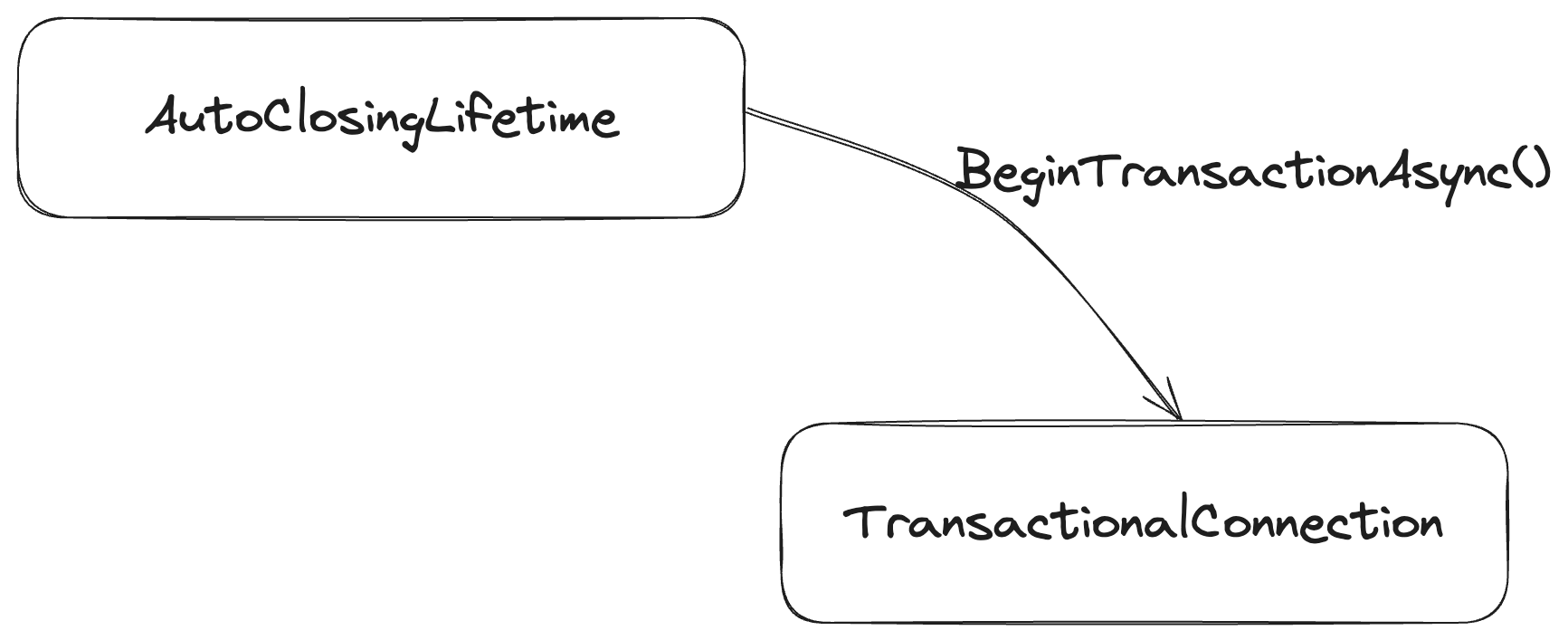
By default now, each IDocumentSession is created with a reference to our default flavor of IConnectionLifetime called AutoClosingLifetime. But when you call BeginTransactionAsync(), the session is creating an all new object with all new behavior for the newly started connection and transaction like this:
    public async ValueTask BeginTransactionAsync(CancellationToken token)
    {
        if (_connection is IAlwaysConnectedLifetime lifetime)
        {
            await lifetime.BeginTransactionAsync(token).ConfigureAwait(false);
        }
        else if (_connection is ITransactionStarter starter)
        {
            var tx = await starter.StartAsync(token).ConfigureAwait(false);
            await tx.BeginTransactionAsync(token).ConfigureAwait(false);

            // As you can see below, the session is completely swapping out its
            // IConnectionLifetime reference so that every operation will go
            // now get the "already connected and in a transaction" state
            // logic
            _connection = tx;
        }
        else
        {
            throw new InvalidOperationException(
                $"The current lifetime {_connection} is neither a {nameof(IAlwaysConnectedLifetime)} nor a {nameof(ITransactionStarter)}");
        }
    }
And now, just to make this a little more concrete, here’s the logic of the AutoClosingLifetime when Marten is executing a single command asynchronously:
By using the “State Pattern”, we are able to remove a great deal of potentially repetitive and error prone if/then branching logic out of our code. That’s even more valuable when you consider that we have additional session state behavior for externally controlled transactions (the user pushes a shared connection and/or transaction into Marten) or for enlisting in ambient transactions. Many of the ancient GoF patterns were at heart, a way to head off potential bugs by reducing the amount if if/then branching code.
Last thing, many of you are going to correctly call out that the mechanical implementation is very similar to the old “Strategy” pattern. That’s certainly true, but I think the key is that the intent is a little different. The “State Pattern” is closely related to the usage of finite state machines where there’s a fixed set of operations that behave differently depending on the exact state. The Marten IDocumentSession transactional behavior qualifies as a “state pattern” in my book.
Not that I think it’s worth a lot of argument if you wanna just say it still looks like a “strategy”:-)
A very important part of any event sourcing architecture is actually being able to interpret the raw events representing the current (or past) state of the system. That’s where Marten’s “Projection” subsystem comes into play as a way to compound a stream of events into a stateful object representing the whole state.
Most of the examples you’ll find of Marten projections will show you one of the aggregation recipes that heavily lean on conventional method signatures with Marten doing some “magic” around those method names, like this simple “self-aggregating” document type:
public record TodoCreated(Guid TodoId, string Description);
public record TodoUpdated(Guid TodoId, string Description);

public class Todo
{
    public Guid Id { get; set; }

    public string Description { get; set; } = null!;

    public static Todo Create(TodoCreated @event) => new()
    {
        Id = @event.TodoId,
        Description = @event.Description,
    };

    public void Apply(TodoUpdated @event)
    {
        Description = @event.Description;
    }
}
Notice the Apply() and Create() methods in the Todo class above. Those are following a naming convention that Marten uses to “know” how to update a Todo document with new information from events.
I (and by “I” I’m clearly taking responsibility for any problems with this approach) went down this path with Marten V4 as a way to make some performance optimizations at runtime. This approach goes okay if you stay well within the well lit path (create, update, maybe delete the aggregate document), but can break down when folks get “fancy” with things like soft deletes. Or all too frequently, this approach can confuse users when the problem domain gets more complex.
There’s an escape hatch though. We can toss aside all the conventional magic and the corresponding runtime magic that Marten does for these projections and just write some explicit code.
Using Marten’s “CustomProjection” recipe — which is just a way to use explicit code to do aggregations of event data — we can write the same functionality as above with this equivalent:
public record TodoCreated(Guid TodoId, string Description);
public record TodoUpdated(Guid TodoId, string Description);

public class Todo
{
    public Guid Id { get; set; }
    public string Description { get; set; } = null!;
}

// Need to inherit from CustomProjection
public class TodoProjection: CustomProjection<Todo, Guid>
{
    public TodoProjection()
    {
        // This is kinda meh to me, but this tells
        // Marten how to do the grouping of events to
        // aggregated Todo documents by the stream id
        Slicer = new ByStreamId<Todo>();


        // The code below is only valuable as an optimization
        // if this projection is running in Marten's async
        // daemon to help the daemon filter candidate events faster
        IncludeType<TodoCreated>();
        IncludeType<TodoUpdated>();
    }

    public override ValueTask ApplyChangesAsync(DocumentSessionBase session, EventSlice<Todo, Guid> slice, CancellationToken cancellation,
        ProjectionLifecycle lifecycle = ProjectionLifecycle.Inline)
    {
        var aggregate = slice.Aggregate;
        foreach (var e in slice.AllData())
        {
            switch (e)
            {
                case TodoCreated created:
                    aggregate ??= new Todo { Id = slice.Id, Description = created.Description };
                    break;
                case TodoUpdated updated:
                    aggregate ??= new Todo { Id = slice.Id };
                    aggregate.Description = updated.Description;
                    break;
            }
        }

        // This is an "upsert", so no silly EF Core "is this new or an existing document?"
        // if/then logic here
        session.Store(aggregate);

        return new ValueTask();
    }
}
Putting aside the admitted clumsiness of the “slicing” junk, our projection code is just a switch statement. In hindsight, the newer C# switch expression syntax was just barely coming out when I designed the conventional approach. If I had it to do again, I think I would have focused harder on promoting the explicit logic and bypassed the whole conventions + runtime code generation thing for aggregations. Oh well.
For right now though, just know that you’ve got an escape hatch with Marten projections to “just write some code” any time the conventional approach causes you the slightest bit of grief.
Hey, did you know that JasperFx Software is ready for formal support plans for Marten and Wolverine? Not only are we trying to make the “Critter Stack” tools be viable long term options for your shop, we’re also interested in hearing your opinions about the tools and how they should change.We’re also certainly open to help you succeed with your software development projects on a consulting basis whether you’re using any part of the Critter Stack or any other .NET server side tooling.
A lot of pull requests and bug fixes just happened to land today for both Marten and Wolverine. In order, we’ve got:
Marten 7.0.0 Beta 5
Marten 7.0.0 Beta 5 is actually quite a big release and a major step forward on the road to the final V7 release. Besides some bug fixes, I think the big highlights are:
Marten finally gets the long awaited “Partial Update” model that only depends on native PosgreSQL features! Huge addition from Babu. If you’re coming to Marten from MongoDb, or only would if Marten had the ability to modify documents without first having to load the whole thing, well now you can! No PLv8 extension necessary!
We pushed through a new low level execution model that’s more parsimonious about how long database connections are kept open that should help applications using Marten scale to more concurrent transactions. This should also help folks using Marten in conjunction with Hot Chocolate as now IQuerySession could be used in multiple threads in parallel.
Marten now uses Polly internally for retries on transient errors, and the “retry” functionality actually works now (it didn’t actually do anything useful before, as I shamefully refuse to make eye contact with you).
Several fixes around full text indexes that were blocking some folks
Wolverine 1.16.0
Wolverine 1.16.0 came out today with a couple additions and fixes related to MQTT or Rabbit MQ message publishing to topics. As an example, here’s some new functionality with Rabbit MQ message publishing:
You can specify publishing rules for messages by supplying the logic to determine the topic name from the message itself. Let’s say that we have an interface that several of our message types implement like so:
public interface ITenantMessage
{
    string TenantId { get; }
}
Let’s say that any message that implements that interface, we want published to the topic for that messages TenantId. We can implement that rule like so:
using var host = await Host.CreateDefaultBuilder()
    .UseWolverine((context, opts) =>
    {
        opts.UseRabbitMq();

        // Publish any message that implements ITenantMessage to
        // a Rabbit MQ "Topic" exchange named "tenant.messages"
        opts.PublishMessagesToRabbitMqExchange<ITenantMessage>("tenant.messages",m => $"{m.GetType().Name.ToLower()}/{m.TenantId}")

            // Specify or configure sending through Wolverine for all
            // messages through this Exchange
            .BufferedInMemory();
    })
    .StartAsync();
Wolverine 2.0 Alpha 1
Knock on wood, if the GitHub Action & Nuget gods all agree, there will be a Wolverine 2.0 alpha 1 set of Nugets available that’s just Wolverine 1.16, but targeting the very latest Marten 7 betas as somebody asks me just about every single day when that’s going to be ready.
Enjoy! And don’t tell me about any problems with these releases until Monday!
Summary
I had a very off week as I struggled with a cold, a busy personal life, and way more Zoom meetings than I normally have. All the same, getting to spit out these three releases today makes me feel like Bill Murray here:
Hey, did you know that JasperFx Software is ready for formal support plans for Marten and Wolverine? Not only are we trying to make the “Critter Stack” tools be viable long term options for your shop, we’re also interested in hearing your opinions about the tools and how they should change.We’re also certainly open to help you succeed with your software development projects on a consulting basis whether you’re using any part of the Critter Stack or any other .NET server side tooling.
Let’s build a small web service application using the whole “Critter Stack” and their friends, one small step at a time. For right now, the “finished” code is at CritterStackHelpDesk on GitHub.
First off, we’re using Marten in our incident tracking, help desk system to read and persist data to a PostgreSQL database. When handling messages, Wolverine could easily encounter transient (read: random and not necessarily systematic) exceptions related to network hiccups or timeout errors if the database happens to be too busy at that very time. Let’s tell Wolverine to apply a little exponential backoff (close enough for government work) and retry a command that hits one of these transient database errors a limited number of times like this within the call to UseWolverine() within our Program file:
    // Let's build in some durability for transient errors
    opts.OnException<NpgsqlException>().Or<MartenCommandException>()
        .RetryWithCooldown(50.Milliseconds(), 100.Milliseconds(), 250.Milliseconds());
The retries may happily catch the system at a later time when it’s not as busy, so the transient error doesn’t reoccur and the message can succeed. If we get successive failures, we wait longer before retries. This retry policy effectively throttles a Wolverine system and may give a distressed subsystem within your architecture (in this case the PostgreSQL database) a chance to recover.
Other times you may have a handler encounter an exception that tells us the message in question is invalid somehow, and could never be handled. There’s absolutely no reason to retry that message, so instead, let’s tell Wolverine to instead discard that message immediately (and not even bother to move it to a dead letter queue):
    // Log the bad message sure, but otherwise throw away this message because
    // it can never be processed
    opts.OnException<InvalidInputThatCouldNeverBeProcessedException>()
        .Discard();
I’ve done a few integration projects now where some kind of downstream web service was prone to being completely down. Let’s pretend that we’re only calling that web service through a message handler (my preference whenever possible for exactly this failure scenario) and can tell from an exception that the web service is absolutely unavailable and no other messages could possibly go through until that service is fixed.
Wolverine can do that as well, like so:
    // Shut down the listener for whatever queue experienced this exception
    // for 5 minutes, and put the message back on the queue
    opts.OnException<MakeBelieveSubsystemIsDownException>()
        .PauseThenRequeue(5.Minutes());
And finally, Wolverine also has a circuit breaker functionality to shut down processing on a queue if there are too many errors in a certain time. This feature certainly applies to messages coming in from external messages from Rabbit MQ or Azure Service Bus or AWS SQS, but can also apply to database backed local queues. For the help desk system, I’m going to add a circuit breaker to the local queue for processing the TryAssignPriority command to pause all local processing on the current node if a certain threshold of message processing is failing:
    opts.LocalQueueFor<TryAssignPriority>()
        // By default, local queues allow for parallel processing with a maximum
        // parallel count equal to the number of processors on the executing
        // machine, but you can override the queue to be sequential and single file
        .Sequential()

        // Or add more to the maximum parallel count!
        .MaximumParallelMessages(10)

        // Pause processing on this local queue for 1 minute if there's
        // more than 20% failures for a period of 2 minutes
        .CircuitBreaker(cb =>
        {
            cb.PauseTime = 1.Minutes();
            cb.SamplingPeriod = 2.Minutes();
            cb.FailurePercentageThreshold = 20;

            // Definitely worry about this type of exception
            cb.Include<TimeoutException>();

            // Don't worry about this type of exception
            cb.Exclude<InvalidInputThatCouldNeverBeProcessedException>();
        });
And don’t worry, Wolverine won’t lose any additional messages published to that queue. They’ll just sit in the database until the current node picks back up on this local queue or another running node is able to steal the work from the database and continue.
Summary and What’s Next
I only gave some highlights here, but Wolverine has some more capabilities for error handling. I think these policies are probably something you adapt over time as you learn more about how your system and its dependencies behave. Throwing more descriptive exceptions from your own code is definitely beneficial as well for these kinds of error handling policies.
I’m almost done with this series. I think the next post or two — and it won’t come until next week — will be all about logging, auditing, metrics, and Open Telemetry integration.




 The Shade Tree Developer